
The Essential Managed IT Services for Small Business Success


Moving Beyond Break-Fix IT
Small business managed IT services provide comprehensive technology support through a monthly subscription model, replacing unpredictable break-fix costs with proactive monitoring, cybersecurity protection, help desk support, and strategic planning. Instead of waiting for problems to occur, a Managed Service Provider (MSP) actively maintains your systems, prevents downtime, and aligns technology with your business goals.
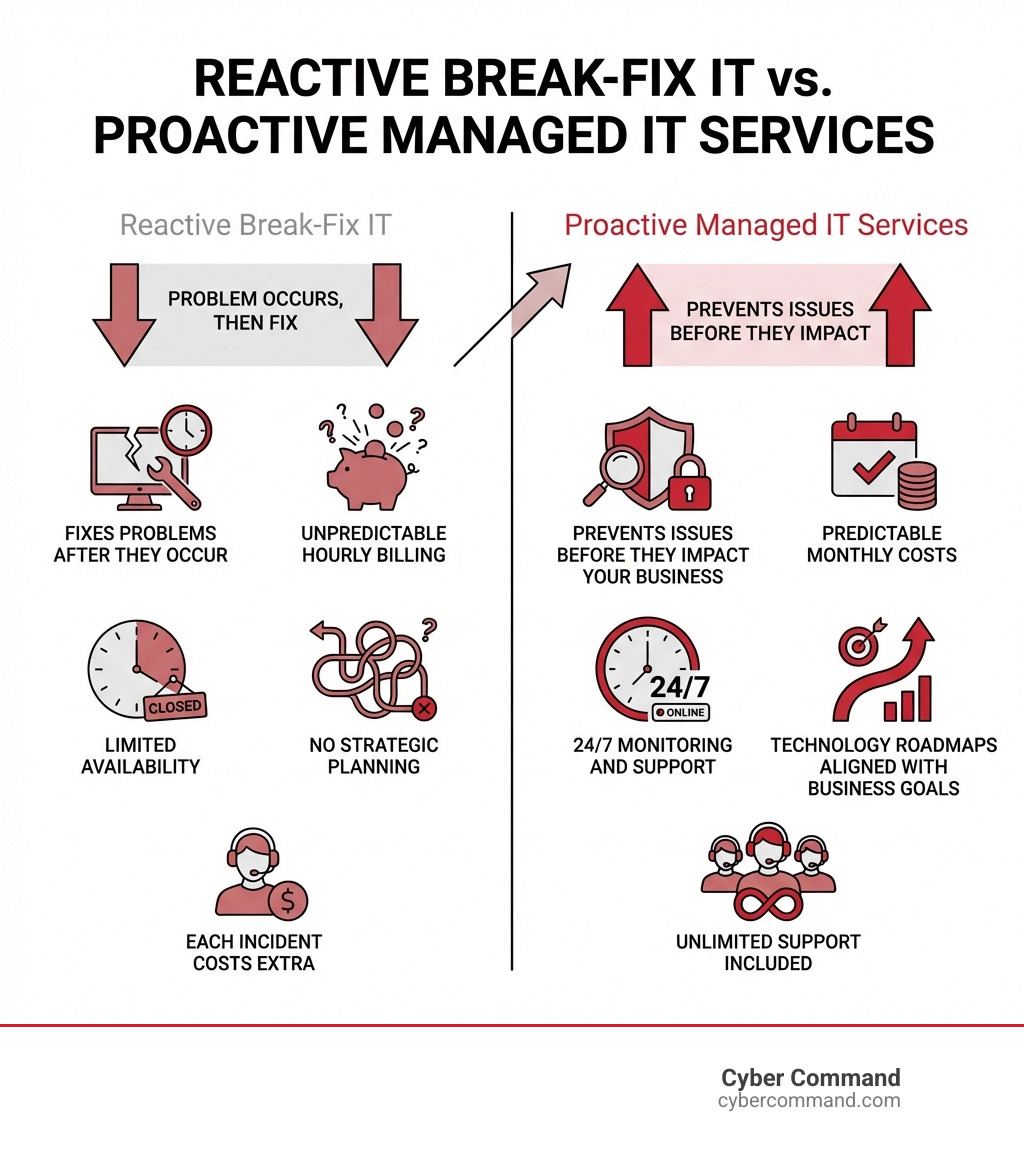
Key differences between traditional IT and managed IT services:
| Traditional Break-Fix IT | Managed IT Services |
|---|---|
| Reactive – fixes problems after they occur | Proactive – prevents issues before they impact your business |
| Unpredictable hourly billing | Predictable monthly costs |
| Limited availability | 24/7 monitoring and support |
| No strategic planning | Technology roadmaps aligned with business goals |
| Each incident costs extra | Unlimited support included |
The shift toward managed services isn’t just a trend. A JumpCloud survey revealed that 87.5% of SMBs use or consider an MSP, driven by increasing cybersecurity threats, IT staffing challenges, and the need for predictable technology costs.
If you’re constantly battling tech issues, dealing with unexpected invoices, or worrying about security threats, you’re not alone. Many business leaders feel overwhelmed by IT complexities when they should be focused on growth.
The reality is simple: Modern small businesses need enterprise-level IT capabilities, but can’t afford to build an entire IT department in-house. Managed IT services bridge this gap by providing access to certified experts, advanced security tools, and strategic guidance at a fraction of the cost of hiring full-time staff.
I’m Reade Taylor, Founder and CEO of Cyber Command, and I’ve spent my career building secure, reliable IT systems that empower businesses rather than hinder them. After years as an engineer with IBM Internet Security Systems, I founded Cyber Command to change how businesses experience technology support—making small business managed IT services accessible, transparent, and genuinely helpful rather than stressful.
In this guide, I’ll walk you through the essential managed IT services that transform technology from a constant headache into a competitive advantage.
Why Your Company Needs Small Business Managed IT Services
Running a small business in Florida or Texas means juggling a thousand things at once. We know you’re passionate about your craft, but sometimes, managing IT can feel like trying to herd cats while reciting Shakespeare backward. That’s where small business managed IT services come in. They’re designed to take the IT burden off your shoulders, allowing you to focus on what you do best: growing your business.
Outsourcing your IT isn’t just about handing off tasks; it’s about gaining a strategic partner. We offer a comprehensive, proactive approach to IT management, which means we work to prevent problems before they even appear. This shift from reactive “break-fix” to proactive management brings a wealth of benefits, from significant cost savings to improved efficiency and access to top-tier expertise. For a deeper dive into the advantages, explore the Benefits of IT Outsourcing.
Let’s look at how managed IT services stack up against trying to handle everything in-house:
| Feature | In-House IT | Managed IT Services |
|---|---|---|
| Cost Structure | High upfront costs (salaries, benefits, tools) | Predictable monthly fees, lower overall operational costs |
| Expertise | Limited to individual staff knowledge | Access to a team of specialized, certified experts |
| Availability | Business hours, prone to single points of failure | 24/7/365 monitoring and support |
| Proactivity | Often reactive, fixes issues as they arise | Proactive monitoring, preventative maintenance |
| Scalability | Difficult to scale with business growth | Easily scales up or down with your needs |
| Focus | Diverts resources from core business | Allows focus on core business, strategic alignment |
Reduce Costs and Improve Efficiency
One of the most immediate and tangible benefits of small business managed IT services is the ability to Unlock Cost Savings: Benefits of Outsourcing IT Services. Instead of unpredictable hourly rates for emergency repairs, you get a fixed monthly fee. This predictable IT spending makes budgeting easier and eliminates those stomach-dropping unexpected IT invoices.
Beyond predictable costs, managed services significantly reduce downtime. Research by IDC showed that IT-related downtime. costs small businesses between $82,200 to $256,000 for a single event. Imagine the relief of having a team constantly monitoring your systems, patching vulnerabilities, and resolving minor glitches before they escalate into costly outages. This proactive approach keeps your operations running smoothly, meaning more productivity for your team and happier customers. When your IT is humming along, you and your employees can focus on your core business functions, driving innovation and growth, not troubleshooting printer woes.
Gain a Strategic Technology Partner
Many small businesses, whether in Orlando, Jacksonville, or Plano, struggle with IT staffing issues. A study found that 42% of companies face this challenge, and solving it correlates with a whopping 125% higher profit growth. That’s where we come in. With small business managed IT services, you gain access to a team of certified experts without the overhead of hiring full-time staff. We bring a diverse range of specialized knowledge—from cybersecurity to cloud solutions—that would be difficult and expensive to replicate in-house.
This partnership extends beyond just fixing problems. We act as your strategic IT consultants, helping with IT planning and roadmaps. We sit down with you, understand your business goals, and develop a technology strategy that supports them. This often includes crucial vendor management, where we handle communications and issues with your software providers, internet service providers, and other tech vendors. This frees up your time, allowing you to experience How I Increased Productivity by Outsourcing IT Services.

Signs You Need to Switch to Managed Services
How do you know if small business managed IT services are right for you? Well, if any of these sound familiar, it might be time for a change:
- Frequent Downtime: Are your systems constantly crashing or experiencing unexpected outages? This is a major productivity killer and a sign that your IT isn’t being managed proactively.
- Slow System Performance: If your computers are sluggish, software is freezing, or your network is crawling, it’s impacting your team’s ability to work efficiently.
- Rising or Unpredictable IT Costs: Are you constantly getting hit with unexpected bills for IT repairs? Managed services offer predictable monthly pricing, turning a variable cost into a fixed one.
- Lack of Cybersecurity Strategy: In today’s threat landscape, ignoring cybersecurity is like leaving your front door wide open. If you don’t have a clear plan to protect your data, you’re a target.
- Employees are Handling IT Issues: Are your valuable employees, who should be focusing on their actual jobs, spending precious time trying to troubleshoot IT problems? This is a huge drain on productivity and morale.
- Your Business is Growing Rapidly: As your business expands, so does the complexity of your IT needs. Managed services scale with you, providing the support you need without the growing pains of building an internal IT department.
- Outdated Technology: If you’re still running on ancient software or hardware, you’re not alone. Outdated technology has a moderate (50.2%) to major (16.2%) impact on employee productivity, and it’s often a security risk too.
If you nodded along to a few of these, congratulations! You’ve identified areas where managed IT can make a profound difference.
10 Essential Managed Services for Small Business Success
When we talk about small business managed IT services, we’re not just talking about fixing a broken printer (though we do that too!). We’re talking about a comprehensive suite of solutions designed to keep your entire technology ecosystem healthy, secure, and aligned with your business goals. For a general overview of what’s typically included, check out IT Managed Services: What Services Are Included?.
Here are the 10 essential managed IT services that we believe are crucial for any small business looking to thrive:
- 24/7 Network Monitoring and Management
- Comprehensive Cybersecurity Protection
- Help Desk and Technical Support
- Data Backup and Disaster Recovery
- Cloud Services Management
- IT Asset and Vendor Management
- Mobile Device Management (MDM)
- Strategic IT Consulting (vCIO)
- Security Awareness Training
- Co-Managed IT Services
Let’s explore each one.
1. 24/7 Network Monitoring and Management
Imagine having a vigilant guard watching over your IT systems, 24 hours a day, 7 days a week. That’s what 24/7 network monitoring and management provide. We proactively monitor your network health, servers, and devices, looking for any anomalies or potential issues. This allows us to address problems like slow performance, storage issues, or impending hardware failures before they cause costly downtime. It’s all about keeping your systems optimized and running smoothly. This level of proactive care is the foundation of effective IT Infrastructure Management, preventing issues before they even have a chance to disrupt your business.
2. Comprehensive Cybersecurity Protection
This isn’t just an “add-on” anymore; it’s a non-negotiable necessity. Nearly half (43%) of all cyberattacks target small organizations, and the threats are constantly evolving. Our comprehensive cybersecurity protection offers multi-layered security, including advanced threat hunting, vulnerability management, and robust firewall management. We implement enterprise-grade defenses custom to your business, helping you become a much harder target for cybercriminals. From endpoint protection to network security, we cover all bases to protect your valuable data and reputation. Learn more about how we safeguard your business with Cybersecurity for Small Business.
3. Help Desk and Technical Support
When something goes wrong, you need help, and you need it fast. Our help desk and technical support provide a single point of contact for all your IT issues. Whether it’s a software glitch, a network problem, or a “my printer is acting possessed” moment, our U.S.-based team is ready to assist. We offer unlimited remote and on-site support, ensuring fast response times and quick resolution. This frees your employees from troubleshooting, allowing them to stay productive and focused. We’ve seen How 24/7 IT Support Transformed My Company’s Operations for many businesses, proving the value of responsive IT Support Service.
4. Data Backup and Disaster Recovery
The unexpected happens. Hardware fails, natural disasters strike, and cyberattacks can encrypt your data. Without a solid data backup and disaster recovery plan, your business could face catastrophic losses. A Nationwide Insurance survey revealed that a disaster recovery plan is missing for 68% of small businesses. We implement automated backups, combining secure cloud and on-site solutions to ensure your data is always protected and recoverable. Crucially, we don’t just set it and forget it; we regularly test recovery plans to ensure they work when you need them most, providing true business continuity. For more details on protecting your business, see our guide on Disaster Recovery Plan.
5. Cloud Services Management
The cloud offers incredible flexibility, scalability, and cost savings, but managing it can be complex. We help with everything from cloud migration to ongoing management of your cloud-based applications and infrastructure. Whether you’re using Microsoft 365, need cloud hosting for specific applications, or are exploring scalable infrastructure solutions, we ensure your cloud services are optimized, secure, and performing efficiently. Find the full Benefits of Moving to the Cloud and how we can manage your Cloud Services.
6. IT Asset and Vendor Management
Keeping track of all your hardware, software licenses, and warranties can be a headache. We handle IT asset management, including hardware and software lifecycle management, procurement assistance, and warranty tracking. But it doesn’t stop there. We also manage your third-party tech vendors, acting as your liaison to resolve issues, manage disputes, and conduct cost assessments. This means you only have one point of contact for all your tech needs, streamlining operations and saving you valuable time. While IT Project Management Services (https://cybercommand.com/it-project-management-services/) is more about specific projects, our vendor management expertise ensures all your tech partners are working seamlessly together.
7. Mobile Device Management (MDM)
With more employees working remotely or using personal devices for business, securing smartphones, tablets, and laptops is more critical than ever. Cybersecurity trends for 2020 already indicated that mobile devices would increasingly be targeted. Our Mobile Device Management (MDM) solutions allow us to enforce security policies, encrypt sensitive data, and remotely wipe devices if they are lost or stolen. This protects your business data, ensures compliance, and allows your team to work securely from anywhere, whether they’re in Orlando or on the road.
8. Strategic IT Consulting (vCIO)
Think of us as your virtual Chief Information Officer (vCIO). We don’t just fix your IT; we help you plan for its future. This includes developing technology roadmaps, assisting with IT budgeting and planning, and ensuring your technology investments align with your overall business goals. We also provide compliance consulting for specific industry regulations like HIPAA or CMMC, ensuring your IT meets necessary standards. This strategic guidance is vital for growth, as highlighted in Leading Your Business to Success: The First 8 Questions to Ask Before You Hire Managed IT Services.
9. Security Awareness Training
The best firewalls and antivirus software can’t stop human error. Phishing attacks remain a top threat, with cybersecurity services for SMBs reporting phishing as a top attack vector. Our security awareness training includes phishing simulations and comprehensive employee education on identifying and avoiding cyber threats. By empowering your team with knowledge, we help reduce human error and cultivate a security-conscious culture, turning your employees into your strongest line of defense.
10. Co-Managed IT Services
For businesses with an existing in-house IT team, co-managed IT services offer the best of both worlds. We don’t replace your team; we supplement it. This means your internal IT staff can focus on strategic projects or day-to-day tasks, while we provide specialized tools, expertise, and 24/7 monitoring that might otherwise be out of reach. It’s a flexible support model that improves your capabilities and ensures no IT stone is left unturned. Find What Are the Benefits of Co-Managed IT? and how this collaborative approach can lift your IT operations.
How to Choose and Budget for Your IT Partner
Choosing the right partner for small business managed IT services is a critical decision, almost as important as choosing your business’s location. Just like you wouldn’t pick a storefront without doing your homework, you shouldn’t pick an MSP without careful consideration. It’s not just about who’s “near me” in Orlando or Tampa Bay; it’s about finding the right fit for your unique needs. We want you to feel confident in your choice, which is why we encourage you to review our A Comprehensive Guide to Finding Reliable Managed IT Services.
How to choose the right small business managed it services provider
When evaluating potential providers for small business managed IT services, we recommend asking these key questions:
- Assess their expertise and certifications: Do they have a team with diverse certifications and proven experience? Do they understand current threats and technologies?
- Check reviews and case studies: What do other businesses say about their service? Look for testimonials that resonate with your business size and industry.
- Ensure they understand your industry: Does the MSP have experience with the specific compliance or technology needs of your sector (e.g., healthcare, finance, legal)?
- Evaluate their support process: What are their response times? How do they handle emergencies? Is their support team U.S.-based? (We pride ourselves on our proactive, 24/7/365 U.S.-based support).
Choosing an MSP is a partnership. We believe in transparency and aligning our services with your business goals. For more in-depth tips, explore How I Chose the Ideal Managed Service Provider: Expert Tips.
What factors influence the cost of small business managed it services?
Understanding the cost of small business managed IT services involves looking beyond a single price tag. Several factors influence the overall investment:
- Number of users and devices: This is often a primary determinant. More employees and devices generally mean more endpoints to manage, monitor, and support.
- Complexity of your IT environment: Do you have multiple servers, specialized software, or intricate network configurations? A more complex setup requires more intensive management.
- Level of service required: Do you need 24/7/365 support, or are standard business hours sufficient? Are there specific compliance requirements?
- On-site vs. remote support needs: While much can be done remotely, some businesses require regular on-site visits, which can influence pricing.
We believe in transparent, all-inclusive pricing, so you know exactly what you’re getting without hidden fees. For a detailed breakdown of how costs are structured, check out our guides on Managed IT Services Pricing and the Average Cost of IT Support for Small Business.
Frequently Asked Questions about Managed IT Services
We get a lot of great questions from business owners like you, trying to make sense of the IT landscape. Here are some of the most common ones we hear:
What is the difference between managed IT and co-managed IT?
It’s a great question, and one we hear often!
- Managed IT means we take on the full responsibility for your IT department. It’s like having a complete IT team without the overhead of hiring one. We handle everything from monitoring to strategic planning, allowing you to completely offload your IT concerns.
- Co-managed IT, on the other hand, is a collaborative approach. If you have an existing in-house IT staff, we partner with them, augmenting their capabilities with our specialized tools, 24/7 monitoring, and deep expertise. Your team focuses on what they do best, and we fill in the gaps, provide advanced security, or handle routine tasks.
The choice depends on your current resources and needs. Many businesses find Co-Managed IT an excellent way to boost their existing team’s effectiveness.
How much should a small business budget for managed IT services?
This is like asking “how much does a car cost?” – it depends on what you need! The costs for small business managed IT services can vary widely based on your size, the complexity of your IT environment, and the specific services you require.
Pricing models often include per-user, per-device, or flat-rate tiers. A typical range can be anywhere from $100-$250 per user per month, but this is a rough estimate. The key is to focus on the value and return on investment (ROI), not just the lowest price. A cheaper service might mean less comprehensive cybersecurity or slower response times, which can cost you far more in the long run. We advocate for transparent, all-inclusive pricing so you can budget accurately. For more detailed insights, our Managed IT Services Monthly Cost guide offers a deeper look.
What is an MSP’s role in cybersecurity?
An MSP’s role in cybersecurity is absolutely crucial – we act as your dedicated security team. In today’s landscape, where cyber threats are constant and sophisticated, a small business simply cannot afford to have a reactive approach.
We implement and manage state-of-the-art security tools, such as advanced firewalls, endpoint detection and response (EDR), and security information and event management (SIEM) systems. We monitor for threats 24/7, respond to incidents, and help ensure your business complies with relevant industry regulations. This proactive role is critical because, as we’ve seen, nearly half of all cyberattacks target small businesses. Understanding the Impact of Cybersecurity Threats on Small Business Operations highlights why this proactive defense is non-negotiable. We’re constantly adapting our strategies to protect you from evolving threats, keeping your data safe and your business resilient.
Conclusion: Secure Your Future with a Proactive IT Strategy
We hope this guide has shed some light on the power of small business managed IT services. It’s clear that in today’s , threat-filled digital world, a proactive IT strategy is not a luxury—it’s a necessity for survival and growth. By partnering with an MSP, you gain predictable costs, improved security, improved efficiency, and the strategic guidance needed to keep your business competitive.
At Cyber Command, we provide enterprise-grade IT, cybersecurity, and platform engineering services with proactive, 24/7/365 U.S.-based support. We pride ourselves on transparent, all-inclusive pricing and acting as a true extension of your team, whether you’re in Winter Springs, Orlando, Jacksonville, Tampa Bay, Central Florida, or Plano, Texas. We’re not just an IT vendor; we’re your technology partner, committed to your success.
Don’t let IT challenges hold your business back. Take the next step to optimize your technology, secure your assets, and empower your growth.
Learn more about our Co-Managed IT solutions or reach out to us for a personalized consultation. Let’s build a secure and efficient future for your business, together.
