
Expert IT Support Near Lake Nona Orlando FL for Businesses

A lot of Lake Nona business owners hit the same wall at roughly the same moment. The firm adds staff, opens another suite, adopts more cloud apps, and suddenly the old approach to IT stops holding up. Tickets sit too long, onboarding drags, printers and Wi-Fi become recurring distractions, and cybersecurity starts feeling like a risk management problem instead of a technical one.
That's why IT Support Near Lake Nona Orlando FL has to be evaluated differently than generic “computer repair.” In a district built for business growth, professional services, healthcare-adjacent operations, and hybrid work, support has to protect uptime, reduce risk, and scale without creating chaos.
Table of Contents
- Why Lake Nona Businesses Need More Than Just IT Support
- The Spectrum of IT Support Models For Your Business
- Essential IT Services for Central Florida Professionals
- The Critical Role of 24/7 Cybersecurity and SOC
- Navigating Compliance and Industry Specific Needs
- How to Choose Your Lake Nona IT Partner
- Partner with Cyber Command for Your Lake Nona Growth
Why Lake Nona Businesses Need More Than Just IT Support
A growing architecture office, dental practice, or advisory firm in Lake Nona usually doesn't fail because of one dramatic IT outage. It gets slowed down by smaller issues that pile up. New employees wait for device setup. Shared files get messy. Cloud logins break at the worst time. Vendors point fingers at each other when phones, internet, or business software don't work together.
That's the point where “call someone when something breaks” stops being enough. A business in a planned, fast-moving district needs support that can standardize systems before growth creates operational drag.

Growth changes the job of IT
Lake Nona isn't just another pocket of Orlando. According to the Lake Nona fact sheet, it spans 17 square miles and 11,000 acres (about 44 square kilometers) and has a median age of 37. The area also includes millions of square feet of residential and commercial development. That matters because more business density usually means more devices, more networks, more software vendors, and more points of failure.
In practical terms, IT support in this environment has to do more than reset passwords and replace hardware. It has to support business movement. Office expansions, hybrid staff, cloud migrations, compliance expectations, and vendor coordination all become part of the support function.
Practical rule: If your team loses time to recurring technical friction every week, you don't have a repair problem. You have an operations problem.
What works and what breaks down
Reactive support works for very small environments with low complexity. It doesn't work well once your business depends on real-time access to cloud files, secure remote access, stable wireless coverage, and fast user onboarding.
What tends to work better is a support model built around prevention, visibility, and ownership. That means someone is tracking device health, patching systems, documenting vendors, and spotting weak points before they interrupt the workday. Businesses looking for a stronger operating model often start with a more structured approach to local IT support for small business.
Common signs you've outgrown basic support include:
- Frequent repeat issues: The same Wi-Fi, printing, or login problems keep returning.
- Unclear accountability: Your internet provider, phone vendor, and software vendor each blame the other.
- Slow employee setup: New hires can't be productive on day one.
- Security anxiety: You're not sure who's watching alerts, handling patches, or validating backups.
Lake Nona businesses don't need more noise from IT. They need a support structure that keeps pace with growth.
The Spectrum of IT Support Models For Your Business
Not all IT support is the same, and many business owners compare options using the wrong criteria. They focus on hourly rates or ticket volume instead of the bigger questions. How predictable is the cost? How much downtime risk are you carrying? Who is responsible for prevention?
The right model depends on your internal capacity, regulatory exposure, and tolerance for disruption.
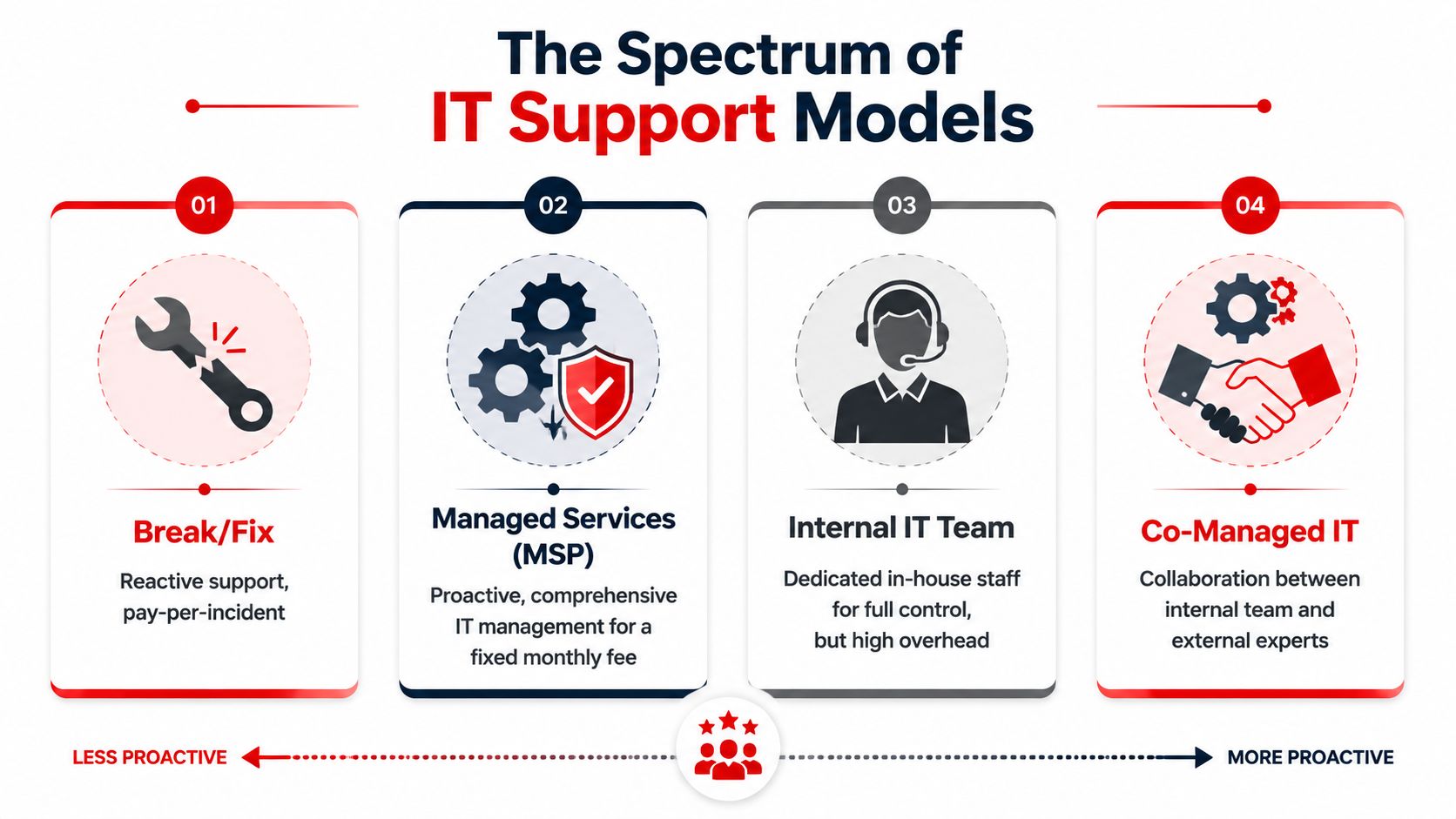
Four common support models
| Model | How it works | What it does well | Where it falls short |
|---|---|---|---|
| Break-fix | You call when something breaks | Low commitment for very small environments | Costs swing unpredictably, and problems are handled after impact |
| Managed services | Ongoing support for users, devices, and systems on a monthly plan | Better consistency, planning, and prevention | Requires a provider with strong process discipline |
| Internal IT team | In-house staff owns daily support and strategy | Direct control and internal familiarity | Hiring, coverage, and specialization can get expensive |
| Co-managed IT | Internal staff shares responsibilities with an external partner | Good fit for lean internal teams that need depth | Success depends on clear role boundaries |
What the Orlando market tells you
The local market has largely moved toward recurring support. One Orlando guide notes that most managed IT providers use tiered, per-user pricing ranging from $100 to $250 per user per month, which shows how standardized predictable monthly support has become in the area according to this Orlando IT support pricing guide.
That doesn't mean every monthly plan is equal. Some agreements only cover basic helpdesk activity. Others include patching, vendor management, reporting, cloud administration, security tooling, and strategic guidance. If you compare providers only on the monthly number, you can miss major differences in scope.
A practical way to choose
Start with your operating reality, not your ideal org chart.
- Choose break-fix if: You have minimal technology dependence and can tolerate disruption.
- Choose managed services if: You want one team accountable for user support, maintenance, and stability.
- Choose internal IT if: You need dedicated in-house ownership and can support the overhead.
- Choose co-managed IT if: You already have capable staff but need extra coverage, cybersecurity depth, or project help.
Most businesses don't switch models because of technology. They switch because the old model starts costing more in delays, confusion, and unmanaged risk than it saves in fees.
If you're benchmarking options, it helps to review what a mature managed IT support model in Orlando should include before comparing proposals.
Essential IT Services for Central Florida Professionals
Professional firms in Lake Nona usually need more than a generic helpdesk bundle. A law office, engineering group, accounting firm, or medical-adjacent practice depends on secure document access, stable communications, fast onboarding, and consistent vendor coordination. When any of those slip, billable work slows down.
That's why support should be judged by business outcomes, not by how many tools are included.
Support that matches a mixed work environment
Lake Nona businesses should be evaluated in the context of a fast-growing, master-planned district. They need support that can handle mixed-use offices, remote workers, and cloud apps across a growing footprint, not just generic computer repair, as reflected on the Lake Nona community site.
For most professional teams, that translates into a few essential service areas:
- User support that removes friction: Fast resolution for login issues, device problems, printing failures, and software access keeps employees focused on client work.
- Cloud administration that stays organized: Shared drives, email, identity controls, and permissions need structure, especially when teams collaborate across offices or from home.
- Endpoint management that prevents drift: Devices should be patched, encrypted where appropriate, monitored, and replaced on a plan instead of on a panic basis.
- Vendor management that reduces blame loops: Someone has to own the coordination between internet, line-of-business software, telecom, copier, and security vendors.
Fully managed vs co-managed in practice
Fully managed support makes sense when leadership wants one external team to own the day-to-day work. That usually includes helpdesk, device lifecycle planning, patching, account administration, and escalation management. It's often the cleanest route for firms with no internal IT bench.
Co-managed support fits a different scenario. Maybe you have one internal IT manager who knows the business well but can't cover everything. In that case, an outside partner can take on after-hours support, security operations, project work, documentation, or specialized engineering while the internal lead retains control of priorities.
A healthy support environment should give your team these advantages:
- Clear onboarding workflows so new hires don't start with missing access.
- Standard configurations so every workstation behaves predictably.
- Backup and recovery ownership so no one is guessing during an outage.
- Regular reporting so leadership can see patterns instead of relying on anecdotal complaints.
Good IT support disappears into the background. Employees don't think about it because systems keep working, access stays consistent, and issues are resolved before they spread.
That's the level most Central Florida professional firms are really trying to buy.
The Critical Role of 24/7 Cybersecurity and SOC
A lot of businesses still think cybersecurity means antivirus, a firewall, and some employee training. Those matter, but they don't answer the harder question. Who is watching your environment when something suspicious happens at night, on a weekend, or during a holiday?
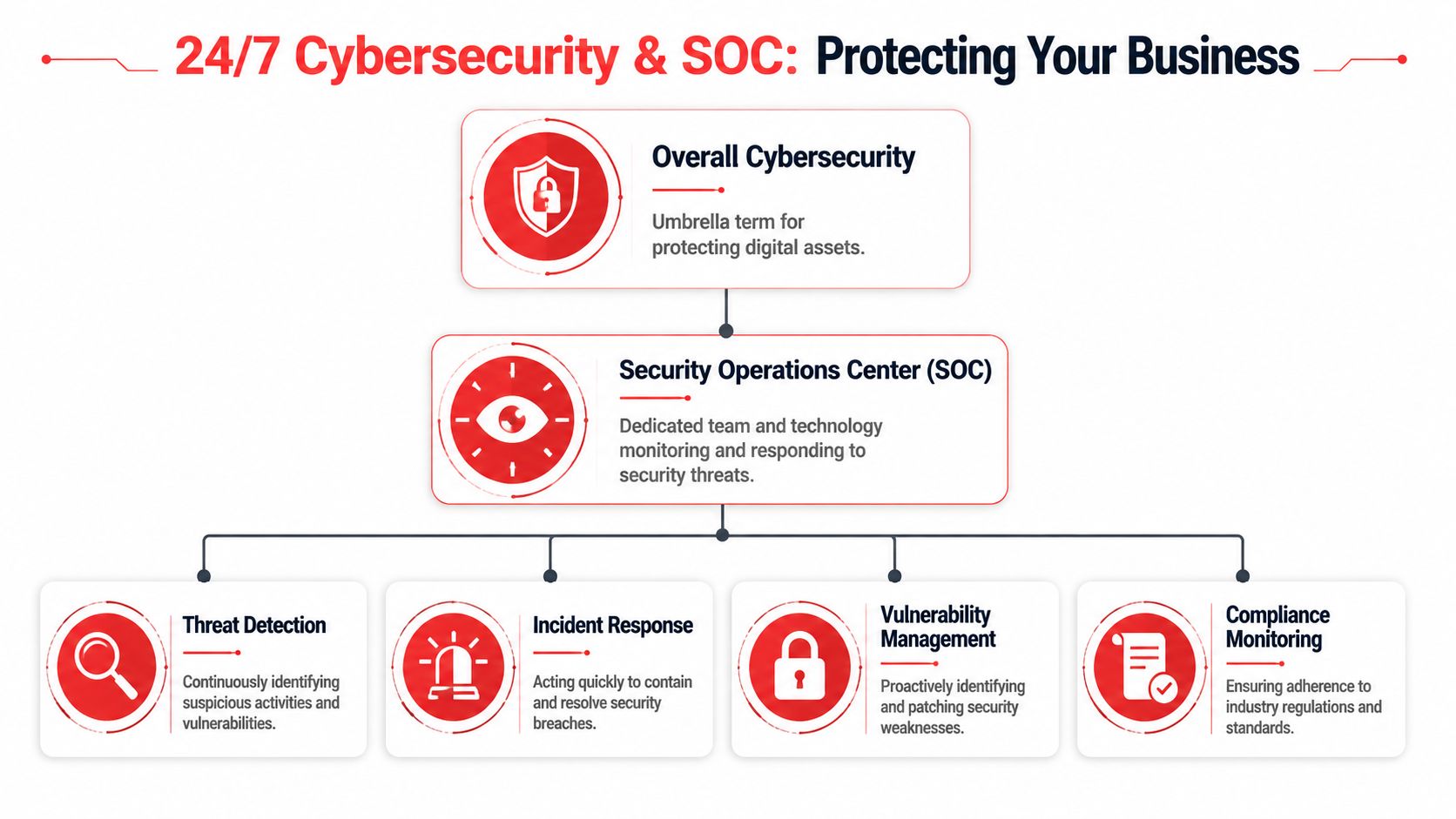
That's where a Security Operations Center, or SOC, changes the conversation. Think of it as a 24/7 security function that monitors activity, investigates alerts, and helps contain threats before they turn into a business interruption.
Why continuous coverage matters
The Lake Nona and broader Orlando market can support 24/7/365 helpdesk coverage because local providers advertise round-the-clock emergency support. That matters because after-hours response reduces mean time to restore service for critical incidents, as described on this Orlando managed IT services page covering round-the-clock emergency support.
For a business owner, the point isn't technical elegance. It's continuity. If a user account is compromised, a critical system starts behaving abnormally, or a backup job fails before a Monday morning rush, waiting until standard office hours can multiply the damage.
What a SOC actually does
A capable SOC usually supports several functions at once:
- Threat detection: Reviewing security events and separating real risks from routine noise.
- Incident response: Containing compromised accounts, isolating affected systems, and coordinating recovery.
- Vulnerability management: Flagging weak points so they can be patched or remediated.
- Compliance support: Maintaining visibility into controls, changes, and risk areas that matter for regulated operations.
Email remains one of the most common entry points for business risk, which is why domain protection and message authentication deserve executive attention. If you want a clear operational overview, this guide to SPF, DKIM, DMARC, BIMI is useful for understanding how authenticated email reduces spoofing risk and improves trust in outbound communications.
The mistake many firms make
They buy security tools but not a response model. Tools can generate alerts all day. They can't decide business impact, call a user, coordinate containment, or document the chain of events for leadership.
A security stack without people and process is just a collection of alarms. Someone still has to decide what matters and what happens next.
Business owners evaluating IT Support Near Lake Nona Orlando FL should ask whether cybersecurity is built into operations or treated like a bolt-on product. If you need a plain-English explanation of that operating layer, this overview of what a Security Operations Center is is a helpful starting point.
Navigating Compliance and Industry Specific Needs
Lake Nona's business profile changes the compliance conversation. This isn't only about hospitals or large enterprise settings. A district anchored by serious healthcare infrastructure creates an ecosystem where medical practices, wellness brands, dental offices, legal firms, and financial professionals often handle sensitive information and can't afford loose controls.
That raises the bar for IT decisions.
Healthcare-grade resilience has broader value
Lake Nona is anchored by major healthcare infrastructure, including UCF Lake Nona Hospital, which signals that the surrounding business ecosystem includes organizations that handle sensitive data and require stronger uptime and resilience. That local context is clear on the UCF Lake Nona Hospital location page.
Even if your business isn't a hospital, you may still operate under similar pressures. A plastic surgery office has patient schedules and sensitive records. A law firm has confidential client documents. A financial office has identity and account information. In each case, downtime and sloppy access controls create risk that goes far beyond inconvenience.
What compliance-aware support looks like
Compliance-focused IT support usually shows up in operational discipline, not marketing language.
- Access control: Staff should have the right access, not broad access.
- Patch discipline: Systems need a consistent process for updates, especially for business-critical endpoints.
- Audit readiness: Documentation, asset visibility, and change tracking should exist before anyone asks for them.
- Recovery planning: Backups only matter if someone is responsible for validating that recovery will work.
This same mindset often applies to digital accessibility. If your organization serves the public online, leadership should also understand what compliant user access means on the web. This plain-language resource on what is ADA accessible is useful for framing accessibility as part of business responsibility rather than a design afterthought.
Industry nuance matters
A generic support provider may be fine for replacing a laptop or troubleshooting a printer. That's not the same as understanding how to secure exam-room devices, manage access for rotating staff, protect client records, or support a front desk that can't stop operating because a line-of-business app is unstable.
The best compliance conversations start with workflow. If support teams don't understand how your staff actually deliver services, they won't protect the right systems in the right order.
For Lake Nona businesses, “good enough” IT often isn't good enough for the risk profile.
How to Choose Your Lake Nona IT Partner
Most firms don't need the cheapest provider. They need the clearest operator. The wrong partner creates confusion during incidents, hides behind vague scope boundaries, and treats strategy like an upsell. The right one makes support predictable and accountability visible.
A simple interview process usually exposes the difference.
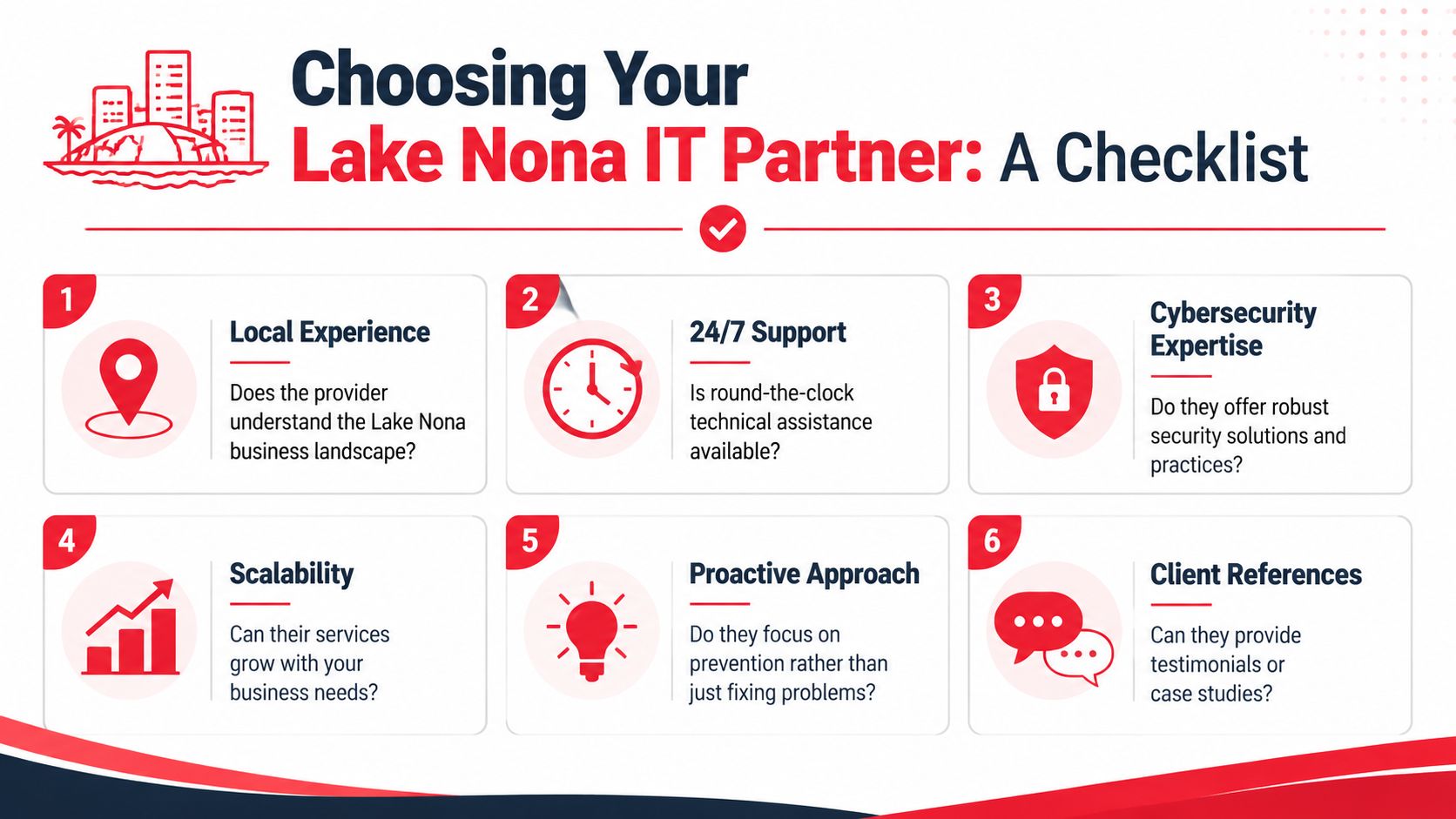
Questions worth asking in the first meeting
Use direct questions and listen for direct answers.
- How do you handle response times? Ask what happens during routine issues, urgent outages, and after-hours incidents.
- Can you support Lake Nona on site when needed? Remote support is important, but some problems still require hands-on work.
- What's included in your monthly scope? You want clarity on helpdesk, patching, vendor management, cloud administration, and security responsibilities.
- How do you report on system health and support activity? Good partners don't rely on verbal reassurance. They show patterns, open risks, and recurring issues.
- How do you support growth? Ask how they handle onboarding, office moves, location expansion, and policy standardization.
Watch for weak answers
A provider may sound capable until you ask about process. That's where gaps show up.
| Question area | Strong signal | Weak signal |
|---|---|---|
| Coverage | Clear escalation path and after-hours process | Vague promises to “be available” |
| Security | Defined monitoring, response, and documentation practices | Heavy focus on tools, little focus on action |
| Accountability | Specific ownership for vendors and recurring issues | Finger-pointing built into the model |
| Scalability | Repeatable onboarding and standards | Custom improvisation every time |
Asset disposal is another overlooked topic. If a provider helps refresh devices or retire infrastructure, leadership should ask how data gets destroyed and documented. This practical data destruction guide from Reworx Recycling is a useful reference point for understanding what secure end-of-life handling should look like.
A final screening lens
Ask yourself whether the provider sounds like a technician for hire or an operational partner. One fixes isolated issues. The other reduces recurrence, improves resilience, and helps leadership make better technology decisions.
If your environment includes hybrid workers, cloud apps, sensitive data, and multiple vendors, your shortlist should be built around maturity, not just friendliness.
Partner with Cyber Command for Your Lake Nona Growth
Businesses in Lake Nona don't need generic support. They need a partner that understands uptime, risk, compliance pressure, and the operational reality of growing in a high-expectation business environment. That means responsive helpdesk coverage, disciplined cybersecurity, clear reporting, and a service model that supports both day-to-day stability and long-term growth.
Cyber Command, LLC fits that profile. The company serves Central Florida with a local presence, delivers 24/7/365 live, U.S.-based helpdesk support, and provides both fully managed and co-managed IT. Its model is built around predictable pricing, proactive prevention, transparent reporting, and a dedicated 24/7 SOC for threat hunting, incident response, recovery, and compliance support.
That combination matters for professional firms, private medical practices, financial teams, industrial organizations, and community-serving businesses that can't afford reactive IT. It also matters for leaders who are tired of unclear scope, vendor finger-pointing, and support that only shows up after productivity has already taken the hit.
Cyber Command also brings practical depth in the areas that typically create the most friction during growth: cloud services, vendor management, endpoint protection, patching, office changes, strategic planning, and support for businesses that need a more structured technology roadmap without building a large in-house department.
If you're evaluating IT Support Near Lake Nona Orlando FL, the standard should be simple. Your provider should help your team work without interruption, reduce avoidable risk, and give leadership clear accountability.
Cyber Command, LLC can help you build that kind of environment. If your business near Lake Nona needs managed IT, co-managed support, stronger cybersecurity, or a clearer plan for growth, contact Cyber Command, LLC for a no-obligation conversation about your current setup and where it needs to go next.
