
Orlando IT Services: Top Providers for Your Business

Growth in Orlando often creates IT problems before it creates IT maturity. A firm hires five people, opens a second office, or adds a new software platform, and the weak spots show up fast. Laptops slow down, shared files get messy, remote access fails at the wrong time, and an office manager or operations lead ends up fielding issues that should never have landed on their desk.
That pattern hits Central Florida businesses in different ways. A law office needs dependable document access, secure email, and clear user permissions across partners, associates, and support staff. A medical practice has to add devices, support physicians across locations, protect patient data, and keep systems available after hours. An industrial company may depend on warehouse connectivity, mobile devices, vendor portals, and plant or field operations that cannot afford long outages.
This growth raises the bar for local businesses.
Clients expect faster response times. Employees expect stable systems whether they are in the office, at home, or on the road. Regulators and insurers expect documented controls, not informal workarounds. For Orlando companies in professional services, medical, and industrial environments, the question is not whether outside IT support sounds affordable. The question is whether your current setup can hold up under operational pressure, security threats, and compliance requirements without creating unpredictable costs.
Navigating Growth and IT Headaches in Orlando
Revenue can be up and the business can still feel harder to run.
A growing Orlando firm adds staff, opens another location, or rolls out a new cloud app. Then the weak points show up fast. Password resets pile up. Wi-Fi drops during meetings. A backup fails unnoticed until someone needs a file. The owner, office manager, or operations lead gets pulled into problems that should have been handled upstream.

That is usually the point where break-fix support starts costing more than it saves. A law office loses billable time because a partner cannot reach matter files before a client call. A medical practice cannot afford after-hours access problems tied to scheduling, imaging, or EHR workflows. An industrial company loses production time because warehouse connectivity or a vendor portal goes down. The invoice for the repair is only part of the cost. Delays, workarounds, and missed deadlines do more damage.
Why this gets harder in Central Florida
Central Florida businesses are operating in a more technical market than they were a few years ago. As noted earlier, the Orlando Economic Partnership reported continued growth in the region's tech workforce in 2023. For business owners, the practical takeaway is clear. The local market now expects better uptime, tighter security, and faster response when systems fail.
That shift is especially important in Orlando's core industries. Professional services firms need controlled access to documents, email, and client data across attorneys, accountants, consultants, and support staff. Medical groups face privacy obligations, device sprawl, and pressure to keep systems available across offices and after hours. Industrial and field-based companies depend on stable networks, mobile access, vendor systems, and recovery plans that hold up during outages and storm season.
Cheap support does not solve those problems.
Practical rule: If IT issues interrupt operations every week, the problem is not random support demand. The problem is the way IT is being managed.
What owners usually need instead
Orlando businesses usually do not need another provider promising a friendly helpdesk and 24/7 coverage. They need a partner that can reduce operational risk, support compliance, and keep spending predictable as the company grows.
That means asking harder questions:
- Can the provider keep staff working when devices fail, accounts lock, or an office loses connectivity?
- Can they prevent repeat issues with patching, monitoring, backup testing, and standards for new users and devices?
- Can they support regulated environments with documented controls, access management, and audit-ready processes?
- Can they handle multi-site operations without leaving remote staff, physicians, or field teams stranded?
- Can they give you cost predictability instead of a string of emergency invoices and surprise project charges?
For a lot of Orlando companies, that is the key threshold. IT is no longer a background utility. It is part of service delivery, risk control, and day-to-day operations.
Decoding the Spectrum of Modern IT Services
A provider can answer tickets fast and still leave your business exposed. That gap shows up all over Orlando. A medical practice may get quick password resets but still fail a backup restore test. A law firm may have decent user support but weak access controls around client files. A manufacturer may keep production PCs running while remote site connectivity, vendor access, and patching drift out of control.
That is why "IT services" needs a tighter definition.
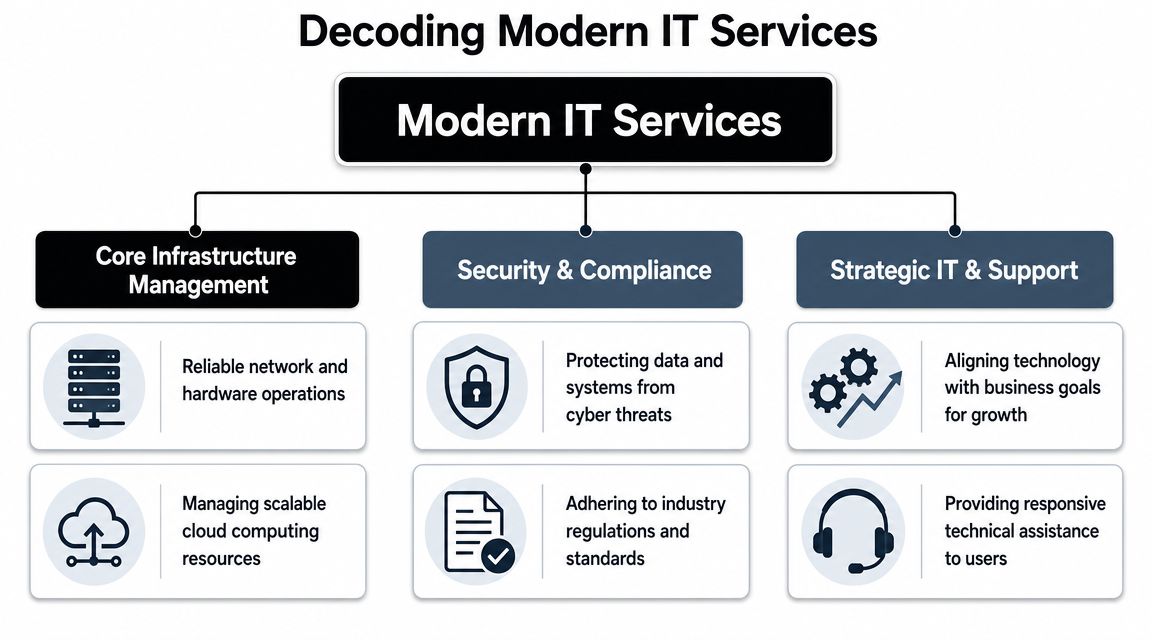
The service stack is easier to evaluate in three parts. First, the systems that keep staff productive. Second, the controls that reduce security and compliance risk. Third, the planning work that prevents recurring outages, rushed purchases, and undocumented changes.
Core infrastructure management
This is the operating layer behind daily work.
It includes endpoints, networks, wireless, printers, line-of-business applications, identity platforms, backup systems, and cloud tools such as Microsoft 365 or Azure. In a multi-office Orlando business, that also means handling site-to-site consistency, remote access, and vendor coordination without waiting for something to break.
A solid infrastructure scope usually includes:
- Helpdesk support: A clear process for account lockouts, email issues, application errors, onboarding, offboarding, and access requests
- Endpoint management: Standardized device setup, patching, encryption, antivirus, and replacement planning
- Network administration: Ongoing management of firewalls, switches, Wi-Fi, VPNs, internet failover, and location connectivity
- Cloud operations: Administration of file storage, collaboration tools, identity policies, license changes, and backup settings
The trade-off is straightforward. Providers that focus only on ticket volume often look cheaper at first, but they leave standardization work unfinished. That usually leads to more recurring issues, more user downtime, and more project spend later.
Security and compliance controls
Security should be built into the service model, not bolted on after an incident.
For Central Florida companies, the details matter. Medical groups need access controls, audit trails, device protections, and documented processes that support HIPAA expectations. Professional services firms need tighter identity management, email security, and data handling because a compromised mailbox can expose client communications, contracts, and financial records. Industrial companies need to control remote vendor access, segment networks where needed, and protect older systems that cannot be patched on a normal cycle.
A provider should be able to explain how each control is operated, who reviews alerts, how incidents are escalated, and what evidence is retained for audits or insurance questionnaires. "We include cybersecurity" is not enough.
Look for these controls in plain language:
- Identity and access management: MFA, conditional access, account reviews, and clean offboarding
- Endpoint protection: Detection, response, encryption, and policy enforcement on laptops and desktops
- Email security: Filtering, impersonation protection, user reporting, and response procedures
- Backup and recovery validation: Restore testing, retention policies, and documented recovery steps
- Compliance support: Policies, logs, risk reviews, and evidence collection for regulated environments
If a provider offers co-managed IT support options, ask which of these controls stay with your internal team and which ones they will own. That split needs to be explicit.
Strategic support and planning
Planning is where service quality becomes business value.
A provider that only reacts to tickets will not help you control refresh cycles, clean up vendor sprawl, or prepare for office moves, audits, or system changes. Strong providers maintain documentation, review recurring incidents, map out infrastructure decisions, and tie recommendations to budget timing.
Here is what that work should accomplish:
| Service area | What it should accomplish |
|---|---|
| IT roadmap | Prioritize upgrades, renewals, and projects based on operational risk and business goals |
| Budgeting | Forecast hardware, licensing, and project costs before they become emergencies |
| Vendor management | Coordinate software, internet, telecom, copier, cloud, and line-of-business providers |
| Documentation | Maintain network diagrams, asset records, admin access lists, and operating procedures |
| Reporting | Show recurring issues, unresolved risks, service trends, and accountability |
Price and a 24/7 helpdesk promise do not tell you whether a provider can run this full stack well. Orlando IT services should be judged by how they protect uptime, support compliance, and keep technology spending predictable.
Managed vs Co-Managed IT Which Model Fits Your Business
The first decision isn't which provider to hire. It's which operating model fits your company.
Some Orlando businesses need to outsource the entire function. Others already have an internal IT person or small team and need depth, coverage, or specialized security support. That's the difference between fully managed IT and co-managed IT.
When fully managed makes sense
Fully managed IT fits companies that don't want to build an internal department. That's common for smaller law firms, accounting practices, medical groups, manufacturers, and nonprofits where leadership wants one partner to own support, infrastructure, security coordination, vendor management, and planning.
The advantage is clarity. One provider owns the workflow, standards, escalation path, and documentation.
When co-managed is the better move
Co-managed IT works when you already have internal capability but need reinforcement. Maybe you have one systems administrator who handles daily support but can't also cover after-hours issues, compliance work, cloud architecture, major projects, and security monitoring. In that case, a partner can fill the gaps without replacing your internal lead.
If your team is weighing that route, this overview of co-managed IT solutions is a useful reference point for how responsibilities can be split.
Managed vs. Co-Managed IT A Comparison for Orlando Businesses
| Factor | Fully Managed IT | Co-Managed IT |
|---|---|---|
| Primary role | Outsourced IT department | Extension of internal IT |
| Internal staffing need | Minimal or none | Existing IT lead or team remains in place |
| Control over daily decisions | Provider handles more operational decisions | Shared control between internal team and provider |
| Access to specialized skills | Included through provider bench | Added where your internal team lacks depth |
| After-hours coverage | Usually easier to centralize | Useful when internal staff can't cover nights or weekends |
| Scalability | Good for growing firms without hiring internally | Good for firms outgrowing one-person IT |
| Best fit | Owners who want accountability from one partner | Organizations that want support without giving up internal oversight |
Decision shortcut: If nobody inside your company owns IT strategy, vendor coordination, and security operations, fully managed is usually the cleaner model. If someone does own those areas but lacks bandwidth, co-managed often fits better.
The wrong choice creates friction. Fully managed can frustrate a strong internal IT leader if the provider tries to replace them. Co-managed can fail if responsibilities are vague and both sides assume the other is handling critical work.
The Cybersecurity Imperative for Central Florida Businesses
A Maitland medical practice can lose access to scheduling and patient records from one compromised Microsoft 365 account. A manufacturer west of Orlando can halt shipping because a ransomware event hits a file server tied to production paperwork. A law firm downtown can create a reportable client-data issue because one former employee still has cloud access. In Central Florida, cybersecurity failures turn into operating problems fast.

The common mistake is treating security like a product purchase instead of an operating discipline. A business installs antivirus, adds a firewall, and assumes coverage is in place. Then patching slips, login alerts go unread, a cloud app is shared too broadly, or no one knows who is supposed to isolate an infected device. The failure happens between controls, ownership, and follow-through.
Why layered defense matters
Effective protection comes from coordinated controls that cover different points of failure. Firewalls limit unwanted access. Endpoint protection helps catch malware on user devices. Intrusion monitoring improves visibility when an attacker starts moving through the environment. Encryption reduces exposure if a laptop, phone, or backup set is lost.
Those tools matter, but operations decide whether they work. Someone has to own patch timing, identity policy, privileged access reviews, alert triage, containment, backup testing, and recovery. If your provider cannot show how those tasks are performed each month, you are buying software, not a security program.
Central Florida risk looks different by industry
Local businesses do not share the same threat profile, even when they have similar headcounts.
Professional services firms in Orlando and Winter Park often face email compromise, weak offboarding, and overexposed document repositories. The financial hit usually comes from lost billable time, client notification, and reputation damage. Medical practices carry a different burden. They need tighter access controls, audit trails, device management, and support for HIPAA-related processes because patient data moves through front-desk systems, clinical applications, mobile devices, and third-party vendors. Industrial and field-service companies have another set of trade-offs. They often run older systems, shared workstations, remote access for technicians, and office-to-plant connections that widen the attack surface and complicate patching windows.
Cloud use adds another layer of exposure. File sharing, SaaS applications, and remote collaboration improve speed, but they also create more places for identity abuse and misconfigured access. For cloud-heavy teams, understanding cloud security for startups is a useful primer on how storage, identity, and application risk change once work happens outside the office.
What to ask a provider
Skip broad promises and ask how security works in practice. Ask who reviews alerts after hours, how fast suspicious sign-ins are investigated, how endpoints are isolated, how backups are tested, and what documentation you receive after an incident. Ask how they handle MFA enforcement, user access reviews, vendor risk, and compliance support for your industry.
A useful baseline is this guide to cybersecurity best practices for small businesses. It outlines the controls business owners should expect to see turned into routine operational work, not left as one-time setup tasks.
One more point matters in Orlando. Summer storms, regional outages, and dispersed offices put pressure on business continuity. Security planning should cover recovery priorities, remote access fallback, and clear communication during an outage, not just threat prevention.
If a provider can list tools but cannot explain alert ownership, containment steps, recovery order, and compliance responsibilities, the risk has not been reduced. It has been reassigned, usually back to you.
Understanding Pricing Models and Service Level Agreements
IT proposals often look comparable until you read the exclusions. That's where many bad decisions start.
A business owner sees one provider with a lower monthly fee and assumes the value is obvious. Then they discover patching is limited, endpoint protection costs extra, documentation isn't included, after-hours response triggers extra billing, and project work starts a second invoice stream. The plan was cheaper on paper, not in operation.
What common pricing models actually mean
Most Orlando IT services are packaged in one of three ways:
- Per user pricing works well when staff rely on multiple devices and standardized applications. It can simplify budgeting for office-heavy teams.
- Per device pricing can fit environments with shared workstations, fixed assets, or nontraditional user counts, but it can also create blind spots if some tools and services aren't tied cleanly to device counts.
- Flat-rate managed service sounds attractive because it offers predictability, but the details matter more than the label.
A useful industry caution is that “cheaper” flat-rate IT can end up costing more if it excludes patching, endpoint protection, or after-hours response, as discussed in this analysis of cost control and operational inclusion in IT services. That's the right lens. Don't compare fee alone. Compare what's operationally included.
The SLA terms that deserve attention
A Service Level Agreement, or SLA, is where the provider shows what “support” means in measurable terms. Many buyers focus on response time only. That's not enough.
Review these items carefully:
Response commitment
How quickly does the provider acknowledge a critical issue, a standard issue, and a low-priority request?Resolution ownership
Does the provider only respond, or do they stay engaged until the issue is resolved across vendors and systems?After-hours scope
Are nights, weekends, and holidays covered for all users, only emergencies, or billed separately?Included security operations
Does the agreement include patching, endpoint protection, monitoring, and remediation workflow?
For a plain-English primer on how SLAs are structured in connectivity services, this guide to SLAs for internet and VoIP is useful context.
A better way to compare proposals
Use a scope-first comparison. Put each provider's offer into the same grid and map what's included, excluded, capped, or billed separately. This breakdown of IT managed services pricing models can help frame that review.
A low headline price often hides labor shifting back onto your staff. The better question is whether the agreement reduces interruption, risk, and surprise spending.
Real-World IT Scenarios for Orlando Industries
The best way to judge Orlando IT services is to test them against actual operating conditions. Different industries break in different places.
One of the biggest gaps in local provider marketing is that broad promises don't explain how support works for regulated, multi-site, or field-based organizations. Buyers should push providers to answer questions about compliance support, standardized remote monitoring, and incident response across offices and field teams, as emphasized in Vann Data's IT planning and budgeting perspective.
Professional services in downtown Orlando
A law firm or accounting office usually depends on document access, email continuity, identity security, and clean onboarding and offboarding. The helpdesk matters, but the deeper issue is process. Who controls permissions for former employees? Who verifies backup integrity? Who standardizes laptops so every new hire doesn't become a custom setup project?
A solid provider should bring documented user lifecycle processes, secure remote access, and reporting that leadership can readily review.
Industrial and field-service operations
An industrial firm near the 417 corridor has a very different environment. Some users sit in an office. Others are in warehouses, vehicles, plants, or customer locations. Devices go offline. Printers support inventory workflows. VPN and authentication failures can stop field work before the day starts.
In this setting, “support” must include standardized remote monitoring across sites, repeatable device deployment, and escalation paths that don't depend on one person knowing the environment from memory.
Multi-site businesses don't fail because they lack a ticketing system. They fail because nobody standardizes the environment behind the tickets.
Private medical practices and specialty clinics
A medical spa, dental group, veterinary practice, or specialty clinic has little room for sloppy access control. The challenge isn't only HIPAA awareness. It's handling everyday realities such as front-desk turnover, shared devices, line-of-business systems, imaging workflows, patient communication platforms, and secure mobile access.
Providers should be able to explain how they support compliance-sensitive workflows without slowing the office down. That includes documentation, endpoint standards, encryption, and incident response discipline.
Nonprofits and community organizations
Nonprofits usually need predictable support and less chaos, not an enterprise science project. They often work with lean administrative teams, donated technology, and mixed user skill levels. The right provider simplifies the environment, trims unnecessary vendor overlap, and sets a realistic standard the organization can maintain.
If you operate across several programs or facilities, classifying locations and operating needs consistently can even become a data problem. Teams working on broader systems planning sometimes use tools like a NAICS classification API when organizing business-unit or partner data across platforms.
Your Checklist for Choosing an Orlando IT Partner
A provider meeting often goes the same way. You ask about response time, cybersecurity, and support coverage. They answer yes to everything. Two months later, your medical office still has shared logins at the front desk, your law firm still has no clear escalation path after hours, or your shop floor PCs are falling behind on patches because nobody defined ownership.
That is why vendor selection needs to get past the sales script.
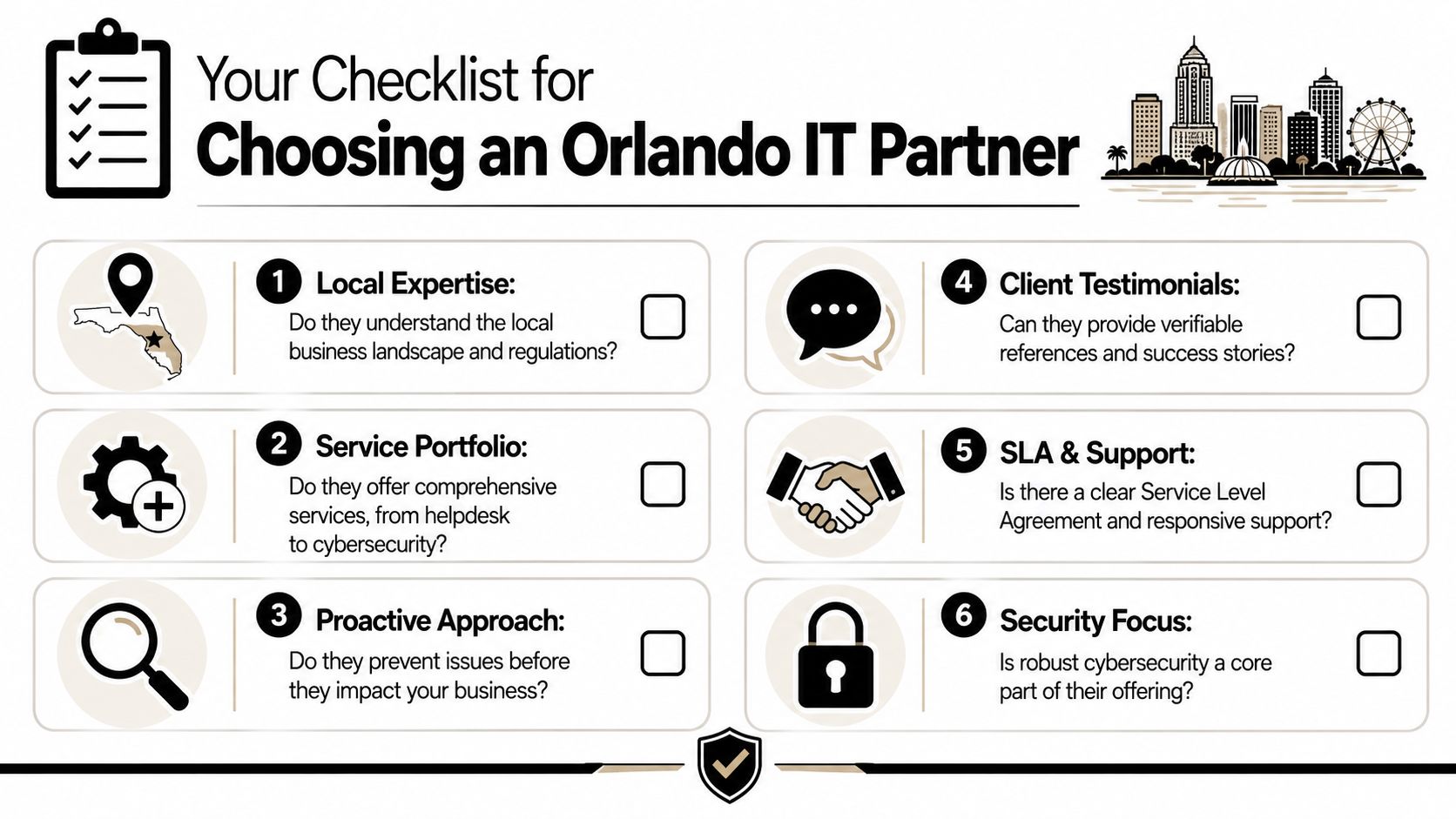
For Orlando businesses, a key test is operational clarity. A capable provider should explain how it handles after-hours incidents, patch approvals, vendor coordination, user onboarding, and security events in a way that fits your industry. A specialty clinic has different risk points than a CPA firm. A manufacturer with multiple shifts has different uptime demands than a nonprofit with a lean admin team. Price matters, but gaps in process usually cost more than a higher monthly fee.
Questions worth asking in every sales call
Use this list to pressure-test any Orlando IT services proposal:
- Who answers after hours? Ask whether support is staffed continuously, what qualifies as an emergency, and who owns escalation.
- What is included in the standard stack? Get specifics on patching, endpoint protection, encryption, monitoring, documentation, vendor coordination, and backup oversight.
- How do you support compliance-sensitive environments? A good answer should address access control, device standards, audit support, and incident handling without slowing daily work.
- How do you handle multi-site and remote staff? Ask how they standardize systems across offices, field users, and shared devices.
- What reporting do we receive? You should see recurring incidents, open risks, asset visibility, and planning recommendations.
- What happens during onboarding? A disciplined provider should document systems, credentials, vendors, endpoints, and policies before taking over.
- What is excluded? This usually exposes project fees, third-party vendor work, hardware support limits, or security tasks that are assumed but not covered.
What a strong answer sounds like
Good providers speak in operating details. They explain who reviews failed backups, how suspicious login alerts are triaged, when management gets notified, how Microsoft 365 changes are approved, and what happens if an internet circuit fails at 4:30 p.m. on a Friday. If they stay at the level of "we are proactive" or "we customize everything," keep pushing.
In Central Florida, I would also test for industry fit. Professional services firms need tight identity control, email security, and documented procedures that hold up under client scrutiny. Medical groups need consistent workstation standards, account removal discipline, and support that understands patient-facing downtime. Industrial companies need providers that respect production schedules, older equipment constraints, and the cost of an outage during receiving, shipping, or a late shift.
Cyber Command, LLC is one provider in the local market that offers managed IT, co-managed IT, cloud services, and cybersecurity support. That is not a recommendation by default. It is a reminder to compare breadth, accountability, and operating maturity, not just whether a company promises a 24/7 helpdesk.
Buyer test: If you cannot identify who owns security, support, planning, and escalation after the first meeting, the proposal is still too vague.
The right partner should reduce business risk, stabilize day-to-day operations, and make IT costs easier to forecast. That is the standard.