Orlando Managed Service Provider: A Buyer’s Guide for 2026

A lot of Orlando business owners reach the same point the same way. A law office in downtown Orlando adds staff faster than its systems can keep up. A medical practice in Lake Nona starts worrying about phishing after a suspicious login alert. A multi-location professional services firm realizes its “IT guy” can reset passwords, but can't give leadership a clear answer on backup readiness, after-hours response, or compliance exposure.

That's usually when the search for an Orlando managed service provider starts. Not because the business wants to outsource inconvenience, but because leadership needs technology to become predictable.

The MSP model has grown well beyond outsourced helpdesk. The U.S. managed services market is projected to grow from $69.55 billion in 2025 to $116.25 billion by 2030, and the same analysis notes that 44.9% of MSPs offer disaster recovery services while 29.2% prioritize cybersecurity, which reflects a shift toward resilience rather than simple ticket handling (managed services market projections and service mix). That matters in Central Florida, where firms often need to balance growth, seasonal demand, compliance pressure, remote access, and real-world security risk at the same time.

If you're sorting through providers now, skip the generic promises. Focus on whether the provider can reduce downtime, control risk, and give you a cost model you can plan around. If you need a local starting point, this overview of IT support for small businesses in Orlando helps frame what a stronger support model should look like in practice.

Table of Contents

Is Your IT Keeping Up with Your Orlando Business

Growth exposes weak IT fast. A firm can tolerate a few annoying support issues when it has a small team in one office. Once it has client deadlines, cloud apps, remote users, compliance obligations, and sensitive data moving across multiple devices, small gaps become business problems.

A stressed businessman looking at an application not responding error on his computer screen in an office.

In Orlando, that pressure shows up in familiar ways. Healthcare practices need dependable access to records and systems. Accounting and legal teams need secure document handling and consistent workstation performance during deadline-heavy periods. Multi-site businesses across Central Florida need standardization, not a different support experience in every location.

What usually fails first isn't the hardware. It's the operating model. Support becomes reactive. Backups exist, but nobody in leadership knows whether recovery will work. Security tools are installed, but no one is actively watching for suspicious behavior after hours. Vendor sprawl grows, and no one owns the whole environment.

A good MSP relationship starts when the business stops asking, “Who fixes this?” and starts asking, “Who is accountable for keeping this stable and secure?”

That's why an Orlando managed service provider should be evaluated as a business partner, not a repair shop. The right provider helps you turn scattered IT activity into managed operations with defined response paths, clearer ownership, and fewer surprises.

Beyond Helpdesk What a Modern Orlando MSP Delivers

A modern MSP should handle support, but support is the floor, not the ceiling. If all you're buying is ticket response, you're still managing too much risk internally.
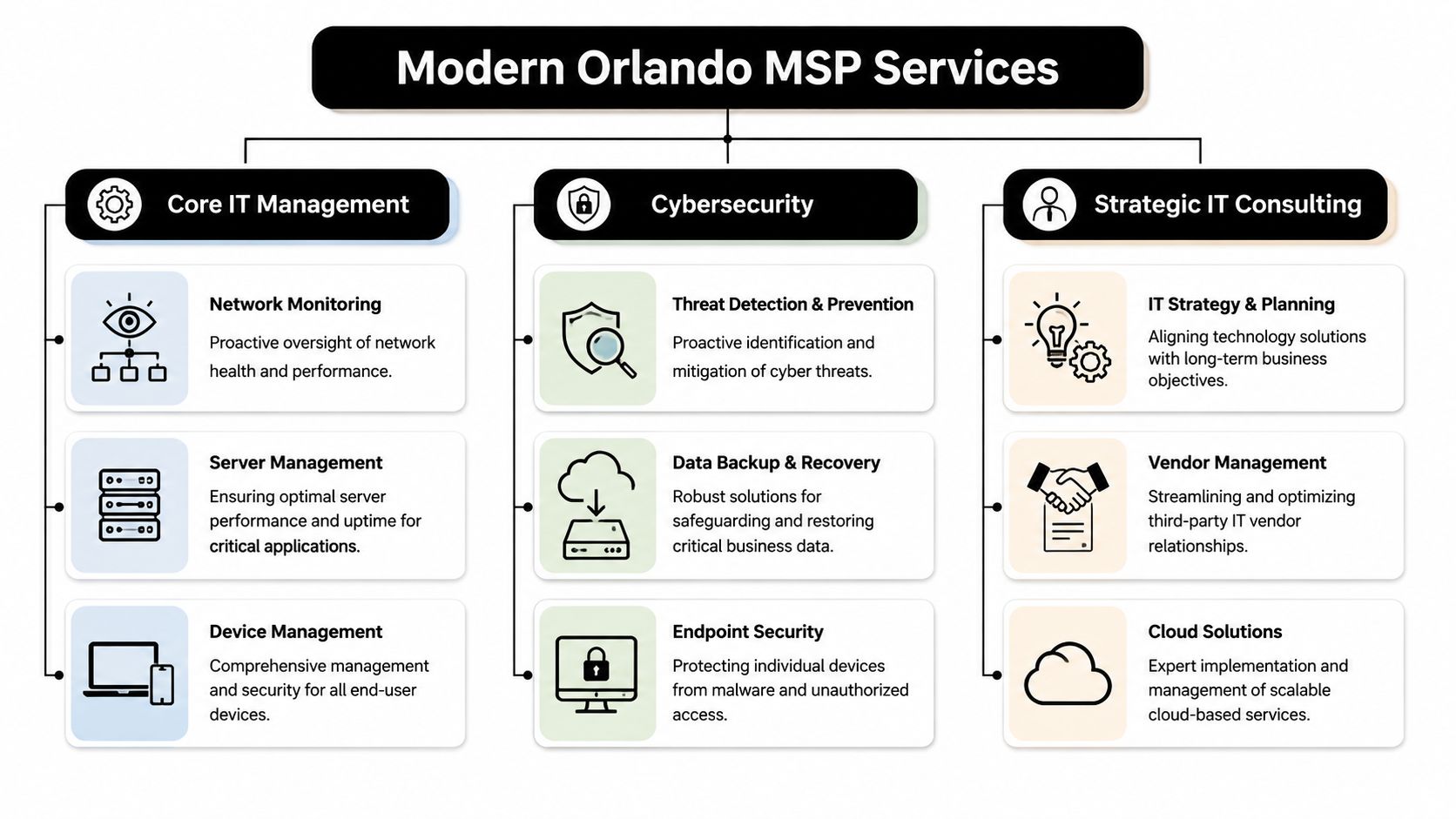
A diagram illustrating IT services provided by a managed service provider in Orlando, including core IT, cybersecurity, and consulting.

The baseline is proactive operations

A competent Orlando managed service provider should continuously manage the often-overlooked parts of IT that create outages when neglected.

That includes:

  • Monitoring and alerting: Watching servers, endpoints, network health, storage, and key business systems so the team can respond before staff starts calling.
  • Patch and endpoint management: Keeping devices current, enforcing standards, and reducing the number of avoidable security gaps created by inconsistent updates.
  • Backup oversight: Not just running backups, but checking job success, retention, and recovery readiness.
  • Vendor coordination: Owning the handoff between your business and internet, cloud, software, telecom, and line-of-business vendors when issues cross systems.

For a busy office manager or administrator, that operational discipline matters more than technical jargon. It means fewer interruptions, fewer mystery failures, and less time spent chasing multiple vendors.

Security has to operate every day

Cybersecurity can't be bolted onto managed IT anymore. If a provider treats it as an optional add-on, you should assume the service model is behind where the market already is.

A stronger MSP will pair endpoint protection with log visibility, incident response playbooks, user access review, phishing defense, backup isolation, and escalation procedures that continue after the business day ends. If you want a practical example of what that operating layer can look like, UTMStack managed SIEM is a useful reference for understanding how centralized detection and response supports ongoing security operations.

Practical rule: If a provider says it offers “24/7 security,” ask what happens at 2:00 a.m. Who sees the alert, who investigates it, and who contacts your business?

A real answer should describe people, process, and decision paths. Anything softer than that is a sales phrase.

Compliance support should be operational

Central Florida businesses in healthcare, financial services, legal, and adjacent professional sectors often don't need a lecture on compliance. They need help turning compliance expectations into repeatable IT work.

That means an MSP should be ready to support activities such as:

  • Access control reviews: Confirming the right people have the right access, and removing stale accounts quickly.
  • Documentation: Maintaining asset records, network documentation, policies, and change history that leadership can review.
  • Evidence collection: Producing recurring reports, security records, and control documentation when audits or insurance questionnaires show up.
  • Risk reduction in daily workflows: Hardening endpoints, securing remote access, managing backups, and reducing single points of failure.

One Orlando-area option in this category is Cyber Command, LLC, which provides managed IT, co-managed IT, a 24/7 SOC, vendor management, and compliance support as part of its service model. That kind of integrated approach is what businesses should look for, whether they choose one provider or another.

Key Evaluation Criteria for Central Florida Businesses

The hardest part of buying managed IT isn't finding providers. It's separating polished sales language from operational maturity.

Maturity matters more than marketing

A useful benchmark comes from Orlando managed IT pricing guidance. It notes that roughly 150,000 to 200,000 firms call themselves MSPs, while only 5,000 to 10,000 are considered mature and certifiable, and it places common managed IT pricing around $100 to $300 per user per month depending on scope.

That gap matters. Plenty of firms can sell remote support, antivirus, and a monthly invoice. Far fewer can show mature service delivery with documented controls, recurring reporting, backup accountability, onboarding discipline, offboarding discipline, and vendor ownership.

When you evaluate providers, look for signs that they run a system, not a personality-driven operation.

Useful indicators include:

  • Documented processes: They can explain onboarding, escalation, patching, access changes, and incident response in plain language.
  • Recurring review structure: They don't disappear after contract signing. They schedule business reviews, roadmap discussions, and service reporting.
  • Service boundaries: They can tell you what's included, what triggers extra work, and how after-hours situations are handled.
  • Operational proof: They can show examples of reporting, standards, and change control without speaking in abstractions.

Local response still matters

A Central Florida business doesn't always need onsite support every week. It does need a provider that can show up when hands-on work matters.

That's especially true for:

  • Medical and dental offices dealing with workstations, printers, scanners, and office-specific workflows.
  • Professional firms that can't afford conference room failures, workstation issues before client meetings, or preventable office network outages.
  • Multi-location organizations that need one support standard across branches, not fragmented local fixes.

A local presence also tends to improve accountability. When leadership knows who owns the relationship, issues get escalated faster and planning conversations get more practical.

Ask for evidence of security operations

A lot of providers will say they do security. Ask what they run.

You want detail around monitoring, triage, endpoint standards, incident handling, identity controls, backup escalation, and reporting. If your business has regulated data, ask how they support security documentation and policy enforcement tied to your environment.

Healthcare organizations should also review current guidance before provider meetings. This checklist for navigating 2025 HIPAA requirements is a helpful way to frame the questions you should bring into the conversation.

Don't ask, “Do you do compliance?” Ask, “What reports, controls, and review processes will you own each month?”

That wording forces a clearer answer. It also reveals whether the provider understands regulated operations or just knows the vocabulary.

Decoding Orlando MSP Pricing and Hidden Costs

Pricing causes more confusion than almost any other part of the MSP buying process. The problem usually isn't that proposals are too detailed. It's that they're too simplified at the top and too vague in the fine print.

A person viewing software pricing models for businesses on a tablet device at a desk.

What Orlando pricing usually looks like

Verified Orlando market data shows recurring MSP pricing often falls into three bands: $1,500 to $3,000 per month for basic monitoring and remote help desk, $3,000 to $7,000 per month for fully managed networks with security and backup, and $120 to $200 per hour for ad hoc projects or after-hours emergencies.

Those numbers tell you something important. Orlando businesses aren't buying old-school break-fix support alone. They're budgeting for continuous support, security oversight, and continuity planning.

A second local pricing view puts common managed IT at $100 to $300 per user per month, especially when helpdesk, security monitoring, and mixed onsite and remote support are part of the service. It also argues that buyers should normalize proposals by service components such as endpoint protection, patch cadence, backups, vulnerability management, vendor administration, and incident response, rather than comparing only the headline fee (managed IT service pricing comparison guide).

If you want a deeper breakdown of how these models affect budgeting, this guide to managed IT services cost is a useful reference point.

Where simple pricing models break down

Per-user pricing is easy to quote. It's not always easy to apply fairly.

A law firm with mostly desk-based staff may fit a per-user model well. A business with shared workstations, field employees, rotating devices, multiple sites, and a mix of office and remote work usually won't. The same goes for companies with an internal IT manager that wants outside help for escalation, security operations, documentation, or vendor management.

Watch for these common pricing blind spots:

  • Shared-user environments: Front desk stations, exam rooms, kiosks, and conference devices can distort “per user” math.
  • After-hours needs: A proposal may sound complete until you ask how nights, weekends, and emergencies are billed.
  • Project labor exclusions: Many agreements cover support but not larger moves, remediation work, or changes outside routine administration.
  • Vendor coordination limits: Some providers will call vendors for you. Others treat that as billable consulting.
  • Multi-site complexity: A branch office with its own connectivity, hardware, and workflow needs often requires more support than a flat seat count suggests.

How to compare total cost of ownership

The cheapest monthly quote is often the most expensive operating decision.

Use this framework instead:

Comparison area What to examine What often gets missed
Service scope Helpdesk, patching, backup checks, security monitoring, vendor management Assumptions that “managed” means all of the above
Response model Business hours support, after-hours escalation, onsite availability Emergency work billed separately
Security depth Endpoint controls, incident response process, account protections, reporting Security tools sold without active review
Compliance readiness Documentation, policy support, evidence for audits or insurance Generic promises with no reporting cadence
Environment fit Multi-location support, hybrid staff, shared devices, co-managed workflows One-size-fits-all seat pricing

If your business has more than one location or more than one workflow, ask the provider to explain where the pricing model stops being simple.

That question alone can save you from buying a neat proposal that turns messy after onboarding.

Your Actionable Process for Choosing the Right Partner

A strong MSP selection process should look more like hiring a department leader than buying a utility. You're choosing who gets visibility into your systems, your users, your vendors, and your operational weak points.

Start with internal clarity

Before talking to providers, document what's failing today and what has to improve.

Write down:

  • Recurring pain points: Slow support, inconsistent vendors, poor remote access, backup uncertainty, user frustration, leadership blind spots.
  • Business priorities: Growth, office expansion, hybrid work, system modernization, insurance requirements, audit readiness.
  • Risk areas: Sensitive data, access sprawl, unsupported systems, weak offboarding, unclear recovery process.
  • Required outcomes: Faster response, stronger reporting, fewer vendors to manage, better security oversight, predictable monthly spend.

This step matters because vague requests produce vague proposals. If you ask for “managed IT,” you'll get broad packaging. If you ask for support tied to business objectives, you'll get a more useful conversation.

Run better provider meetings

Your first meeting shouldn't be a product demo. It should be an operating review.

Ask the provider to explain how they would take over your environment, standardize it, secure it, support your staff, and report back to leadership. If you want a practical selection framework before those conversations, this guide on how to choose a managed service provider is a solid checklist.

Use the meeting to test clarity. Mature providers usually answer directly. Less mature ones tend to hide behind generalities.

Here's a practical set of questions to bring.

Essential Questions for Vetting an Orlando MSP

Category Question to Ask Why It Matters
Onboarding How do you transition documentation, credentials, vendors, and support responsibility from the current setup? Weak transitions create outages and confusion in the first weeks.
Support model Who answers support requests, how are priorities set, and how do users escalate urgent issues? You need to know how staff will actually experience the service.
Security operations Who reviews alerts, what triggers investigation, and what happens outside normal business hours? This exposes whether security monitoring is active or mostly passive.
Backup and recovery How do you verify backups and how do you handle recovery testing and emergency restoration? Backup value depends on recoverability, not job completion alone.
Compliance What documentation and recurring reports do you provide for regulated environments? Many providers say they help with compliance but don't produce usable evidence.
Vendor management Which vendors will you coordinate with directly, and what's included in that responsibility? Leadership needs fewer handoffs, not more.
Onsite support When do you come onsite, how is it scheduled, and what work falls outside the agreement? This helps prevent billing surprises.
Reporting What will leadership receive each month or quarter? Good reporting turns IT from guesswork into managed accountability.
Standards What technical standards do you enforce across devices, accounts, and backups? Standardization is what reduces recurring incidents over time.
Strategic guidance Who helps us plan upgrades, risk reduction, and future changes? You need a roadmap, not just ticket closure.

Ask every provider the same core questions. That's how you compare operations instead of personalities.

Compare proposals like an operator

When final proposals arrive, don't line them up by monthly fee first. Line them up by accountability.

Review each proposal through four lenses:

  1. What is clearly included
    Look for precise language around support, security, onsite work, projects, and vendor coordination.

  2. What is excluded or capped
    Find the labor categories that trigger extra billing, especially after-hours support, remediation, office moves, and nonstandard devices.

  3. How the provider will report
    A better MSP relationship includes recurring visibility into issues, standards, risk items, and upcoming decisions.

  4. Whether the service model fits your business
    A provider can be competent and still be the wrong fit for a multi-site healthcare practice, a growing accounting firm, or a co-managed internal IT setup.

Check references with a business lens too. Don't just ask whether the provider is responsive. Ask whether they improved control, communication, and predictability after the first few months.

Finding Your Partner and Taking the Next Step

Choosing an Orlando managed service provider isn't really about outsourcing IT. It's about deciding who will own operational discipline across support, security, vendor coordination, and business continuity.

The right partner should make your environment easier to run. Staff should know where to go for help. Leadership should have better visibility. Compliance-related work should feel more organized. Security shouldn't depend on hope and scattered tools.

The strongest buying criteria are straightforward:

  • Local accountability when onsite work or direct communication matters
  • Security depth that goes beyond checkbox tooling
  • Transparent pricing with fewer hidden labor surprises
  • Documented process for support, reporting, and continuous improvement

If your current setup still feels reactive, it's probably time for a more structured model. A consultation with a qualified local provider can quickly show whether your issues are minor support gaps or signs that your business has outgrown its current IT approach.

Frequently Asked Questions about Orlando MSPs

What's the difference between fully managed IT and co-managed IT

Fully managed IT means the provider takes primary responsibility for day-to-day support, maintenance, and operational oversight. Co-managed IT means the provider works alongside your internal IT person or team. That model works well when you need added depth in security, after-hours coverage, documentation, or project support without replacing internal staff.

How long does onboarding usually take

The timeline depends on the condition of your current environment, how complete your documentation is, and whether you're changing tools, standards, or vendors during the transition. What matters most is that the provider has a structured onboarding process for access handoff, asset review, user communication, and support cutover.

Can an MSP support industry-specific software

Yes, if the provider is willing to learn your workflow and coordinate closely with the software vendor. For legal, accounting, healthcare, architecture, engineering, and similar firms, that usually means supporting the infrastructure around the application, documenting dependencies, handling escalations, and making sure updates or device changes don't break daily operations.


If you want a practical conversation about managed IT, cybersecurity, compliance readiness, and predictable support for your Central Florida organization, talk with Cyber Command, LLC. The goal isn't a hard sell. It's to help you understand what your business needs, where your current gaps are, and whether a more mature MSP model fits the way you operate.

Orlando IT Services: Top Providers for Your Business

Growth in Orlando often creates IT problems before it creates IT maturity. A firm hires five people, opens a second office, or adds a new software platform, and the weak spots show up fast. Laptops slow down, shared files get messy, remote access fails at the wrong time, and an office manager or operations lead ends up fielding issues that should never have landed on their desk.

That pattern hits Central Florida businesses in different ways. A law office needs dependable document access, secure email, and clear user permissions across partners, associates, and support staff. A medical practice has to add devices, support physicians across locations, protect patient data, and keep systems available after hours. An industrial company may depend on warehouse connectivity, mobile devices, vendor portals, and plant or field operations that cannot afford long outages.

This growth raises the bar for local businesses.

Clients expect faster response times. Employees expect stable systems whether they are in the office, at home, or on the road. Regulators and insurers expect documented controls, not informal workarounds. For Orlando companies in professional services, medical, and industrial environments, the question is not whether outside IT support sounds affordable. The question is whether your current setup can hold up under operational pressure, security threats, and compliance requirements without creating unpredictable costs.

Navigating Growth and IT Headaches in Orlando

Revenue can be up and the business can still feel harder to run.

A growing Orlando firm adds staff, opens another location, or rolls out a new cloud app. Then the weak points show up fast. Password resets pile up. Wi-Fi drops during meetings. A backup fails unnoticed until someone needs a file. The owner, office manager, or operations lead gets pulled into problems that should have been handled upstream.

A professional man holding an award in an office while his laptop shows a loading screen.

That is usually the point where break-fix support starts costing more than it saves. A law office loses billable time because a partner cannot reach matter files before a client call. A medical practice cannot afford after-hours access problems tied to scheduling, imaging, or EHR workflows. An industrial company loses production time because warehouse connectivity or a vendor portal goes down. The invoice for the repair is only part of the cost. Delays, workarounds, and missed deadlines do more damage.

Why this gets harder in Central Florida

Central Florida businesses are operating in a more technical market than they were a few years ago. As noted earlier, the Orlando Economic Partnership reported continued growth in the region's tech workforce in 2023. For business owners, the practical takeaway is clear. The local market now expects better uptime, tighter security, and faster response when systems fail.

That shift is especially important in Orlando's core industries. Professional services firms need controlled access to documents, email, and client data across attorneys, accountants, consultants, and support staff. Medical groups face privacy obligations, device sprawl, and pressure to keep systems available across offices and after hours. Industrial and field-based companies depend on stable networks, mobile access, vendor systems, and recovery plans that hold up during outages and storm season.

Cheap support does not solve those problems.

Practical rule: If IT issues interrupt operations every week, the problem is not random support demand. The problem is the way IT is being managed.

What owners usually need instead

Orlando businesses usually do not need another provider promising a friendly helpdesk and 24/7 coverage. They need a partner that can reduce operational risk, support compliance, and keep spending predictable as the company grows.

That means asking harder questions:

  • Can the provider keep staff working when devices fail, accounts lock, or an office loses connectivity?
  • Can they prevent repeat issues with patching, monitoring, backup testing, and standards for new users and devices?
  • Can they support regulated environments with documented controls, access management, and audit-ready processes?
  • Can they handle multi-site operations without leaving remote staff, physicians, or field teams stranded?
  • Can they give you cost predictability instead of a string of emergency invoices and surprise project charges?

For a lot of Orlando companies, that is the key threshold. IT is no longer a background utility. It is part of service delivery, risk control, and day-to-day operations.

Decoding the Spectrum of Modern IT Services

A provider can answer tickets fast and still leave your business exposed. That gap shows up all over Orlando. A medical practice may get quick password resets but still fail a backup restore test. A law firm may have decent user support but weak access controls around client files. A manufacturer may keep production PCs running while remote site connectivity, vendor access, and patching drift out of control.

That is why "IT services" needs a tighter definition.

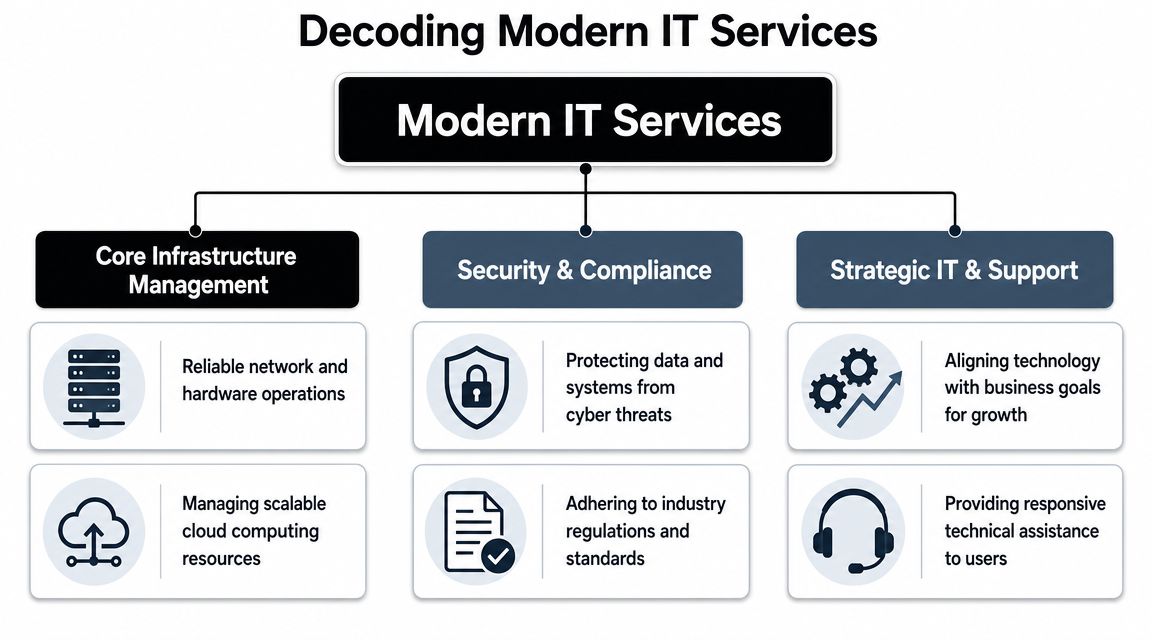
An organizational chart showing the structure of modern IT services, including infrastructure, security, and strategic support.

The service stack is easier to evaluate in three parts. First, the systems that keep staff productive. Second, the controls that reduce security and compliance risk. Third, the planning work that prevents recurring outages, rushed purchases, and undocumented changes.

Core infrastructure management

This is the operating layer behind daily work.

It includes endpoints, networks, wireless, printers, line-of-business applications, identity platforms, backup systems, and cloud tools such as Microsoft 365 or Azure. In a multi-office Orlando business, that also means handling site-to-site consistency, remote access, and vendor coordination without waiting for something to break.

A solid infrastructure scope usually includes:

  • Helpdesk support: A clear process for account lockouts, email issues, application errors, onboarding, offboarding, and access requests
  • Endpoint management: Standardized device setup, patching, encryption, antivirus, and replacement planning
  • Network administration: Ongoing management of firewalls, switches, Wi-Fi, VPNs, internet failover, and location connectivity
  • Cloud operations: Administration of file storage, collaboration tools, identity policies, license changes, and backup settings

The trade-off is straightforward. Providers that focus only on ticket volume often look cheaper at first, but they leave standardization work unfinished. That usually leads to more recurring issues, more user downtime, and more project spend later.

Security and compliance controls

Security should be built into the service model, not bolted on after an incident.

For Central Florida companies, the details matter. Medical groups need access controls, audit trails, device protections, and documented processes that support HIPAA expectations. Professional services firms need tighter identity management, email security, and data handling because a compromised mailbox can expose client communications, contracts, and financial records. Industrial companies need to control remote vendor access, segment networks where needed, and protect older systems that cannot be patched on a normal cycle.

A provider should be able to explain how each control is operated, who reviews alerts, how incidents are escalated, and what evidence is retained for audits or insurance questionnaires. "We include cybersecurity" is not enough.

Look for these controls in plain language:

  • Identity and access management: MFA, conditional access, account reviews, and clean offboarding
  • Endpoint protection: Detection, response, encryption, and policy enforcement on laptops and desktops
  • Email security: Filtering, impersonation protection, user reporting, and response procedures
  • Backup and recovery validation: Restore testing, retention policies, and documented recovery steps
  • Compliance support: Policies, logs, risk reviews, and evidence collection for regulated environments

If a provider offers co-managed IT support options, ask which of these controls stay with your internal team and which ones they will own. That split needs to be explicit.

Strategic support and planning

Planning is where service quality becomes business value.

A provider that only reacts to tickets will not help you control refresh cycles, clean up vendor sprawl, or prepare for office moves, audits, or system changes. Strong providers maintain documentation, review recurring incidents, map out infrastructure decisions, and tie recommendations to budget timing.

Here is what that work should accomplish:

Service area What it should accomplish
IT roadmap Prioritize upgrades, renewals, and projects based on operational risk and business goals
Budgeting Forecast hardware, licensing, and project costs before they become emergencies
Vendor management Coordinate software, internet, telecom, copier, cloud, and line-of-business providers
Documentation Maintain network diagrams, asset records, admin access lists, and operating procedures
Reporting Show recurring issues, unresolved risks, service trends, and accountability

Price and a 24/7 helpdesk promise do not tell you whether a provider can run this full stack well. Orlando IT services should be judged by how they protect uptime, support compliance, and keep technology spending predictable.

Managed vs Co-Managed IT Which Model Fits Your Business

The first decision isn't which provider to hire. It's which operating model fits your company.

Some Orlando businesses need to outsource the entire function. Others already have an internal IT person or small team and need depth, coverage, or specialized security support. That's the difference between fully managed IT and co-managed IT.

When fully managed makes sense

Fully managed IT fits companies that don't want to build an internal department. That's common for smaller law firms, accounting practices, medical groups, manufacturers, and nonprofits where leadership wants one partner to own support, infrastructure, security coordination, vendor management, and planning.

The advantage is clarity. One provider owns the workflow, standards, escalation path, and documentation.

When co-managed is the better move

Co-managed IT works when you already have internal capability but need reinforcement. Maybe you have one systems administrator who handles daily support but can't also cover after-hours issues, compliance work, cloud architecture, major projects, and security monitoring. In that case, a partner can fill the gaps without replacing your internal lead.

If your team is weighing that route, this overview of co-managed IT solutions is a useful reference point for how responsibilities can be split.

Managed vs. Co-Managed IT A Comparison for Orlando Businesses

Factor Fully Managed IT Co-Managed IT
Primary role Outsourced IT department Extension of internal IT
Internal staffing need Minimal or none Existing IT lead or team remains in place
Control over daily decisions Provider handles more operational decisions Shared control between internal team and provider
Access to specialized skills Included through provider bench Added where your internal team lacks depth
After-hours coverage Usually easier to centralize Useful when internal staff can't cover nights or weekends
Scalability Good for growing firms without hiring internally Good for firms outgrowing one-person IT
Best fit Owners who want accountability from one partner Organizations that want support without giving up internal oversight

Decision shortcut: If nobody inside your company owns IT strategy, vendor coordination, and security operations, fully managed is usually the cleaner model. If someone does own those areas but lacks bandwidth, co-managed often fits better.

The wrong choice creates friction. Fully managed can frustrate a strong internal IT leader if the provider tries to replace them. Co-managed can fail if responsibilities are vague and both sides assume the other is handling critical work.

The Cybersecurity Imperative for Central Florida Businesses

A Maitland medical practice can lose access to scheduling and patient records from one compromised Microsoft 365 account. A manufacturer west of Orlando can halt shipping because a ransomware event hits a file server tied to production paperwork. A law firm downtown can create a reportable client-data issue because one former employee still has cloud access. In Central Florida, cybersecurity failures turn into operating problems fast.

A digital shield protecting an Orlando business building from cyber threats like malware and ransomware attacks.

The common mistake is treating security like a product purchase instead of an operating discipline. A business installs antivirus, adds a firewall, and assumes coverage is in place. Then patching slips, login alerts go unread, a cloud app is shared too broadly, or no one knows who is supposed to isolate an infected device. The failure happens between controls, ownership, and follow-through.

Why layered defense matters

Effective protection comes from coordinated controls that cover different points of failure. Firewalls limit unwanted access. Endpoint protection helps catch malware on user devices. Intrusion monitoring improves visibility when an attacker starts moving through the environment. Encryption reduces exposure if a laptop, phone, or backup set is lost.

Those tools matter, but operations decide whether they work. Someone has to own patch timing, identity policy, privileged access reviews, alert triage, containment, backup testing, and recovery. If your provider cannot show how those tasks are performed each month, you are buying software, not a security program.

Central Florida risk looks different by industry

Local businesses do not share the same threat profile, even when they have similar headcounts.

Professional services firms in Orlando and Winter Park often face email compromise, weak offboarding, and overexposed document repositories. The financial hit usually comes from lost billable time, client notification, and reputation damage. Medical practices carry a different burden. They need tighter access controls, audit trails, device management, and support for HIPAA-related processes because patient data moves through front-desk systems, clinical applications, mobile devices, and third-party vendors. Industrial and field-service companies have another set of trade-offs. They often run older systems, shared workstations, remote access for technicians, and office-to-plant connections that widen the attack surface and complicate patching windows.

Cloud use adds another layer of exposure. File sharing, SaaS applications, and remote collaboration improve speed, but they also create more places for identity abuse and misconfigured access. For cloud-heavy teams, understanding cloud security for startups is a useful primer on how storage, identity, and application risk change once work happens outside the office.

What to ask a provider

Skip broad promises and ask how security works in practice. Ask who reviews alerts after hours, how fast suspicious sign-ins are investigated, how endpoints are isolated, how backups are tested, and what documentation you receive after an incident. Ask how they handle MFA enforcement, user access reviews, vendor risk, and compliance support for your industry.

A useful baseline is this guide to cybersecurity best practices for small businesses. It outlines the controls business owners should expect to see turned into routine operational work, not left as one-time setup tasks.

One more point matters in Orlando. Summer storms, regional outages, and dispersed offices put pressure on business continuity. Security planning should cover recovery priorities, remote access fallback, and clear communication during an outage, not just threat prevention.

If a provider can list tools but cannot explain alert ownership, containment steps, recovery order, and compliance responsibilities, the risk has not been reduced. It has been reassigned, usually back to you.

Understanding Pricing Models and Service Level Agreements

IT proposals often look comparable until you read the exclusions. That's where many bad decisions start.

A business owner sees one provider with a lower monthly fee and assumes the value is obvious. Then they discover patching is limited, endpoint protection costs extra, documentation isn't included, after-hours response triggers extra billing, and project work starts a second invoice stream. The plan was cheaper on paper, not in operation.

What common pricing models actually mean

Most Orlando IT services are packaged in one of three ways:

  • Per user pricing works well when staff rely on multiple devices and standardized applications. It can simplify budgeting for office-heavy teams.
  • Per device pricing can fit environments with shared workstations, fixed assets, or nontraditional user counts, but it can also create blind spots if some tools and services aren't tied cleanly to device counts.
  • Flat-rate managed service sounds attractive because it offers predictability, but the details matter more than the label.

A useful industry caution is that “cheaper” flat-rate IT can end up costing more if it excludes patching, endpoint protection, or after-hours response, as discussed in this analysis of cost control and operational inclusion in IT services. That's the right lens. Don't compare fee alone. Compare what's operationally included.

The SLA terms that deserve attention

A Service Level Agreement, or SLA, is where the provider shows what “support” means in measurable terms. Many buyers focus on response time only. That's not enough.

Review these items carefully:

  1. Response commitment
    How quickly does the provider acknowledge a critical issue, a standard issue, and a low-priority request?

  2. Resolution ownership
    Does the provider only respond, or do they stay engaged until the issue is resolved across vendors and systems?

  3. After-hours scope
    Are nights, weekends, and holidays covered for all users, only emergencies, or billed separately?

  4. Included security operations
    Does the agreement include patching, endpoint protection, monitoring, and remediation workflow?

For a plain-English primer on how SLAs are structured in connectivity services, this guide to SLAs for internet and VoIP is useful context.

A better way to compare proposals

Use a scope-first comparison. Put each provider's offer into the same grid and map what's included, excluded, capped, or billed separately. This breakdown of IT managed services pricing models can help frame that review.

A low headline price often hides labor shifting back onto your staff. The better question is whether the agreement reduces interruption, risk, and surprise spending.

Real-World IT Scenarios for Orlando Industries

The best way to judge Orlando IT services is to test them against actual operating conditions. Different industries break in different places.

One of the biggest gaps in local provider marketing is that broad promises don't explain how support works for regulated, multi-site, or field-based organizations. Buyers should push providers to answer questions about compliance support, standardized remote monitoring, and incident response across offices and field teams, as emphasized in Vann Data's IT planning and budgeting perspective.

Professional services in downtown Orlando

A law firm or accounting office usually depends on document access, email continuity, identity security, and clean onboarding and offboarding. The helpdesk matters, but the deeper issue is process. Who controls permissions for former employees? Who verifies backup integrity? Who standardizes laptops so every new hire doesn't become a custom setup project?

A solid provider should bring documented user lifecycle processes, secure remote access, and reporting that leadership can readily review.

Industrial and field-service operations

An industrial firm near the 417 corridor has a very different environment. Some users sit in an office. Others are in warehouses, vehicles, plants, or customer locations. Devices go offline. Printers support inventory workflows. VPN and authentication failures can stop field work before the day starts.

In this setting, “support” must include standardized remote monitoring across sites, repeatable device deployment, and escalation paths that don't depend on one person knowing the environment from memory.

Multi-site businesses don't fail because they lack a ticketing system. They fail because nobody standardizes the environment behind the tickets.

Private medical practices and specialty clinics

A medical spa, dental group, veterinary practice, or specialty clinic has little room for sloppy access control. The challenge isn't only HIPAA awareness. It's handling everyday realities such as front-desk turnover, shared devices, line-of-business systems, imaging workflows, patient communication platforms, and secure mobile access.

Providers should be able to explain how they support compliance-sensitive workflows without slowing the office down. That includes documentation, endpoint standards, encryption, and incident response discipline.

Nonprofits and community organizations

Nonprofits usually need predictable support and less chaos, not an enterprise science project. They often work with lean administrative teams, donated technology, and mixed user skill levels. The right provider simplifies the environment, trims unnecessary vendor overlap, and sets a realistic standard the organization can maintain.

If you operate across several programs or facilities, classifying locations and operating needs consistently can even become a data problem. Teams working on broader systems planning sometimes use tools like a NAICS classification API when organizing business-unit or partner data across platforms.

Your Checklist for Choosing an Orlando IT Partner

A provider meeting often goes the same way. You ask about response time, cybersecurity, and support coverage. They answer yes to everything. Two months later, your medical office still has shared logins at the front desk, your law firm still has no clear escalation path after hours, or your shop floor PCs are falling behind on patches because nobody defined ownership.

That is why vendor selection needs to get past the sales script.

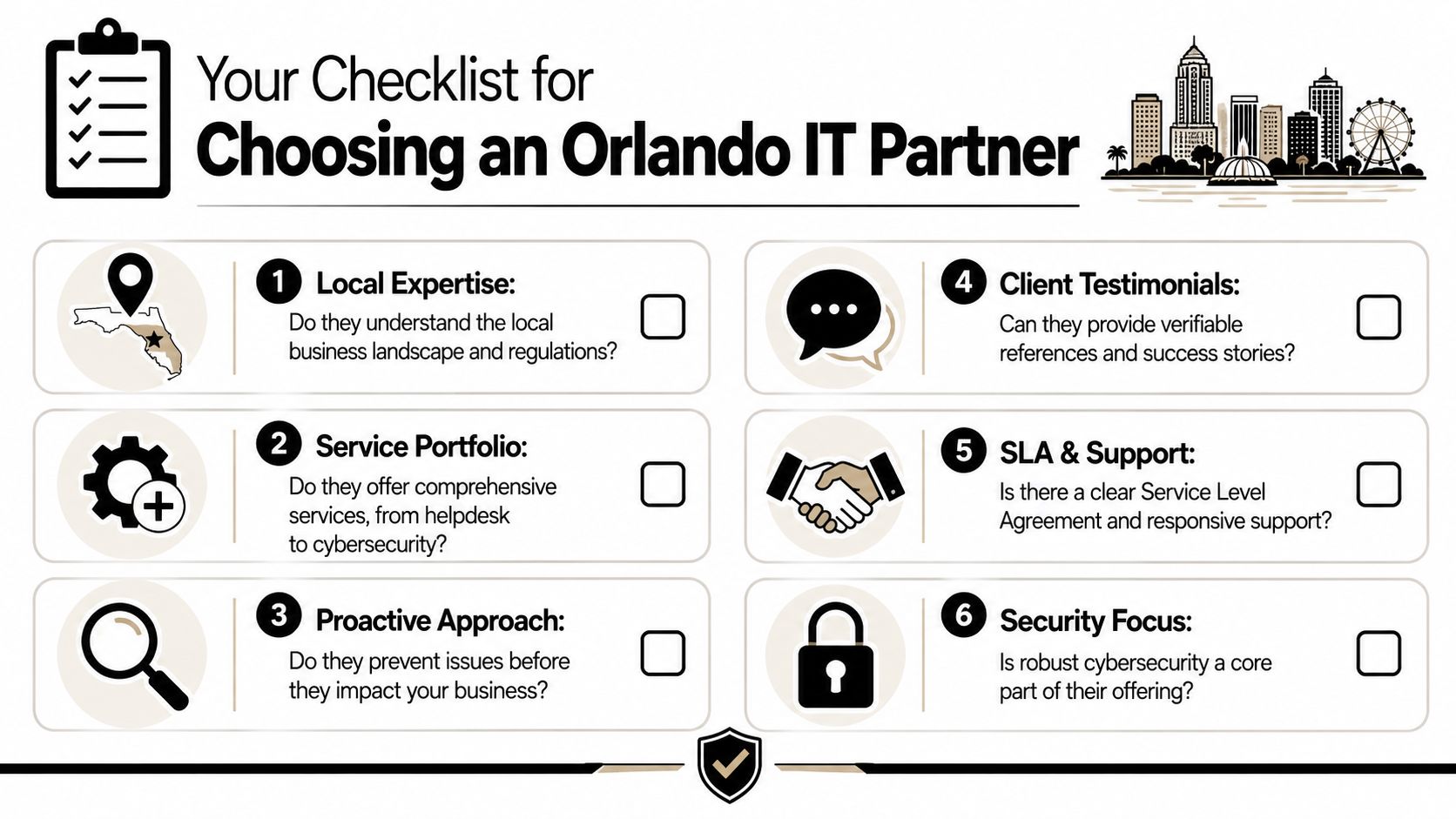
A checklist graphic helping businesses choose an IT partner in Orlando, Florida, featuring six key criteria.

For Orlando businesses, a key test is operational clarity. A capable provider should explain how it handles after-hours incidents, patch approvals, vendor coordination, user onboarding, and security events in a way that fits your industry. A specialty clinic has different risk points than a CPA firm. A manufacturer with multiple shifts has different uptime demands than a nonprofit with a lean admin team. Price matters, but gaps in process usually cost more than a higher monthly fee.

Questions worth asking in every sales call

Use this list to pressure-test any Orlando IT services proposal:

  • Who answers after hours? Ask whether support is staffed continuously, what qualifies as an emergency, and who owns escalation.
  • What is included in the standard stack? Get specifics on patching, endpoint protection, encryption, monitoring, documentation, vendor coordination, and backup oversight.
  • How do you support compliance-sensitive environments? A good answer should address access control, device standards, audit support, and incident handling without slowing daily work.
  • How do you handle multi-site and remote staff? Ask how they standardize systems across offices, field users, and shared devices.
  • What reporting do we receive? You should see recurring incidents, open risks, asset visibility, and planning recommendations.
  • What happens during onboarding? A disciplined provider should document systems, credentials, vendors, endpoints, and policies before taking over.
  • What is excluded? This usually exposes project fees, third-party vendor work, hardware support limits, or security tasks that are assumed but not covered.

What a strong answer sounds like

Good providers speak in operating details. They explain who reviews failed backups, how suspicious login alerts are triaged, when management gets notified, how Microsoft 365 changes are approved, and what happens if an internet circuit fails at 4:30 p.m. on a Friday. If they stay at the level of "we are proactive" or "we customize everything," keep pushing.

In Central Florida, I would also test for industry fit. Professional services firms need tight identity control, email security, and documented procedures that hold up under client scrutiny. Medical groups need consistent workstation standards, account removal discipline, and support that understands patient-facing downtime. Industrial companies need providers that respect production schedules, older equipment constraints, and the cost of an outage during receiving, shipping, or a late shift.

Cyber Command, LLC is one provider in the local market that offers managed IT, co-managed IT, cloud services, and cybersecurity support. That is not a recommendation by default. It is a reminder to compare breadth, accountability, and operating maturity, not just whether a company promises a 24/7 helpdesk.

Buyer test: If you cannot identify who owns security, support, planning, and escalation after the first meeting, the proposal is still too vague.

The right partner should reduce business risk, stabilize day-to-day operations, and make IT costs easier to forecast. That is the standard.

Co-managed IT Solutions: Your Guide for Florida & Texas

A lot of business owners in Orlando and Plano are in the same spot right now. The company has grown, the staff depends on cloud apps, every location needs stable Wi-Fi and secure access, and the internal IT person or small team is buried in tickets. They’re resetting passwords, dealing with printer issues, chasing software vendors, and answering after-hours calls when they should be planning security improvements or infrastructure upgrades.

That strain gets worse in regulated industries. A medical practice can’t afford patching delays. A law firm can’t shrug off email compromise. An architecture or engineering firm can’t have project files locked up by ransomware because endpoint protection was inconsistent. When the team is always reacting, important work slips. The business feels that in downtime, stress, and missed opportunities.

The Modern IT Challenge for Growing Businesses

A familiar pattern shows up in growing firms across Central Florida. The office opens at 8, users are already waiting on support, and the one person who knows the environment is trying to juggle urgent requests with larger priorities like MFA rollout, firewall review, backup testing, and vendor renewals. By noon, the plan for the day is gone.

That’s not a staffing failure. It’s a capacity problem.

For many small and midsized organizations, internal IT carries a wide job description that mixes helpdesk, systems administration, purchasing, user training, compliance support, and cybersecurity oversight. Those roles don’t scale cleanly when the business adds locations, hires quickly, or takes on stricter client and regulatory requirements.

Reactive work crowds out strategic work

The issue isn’t that your internal team lacks skill. It’s that routine support work keeps winning because the pain is immediate. A partner can wait on a roadmap update. A locked account can’t.

Common signs the model is breaking down:

  • Security tasks keep getting postponed because user issues always come first.
  • After-hours alerts land on the same person who already handled the workday queue.
  • Vendor sprawl grows unnoticed with separate contacts, renewals, and licensing rules.
  • Documentation lives in someone’s head instead of a shared operational system.
  • Compliance preparation feels rushed every time an audit, insurance review, or client questionnaire appears.

About 60% of businesses now use managed or co-managed IT services to reduce costs and improve efficiency, according to industry reporting on co-managed IT adoption. That number makes sense on the ground. Businesses aren’t moving this direction because it sounds modern. They’re doing it because the old model of “let our one or two IT people handle everything” stops working at a certain level of growth and risk.

Practical rule: If your internal IT lead spends more time clearing backlog than improving security posture, you don’t have an effort problem. You have a support model problem.

For regulated businesses, governance starts to matter. Security controls, documentation, access reviews, retention policies, and audit readiness need a playbook, not just good intentions. If you’re tightening processes around regulated data or internal controls, the modern playbook for corporate compliance is a useful reference for framing what “organized” should look like.

Co-managed IT enters here as reinforcement. It doesn’t replace the people who know your staff, workflows, software quirks, and business priorities. It gives them depth, coverage, and specialized support where the pressure is highest.

Defining Co-Managed IT A Partnership Model

Co-managed IT works best when you think of your internal IT lead as the general contractor for your technology environment. That person knows the building. They know where the wiring is messy, which systems are fragile, which users need extra support, and what the business can or can’t tolerate during a change window.

A co-managed partner plays the role of specialized subcontractors. One team brings cybersecurity depth. Another handles infrastructure monitoring. Another supports cloud operations, patching, backup verification, and escalation when an issue is more complex than a routine ticket.

A professional man and woman discussing IT solutions in front of a digital screen display.

What the internal team should keep

The internal side should usually retain the work that depends on business context and local ownership.

That often includes:

  • User relationship management such as onboarding coordination, executive support, and department-specific workflows
  • Application knowledge for line-of-business software, internal approvals, and process exceptions
  • Technology decision-making tied to budgets, leadership priorities, and business timing
  • On-site tasks that require physical presence, local judgment, or direct access to equipment

This is why co-managed IT usually feels better to internal teams than full outsourcing. They don’t lose control. They gain support.

What the external partner should own

The partner should take work that benefits from scale, specialization, or round-the-clock operations.

That commonly includes:

  1. 24/7 monitoring and alert response so critical issues don’t sit overnight.
  2. Security operations support such as endpoint oversight, incident response assistance, and threat detection.
  3. Patch management and maintenance that can run consistently without depending on one person’s calendar.
  4. Backup and recovery oversight so restore readiness is checked, not assumed.
  5. Project depth for cloud changes, infrastructure refreshes, and major migrations.

RSM notes that co-managed IT gives organizations access to enterprise-grade risk management, including continuous system health monitoring, automated network assessments, and compliance expertise for frameworks like HIPAA, without the cost of hiring all of that talent internally, as described in RSM’s overview of co-managed IT services.

Co-managed IT fails when both sides think they own the same task, or worse, when both sides think the other one owns it.

That’s why the service model matters more than the label. “Co-managed” isn’t a feature. It’s an operating structure. The best arrangements document who handles Tier 1 tickets, who touches security tools, who approves changes, who manages vendors, and who gets called first when a critical system goes down.

For a busy owner, the outcome is simple. Your internal IT person remains the trusted operator who understands your business. The outside partner gives that person a bench of specialists, better tooling, and after-hours coverage without forcing you into a fully outsourced model.

Choosing Your Support Model Co-Managed vs Fully Managed vs In-House

Every support model has a place. The wrong one usually shows up when the business grows faster than the technology structure around it.

Nearly 90% of SMBs either work with MSPs for co-managed IT or plan to, driven by the need for scalable support without adding more full-time hires, according to JumpCloud’s MSP trends summary. That doesn’t mean every company should choose the same model. It means leaders are actively looking for an advantage.

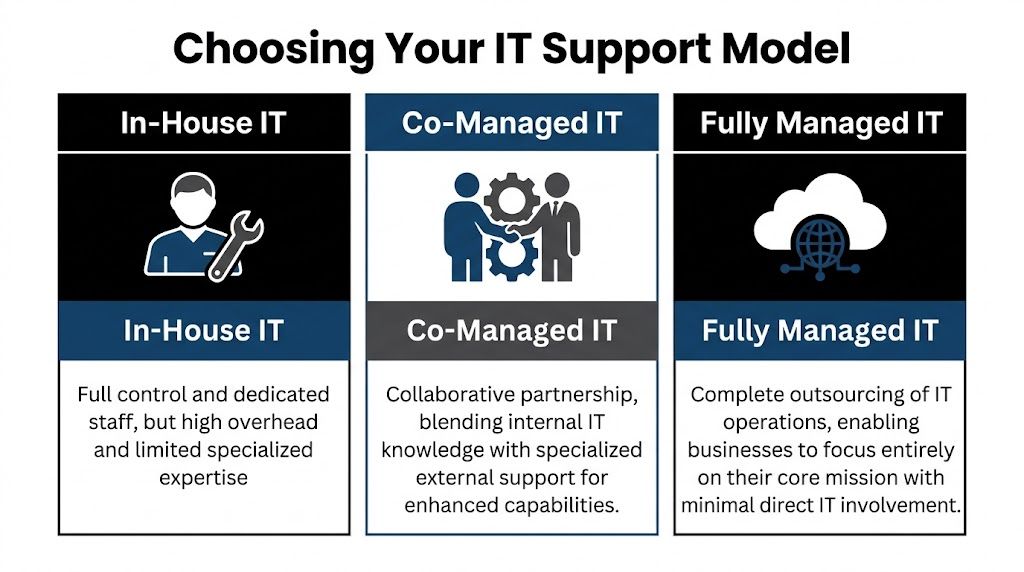
A comparison chart outlining the differences between In-House, Co-Managed, and Fully Managed IT support models.

Where each model fits

An in-house team fits companies that want maximum control and already have enough depth to cover support, infrastructure, security, documentation, vacations, and growth. That can work well, but it gets expensive and fragile if too much knowledge sits with too few people.

A fully managed IT model fits organizations that don’t want to build an internal IT function or don’t need one. That’s often a good option when the company wants a single outside partner to own support and operations end to end. If you’re weighing that route, this overview of fully managed IT support is a useful baseline for comparison.

Co-managed IT fits the middle. It’s often the sweet spot for firms that already have some IT capability but need more capacity, stronger security, or specialized depth without rebuilding the entire department.

IT Support Model Comparison

Factor In-House IT Team Fully Managed IT (MSP) Co-Managed IT (Hybrid)
Control Highest direct control Lower day-to-day internal control Shared control with defined ownership
Staffing burden Business handles hiring, retention, coverage Provider handles staffing Shared staffing model
Specialized expertise Depends on current team Broad provider bench Broad provider bench plus internal context
After-hours support Hard to sustain with small teams Usually included in provider model Added without replacing internal staff
Best fit Large enough team with broad skill coverage Businesses wanting complete outsourcing Businesses with internal IT that need leverage

The sweet spot for regulated firms

Co-managed IT makes the most sense when the business already has someone who understands the environment but doesn’t have enough time or specialist coverage to handle everything well.

That’s common in:

  • Law firms where staff need quick support, document access must stay reliable, and security incidents can become client trust issues fast
  • Medical practices that need HIPAA-aware processes, dependable patching, and minimal disruption to scheduling and clinical workflows
  • Accounting and financial firms where compliance pressure, phishing risk, and seasonal workload spikes can overwhelm a small internal team
  • Multi-location organizations that need standards across sites without hiring a full internal bench

Trade-offs leaders should be honest about

A fully internal model gives you tight control, but it can leave the company exposed when a key person is out, leaves, or gets buried.

A fully managed model simplifies accountability, but some organizations don’t want to hand over all local context, application nuance, or user relationships.

Co-managed IT solves a lot of that, but only when the division of labor is explicit. If ownership is vague, the partnership can create friction instead of relief.

For many firms in Orlando and Plano, the real question isn’t “Should we outsource IT?” It’s “Which responsibilities should stay close to the business, and which should be handled by specialists?”

That’s the decision framework that produces a support model you can live with.

Core Services in a Co-Managed IT Solution

A good co-managed agreement doesn’t stop at “extra hands.” It defines operating support that lowers risk, improves consistency, and gives your internal team room to focus on work the business notices.

A diverse professional team collaborates on co-managed IT solutions in a modern office meeting room setting.

Helpdesk overflow and escalation

This is often the first pain point a business feels. Your internal person becomes the catch-all for everything, from account access to device setup to application troubleshooting.

Co-managed helpdesk support changes that by splitting the queue. Routine requests can go to the partner, while escalations and business-specific issues stay with the internal team. That keeps the on-site lead from spending the whole week in reactive mode.

For a professional services firm, this matters because user interruption is expensive even when the issue is small. Fast response protects billable time.

Security operations and endpoint protection

Co-managed IT solutions create real risk reduction. Small internal teams usually can’t run continuous threat monitoring, investigate suspicious alerts after hours, or maintain the same security discipline every day while also handling regular support.

A partner can support:

  • Endpoint protection oversight across laptops, desktops, and servers
  • Threat detection and response when alerts require immediate review
  • Patching cadence management so vulnerabilities don’t wait for a free afternoon
  • Backup verification and recovery coordination when something goes wrong
  • Policy alignment for access control, device standards, and user risk reduction

For regulated industries, this isn’t just about stopping malware. It’s about proving that security operations are deliberate, documented, and repeatable.

Compliance support and risk management

Owners frequently underestimate co-management's value. Compliance work isn’t one document or one annual check. It’s a series of operational habits.

The strongest providers help internal teams maintain those habits by supporting system reviews, security controls, change logging, patch documentation, backup oversight, and audit readiness. That’s especially useful for medical, financial, and industrial organizations that can’t afford to improvise around HIPAA, CMMC, or similar requirements.

Vendor management and licensing control

Many businesses have a hidden IT tax. It lives in vendor overlap, unclear renewals, duplicate software, unmanaged licenses, and finger-pointing between telecom, internet, software, and hardware providers.

A co-managed partner can centralize that process. Instead of your office manager, controller, or internal IT lead chasing every renewal and support line, the partner helps maintain ownership records, standardizes contacts, and pushes vendors toward resolution.

This is less glamorous than cybersecurity, but it’s operationally important. Clean vendor management reduces delay during outages and improves budgeting.

Field observation: The businesses that run IT smoothly usually aren’t the ones with the most tools. They’re the ones with clear documentation, consistent ownership, and fewer unmanaged exceptions.

Documentation, network diagrams, and operational visibility

If only one person knows how the environment works, you don’t have resilience. You have dependency.

Strong co-managed relationships improve documentation around assets, dependencies, network layout, access standards, and change history. That matters during troubleshooting, onboarding, cyber response, insurance reviews, and growth planning.

Examples of useful operational artifacts include:

  1. Network diagrams that show how locations, firewalls, wireless, and critical systems connect
  2. Asset inventories that identify what’s deployed, where it lives, and who supports it
  3. Escalation maps so users and leaders know who owns what
  4. Change records that reduce confusion after updates or outages

Strategic planning and business alignment

The best co-managed IT solutions don’t just absorb tickets. They create space for roadmap work.

That can include cloud planning, lifecycle planning, infrastructure standardization, budgeting, and quarterly reviews of open risks and upcoming projects. This is also the right place to mention one factual example from the market. Cyber Command, LLC offers co-managed IT that includes monitoring, ticket handling, patch management, vendor management, network diagrams, QBRs, and continuous security support for internal teams that need added depth.

When this layer is missing, IT becomes a utility that only gets attention when something breaks. When it’s present, IT starts supporting growth decisions before they turn into operational problems.

Calculating the ROI of Co-Managed IT

Business owners usually ask the right question. Not “What features are included?” but “What does this change financially and operationally?”

That’s the right lens.

According to Adams Brown’s review of co-managed IT benefits, co-managed models can produce a 20-35% TCO reduction by shifting from reactive fixes to proactive prevention, while also enabling internal teams to complete strategic initiatives 40% faster. Those two outcomes belong together. The savings don’t come only from paying a provider instead of hiring. They come from reducing interruption, limiting avoidable incidents, and freeing skilled staff to work on projects that move the business forward.

Where the return actually shows up

Most ROI in co-managed IT comes from four areas.

  • Less downtime: Problems are caught earlier, handled faster, or prevented through monitoring and maintenance.
  • Lower disruption from security events: Better visibility and response reduce the chance that a small issue becomes a business crisis.
  • Stronger use of internal talent: Your internal team spends less time on repetitive support and more time on improvements.
  • More predictable budgeting: The company trades surprise effort and scattered vendor costs for a clearer operating model.

If you want a budgeting framework before comparing proposals, this guide to managed IT services cost is a practical place to start.

A simple ROI lens for owners

You don’t need a complicated spreadsheet to evaluate co-managed IT. Start with questions like these:

ROI Area What to examine
Support efficiency Are high-value employees waiting on basic support?
Security exposure Are patching, monitoring, and backup checks being handled consistently?
Internal capacity Is your IT lead improving systems or just clearing backlog?
Vendor overhead How much leadership or admin time goes into managing providers and renewals?

If the current model creates repeated delays, owner escalations, and preventable risk, then the cost of staying put is already high, even if it doesn’t show up neatly in one invoice.

The risk that can erase the return

There’s one trap that ruins otherwise good co-managed partnerships. Poor role design.

If the provider thinks your internal staff owns user communication, but your internal staff thinks the provider owns it, people wait. If change approval, after-hours escalation, or patching authority isn’t explicit, important work stalls or gets duplicated.

That’s why service design matters as much as technical capability.

A workable shared SLA structure should define:

  • Who receives the initial ticket
  • Which tickets stay internal
  • Which issues escalate to the partner
  • Who approves security and infrastructure changes
  • How after-hours incidents are handled
  • What reporting is reviewed monthly or quarterly

The fastest way to lose ROI in a co-managed model is to pay for support that no one fully operationalized.

Done right, co-managed IT turns IT from a pressure point into an efficiency layer. Done loosely, it becomes one more vendor relationship to manage. The difference is in scope clarity, process ownership, and disciplined review.

Your Vendor Evaluation Checklist for Central Florida and Plano

Most businesses don’t pick the wrong provider because the sales pitch sounded good. They pick the wrong provider because they didn’t pressure-test the operating model.

That mistake matters. An estimated 25-40% of co-managed engagements fail because roles, escalation paths, and shared SLAs weren’t clearly defined, according to Meriplex’s discussion of co-managed versus fully outsourced MSP models.

A professional man in a suit reviews a vendor evaluation checklist on a tablet at a sunny desk.

Questions that reveal how the partnership will really work

Ask these before you sign anything:

  • Who owns the ticket queue by category? Don’t accept “we’ll work that out later.” Get examples.
  • How do after-hours incidents get escalated? Especially for security alerts, internet outages, and line-of-business application failures.
  • What compliance experience do you have in my industry? A medical practice, law firm, and industrial company don’t face the same requirements.
  • How do you document the environment? Ask whether network diagrams, asset records, and change tracking are part of the service.
  • Who manages third-party vendors? You want a provider that reduces finger-pointing, not one that adds another layer to it.
  • How is success reviewed? Monthly reporting and quarterly review meetings should be standard.

For businesses that want to pressure-test the broader supplier exposure side, this primer on expert vendor risk assessment is a useful companion to technical due diligence.

Sample SLA language to ask for

You don’t need legal-grade wording in the first conversation, but you do need operational clarity. Ask a provider to show examples of how they define:

  1. Shared responsibility matrix
    Which tasks belong to internal IT, the MSP, or both?

  2. Escalation path by severity
    Who gets notified first, and when does an issue move from service desk to engineering or security?

  3. Change approval process
    What can the provider act on directly, and what requires internal approval?

  4. Reporting cadence
    What metrics, risk items, and project updates are reviewed on a regular schedule?

Local and industry fit matters

For Orlando, Winter Springs, and Plano businesses, local relevance is more than a nice extra. It affects response, communication, and judgment.

Look for a provider that understands:

  • Multi-location support realities for practices, firms, and distributed offices
  • Regulated workflows in healthcare, finance, and public-facing organizations
  • Local presence and on-site response expectations when remote support isn’t enough
  • U.S.-based helpdesk and security operations expectations if your leadership wants tighter communication and accountability

If you’re comparing options side by side, this checklist for comparing IT managed services options can help structure the evaluation.

Red flags you shouldn’t ignore

A few warning signs tend to predict future friction:

  • They talk tools before process.
  • They can’t explain where your internal team stays in control.
  • They avoid detailed SLA examples.
  • They treat compliance as an add-on conversation instead of an operating requirement.
  • They don’t ask how your business operates.

A good co-managed partner should sound like an operator. They should care about ownership, handoffs, business constraints, and accountability, not just technology categories.

Empowering Your Team for Strategic Growth

The strongest case for co-managed IT isn’t that it gives you more tickets closed. It’s that it lets your internal team operate at the precise level your business needs.

When routine support, monitoring, patching, documentation, and security operations are handled in a disciplined shared model, your internal IT lead can spend more time on planning, standardization, and business alignment. That changes the conversation from “Why does IT always feel behind?” to “What should we improve next?”

For firms in Central Florida and North Texas, that matters because growth creates technical complexity fast. New staff, new software, new compliance demands, and new attack surface all arrive before most businesses are ready for them.

Co-managed IT solutions work when they protect what’s valuable about your in-house knowledge while adding the specialized depth that small teams rarely have on their own. The result isn’t less ownership. It’s increased effectiveness.

Frequently Asked Questions About Co-Managed IT Solutions

Is co-managed IT only for larger companies

No. It often fits small and midsized businesses that already have an internal IT person or a lean team but need more coverage, security depth, or project support.

Does co-managed IT replace internal staff

It shouldn’t. The healthiest model keeps internal ownership for business-specific decisions and user context, while the external partner handles agreed support, monitoring, security, and specialized work.

Is co-managed IT a good fit for healthcare and legal firms

Yes, often very much so. Those environments usually need stronger cybersecurity, consistent documentation, and support for compliance-related processes without building a large internal department.

What should happen during onboarding

The provider should document systems, define responsibilities, build escalation paths, align ticket ownership, and confirm what gets reviewed regularly. If those items feel vague, stop and clarify them before service begins.

What makes co-managed IT solutions fail

Most failures trace back to unclear roles, weak communication, and SLAs that never became day-to-day operating rules.


If your team is stretched thin and you need a co-managed IT structure that supports security, compliance, and day-to-day accountability, Cyber Command, LLC is one option to evaluate for organizations in Orlando, Winter Springs, and Plano. The company provides co-managed IT, cybersecurity, U.S.-based helpdesk, and 24/7 operational support designed to work alongside internal teams rather than replace them.