
Find Your Ideal IT Company in Orlando FL


Your office opens at 8. By 8:17, someone can't access email. At 9:05, the practice management software slows to a crawl. Before lunch, a staff member clicks a convincing invoice attachment, and now you're wondering whether it was harmless or the start of a breach. Then the IT bill arrives, and it only covers the things that already broke.
That pattern is common across Central Florida. Business owners in Orlando, Winter Springs, and Kissimmee often aren't dealing with one dramatic outage. They're dealing with a constant drag on productivity, surprise support costs, and the low-grade stress of knowing their security probably isn't where it should be.
For an IT company in Orlando, FL, the crucial question isn't who can reset passwords fastest. It's who can help your business run cleanly, securely, and predictably while you focus on serving clients and growing.
Is Your IT Holding Your Orlando Business Back
A lot of owners assume their technology is "good enough" because the business is still operating. That benchmark is too low. If your team waits on slow logins, fights Wi-Fi issues, or loses time to recurring printer, line-of-business app, and file access problems, your IT isn't supporting growth. It's taxing it.
That problem gets more expensive in a market the size of Greater Orlando. The Orlando–Kissimmee–Sanford metropolitan area had 2,673,376 people in 2020, making it Florida's third-largest metro, spanning Orange, Osceola, Lake, and Seminole counties, according to Orlando metro population data. In practice, that means local companies often serve distributed customers, multiple offices, and busy field staff. They need IT support that understands regional logistics and can respond quickly when systems fail.

What IT drag looks like in daily operations
It rarely starts as a major incident. It shows up as:
- Repeated interruptions: Staff keep opening tickets for the same device, network, or application issues.
- Unplanned spending: You approve emergency support because no one handled maintenance before the failure.
- Security guesswork: You don't know whether systems are patched, backups are tested, or alerts are actively reviewed.
- Leadership distraction: Owners and office managers become the unofficial escalation path for every technical problem.
Practical rule: If your team talks about IT only when something breaks, your current model is already costing you more than the invoice shows.
What a business owner should expect instead
A competent provider doesn't just fix today's issue. They reduce the odds of the next one. That means standardizing devices, controlling admin access, documenting vendors, managing software updates, and planning around business priorities instead of waiting for panic.
For Orlando businesses, that shift matters. A local accounting firm, medical office, engineering team, or multi-site service company doesn't need more tickets. It needs fewer preventable problems.
The first step is simple. Stop treating IT as a utility bill you endure. Start treating it like an operating function that either protects margin and uptime, or subtly works against both.
Beyond Break-Fix The Modern Managed IT Services Model
Break-fix support sounds cheaper because you only pay when something goes wrong. In reality, that's the problem. The provider gets paid when systems fail, not when they stay healthy.
Managed services flips that incentive. The provider monitors, maintains, patches, documents, and advises continuously so problems are handled early or avoided entirely. Think of break-fix as calling the fire department after smoke fills the building. Managed services is the fire marshal checking wiring, alarms, exits, and suppression systems before the fire starts.
Comparing IT support models
| Feature | Break-Fix Model | Managed Services Model |
|---|---|---|
| Primary approach | Reactive support after failure | Proactive monitoring and maintenance |
| Billing | Variable hourly or per-incident charges | Predictable recurring pricing |
| System oversight | Limited between tickets | Ongoing visibility into devices, users, and alerts |
| Security posture | Often added only after an incident | Built into daily operations |
| Planning | Minimal, issue-driven | Regular roadmap, lifecycle, and standards discussions |
| Business impact | More surprise downtime and budget volatility | More stable operations and clearer expectations |
What managed services should actually include
A real managed IT relationship should cover more than a helpdesk phone number. At minimum, most businesses should expect:
- 24/7 monitoring: Servers, endpoints, backups, and critical alerts should be watched continuously.
- Patch and endpoint management: Operating systems and supported applications need routine updating and policy enforcement.
- User support: Password resets matter, but so do application issues, onboarding, vendor coordination, and device setup.
- Documentation: Network diagrams, asset records, admin access controls, and vendor details shouldn't live in someone's memory.
- Security operations: Threat detection, log review, endpoint protection, identity controls, and incident response need clear ownership.
- Strategic guidance: Hardware refresh planning, cloud decisions, budgeting, and risk review should happen before renewal deadlines and outages force the issue.
Businesses trying to understand the broader role of cyber resilience in managed services should look beyond ticket handling and ask how their provider prevents disruption, contains incidents, and restores operations.
A practical walkthrough of how managed IT services work in day-to-day operations is useful because it shows whether the provider has a repeatable process or just a sales pitch.
If the proposal focuses on response time but says little about prevention, security operations, standards, or planning, you're probably still looking at a reactive model with a nicer label.
What doesn't work
What fails most often is the half-step model. That's where a provider installs a few monitoring tools, promises "proactive support," but still spends most of its time reacting to recurring issues. You end up paying a recurring fee while still living in a break-fix environment.
Good managed services feels boring in the best way. Fewer surprises. Cleaner systems. Better documentation. Faster onboarding. More confidence that someone is watching what matters.
The Top Cybersecurity Threats to Central Florida Businesses
Cybersecurity risk in Central Florida isn't abstract. Orlando ranks No. 9 nationally for fastest-growing tech hubs, and local tech industry job growth is projected to rise 26.8% by 2030, according to UCF's report on Orlando tech growth. For business owners, the takeaway is simple. More users, more cloud tools, more endpoints, and more connected vendors create a larger attack surface.
That affects firms that don't think of themselves as "tech companies" just as much as software shops do. Law firms hold privileged documents. Medical practices store sensitive patient information. Accounting teams move financial data and approvals every day. Architecture and engineering groups exchange large project files with outside partners. Attackers go where access is easiest and disruption hurts most.

The threats that cause the most damage
Ransomware is still one of the most disruptive events a business can face. It can shut down scheduling, invoicing, document access, and internal communication all at once. Even when backups exist, recovery can be messy if permissions, retention, and restoration testing weren't handled well beforehand.
Phishing and social engineering remain dangerous because they target people, not just systems. A fake shared document request, vendor invoice, payroll update, or password reset prompt can bypass weak processes in minutes.
Other recurring risks include:
- Data breaches: Sensitive customer, employee, or business records are exposed because access controls were loose or suspicious activity wasn't caught early.
- Insider mistakes or misuse: Employees don't need bad intent to create damage. Sending files to the wrong recipient or storing data in unmanaged apps is enough.
- Insecure smart devices: Cameras, conference room gear, badge systems, and other connected devices often get installed and forgotten.
What a 24/7 SOC actually does
A Security Operations Center, or SOC, is the team watching for signs of compromise when your office is closed and your staff is asleep. They review alerts, investigate suspicious behavior, escalate incidents, and help contain threats before they spread.
For smaller organizations, that matters because most don't have internal security analysts reviewing logs or endpoint detections around the clock. Without that coverage, many businesses are relying on luck, default alerts, and the hope that someone notices a problem fast enough.
The operational impact on smaller organizations is covered well in this overview of the impact of cybersecurity threats on small business operations. The business consequence isn't just "a cyber issue." It's downtime, client communication failures, lost trust, regulatory stress, and leadership time pulled away from actual operations.
Security isn't a product you buy once. It's a set of controls, reviews, and response actions that have to keep working while your business changes.
Cyber Command's All-Inclusive IT Partnership Model
The gap between "we have IT support" and "our technology is under control" usually comes down to ownership. Who is monitoring systems? Who coordinates with software vendors? Who keeps documentation current? Who sees a security alert at night and decides whether it's noise or an active incident?
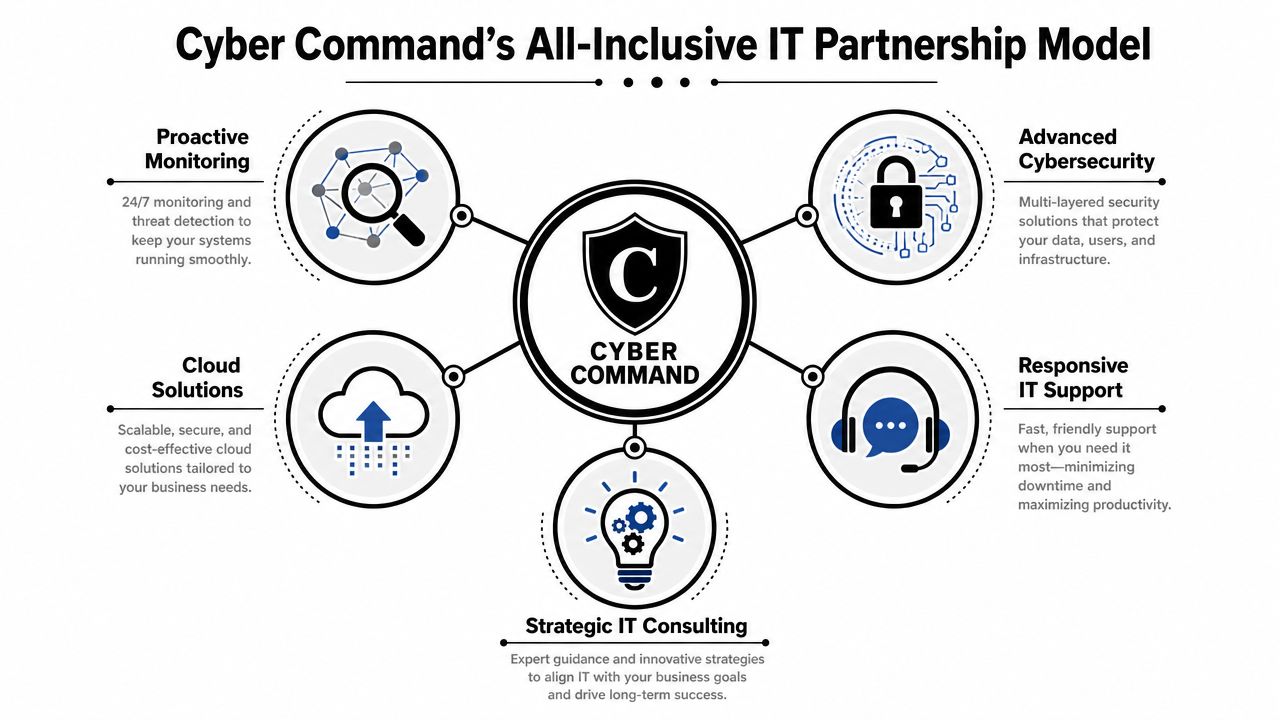
An all-inclusive model works when those responsibilities are clearly assigned and covered under one operating framework. Instead of stitching together a helpdesk, a security tool, a cloud consultant, and a local freelancer for onsite work, the business gets one accountable partner with defined processes.
What this model looks like in practice
For Orlando businesses, the useful pieces tend to be straightforward:
- Managed and co-managed options: Some companies want to outsource everything. Others have an internal IT generalist who needs escalation support, security depth, and process coverage.
- Flat-rate structure: Predictable pricing matters because owners need to budget around operations, not surprise invoices after every emergency.
- 24/7 helpdesk coverage: Problems don't wait for business hours, especially for remote staff, traveling employees, and multi-location teams.
- Security operations: Threat hunting, incident response, endpoint policy enforcement, and recovery planning need active ownership.
- Vendor and license management: Someone should track renewals, coordinate with internet providers and software vendors, and reduce finger-pointing when issues appear.
- Strategic reporting: Quarterly reviews, asset planning, risk discussions, and roadmap decisions keep technology aligned with business goals.
Why the partnership model is different
A ticket vendor closes the issue you reported. A strategic IT partner looks upstream and asks why the issue kept happening. Was the device never standardized? Did the user have the wrong permissions? Was the backup configured but never validated? Did a cloud app get rolled out without access controls?
That's where a provider like Cyber Command, LLC fits as one option for businesses that want a U.S.-based helpdesk, fully managed or co-managed IT, cloud support, transparent reporting, and 24/7 SOC coverage under one agreement. The value isn't the label. It's the reduction in operational ambiguity.
The right IT relationship should lower the number of decisions you have to make during a bad day.
What to watch for in any provider model
Not every "all-inclusive" agreement is inclusive. Ask whether onboarding, vendor management, covered system projects, documentation, backup oversight, compliance support, and after-hours response are part of the service or extra billable events.
If the answers stay vague, expect friction later. The strongest IT partnerships remove uncertainty before something breaks, not after.
Tailored IT Support for Orlando's Key Industries
Generic support doesn't hold up well in specialized businesses. A law office, dental practice, and engineering firm might all need endpoint management and security controls, but their operational risks are different. The right support model accounts for how the business works.
Orlando's business mix makes that especially important. The region is described as one of the nation's top metros for STEM job growth, and that expansion creates more complexity around endpoint sprawl, SaaS management, and infrastructure standardization, according to Orlando Economic Partnership's technology overview. More specialized tools and more connected workflows mean more room for inconsistency if nobody is setting standards.
Legal and accounting firms
Professional services firms live on trust, deadlines, and document control.
For these teams, IT support should prioritize:
- Confidential file access: Matter documents, tax records, and client communications need controlled sharing and clear permissions.
- Email security and identity protection: Approval requests, wire instructions, and shared document notices are common social engineering angles.
- Reliable line-of-business support: Practice management, tax, document management, and PDF workflows have to work without constant user workarounds.
A weak setup usually shows up as shared passwords, ad hoc file storage, and no clear process for onboarding or offboarding staff.
Medical and dental practices
Medical offices don't just need "computers that work." They need systems that support patient care, privacy, and scheduling continuity.
The biggest priorities are usually:
- Stable access to clinical and office systems: Front desk teams can't afford downtime during patient intake, claims processing, or schedule management.
- HIPAA-aware controls: Access management, endpoint protection, secure communication practices, and documentation matter.
- Device consistency: Treatment room workstations, front office endpoints, scanners, and mobile devices all need predictable standards.
What fails here is improvisation. One unmanaged laptop or one former employee account left active can create outsized risk.
Architecture, engineering, and technical firms
These firms often have stronger technical talent on the business side, but not always the time or internal discipline to manage infrastructure well.
Their environment tends to need:
- Support for specialized applications: Large design files, rendering workflows, and version-sensitive software need careful workstation and storage planning.
- Cloud and access strategy: Hybrid teams need secure ways to work on shared files without creating sync conflicts and shadow IT habits.
- Standardized endpoints: As teams grow, one-off workstation builds become expensive to support and hard to secure.
For these firms, the right IT company in Orlando, FL should understand that speed alone isn't enough. Precision, documentation, and repeatability matter more.
How to Choose the Right IT Company in Orlando
Orlando's IT market is mature, with providers segmented around cybersecurity, compliance management, and co-managed IT, according to Orlando MSP market segmentation insights. That's good news for buyers, but it also means you can't evaluate providers on friendliness and response promises alone. You need to test technical depth.
Questions that reveal how a provider really operates
Ask direct questions and pay attention to how specific the answers are.
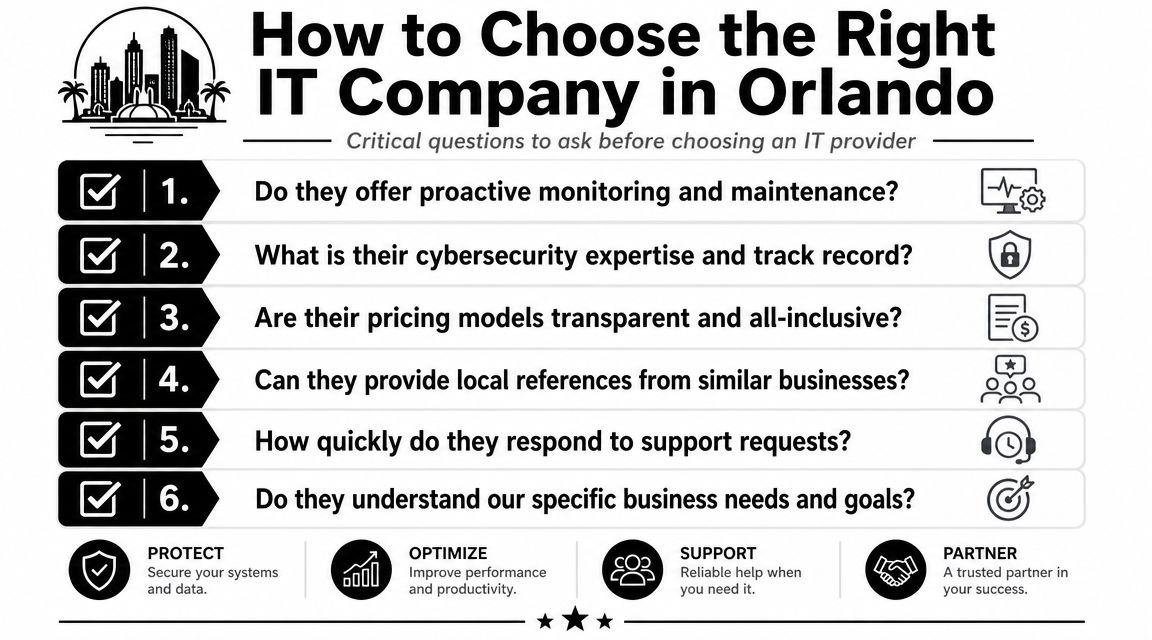
How do you handle proactive monitoring and maintenance?
If they can't explain what they monitor, how alerts are triaged, and who owns patching, they probably lean reactive.What does your cybersecurity stack include operationally?
Don't stop at "we provide security." Ask who investigates alerts, how endpoint events are handled, and what happens after suspicious activity is detected.Is pricing transparent and all-inclusive?
You need to know what's covered, what's excluded, and which projects or after-hours events trigger extra billing.Can you support our internal IT team if we don't want full outsourcing?
Co-managed support is valuable when your in-house staff needs escalation, vendor coverage, or security depth without giving up control.What reporting and planning do you provide?
Good providers review asset health, recurring issues, security trends, and business priorities on a schedule.How do you validate your own security capabilities?
If a provider claims strong security practice, ask how they test assumptions. Businesses that want to understand what an expert cybersecurity partner for MSPs looks like should pay attention to providers that welcome independent assessment instead of dodging it.
What good answers sound like
Strong providers answer with process. Weak ones answer with slogans.
Look for specifics such as:
- Defined response paths: Who answers after hours, who escalates incidents, and who owns communication.
- Documented onboarding: Asset discovery, admin access review, vendor inventory, policy alignment, and baseline security checks.
- Clear boundaries: Covered systems, exclusions, project terms, and compliance responsibilities should be spelled out.
- Business alignment: They should ask about your staff, workflows, applications, growth plans, and risk tolerance.
A practical decision framework appears in these questions to ask before hiring managed IT services. Use it as a filter. If a provider gets uncomfortable when you ask detailed questions, that's useful information.
Buy on accountability, not charm. The provider who presents the clearest operating model is usually the safer choice.
Frequently Asked Questions About Orlando IT Services
Is managed IT more expensive than break-fix support
It can look more expensive on a monthly line item, but that comparison misses the actual cost. Break-fix billing often hides the price of recurring downtime, staff interruption, emergency projects, and security gaps. Predictable service pricing is usually easier to manage than uncertain hourly invoices tied to preventable failures.
Is switching IT providers disruptive
It doesn't have to be, but only if the transition is planned well. A clean onboarding should include documentation transfer, admin credential review, endpoint inventory, backup verification, vendor coordination, and a schedule for stabilizing priority systems first. Trouble usually comes from rushed transitions and poor recordkeeping, not from the act of switching itself.
Should I hire a local provider or a national remote firm
That depends on your environment. If your business has physical offices, shared devices, networking equipment, specialty hardware, or staff who need hands-on support, local presence matters. A provider with real familiarity with Central Florida businesses can usually coordinate onsite needs and vendor relationships more smoothly than a fully remote team with no local footprint.
What should I prioritize first if my budget is limited
Start with the controls that reduce operational risk fastest. That usually means endpoint protection, patching, identity controls, backups, documented support processes, and clear ownership for incident response. Fancy tooling won't help much if basic standards are still inconsistent.
What if I already have an internal IT person
Then you may not need full outsourcing. Many businesses benefit more from co-managed support that gives the internal team helpdesk coverage, security operations, documentation discipline, project support, and escalation capacity. That's often a better fit than replacing staff who already know the business.
If you're evaluating options for an IT company in Orlando, FL, Cyber Command, LLC is one provider to review for managed IT, co-managed support, cybersecurity operations, and local business IT coverage in Central Florida. The useful next step isn't a sales pitch. It's a candid review of your current support model, recurring issues, security gaps, and what ownership should look like going forward.
