
Beyond the Basics: What to Look for in Managed IT Services Plans


Why Choosing the Right Managed IT Services Plan Matters
Managed IT services plans are subscription-based agreements for outsourcing technology operations to a specialized provider. These plans typically include 24/7 monitoring, proactive cybersecurity, data backup, help desk support, and strategic IT guidance (vCIO services). Pricing models often range from $150-$400 per user per month. Most providers offer tiered plans (e.g., Foundation, Standard, Premium) or flexible per-user/per-device pricing to match specific needs.
As Reade Taylor, CEO of Cyber Command, I’ve seen too many businesses struggle with unclear pricing and reactive support. I founded Cyber Command to offer a better way, where pricing is transparent and technology drives you forward.
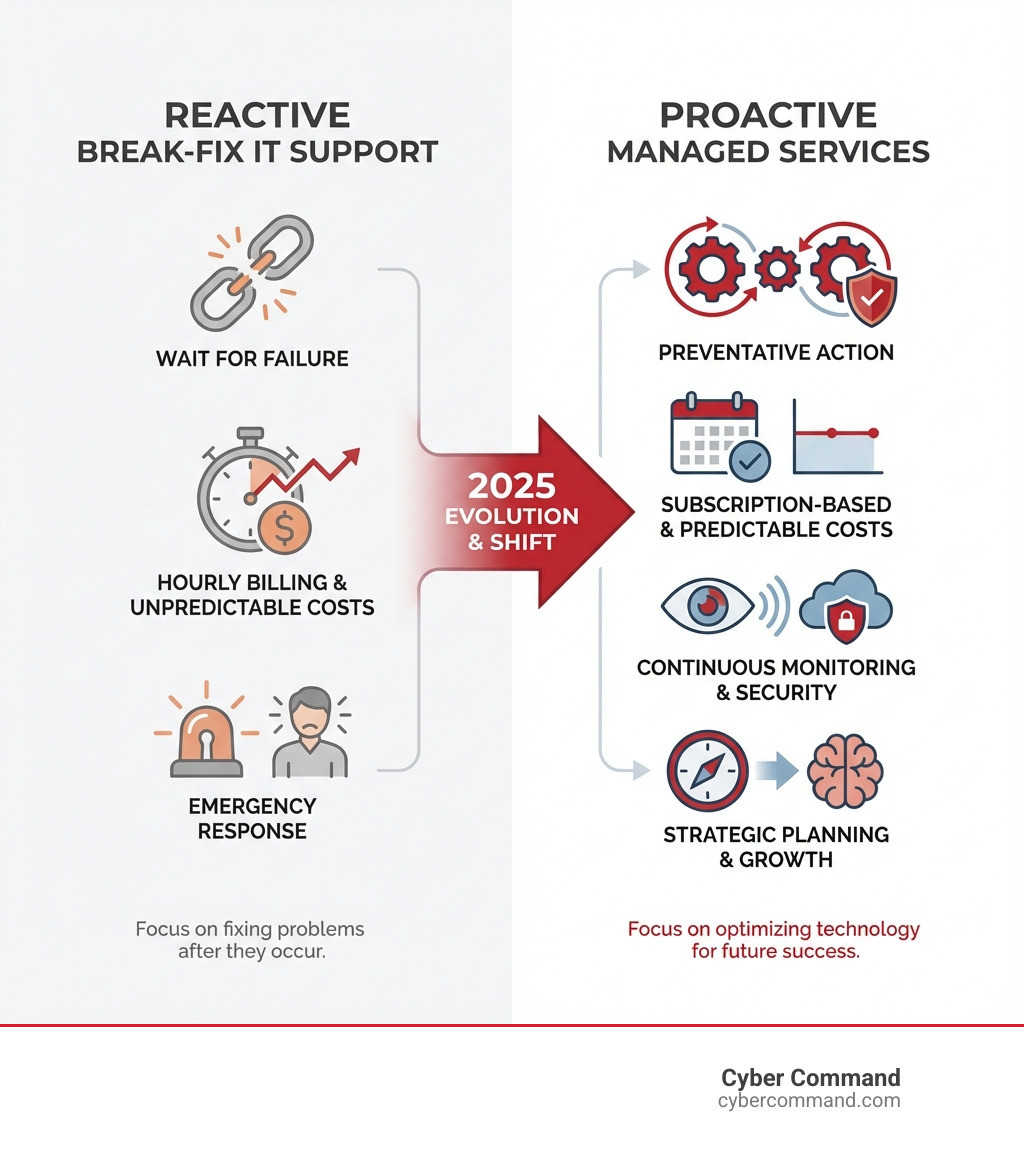
The managed services model is a proactive alternative to the old break-fix approach. Instead of waiting for systems to fail and paying high hourly rates ($175-$350) for emergency fixes, you get continuous management that prevents problems.
This shift is critical. Proactive monitoring, automated patching, and real-time threat detection turn technology from a cost center into a strategic asset. However, not all plans are equal. Some offer cheap monitoring but charge extra for support, while others have all-inclusive pricing but vary in what’s covered.
In the sections ahead, we’ll break down exactly what to look for in managed IT services plans—from understanding pricing models and service components to evaluating providers and ensuring you get real value for your investment.
Understanding the Core Components of Managed IT
What Are Managed IT Services?
Managed IT services involve delegating your technology operations to a specialized Managed Service Provider (MSP). Think of it as having an expert IT department without the overhead. This allows us to be proactive, continuously monitoring, maintaining, and improving your systems rather than reacting to crashes or breaches. The history of managed IT traces from Application Service Providers (ASPs) in the 1990s to today’s comprehensive providers, driven by the rise of cloud computing and cybersecurity threats. This evolution highlights the critical role MSPs play in offering 24/7/365 coverage and expertise that is costly to maintain in-house.
Fully Managed vs. Co-Managed IT
When considering managed IT services plans, you’ll encounter two primary models:

-
Fully Managed IT: We become your entire IT department, taking full responsibility for your technology infrastructure, from strategic planning to help desk support. This is ideal for businesses without an internal IT team or those who want to focus completely on core functions.
-
Co-Managed IT: We work with your existing IT team in a collaborative partnership. Your staff can focus on strategic projects while we handle routine tasks, advanced cybersecurity, or 24/7 support. This model is perfect for augmenting your team’s capabilities. Learn more with our guide to Co-Managed IT.
| Feature | Fully Managed IT | Co-Managed IT | Traditional Break-Fix Support |
|---|---|---|---|
| Responsibility | Complete IT operations outsourced | Shared with internal IT team | Client responsible; IT called when broken |
| Approach | Proactive, strategic, continuous | Collaborative, specialized support | Reactive, emergency-based |
| Cost Model | Predictable monthly subscription | Predictable monthly subscription | Hourly rates, unpredictable |
| Expertise Access | Full access to diverse IT specialists | Access to specialized expertise | Limited to technician’s knowledge |
| Strategic Planning | Included, vCIO services | Often included for specific areas | None, focus on immediate fixes |
| Downtime | Minimized through proactive measures | Minimized through shared measures | High potential for extended downtime |
| Ideal For | Businesses without in-house IT | Businesses with an existing IT team | Very small businesses with minimal needs |
What’s Included in Typical Managed IT Services Plans?
While offerings vary, comprehensive managed IT services plans typically include:
- Network Monitoring and Management: Continuous oversight of your network for optimal performance and management of devices like firewalls and switches.
- 24/7 Help Desk Support: Unlimited remote support for end-users, with fast response times for critical issues.
- Cybersecurity Services: A critical suite including Managed Endpoint Detection and Response (EDR) with 24/7 SOC monitoring, threat detection, security awareness training, vulnerability scanning, email security, dark web monitoring, and Multi-Factor Authentication (MFA).
- Cloud Management: Administration of cloud infrastructure and apps like Microsoft 365, Google Workspace, Azure, and AWS.
- Data Backup and Recovery: Robust solutions to back up data and ensure rapid recovery after a loss.
- Disaster Recovery Plan: A comprehensive plan to ensure business continuity after a major disruption.
- IT Asset Management: Tracking and managing hardware and software lifecycles.
- Employee Onboarding and Offboarding: Streamlining IT processes for new and departing employees.
- Strategic IT Roadmapping & Planning: Expert advisory services (vCIO) to align technology with business goals.
- Compliance Management: Ensuring IT practices meet regulatory requirements like HIPAA, CMMC, FINRA, or SOC 2.
- Vendor Management: Handling relationships with third-party technology vendors on your behalf.
Decoding Managed IT Services Plans and Pricing
Understanding the cost structure of managed IT services plans can feel complex, but we believe in transparent pricing so you know exactly what you’re paying for. It’s about achieving budget predictability and a strong return on investment (ROI). For a deeper dive, explore our guide to IT Managed Services Pricing Models.

Common Pricing Models Explained
The way MSPs charge for services varies, but here are the most common models:
- Per-User Pricing: A popular model where you pay a fixed monthly fee for each user, regardless of their device count. It’s straightforward and scalable.
- Per-Device Pricing: You’re charged a monthly fee for each managed device (e.g., server, workstation, firewall). This can be cost-effective if users have few devices.
- Tiered Plans: MSPs often offer service tiers (e.g., Basic, Standard, Premium) with progressively more comprehensive services, such as advanced security or compliance features.
- All-Inclusive Flat-Rate: A single, fixed monthly fee covers all your IT needs, including unlimited support, offering maximum budget predictability.
- Value-Based Pricing: A less common model that ties cost to business outcomes, such as a guaranteed reduction in downtime.
- Monitoring-Only Services: The cheapest option ($30-$50/user/month), but these plans often incur extra hourly charges for actual problem-solving, making them less cost-effective in the long run.
- Hourly Rates for Ad-Hoc Projects: Most MSPs offer hourly rates ($175-$350/hour) for projects outside a managed service agreement, like new system implementations.
To get a clearer picture of potential costs, check out our comprehensive guide: How Much Does Managed IT Services Cost?
Key Factors That Influence Cost
The price of managed IT services plans is determined by several key factors:
- Number of Users and Devices: More users and devices (workstations, servers, mobile devices) mean more endpoints to support, monitor, and secure, which increases costs.
- Infrastructure Complexity: A simple cloud-based setup is less expensive to manage than a complex hybrid environment with multiple servers, advanced networking, and specialized software.
- On-Premise vs. Cloud Infrastructure: The location of your infrastructure affects pricing. Cloud environments require expertise in platforms like Azure or AWS, while on-premise setups may need more physical maintenance.
- Service Level Agreement (SLA) Requirements: Your desired service level impacts cost. Tighter SLAs with faster, guaranteed response and resolution times require more resources and come at a higher price.
- Compliance Needs: Businesses in regulated industries (HIPAA, FINRA, CMMC) require specialized security, auditing, and reporting services, which adds to the overall cost.
For a deeper understanding, consult our resource on Discover Key Factors Influencing IT Managed Service Pricing.
Understanding the Price Ranges
While exact figures depend on your needs, here are general price ranges for managed IT services plans in the US and Canada:
- Overall Range: Comprehensive packages typically run from $150 to $400 per user, per month.
- Per-User Charges: Mid-to-high range plans with proactive support often cost $150-$175 per user per month. Plans with fully hosted systems can reach $250-$400 per user per month.
- Per-Device Pricing (if applicable):
- $100-$400 per server
- $50-$100 per workstation
- $30-$75 per firewall
- $15-$40 per switch
- Monitoring-Only Services: These basic plans range from $30-$50 per user per month but often come with additional hourly fees ($175-$350) for support, making them less predictable.
The exact Managed IT Services Monthly Cost for your business will depend on the factors mentioned above. We aim for transparent, all-inclusive pricing without hidden fees.
The Strategic Benefits of a Proactive IT Partnership
A proactive IT partnership, built on well-structured managed IT services plans, transforms technology from an expense into a powerful asset. It allows you to focus on growth and innovation, knowing your IT infrastructure is in expert hands. This approach increases efficiency, reduces downtime, and provides access to specialized expertise. Find out more about Why Choose Managed IT Services.
Bolstering Your Cybersecurity and Compliance
In today’s digital landscape, cybersecurity is a business imperative. A key benefit of robust managed IT services plans is the enterprise-grade security and compliance support they provide.
- Proactive Threat Prevention: We don’t wait for attacks. Our services include continuous monitoring and advanced security measures like Endpoint Detection and Response (EDR) with 24/7 SOC (Security Operations Center) monitoring to reduce risks like ransomware. For strategies, see our guide on Enterprise Ransomware Prevention.
- Vulnerability Management: We perform regular scanning and patching to close security gaps before they can be exploited.
- Security Awareness Training: We educate your employees through training and phishing simulations, turning them into a strong line of defense.
- SIEM and SOC Services: Security Information and Event Management (SIEM) and a Security Operations Center (SOC) team provide 24/7 threat analysis and response—expert protection most SMBs cannot afford in-house.
- Meeting Regulatory Requirements: We help businesses in regulated sectors meet standards like HIPAA, SOC 2, CMMC, and FINRA with built-in controls, reporting, and expert guidance.
- Data Protection: We implement robust data backup and disaster recovery solutions to ensure your critical data is protected and recoverable.
A strong managed IT plan provides a team of security experts, saving you time and reducing complexity.
Gaining a Competitive Edge
Beyond security, strategic managed IT services plans offer a distinct competitive advantage by liberating your business from IT burdens.
- Focus on Core Business Functions: With IT expertly managed, your internal teams are free to focus on driving revenue, developing products, and serving customers.
- Strategic IT Roadmapping and vCIO Services: We provide Virtual CIO (vCIO) services to align your technology investments with your long-term business goals, ensuring your IT supports your growth.
- Faster Adoption of New Technology: An MSP partner helps you quickly adopt and optimize new technologies that provide a competitive edge, which is critical given the rapid 7 Technology Shifts impacting businesses.
- Improved Productivity: A stable, secure IT environment means fewer disruptions and higher productivity for your employees.
- Scalability and Flexibility: Managed services allow you to scale IT resources up or down as your business evolves, without major capital expenditure.
By shifting IT from a reactive cost center to a proactive partner, we help you leverage technology to outpace the competition.
How to Choose the Right Managed Service Partner
Selecting the right Managed Service Provider (MSP) is a critical decision for your business’s technological future. It’s about finding a long-term partner who understands your vision. This process requires careful vetting and a clear understanding of your own needs. For expert tips, refer to How to Choose the Right Managed Service Partner: Expert Tips.
Assessing Your Business’s Unique IT Needs
Before evaluating managed IT services plans, you must first conduct a self-assessment.
- Conduct an Internal IT Audit: Take stock of your current hardware, software, and IT costs (including hidden ones like downtime) to understand your infrastructure needs.
- Identify Pain Points: Clearly define where your current IT falls short. Are you experiencing frequent downtime, slow systems, or security incidents?
- Define Business Goals: Align your IT strategy with your 1-3-5 year business goals. If you plan to scale, you need a provider that offers flexible solutions.
- Determine Required Service Scope: Based on your audit and goals, outline the specific services you need. Do you require full outsourcing (fully managed) or support for an existing team (co-managed)?
A thorough self-assessment is the first step to a successful partnership. For more on this, explore How I Evaluated My Managed Service Provider: Key Criteria.
Evaluating Different Managed IT Services Plans
Once you know your needs, scrutinize the various managed IT services plans available.
- Service Level Agreements (SLAs): This critical document defines the expected level of service. Look for clear metrics on response times (e.g., under 15 minutes for critical issues), resolution times, uptime guarantees (e.g., 99.99%), and help desk availability (e.g., 24/7/365 U.S.-based).
- Provider Reputation and Expertise: Look for MSPs with a proven track record in your industry. Ask for case studies and testimonials from comparable organizations.
- On-Site Support Availability: While most support is remote, confirm that the plan includes on-site support options, which can be a major advantage for businesses in Florida or Texas.
- Technology Stack and Tools: Does the MSP use modern, enterprise-grade solutions for monitoring, management, and security (e.g., EDR, SIEM)?
- Scalability and Flexibility: The plan should adapt as your business grows. An ideal MSP can support your future expansion.
Ensuring Accountability and Avoiding Pitfalls
To ensure a successful long-term relationship, establish accountability and avoid common pitfalls.
- Clear Reporting and Communication: Your MSP should provide regular, easy-to-understand reports on system performance, security, and SLA metrics.
- Regular Strategic Reviews: Your provider should schedule periodic reviews (e.g., quarterly) to discuss business goals and align your IT roadmap, leveraging their vCIO services.
- Defined Escalation Procedures: The agreement should clearly outline the escalation path for critical issues that are not resolved within the SLA.
- Addressing Potential Challenges:
- Lack of On-Site Presence: Ensure your plan accounts for physical support if you have on-premise infrastructure.
- Scope Creep: Your agreement should clearly define the scope of work to avoid unexpected charges.
- Strategic Planning Gaps: Ensure your MSP is a strategic partner, not just a reactive help desk.
- Ensuring Provider Transparency: As noted in recent benchmark surveys, the most successful MSPs are flexible and transparent about their pricing and processes. Vague pricing or an inability to audit your systems is a red flag. We believe in full transparency, acting as an extension of your business.
Frequently Asked Questions about Managed IT Services
Are managed IT services suitable for small businesses?
Yes, absolutely. Small businesses often benefit most from managed IT services plans by gaining access to enterprise-level expertise, advanced tools, and robust security that would be prohibitively expensive to build in-house. This allows them to compete effectively and scale their technology for a predictable monthly cost. It is an ideal solution for Managed IT Services for Small Business seeking top-tier support without the high overhead.
How do you ensure an MSP is secure?
Verifying your MSP’s security is critical. Here’s how:
- Verify their Security Protocols: Ask about their internal security policies, data encryption, access controls, and how they protect client data.
- Check for Certifications: Look for industry-recognized certifications like SOC 2 or ISO 27001, which indicate adherence to rigorous, audited security standards.
- Inquire About Cybersecurity Services: A secure MSP will offer robust services like EDR, SIEM, and security awareness training. Their ability to protect you reflects their own capabilities.
- Ask About Their Incident Response Plan: Understand their procedures for handling and communicating a security incident affecting your systems.
We emphasize that Cybersecurity is a core component of our offerings, and we apply the same stringent measures to our own operations.
What is a Service Level Agreement (SLA)?
A Service Level Agreement (SLA) is a contract that defines the level of service you can expect from your provider. It is a crucial document for ensuring accountability and setting clear expectations for your managed IT services plans. Key elements include:
- Service Availability/Uptime Guarantees (e.g., 99.99% uptime)
- Response and Resolution Times (e.g., 15-minute response for critical issues)
- Performance Metrics and reporting requirements
- Escalation Procedures and penalties for non-compliance
Conclusion
Choosing the right managed IT services plans is a strategic investment in your business’s future. It’s about shifting IT from a reactive cost center to a proactive engine for growth and stability. Focus on value over price; a comprehensive plan from a proactive partner will deliver a far greater return than a cheap, monitoring-only service.
At Cyber Command, we offer enterprise-grade IT and cybersecurity with a difference. Our unique selling proposition is proactive, 24/7/365 U.S.-based support with transparent, all-inclusive pricing. We act as an extension of your business, ensuring your technology drives success.
Ready to transform your IT into a strategic asset? Explore our Managed IT Services today.
