
April 23, 2026
Local IT Support for Small Business: Your 2026 Guide
Local it support for small business - Get expert local IT support for small business in Orlando, Winter Springs & beyond. Discover benefits, security
Your office opens at 8. By 8:07, your staff can’t access email, the printer queue is jammed, and one employee says a suspicious login prompt just appeared on their screen. If you’re running a law firm in downtown Orlando, a medical practice in Winter Springs, or a light industrial company supporting jobs across Central Florida, that isn’t just an IT problem. It interrupts billing, scheduling, patient communication, and trust.
A lot of small businesses are still trying to manage technology with a mix of internal guesswork, old vendors, and last-minute repair calls. That model usually holds until it doesn’t. Then the owner gets pulled into decisions they shouldn’t have to make, under pressure, without clear visibility into risk, downtime, or cost.
The better approach is local it support for small business built around prevention, accountability, and fast response when something physical breaks. For Orlando-area companies especially, local matters. You need someone who understands your business, your vendors, your compliance pressure, and the fact that waiting until tomorrow is often not an option.
Why Local IT Support Is a Strategic Asset Not an Expense
An Orlando business owner rarely says, “I want to buy more IT.” They usually say, “I need my team working, my files accessible, my systems secure, and my costs under control.” That is the core function of IT support. It isn’t about gadgets. It’s about keeping the business operational.

The market has already moved in that direction. A striking 27% of small businesses operate without any dedicated IT support, while 39% rely on external IT contractors, making outside support the most common solution according to small business IT support statistics compiled by Fuse Technology Group. That should tell you two things. First, many firms are still exposed. Second, outsourcing support is no longer unusual. It’s standard.
What owners get wrong about IT cost
The common mistake is treating IT as a line item to minimize instead of a business function to stabilize. That leads to delayed upgrades, skipped patching, weak backups, and unmanaged devices. On paper, that can look cheaper for a while.
In practice, the business pays elsewhere:
- Staff time gets wasted when employees troubleshoot basic issues instead of serving clients.
- Revenue gets delayed when email, line-of-business apps, or shared files go down.
- Security risk grows when no one owns patching, endpoint protection, or backup verification.
- Leadership gets distracted because the owner becomes the default escalation point.
Practical rule: If your team only talks to IT when something is already broken, you don’t have an IT strategy. You have an interruption pattern.
Why local changes the equation
A local partner brings more than geography. They bring context. An Orlando accounting firm, a private dental practice, and a field-service company may all use Microsoft 365, cloud storage, firewalls, and endpoint tools. They do not have the same workflows, vendor stack, or risk tolerance.
Good local support should help you:
- Reduce downtime through monitoring, maintenance, and faster on-site response
- Improve security posture with patching, endpoint controls, and incident response planning
- Coordinate vendors so your internet provider, software reps, phone system, copier company, and cloud platforms don’t all point fingers at each other
- Plan technology around growth so new hires, new offices, and new software don’t create chaos
For small businesses in Central Florida, that shift is the difference between reactive support and operational resilience. The business outcome matters more than the technical label. If your systems stay available, your risk is lower, and your team can work without friction, IT has become an asset.
Stuck on something like this right now?
Talk it through with a real US-based engineer, 24/7, no phone trees: (407) 587-0089.
Book a Free Strategy SessionIn-House vs Break-Fix vs Managed Local IT Support
Most small businesses end up choosing between three models. They often compare them by monthly price alone, which is the wrong filter. The better question is this: which model gives you reliable support, predictable cost, and enough structure to grow without increasing risk?
A simple analogy helps. In-house IT is like hiring a full-time chef. You get dedicated attention, but one person can’t be an expert in every cuisine. Break-fix support is like ordering takeout only when everyone’s already hungry. It solves the immediate pain, but nothing is planned. Managed local IT support is closer to a meal-prep service designed around your needs. It’s ongoing, repeatable, and built to prevent problems before they hit the table.
IT support models at a glance
Attribute
Break-Fix (Reactive)
In-House IT Staff
Managed IT Services (Proactive)
Primary model
Call when something breaks
Dedicated internal employee or team
Ongoing outside partner with monitoring and support
Budget predictability
Low. Costs spike during outages or projects
Moderate to low. Payroll, tools, benefits, coverage gaps
Higher when pricing is flat-rate and scoped clearly
Response pattern
Reactive only
Depends on staffing depth and availability
Preventive maintenance plus user support
Coverage breadth
Usually narrow and issue-specific
Can be limited by one person’s skillset
Broader across helpdesk, security, cloud, vendors, and planning
On-site availability
Depends on schedule
Available if physically present
Available based on local provider coverage
Strategic planning
Rare
Sometimes, if the staff member has time
Usually part of the relationship through reviews and roadmaps
Best fit
Very small firms with minimal dependence on tech
Larger companies that can justify full-time headcount
SMBs that need mature support without building a full department
What works and what doesn’t
Break-fix can still make sense for very small operations with simple needs. If you have a handful of users, no compliance pressure, and low reliance on line-of-business systems, it may feel sufficient. The weakness is obvious once you rely on cloud apps, shared files, VoIP, remote access, or any regulated data. Problems are handled after impact, not before.
In-house support can work well when the company is large enough to support proper staffing. The problem for many SMBs is coverage. One internal admin may know your environment well, but that doesn’t guarantee depth in Microsoft 365 security, firewall policy, backup validation, identity management, vendor coordination, and strategic planning. It also doesn’t solve vacation days, after-hours issues, or turnover.
Managed local IT support tends to fit the gap most Orlando-area SMBs are trying to solve. They need enterprise-grade capability without building an enterprise department.
Why proactive support supports growth
Technology adoption has become a growth issue, not just an efficiency issue. Small businesses that are high adopters of technology platforms, meaning 6 or more, saw 84% profit increases and 82% sales growth according to the U.S. Chamber of Commerce analysis on technology platforms and small business growth. The practical takeaway is straightforward. Businesses grow when they can use more systems confidently and securely.
That requires more than someone answering tickets. It requires a support model that can standardize devices, manage user access, secure cloud tools, and keep the environment stable as the business adds software.
One useful distinction here is operational design. If you’re comparing providers, it helps to choose IT support wisely by understanding the distinctions between a helpdesk and a service desk. That difference affects how requests get handled, how incidents are prioritized, and whether your provider only fixes issues or also manages services in a structured way.
A reactive vendor restores yesterday. A proactive partner prepares next quarter.
A better decision filter
When evaluating your options, don’t ask only, “What’s the monthly fee?” Ask:
- Who owns prevention
- Who coordinates vendors
- Who handles security operations
- Who can be on-site when hardware or cabling fails
- Who gives leadership a roadmap instead of a pile of tickets
Those answers usually tell you more than any quote sheet.
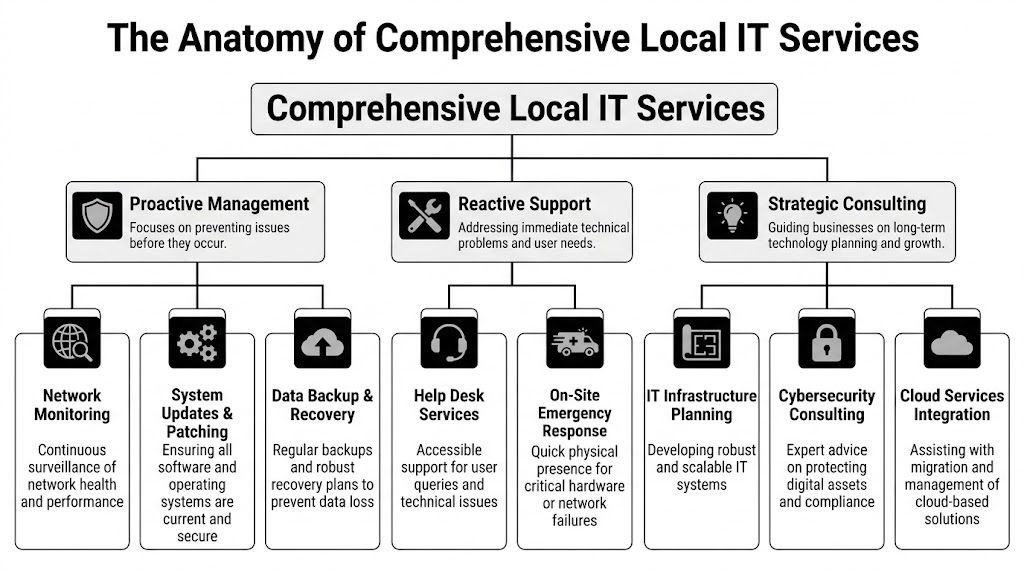
The Anatomy of Comprehensive Local IT Services
A 20-person law firm in Orlando rarely loses a full day to one dramatic IT failure. It loses time in smaller cuts. A partner cannot open a client file from SharePoint. MFA locks out a new hire before a hearing. A copier scan workflow breaks and intake staff start using personal email to keep work moving. In a medical office or light industrial shop, the pattern is similar. The interruption starts small, then spreads into delayed appointments, missed billable work, and avoidable risk.
That is what local it support for small business has to address. A real service model covers user support, device and cloud administration, security operations, vendor coordination, and planning. Owners who want a practical benchmark can review what strong local IT support providers near you should cover.
The helpdesk protects productive hours
Staff judge IT by the first interaction. If password resets take half a day, Outlook profiles break repeatedly, printers fail without ownership, or laptop setups drag into week two, confidence drops fast.
Good helpdesk work resolves common issues quickly and documents the pattern behind them. For professional services firms, every delay can hit billable utilization. For medical practices, front-desk friction affects scheduling, intake, and patient communication. For industrial firms, one workstation or wireless issue can slow dispatch, inventory updates, or shop-floor reporting.
Response matters. Resolution matters more.
A ticket queue by itself is not a service model. Small businesses need a team that can fix the issue, identify whether it points to a larger problem, and stop the repeat.
Preventive operations reduce avoidable outages
Owners often notice this layer only after they have lived without it. Routine monitoring, patching, backup checks, device standards, and maintenance windows do quiet work that keeps users out of trouble.
The goal is simple. Fewer preventable failures and faster recovery when something does break.
That usually includes:
- Endpoint patching for laptops, desktops, and servers
- Monitoring and alerting for degraded services, storage issues, failed backups, and hardware health
- Backup verification so recovery is tested instead of assumed
- Asset and lifecycle tracking for warranty status, aging equipment, and replacement timing
- Documentation such as network maps, ISP details, admin access records, and vendor contacts
For a plain-language security baseline, Top Cybersecurity Tips for Small Businesses covers several controls many firms still handle inconsistently, especially around updates, user access, and staff awareness.
Cloud and identity management shape day-to-day control
Cloud support is not just mailbox administration. It affects onboarding speed, remote access, file governance, and how safely staff can work from a client site, branch office, or exam room.
For small businesses, that usually means Microsoft 365 administration, SharePoint and OneDrive structure, group and permission design, cloud backup oversight, mobile device management, and support for line-of-business apps run by outside vendors. In a law office, poor permission design can expose client matters to the wrong team. In a medical practice, weak account controls can create privacy problems and staff lockouts at the same time. In an industrial environment, broad access rights can expose systems that field users never needed in the first place.
Cloud platforms drift quickly without standards. Files spread across personal drives, former staff keep access longer than they should, and no one is sure which application owns the record. Clean identity and cloud administration fix that.
Security operations have to sit inside the support model
Security cannot live in a separate folder while the support team handles everything else. User devices, email, cloud identities, backups, and vendor access all connect. If no one owns that connection, gaps stay open.
A mature local provider should define who handles:
- Endpoint protection on workstations and servers
- Identity controls including MFA, privileged access, and account review
- Threat monitoring for suspicious sign-ins, malware activity, and risky changes
- Incident response so containment, investigation, and recovery have a clear process
- Compliance support for firms handling regulated or sensitive information
This matters more in the sectors that get overlooked by generic SMB advice. Medical practices have privacy and availability pressure. Professional services firms hold confidential client data that attackers can monetize quickly. Industrial firms often run older systems, vendor-connected equipment, and flat networks that create practical security trade-offs.
Vendor and license management close expensive gaps
This is one of the most undervalued parts of a strong IT partnership. Small businesses usually rely on multiple outside vendors: internet providers, phone systems, EHR platforms, legal software, accounting tools, copier vendors, security cameras, building access systems, and cloud apps. When something fails, the owner should not have to decide who is responsible.
A good IT partner keeps vendor records current, knows contract terms, tracks renewals, and pushes the right provider when support stalls. The same goes for software licensing. Many firms overpay for unused seats, under-license critical tools, or let admin accounts pile up because nobody is reviewing the stack. That is wasted money and unnecessary risk.
Strategy turns support into an operating advantage
The highest-value IT conversations are usually about decisions, not tickets. Replace the server or retire it. Standardize on one firewall platform or keep a mixed environment. Keep co-managed IT in-house or hand off security monitoring. Spend this quarter on wireless upgrades, backup improvements, or identity controls first.
That is where recurring reviews, budgeting, project sequencing, and risk discussions matter. Cyber Command, LLC is one example of a local provider built around that broader model. The company offers 24/7/365 U.S.-based helpdesk, managed and co-managed IT, cloud services, a dedicated SOC, and vendor management for organizations in Orlando, Winter Springs, and beyond.
The firms that get the most value from local IT support do not buy isolated fixes. They build an operating model that keeps users productive, reduces avoidable downtime, and gives leadership a clearer view of risk, cost, and next-step priorities.
Why Proximity Matters for Uptime and Security
Some IT problems can be solved remotely in minutes. Others can’t. If a switch fails, a firewall locks up, a circuit goes down, a cable is damaged, or a workstation in a clinical or production setting needs physical attention, location matters immediately.

According to Join Homebase’s review of small business IT support, local providers can typically deliver hands-on assistance within 2 to 4 hours, compared with 24 to 48 hours for national providers, and the same source notes benchmarked downtime costs for small businesses at $5,600 per minute. Even if your own loss rate is lower than that benchmark, the business logic still stands. Waiting a day or two for physical support is expensive.
Physical issues don’t care about remote promises
National providers often present a polished remote support model. That can work for software issues and routine user support. It breaks down when the problem lives in the office.
Examples include:
- Network hardware failure in a server closet
- Bad cabling or patch panel issues after an office move or renovation
- Internet handoff problems requiring coordination with the ISP on-site
- Printer and scanner issues tied to workflows in legal, medical, or administrative environments
- Local device deployment for new hires or acquisitions
For a medical office, delayed on-site response can disrupt patient flow. For a law firm, it can stall access to document systems during deadlines. For industrial businesses, even a localized outage can interrupt operations, scheduling, or shipping.
Local providers understand local operating conditions
A Central Florida business has different continuity concerns than a company in another region. Summer storms, hurricane planning, power instability, and multi-site coordination across Orlando, Winter Springs, and surrounding areas all affect infrastructure choices.
A nearby team can help you make practical decisions such as:
- Where backup internet makes sense
- How to stage power protection for critical systems
- Which systems need local failover procedures
- What should be documented before storm season
- How to prioritize recovery after a site event
Multi-site and industrial firms face a different set of pressures, especially when distributed operations, warehouse environments, or industrial systems are involved. Proximity helps because the provider isn’t building a generic playbook from a distance. They can evaluate the actual site and business process.
If you’re assessing options, it’s worth reviewing what to look for in local IT support providers near you for expert help. The best local firms don’t just say they’re nearby. They define what on-site support includes, when it applies, and how it ties into the broader service model.
When the issue is physical, “remote first” can quickly become “remote only.” That’s a problem if your business depends on a real office, real devices, and real uptime.
Security improves when the provider knows the environment
Security isn’t only a cloud problem. Physical presence improves security too. Local teams can verify how network equipment is stored, who has access to shared spaces, whether retired devices are handled correctly, and whether office changes introduced risk without anyone noticing.
That matters for regulated firms and for businesses with low internal IT maturity. You don’t want a provider learning your environment from ticket notes alone. You want them to know how the business runs.
Finding Your IT Partner Without Hidden Costs
The monthly fee matters, but it isn’t the whole cost. Small businesses get into bad IT relationships when they compare quotes line by line and ignore what’s excluded, what stays reactive, and what gets billed later as “extra.”
The right way to evaluate local it support for small business is through total cost of ownership, not just sticker price. A cheaper plan that excludes security work, vendor coordination, documentation, project labor, or on-site support can cost more over the life of the relationship.
Flat-rate is useful only if the scope is real
A flat monthly price is attractive because it reduces surprise billing. That’s one reason managed services have become the default choice for many SMBs. But “flat-rate” only works if the service agreement is explicit.
You should know:
- Which users, devices, and locations are covered
- Whether cybersecurity tooling is included
- What counts as project work
- How after-hours issues are handled
- Whether vendor management is part of the service
- What reporting you receive each month or quarter
The financial case for proactive support is strong when the service is preventive. Infradapt’s discussion of small business IT support states that proactive managed IT services can yield 40-60% cost savings over reactive break-fix models, and the same source notes that unpatched systems are exploited in 60% of cyberattacks on small businesses. That tells you where hidden costs usually come from: preventable incidents.
The overlooked budget leak is vendor and license sprawl
One of the most expensive patterns in small business IT isn’t dramatic. It’s quiet. Over time, companies add Microsoft licenses, industry software seats, backup tools, e-signature platforms, phone systems, cloud storage subscriptions, security add-ons, and one-off SaaS products. A few users leave, one department changes software, another office keeps an old tool alive, and nobody audits the stack.
That creates several problems at once:
- Duplicate software that different teams use for the same job
- Unused licenses that keep renewing
- Poor negotiating power with vendors because nobody negotiates from a full view of spend
- Security blind spots when unknown apps still hold company data
- Support confusion because responsibility is spread across too many vendors
A good local provider should help review those agreements and rationalize what stays, what goes, and what should be renegotiated. If you’re trying to understand what drives pricing, this guide on key factors influencing IT managed service pricing is a practical starting point because it moves the conversation beyond hourly rates.
Questions worth asking in the first meeting
Don’t ask only, “What do you charge?” Ask questions that expose operating maturity.
-
How do you onboard a new client
Listen for asset discovery, documentation, baseline security review, admin access cleanup, and backup validation.
-
What do you do proactively every month
You want specifics. Monitoring, patch review, security review, vendor follow-up, lifecycle planning, and reporting.
-
How do you handle vendor management
Ask whether they coordinate with your internet provider, copier company, cloud vendors, VoIP provider, and software support teams.
-
What visibility will I get as an owner
You should receive understandable reporting, not just raw ticket exports.
-
What’s included in cybersecurity
Get clear on endpoint protection, response processes, user access controls, and whether security monitoring is built in or sold separately.
-
When do you come on-site
This answer should be direct. Vague language usually means inconsistent field support.
Buyer guidance: If a provider makes pricing sound simple by leaving out responsibility, you’re the one who’ll pay later.
What a healthy proposal looks like
A strong proposal usually reads clearly. It defines coverage, assumptions, exclusions, response approach, strategic cadence, and responsibilities on both sides. It doesn’t force the owner to decode hidden labor categories.
Clarity is part of the service. If the contract is murky, the relationship usually will be too.
Common Mistakes to Avoid When Choosing IT Support
A lot of bad IT decisions don’t look bad at the start. The provider seems responsive, the price looks lower, and the owner feels relieved to hand off the problem. The trouble shows up later, when the business realizes it bought a ticket queue instead of an operating partner.

Red flags that deserve immediate scrutiny
-
They talk only about response time
Fast replies matter, but they don’t replace prevention, documentation, planning, or security operations. A provider can answer quickly and still leave your environment messy.
-
Their billing model stays vague
If you can’t tell what’s covered, you’ll end up approving add-ons during stressful moments. That’s when budgets get distorted.
-
They ignore strategic reviews
Small businesses still need roadmap conversations. Without them, old hardware lingers, cloud sprawl grows, and risk accumulates.
-
They don’t address vendor management
This is a bigger issue than many owners realize. A local IT partner can often audit and consolidate software and vendor agreements to recover 10-30% of IT spending, based on the analysis highlighted by SRS Networks on local IT support benefits. If a provider doesn’t touch this area, they may be overlooking one of the easiest ways to reduce waste.
-
They have no meaningful local presence
If everything depends on remote support or third-party dispatch, your “local” relationship may be local in name only.
The biggest mistake is choosing for comfort, not capability
Owners often choose the familiar shop that has “always helped us out.” That history has value, but loyalty shouldn’t replace standards. Your business today probably depends on cloud identity, endpoint security, compliance controls, vendor coordination, and documented recovery planning in ways it didn’t a few years ago.
What worked when you had six employees and one office may not work when you have multiple software platforms, remote users, and customer data spread across several systems.
A provider who only fixes what’s visible will miss the risks that matter most.
Watch for misalignment with your industry
For professional services, the issue is usually workflow interruption and document access. For medical practices, it’s privacy, continuity, and vendor-heavy systems. For industrial firms, it’s uptime across locations, field devices, and infrastructure consistency.
A provider doesn’t need to specialize only in your vertical, but they do need to understand the operating reality of it. If their questions stay generic, their service probably will too.
Your Checklist for Securing the Right Local IT Partner
A good decision here should make the next few years calmer, not just the next few weeks easier. You’re not only hiring someone to resolve tickets. You’re choosing who will influence uptime, security, vendor relationships, budgeting, and the pace at which your business can adopt new tools safely.
Use this checklist to pressure-test the fit.
Core requirements for any Central Florida SMB
-
Local response capability
Confirm they can provide real on-site support in your area, not just remote assistance plus outsourced dispatch.
-
Clear service scope
Make sure the agreement defines covered users, devices, locations, security tools, and project boundaries.
-
Proactive operating model
Ask what they monitor, patch, review, document, and report on regularly.
-
Cybersecurity ownership
Verify who handles endpoint protection, access controls, incident response coordination, and recovery steps.
-
Vendor and license management
Ask whether they will review software licenses, SaaS subscriptions, ISP relationships, and support renewals.
-
Executive visibility
Require reporting that a business owner can understand without translating technical jargon.
Industry-specific checks
Professional services firms
-
Document workflow support
Confirm experience supporting file-heavy environments, Microsoft 365, secure sharing, and access controls for attorneys, accountants, architects, and engineers.
-
Deadline-aware support
Ask how they handle issues that affect billable time, client communication, and court or filing deadlines.
Medical and dental practices
-
Compliance readiness
Verify familiarity with healthcare-related security and privacy requirements, including whether they can support compliance documentation and vendor coordination.
-
Clinical workflow awareness
Make sure they understand scheduling systems, imaging or specialty applications, and the impact of downtime on patient operations.
Industrial and field-service organizations
-
Multi-site consistency
Ask how they standardize devices, networks, and support across offices, shops, or remote facilities.
-
Operational resilience
Confirm they can support shared infrastructure, remote users, and line-of-business systems tied to production, dispatch, or service delivery.
Questions to ask before signing
This article pairs well with these first questions to ask before you hire managed IT services, especially if you’re comparing multiple local providers.
Bring these questions into the meeting:
- What will you fix in the first 30 days
- What risks do you expect to find during onboarding
- How do you communicate during an active incident
- Who owns vendor escalations
- What does a quarterly review include
- How do you recommend technology changes without overselling
What the right fit feels like
The right partner doesn’t just sound technical. They sound organized. They ask about your workflows, your risk tolerance, your vendors, and your growth plans. They explain trade-offs plainly. They don’t hide behind jargon, and they don’t make every recommendation feel like a sales event.
That combination matters more than polish. Small businesses need support that is local, proactive, and accountable. When that relationship is in place, technology stops pulling leadership into daily disruption and starts supporting the business the way it should.
Cyber Command, LLC supports organizations in Orlando, Winter Springs, and across the U.S. with managed IT, co-managed IT, cloud services, 24/7/365 U.S.-based helpdesk, and cybersecurity operations designed around uptime and accountability. If you’re evaluating local IT support for small business and want a practical conversation about your current risks, vendor sprawl, and support gaps, you can learn more at Cyber Command, LLC.
This article is for general informational purposes only and is not legal, compliance, insurance, or other professional advice. Threats, technologies, and regulations change quickly; confirm current requirements with your own advisors before acting. See our full disclaimer.