8 Business Impact Analysis Templates for Central Florida

It's 9 AM on a Monday. Your team can't access client files, your scheduling system is down, and a cryptic message is sitting on every screen. A cyberattack has crippled your operations. For many businesses in Orlando, Winter Springs, and across Central Florida, that scenario isn't hypothetical anymore.

The hard question isn't whether a disruption can happen. It's what you'll do in the first hour, the first day, and the first week after it does. Most owners already know they need backups, security tools, and cyber insurance. What they often don't have is a clear business decision framework for what gets restored first, how much downtime is acceptable, and what the outage is costing them.

That's where business impact analysis templates matter. A good BIA template forces leadership to identify mission-essential work, define recovery time and recovery point expectations, and connect technical recovery plans to real business outcomes. In practice, that means fewer arguments during a crisis and faster decisions under pressure.

For Central Florida businesses, that work needs to reflect local realities. Medical practices in Winter Springs have patient records and HIPAA obligations. Orlando law firms and accounting firms depend on document systems, email, and billable time. Manufacturers and field-service companies have a very different problem set, with production systems, dispatch, inventory, and sometimes operational technology sitting outside the normal office IT conversation.

The templates below aren't generic downloads thrown into a list. They're practical models we'd use to guide real conversations with healthcare groups, professional services firms, and industrial companies that need a workable plan without a full internal risk team. If your business depends on technology to serve clients, schedule patients, move projects forward, or keep production running, you need a BIA before the next disruption forces your priorities for you.

Table of Contents

1. NIST Cybersecurity Framework Business Impact Analysis Template

A Monday morning outage tells you fast whether your BIA is real or just a spreadsheet. We see this with Central Florida firms all the time. An Orlando design or advisory team loses access to email, files, and identity services at once, and leadership has to decide within minutes what gets restored first, what can wait, and which delays start costing revenue or putting client obligations at risk.

That is why the NIST-aligned template is a strong starting point for organizations that need a defensible process without creating paperwork for its own sake. It works well for healthcare groups, professional services firms, and other SMBs that need a shared method leadership, operations, and IT can all use.

NIST's template centers the discussion on Mission Essential Functions and Essential Supporting Activities, then ties each one to a tolerable downtime window, operational impact, and dependency chain, as outlined in the NIST BIA template guidance. That structure matters. A useful BIA does not start with servers. It starts with the business services that have to keep running, then works backward to the people, systems, vendors, and data required to support them.

What makes this template useful

The practical value is the recovery discipline it creates. Leadership can sort business functions into clear recovery tiers, assign realistic recovery objectives, and force hard decisions before an incident does it for them. In our client work, that usually exposes a gap between what teams say is "high priority" and what they are prepared to restore.

For a Central Florida professional services firm, top-tier recovery often includes identity systems, email, document storage, case or project files, and the line-of-business application that drives billing or client delivery. For a medical practice, the list usually shifts toward scheduling, records access, clinical documentation, and the systems that affect patient communication. If that organization also has privacy obligations, the BIA should align with guidance from experienced HIPAA compliance experts so recovery priorities match both operations and regulatory expectations.

Practical rule: Start with the functions that stop revenue, client service, or patient care the moment they fail. Build the asset list after that.

This template also handles a problem many SMBs underestimate. Ransomware recovery is not just a restore question. It is a business sequencing question. If backups are available but identity, MFA, remote access, or key application dependencies are still down, the business is still down. A good NIST-based BIA forces that conversation early.

Where it fits in Central Florida

This format is especially useful in organizations with cross-department dependencies that leadership does not fully see yet. An architecture or engineering firm can separate project file access, collaboration, and client communication into different recovery targets instead of labeling everything "the network." A financial or advisory practice can map secure communications, document repositories, and client-facing workflows to distinct downtime tolerances. A growing healthcare group can use the same structure to distinguish patient-impacting functions from back-office delays.

The trade-off is time. A NIST-style BIA asks for input from department heads, not just IT, and that means interviews, follow-up questions, and occasional disagreement. That extra effort is usually worth it. The shortcut version often misses the unofficial file share, the manual workaround the team depends on every Friday, or the cloud app that never made it into formal documentation.

Use this template when leadership wants structure, clear ownership, and a direct line from business priorities to recovery planning. For SMBs without a dedicated risk team, keep the first pass focused. Pick the top business functions, identify the people and systems behind them, document realistic downtime limits, and review the results after major changes such as acquisitions, cloud migrations, staffing shifts, or a serious security incident.

2. Healthcare-Specific BIA Template (HIPAA Compliant)

Healthcare businesses need a BIA that reflects patient care, privacy obligations, and the understanding that not every outage has the same consequence. A plastic surgery practice in Orlando doesn't prioritize systems the same way a veterinary clinic or orthodontic office does, but all of them need to decide what affects treatment, records access, and patient communication first.
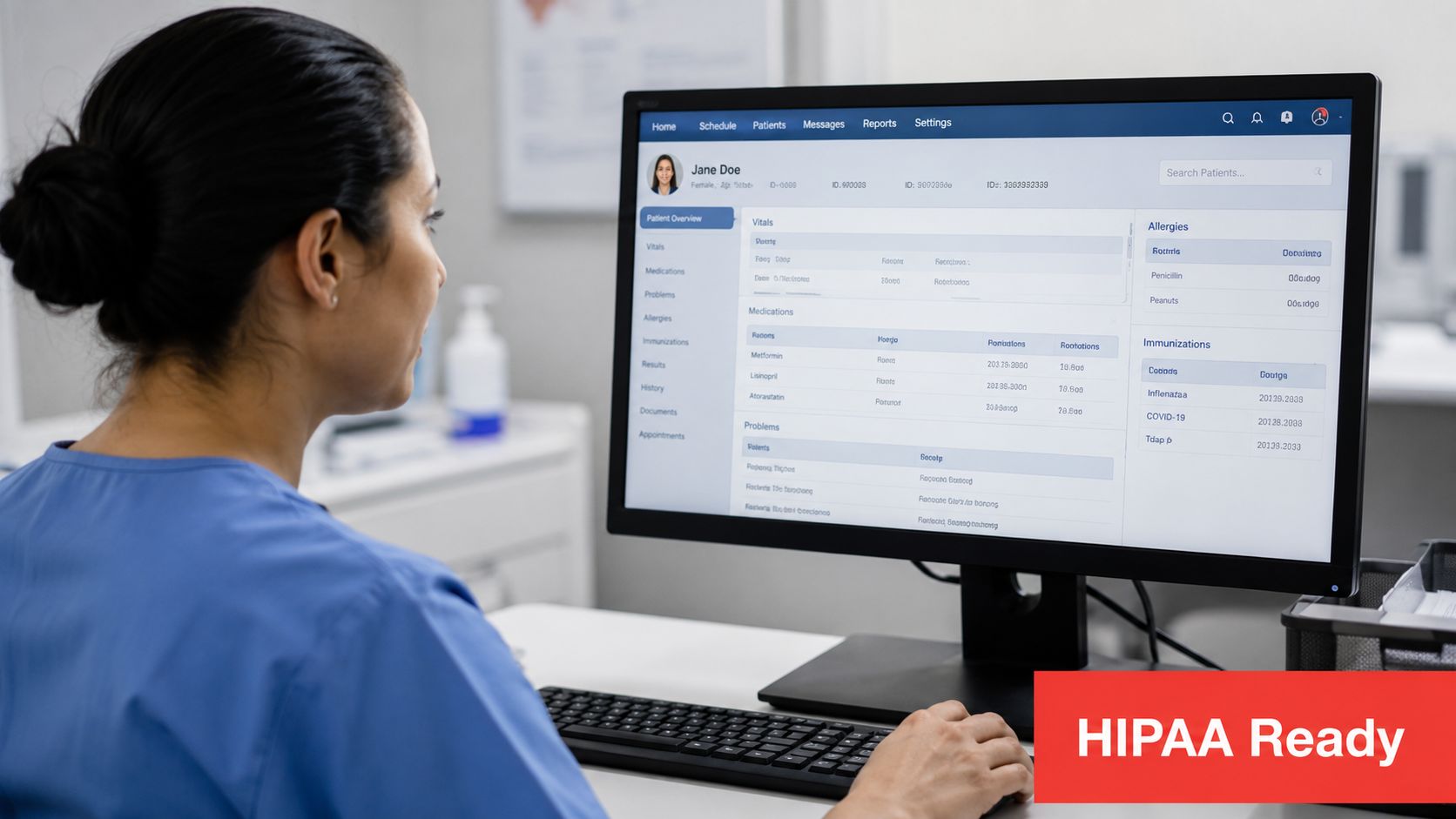
A medical professional reviews a patient's digital health records on a computer monitor in a clinic setting.

The best healthcare business impact analysis templates separate patient-facing systems from administrative systems right away. Scheduling, EHR access, imaging, treatment documentation, and medication records usually need far shorter recovery windows than payroll, marketing platforms, or routine back-office reporting.

What healthcare teams need in the template

One fact healthcare leaders should not ignore is how often the attack starts with a person. In businesses like law, accounting, engineering, and medical practices, more than 60% of breaches originate from phishing or compromised credentials according to this BIA discussion focused on cyber risk. That makes identity protection, email continuity, and access recovery core parts of the healthcare BIA, not side topics.

A strong template should also document breach response timing and patient notification obligations alongside system recovery. That's why many practices benefit from working with HIPAA compliance experts while building the BIA, especially if they've grown quickly and their workflows changed faster than their documentation.

Where practices get this wrong

The common mistake is treating all patient data as one bucket. An Orlando plastic surgery office may decide cosmetic procedure scheduling and patient photo access require a much faster recovery target than archived marketing assets. A Winter Springs orthodontic office may rank active treatment plans and chairside documentation above everything else because missed adjustments affect clinical operations immediately.

Another issue is underestimating non-financial damage. Standard templates often capture revenue impact well but miss reputational harm, regulatory exposure, and trust loss. That gap can leave significant risk outside the plan, especially in healthcare and professional services, as described in this analysis of BIA shortcomings.

In healthcare, downtime is never just an IT problem. It becomes a patient communication problem, a documentation problem, and a compliance problem within minutes.

If you run a private practice in Central Florida, build the template around actual patient flow. Front desk, provider, billing, and compliance each see the outage differently. Your BIA should reflect that.

3. Professional Services Firm BIA Template (Accounting, Legal, Architecture, Engineering)

Professional services firms don't sell inventory. They sell expertise, response time, confidentiality, and client trust. That changes how business impact analysis templates should be built.

An accounting practice in Orlando may feel pain first through tax software and its client portal. A law office in Winter Springs may feel it through case management, document access, and secure communication. An engineering or architecture firm may be dead in the water if CAD files or project collaboration platforms disappear for half a day.

What to measure in a knowledge-work environment

The useful template here starts with matters, engagements, and deliverables, not servers. If staff can't access iManage, NetDocuments, QuickBooks, CCH software, Autodesk files, Bluebeam sessions, Microsoft 365, or Adobe Sign, client work slows down immediately. The BIA has to capture that chain clearly.

Structured templates prove helpful. In enterprise continuity frameworks, BIA templates that integrate RTO and RPO metrics have shown 15 to 20% higher accuracy in financial loss modeling than static spreadsheets, and 78% of organizations using structured RTO and RPO templates achieved alignment between technical recovery capabilities and business-critical process tolerances within 90 days according to Hyperproof's business impact analysis overview. For firms billing by the hour and working to deadlines, that added structure matters.

What works in real firms

The firms that get this right usually attach a confidential appendix listing high-value clients, key deadlines, and special handling requirements. They don't circulate that appendix broadly, but they do use it to shape priorities. If a litigation team has filing deadlines or an accounting team is in the middle of tax season, the recovery order should reflect that.

A practical template should include:

  • Client communication tools: Email, Microsoft Teams, VoIP, and messaging platforms deserve a high priority because clients notice communication outages immediately.
  • Work product repositories: Document management systems, file shares, SharePoint, and CAD storage often matter more than general office apps.
  • Location and compliance constraints: Some firms have client or regulatory requirements that affect where data can be restored and who can access it.

What doesn't work is setting every system to the same urgency. If everything is critical, nothing is. Good BIAs force partners and practice leaders to choose what the business cannot operate without.

4. Manufacturing and Industrial Operations BIA Template

Manufacturing and industrial businesses need a BIA that treats operations, safety, and cyber risk as one conversation. Office IT matters, but it's often not the first thing leadership worries about when a line stops, a dispatch board goes dark, or inventory status becomes unreliable.

A professional manufacturing worker wearing a high-visibility vest operates a control panel on an industrial factory floor.

The template should separate IT systems from OT systems. Microsoft 365, ERP, inventory software, and dispatch tools belong in one dependency chain. PLCs, HMIs, production controllers, and plant-floor networks belong in another. If you combine them too early, you miss the fact that each side has different recovery procedures, different vendors, and different safety implications.

Why industrial BIAs need a different structure

A generic office template usually asks the right high-level questions but misses plant-floor realities. Industrial teams need fields for equipment dependencies, spare parts access, shift coverage, vendor service contacts, and manual workarounds when automation fails.

The financial piece also has to be explicit. Cybersecurity-focused BIAs should assign dollar values to internal delays and customer-facing disruption, including overtime and backlog recovery costs. For small businesses, unplanned downtime can cost an average of $8,000 per hour in lost revenue and remediation according to Smartsheet's business impact analysis guidance. Even if your own cost profile is higher or lower, that figure is enough to make most owners stop treating downtime as an abstract risk.

A practical industrial example

A Central Florida manufacturer dealing with ransomware might rank production line controls, ERP-driven scheduling, and raw material visibility above nearly everything else. An equipment maintenance company around Orlando may put field dispatch, mobile technician communication, and spare-parts inventory at the top because those systems control service delivery in real time.

Safety can force a faster recovery target than revenue does. If operators can't verify machine state, production may need to stay stopped even when the business pressure says restart.

The template should also document partner notification. Suppliers, contract manufacturers, and major customers often need early notice if your outage will affect shipment timing or service capacity. That's not just courtesy. It's part of protecting margin and trust during a disruption.

5. Small Business Quick-Start BIA Template (1–50 Employees)

A 12-person office gets locked out of email at 8:15 a.m. By 9:00, invoices are stalled, client messages are piling up, and nobody is sure which vendor to call first. That is the moment a small-business BIA either proves its value or exposes that the company has been operating on tribal knowledge.

For small firms across Central Florida, the quick-start version is usually the right one. Healthcare practices, law and accounting offices, engineering firms, and specialty manufacturers rarely have a dedicated risk team. They still need clear recovery priorities, especially now that ransomware and cloud account compromise can shut down operations just as fast as a server failure or power issue.

What a small business template should include

Keep the template short enough to finish and specific enough to drive action. In our client work, the best format asks each function to list its core activities, the systems or records each one depends on, the owner, the acceptable downtime, and the impact if that activity stops for a few hours, one day, and several days.

That structure works because it forces real decisions.

A good quick-start BIA for a 1 to 50 person business should cover:

  • Critical activities: Usually 5 to 8 per department or business function
  • Business impact categories: Revenue, client service, legal or regulatory exposure, operational delay, and reputation
  • Recovery targets: How fast the activity must be restored and how much data loss is acceptable
  • Key dependencies: People, applications, internet access, devices, vendors, facilities, and paper records if they still matter
  • Workarounds: Manual steps the team can use for a short outage
  • Decision owners: Who approves downtime tolerance and who authorizes recovery spending

Small organizations often discover that the weakness is not the server. It is the billing coordinator with the only export procedure, the office printer tied to intake, or the owner's phone number being the fallback for every vendor account.

How SMBs should actually use it

Run one working session with leadership and the people who keep daily operations moving. Front-desk staff, dispatchers, schedulers, and bookkeepers usually have a better read on immediate business impact than a purely technical review will give you. They know which outage creates confusion in the first hour and which one can wait until tomorrow.

This matters even more in smaller Central Florida firms where one system often supports multiple functions. A professional services office may rely on one cloud platform for email, file access, and client communication. A medical practice may depend on internet connectivity, scheduling, and document scanning to keep patients moving. A small manufacturer may have only a few production systems, but if one of them fails, shipments stop.

The BIA should lead directly into a practical business continuity planning process for small and midsize companies. Otherwise, it becomes another worksheet that never changes how the business responds under pressure.

Common shortcuts that create bad BIAs

Small companies do not need a long document. They do need honest priorities.

These mistakes show up constantly:

  • Including every app in the company: Start with the activities that would hurt the business in the first business day
  • Letting IT guess the impact alone: Department leads need to approve downtime tolerance and recovery order
  • Ignoring cyber incidents: The template should account for account lockouts, ransomware, and lost access to cloud systems, not just storms and hardware failure
  • Skipping vendor details: Support contacts, contract numbers, and admin access matter during recovery
  • Leaving out manual operations: If payroll, intake, dispatch, or patient communication can run on paper for a few hours, document how

The trade-off is simple. A shorter template gets completed, reviewed, and used. A bloated one gets abandoned halfway through. For small businesses, speed and clarity beat paperwork every time.

6. Multi-Location Enterprise BIA Template (Federated Model)

Multi-location businesses need one BIA model with local detail, not one giant spreadsheet that flattens every site into the same priority. That's the difference between a usable federated template and a document nobody trusts during an outage.

An Orlando headquarters may host core systems and leadership, while a Winter Springs satellite office depends on shared infrastructure for client work. A medical group with multiple locations may centralize scheduling and records, but each office still has different staffing, workflows, and contingency options. The template has to account for both realities.

How to structure a federated BIA

The best format gives each location its own worksheet, then rolls those findings into a central dependency map. That lets leadership see which systems are common across all sites and which disruptions are location-specific. Shared email, identity, EHR, ERP, dispatch, and file access usually sit at the center.

This is also where authority matters. If two locations are affected and resources are limited, someone has to decide which recovery sequence takes priority. If that answer isn't documented before the event, teams lose time arguing when they should be restoring service.

What multi-site teams usually miss

Communication chains are often weaker than the technical plan. Many organizations know which server needs attention first but haven't defined who updates site managers after hours, who talks to staff, and who tells customers what happened. In a distributed business, that confusion creates almost as much damage as the outage itself.

A good federated template should document:

  • Site-specific critical processes: Intake, production, care delivery, dispatch, or branch operations may differ by location.
  • Shared dependencies: Internet carriers, Microsoft 365 tenants, centralized identity, VoIP, and line-of-business databases often create cross-site failure points.
  • Recovery governance: Someone needs named authority for prioritization, approvals, and communications when multiple locations are competing for the same recovery resources.

The trade-off here is speed versus consistency. Fully centralized BIAs are easier to manage but usually miss local pain points. Fully local BIAs are richer but harder to compare. The federated model is the one that usually works for growing Central Florida businesses.

7. Ransomware Recovery-Focused BIA Template

A ransomware-focused BIA is different because it starts from a more hostile assumption. You're not just dealing with downtime. You may be dealing with data encryption, exfiltration, extortion, corrupted backups, legal exposure, public communication, and decisions that leadership has to make quickly.

That's why I like a dedicated ransomware template for law firms, accounting firms, medical practices, and any business that would face both operational disruption and confidentiality fallout. It forces the leadership team to model choices before criminals are the ones controlling the timeline.
A professional team of four collaborating on cybersecurity strategies around a table with laptops and documents.

Why a ransomware-specific BIA matters

One useful fact from continuity practice is that structured BIA work can help organizations align technical recovery capabilities with what the business can tolerate. In a ransomware scenario, that alignment matters because leadership may discover that a “recover from backup” strategy sounds strong on paper but doesn't meet the business tolerance for core systems once legal review, validation, and staged restoration begin.

A ransomware template should compare likely recovery paths, identify notification triggers, and record the dependencies required for each option. It should also link directly to your ransomware recovery process so the BIA doesn't live separately from the playbook used in the incident.

What to decide before the attack

The practical work is less about writing philosophy and more about documenting decisions leadership will otherwise debate under pressure.

  • Backup integrity: Don't assume your backups are clean, recent, or restorable. The template should note how backup validation is performed and who confirms it.
  • Decision authority: Name who can approve recovery spending, legal notifications, insurance engagement, and external communications.
  • System sequencing: Decide which applications return first if restoration has to happen in stages.

Recovering from backup only works if you know the backups are usable, the identity layer is secure, and the restored systems won't be re-encrypted on first boot.

For an Orlando law firm, that may mean restoring document systems, identity, secure email, and practice management before anything else. For a Central Florida medical practice, patient records, scheduling, and access control often drive the first wave. The template is valuable because it turns vague confidence into explicit decisions.

8. Compliance-Auditor Ready BIA Template (SOC 2, ISO 27001, GLBA, State Security Laws)

A client security review lands in the inbox on Monday morning. By Wednesday, leadership needs to show which business functions are time-sensitive, who approved the recovery targets, which vendors those functions depend on, and how the BIA connects to incident response, backup testing, and continuity planning. That is where a generic worksheet usually falls apart.

An auditor-ready BIA has to do two jobs at once. It needs to help the business recover, and it needs to hold up under review from customers, assessors, regulators, insurers, and outside auditors. For Central Florida firms in healthcare, professional services, and financial operations, that means documenting more than downtime tolerance. It means showing ownership, evidence, and a clear link between business impact and security controls.

What auditors expect to see

Auditors usually look for traceability. They want to see that recovery objectives tie back to named business processes, identified data types, supporting systems, third parties, and an accountable business owner who signed off on the decision.

The format matters because audit scrutiny is different from operational use. A useful template should capture core business elements such as people, technology, facilities, suppliers, and customer-facing dependencies. It should also record the reason a function is ranked as critical, what legal or contractual obligations apply, and what would trigger escalation if the recovery target is missed.

That sign-off is not paperwork for its own sake.

In practice, it proves the priorities came from the business, not just from IT. We see this matter during SOC 2 readiness work, GLBA documentation reviews, HIPAA assessments, and state-law diligence requests after a security incident. If finance, operations, or clinical leadership never approved the assumptions in the BIA, the document is harder to defend.

How to make the document defensible

The strongest version includes an evidence appendix or reference section. Keep approval records, recovery exercise notes, architecture diagrams, vendor dependency records, policy references, and test results with the BIA or clearly mapped to it. An auditor should be able to follow the chain from business impact, to recovery objective, to implemented safeguard, to proof that the safeguard was tested.

For SMBs without a dedicated risk team, the trade-off is usually speed versus audit readiness. A lighter template is faster to complete, but it often leaves out the rationale, approval trail, and control mapping an auditor will ask for later. We generally advise clients to keep the main BIA simple enough for department leaders to update, then add a short evidence section that maps each critical function to related policies, tests, and records.

A Central Florida accounting firm may use this template to support GLBA expectations around client financial data, outsourced systems, and recovery sequencing for tax, payroll, and document platforms. A medical practice may need the same structure to show how clinical systems, scheduling, patient communications, and access controls support HIPAA-related continuity expectations. A professional services firm pursuing SOC 2 often needs the BIA to line up with availability commitments, vendor oversight, and incident response documentation.

What fails under audit is vague language and missing ownership. “Critical system” does not help much. “Client document management must be restored before internal training portals because client service stops, contractual deadlines are missed, and regulated records become inaccessible” is far easier to defend. Specificity wins. Ownership wins. Evidence wins.

Business Impact Analysis Templates, 8-Template Comparison

Template Core features UX & Quality Value proposition Target audience Unique selling points & Price tier
NIST Cybersecurity Framework BIA Template Maps functions to cyber risk; RTO/RPO; quantitative scoring; compliance links (HIPAA/GLBA/SOC2) Auditor-recognized; scalable; initial setup time-intensive Justifies investments; speeds incident response; lowers recovery costs Professional services, medical practices, financial firms Standardized, auditor-friendly; mid–high (requires technical effort)
Healthcare-Specific BIA Template (HIPAA Compliant) Patient access prioritization; HIPAA penalty impact; telemedicine & pharmacy recovery Regulator-focused; detailed; can be voluminous Reduces fines & reputational risk; improves patient trust Medical offices, dental, vet clinics, medical spas HIPAA-aligned, penalty calc; mid–high (may need compliance review)
Professional Services Firm BIA Template Client confidentiality mapping; billable-hour recovery; document/version control SLA-aligned; revenue-impact focused; stakeholder coordination required Protects billable revenue; supports claims and audits Accounting, legal, architecture, engineering firms Client-workproduct protection; mid (requires partner alignment)
Manufacturing & Industrial Operations BIA Template PLC/OT priority mapping; inventory & ERP recovery; OT/IT segmentation Operationally precise; requires engineering input Quantifies production loss; supports insurance & redundancy ROI Manufacturing, industrial services, field service firms OT-aware, production-loss modeling; mid–high (complex OT assessment)
Small Business Quick-Start BIA Template (1–50) One-page priority worksheet; simple scoring; automated downtime calculator Fast (4–6 hrs); no training needed; lightweight documentation Rapid, low-cost readiness; easy to update Small SMBs, solo practitioners, small clinics Quick, affordable starter; low (budget-friendly)
Multi-Location Enterprise BIA Template (Federated) Centralized priority matrix; location-specific RTO/RPO; escalation rules Governance-heavy; complex consolidation Coordinates multi-site recovery; reveals hidden interdependencies Multi-location firms, regional medical networks, enterprises Federated governance; enterprise-grade; high (complex rollout)
Ransomware Recovery-Focused BIA Template Timeline cost modeling; ransom vs. recovery analysis; backup integrity checks Crisis-ready; decision-framework heavy; modeling complexity Prepares leadership for ransom decisions; optimizes backup ROI Professional services, healthcare, financial, legal Ransomware-first planning; mid–high (requires expert analysis)
Compliance-Auditor Ready BIA Template (SOC 2, ISO, GLBA) SOC2/ISO/GLBA mapping; control matrices; auditor evidence appendix Audit-ready; evidence-heavy; ongoing maintenance Shortens audit cycles; enables certifications; legal defensibility Service providers seeking SOC2, regulated firms Auditor-formatted, certification-focused; high (documentation effort)

From Analysis to Action Building a Resilient Business

A Business Impact Analysis isn't paperwork for its own sake. It's the moment a leadership team stops talking about resilience in broad terms and starts making actual recovery decisions. That shift matters because most organizations don't struggle during an incident for lack of effort. They struggle because nobody agreed in advance on what mattered most.

That's why business impact analysis templates are so useful when they're built correctly. They turn scattered assumptions into a usable record of priorities, dependencies, owners, and recovery expectations. They also force departments to confront trade-offs teams often avoid until they're under pressure. Which systems are mission-critical? Which processes can move to manual workarounds for a day? Which vendors, applications, and locations create single points of failure?

For Central Florida businesses, those answers need to reflect the local operating environment. An Orlando law firm, accounting practice, architecture office, or engineering firm depends heavily on document access, email, identity, and client communication. A privately owned medical practice in Winter Springs may be more exposed to scheduling failures, patient record downtime, and compliance risk. A manufacturer or field-service business may have to think about dispatch, ERP, inventory, and plant-floor recovery before anyone talks about lower-priority office systems.

The cybersecurity angle can't be separated from the continuity angle anymore. Ransomware, phishing, compromised credentials, cloud misconfigurations, and weak vendor controls all affect the business the same way in the end. They interrupt operations. A BIA gives you the structure to measure that interruption before the event happens, then align technical controls, backup investments, response procedures, and leadership expectations around it.

That process also creates better management conversations. Once leaders see the likely business effect of losing Microsoft 365, their case management system, their EHR, their ERP platform, or their dispatch tools, security spending becomes easier to justify. Backup strategy becomes easier to prioritize. Testing becomes easier to schedule. The BIA gives the business case, not just the technical argument.

We've seen the same pattern repeatedly with SMBs that don't have dedicated risk teams. The organizations that move first on this work don't necessarily build giant programs. They build clarity. They know who decides, what gets restored first, where the weak spots are, and how to connect IT recovery to real-world operations. That alone changes how a business performs during a disruption.

A useful BIA also ages faster than people think. New vendors, office moves, acquisitions, cloud migrations, compliance obligations, and staffing changes can all make last year's document wrong. That's why the best approach is to treat the template as a living management tool. Review it after major changes. Reconfirm assumptions with department leads. Test whether your actual recovery capabilities still match the priorities on paper.

If you serve clients in Central Florida, this work is no longer optional. Healthcare, professional services, and industrial firms all face cyber risk, but each one experiences downtime differently. Generic templates can start the conversation. Industry-shaped templates finish it. The difference is whether your plan reflects how your business really operates.

The good news is that you don't need a massive internal compliance department to do this well. You need a practical template, the right people in the room, and an IT and cybersecurity partner willing to challenge weak assumptions. Once that happens, the BIA stops being a document you file away and becomes a decision tool your business can use.

If you're ready to move from analysis to action and build a more resilient future for your Central Florida business, our team at Cyber Command is here to help.


If your business in Orlando, Winter Springs, or the surrounding Central Florida market needs a practical BIA tied to real cybersecurity and recovery planning, talk with Cyber Command, LLC. We help professional services firms, privately owned medical practices, industrial teams, and growing multi-location organizations turn business impact analysis templates into working continuity, security, and recovery plans.

Bare Metal Recovery: A Guide for Florida Businesses

Monday starts normally until nobody can open the practice management system, the shared drive is unreadable, and the front desk starts writing patient details on paper. Or your law firm gets hit by ransomware before the first client call, and the server that holds case files, templates, billing records, and email archives is dead. In Orlando and Winter Springs, that kind of outage doesn't stay “an IT issue” for long. It becomes missed appointments, delayed filings, panicked clients, and a team standing around waiting for answers.

Small businesses are the most frequent target. 43% of all cyberattacks target small businesses according to this cybersecurity report for Orlando-area businesses. That matters in Central Florida because many firms here are exactly the kind of organizations attackers expect to be underprepared. Law offices, accounting firms, architecture studios, dental offices, orthodontists, and specialty medical practices often depend on a few critical systems and have little room for downtime.

That's where bare metal recovery changes the conversation. It's not just a way to get files back. It's a way to restore the entire working computer or server so the business can resume operations without rebuilding everything by hand. If your continuity plan still assumes someone will reinstall Windows, load applications, reconnect printers, restore user settings, and then test every function manually, the plan is slower than the business can afford. A stronger starting point is a documented business continuity plan for small and midsize companies that treats full-system recovery as a business requirement, not a nice-to-have.

Table of Contents

Your Business Is Gone What Is the Plan

A disaster rarely announces itself politely. It shows up as a failed server, corrupted storage, ransomware lockout, or a workstation that won't boot after an update gone wrong. For a business owner, the technical cause matters less than the immediate business impact. Can staff work, can customers be served, and how long can revenue-producing activity stay offline?

A stressed woman sits at her desk, staring intently at a computer screen in a messy office.

In a downtown Orlando law office, that might mean no access to pleadings, document templates, matter notes, or billing records. In a Winter Springs dental or medical practice, it can mean scheduling stops, charts become inaccessible, and the front office has to scramble with manual workarounds. The longer systems stay down, the more the damage spreads into client trust, staff productivity, and compliance exposure.

Why file backup alone isn't enough

Many owners hear “backup” and assume they're covered. Sometimes they are, but often only at the file level. That means the documents may exist somewhere, yet the system needed to use them isn't ready. The operating system still has to be rebuilt. Applications have to be reinstalled. Settings have to be recreated. Users have to wait.

Bare metal recovery is the plan for that moment. It restores an entire machine, not just its documents, onto hardware with no operating system already installed. That includes the operating system, applications, drivers, configurations, and data. For a small business that can't afford multi-day reconstruction, that's the difference between a controlled interruption and a prolonged shutdown.

Practical rule: If losing one server or one line-of-business PC would stop revenue, that system needs a full recovery path, not just file storage.

The business question to ask today

Most firms don't need more technical jargon. They need a plain answer to one question: “If this machine dies today, what's the exact process to get it back?” If the answer depends on a technician rebuilding the environment from memory, the plan is fragile.

For professional services and private medical offices in Central Florida, bare metal recovery isn't overkill. It's the failsafe that keeps a bad day from turning into a business crisis.

What Is Bare Metal Recovery and How It Compares

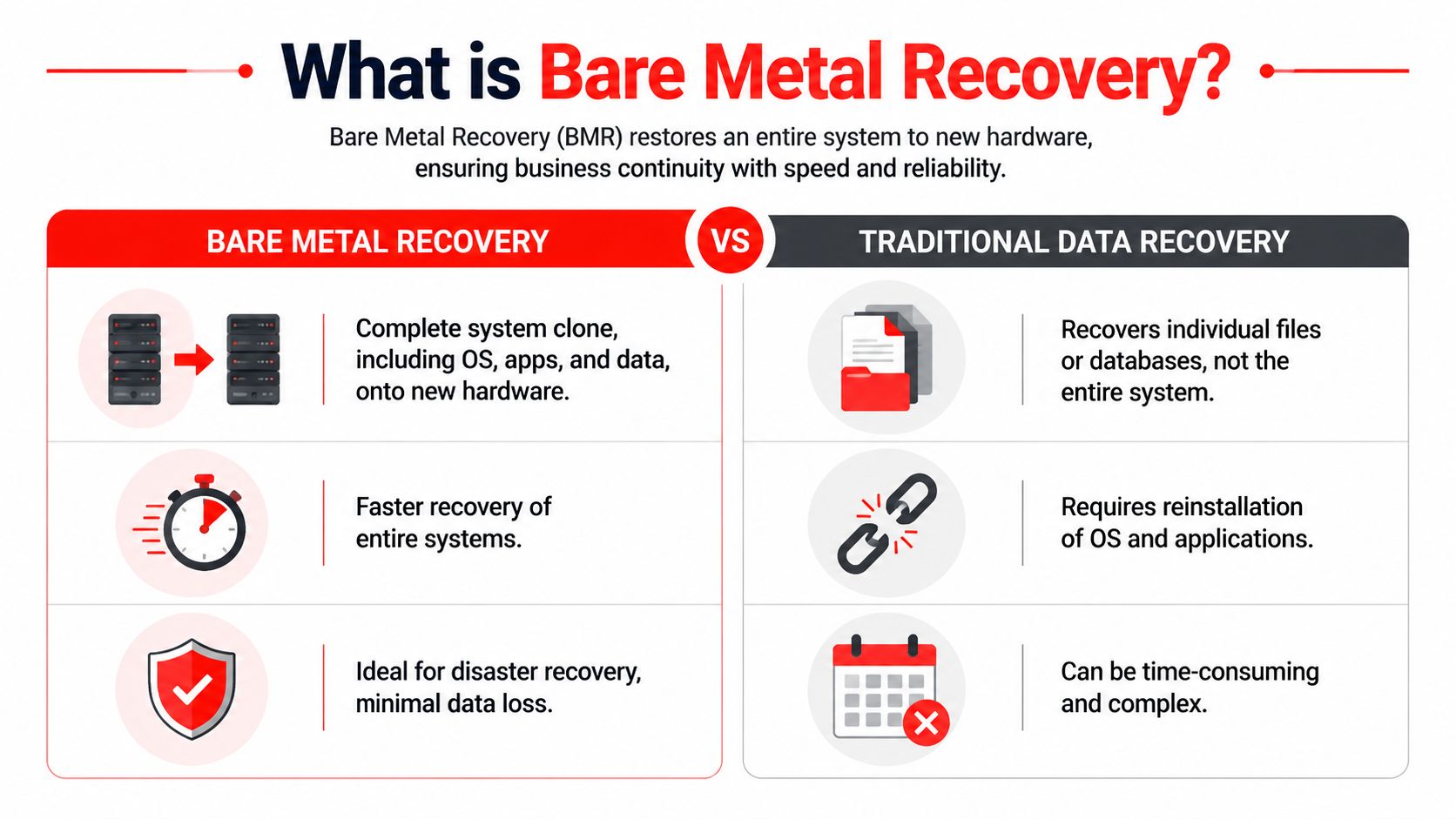
The cleanest way to explain bare metal recovery is to compare it to rebuilding a house after a fire. A file backup is like saving boxes of personal belongings. You still need to reconstruct the walls, doors, wiring, appliances, and layout before life feels normal again. Bare metal recovery is closer to restoring the entire house as it was, including the structure and everything inside it.

A comparison infographic between Bare Metal Recovery and Traditional Data Recovery showcasing their efficiency and key differences.

Microsoft's Windows guidance describes bare metal recovery as a complete disk-image restoration that can remove existing partitions, erase data if requested, and rebuild the default partition layout, boot sector, operating system, drivers, applications, and user data in one image-based process, as outlined in Microsoft's bare metal recovery documentation. That's why it sits in a different category from ordinary file restoration.

For business owners evaluating backup strategy, it also helps to understand where cloud-based backup options for small businesses fit. Cloud storage can be part of the backup location and retention plan. It doesn't automatically mean you have true bare metal recovery capability.

The easiest way to understand it

Bare metal recovery is designed for total-system failure. If a server motherboard fails, if ransomware wrecks a workstation, or if a machine becomes so corrupted that rebuilding it manually would take too long, BMR restores the whole environment.

That includes:

  • The operating system: The machine comes back with the OS in place rather than waiting for a full reinstall.
  • Applications and settings: Line-of-business software, drivers, and system configuration return with the image.
  • User data: Files come back as part of the broader system image, not as isolated folders.
  • Boot structure: The machine can start correctly because the recovery process restores the underlying boot components.

Where other recovery methods fit

Not every problem needs bare metal recovery. That's part of using it wisely.

Recovery method Best use case Limitation
File and folder restore Deleted documents, overwritten spreadsheets, a missing client folder It doesn't rebuild the machine that runs the business
System state restore Specific operating system settings or service components It isn't the same as restoring the entire device
Snapshot-based rollback Short-term rollback in controlled environments It may not help if the underlying hardware is gone
Bare metal recovery Catastrophic failure of the full system It requires planning, compatible targets, and tested backups

A legal office might need file restore when someone deletes a contract. A medical office might use a limited rollback after a bad application change. But when the server itself is unusable, bare metal recovery is the method built for the event.

Bare metal recovery is the option you choose when “just restore the files” would still leave the business offline.

There's also a trade-off. BMR is powerful, but it isn't casual. It requires full-system backups, bootable recovery media, and a recovery design that matches the environment you operate. If the business has complex applications, multiple locations, or compliance obligations, the process needs discipline.

For an Orlando accounting firm during a deadline-heavy period, speed matters more than elegance. The method that restores the whole machine usually wins over the method that restores data in pieces and then asks people to rebuild the rest by hand.

The Bare Metal Recovery Process Explained

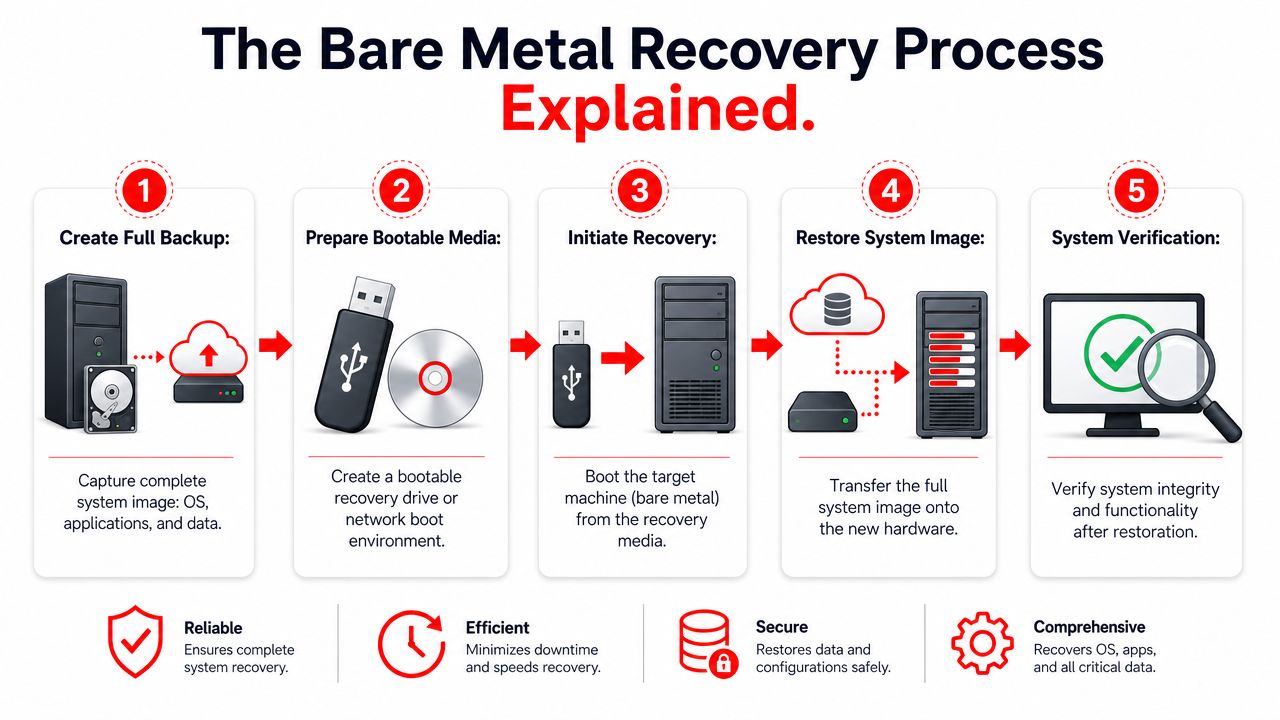
Most business owners don't need command-line detail. They need to know what happens, what has to be ready in advance, and why bare metal recovery can bring a dead system back much faster than a manual rebuild.

A five-step infographic explaining the bare metal recovery process for computer systems from backup to verification.

The reason BMR matters is simple. It restores the entire system, including operating system, applications, drivers, configurations, and data, onto hardware with no pre-installed software or OS. It cuts out the slow sequence of installing the OS, loading drivers, reinstalling applications, and reconfiguring the environment. In practical terms, that can restore critical systems in hours rather than days, and industry benchmarks cited in this bare metal recovery overview show recovery times reduced by up to 70%.

What has to exist before disaster hits

Bare metal recovery starts long before anything fails. If the backup isn't complete, current, and recoverable, there's nothing to restore.

A workable setup usually includes these pieces:

  1. A full backup image
    The backup has to capture the whole system state, not only user files. That means the machine's operating environment is preserved, not just its documents.

  2. Bootable recovery media
    The target machine needs a way to start a lightweight recovery environment. That's commonly done with recovery media such as a USB drive or ISO image.

  3. Compatible target hardware
    The replacement machine has to meet the recovery requirements. If the hardware is too different or undersized, the restore can stall or fail.

  4. A clean target disk
    The destination should be ready for the recovery engine to lay down the image correctly.

What happens during the restore

Once the replacement machine is available, the workflow is more straightforward than most owners expect.

  • Boot the new machine into the recovery environment: This bypasses the need for a pre-installed operating system.
  • Point the recovery tool to the saved system image: The image becomes the blueprint for rebuilding the machine.
  • Allow the restore process to rebuild the disk: Existing partitions are removed and the proper structure is recreated.
  • Apply the system image: The operating system, applications, settings, drivers, and user data are written back to the target.
  • Reboot and validate: The machine starts into the restored environment and the business checks whether the applications, shares, and workflows behave as expected.

That's the technical sequence. The business outcome is what matters. A firm doesn't waste half a day hunting installers, looking up license records, or trying to remember how the original workstation was configured.

A bare metal recovery plan should feel more like swapping a damaged appliance for a working replacement than rebuilding the office from raw materials.

There are practical constraints. The target should be suitable for the source workload. The process works best when backup jobs run consistently and the restore path is rehearsed. It also helps to know which systems deserve this treatment. Not every receptionist PC needs the same recovery priority as the core practice server, domain controller, or accounting system.

For Central Florida SMBs, that distinction keeps costs controlled. Protect the machines that stop business if they disappear. Then build the workflow so recovery is repeatable under pressure, not dependent on whoever happens to answer the phone that morning.

Why RTO RPO and Testing Are Crucial for Success

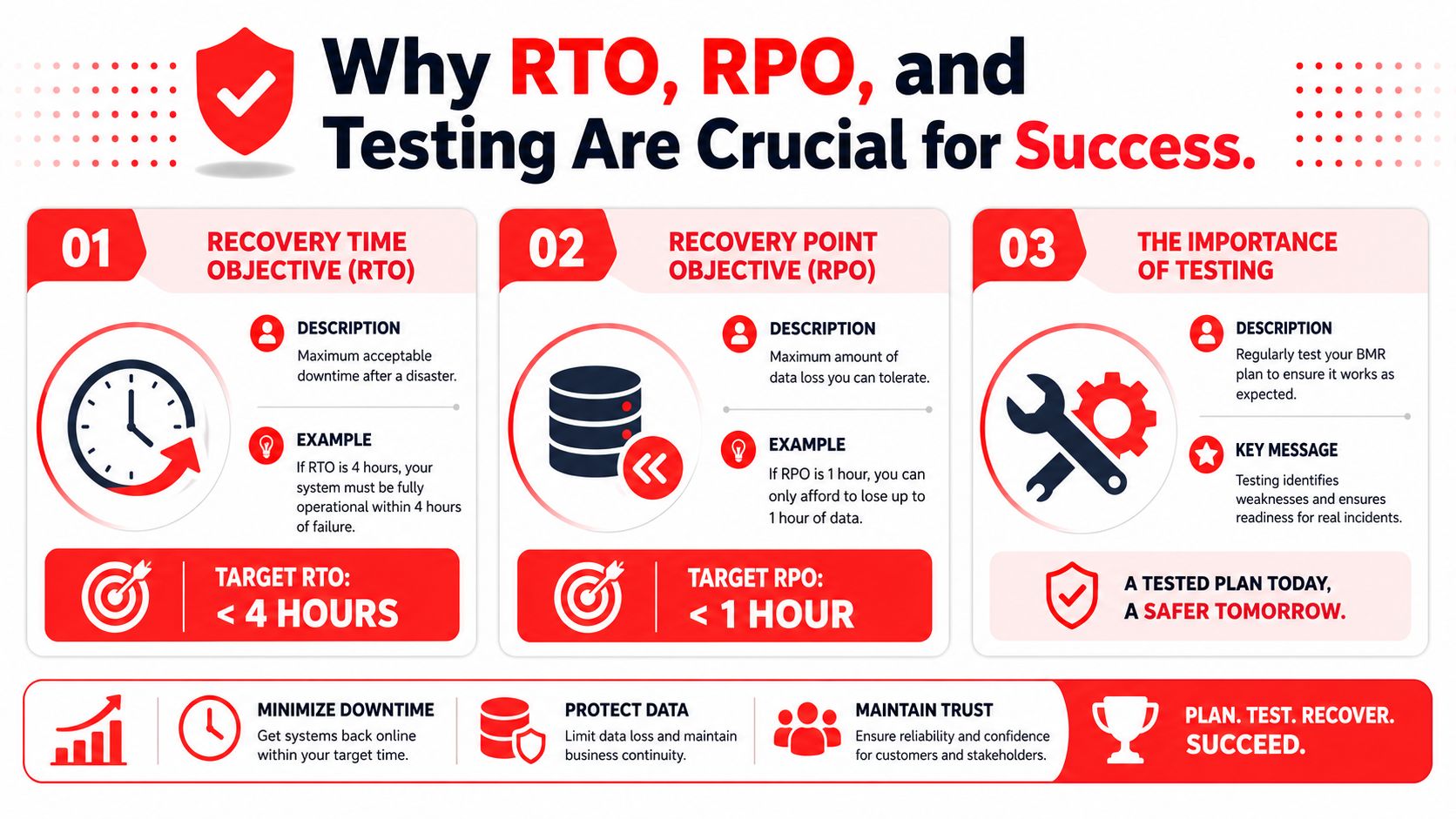
A backup can exist and still fail the business. That happens when leadership never defined how fast systems must return or how much recent data loss the company can tolerate. Those two decisions drive recovery planning more than the backup product itself.

An infographic explaining the importance of RTO, RPO, and regular disaster recovery testing for business continuity.

Two business numbers that matter more than the backup itself

Recovery Time Objective (RTO) is how long the business can afford to be down after a disruption. Recovery Point Objective (RPO) is how much data the business can afford to lose between the last good backup and the incident.

Those sound technical, but they're business decisions.

A CPA firm in a filing crunch may decide that several hours of downtime is painful but manageable, while losing a large chunk of same-day work is not. A specialty medical office may decide that scheduling and patient documentation systems need an especially short recovery window because the front desk and clinicians can't function cleanly without them. A small architecture practice may tolerate slower recovery on archive systems but not on the server that holds current project files.

Here's a simple explanation:

Business question Metric
“How long can we be offline?” RTO
“How much recent work can disappear?” RPO

The mistake many firms make is assuming the presence of backups means the targets are covered. They aren't. Backups without recovery goals produce vague promises like “we should be able to get it back.” That's not good enough when the phones are ringing and staff is idle.

Why testing separates confidence from wishful thinking

At this point, many disaster recovery plans break. The restore has never been validated on compatible hardware, the image hasn't been checked recently, or nobody has documented what success looks like after the machine comes back online.

The risk is not theoretical. 68% of SMBs in North America lack documented bare metal restore validation procedures, and 42% of untested bare metal restores fail during critical migration windows due to driver incompatibilities or corrupted file systems, according to this analysis of bare metal restore validation gaps. Those numbers should get the attention of every business owner who says, “We back up everything.”

A backup you've never restored under realistic conditions is hope, not resilience.

That's why a formal disaster recovery testing plan matters. It turns the conversation from assumptions into evidence.

Untested recovery is like owning a fire extinguisher with the pin rusted in place. It exists, but you don't know if it will work when the room is full of smoke.

A strong testing routine should answer questions like:

  • Does the restored machine boot correctly: A successful image transfer means little if the system can't start and serve users.
  • Do core applications open and function: Login screens alone don't prove business readiness.
  • Are permissions and shares intact: Firms often discover access problems only after staff tries to work.
  • Can the team document recovery steps clearly: If the process lives in one engineer's memory, the plan is brittle.
  • Was the recovered state acceptable for the business: This is the RPO check. Did the business lose more recent work than it can tolerate?

What good testing looks like

Good testing isn't theatrical. It's disciplined. The team identifies critical systems, restores them in a controlled setting, verifies application behavior, records findings, and corrects failures before the next incident.

For a professional services firm, that might mean validating matter management, billing, and document access. For a medical office, it might mean checking scheduling, imaging access, and front-desk workflows. The point is to test the business process, not just the server boot screen.

BMR Pitfalls and Compliance Considerations

Bare metal recovery sounds clean on paper. In production, it can fail for ordinary reasons. The backup image may be incomplete. The target hardware may not match what the restore expects. The disk may not be prepared properly. Drivers may not cooperate. The system may boot, but the key application may still be broken.

Where recoveries break in the real world

The most common problem is treating BMR as a magic button instead of a controlled process. It's powerful, but it still depends on the quality of the backup, the condition of the target system, and the discipline of the team running it.

Common failure points include:

  • Hardware mismatch: A replacement machine that looks similar may still differ in ways that matter during recovery.
  • Unvalidated images: The backup completed, but nobody confirmed that it can be restored into a working environment.
  • Application blind spots: The operating system returns, but critical workflows fail because the application stack wasn't checked after recovery.
  • Priority confusion: Teams waste time restoring low-impact systems before restoring the ones that keep revenue moving.

For a law office, that can mean the file server is back but document management or billing is still down. For a medical practice, it can mean a workstation boots but clinical staff still can't access the systems needed for patient care.

The restore isn't successful when the login screen appears. It's successful when staff can do real work again.

Why compliance starts before protection

A lot of business owners think compliance begins with security controls like multifactor authentication, endpoint protection, or email filtering. Those are important, but they aren't the starting point.

The NIST Cybersecurity Framework 2.0 places Identify first. That means asset inventory and risk assessment come before protection controls, as described in this overview of NIST CSF 2.0 for small businesses. For bare metal recovery, that matters more than it may seem.

If a firm hasn't identified its critical systems, it can't set meaningful recovery priorities. If it hasn't assessed risk, it won't know which servers, workstations, and applications deserve image-level protection. If it doesn't know where sensitive client or patient data lives, it won't know which restore failures could become a regulatory problem.

Here's how that plays out by industry in Central Florida:

  • Legal and financial firms: Missed deadlines, inaccessible records, and incomplete restorations can affect service delivery and retention obligations.
  • Medical and dental practices: Extended outages can disrupt patient scheduling, documentation access, and continuity of care.
  • Architecture and engineering firms: Lost access to active project data can delay deliverables and client approvals.

Compliance isn't only about preventing the breach. It's also about proving the organization can respond, recover, and document what happened. Bare metal recovery supports that goal, but only when the business knows what systems matter, where they reside, and how they'll be validated after a restore.

Partnering for Resilience How Cyber Command Manages BMR

Most small and midsize businesses don't fail at disaster recovery because they don't care. They fail because the work spans too many disciplines at once. Backup design, hardware planning, cybersecurity, application dependency mapping, testing, documentation, and incident response all have to line up under pressure. That's a heavy lift for a law office administrator, a medical practice manager, or a growing accounting firm with no deep internal IT bench.

What a managed approach changes

A managed partner turns bare metal recovery from a technical feature into an operational capability.

That starts with scoping. Not every system deserves the same recovery treatment. A managed team identifies which servers, workstations, and line-of-business roles require image-based recovery because their loss would stop the business. That keeps the plan aligned with real operations instead of protecting everything the same way.

It also changes how backups are watched. In many small environments, backups “run” until someone notices they haven't. A managed model brings routine oversight to backup integrity, job status, storage health, and exception handling so problems surface before the crisis.

The next change is testing. Here, outside accountability matters most. Testing is easy to postpone when internal staff are already overloaded with tickets, vendors, onboarding, and day-to-day support. A managed partner can schedule restore validation, document results, and push remediation when something doesn't pass. That discipline is what turns a recovery plan into a dependable business control.

A solid managed approach also includes:

  • Documented recovery runbooks: Clear steps, system dependencies, escalation paths, and business owners for each critical system.
  • Application-aware validation: Confirmation that users can do real work after recovery, not just sign into Windows.
  • Lifecycle management: Ongoing updates as hardware changes, software evolves, and new business systems are introduced.
  • Security alignment: Recovery planning that works alongside ransomware response, endpoint hardening, and monitoring.
  • Local response expectations: When a firm in Orlando or Winter Springs has a major incident, speed and familiarity matter.

Why local firms hand this off

Central Florida businesses often have lean teams and concentrated risk. One failed server can stop scheduling, billing, document access, and internal communication all at once. That's common in professional services and private medical settings, where a small number of systems support a large share of daily work.

A managed partner helps because the business doesn't have to invent the process during the outage. The planning, testing cadence, documentation, and recovery ownership already exist. That shortens decision time during a crisis.

There's also a cybersecurity angle that business owners can't ignore. Small businesses are frequent targets, and recovery planning belongs inside that broader security program. If ransomware hits, the question isn't only whether the files are backed up. It's whether the business can restore trusted systems in a controlled way, validate them, and return staff to work without improvising every step.

For firms with compliance pressure, managed support is even more valuable. Legal, financial, and medical organizations need recovery records that show process, accountability, and repeatability. Ad hoc restore work can bring systems back, but it often leaves weak documentation behind. That gap matters after an incident.

Good disaster recovery reduces chaos twice. First during the outage, then again when leadership has to explain what was done and why it worked.

A mature managed service for bare metal recovery usually covers four ongoing motions.

First, it keeps the inventory current. If the business adds a server, changes a line-of-business application, or moves a workload, the recovery plan has to reflect that. Old documentation creates false confidence.

Second, it treats testing as recurring operational work. Restores get validated, edge cases get found, and incompatible changes get corrected before they matter.

Third, it ties recovery to support and security operations. When the same partner understands your endpoints, user environment, vendor relationships, and incident handling workflow, recovery tends to move faster because context already exists.

Fourth, it gives leadership a clearer business view. Instead of hearing “backups are green,” owners can ask better questions. Which systems are covered by full-system recovery. Which ones were last tested. Which workflows would still require manual workarounds. That's the level of visibility executives need.

The practical result

For an architect in Orlando, that means project work doesn't depend on one fragile workstation and one person's memory. For an accountant with a deadline-driven practice, it means core systems have a documented path back to service. For a surgeon or dentist in Winter Springs, it means the office can keep the focus on patient care rather than trying to decode an IT failure in the middle of a packed schedule.

The value isn't only technical recovery speed. It's lower uncertainty.

Business owners don't want to become experts in partition layouts, recovery media, or hardware compatibility. They want to know that when a critical system fails, there is a tested process, a responsible team, and a path to restore operations without guesswork. That's what resilience looks like in practice.


If your organization in Orlando, Winter Springs, or Plano needs a recovery strategy that goes beyond basic backups, Cyber Command, LLC can help you build, validate, and manage a bare metal recovery program that fits your real business risk. Their team provides managed IT, cybersecurity, 24/7 support, and operational guidance so professional services firms, medical practices, and growing SMBs can reduce downtime and recover with confidence.

How to Create a Business Continuity Plan

Monday starts normally. A law firm near downtown Orlando opens its case management system and finds every file encrypted. A dental practice in Winter Springs loses access to schedules, imaging, and billing after a storm knocks out power and corrupts a local server restart. Phones still ring. Patients still show up. Clients still expect answers. The problem isn’t just “IT is down.” The business itself has stopped moving.

That’s why a business continuity plan matters. Not as a binder on a shelf, and not as a generic template someone downloaded three years ago. It’s a leadership document that tells your team what happens next when a hurricane, ransomware event, vendor outage, or patient data incident interrupts normal operations.

In Central Florida, the risk picture is unusually practical. You have weather exposure, seasonal power instability, remote and hybrid work, cloud dependence, and growing pressure around data privacy. Professional firms, medical practices, and multi-location businesses all face the same hard question: if a critical system goes down today, who makes decisions, how do you keep serving customers, and how fast can you recover?

If you’re learning how to create a business continuity plan, start with one assumption. A backup drive alone won’t save you. You need a plan for operations, communications, vendors, cyber response, and recovery priorities.

Why Your Florida Business Needs More Than a Backup Drive

A backup can help you recover data. It does not tell your office what to do at 8:15 on a Monday when staff cannot log in, patients are waiting, and your front desk is fielding calls it cannot answer.

I see this mistake often with Central Florida small businesses. The owner has an external drive, a cloud backup subscription, or both, and assumes recovery is covered. Then a hurricane disrupts power across the area, a vendor outage locks up a scheduling platform, or ransomware hits a shared file system. The files may exist somewhere, but the business still stalls because nobody has clear priorities, assigned decision-makers, or a tested process for working through the interruption.

That gap is expensive.

In this region, continuity planning has to cover more than weather. Hurricanes, flooding, and utility instability are part of the equation, but so are phishing attacks, business email compromise, ransomware, and breaches involving client or patient records. For a medical practice, the problem is not limited to restoring charts. The practice also has to decide how to protect patient data, notify the right parties, keep appointments moving, and document decisions in case regulators or insurers ask questions later. For a law firm or accounting office, client trust can erode fast if communication goes quiet for even a few hours.

A usable continuity plan gives your team direction under pressure. It should answer questions like:

  • Who is authorized to make response decisions if the owner or practice manager is unavailable
  • Which business functions must be restored first to keep revenue and service moving
  • How staff will operate in the short term if primary software, phones, or internet access are down
  • What messages go to clients, patients, vendors, and carriers and who sends them
  • When an outage becomes a security incident that requires containment, forensics, legal review, or breach response

Many SMBs assume their IT provider, software vendor, or cloud platform will fill these gaps during a crisis. In practice, each party covers only part of the problem. Your vendor may restore its application. Your IT team may recover servers. Neither one owns your customer communication, manual workarounds, leadership approvals, or incident coordination unless you planned for it in advance.

Backups also fail in predictable ways. The backup repository is tied to the same compromised credentials. Restore testing never happened. The last clean copy is older than anyone expected. The restored data comes back corrupted, incomplete, or still encrypted. Those are operational failures, not just technical ones.

That is why a disaster recovery plan template is useful, but incomplete on its own. Recovery documents help your team rebuild systems. Business continuity planning decides how the company keeps operating while that recovery is happening.

The Florida businesses that come through disruptions with less damage usually make one leadership shift early. They treat downtime as a business risk with legal, financial, and reputational consequences, and they build their plan around both cyber threats and real-world interruptions. For non-technical owners, that usually means working with a managed SOC and IT partner that can monitor threats, guide incident response, and help execute the plan when the pressure is real.

Laying the Foundation with a Business Impact Analysis

A hurricane warning goes up on Tuesday. By Wednesday, your office closes early. By Thursday morning, staff are scattered, your phones are forwarding inconsistently, a few people cannot get past multi-factor authentication, and the practice management system is technically online but nobody can use it. That is the point of a business impact analysis, or BIA. It identifies what has to keep working, who depends on it, and what breaks first when conditions are not normal.

For Central Florida SMBs, that exercise matters just as much for cyber incidents as it does for weather. Ransomware rarely takes down every system at once. It usually cripples a few high-dependency functions first, then exposes how much of the business depends on identity, email, internet access, and a handful of software platforms.

A professional team collaborating on a digital transparent business impact analysis board in a modern office.

Start with business functions, not hardware

Owners often begin with a list of devices. Servers, laptops, Wi-Fi, firewalls, licenses. That list has value, but it does not tell you how the company earns revenue or serves patients, clients, or customers during an outage.

Start with the work itself.

A Central Florida accounting firm may say it needs “the network,” but that answer is too vague to guide recovery. The specific requirement is usually tax software, document management, secure file exchange, payroll access, email, and remote authentication. A medical spa may point to “the server,” when the higher priority is scheduling, charting, payment processing, imaging, and patient communication. A contractor may focus on office internet, while the bigger exposure is access to estimates, job documentation, field communications, and accounting approvals.

Use a whiteboard or worksheet and answer these four questions:

  1. What work has to continue every day?
  2. What has to come back fast to serve customers or patients?
  3. What can pause for a short period without lasting harm?
  4. What can wait until the situation is stable?
Business type Critical function Likely dependency
Law firm Access to active matter files Document management, email, case software
Architecture firm Access to current project files CAD platform, file storage, version control
Dental practice Patient scheduling and imaging Practice software, internet, workstations
Accounting firm Tax and payroll processing Line-of-business apps, MFA, secure portals

This step usually exposes the hidden pressure points. Software access, identity systems, and a small number of employees with tribal knowledge are often bigger continuity risks than the hardware itself. A good BIA helps reduce hidden risks before a storm, outage, or breach forces you to find them the hard way.

Map people, processes, and vendors

A useful BIA covers more than technology. It should show the chain behind each critical function so leadership can see what has to be available at the same time.

Use this inventory format:

  • People who perform the task, plus backups who can step in
  • Processes that have to happen in order for work to move
  • Programs such as QuickBooks, Dentrix, Clio, AutoCAD, Microsoft 365, or your EHR
  • Providers including internet carriers, cloud hosts, payment processors, and specialized software vendors
  • Places where work happens, including office, home, field sites, or a secondary location

Under pressure, many plans often fail. A billing platform may be online, but staff still cannot work if identity access is down. Identity access may depend on email or mobile authentication. Both may depend on internet service. In a ransomware event, a managed SOC partner should already know that chain and be able to validate which dependencies are safe to use, which accounts need to be isolated, and which workarounds are realistic.

Your BIA should tell a stressed manager what the business needs first, second, and third. If it reads like an asset inventory, it is not finished.

Rank impact in plain language

Keep the scoring simple enough that department leaders will use it.

Classify each function into three groups:

  • Must restore first because downtime immediately affects revenue, patient care, legal deadlines, compliance, or customer trust
  • Restore next because the business can operate in a limited way without it for a short time
  • Restore later because the impact is inconvenient but manageable

Then document the actual business effect of downtime in plain language. Examples include:

  • Missed court deadlines
  • Patients rescheduled or diverted
  • Staff unable to bill
  • Payroll delays
  • Customer contracts stalled
  • Inability to verify transactions or records

That level of detail changes the conversation. Instead of arguing over which server matters most, leadership can decide which business outcomes matter most. For non-technical owners, that shift is often the difference between a generic continuity binder and a plan that can guide decisions during a real incident.

Preparedness gaps are common among smaller firms, as noted earlier. That is one reason I push SMB leaders to finish the BIA before they spend money on more tools. If you do not know which functions drive revenue, compliance, and trust, it is easy to buy protection for the wrong systems and leave the actual failure points exposed.

What good BIAs include

A useful BIA usually includes:

  • A ranked list of critical functions
  • Named owners for each function
  • Application and vendor dependencies
  • Manual workaround notes
  • Recovery priority based on business impact

Perfection is not the goal. Clarity is.

A BIA gives your leadership team a usable order of operations when systems are down, staff are stressed, and every vendor says their piece is working. For Florida SMBs dealing with hurricane disruption, ransomware risk, or a patient data breach, that clarity is one of the few advantages you can create before the crisis starts.

Defining Your Recovery Guardrails RTO and RPO

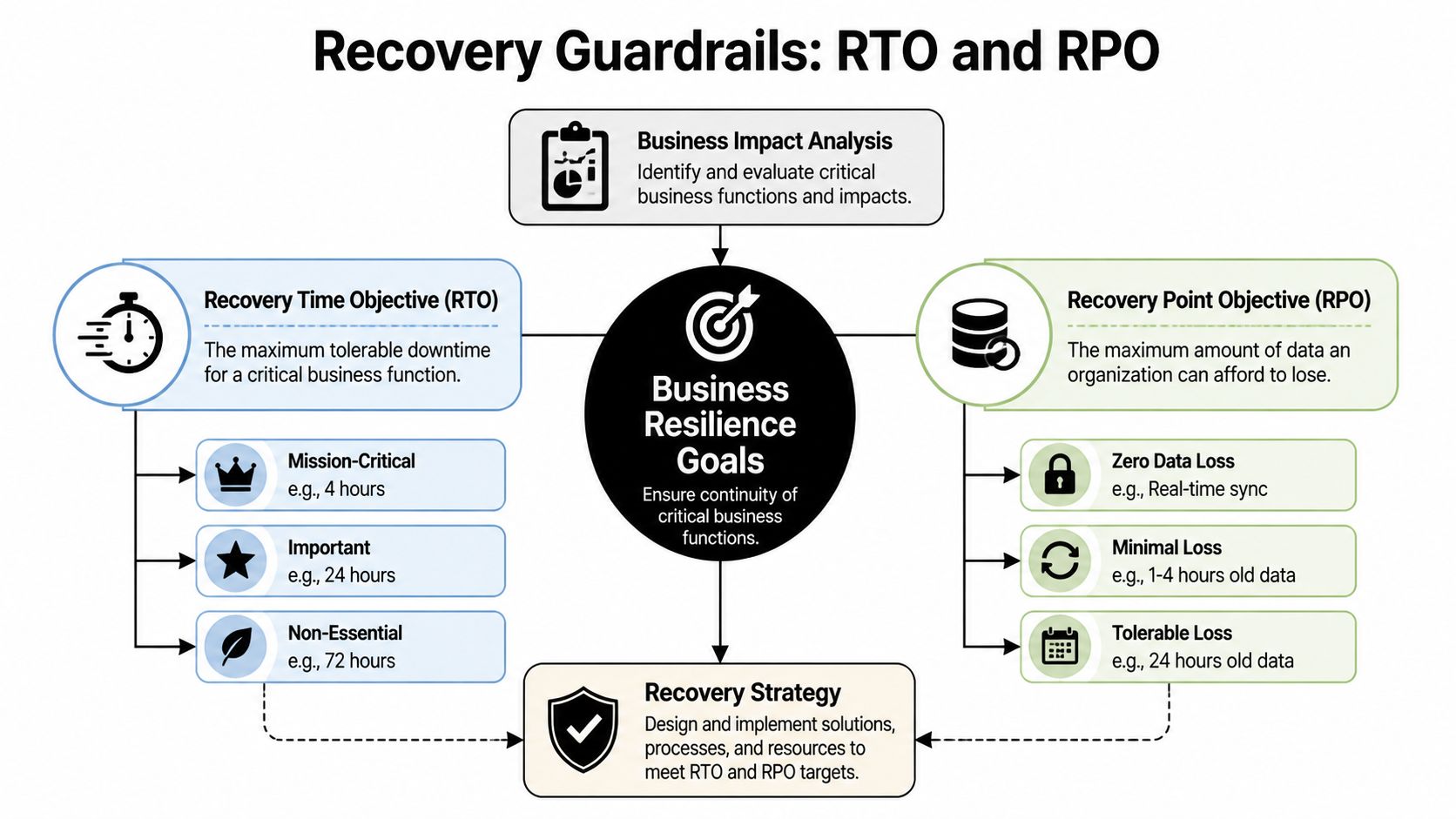
After the BIA, you need two guardrails that make recovery decisions real: RTO and RPO.

Most business owners don’t need a technical lecture here. They need plain language.

Recovery Time Objective (RTO) is the maximum downtime you can tolerate for a critical function.
Recovery Point Objective (RPO) is the maximum data loss you can tolerate.

If your scheduling system can be down for two hours before patients start leaving, that’s your RTO conversation. If your bookkeeping team can only afford to lose a few minutes of transactions before records become unreliable, that’s your RPO conversation.

A diagram illustrating recovery guardrails including Recovery Time Objective, Recovery Point Objective, and Business Resilience Goals.

A simple way to think about each one

Use these analogies with your leadership team:

  • RTO means, “How long can this be unavailable before the business takes unacceptable damage?”
  • RPO means, “How much work are we willing to re-create if the latest data can’t be recovered?”

A law office may tolerate a longer outage for archived records than for active case files. A veterinary clinic may need near-current appointment and treatment data, even if a marketing platform can wait until tomorrow. A construction or engineering firm may survive temporary email disruption but not the loss of project drawings under active revision.

That’s why one company doesn’t have one RTO or one RPO. Each critical function gets its own.

Use ranges that match reality

If you’re deciding values for the first time, don’t guess based on optimism. Base them on actual customer expectations, contractual obligations, and workflow pain.

This simple model helps:

Priority level Example business function RTO mindset RPO mindset
Mission-critical Scheduling, payments, patient data, active client files Restore very quickly Lose very little data
Important Internal collaboration, reporting, standard admin tasks Restore same day if possible Some data re-entry may be acceptable
Lower priority Archive systems, old reference files Can wait longer Older restore points may be workable

A lot of teams discover their expectations and budget don’t match. They want near-instant recovery on every system while storing backups in ways that won’t support it. That’s normal. The point of setting RTO and RPO is to force that trade-off into the open.

If the business says a system must return quickly, the technology, staffing, and vendor choices must support that promise.

Where owners usually misjudge risk

The common mistake isn’t setting targets. It’s setting targets without tracing dependencies.

A firm may say, “We need Microsoft 365 back in one hour.” Fine. But can staff sign in if multi-factor authentication is affected? Can they use phones if internet service is unstable? Can remote staff reach files if VPN access relies on a single appliance in one office?

That kind of mapping helps reduce hidden risks before a real incident exposes them.

Another issue is setting the same recovery target for everything. That usually wastes money on low-priority systems and underprotects the few systems that matter most.

Why sub-four-hour recovery matters

For service-based businesses, faster recovery often means preserved trust. Organizations that successfully meet an RTO/RPO of less than 4 hours achieve 30% faster recovery post-cyber incident, according to Travelers’ business continuity planning guidance. That doesn’t mean every tool in your environment needs that target. It means your critical functions deserve serious attention.

A practical way to finish this step is to ask each department head:

  • What’s the longest this process can be unavailable?
  • What’s the oldest usable version of the data?
  • What manual workaround exists while systems are down?
  • Who signs off if recovery takes longer than planned?

Those answers become the guardrails for everything that follows. Backup design, cloud architecture, incident response, vendor contracts, and communications all depend on them.

Building a Cybersecurity-Focused Recovery Strategy

A modern continuity plan has to assume one uncomfortable truth. The disruption may start as a security event, not a weather event.

That changes the recovery strategy. If ransomware, credential theft, or a data breach is involved, you can’t just power everything back on and hope for the best. You have to contain the incident, verify system integrity, communicate carefully, and restore in a sequence that doesn’t reintroduce the same threat.

A professional IT specialist working on a computer displaying cyber recovery strategy and security data metrics.

Build around the most likely disruptions

For Central Florida businesses, useful planning usually centers on a short list:

  • Ransomware or account compromise
  • Hurricane-related office closure
  • Extended internet or power disruption
  • Critical vendor outage
  • Accidental deletion or system misconfiguration
  • Exposure of patient, client, or financial data

These aren’t equal in impact, and they don’t trigger the same response. A weather closure may require relocation and remote work activation. A ransomware event may require isolation, forensic review, legal guidance, and staged restoration from known-good backups.

That’s why a recovery strategy should split incidents into categories instead of pretending one checklist covers everything.

Incident response comes first

If the disruption appears security-related, your first phase isn’t restoration. It’s control.

That usually means:

  1. Confirming the scope of affected systems and accounts
  2. Containing access by disabling compromised credentials, isolating devices, or segmenting network access
  3. Preserving evidence so you don’t erase the trail before understanding what happened
  4. Making a leadership decision on shutdown, communication, and recovery order

A surprising number of businesses restore too early. They bring a server back online before confirming whether admin credentials were stolen, whether remote access tools were abused, or whether backups are clean. That often turns one bad day into a week of repeated outages.

If your team hasn’t documented escalation paths, use a practical incident response planning guide to define who gets called, who approves business decisions, and when outside counsel or cyber insurance should be notified.

A recovery plan that skips containment can put infected systems back into production faster. It doesn’t put the business back into a safe state.

Communication has to be prewritten

During an outage, leaders waste time drafting messages they should have prepared months earlier.

Your continuity plan should include message templates for:

  • Employees, so they know whether to work remotely, pause work, or switch to manual procedures
  • Customers or patients, so they know whether appointments, deadlines, or services are affected
  • Vendors, so they can assist with restoration and validate dependencies
  • Regulated stakeholders, where legal or compliance notification may be required

For medical, legal, and financial firms, wording matters. Don’t speculate. Don’t promise timelines that haven’t been verified. Don’t let ten people give ten different explanations.

A good communication matrix includes the audience, sender, delivery method, approval path, and a backup channel if email is unavailable.

Choose backup and recovery architecture based on risk

There isn’t one “best” backup setup for every business. The right design depends on your RTO, RPO, budget, application stack, and local operating realities.

Here’s a useful comparison:

Approach Works well when Main concern
Cloud-heavy recovery Staff can work remotely and apps are mostly SaaS-based Internet dependence becomes critical
On-premise recovery Specialized local systems or equipment must stay in office Power, flooding, and physical site disruption
Hybrid recovery You need both local speed and offsite resilience More moving parts to document and test

For a dental office with imaging and practice software tied to local devices, a hybrid approach may make sense. For a law firm living in Microsoft 365, Clio, and cloud document storage, cloud-first continuity may be cleaner. For an architecture or engineering firm with large design files and specialized workstations, recovery often needs both local performance and offsite protection.

The key is sequencing. Decide which systems restore first, which user groups regain access first, and what “safe to use” means before reconnecting restored assets.

Map dependencies before an outage maps them for you

A lot of businesses know their critical applications. Fewer know the supporting pieces those applications need.

Document dependencies like these:

  • Identity and MFA needed to sign in
  • Internet and DNS availability needed to reach cloud services
  • Line-of-business databases that support front-end apps
  • Endpoint protection and patching needed before restored devices go back to users
  • Third-party APIs or payment systems that keep transactions moving

At this stage, continuity and security stop being separate topics. If you restore a payment platform but ignore endpoint health, access controls, or stale credentials, you’ve restored exposure, not operations.

For leaders who want a broader framework, these strategies for robust cyber security are helpful because they connect prevention, detection, and recovery instead of treating them as separate projects.

Make cyber resilience the centerpiece

The old model assumed business continuity meant weather, fire, or hardware failure. That model is outdated. A 2025 IBM report indicates cyber incidents caused 43% of global downtime, with SMBs averaging $25,000 per minute in losses, as summarized by Swimlane’s business continuity overview. Even if your own loss profile differs, the direction is clear. Cyber events now sit at the center of continuity planning.

That has practical implications:

  • Backups need separation and verification
  • Identity systems need stronger controls
  • Endpoint visibility matters during recovery
  • Threat hunting and monitoring shorten the time between compromise and action
  • Compliance review should happen before, not after, the incident

For non-technical business owners, this is usually the turning point. They realize the continuity plan can’t be owned by office administration alone. It needs operational leadership, IT expertise, and security discipline working from the same playbook.

Activating and Maintaining Your Continuity Plan

A continuity plan that hasn’t been tested is mostly theory.

That sounds blunt, but it’s the truth. The first live incident is the worst possible time to discover that key phone numbers are outdated, backup credentials are inaccessible, one software vendor never documented after-hours support, or nobody knows who has authority to switch operations to manual mode.

A professional business team discussing their project progress during a review meeting in an office setting.

Test in layers, not all at once

The best testing programs start small and get progressively more realistic.

A simple sequence works well:

  • Document review to confirm contacts, systems, vendors, and escalation paths are current
  • Tabletop exercise where leaders walk through a scenario such as ransomware during business hours or a hurricane closure before payroll
  • Technical recovery drill where backups, account recovery steps, and alternate access methods are tested
  • Operational exercise where a team performs a short manual process or remote work shift under simulated outage conditions

These exercises reveal different weaknesses. A tabletop may uncover decision confusion. A restore drill may uncover bad assumptions about backup timing or application compatibility. An operational drill may expose process bottlenecks that IT can’t solve on its own.

Assign roles with names, not departments

One of the fastest ways a plan fails is vague ownership.

Don’t write “IT handles systems” and “management handles communication.” Write actual names and alternates. If a hurricane affects one office and a ransomware event hits while your practice administrator is on vacation, the plan still has to function.

A useful role list includes:

Role Primary responsibility
Executive decision-maker Authorizes major business actions and outside notifications
Technical lead Coordinates containment, recovery, and vendor escalation
Operations lead Directs manual workarounds and staff workflow
Communications lead Approves and sends staff and customer updates
Compliance or legal contact Reviews notification obligations and recordkeeping

Field note: Teams respond better when each person knows the first action they own in the first hour.

That first-hour clarity matters more than long procedural prose.

Review after every change that matters

A continuity plan should change when the business changes.

That includes:

  • New software platforms
  • Office relocation or expansion
  • Staff turnover in key roles
  • Vendor changes
  • New compliance obligations
  • Changes to remote work or multi-location operations

Medical practices often add systems over time without updating continuity documents. A dental group adds imaging software. A med spa adds a payment platform. A legal office changes document storage providers. The plan gradually becomes stale, then breaks loudly.

This is one reason testing matters so much. Inadequate plans are common, with 33% failing during actual outages and 35% of disaster recovery tests failing, according to the State of Business Continuity Preparedness 2023. Those failures usually aren’t caused by lack of effort. They’re caused by drift between the written plan and the actual environment.

Tie maintenance to business rhythm

Don’t rely on memory. Tie plan maintenance to existing business checkpoints.

Good triggers include:

  • Quarterly leadership reviews
  • Annual insurance renewal
  • Compliance audits
  • Post-incident reviews
  • Major technology projects

For healthcare and other regulated industries, this is especially important. A tested continuity process supports stronger documentation around operations, access, recovery, and response. It also gives insurers and auditors more confidence that your business can manage an interruption without improvising every critical decision.

The goal isn’t paperwork. The goal is repeatable response under pressure.

Partnering for Resilience Why Florida SMBs Choose Managed IT

Most small and mid-sized businesses don’t struggle because they don’t care about continuity. They struggle because continuity crosses too many lanes. Operations owns the workflows. Leadership owns business decisions. Vendors own pieces of the stack. Internal IT, if it exists, is already busy. Security needs specialized attention. Nobody fully owns the whole thing.

That ownership gap is where many plans break down.

Industry data summarized by BCM Metrics says 70% of BCP failures are due to weak ownership, but shifting this responsibility to a co-managed IT partner can improve test compliance by 80% and guarantee uptime, as discussed in this guide on creating a business continuity plan. Even if a business handles some technology internally, shared accountability often works better than leaving continuity as a side project.

Build versus buy is the real decision

For a Florida SMB, the practical question isn’t whether continuity matters. It’s who is going to keep the plan current, test it, coordinate vendors, document systems, and respond after hours when something breaks.

Building all of that in-house can work if you have mature internal IT, security operations capability, documented infrastructure, and enough management time to run exercises. Many firms don’t.

That’s why managed IT and co-managed models appeal to law firms, medical groups, engineering firms, and community organizations. They need someone to help maintain the operating discipline behind the plan, not just write the document.

What a good partner changes

A strong managed partner usually improves continuity in four ways:

  • Ownership becomes clear because testing, documentation, and follow-up stop floating between departments
  • Technical execution improves because backup validation, endpoint controls, vendor coordination, and recovery procedures are managed consistently
  • Leadership gets usable reporting instead of fragmented updates from multiple providers
  • Costs become more predictable because the business plans around prevention and support instead of repeated emergency projects

The best result isn’t “outsourcing responsibility.” It’s creating a structure where the business owner can focus on clients, staff, and growth while a technical partner helps keep resilience operational.

For Florida companies weighing that decision, this overview of why to choose managed IT services is a useful starting point.

Frequently Asked Questions About Business Continuity Planning

Is a business continuity plan the same as a disaster recovery plan

No. A disaster recovery plan focuses mainly on restoring IT systems, data, and infrastructure. A business continuity plan is broader. It covers how the business keeps operating during disruption, including staff responsibilities, customer communication, vendor coordination, manual workarounds, and recovery priorities.

Can I use a template and fill in the blanks

A template can help you start, especially if you’ve never documented continuity before. It won’t be enough on its own. Generic plans usually miss your actual software stack, approval paths, vendor dependencies, and compliance needs. The useful part is the customization, not the download.

How long does it take to create a plan

That depends on the size of the business, how many systems are involved, and how clearly your workflows are already documented. A small practice with a straightforward environment can move faster than a multi-location firm with specialized software and multiple vendors. The time usually goes into interviews, dependency mapping, and testing, not writing.

What if my business is too small for a formal plan

Small businesses usually have less slack, not more. Fewer staff, fewer backups in roles, and tighter cash flow make interruptions harder to absorb. Even a lean continuity plan is better than relying on memory during a crisis.

What should I do first if I’m starting from scratch

Start with the business impact analysis. Identify your most important functions, the software and vendors behind them, who owns each process, and how long each can be down before the business is in trouble. That creates the foundation for every recovery decision that follows.


If your business in Orlando, Winter Springs, or North Texas needs help turning continuity planning into something operational, Cyber Command, LLC can help. Their team supports managed IT, co-managed IT, 24/7 SOC coverage, incident response, compliance support, and recovery planning so leaders can stop reacting to outages and start building resilience deliberately.

10 Business Continuity Plan Examples for 2026

Your Business Stops. What's the Next Move?

A hurricane warning hits Orlando. Staff start texting about school closures, road conditions, and whether the office will open tomorrow. Or a ransomware alert lands on a screen in the middle of a normal workday, and suddenly nobody can open files, process invoices, or access patient records. In that moment, most businesses learn whether they have a real continuity plan or just a folder with good intentions.

That gap is bigger than most owners think. Only 61% of businesses globally have a business continuity plan, and just 26% have an actual disaster recovery plan in place, according to business continuity statistics compiled by Invenio IT. Confidence is high, but preparation often isn't. For small and mid-sized businesses in Central Florida, that disconnect is dangerous. Hurricanes, power loss, vendor outages, and cyber incidents don't wait for a convenient week.

Good business continuity plan examples don't read like policy manuals. They tell your team exactly who makes decisions, which systems come back first, how clients get updated, and what work continues manually when technology fails. They also reflect local reality. An Orlando law firm doesn't face the same disruption profile as a Winter Springs dental office, and neither should use a generic template copied from a large enterprise.

The strongest plans also assume that internal teams will need help. During a real incident, someone has to investigate alerts, isolate devices, restore backups, coordinate vendors, and document what happened. That's where a managed IT and cybersecurity partner matters. A partner like Cyber Command gives businesses in Central Florida and North Texas the missing operational layer between a written plan and an executed recovery.

Below are 10 practical business continuity plan examples built around the kinds of risks local businesses face.

1. Ransomware Attack Recovery Plan for Professional Services Firms

Law firms, CPA firms, architects, and engineering offices all share the same weakness. They hold high-value data, rely heavily on file access, and usually can't afford much downtime.

A ransomware continuity plan for professional services starts with a blunt assumption. If one workstation is encrypted, the issue may already be broader than one workstation. The first actions should be isolation, evidence preservation, backup validation, and client communication control. Not everyone should speak for the firm.

A leather binder labeled Client Files sits on a desk next to a laptop with a lock icon.

What works in practice

The firms that recover best usually define roles ahead of time:

  • IT lead: Isolates endpoints, disables compromised accounts, and coordinates forensic review.
  • Managing partner or owner: Makes business decisions on client service and authority to activate the plan.
  • Compliance or legal contact: Reviews reporting obligations and documentation.
  • Client communications owner: Sends controlled updates so staff don't improvise.

Many generic business continuity plan examples fall short here. They talk about "restore from backup" as if that's one click. In reality, you need to know which file sets matter first, where the clean backups live, how you verify integrity, and which systems can't be trusted until the investigation is complete.

Practical rule: If your backup restore procedure hasn't been tested by restoring actual client matter files, financial workpapers, or project drawings, you don't know if recovery will work.

A strong ransomware plan also documents where regulated or sensitive data lives. Shared drives, Microsoft 365, local desktops, line-of-business apps, and cloud document systems all need to be mapped before an incident.

Cyber Command's guidance on ransomware incident response paths to effective recovery fits directly into this type of plan because the main challenge isn't only stopping the attack. It's restoring trustworthy operations without making the damage worse.

Common trade-off

Shutting down broad access quickly can interrupt billable work for more people than necessary. Waiting too long can spread the damage. For professional services firms, the better choice is usually fast containment with a short-term manual workflow, especially when client confidentiality is at stake.

2. Managed IT Provider Failover Plan for Medical Practices

A medical practice has a different threshold for disruption. If the phones are down and the EHR is unavailable, the issue isn't just inconvenience. Patient care, scheduling, billing, and documentation all start to break at once.

The most useful healthcare continuity plans build a bridge between digital failure and safe manual operation. The Santa Cruz long-term care continuity template is a strong example because it requires immediate assessment of medical records, purchasing contracts, major equipment, pharmaceuticals, and staffing before deciding whether care can continue onsite or needs to shift elsewhere. You can see that structure in the Santa Cruz Health continuity plan template.

What the plan should contain

For a dental office, veterinary clinic, med spa, or orthodontic practice, the failover plan should answer five operational questions fast:

  • Patient access: How do staff confirm today's appointments if the scheduling system is unavailable?
  • Clinical records: How do providers access essential patient information in a HIPAA-conscious way?
  • Treatment flow: Which procedures continue, and which get postponed?
  • Payments: How are charges documented if the normal billing platform is down?
  • Escalation: Who calls the EHR vendor, managed IT provider, and telecom support?

Printed downtime procedures still matter here. So do local copies of critical contacts. A surprising number of small practices store emergency information only inside the same systems that fail during an outage.

Buckland Medical Practice offers another practical signal. Its continuity planning assumed operations might need to continue at 25% staff capacity during a pandemic response, with annual review by the practice manager and offsite hard and electronic copies of the plan. That kind of staffing assumption, shown in the Buckland Medical Practice business continuity plan, is useful even outside healthcare because it forces leaders to define minimum viable operations.

Keep printed downtime instructions in treatment areas, not just at the front desk. Clinical teams need them where care happens.

What doesn't work

A medical office can't rely on "call IT and wait." The plan has to spell out manual charting, paper timekeeping, patient notification, and EHR vendor escalation. In Central Florida, where storms can combine power, internet, and staffing issues in the same day, a managed IT failover plan needs both cyber and operational thinking.

3. Multi-Location Network Synchronization Plan for Distributed Teams

When a business has offices in Orlando, Winter Springs, and Plano, continuity stops being a single-site question. It becomes a coordination problem.

A multi-location synchronization plan needs to document which office can absorb which work, which systems are cloud-based, which are site-dependent, and what breaks if one location loses internet or local infrastructure. Many distributed teams assume Microsoft 365 or a cloud file platform solves the problem by itself. It doesn't. Shared access helps, but only if identity, endpoint access, permissions, and communication paths all still function.

The mistake most teams make

They map systems, but not dependencies.

If the Orlando office loses connectivity during a storm, can the Plano team answer phones, access current files, and continue work without relying on a line-of-business app that still routes through the affected site? If staff can log in remotely, do they also have the right VPN or identity controls? If one office becomes the temporary hub, who approves the change?

A useful plan should name:

  • Primary and backup operating site: Which office takes over first.
  • Critical applications by dependency: Which apps rely on local servers, cloud services, telecom, or a specific ISP.
  • Cross-site role transfers: Which tasks move to another office and who owns them.
  • Communication path: How location leads coordinate if email or Teams is unstable.

This is one of the most practical business continuity plan examples for firms with growth plans, because expansion often creates hidden complexity. One office may still host legacy file shares. Another may hold the better internet connection. A third may have the only employee who understands a niche process.

What mature teams measure

Databarracks reporting, cited by Revenue Memo, found that businesses with tested BCPs are 2.5x more likely to recover quickly from disasters. The same summary notes that 90% maintain established communication plans and 74% experience fewer disruptions in tested environments, as shown in these business continuity statistics from Revenue Memo.

That lines up with what works on the ground. Multi-location resilience depends less on having a binder and more on rehearsing cross-site takeover, access control, and communication handoffs.

4. Cloud Service Provider Dependency Recovery Plan

At 8:15 a.m. on a Monday in Orlando, staff sign into Microsoft 365 and get nowhere. Email is down. Shared files do not load. The accounting team cannot reach QuickBooks Online. For a business that runs almost everything in the cloud, a vendor outage now looks like a company-wide interruption.

That is why a cloud service provider dependency recovery plan has to do more than name your SaaS tools. It should identify which provider failure stops revenue, which team leader makes the call to switch to offline procedures, how long the business can operate without each platform, and what Cyber Command does during the outage. In Central Florida, that planning matters even more during hurricane season, when a regional power or internet issue can hit your office at the same time a cloud platform is unstable.

A server unit on a wooden desk with two floating cloud icons connected by glowing cables.

What belongs in the plan

A useful cloud dependency plan should cover five practical areas:

  • Application tiering: Separate systems that stop payroll, scheduling, dispatch, patient communication, or billing from tools that can wait a day.
  • Offline operating method: Define how staff handle appointments, approvals, service tickets, and customer communication if the platform is unavailable.
  • Data export schedule: Record which reports, contact lists, financial records, and job data are copied out of the platform, how often, and where they are stored securely.
  • Vendor escalation path: Include support portals, account reps, status pages, and the internal decision-maker who pushes the escalation.
  • Recovery and reconciliation: State how offline work gets entered back into the cloud system after service returns, and who checks for missed records or duplicate entries.

The trade-off is straightforward. Standardizing on one cloud ecosystem keeps administration simpler and usually lowers support costs. It also creates concentration risk. If identity, email, file storage, and workflow tools all sit with one provider, a single outage can freeze large parts of the business.

For many small and midsize companies, the answer is not multi-cloud everywhere. That often adds cost, training overhead, and more failure points. A better fit is usually one primary cloud stack, independent backups, documented exports, and a tested manual fallback. Cyber Command can help businesses build that model through its approach to cloud business continuity and disaster recovery, with clear recovery roles for both the client and the MSP during provider-side incidents.

Monitoring also matters. If your team relies on a provider's public status page alone, response starts late. Cyber Command should be tied into alerting, login failure patterns, backup verification, and log review through tools such as Security Incident and Event Management (SIEM) systems. That gives leadership a faster way to tell the difference between a provider outage, an identity problem, and a local connectivity issue.

The best plans are tested against a real scenario. For example, if a Winter Springs medical office loses access to its cloud scheduling and messaging platform for six hours, the plan should show how front-desk staff confirm appointments, how clinicians document visits, how managers communicate with patients, and how Cyber Command validates data integrity before normal operations resume. That level of detail turns a generic template into a working recovery plan.

5. Cybersecurity Incident Response and Data Breach Recovery Plan

At 8:10 a.m. on a Monday, an Orlando accounting firm can still answer phones, send a few emails, and log into parts of its system, while an attacker is already pulling mailbox data and client files in the background. That is what makes breach response different from a straight outage. Operations may continue just long enough to create bigger legal, financial, and reputational damage.

A usable breach recovery plan sits inside the business continuity plan because the company has to do two jobs at once. It has to contain the incident and keep critical services running. For Central Florida businesses, that usually means deciding which client-facing functions stay online, which systems get isolated, who approves outside counsel or cyber insurance notice, and when Cyber Command takes control of technical containment and evidence preservation.

The practical model

The best plans do not treat every alert the same. They define severity levels, decision authority, evidence rules, and communications steps before an incident starts. A minor malware event should not trigger the same response as suspected data exfiltration from Microsoft 365, a compromised admin account, or a ransomware detonation on a file server.

That structure prevents two expensive mistakes. Teams either dismiss a breach as "an IT issue" and lose valuable time, or they escalate every noisy alert and exhaust staff.

Detection matters just as much as documentation. If the first sign of a breach is a user complaint or a locked account, response is already behind. Continuous log review and escalation workflows supported by Security Incident and Event Management (SIEM) systems give Cyber Command and leadership a faster way to separate suspicious behavior from confirmed business risk.

For a Winter Springs law office or healthcare-adjacent practice, the plan should spell out four tracks that run in parallel. One track contains the threat. Another preserves evidence for forensics, insurance, and possible regulatory review. A third keeps priority business functions running through known-clean devices, alternate credentials, or temporary manual workarounds. The fourth manages communication with employees, customers, legal counsel, and carriers so nobody sends premature or inaccurate statements.

A breach plan fails when it focuses on notification deadlines and ignores the harder operational question: how will the business serve clients while investigators are still determining scope?

What doesn't work

Many SMBs assign one internal manager to coordinate IT, legal review, vendor outreach, staff instructions, and customer communication. In practice, that breaks down fast. During a real incident, leadership needs an outside partner to handle containment, forensic coordination, log preservation, recovery sequencing, and documentation while ownership stays focused on business decisions.

Generic breach templates also miss local operating realities. In Central Florida, a company may already be dealing with storm disruptions, remote staff, or office closures when a cyber event hits. The plan should account for that overlap. If internet access is unstable, if key staff are working from home, or if a hurricane watch is already affecting office operations, Cyber Command needs predefined authority to isolate systems, approve fallback workflows, and coordinate recovery without waiting on a full in-person response team.

6. Network Outage Contingency Plan for Industrial and Field-Service Operations

Industrial and field-service businesses don't just lose convenience when the network drops. They lose dispatch visibility, inventory flow, job updates, equipment telemetry, and often the ability to coordinate crews in the field.

This plan has to be built around degraded operations. Not ideal operations.

A laptop showing an incident response checklist on a wooden meeting table with an evidence drive.

What the field needs first

If a dispatch system or WAN circuit fails, the team should already know which information lives locally on devices and which procedures switch to voice and paper. That means preloading route details, customer contacts, equipment notes, and service instructions onto laptops or tablets before crews leave the office.

For industrial firms with multiple facilities, vendor dependency also enters the picture fast. CloudOrbis highlights a poorly served area in many continuity examples: third-party vendor dependency management for multi-location industrial operations, including contingency SLAs, network diagram mapping, and quarterly review discipline in these business continuity plan examples focused on vendor risk.

That gap is real in practice. Field-service organizations often know their primary ISP and software vendors, but they haven't documented fallback process owners, alternate routing, or how long each site can function without central systems.

What a realistic outage plan includes

  • Offline dispatch packet: Daily schedule, addresses, contact names, and job priorities.
  • Communication fallback: Group SMS, radio, cellular voice trees, and site-level call scripts.
  • Bandwidth triage: Which systems stay up if connectivity is degraded.
  • Local operations mode: How each facility receives, completes, and records work when the central platform is unavailable.

The trade-off is speed versus consistency. Manual workarounds keep crews moving, but they create reconciliation work later. That's acceptable. Total stoppage is usually worse.

For North Texas manufacturers and Central Florida service businesses, the best continuity plans assume at least one future outage will involve both connectivity and cybersecurity concerns at the same time.

7. Email and Communication System Failover Plan

Most businesses don't notice how much operational logic lives inside email until Exchange, Microsoft 365, Teams, Slack, or the phone system goes unavailable.

Approvals stall. Customer updates stop. Internal confusion spreads faster than the original outage.

The plan that actually helps

An email and communication failover plan should be short, obvious, and rehearsed. Staff shouldn't need a 30-page document to know what to do when inboxes won't load.

At minimum, define:

  • Primary alert method: Who sends the first outage notice and through what non-email channel.
  • Alternate channels: SMS groups, personal email, a backup messaging app, or voice bridge.
  • Client communication trigger: Which outages require customer-facing status updates.
  • Archived access process: How leaders retrieve critical prior communications if the system is unavailable.
  • Phone fallback: Cellular routing, alternate answering procedures, or emergency voicemail updates.

This is one area where tested communication discipline matters as much as technology. Databarracks data summarized by Revenue Memo notes that 90% of organizations with tested continuity plans maintain established communication plans. That's one reason communication planning deserves its own entry among business continuity plan examples, even though many companies bury it inside a larger IT document.

What I see go wrong

Teams overbuild technical failover and underbuild communication ownership. Nobody knows who drafts the first customer message. Sales sends one thing, operations sends another, and support waits for direction.

If your team can't tell employees and customers what's happening within the first phase of an outage, the technical recovery will feel slower than it is.

For local businesses around Orlando and Winter Springs, communication outages often overlap with weather disruption. That makes mobile-first communication planning more important than desktop-first assumptions.

8. Compliance and Regulatory Reporting Recovery Plan

A continuity plan for regulated work has a different purpose. It isn't only about restoring systems. It's about preserving evidence, deadlines, and defensible records while systems are impaired.

Law firms, CPA firms, healthcare groups, and financial organizations need a compliance recovery layer that says who documents what, where records are stored during an outage, and how filing obligations are tracked if the normal workflow platform is unavailable.

The discipline regulated firms need

This plan should identify every compliance-dependent process that can't "wait until systems come back."" Think audit trails, patient access logs, legal hold records, document retention, and required submissions tied to a calendar.

Good planning here usually includes:

  • Manual documentation templates: Incident logs, access logs, filing records, and exception approvals.
  • Regulatory calendar backup: An offline or independently accessible version of critical deadlines.
  • Escalation sequence: Compliance officer, outside counsel, managed IT/security lead, and business owner.
  • System-of-record fallback: Where the temporary authoritative record lives while primary systems are unavailable.

Many businesses assume compliance resumes after IT recovers. That's backwards. The organization has to maintain a defensible process during the disruption itself.

One practical way to improve this is to align continuity tasks with control mapping. Cyber Command's approach to compliance mapping for businesses a guide on GDPR and HIPAA is useful because it turns abstract obligations into operational steps tied to systems, data, and owners.

What works better than generic templates

The best compliance continuity plans don't just cite frameworks. They connect actual business systems to actual obligations. In a healthcare office, that means documenting downtime charting and audit preservation. In an accounting firm, it means preserving client workpaper integrity and approval history even if the normal platform is unavailable.

9. Vendor and Third-Party Dependency Management Plan

A vendor outage can shut down your business even when your own network is healthy. Payment processor issues, telecom disruptions, SaaS failures, and security tool outages all fit here.

This is one of the most neglected business continuity plan examples because many SMBs treat vendors as fixed utilities instead of operational dependencies that need oversight and fallback.

What to document before the outage

Start with a simple truth. Your continuity plan is only as strong as the vendors behind your critical services.

Map each critical vendor by business function, not by invoice category. That means identifying which partner supports payments, internet, cloud identity, endpoint protection, backup, phones, line-of-business software, and physical access. Then assign an internal owner for each relationship.

CloudOrbis points out that many continuity examples still underserve multi-location industrial and field-service organizations that need better vendor contingency planning, including QBR-driven review and failover alignment with network diagrams. That observation matters well beyond industrial firms because the same problem shows up in professional services and healthcare.

A practical vendor continuity plan should include:

  • Escalation path: Named contacts, after-hours support route, and contract reference.
  • Fallback vendor or workaround: Not every service needs a second vendor, but every critical function needs a backup path.
  • Dependency notes: Which internal systems fail if that vendor is unavailable.
  • Review schedule: Vendor risk shouldn't be reviewed only during renewal month.

Trade-offs worth making

Dual-vendor strategies sound attractive, but they add cost and administration. For many SMBs, the better move is selective redundancy. Keep true backup options for the few vendors whose outage would stop revenue, care delivery, or security operations.

In practical terms, that's where an MSP/MSSP like Cyber Command becomes part of the continuity plan itself. A good partner doesn't just fix tickets. They maintain vendor relationships, document dependencies, run reviews, and help leaders avoid finding out during a crisis that nobody knows who owns the problem.

10. Physical Facility Disruption and Disaster Recovery Plan

For Central Florida businesses, facility disruption planning can't be generic. Hurricanes, flooding, prolonged utility problems, and building access issues are operational realities. The same goes for severe weather events affecting North Texas locations.

A physical disruption plan should answer a hard question quickly. If the building is unusable tomorrow, what work continues, from where, on which systems, and under whose authority?

The local version of the plan

The best plans separate life safety from business recovery, then reconnect them in sequence. Evacuation and accountability come first. Operational relocation comes next.

That means documenting:

  • People protection: Evacuation routes, emergency contacts, and accountability checks.
  • Alternate work location: Remote work, temporary office, or another branch.
  • Critical facility systems: Power, HVAC, telecom, networking, access control, and any equipment that can't sit idle.
  • Records and insurance access: Offsite copies of key documents and claim contacts.
  • Public communication: Customer updates, vendor notifications, and reopening messaging.

Databarracks data summarized by Revenue Memo notes that software failures, cybersecurity incidents, networks, and human error all contribute heavily to unplanned downtime. Physical disruption plans need to account for that overlap. A hurricane doesn't just close a building. It can also trigger ISP failure, remote access strain, and security gaps as staff connect from everywhere at once.

If the event damages the property itself, organizations often need outside support such as commercial restoration services while IT and security teams focus on restoring operations.

What doesn't work in Florida

A plan that assumes everyone will work from home is incomplete. Staff may lose power, internet, or safe access at the same time. The better approach is tiered continuity: remote where possible, alternate site for essential roles, manual fallback where necessary, and managed IT/security coordination throughout.

Comparison of 10 Business Continuity Plan Examples

Plan Implementation complexity Resource requirements Expected outcomes Ideal use cases Key advantages
Ransomware Attack Recovery Plan for Professional Services Firms High, specialized IR workflows and regulatory steps Immutable backups, forensic partners, legal/compliance and trained IT staff Fast, compliant data restoration and regulated breach notification Law firms, CPA firms, architectural and engineering consultancies Preserves client trust and compliance; clear decision frameworks
Managed IT Provider Failover Plan for Medical Practices Medium, HIPAA-focused failover and manual workflows EHR vendor coordination, printed templates, staff training, secondary connectivity Continued patient care, maintained HIPAA compliance, reduced cancellations Dental offices, clinics, veterinary and medical spas Protects patient safety and billing continuity; clear escalation
Multi-Location Network Synchronization Plan for Distributed Teams High, multi-site replication and complex networking Multi-region cloud or on-prem infra, network engineers, monitoring tools Geographic redundancy, seamless failover, consistent access across sites Multi-office professional services, regional operations, distributed teams Scalable redundancy; supports business growth and flexibility
Cloud Service Provider Dependency Recovery Plan Medium, vendor procedures plus local backup processes Backup storage, extraction scripts, SLA docs, vendor contacts Reduced single-provider risk, faster recovery with local failsafes Any cloud-dependent orgs, especially accounting/finance Clear vendor escalation paths and local backup protection
Cybersecurity Incident Response and Data Breach Recovery Plan High, 24/7 SOC integration and forensic coordination SIEM/SOC, forensic partners, legal/comms teams, incident playbooks Rapid detection, containment, regulatory reporting and remediation All industries; critical for healthcare, finance, professional services Limits breach impact and improves long-term resilience
Network Outage Contingency Plan for Industrial and Field-Service Operations Medium, local segmentation and offline app support Mobile hotspots, MDM, offline-capable apps, field training Continued field operations, equipment safety, reduced dispatch loss HVAC/plumbing, manufacturing, utilities, field service orgs Enables offline work and protects revenue and safety
Email and Communication System Failover Plan Low–Medium, alternate channels and failover rules Backup mailboxes, SMS/status page, VoIP cellular backup, contact lists Maintained stakeholder communication; minimal disruption Distributed teams and client-facing organizations Quick to implement and low cost; preserves critical communications
Compliance and Regulatory Reporting Recovery Plan Medium, manual reporting and regulatory coordination Regulatory contacts, filing templates, compliance/legal expertise Meets filing deadlines, preserves audit trails, avoids penalties Financial services, accounting firms, law firms, regulated entities Protects regulatory standing and demonstrates good-faith efforts
Vendor and Third-Party Dependency Management Plan Medium, mapping, SLAs and contract workarounds Vendor SLAs, alternative vendors/contracts, monitoring and reviews Reduced vendor single points of failure and faster escalation Organizations dependent on SaaS, payment processors, telecoms Improves vendor accountability and continuity options
Physical Facility Disruption and Disaster Recovery Plan Medium–High, logistics, alternate sites and safety procedures Alternative facilities, remote-work infra, insurance, emergency supplies Employee safety, business resumption from alternate locations All facility-based organizations, especially in disaster-prone regions Protects people and enables operational recovery with insurance support

From Plan to Resilience Your Next Steps

These business continuity plan examples show a pattern. The plans that hold up in real incidents aren't the longest. They're the clearest, the most tested, and the most connected to how the business runs.

That's especially true for small and mid-sized businesses in Orlando, Winter Springs, and the surrounding Central Florida market. Most don't have a deep internal bench for security operations, infrastructure recovery, compliance interpretation, vendor escalation, and user support all at once. During a disruption, the owner, office manager, or operations lead often becomes the default incident commander whether they're ready or not.

That's why a continuity plan can't stop at documentation. It has to define execution.

A usable plan identifies your critical services, your minimum operating mode, your communication chain, your recovery priorities, and your external support structure. It also reflects the kinds of incidents you're likely to face. For Central Florida organizations, that includes hurricanes and facility access problems. For nearly everyone, it now also includes ransomware, cloud outages, vendor disruptions, and account compromise.

The preparedness gap is still wide. According to continuity data summarized by Invenio IT, only 30% of small firms have a BCP strategy, compared with 54% of mid-sized firms and 73% of large corporations. The same source notes that 44% of businesses have no disaster recovery plan at all, and organizations with tested BCPs are more likely to recover quickly, as outlined in these business continuity statistics for SMBs and larger firms. That gap isn't just a planning issue. It's a capacity issue. Smaller organizations often know they need a plan, but they don't have the time or internal depth to build and test one properly.

Testing is where the full value appears. A tabletop exercise exposes unclear authority. A backup restore test exposes weak assumptions. A communication drill shows whether staff know where to look when email is down. A vendor review often uncovers that nobody has after-hours escalation details. None of that is failure. That's exactly what testing is supposed to reveal.

The other shift business owners need to make is viewing cybersecurity as part of continuity, not a separate project. Security monitoring, endpoint protection, identity controls, backup validation, cloud architecture, and user training all feed directly into uptime and recoverability. If your security stack is weak, your continuity plan is weak. If your continuity plan ignores cyber, it's already outdated.

Cyber Command becomes critical. A managed IT and cybersecurity partner shouldn't be a name buried in your vendor list. The right partner becomes part of the operating model. Cyber Command helps organizations build plans around actual systems and business processes, not generic templates. The team supports 24/7 SOC monitoring, incident response, backup and recovery planning, cloud resilience, compliance alignment, vendor management, and ongoing testing. That gives business owners something more useful than a document. It gives them a response capability.

If you're in Orlando, Winter Springs, or managing a multi-location operation that includes North Texas, now is the time to review your current plan critically. Can your team operate if your office is closed? If Microsoft 365 is unavailable? If a user opens the wrong attachment? If a key vendor goes dark? If the answer depends on improvisation, the plan isn't ready yet.

Resilience isn't built during the crisis. It's built before it, then proven during it.


If your business needs an effective continuity plan, Cyber Command, LLC can help you build it, test it, and support it when con…com) can help you build it, test it, and support it when conditions turn against you. From Orlando and Winter Springs to North Texas, Cyber Command delivers managed IT, 24/7 SOC protection, incident response, cloud resilience, compliance support, and vendor coordination designed for organizations that need uptime without guesswork.

Essential Backup Services for Small Business Data Protection

Here in Florida, backup services aren't just an IT best practice—they’re a core part of business survival. It’s easy to think it won’t happen to you, but from a sudden ransomware attack freezing your Orlando operations to a hurricane physically wiping out your Winter Springs office, relying on luck is not a strategy.

A proper backup plan is what ensures you can get back to your critical data and keep serving clients, no matter what disaster comes your way.

Why Backups Are a Lifeline for Florida Businesses

A man works on a laptop next to a data storage device as rain falls outside a window.

Imagine your Orlando accounting firm gets hit with ransomware right in the middle of tax season. Suddenly, years of client financials, tax records, and sensitive communications are gone—locked behind an encryption wall. This isn't some far-fetched Hollywood scenario.

In reality, small and medium-sized businesses face nearly four times as many data breaches as large corporations. Cybercriminals see smaller firms as easy, lucrative targets, gambling that they lack robust cybersecurity and, more importantly, a solid recovery plan.

But for Central Florida businesses, the threats don't stop there. Beyond the digital dangers that affect everyone, we have localized disasters to worry about. A severe storm can knock out power for days or cause flooding that destroys on-site servers, hard drives, and any other hardware in its path. That USB drive you keep next to the main computer? It offers zero protection when the office is under a foot of water.

The Dual Threats to Central Florida Firms

This unique mix of digital and physical risks makes a comprehensive backup strategy an absolute necessity. Without one, you're exposed on two fronts. A real plan for backup services for small business has to address both threats by creating secure, redundant copies of your data in geographically separate locations.

This dual protection is non-negotiable for professional services, where data is the entire business:

  • Legal Practices: Attorneys in Kissimmee or Lake Mary are responsible for confidential case files and client data. A breach or total loss doesn't just halt work—it can trigger malpractice claims and destroy a firm's reputation overnight.
  • Financial Firms: Accountants and financial advisors in Altamonte Springs manage irreplaceable records. Losing that data could cripple their ability to function and bring on serious regulatory penalties.
  • Medical and Dental Offices: A Winter Park medical spa or dental practice holds sensitive patient health information (PHI). A data loss event not only disrupts patient care but also opens the door to massive HIPAA fines.

A robust backup plan is your first and last line of defense. It stops being an IT cost and becomes an indispensable investment in business survival and operational continuity.

Ultimately, these services create a safety net that protects your client relationships, your reputation, and your bottom line. The ability to restore operations quickly after a data loss event is what separates a minor hiccup from a business-ending catastrophe.

Getting a handle on what you truly need is the first step, and our comprehensive guide to business IT support in Florida can provide even more valuable context. A well-designed backup strategy means you can keep serving your clients with confidence, no matter what comes your way.

Decoding Your Data Recovery Needs

Before you can even look at backup services, you need to answer two gut-check questions about your business. Forget the technical jargon for a moment. This is about defining your absolute, must-have survival requirements when a data disaster strikes. Get these right, and you’ll be able to have a meaningful conversation with any IT provider.

The first question is simple but critical: how much data can you afford to lose and recreate from scratch? This is your Recovery Point Objective (RPO). Think of it as hitting the ‘rewind button’ for your business data.

Imagine your Orlando legal practice processes client payments and case updates all day long. If your system crashes at 4 PM, an RPO of 24 hours means you lose everything from that day. Every payment, every document, every billable minute. Is your team prepared to manually re-enter a full day's work? For most, that’s a hard no, which pushes them toward a much smaller RPO—maybe an hour, or even just a few minutes.

Defining Your Downtime Tolerance

The second question gets to the heart of business continuity: how long can your business afford to be completely shut down? This is your Recovery Time Objective (RTO). It’s the countdown clock for getting your systems back online after they fail.

Could your Winter Springs dental office survive being down for a whole day? That means no access to patient schedules, no new appointments, and no way to view medical records. The cost of canceled appointments, idle staff, and the hit to your reputation adds up fast. For businesses where every minute of downtime bleeds money and erodes client trust, a low RTO—measured in minutes, not days—is non-negotiable.

Together, RPO and RTO are the twin pillars of any serious backup strategy. They translate fuzzy ideas about data loss into hard business numbers, defining your tolerance for loss and downtime. They are the foundation for choosing the right solution.

Getting this right has never been more important. The global market for backup services is on track to explode past $60 billion by 2033, a surge driven by relentless cyberattacks and the sheer volume of data we all create. With compliance rules in sectors like healthcare and finance getting stricter, having a solid backup plan isn't optional. You can find more detailed market analysis on Data Insights Market.

Key Concepts Beyond RPO and RTO

Once you have your RPO and RTO dialed in, a few other concepts are vital for building a truly resilient defense.

  • Data Retention Policies: These are the rules that dictate how long you’re legally or operationally required to keep data. An accounting firm in Altamonte Springs, for example, might need to hold financial records for seven years to satisfy tax laws, while a medical spa in Lake Nona has to follow strict HIPAA rules for patient data. Your backup strategy needs to enforce these rules without anyone having to think about it.
  • Encryption: This is your data’s digital vault. Encryption scrambles your data, making it completely unreadable to anyone who doesn't have the key. It's an absolute must-have cybersecurity feature that protects your information whether it’s "at rest" (sitting on a server) or "in transit" (moving across the internet to the cloud).
  • Image-Based vs. File-Level Backups: This is a big one. A file-level backup is great for grabbing individual files and folders. But an image-based backup takes a complete snapshot of an entire server—the operating system, all your applications, the settings, and every last piece of data. If you lose a spreadsheet, a file-level backup will save the day. But if your main server crashes? Only an image-based backup can bring it back to life quickly, which can make a world of difference to your RTO.

And what happens if, despite all these precautions, you face a catastrophic failure? Knowing that professional data recovery services exist is a good fallback. But with a solid plan built on these principles, you make it far less likely you'll ever need to make that call. Now you’re equipped to ask the right questions and have a productive conversation with any potential IT partner.

Comparing Backup Models for Your Business

Once you know what a data disaster would cost you, the next step is picking the right backup model to prevent it. Not all backups are the same, and the best choice for a business involves a careful balance between recovery speed, security, and budget. Whether you’re an architect in Sanford or an accountant in Winter Park, let’s break down the common approaches to find your perfect fit.

The most basic method is a Local Backup. This is probably what you think of first: copying your data to an external hard drive or a local Network Attached Storage (NAS) device. The main advantage here is speed. Restoring a file or even an entire server is incredibly fast because the data is already on your network.

But there’s a massive catch. Since your backup hardware is in the same building as your computers, it's exposed to the exact same risks. A fire, flood, or even a simple theft that takes out your main equipment will almost certainly destroy your backups, too.

The Rise of Cloud and Hybrid Solutions

This is exactly why Cloud Backups have become so popular. Instead of storing data locally, this model encrypts your files and sends them over the internet to a secure, off-site data center. For any Central Florida business, this is a game-changer. It offers real protection from localized disasters like hurricanes. If your office is flooded or you lose power for days, your data is still safe and accessible from anywhere.

The growth in this space is staggering. The global cloud backup market is expected to explode from $6.99 billion in 2025 to a massive $51.57 billion by 2034. This trend means that enterprise-grade data protection, once out of reach for small businesses, is now affordable and accessible. In fact, U.S. National Institute of Standards and Technology (NIST) data shows that 75% of businesses have already adopted cloud backups for precisely this reason.

This chart helps you visualize which backup model fits best by weighing your tolerance for data loss against your tolerance for downtime.

A flowchart explaining backup needs: assess risk, tolerable data loss, and downtime for solutions.

The key takeaway is simple: the less data you can afford to lose and the less downtime you can handle, the more you need a robust, multi-layered solution.

That brings us to what many consider the gold standard: the Hybrid Backup. This strategy combines the best of both worlds. It creates a local backup for speed and a cloud backup for disaster-proofing. With a hybrid model, you get lightning-fast restores for everyday hiccups (like an accidentally deleted file) while keeping a complete, secure copy off-site for a major catastrophe.

To help you see the trade-offs at a glance, here’s a quick comparison of the main backup strategies.

Comparison of Business Backup Models

Backup Model Primary Benefit Key Weakness Best For
Local Fast, on-site recovery Vulnerable to local disasters Quick file restores, non-critical data
Cloud Disaster-proof, accessible anywhere Slower restores, internet-dependent Disaster recovery, remote teams
Hybrid Combines speed and safety More complex, slightly higher cost Businesses needing both speed and DR

This table makes it clear that while local and cloud backups have their place, a hybrid approach offers the most comprehensive protection for a business that can't afford to be offline.

Beyond Backup with Disaster Recovery as a Service

Finally, for businesses that need the ultimate safety net, there’s Disaster Recovery as a Service (DRaaS). This goes far beyond just saving your files; it’s like having a complete "standby office" ready to go in the cloud. DRaaS doesn't just back up your data—it replicates your entire IT environment, including your servers, applications, and network settings.

If a disaster takes your primary office offline, DRaaS allows you to "failover" and run your entire business from that cloud environment. Your team can keep working, and your clients won't even notice a disruption.

For a busy law firm in Maitland or a medical practice in Kissimmee where any downtime is unacceptable, DRaaS transforms backup from a simple data archive into a true business continuity solution. You can explore our complete guide on cloud disaster recovery options to see how this works in practice.

As you weigh these options, looking at what the market offers, like the 7 best backup solutions for small business, can provide valuable context. Ultimately, the right choice will align perfectly with your operations, budget, and how much risk you're willing to take.

Meeting Cybersecurity and Compliance Demands

For most professional services here in Central Florida, a backup service is about so much more than just getting your files back after a glitch. It's a fundamental cybersecurity and compliance requirement. A modern backup strategy isn't just a safety net; it must directly combat the relentless cybersecurity threats and strict industry rules that define how businesses in Orlando, Winter Springs, and Apopka operate. Getting this wrong can lead to crippling fines, client lawsuits, and a hit to your reputation from which you might never recover.

Your backups must do more than just restore data. They are a critical component of your cybersecurity posture, proving that data was protected, kept confidential, and never compromised. This is where your backup plan, security defenses, and compliance obligations all come together.

Targeted Advice for Central Florida Industries

Different industries face unique cyber threats and regulatory pressures. For a law firm in Kissimmee, the top priority might be client confidentiality and producing tamper-proof records for legal discovery. A dental practice in Lake Mary, on the other hand, is laser-focused on HIPAA and protecting Patient Health Information (PHI) from ransomware. A one-size-fits-all approach to backup services simply doesn't work.

Let’s dig into the specific cybersecurity needs for a few key sectors right here in our community:

  • Legal and Accounting Firms: For any business in Orlando or Maitland where client data is the crown jewel, protection is everything. This demands backups that are not only encrypted but also immutable. An immutable backup is a write-once, read-many version of your data that cannot be changed, deleted, or even encrypted by a ransomware attack. It creates a perfect, untouchable archive you can count on for recovery and as legal proof against cyber tampering.
  • Medical, Dental, and Wellness Practices: Any practice that touches PHI, from a Winter Park plastic surgeon to a Clermont dentist, operates under the strict rules of HIPAA. Your backup solution must have end-to-end encryption for all data, whether it's being sent over the network or just sitting on a server. Just as important, your IT partner must be willing to sign a formal Business Associate Agreement (BAA)—a legal contract that makes them accountable for helping you protect that patient data from cyber threats.

A well-designed backup plan is also one of the most powerful weapons in your cybersecurity arsenal. If your business becomes a target, your backups will be the deciding factor between a minor headache and a full-blown catastrophe.

Your Ultimate Defense Against Ransomware

Ransomware is one of the most terrifying threats facing small businesses today. Cybercriminals know that smaller firms in cities like Ocoee and Sanford often lack the fortress-like defenses of giant corporations, which puts a target on their backs. A successful attack can lock you out of your entire business—your files, your software, your client records—while demanding a huge payment for their return.

In this scenario, a modern backup system is not just a recovery tool; it's your get-out-of-jail-free card. Paying the ransom is a risky gamble that funds criminal enterprises and offers no guarantee you'll get your data back. A clean, tested, and isolated backup makes the ransom demand irrelevant.

This is where the concept of an air-gapped backup becomes absolutely essential. An air-gapped backup is one that is physically or logically disconnected from your live network. Since it isn't connected, ransomware that infects your main systems can't spread to and encrypt your backups. It creates a digital firewall between your live environment and your recovery data.

By combining immutability with air-gapped storage, you build a fortress around your data. Even if a sophisticated attack gets past your frontline defenses, you can confidently restore your systems from an uncompromised copy. This is the difference between a swift, controlled recovery that takes hours and a business-crippling disaster that drags on for weeks. For a small business, this cybersecurity capability is a lifeline.

You can get more details on how to navigate complex rules by checking out our guide on compliance mapping for GDPR and HIPAA.

Choosing the Right IT Partner in Orlando

Two businessmen shake hands over a laptop and SLA document with a modern cityscape in the background.

The right backup technology is only half the battle. Without a skilled partner managing, monitoring, and testing it, even the best software is just an expensive, unused insurance policy. For a small business in Orlando, choosing a managed IT and cybersecurity partner is one of the most critical decisions you can make for your operational resilience.

This isn't about hiring a company to just fix computers. It’s about finding a team you can genuinely trust to protect your most valuable asset—your data. The difference between a true partner and a simple vendor becomes painfully obvious during a crisis. A proactive partner turns a potential catastrophe into a manageable incident, while a reactive one leaves you scrambling when every second of downtime costs you money and erodes client trust.

Exposing the Dangerous 'Confidence Gap'

Imagine you run a small dental practice here in Orlando, where patient records are your absolute lifeline. You have backups in place, so you feel secure. But then a shocking reality hits: even when backup services for small business are active, they're often untested and unreliable when you need them most.

A recent study projected that in 2025, only 15% of businesses will test their backups daily, with many settling for weekly checks that leave gaping holes in their defenses. This feeds directly into the growing 'Confidence Gap' plaguing organizations. Over 60% of businesses believe they can recover from downtime in a few hours, but only 35% actually pull it off.

For professional services in Central Florida—accountants, lawyers, or medical spas—this overconfidence is a terribly costly gamble. Every minute your systems are down means missed appointments and lost revenue, especially as cybercriminals increasingly target SMBs. You can read more about these critical data backup trends on TPx.

This gap between feeling protected and being protected is where businesses fail. A true partner closes that gap with proof, not promises. They operate on the principle that a backup that has never been tested isn't a backup at all—it's just a hope.

Critical Questions to Vet Your IT Partner

To avoid falling into the confidence gap, you need to ask tough, specific questions that reveal a provider’s real capabilities. Forget the sales pitch and zero in on the operational details that matter during an actual disaster. A trustworthy partner will have clear, immediate answers.

Use this checklist to vet any potential managed IT provider:

  • Recovery Testing: "Do you perform automated, daily restore tests, and can you provide the reports to prove it?" This is the single most important question. Manual or weekly tests are simply not enough in today's threat landscape.
  • Guaranteed SLAs: "What are your guaranteed RTO and RPO metrics in the Service Level Agreement (SLA)?" If they can’t put their recovery promises in writing, you should walk away.
  • Support Availability: "Is your support team available 24/7/365, and are they based in the U.S.?" When a crisis hits at 2 AM on a Saturday, you need immediate help from experts, not a ticket in an overseas queue.
  • Cybersecurity Focus: "How do your backup services integrate with a broader cybersecurity strategy to protect against threats like ransomware?" A modern provider should speak fluently about immutable backups, air-gapping, and proactive threat detection.
  • Pricing Model: "Is your pricing a predictable, flat-rate fee, or am I going to be charged extra for emergency support and projects?" Hidden fees and hourly billing for disaster recovery can be financially devastating.

A provider’s hesitation or inability to answer these questions directly is a major red flag. True partners operate with complete transparency because their processes are built to withstand scrutiny.

The Value of a Local Orlando Partner

In a world of remote everything, the value of having a local partner can't be overstated. While most IT issues can be resolved from afar, some crises demand an immediate, on-the-ground presence. This is especially true here in Central Florida, where a hurricane or major power outage can cause physical hardware damage that no remote session can fix.

Having a partner with a physical presence in the Orlando area means they can provide rapid, hands-on support when you need it most. They can be at your office to replace failed servers, restore network connectivity, or manage on-site recovery efforts. This local expertise and rapid response capability can dramatically shorten your downtime, turning a potentially business-ending event into a well-managed recovery.

Frequently Asked Questions About Backup Services

When you're looking into backup services, a lot of practical questions come up. As a business owner here in Orlando or Winter Springs, you need straight answers to make the right call. Here are a few of the most common questions we get, with the kind of no-nonsense answers we'd give you over coffee.

How Much Should My Small Business Budget for Backup Services?

It's the first question on everyone's mind, and the honest answer is: it depends. The cost is tied to how much data you have, the type of solution you need, and how fast you need to be back up and running (your RTO).

A basic file backup can be cheap, but a fully managed service with Disaster Recovery (DRaaS) and a guaranteed uptime SLA is a bigger investment—though it often comes with a predictable, flat monthly fee. The real question isn't what it costs, but what it saves. For a professional service firm in Central Florida, a single day of downtime can easily blow past the entire annual cost of a rock-solid backup plan. It's an investment that pays for itself the first time you need it.

Is Google Drive or Dropbox Good Enough for Business Backup?

We get this one a lot. While services like Google Drive and Dropbox are fantastic for sharing and syncing files, they are absolutely not true business backup solutions. They're built for convenience, not for continuity.

Think of it this way: file-sync tools are like a spare tire, while a true backup is a full roadside assistance plan. They lack critical cybersecurity features for business survival, like full system image backups, robust ransomware protection that stops criminals from encrypting your synced files, automated recovery testing, and contractually guaranteed recovery times.

For a medical practice or law firm, they also fall short of compliance standards like HIPAA. A dedicated business backup service is your safety net, designed for one thing: getting your entire business back on its feet, fast.

My Business Is Very Small. Do I Really Need a Managed Service?

Yes, without a doubt. Cybercriminals have gotten wise—they actively hunt for small businesses, betting that they've cut corners on security. A single ransomware attack is a business-ending event for many, yet an astonishing 68% of small companies still use outdated backup methods that leave the door wide open.

DIY backups might feel cheaper upfront, but you're taking a huge gamble on human error, untested restores, and painfully slow recovery. A managed service provider takes that entire burden off your shoulders. We monitor, manage, and test your backups daily. It’s our job to make sure that when disaster strikes—and it’s a matter of when, not if—your data is safe and your business is ready to recover. That peace of mind is priceless.


At Cyber Command, LLC, we believe your backup strategy should be a core strength, not a hidden liability. Our managed IT and cybersecurity services for businesses in Orlando and across Central Florida ensure your data is always protected, tested, and ready for anything. Secure your business's future and schedule a consultation with our team today.

Contingency planning example: Cybersecurity & resilience for Florida businesses

For businesses in Orlando, Winter Springs, and across Central Florida, contingency planning often starts and ends with hurricanes. But in today's economy, the most significant threats are frequently invisible. From ransomware attacks that can cripple a law firm overnight to cloud outages that halt operations for a multi-location enterprise, a robust business continuity strategy must account for a wider spectrum of modern risks. True resilience means preparing for the disruptions that happen far more often than a Category 5 storm.

This guide moves beyond theory, providing a practical contingency planning example for 8 critical scenarios. We focus on the specific cybersecurity and operational challenges faced by professional services, medical practices, and industrial firms in our region. Instead of abstract concepts, you will find actionable templates, strategic analysis, and clear steps you can implement to protect your operations, data, and reputation.

You will learn how to build a defense against realistic threats like a primary data center failure, an unexpected compliance audit, or the sudden loss of a key vendor. Each section breaks down the incident with:

  • Triggers: What signals the start of the event.
  • Roles & Responsibilities: Who does what during the crisis.
  • Actionable Checklists: Step-by-step recovery processes.
  • Communication Scripts: What to say to clients, employees, and stakeholders.

These aren't just hypotheticals; they are survivable events when you have the right plan. This article provides the blueprint to ensure your Central Florida business is prepared for whatever comes next.

1. Ransomware Attack Response & Recovery Plan

A ransomware attack is one of the most destructive cybersecurity incidents a business can face, capable of grinding operations to a halt in minutes. This type of contingency plan provides a detailed, step-by-step guide to detect, contain, and recover from an attack where criminals have encrypted your critical data. For professional services firms in Orlando, medical practices in Kissimmee, or financial groups across Central Florida, the inability to access client files, patient records, or financial data is a business-ending event.

This plan moves beyond simple backup and restore. It establishes clear protocols for immediate action, ensuring the response is fast, organized, and effective in the face of a severe cyber threat.

Strategic Breakdown & Tactics

A strong ransomware response plan is a critical contingency planning example because it addresses a high-probability, high-impact cybersecurity threat. The goal is to minimize downtime and financial loss while maintaining client trust and regulatory compliance.

  • Immediate Isolation: The first step is to contain the threat. The plan must detail how to immediately disconnect infected devices from the network-both wired and wireless-to stop the ransomware from spreading.
  • Role-Based Activation: Not everyone needs to do everything. The plan assigns specific duties: an IT lead initiates the recovery, a communications manager informs stakeholders, and an executive member coordinates with legal counsel and law enforcement.
  • Backup Restoration: This is the core of recovery. The plan outlines procedures for restoring data from clean, verified backups. Crucially, it specifies the use of immutable or offline backups that ransomware cannot reach or alter.

Key Takeaway: A successful recovery isn't just about having backups; it's about having tested, segregated backups and a documented process to restore them under pressure. The objective is a swift and predictable return to operations, not a frantic search for files.

Actionable Implementation & Best Practices

To make this plan work, you must be proactive. For medical practices, this means restoring patient records within hours to maintain care continuity. For law firms, it's about getting case files back online to meet court deadlines.

  • Test Quarterly: Don't wait for an annual review. Simulate a recovery every quarter to find gaps in your process and ensure your team is prepared.
  • Document Everything: Create step-by-step recovery guides with screenshots. When an attack hits, nobody should be guessing what to do next.
  • Measure Your Response: Track your Mean Time to Recovery (MTTR) after every test and incident. This metric shows how quickly you can get back to business and helps identify areas for improvement.

Preventing an attack is always the best defense. A solid ransomware contingency plan is a business's last line of defense, but it must be supported by proactive security measures. For a deeper look at front-line defenses, explore our complete ransomware prevention checklist.

2. Data Center/Cloud Service Failure Contingency Plan

A complete outage of your cloud provider or primary data center can paralyze a modern business. This contingency plan addresses infrastructure failures, such as a regional AWS or Azure outage, that make your applications and data inaccessible. For Central Florida businesses, from multi-location retail chains to accounting firms in Kissimmee, losing access to core systems means lost revenue and damaged client trust.

Technician in a modern data center with glowing server racks and 'Failover' cloud graphic.

This plan details the procedures for failing over to a secondary, pre-configured environment. It ensures that even if your primary infrastructure goes down, your operations can continue with minimal disruption, preserving service delivery for law firms in Orlando or patient care for medical practices.

Strategic Breakdown & Tactics

A cloud service failure plan is a vital contingency planning example because it prepares for a high-impact, external dependency failure. The objective is to achieve a rapid, seamless transition to a backup site, maintaining business continuity without significant data loss or downtime.

  • Automated Failover Triggers: The best plans reduce human delay. This tactic involves setting up automated monitoring that detects a primary system failure and initiates the failover process to a secondary cloud region without manual intervention.
  • Designated Recovery Teams: The plan must assign clear responsibilities. An infrastructure lead manages the technical switchover, a support manager coordinates with end-users, and a communications lead updates clients using pre-approved templates.
  • Geographic Redundancy: This is the foundation of a resilient infrastructure. The strategy involves replicating data and applications to a geographically separate cloud region. For a Florida-based company, this might mean failing over from a primary site in the US East to a secondary in US Central to avoid regional disasters like hurricanes.

Key Takeaway: True resilience isn't just about having a backup site; it's about having an orchestrated, tested failover process. The goal is a predictable and swift recovery of service, driven by automated systems and clear human protocols.

Actionable Implementation & Best Practices

To ensure this plan is effective when needed, continuous preparation is key. For a law firm, this means ensuring client portals remain accessible during an outage. For medical clinics, it's about maintaining uninterrupted access to telehealth platforms and patient records.

  • Test Quarterly: Conduct full failover drills every quarter. Use actual workloads to simulate a real-world outage, which helps identify DNS issues, database replication lags, or other hidden problems.
  • Document DNS Procedures: Create a precise, step-by-step guide for switching DNS records to point to the secondary site. Clearly document who is responsible and what credentials are required.
  • Measure Recovery Points: Continuously monitor your Recovery Point Objective (RPO) to know exactly how much data might be lost in a failover. Strive to keep this window as small as possible through robust data replication.

Having a plan is the first step, but understanding the technology behind it is just as important. To explore specific strategies and tools, review our complete guide to cloud disaster recovery options.

3. Cybersecurity Breach & Incident Response Plan

A cybersecurity breach goes beyond a simple system failure; it represents an active, unauthorized intrusion that can result in data theft, reputational damage, and severe regulatory penalties. This type of contingency plan provides a structured protocol for detecting, documenting, containing, and remediating unauthorized access or data exfiltration. For Orlando medical practices handling Protected Health Information (PHI) or Kissimmee law firms managing attorney-client privileged communications, a disorganized response to a data breach is a direct threat to their license to operate.

This plan is the playbook for managing the crisis. It ensures every action is deliberate, documented, and aligned with legal and regulatory obligations from the moment an incident is suspected.

A person in gloves uses a laptop displaying 'Data Breach Detected' and 'Forensics', with an external forensics device.

Strategic Breakdown & Tactics

A detailed Incident Response Plan is a critical contingency planning example because it prepares an organization for a "when, not if" cybersecurity scenario. The strategy is to control the chaos, preserve evidence, and execute a response that protects clients and the business itself.

  • Severity Assessment & Containment: The first priority is to understand the scope and stop the bleeding. The plan must define how to assess breach severity-for instance, was sensitive data accessed or just exfiltrated? It then guides the team on isolating compromised systems without tipping off the attacker or destroying forensic evidence.
  • Forensic Investigation: This tactic involves a methodical investigation to determine the who, what, when, and how of the breach. The plan should outline procedures for engaging a pre-vetted digital forensics firm to preserve evidence in a legally defensible manner, often under attorney-client privilege.
  • Regulatory & Victim Notification: Speed and accuracy are paramount. The plan must include a decision tree for when to notify authorities and affected individuals, based on data sensitivity and legal requirements (e.g., HIPAA's 60-day rule). An accounting firm detecting unauthorized access to client tax documents, for example, would follow specific IRS and state notification timelines.

Key Takeaway: An effective breach response is not improvised. It relies on a pre-established framework that defines roles, triggers actions, and navigates complex legal requirements. The goal is to manage the incident with precision, not to react in a panic.

Actionable Implementation & Best Practices

To ensure this plan is effective under pressure, it must be integrated into your operational culture. This means preparing for an event like a medical practice needing to notify patients within days of a phishing-based credential compromise, ensuring the process is smooth and compliant.

  • Conduct Tabletop Exercises: Annually, run a simulated breach scenario with your leadership team, IT, and legal counsel. These exercises reveal gaps in your plan and build muscle memory for a real event.
  • Establish a Retainer: Don't wait for a breach to find help. Establish a retainer with a cybersecurity forensics firm and pre-approve legal counsel with your cyber insurance carrier to ensure an expert team is ready to deploy instantly.
  • Document & Destroy Securely: Maintain encrypted, attorney-privileged logs of all investigative findings. A critical part of remediation includes the secure destruction of data on compromised hardware to prevent any lingering threats from being exploited later.

The plan is your guide during the storm, but employee awareness is the breakwater that stops many storms from forming. Train your team relentlessly on identifying phishing attempts and reporting suspicious activity immediately.

4. Key Personnel Unavailability & Business Continuity Plan

The most valuable asset in any business is often its people, especially those with specialized knowledge. This contingency plan addresses the operational risk posed by the sudden unavailability of critical personnel-whether it's an IT administrator, a key executive, or an office manager. For a busy law firm in Lake Nona or a multi-location dental practice across Central Florida, the unexpected departure of the one person who knows how to run the case management software or patient scheduling system can cause immediate and significant disruption.

This plan focuses on creating resilience through knowledge sharing and documented procedures. It ensures that operations continue smoothly, even when a key team member is absent due to illness, resignation, or an emergency.

Strategic Breakdown & Tactics

A personnel-focused plan is a crucial contingency planning example because it tackles a threat that is often overlooked yet highly probable. The goal is to make operational knowledge a shared asset rather than an individual silo, guaranteeing that system access, vendor relationships, and critical processes are never dependent on a single person.

  • System & Process Documentation: The foundation of this plan is the creation of detailed "runbooks" for every critical business function. This includes everything from server reboots and software updates to processing payroll and contacting key vendors.
  • Role-Based Cross-Training: The plan identifies primary, secondary, and even tertiary personnel for each critical role. It formalizes a cross-training schedule to ensure backup team members have the hands-on experience needed to step in confidently.
  • Emergency Access Protocols: For sensitive systems like password vaults, financial software, or core infrastructure, the plan establishes secure, multi-person protocols for emergency access. This prevents a single point of failure from locking the business out of its own tools.

Key Takeaway: Business continuity isn't just about technology; it's about people and processes. A successful plan ensures that no single individual's absence can halt operations, transforming institutional knowledge from a vulnerability into a documented, shared strength.

Actionable Implementation & Best Practices

Making this plan effective requires a continuous commitment to documentation and training. For a professional services firm, this means anyone on the administrative team can access and manage client intake. For a medical practice, it ensures billing cycles continue uninterrupted even if the office manager resigns.

  • Create Video Runbooks: For complex, multi-step procedures, record screen-capture videos with voice-overs. This makes it far easier for a backup to follow along under pressure than reading dense text.
  • Conduct Knowledge Transfer Sessions: Hold quarterly sessions where key personnel walk their designated backups through critical tasks. Treat this as a mandatory, scheduled event, not an afterthought.
  • Simulate the Scenario: Once a quarter, have a cross-trained employee perform a critical task while the primary person is unavailable (but on standby). This real-world test quickly reveals gaps in documentation or training.

A plan for personnel unavailability is your company’s insurance policy against knowledge silos. While this plan ensures continuity, proactive IT management can further reduce dependency on any one individual. To see how managed services can standardize your systems and make them easier for anyone to manage, explore our co-managed IT solutions.

5. Extended Network Outage & Connectivity Loss Plan

In our hyper-connected economy, a prolonged network outage is no longer a minor inconvenience; it's a direct threat to business continuity. This plan addresses the catastrophic loss of internet connectivity, ISP failures, or wide-area network disruptions that can cripple multi-location operations. For a law firm in Orlando, this means losing access to cloud-based case management systems, while a multi-location industrial firm in Central Florida might find its field operations completely uncoordinated.

This type of contingency plan creates a playbook for maintaining productivity when digital lifelines are cut. It outlines backup connectivity, failover procedures, and alternative communication methods to ensure your business doesn't go dark when your network does.

Strategic Breakdown & Tactics

This is a critical contingency planning example because it tackles a common, high-impact vulnerability that many businesses overlook until it’s too late. The objective is to create resilience through redundancy and preparedness, enabling core functions to continue even without a primary internet connection.

  • Connectivity Redundancy: The core tactic is to eliminate single points of failure. This plan details the implementation of a secondary, independent ISP-ideally one using different physical infrastructure (e.g., fiber and cable). SD-WAN technology can then automatically reroute traffic to the working connection.
  • Operational Adaptability: When primary systems are unreachable, the plan must activate offline workflows. This involves identifying tasks that can be performed locally on devices and synched later. For a medical practice, this could mean using a documented paper-based process for patient check-ins.
  • Decentralized Communication: The plan establishes a communication cascade that doesn't rely on the company network. This includes pre-configured mobile hotspots for key personnel, a text message alert system for all staff, and a designated conference call line for leadership to coordinate a response.

Key Takeaway: Surviving a network outage depends on having pre-established alternatives. A successful plan isn't about waiting for the ISP to fix the problem; it’s about seamlessly failing over to backup systems and workflows that keep your team productive and your clients served.

Actionable Implementation & Best Practices

To make this plan effective, you must build resilience into your daily operations. For an accounting firm, this means having a way to process client deliverables during an outage. For a multi-site business, it means ensuring each location can operate independently if the main network link fails.

  • Test Failover Monthly: Don't just trust that your backup connection works. Actively switch to it once a month to simulate a real outage. This regular testing ensures the hardware is functional and your team knows the procedure.
  • Document Offline Workflows: Identify critical business functions and create step-by-step guides for performing them without internet access. Ensure these documents are stored locally on employee laptops and in physical binders.
  • Establish Clear Communication Protocols: Create an employee communication tree for outage notifications that uses personal cell phones and a non-company email system. Everyone should know who to contact and how to get status updates without needing the corporate network.

A foundational element of any comprehensive contingency strategy is a robust network infrastructure, essential for maintaining operations even during disruptions. By investing in resilient systems and practicing your response, you can turn a potential disaster into a managed event.

6. Compliance Audit Failure & Regulatory Investigation Plan

For businesses in regulated industries, a notice of a failed audit or a regulatory investigation can be just as disruptive as a technical disaster. This contingency plan provides a structured framework for responding to compliance citations from agencies like HIPAA, the IRS, or state professional boards. It moves beyond panic and ensures a deliberate, documented response to correct failures and minimize penalties. For a medical practice in Kissimmee facing a HIPAA audit or a financial firm in Orlando dealing with an SEC inquiry, this plan is essential for survival.

The objective is to manage the crisis professionally, demonstrating good-faith efforts to regulators and preserving the trust of clients and patients. It outlines a clear path for remediation, evidence gathering, and communication.

Strategic Breakdown & Tactics

A well-defined compliance response is a crucial contingency planning example because it manages legal, financial, and reputational risk simultaneously. The goal is to contain the immediate fallout, address the root cause of the failure, and establish stronger controls to prevent recurrence.

  • Dedicated Coordination: The plan immediately assigns a compliance lead or officer to act as the single point of contact. This person coordinates all internal remediation efforts and manages communication with legal counsel and the regulatory body.
  • Evidence and Timeline Management: From the moment a notice is received, every action, communication, and decision must be documented in a detailed timeline. This creates an organized evidence log demonstrating a serious and methodical response to the findings.
  • Strategic Remediation: The plan prioritizes corrective actions based on risk. A high-severity finding from a HIPAA audit related to patient data access would be addressed before a minor administrative error, ensuring resources are focused where they matter most.

Key Takeaway: The response to a regulatory failure is not just about fixing the identified problem. It's about proving to regulators that your organization is committed to compliance through a documented, organized, and transparent remediation process.

Actionable Implementation & Best Practices

To make this plan effective, it must be integrated into your operational culture, not just stored in a folder. For an accounting firm, this means systematically correcting any client data security gaps. For a law practice, it involves reinforcing attorney-client privilege protections.

  • Engage Counsel Early: Involve your legal team from the beginning. This ensures communications related to the investigation can be protected under attorney-client privilege, giving you a safe space to strategize.
  • Conduct Mock Audits: Don't wait for a real inspection to find your weaknesses. Perform internal mock audits quarterly to proactively identify and close compliance gaps before they become official findings.
  • Establish a Reporting Protocol: Create a clear, no-fault system for employees to report potential compliance issues. Catching a problem internally is always better than having it discovered by an external auditor.

7. Business Interruption from Natural Disaster or Facility Damage Plan

For businesses in Florida, the threat of a hurricane, flood, or severe storm is a constant reality. This contingency plan addresses the physical destruction of your workplace, providing a clear roadmap to maintain operations when your primary facility is inaccessible. It covers scenarios from minor water damage to a complete loss requiring relocation, ensuring your business can continue serving clients.

A flooded office with a laptop displaying 'Backup Restored' and an emergency kit on a desk.

This plan moves beyond "work from home" policies. It establishes a structured response for evacuating the premises, securing assets, and activating a secondary operational site, whether that's a pre-arranged co-working space in Orlando or a designated backup office.

Strategic Breakdown & Tactics

This is a vital contingency planning example because it directly confronts location-specific threats that can cause total operational failure. The goal is to make your business location-independent, so a disaster that hits your building doesn't also sink your company.

  • Pre-Arranged Workspaces: The plan identifies and establishes agreements with alternative work locations before an event. This could be a co-working space for a law firm or a designated branch office for a multi-location company in Central Florida.
  • Critical Operations Transfer: It outlines exactly which functions are essential and the steps to move them. For a medical practice, this means activating cloud-based EMR access and rerouting patient calls. For an industrial firm, it involves remote access to equipment diagnostics.
  • Insurance & Asset Coordination: The plan includes a detailed inventory of all physical assets, complete with photos and serial numbers. This documentation is critical for streamlining insurance claims for business interruption and equipment replacement.

Key Takeaway: Resilience isn't about having a single, perfect office; it’s about operational flexibility. The objective is to make your physical location a variable, not a single point of failure, allowing for a swift and organized transition to a temporary but fully functional workspace.

Actionable Implementation & Best Practices

To make this plan effective, you must prepare for the physical disruption. An Orlando-based accounting firm must be able to securely access client financial data from a temporary office just as easily as they could from their main one.

  • Test Evacuation and Check-in: Run annual drills for facility evacuation. More importantly, test your post-disaster employee check-in procedure and communication tree to ensure everyone can be accounted for and receive instructions.
  • Create Emergency Kits: Prepare go-bags for critical personnel. These should contain copies of important documents, emergency contact lists, encrypted hard drives with essential data, and network access credentials.
  • Review Insurance Annually: Business interruption insurance is not set-it-and-forget-it. Review your policy every year with your provider to ensure it covers modern scenarios like extended utility outages and supply chain disruptions post-disaster.

A physical disaster can strike with little warning. Having a detailed plan ensures your response is immediate and effective, safeguarding both your team and your business continuity.

8. Vendor/Third-Party Service Provider Failure Plan

Heavy reliance on external vendors is standard for modern businesses, but this dependency creates significant risk. A Vendor/Third-Party Service Provider Failure Plan addresses what happens when a critical partner-like a managed IT provider, cloud host, or software vendor-suddenly fails. For an accounting firm in Orlando depending on a specific tax software, or a dental practice in Kissimmee using a cloud-based patient management system, a vendor collapse can be just as disruptive as an internal system failure.

This plan prepares you to act decisively when a vendor goes out of business, suffers a major service outage, abandons support, or the relationship breaks down, forcing an emergency migration to an alternative solution. This is a critical cybersecurity concern, as a compromised vendor can become a direct attack vector into your own network.

Strategic Breakdown & Tactics

This is a crucial contingency planning example because it confronts the reality that business operations often extend beyond your own four walls. The goal is to ensure service continuity by either transitioning to a new vendor or bringing the capability in-house with minimal disruption to clients and revenue.

  • Dependency Mapping: The plan's foundation is a map of all third-party dependencies. It identifies which services are critical, what data they hold, and the business impact if that service is lost.
  • Pre-Vetted Alternatives: A key tactic is to pre-qualify one or two backup vendors for your most critical services before an incident occurs. This avoids a desperate, high-pressure search when your primary provider fails.
  • Data Escrow & Extraction: The plan must outline how to retrieve your data. This involves negotiating contract clauses that guarantee data access and cooperation during a transition and having a technical procedure for extracting it in a usable format.

Key Takeaway: You cannot control your vendors, but you can control your preparedness. A solid vendor failure plan assumes the worst-case scenario and establishes a clear, pre-planned "off-ramp" to protect your operations and data assets.

Actionable Implementation & Best Practices

To make this plan effective, you must treat vendor risk with the same seriousness as internal threats. For law firms, this means ensuring they can always access case files, even if their case management software provider disappears overnight.

  • Test Data Extraction Annually: Don't just assume you can get your data back. Perform an annual test to extract data from a critical vendor's platform and confirm it can be imported into an alternative system.
  • Review Vendor Health & Cybersecurity: Conduct annual due diligence. Review vendor financial stability, check for negative press, and ask direct questions about their business continuity and cybersecurity plans, including recent security audits.
  • Document Integration Points: Create clear documentation showing how each vendor's service integrates with your internal systems. This guide becomes invaluable for a swift and orderly transition to a new provider.

Proactive management is the best way to avoid being caught off-guard by a failing partner. Understanding your third-party risks is the first step in building a resilient business. For a deeper analysis, see our guide on safeguarding your business with third-party risk management insights.

8-Scenario Contingency Plan Comparison

Plan Implementation complexity Resource requirements Expected outcomes Ideal use cases Key advantages
Ransomware Attack Response & Recovery Plan High — multi-stage detection, isolation, recovery workflows Significant — immutable/offline backups, forensic capability, regular testing, staff training Rapid containment and recovery, reduced downtime, lower ransom likelihood Professional services, medical practices, financial firms with sensitive data Minimizes downtime and reputational/financial impact; supports compliance readiness
Data Center/Cloud Service Failure Contingency Plan High — multi-region failover, sync, automated routing High — multi-region or dual data centers, automation, testing resources Maintained availability and SLA compliance, geographic redundancy Multi-location companies, service providers, 24/7 operations Preserves uptime and client access; reduces single-point-of-failure risk
Cybersecurity Breach & Incident Response Plan Medium–High — detection, triage, forensics, legal coordination Specialized — forensic teams, legal counsel, notification and monitoring costs Swift containment, documented investigations, regulatory-compliant notifications Medical, law, accounting, financial services handling PHI/privileged data Reduces regulatory penalties, protects client trust, preserves forensic evidence
Key Personnel Unavailability & Business Continuity Plan Medium — role mapping, runbooks, cross-training programs Moderate — documentation effort, training time, backup staffing Reduced single-point failures, faster role coverage, preserved institutional knowledge Small teams, organizations with critical specialized staff Ensures continuity of operations and faster onboarding of replacements
Extended Network Outage & Connectivity Loss Plan Medium — failover design, SD-WAN or routing policies Moderate — dual ISPs, hotspots/satellite, network equipment, data plans Continued connectivity, support for remote work and client communications Multi-location firms, field service, remote-dependent organizations Maintains productivity and communications during ISP or WAN outages
Compliance Audit Failure & Regulatory Investigation Plan Medium — evidence collection, remediation planning, legal engagement High — legal counsel, remediation work, audit resources Demonstrated good-faith response, reduced penalties, strengthened controls Medical practices, law firms, accounting, financial services under regulation Mitigates enforcement risk and shows documented corrective action
Business Interruption from Natural Disaster or Facility Damage Plan Medium–High — evacuation, relocation, equipment recovery High — alternative workspace agreements, replacement equipment, insurance coordination Faster operational restart, employee safety, supported insurance claims Businesses in disaster-prone areas, single-site operations, field services Enables rapid recovery and protects employees while sustaining operations
Vendor/Third-Party Service Provider Failure Plan Medium — dependency mapping, transition and data extraction planning Moderate — vendor assessments, alternate contracts, backup data stores Reduced vendor lock-in, faster transition to alternatives, maintained services Organizations dependent on external IT, MSPs, software vendors Minimizes disruption from vendor failure and protects access to critical data

From Planning to Partnership: Activating Your Business Resilience

Reviewing a contingency planning example is the first step; activating a robust plan is what truly creates business resilience. The detailed scenarios we’ve explored, from ransomware recovery to third-party vendor failures, all point to a fundamental truth for modern businesses in Central Florida and beyond: operational continuity and cybersecurity are deeply intertwined and non-negotiable. A plan is only as strong as its execution, which demands the right technology, documented processes, and a skilled team ready to respond 24/7/365.

The examples in this article, whether a data center outage or a key personnel absence, were designed to be more than just theoretical exercises. They are blueprints for action. Each strategic breakdown and tactical insight serves a single purpose: to help you build a more prepared, secure, and resilient organization. The common thread connecting them all is the need for proactive measures, not reactive panic.

From Theory to Actionable Strategy

The difference between a company that survives a major disruption and one that doesn't often comes down to preparation. Waiting for an incident to occur is a high-stakes gamble. Instead, the focus must shift to building a framework for resilience.

Key Strategic Point: Effective contingency planning is not a one-time project but a continuous business function. It requires regular testing, updating, and alignment with your technology infrastructure and security posture.

The most effective plans are those that are actively managed. This means moving beyond a document stored on a server and creating a living strategy that your team understands and can execute flawlessly under pressure.

Your Next Steps Toward Business Continuity

Transforming these examples into your own operational reality is the most critical takeaway. Here are the immediate, actionable steps you can take to start this process:

  1. Identify Your Top 3 Risks: Look at the examples provided. Which three scenarios pose the most significant and immediate threat to your specific business, whether you're a law firm in Orlando, a medical practice in Winter Springs, or a multi-site industrial company?
  2. Assign Clear Ownership: For each identified risk, designate a clear owner. This individual is responsible for developing the initial draft of the contingency plan, identifying the response team, and outlining resource needs.
  3. Map Technology to Your Plan: Review your current IT infrastructure. Do you have the necessary tools for a rapid recovery? This includes verified data backups, secure remote access for your team, and advanced endpoint protection to stop threats before they escalate.
  4. Conduct a Tabletop Exercise: Once a draft plan is ready, walk through it with your key stakeholders. A simple "what-if" discussion can reveal critical gaps in communication, resource allocation, and decision-making authority that are far easier to fix now than during a real crisis.

For businesses in Central Florida, from professional services firms with strict compliance needs to medical practices handling sensitive patient data, these steps are not just best practices; they are essential for survival and growth. A well-executed contingency planning example becomes your competitive advantage, assuring clients, partners, and employees that your organization is built to last. It demonstrates a commitment to operational excellence that protects your reputation and your bottom line. Don't wait for a disruption to test your defenses. The time to build a resilient future is now, moving from planning to a proactive partnership that secures your business against any storm, digital or otherwise.


Is your business prepared to turn these plans into reality? The team at Cyber Command, LLC specializes in transforming contingency plans from paper documents into active, tested, and reliable business safeguards. We provide the managed IT, cybersecurity, and compliance expertise that businesses in Central Florida need to ensure recovery is predictable and measurable. Contact Cyber Command, LLC today to build a technology roadmap that ensures you can weather any storm.