
June 26, 2026
Bare Metal Recovery: A Guide for Florida Businesses
Learn what bare metal recovery is and why it's vital for Orlando & Winter Springs SMBs. A complete guide to reducing downtime and protecting your business.
Monday starts normally until nobody can open the practice management system, the shared drive is unreadable, and the front desk starts writing patient details on paper. Or your law firm gets hit by ransomware before the first client call, and the server that holds case files, templates, billing records, and email archives is dead. In Orlando and Winter Springs, that kind of outage doesn’t stay “an IT issue” for long. It becomes missed appointments, delayed filings, panicked clients, and a team standing around waiting for answers.
Small businesses are the most frequent target. 43% of all cyberattacks target small businesses according to this cybersecurity report for Orlando-area businesses. That matters in Central Florida because many firms here are exactly the kind of organizations attackers expect to be underprepared. Law offices, accounting firms, architecture studios, dental offices, orthodontists, and specialty medical practices often depend on a few critical systems and have little room for downtime.
That’s where bare metal recovery changes the conversation. It’s not just a way to get files back. It’s a way to restore the entire working computer or server so the business can resume operations without rebuilding everything by hand. If your continuity plan still assumes someone will reinstall Windows, load applications, reconnect printers, restore user settings, and then test every function manually, the plan is slower than the business can afford. A stronger starting point is a documented business continuity plan for small and midsize companies that treats full-system recovery as a business requirement, not a nice-to-have.
Stuck on something like this right now?
Talk it through with a real US-based engineer, 24/7, no phone trees: (407) 587-0089.
Book a Free Strategy SessionYour Business Is Gone What Is the Plan
A disaster rarely announces itself politely. It shows up as a failed server, corrupted storage, ransomware lockout, or a workstation that won’t boot after an update gone wrong. For a business owner, the technical cause matters less than the immediate business impact. Can staff work, can customers be served, and how long can revenue-producing activity stay offline?

In a downtown Orlando law office, that might mean no access to pleadings, document templates, matter notes, or billing records. In a Winter Springs dental or medical practice, it can mean scheduling stops, charts become inaccessible, and the front office has to scramble with manual workarounds. The longer systems stay down, the more the damage spreads into client trust, staff productivity, and compliance exposure.
Why file backup alone isn’t enough
Many owners hear “backup” and assume they’re covered. Sometimes they are, but often only at the file level. That means the documents may exist somewhere, yet the system needed to use them isn’t ready. The operating system still has to be rebuilt. Applications have to be reinstalled. Settings have to be recreated. Users have to wait.
Bare metal recovery is the plan for that moment. It restores an entire machine, not just its documents, onto hardware with no operating system already installed. That includes the operating system, applications, drivers, configurations, and data. For a small business that can’t afford multi-day reconstruction, that’s the difference between a controlled interruption and a prolonged shutdown.
Practical rule: If losing one server or one line-of-business PC would stop revenue, that system needs a full recovery path, not just file storage.
The business question to ask today
Most firms don’t need more technical jargon. They need a plain answer to one question: “If this machine dies today, what’s the exact process to get it back?” If the answer depends on a technician rebuilding the environment from memory, the plan is fragile.
For professional services and private medical offices in Central Florida, bare metal recovery isn’t overkill. It’s the failsafe that keeps a bad day from turning into a business crisis.
What Is Bare Metal Recovery and How It Compares
The cleanest way to explain bare metal recovery is to compare it to rebuilding a house after a fire. A file backup is like saving boxes of personal belongings. You still need to reconstruct the walls, doors, wiring, appliances, and layout before life feels normal again. Bare metal recovery is closer to restoring the entire house as it was, including the structure and everything inside it.
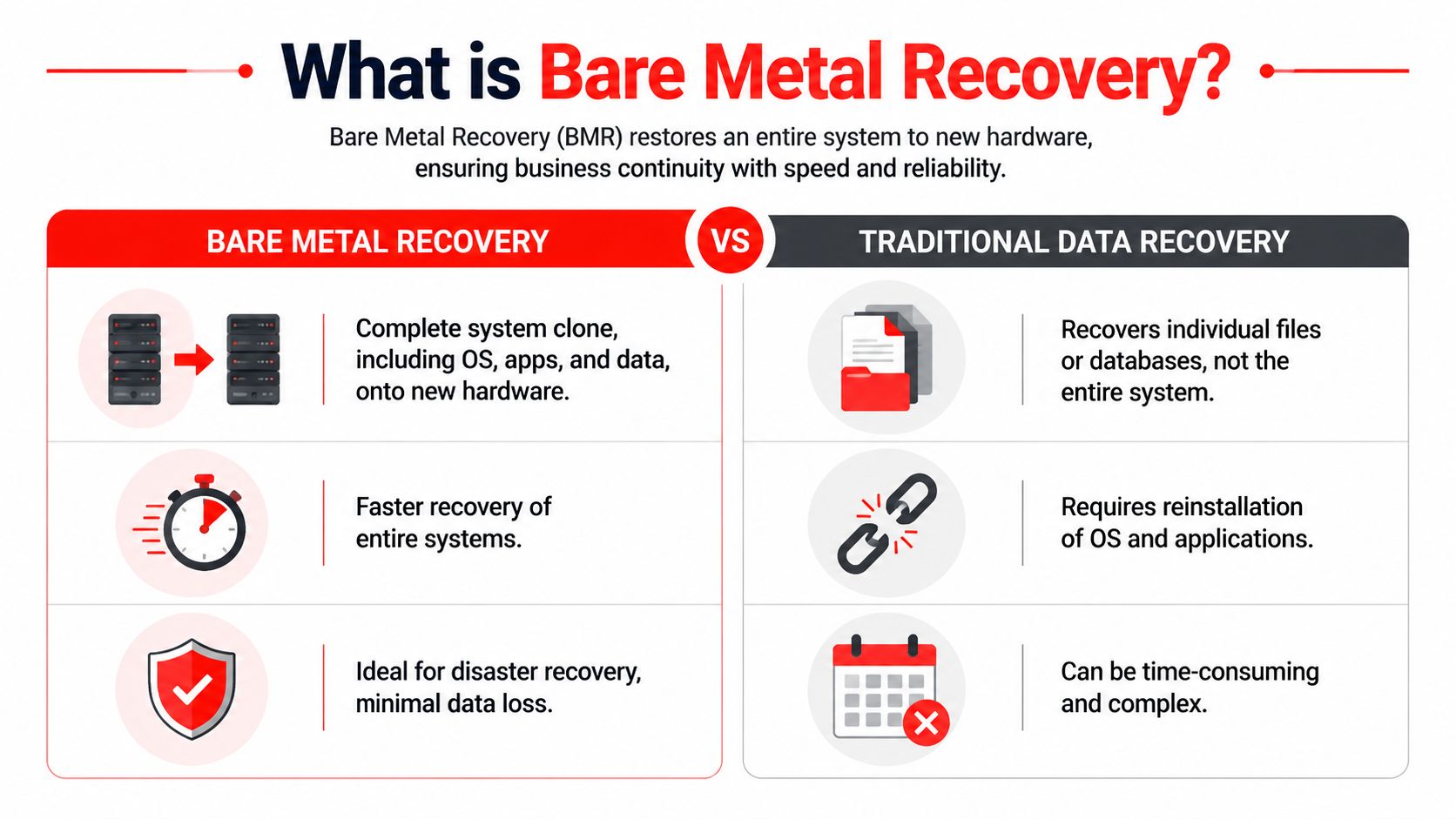
Microsoft’s Windows guidance describes bare metal recovery as a complete disk-image restoration that can remove existing partitions, erase data if requested, and rebuild the default partition layout, boot sector, operating system, drivers, applications, and user data in one image-based process, as outlined in Microsoft’s bare metal recovery documentation. That’s why it sits in a different category from ordinary file restoration.
For business owners evaluating backup strategy, it also helps to understand where cloud-based backup options for small businesses fit. Cloud storage can be part of the backup location and retention plan. It doesn’t automatically mean you have true bare metal recovery capability.
The easiest way to understand it
Bare metal recovery is designed for total-system failure. If a server motherboard fails, if ransomware wrecks a workstation, or if a machine becomes so corrupted that rebuilding it manually would take too long, BMR restores the whole environment.
That includes:
- The operating system: The machine comes back with the OS in place rather than waiting for a full reinstall.
- Applications and settings: Line-of-business software, drivers, and system configuration return with the image.
- User data: Files come back as part of the broader system image, not as isolated folders.
- Boot structure: The machine can start correctly because the recovery process restores the underlying boot components.
Where other recovery methods fit
Not every problem needs bare metal recovery. That’s part of using it wisely.
Recovery method
Best use case
Limitation
File and folder restore
Deleted documents, overwritten spreadsheets, a missing client folder
It doesn’t rebuild the machine that runs the business
System state restore
Specific operating system settings or service components
It isn’t the same as restoring the entire device
Snapshot-based rollback
Short-term rollback in controlled environments
It may not help if the underlying hardware is gone
Bare metal recovery
Catastrophic failure of the full system
It requires planning, compatible targets, and tested backups
A legal office might need file restore when someone deletes a contract. A medical office might use a limited rollback after a bad application change. But when the server itself is unusable, bare metal recovery is the method built for the event.
Bare metal recovery is the option you choose when “just restore the files” would still leave the business offline.
There’s also a trade-off. BMR is powerful, but it isn’t casual. It requires full-system backups, bootable recovery media, and a recovery design that matches the environment you operate. If the business has complex applications, multiple locations, or compliance obligations, the process needs discipline.
For an Orlando accounting firm during a deadline-heavy period, speed matters more than elegance. The method that restores the whole machine usually wins over the method that restores data in pieces and then asks people to rebuild the rest by hand.
The Bare Metal Recovery Process Explained
Most business owners don’t need command-line detail. They need to know what happens, what has to be ready in advance, and why bare metal recovery can bring a dead system back much faster than a manual rebuild.
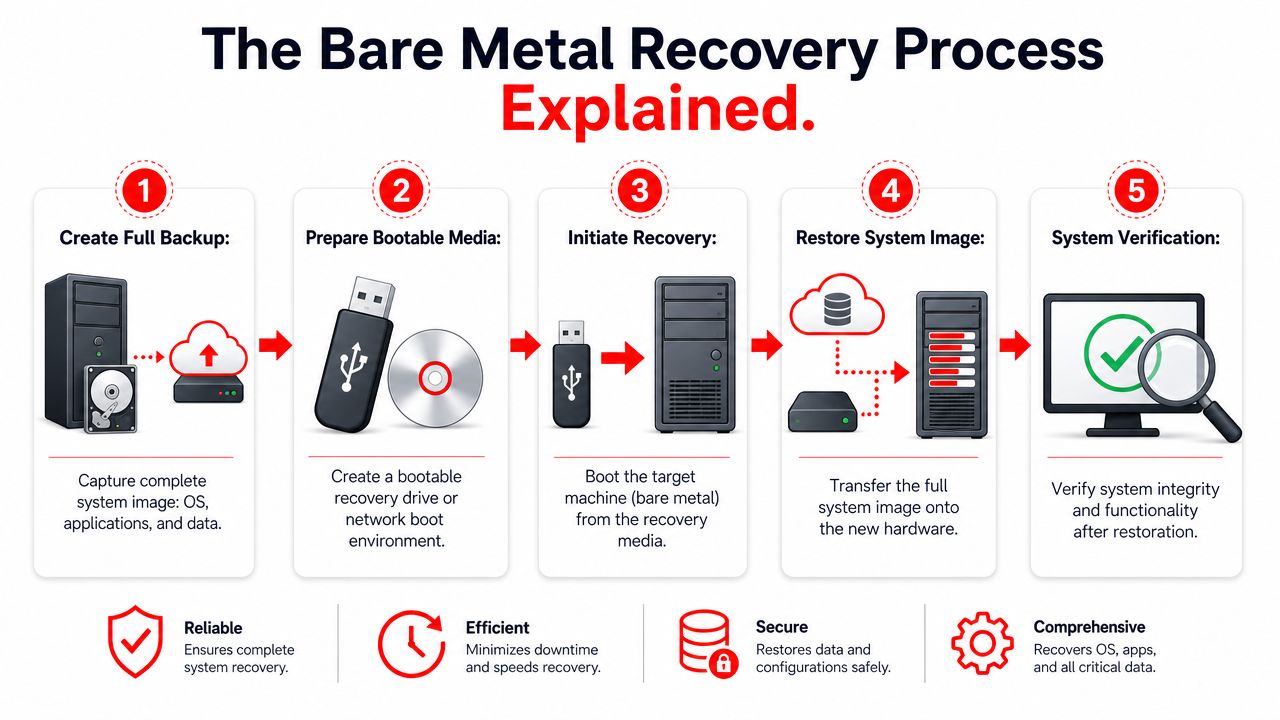
The reason BMR matters is simple. It restores the entire system, including operating system, applications, drivers, configurations, and data, onto hardware with no pre-installed software or OS. It cuts out the slow sequence of installing the OS, loading drivers, reinstalling applications, and reconfiguring the environment. In practical terms, that can restore critical systems in hours rather than days, and industry benchmarks cited in this bare metal recovery overview show recovery times reduced by up to 70%.
What has to exist before disaster hits
Bare metal recovery starts long before anything fails. If the backup isn’t complete, current, and recoverable, there’s nothing to restore.
A workable setup usually includes these pieces:
-
A full backup image
The backup has to capture the whole system state, not only user files. That means the machine’s operating environment is preserved, not just its documents. -
Bootable recovery media
The target machine needs a way to start a lightweight recovery environment. That’s commonly done with recovery media such as a USB drive or ISO image. -
Compatible target hardware
The replacement machine has to meet the recovery requirements. If the hardware is too different or undersized, the restore can stall or fail. -
A clean target disk
The destination should be ready for the recovery engine to lay down the image correctly.
What happens during the restore
Once the replacement machine is available, the workflow is more straightforward than most owners expect.
- Boot the new machine into the recovery environment: This bypasses the need for a pre-installed operating system.
- Point the recovery tool to the saved system image: The image becomes the blueprint for rebuilding the machine.
- Allow the restore process to rebuild the disk: Existing partitions are removed and the proper structure is recreated.
- Apply the system image: The operating system, applications, settings, drivers, and user data are written back to the target.
- Reboot and validate: The machine starts into the restored environment and the business checks whether the applications, shares, and workflows behave as expected.
That’s the technical sequence. The business outcome is what matters. A firm doesn’t waste half a day hunting installers, looking up license records, or trying to remember how the original workstation was configured.
A bare metal recovery plan should feel more like swapping a damaged appliance for a working replacement than rebuilding the office from raw materials.
There are practical constraints. The target should be suitable for the source workload. The process works best when backup jobs run consistently and the restore path is rehearsed. It also helps to know which systems deserve this treatment. Not every receptionist PC needs the same recovery priority as the core practice server, domain controller, or accounting system.
For Central Florida SMBs, that distinction keeps costs controlled. Protect the machines that stop business if they disappear. Then build the workflow so recovery is repeatable under pressure, not dependent on whoever happens to answer the phone that morning.
Why RTO RPO and Testing Are Crucial for Success
A backup can exist and still fail the business. That happens when leadership never defined how fast systems must return or how much recent data loss the company can tolerate. Those two decisions drive recovery planning more than the backup product itself.
Two business numbers that matter more than the backup itself
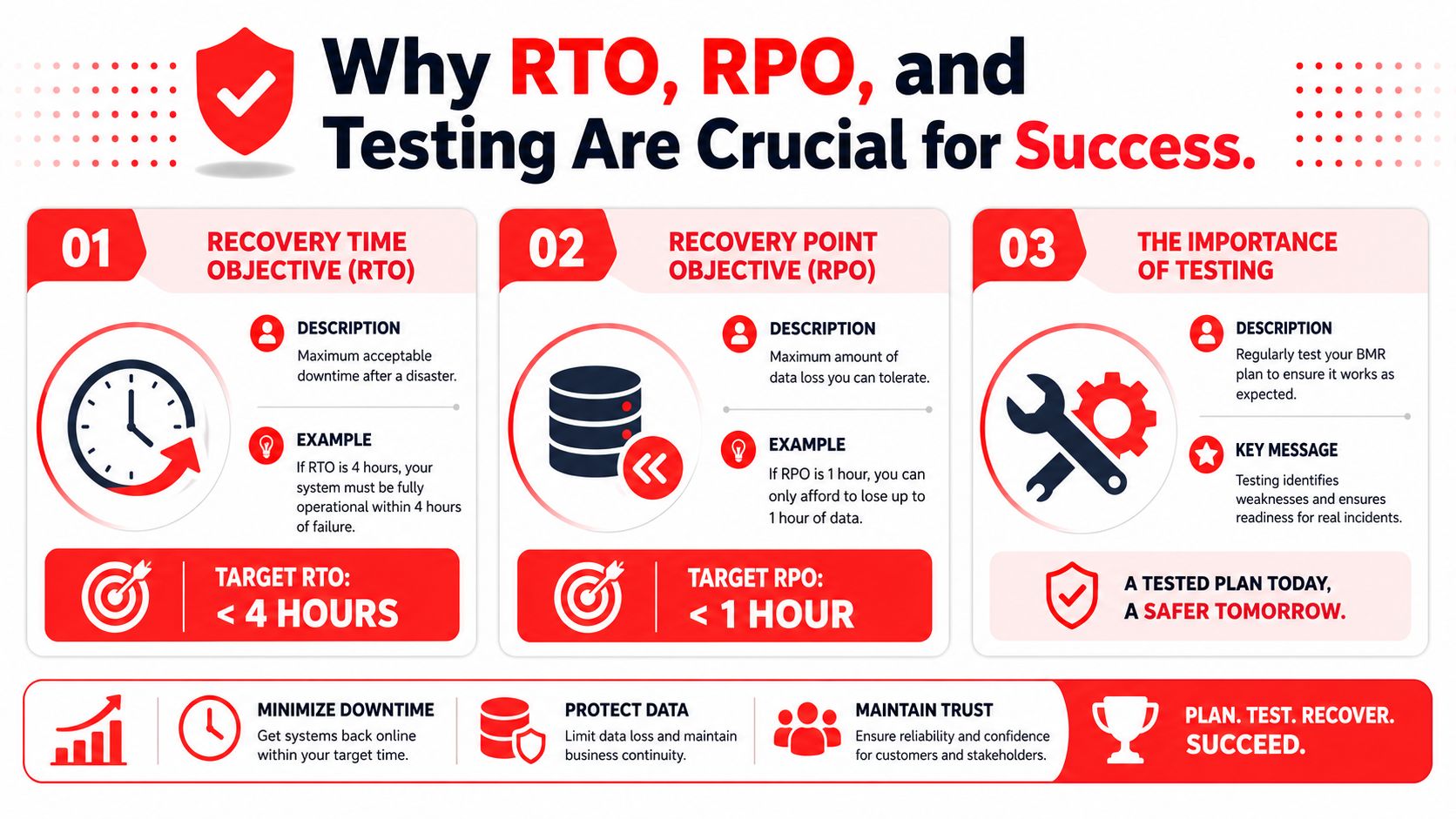
Recovery Time Objective (RTO) is how long the business can afford to be down after a disruption. Recovery Point Objective (RPO) is how much data the business can afford to lose between the last good backup and the incident.
Those sound technical, but they’re business decisions.
A CPA firm in a filing crunch may decide that several hours of downtime is painful but manageable, while losing a large chunk of same-day work is not. A specialty medical office may decide that scheduling and patient documentation systems need an especially short recovery window because the front desk and clinicians can’t function cleanly without them. A small architecture practice may tolerate slower recovery on archive systems but not on the server that holds current project files.
Here’s a simple explanation:
Business question
Metric
“How long can we be offline?”
RTO
“How much recent work can disappear?”
RPO
The mistake many firms make is assuming the presence of backups means the targets are covered. They aren’t. Backups without recovery goals produce vague promises like “we should be able to get it back.” That’s not good enough when the phones are ringing and staff is idle.
Why testing separates confidence from wishful thinking
At this point, many disaster recovery plans break. The restore has never been validated on compatible hardware, the image hasn’t been checked recently, or nobody has documented what success looks like after the machine comes back online.
The risk is not theoretical. 68% of SMBs in North America lack documented bare metal restore validation procedures, and 42% of untested bare metal restores fail during critical migration windows due to driver incompatibilities or corrupted file systems, according to this analysis of bare metal restore validation gaps. Those numbers should get the attention of every business owner who says, “We back up everything.”
A backup you’ve never restored under realistic conditions is hope, not resilience.
That’s why a formal disaster recovery testing plan matters. It turns the conversation from assumptions into evidence.
Untested recovery is like owning a fire extinguisher with the pin rusted in place. It exists, but you don’t know if it will work when the room is full of smoke.
A strong testing routine should answer questions like:
- Does the restored machine boot correctly: A successful image transfer means little if the system can’t start and serve users.
- Do core applications open and function: Login screens alone don’t prove business readiness.
- Are permissions and shares intact: Firms often discover access problems only after staff tries to work.
- Can the team document recovery steps clearly: If the process lives in one engineer’s memory, the plan is brittle.
- Was the recovered state acceptable for the business: This is the RPO check. Did the business lose more recent work than it can tolerate?
What good testing looks like
Good testing isn’t theatrical. It’s disciplined. The team identifies critical systems, restores them in a controlled setting, verifies application behavior, records findings, and corrects failures before the next incident.
For a professional services firm, that might mean validating matter management, billing, and document access. For a medical office, it might mean checking scheduling, imaging access, and front-desk workflows. The point is to test the business process, not just the server boot screen.
BMR Pitfalls and Compliance Considerations
Bare metal recovery sounds clean on paper. In production, it can fail for ordinary reasons. The backup image may be incomplete. The target hardware may not match what the restore expects. The disk may not be prepared properly. Drivers may not cooperate. The system may boot, but the key application may still be broken.
Where recoveries break in the real world
The most common problem is treating BMR as a magic button instead of a controlled process. It’s powerful, but it still depends on the quality of the backup, the condition of the target system, and the discipline of the team running it.
Common failure points include:
- Hardware mismatch: A replacement machine that looks similar may still differ in ways that matter during recovery.
- Unvalidated images: The backup completed, but nobody confirmed that it can be restored into a working environment.
- Application blind spots: The operating system returns, but critical workflows fail because the application stack wasn’t checked after recovery.
- Priority confusion: Teams waste time restoring low-impact systems before restoring the ones that keep revenue moving.
For a law office, that can mean the file server is back but document management or billing is still down. For a medical practice, it can mean a workstation boots but clinical staff still can’t access the systems needed for patient care.
The restore isn’t successful when the login screen appears. It’s successful when staff can do real work again.
Why compliance starts before protection
A lot of business owners think compliance begins with security controls like multifactor authentication, endpoint protection, or email filtering. Those are important, but they aren’t the starting point.
The NIST Cybersecurity Framework 2.0 places Identify first. That means asset inventory and risk assessment come before protection controls, as described in this overview of NIST CSF 2.0 for small businesses. For bare metal recovery, that matters more than it may seem.
If a firm hasn’t identified its critical systems, it can’t set meaningful recovery priorities. If it hasn’t assessed risk, it won’t know which servers, workstations, and applications deserve image-level protection. If it doesn’t know where sensitive client or patient data lives, it won’t know which restore failures could become a regulatory problem.
Here’s how that plays out by industry in Central Florida:
- Legal and financial firms: Missed deadlines, inaccessible records, and incomplete restorations can affect service delivery and retention obligations.
- Medical and dental practices: Extended outages can disrupt patient scheduling, documentation access, and continuity of care.
- Architecture and engineering firms: Lost access to active project data can delay deliverables and client approvals.
Compliance isn’t only about preventing the breach. It’s also about proving the organization can respond, recover, and document what happened. Bare metal recovery supports that goal, but only when the business knows what systems matter, where they reside, and how they’ll be validated after a restore.
Partnering for Resilience How Cyber Command Manages BMR
Most small and midsize businesses don’t fail at disaster recovery because they don’t care. They fail because the work spans too many disciplines at once. Backup design, hardware planning, cybersecurity, application dependency mapping, testing, documentation, and incident response all have to line up under pressure. That’s a heavy lift for a law office administrator, a medical practice manager, or a growing accounting firm with no deep internal IT bench.
What a managed approach changes
A managed partner turns bare metal recovery from a technical feature into an operational capability.
That starts with scoping. Not every system deserves the same recovery treatment. A managed team identifies which servers, workstations, and line-of-business roles require image-based recovery because their loss would stop the business. That keeps the plan aligned with real operations instead of protecting everything the same way.
It also changes how backups are watched. In many small environments, backups “run” until someone notices they haven’t. A managed model brings routine oversight to backup integrity, job status, storage health, and exception handling so problems surface before the crisis.
The next change is testing. Here, outside accountability matters most. Testing is easy to postpone when internal staff are already overloaded with tickets, vendors, onboarding, and day-to-day support. A managed partner can schedule restore validation, document results, and push remediation when something doesn’t pass. That discipline is what turns a recovery plan into a dependable business control.
A solid managed approach also includes:
- Documented recovery runbooks: Clear steps, system dependencies, escalation paths, and business owners for each critical system.
- Application-aware validation: Confirmation that users can do real work after recovery, not just sign into Windows.
- Lifecycle management: Ongoing updates as hardware changes, software evolves, and new business systems are introduced.
- Security alignment: Recovery planning that works alongside ransomware response, endpoint hardening, and monitoring.
- Local response expectations: When a firm in Orlando or Winter Springs has a major incident, speed and familiarity matter.
Why local firms hand this off
Central Florida businesses often have lean teams and concentrated risk. One failed server can stop scheduling, billing, document access, and internal communication all at once. That’s common in professional services and private medical settings, where a small number of systems support a large share of daily work.
A managed partner helps because the business doesn’t have to invent the process during the outage. The planning, testing cadence, documentation, and recovery ownership already exist. That shortens decision time during a crisis.
There’s also a cybersecurity angle that business owners can’t ignore. Small businesses are frequent targets, and recovery planning belongs inside that broader security program. If ransomware hits, the question isn’t only whether the files are backed up. It’s whether the business can restore trusted systems in a controlled way, validate them, and return staff to work without improvising every step.
For firms with compliance pressure, managed support is even more valuable. Legal, financial, and medical organizations need recovery records that show process, accountability, and repeatability. Ad hoc restore work can bring systems back, but it often leaves weak documentation behind. That gap matters after an incident.
Good disaster recovery reduces chaos twice. First during the outage, then again when leadership has to explain what was done and why it worked.
A mature managed service for bare metal recovery usually covers four ongoing motions.
First, it keeps the inventory current. If the business adds a server, changes a line-of-business application, or moves a workload, the recovery plan has to reflect that. Old documentation creates false confidence.
Second, it treats testing as recurring operational work. Restores get validated, edge cases get found, and incompatible changes get corrected before they matter.
Third, it ties recovery to support and security operations. When the same partner understands your endpoints, user environment, vendor relationships, and incident handling workflow, recovery tends to move faster because context already exists.
Fourth, it gives leadership a clearer business view. Instead of hearing “backups are green,” owners can ask better questions. Which systems are covered by full-system recovery. Which ones were last tested. Which workflows would still require manual workarounds. That’s the level of visibility executives need.
The practical result
For an architect in Orlando, that means project work doesn’t depend on one fragile workstation and one person’s memory. For an accountant with a deadline-driven practice, it means core systems have a documented path back to service. For a surgeon or dentist in Winter Springs, it means the office can keep the focus on patient care rather than trying to decode an IT failure in the middle of a packed schedule.
The value isn’t only technical recovery speed. It’s lower uncertainty.
Business owners don’t want to become experts in partition layouts, recovery media, or hardware compatibility. They want to know that when a critical system fails, there is a tested process, a responsible team, and a path to restore operations without guesswork. That’s what resilience looks like in practice.
If your organization in Orlando, Winter Springs, or anywhere in the U.S. needs a recovery strategy that goes beyond basic backups, Cyber Command, LLC can help you build, validate, and manage a bare metal recovery program that fits your real business risk. Their team provides managed IT, cybersecurity, 24/7 support, and operational guidance so professional services firms, medical practices, and growing SMBs can reduce downtime and recover with confidence.
Get updates like this in your inbox
Plain-English alerts when something like this breaks, and the occasional guide. No sales sequences; unsubscribe with one click.
This article is for general informational purposes only and is not legal, compliance, insurance, or other professional advice. Threats, technologies, and regulations change quickly; confirm current requirements with your own advisors before acting. See our full disclaimer.