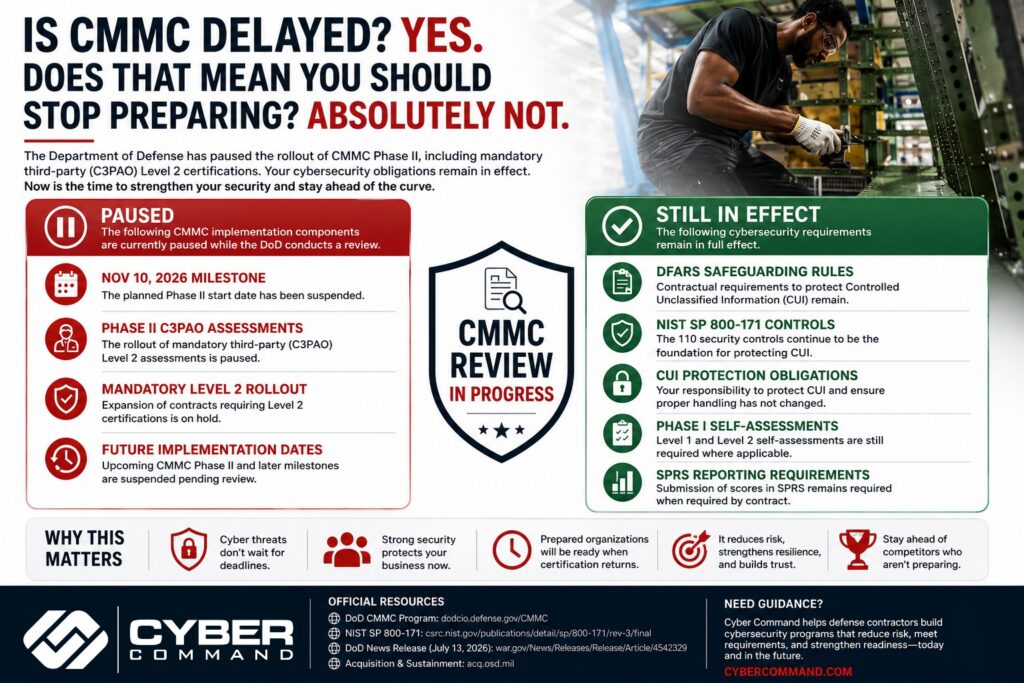
The Department of Defense has suspended the planned rollout of CMMC Phase II, which was set to begin on November 10, 2026, while it conducts a broader review of the program.
Does that mean cybersecurity requirements have gone away? No.
Organizations handling Controlled Unclassified Information (CUI) are still on the hook for existing DFARS safeguarding requirements and NIST SP 800-171 obligations where applicable. Phase I self-assessment requirements also remain fully in effect.
If your organization has been waiting to improve its cybersecurity posture until “CMMC comes back” you’re solving the wrong problem. The goal was never to pass an audit it’s to protect your business and stay eligible to win and retain Department of Defense contracts.
Is CMMC Cancelled?
No. CMMC has not been cancelled.
The Department paused the rollout of Phase II specifically the expansion of mandatory Level 2 third-party (C3PAO) certifications while a review is underway. The underlying cybersecurity framework and contractual security obligations remain firmly in place.
What Exactly Was Delayed?
The pause affects:
The November 10, 2026 Phase II implementation milestone
The expansion of mandatory third-party Level 2 assessments
Future implementation milestones while the review continues
The Department has also stood up a 60-day CMMC Reform Task Force to evaluate the program and recommend changes.
What Did Not Change?
This is the most important question and the one contractors most often get wrong.
These requirements are still very much active:
✔ DFARS cybersecurity obligations
✔ Protection of Controlled Unclassified Information (CUI)
✔ NIST SP 800-171 security controls
✔ Existing Phase I self-assessment requirements
✔ SPRS reporting requirements where applicable
None of these obligations disappeared just because Phase II was paused.
Why Did the DoD Pause Phase II?
According to the Department, the review is intended to:
Reduce unnecessary compliance burden
Improve acquisition speed
Lower barriers for small and non-traditional contractors
Focus on scalable cybersecurity rather than excessive bureaucracy
In other words, the Department is reviewing how organizations prove cybersecurity Not whether cybersecurity matters.
The Bigger Question Nobody Is Asking
Most of the coverage on this topic is stuck on one question: “When will CMMC come back?”
The better question is: “Why were we preparing in the first place?”
If your answer is “because we needed to pass an audit,” you’re thinking about CMMC backwards.
Organizations don’t take million-dollar hits because they failed an audit. They take those hits because they experienced:
Ransomware
Intellectual property theft
Supply chain compromise
Business interruption
Contract risk
Reputational damage
CMMC was never about creating paperwork. It exists because those threats are real, and certification became the mechanism to verify organizations were actually taking security seriously. That distinction matters — and it should shape how you approach the next several months.
What This Means for Defense Contractors
If you’re already preparing: keep going. Nothing about the pause reduces your existing DFARS or NIST SP 800-171 obligations.
If you’ve been waiting: start now. This pause is not a green light to deprioritize security.
If you delayed cybersecurity hoping the rules would change: this is actually your best opportunity. You now have breathing room to strengthen your security program without the pressure of an imminent third-party assessment deadline.
Organizations that use this window wisely will be in a far stronger position when revised certification requirements return and they will avoid the scramble that so many contractors went through the first time compliance deadlines were announced.
What Cyber Command Recommends
At Cyber Command, we don’t believe organizations should build cybersecurity programs just to satisfy an audit. We believe organizations should build resilient security programs because:
Cyber attacks don’t wait for regulatory deadlines.
Contract requirements continue to evolve.
Strong security reduces operational risk regardless of certification timing.
Companies that invest steadily avoid expensive, last-minute compliance projects.
Whether the next version of CMMC arrives in six months or eighteen, those investments keep paying off.
Not sure where your organization stands on NIST SP 800-171 or DFARS compliance? Cyber Command helps defense contractors assess their current posture, close gaps, and build a security program that holds up regardless of what happens with CMMC’s timeline. Contact us to talk through where you stand today.
Where to Verify This Information
We’d rather you check the primary sources than take our word for it:
Department of Defense / CIO – Cybersecurity Maturity Model Certification (CMMC): dodcio.defense.gov/CMMC
Official announcement on the Phase II suspension and review: war.gov release
Area of Inquiry
What to Ask
Why It Matters
Backup architecture
Do you provide tested, immutable, and offsite backups, and how often do you verify full restoration?
Modern ransomware often targets backup files and management consoles. Recovery depends on copies the attacker cannot alter or reach.
Recovery expectations
What systems come back first, how long should recovery take, and what business functions stay down during that window?
Leaders need realistic recovery priorities, not vague promises.
Monitoring model
Who reviews alerts after hours, and what actions can your team take without waiting for the next business day?
Ransomware activity often starts nights and weekends. Delay increases damage.
Containment capability
What do you do in the first 15 minutes if a device starts encrypting files or a user account shows suspicious behavior?
Fast isolation can limit spread across servers, cloud storage, and shared drives.
Access security
How do you enforce MFA, least privilege, separate admin accounts, and review of stale access?
Identity abuse remains one of the most common paths into ransomware events.
Patch management
How do you handle critical vulnerabilities on firewalls, servers, endpoints, and line-of-business applications?
Attackers regularly use known weaknesses that stayed open too long.
Incident leadership
Who coordinates the response, updates leadership, works with legal counsel, and preserves evidence?
Good tools help. Clear command during a crisis prevents confusion and bad decisions.
Compliance support
How do you support HIPAA, financial data protection requirements, and breach reporting decisions in Florida?
Regulated firms need security work that lines up with legal obligations and documentation needs.
Reporting cadence
What does leadership receive each month, and will someone explain risk changes in plain language?
Owners and executives need clear visibility to make funding and policy decisions.
Listen for direct answers. A capable partner should be able to explain backup isolation, testing frequency, response authority, and recovery trade-offs without hiding behind jargon.
If answers stay high level, assume the service is general IT support with a security label attached. That model can handle help desk work. It usually does not hold up well during a ransomware event.
The right fit for an Orlando business is a provider that can show how prevention, monitoring, access control, and recovery work together. Tested, immutable, and offsite backups should be part of that conversation from the first meeting, because they are often the difference between a controlled outage and a prolonged business shutdown.
If your business in Orlando, Winter Springs, or the broader Central Florida market needs a practical ransomware defense strategy, Cyber Command, LLC can help you assess backup resilience, tighten access controls, improve active monitoring, and build an incident response process that matches how your organization operates.
Ransomware accounted for 88% of all data breaches affecting Central Florida small and mid-sized businesses in 2025, and approximately 19% of those businesses faced bankruptcy after an attack, according to Harmony Tech's summary of Central Florida small business cybersecurity data. That should change how Orlando business owners think about cyber risk.
The mistake I still see most often is assuming ransomware protection is mainly about antivirus or “having backups.” It isn't. Modern attackers go after access, identity, backup systems, and response speed. If your backups can be deleted, overwritten, or restored only after a chaotic scramble, they're not a real recovery plan.
For Orlando firms in healthcare, legal, accounting, engineering, architecture, and other professional services, ransomware protection needs to be practical. It has to match how people work, how files are shared, and what the business can tolerate if systems go down.
The Escalating Ransomware Threat to Orlando Businesses
Ransomware is one of the fastest ways an Orlando business can lose access to revenue, operations, and customer trust at the same time. Earlier in this guide, the Central Florida data showed how heavily smaller organizations are being hit. The practical point for local owners is simple. This is a common business risk, not a rare IT event.
I see the same pattern across Orlando-area companies. The organizations under the most pressure are usually the ones with limited internal IT capacity, shared file systems, remote access, cloud apps, and no recovery process that has been tested under stress. That profile fits many law firms, medical practices, construction companies, manufacturers, distributors, and field-service businesses across Orlando and nearby Central Florida markets.
Why Orlando-area SMBs are preferred targets
Attackers do not need an advanced exploit to cause major damage. They look for weak passwords, exposed remote access, phishing responses, unmanaged devices, and users with more access than they need. Once inside, they go after the systems that create the most business pressure, such as file shares, line-of-business applications, email, and identity systems.
Industry matters, but operating model matters more. Professional services firms hold contracts, financial records, and client communications. Medical offices depend on scheduling, documentation, imaging, and billing staying available. Industrial and service businesses rely on dispatching, vendor coordination, mobile devices, and shared operational data. Each of those environments creates urgency, and urgency is what ransomware groups use to force decisions.
Small businesses are not ignored by ransomware operators. They are often selected because disruption hits faster and recovery is less mature.
The myth that causes the most damage
The costliest assumption is that backups alone solve ransomware. Standard backups often fail for one reason. Modern attackers look for them first. If backup repositories are reachable from the production environment, poorly segmented, or never tested, they can be encrypted, deleted, or corrupted before anyone starts recovery.
That is the nuance many Orlando businesses miss. Recovery depends on backups that are tested, immutable, and offsite. If they cannot be altered by an attacker, if they are stored beyond the blast radius of the main network, and if the team has already proven they can restore from them, the business has real options. If not, the backup system becomes part of the incident.
A ransomware event quickly turns into a leadership problem. Owners and managers have to decide how to keep payroll moving, how to communicate with customers, whether regulated data was exposed, and how long the business can operate without its core systems.
If your company depends on email, shared files, cloud platforms, remote access, or industry software, you already have enough exposure to justify serious ransomware protection in Orlando. Smaller size does not lower the risk. In many cases, it reduces your margin for error.
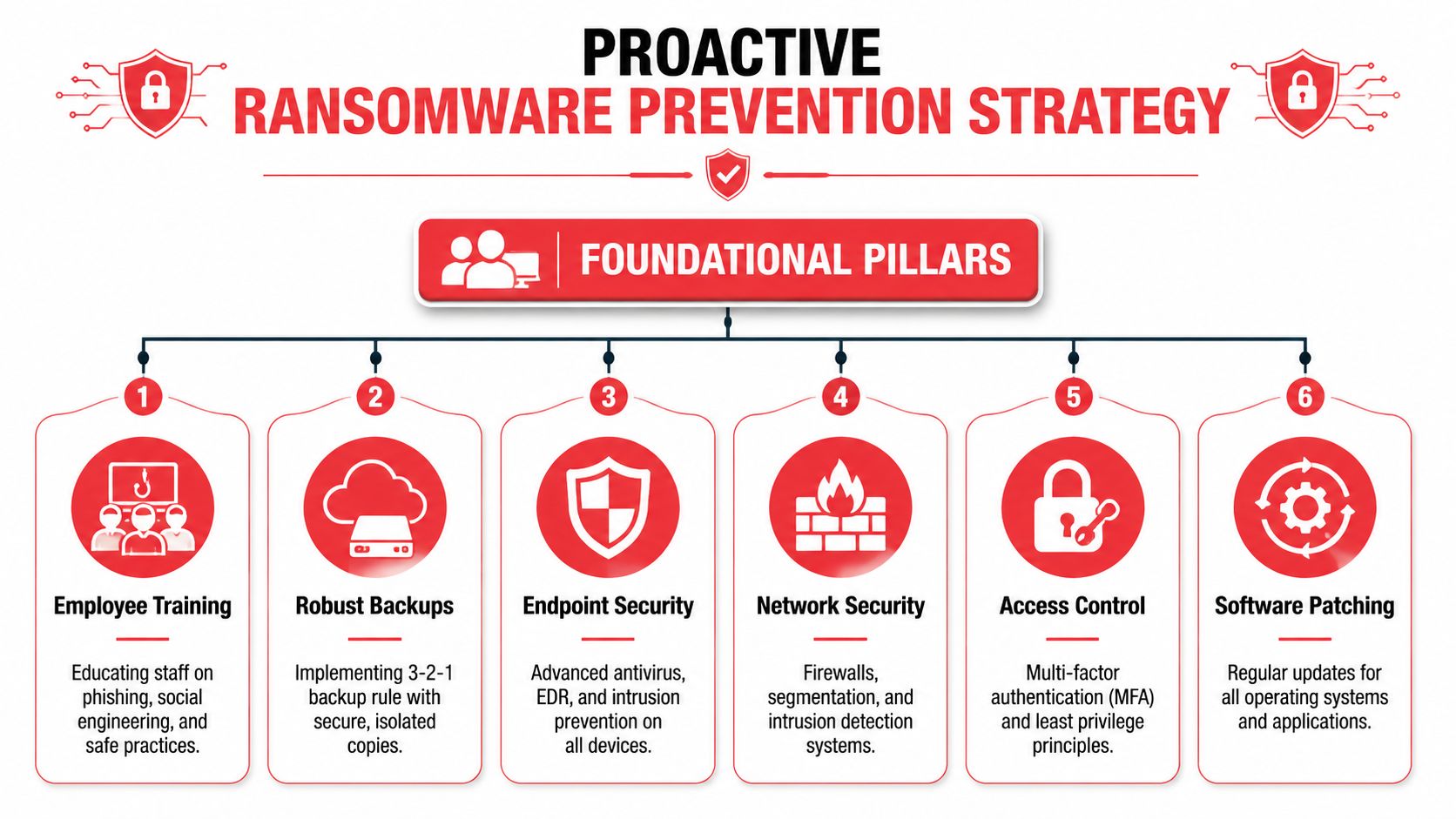
Proactive Defense Your Foundational Ransomware Prevention Strategy
A solid prevention strategy doesn't rely on a single product. It uses layers that interrupt the attack at different points: email delivery, user access, endpoint execution, internal movement, and recovery. If one layer fails, the next one has to slow the attacker down.
This matters in Orlando because phishing remains a leading entry point. In Orlando, phishing emails constitute approximately 41% of all ransomware initial access vectors, and 90% of organizations that tested their backup recovery successfully recovered without paying ransom, according to Tech Rage IT's Orlando-focused ransomware guidance.
A simple visual overview helps, but success depends on operational discipline. Many Orlando companies have pieces of this in place. Fewer have the pieces integrated and tested. Even basic cybersecurity program visuals used in internal planning can help leadership understand whether the controls work together.
Why standard backups fail
The phrase “we have cloud backup” often gives false confidence. If those backups can be altered, deleted, encrypted, or restored only after a long manual process, they don't provide reliable ransomware resilience.
The safer model is tested, immutable, and offsite backup architecture. Each part matters:
Tested recovery: A backup job that finishes successfully isn't the same as a recovery that works under pressure.
Immutable storage: The backup copy can't be changed or deleted during the retention window.
Offsite separation: Recovery data isn't sitting in the same blast radius as the production environment.
That's the nuance many SMBs miss. Attackers know that if they destroy recovery options, they increase pressure to pay. So they look for backup consoles, synced storage, admin credentials, and retention settings before they trigger the main encryption event.
Practical rule: Don't ask whether backups exist. Ask whether the business can restore clean data quickly after an attacker has already tried to tamper with recovery systems.
The six layers that matter most
Prevention works best when leadership understands what each layer is supposed to stop.
Employee awareness and email controls: Because phishing is such a common entry path in Orlando, staff need training tied to realistic scenarios. Finance requests, document shares, password resets, and vendor messages deserve extra scrutiny. Email filtering reduces risk, but people still need to know when to pause and verify.
Multi-factor authentication: MFA should protect remote access, email, cloud apps, admin accounts, and any business platform that exposes login access from outside the office. MFA won't solve every problem, but it blocks a lot of avoidable account takeovers.
Aggressive patching: Systems that lag on security updates create openings attackers actively hunt. That includes operating systems, firewalls, browsers, remote access software, and line-of-business applications. Patching isn't glamorous, but it closes known holes before criminals can use them.
Endpoint detection and response: Traditional antivirus is too narrow on its own. Modern ransomware defense needs behavioral detection that can flag suspicious commands, credential abuse, unusual encryption behavior, and signs of persistence.
Network segmentation: Not every workstation should freely talk to every server, and not every user should reach every share. Segmentation limits how far a compromise can spread and protects high-value systems from a single click gone wrong.
Least privilege: Users should have only the access required for their roles. Shared admin credentials, broad local admin rights, and excessive file permissions make ransomware far more damaging.
A provider such as Cyber Command, LLC can implement these layers as part of a managed security program, but the model matters more than the brand. Orlando businesses need defenses that are maintained continuously, not deployed once and forgotten.
Active Monitoring How to Detect Threats Before They Escalate
Prevention reduces risk. It doesn't eliminate it. That's why active monitoring matters.
A lot of SMBs buy security tools that generate alerts, then assume those alerts equal protection. They don't. An alert without review is like an alarm system wired to an empty building. The siren may sound, but nobody is there to verify what happened, decide what matters, and act before the issue spreads.
Why alerts alone don't solve the problem
Ransomware campaigns rarely look dramatic at the start. The early signs are often subtle. A user logs in from an unusual pattern. A process launches in a way that doesn't fit normal business activity. A file share starts seeing odd access behavior. An admin action appears at the wrong time, from the wrong endpoint, for the wrong reason.
Automated tools can detect pieces of this. But tools don't understand business context on their own. They don't know whether a script execution was part of approved maintenance or the first stage of a compromise. They don't know whether a new account is expected or suspicious. They don't call your leadership team when a threat is moving faster than the ticket queue.
Passive security collects signals. Active security turns signals into decisions.
What effective monitoring looks like
For Orlando companies, the practical benchmark is round-the-clock monitoring with human review and a clear response path. That doesn't just mean watching dashboards. It means triaging suspicious behavior, investigating anomalies, escalating verified threats, and taking containment actions when needed.
Effective monitoring usually includes:
Continuous endpoint visibility: Laptops, desktops, and servers need centralized telemetry.
Identity monitoring: Login anomalies, privilege changes, and risky access behavior have to be reviewed quickly.
Threat hunting: Security analysts proactively look for indicators of compromise instead of waiting for a high-confidence alarm.
Escalation discipline: A confirmed threat should trigger an immediate operational response, not a note for tomorrow morning.
Recovery awareness: Monitoring teams should know which systems are business-critical so they can prioritize containment accordingly.
Many businesses draw the line between IT support and cybersecurity operations. Standard support helps users when something breaks. Active security looks for signs that someone is trying to break in, persist, and spread before the business notices anything is wrong.
For medical offices, law firms, accounting practices, and industrial organizations in Central Florida, that distinction is critical. Ransomware isn't hard only because encryption is disruptive. It's hard because attackers often spend time inside the environment first. If nobody is watching with context, the first visible sign may be the ransom note.
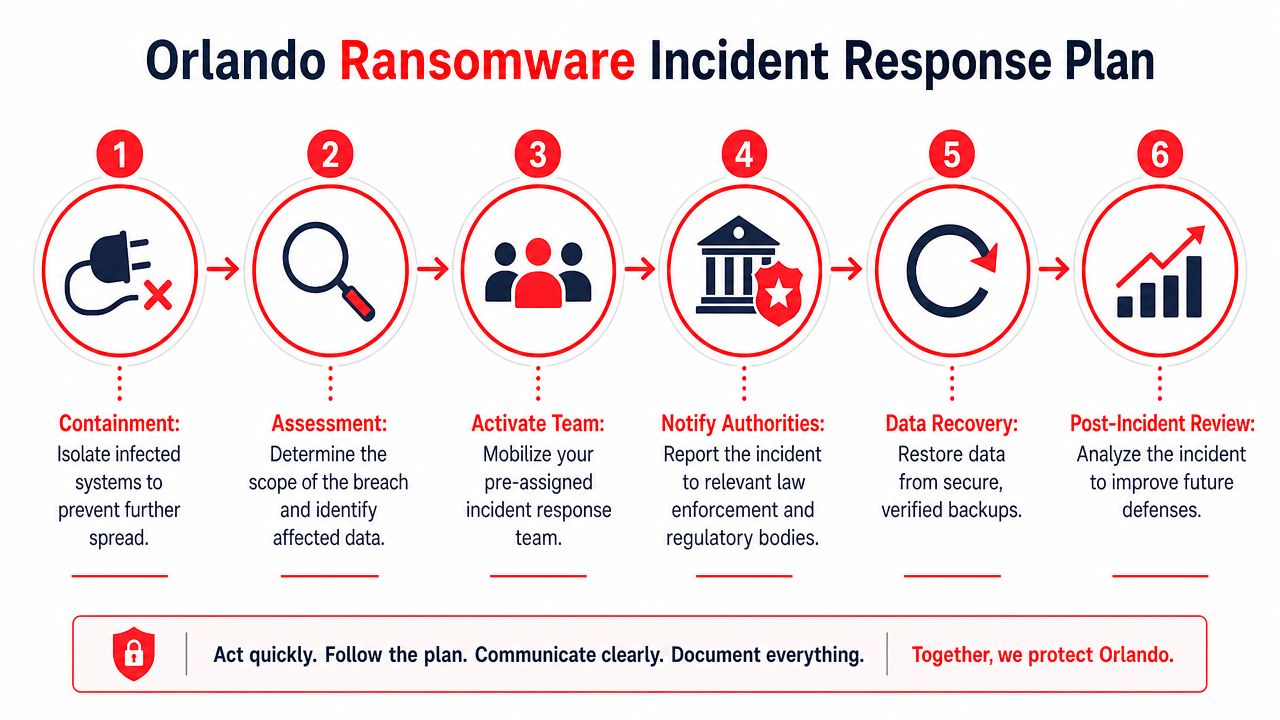
Your Orlando Ransomware Incident Response Plan
When ransomware hits, speed matters more than perfection. Confusion is expensive. Delay is worse.
The most important first action is simple and physical. Disconnect the infected device from all network connections within minutes, including wired Ethernet, Wi-Fi, and Bluetooth. Organizations that do this within 15 minutes reduce lateral movement by over 90%, and more than 80% of organizations that paid a ransom were attacked again, often within a month, according to SEI's ransomware prevention and response guidance.
The first move decides the outcome
A lot of organizations lose precious time because people hesitate. They wonder whether the alert is real, whether disconnecting a device will interrupt work, or whether they should wait for IT to confirm. That hesitation gives ransomware room to spread.
If a workstation shows signs of encryption, a ransom note appears, or unusual file-locking activity starts, isolate first. Investigate second.
Take these actions immediately:
Disconnect the device: Remove every network path you can. Wired, wireless, Bluetooth, dock connection, shared drives.
Stop local backup tasks: If automatic local backup jobs are running, pause them during isolation so clean backup points aren't overwritten or corrupted.
Preserve the state: Don't let users keep clicking around. Don't reconnect “just to check one thing.”
Escalate internally: Leadership, operations, IT, legal, and compliance contacts should know an incident is active.
If the business has to choose between a short interruption on one device and a company-wide encryption event, choose the interruption every time.
A calm response sequence for business leaders
A workable incident response plan doesn't need to be elaborate. It does need clear roles and an order of operations.
Step 1: Contain. Limit spread. Isolate affected systems, disable compromised accounts if needed, and restrict remote access paths until the team understands scope.
Step 2: Assess. Identify what's impacted. Is it one endpoint, several users, a file server, a cloud account, or something broader? Determine what data and business functions may be affected.
Step 3: Activate the response team. This should include executive decision-makers, IT or security personnel, operations owners, and legal or compliance stakeholders where applicable.
Step 4: Preserve evidence. Logs, screenshots, encrypted file samples, and timestamps matter. They help with forensic review, insurance discussions, legal obligations, and lessons learned.
Step 5: Restore from verified recovery sources. Only restore from clean, validated backups. Restoring too quickly from an unverified source can reintroduce the same problem.
Step 6: Communicate carefully. Staff need instructions. Clients may need updates. Regulated businesses may have reporting obligations. Mixed messages create additional damage.
A common leadership question is whether paying the ransom is the practical shortcut. Usually, it isn't. Paying doesn't guarantee clean recovery, it doesn't erase legal or compliance issues, and the data shows it often invites another attack. A better strategy is disciplined containment, clean restoration, and a post-incident review that fixes the weaknesses the attacker used.
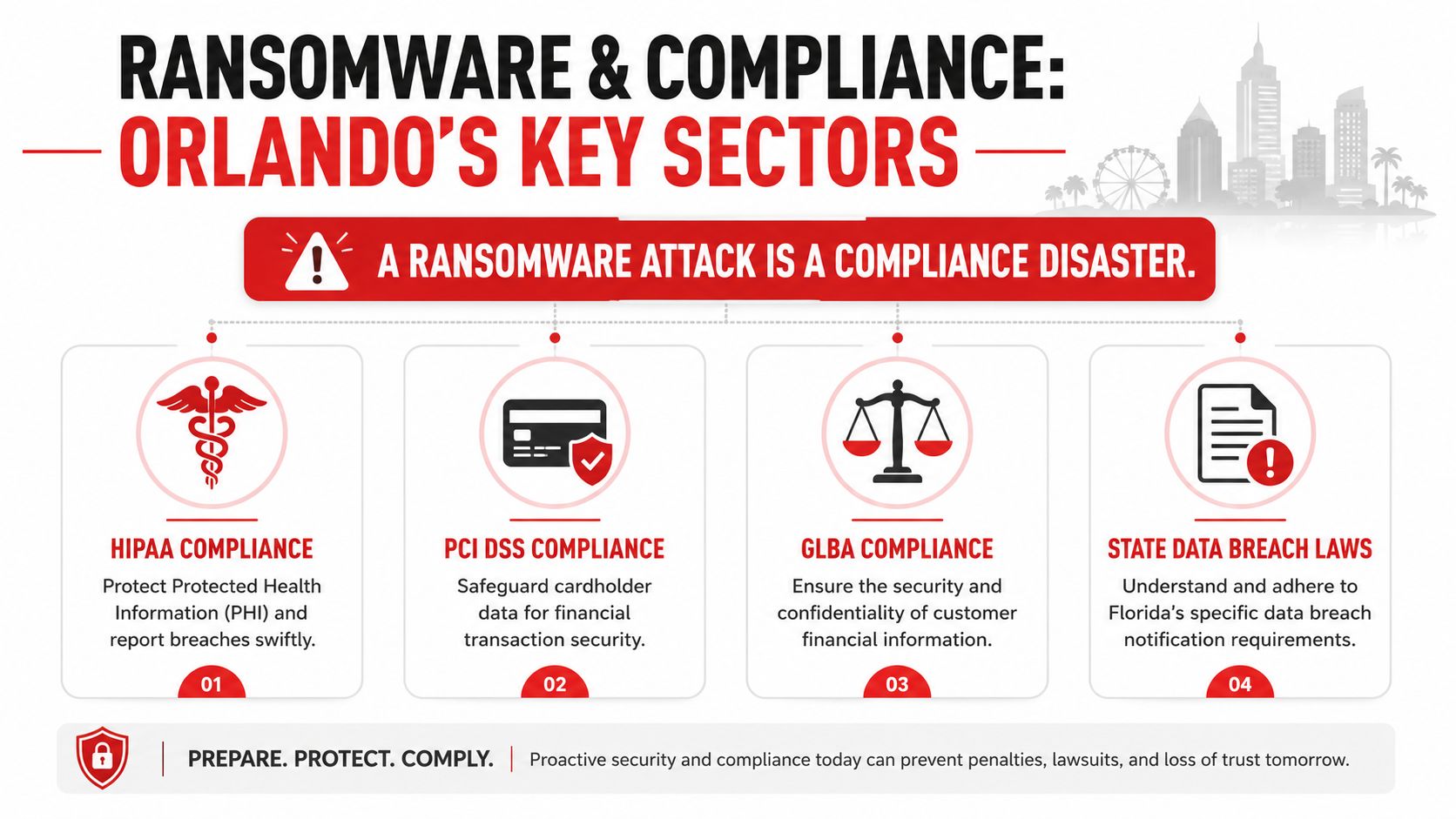
Navigating Compliance in Orlando's Professional and Medical Sectors
For many Orlando organizations, ransomware isn't just an outage. It's a compliance event with legal, contractual, and reputational consequences.
That's especially true in healthcare, financial services, and professional services. A medical practice handling protected health information, a financial advisor managing customer financial data, or a law firm storing sensitive client records may face obligations that go far beyond restoring files and returning to work.
Why ransomware becomes a compliance event
Florida's incident trend should get the attention of any regulated organization. Between 2020 and 2024, Florida experienced a 67% increase in publicly documented ransomware incidents compared with the prior four-year period, and for businesses governed by regulations like HIPAA, the average total cost of a ransomware attack can exceed $5 million when factoring in fines and recovery, according to Cyber Florida's ransomware incident analysis.
That number matters because regulated incidents often involve more than encryption. They can involve access to confidential data, business interruption, mandatory review, external counsel, forensic work, client notification, and regulatory reporting. The technical event quickly turns into a documentation and decision-making exercise.
A simple cloud compliance partner badge example used in internal materials won't make a company compliant. What matters is whether policies, access controls, audit readiness, backup design, and response workflows align with the obligations tied to the data you hold.
What regulated Orlando firms need to prepare now
The most exposed sectors in Central Florida tend to share the same weaknesses: broad access to sensitive files, heavy dependence on cloud systems, and limited in-house security oversight.
A stronger compliance posture includes:
Documented access control: Know who can access sensitive data and why.
Retention and recovery discipline: Keep recovery methods aligned with legal and operational requirements.
Incident reporting workflow: Leadership should already know who evaluates notification obligations.
Vendor accountability: Third-party service relationships should be reviewed for security and breach responsibilities.
Evidence preservation: Regulated response often depends on what the organization can document after the event.
Healthcare practices in Orlando need ransomware protection that supports HIPAA realities. Accounting, legal, and financial firms need the same level of seriousness for confidentiality, record integrity, and client trust. In those environments, ransomware defense is part of governance, not just IT maintenance.
Vetting a Cybersecurity Partner A Checklist for Orlando Businesses
A ransomware provider should be evaluated the same way you would evaluate any business-critical partner. Price matters. Response time matters. The bigger question is whether that provider can keep your company operating after a real attack, especially when attackers go after backups first.
That is where many Orlando businesses get misled. A vendor says you have backups, monitoring, and endpoint protection. Leadership assumes recovery is covered. Then an incident hits, the backup copies are connected to the same environment, restoration has not been tested under pressure, and the business learns too late that backup existence is not the same as recoverability.
Medical groups, law firms, accounting practices, architecture firms, and manufacturers face this problem often because they depend heavily on files, cloud apps, and small internal IT teams. They need a partner who can explain the business impact of each control, not just list products and licenses.
A disciplined buying process helps. Healthcare groups already use that mindset in other vendor decisions. Happy Billing's RCM selection guide reflects that broader principle. Ask how the service works, how performance is measured, what happens when something fails, and who owns the result.
Awards and recognition can support credibility, including this Orlando cybersecurity recognition image. They do not answer the operational questions that decide whether you can contain an attack and recover cleanly.
Cybersecurity Partner Vetting Checklist
Area of Inquiry
What to Ask
Why It Matters
Backup architecture
Do you provide tested, immutable, and offsite backups, and how often do you verify full restoration?
Modern ransomware often targets backup files and management consoles. Recovery depends on copies the attacker cannot alter or reach.
Recovery expectations
What systems come back first, how long should recovery take, and what business functions stay down during that window?
Leaders need realistic recovery priorities, not vague promises.
Monitoring model
Who reviews alerts after hours, and what actions can your team take without waiting for the next business day?
Ransomware activity often starts nights and weekends. Delay increases damage.
Containment capability
What do you do in the first 15 minutes if a device starts encrypting files or a user account shows suspicious behavior?
Fast isolation can limit spread across servers, cloud storage, and shared drives.
Access security
How do you enforce MFA, least privilege, separate admin accounts, and review of stale access?
Identity abuse remains one of the most common paths into ransomware events.
Patch management
How do you handle critical vulnerabilities on firewalls, servers, endpoints, and line-of-business applications?
Attackers regularly use known weaknesses that stayed open too long.
Incident leadership
Who coordinates the response, updates leadership, works with legal counsel, and preserves evidence?
Good tools help. Clear command during a crisis prevents confusion and bad decisions.
Compliance support
How do you support HIPAA, financial data protection requirements, and breach reporting decisions in Florida?
Regulated firms need security work that lines up with legal obligations and documentation needs.
Reporting cadence
What does leadership receive each month, and will someone explain risk changes in plain language?
Owners and executives need clear visibility to make funding and policy decisions.
Listen for direct answers. A capable partner should be able to explain backup isolation, testing frequency, response authority, and recovery trade-offs without hiding behind jargon.
If answers stay high level, assume the service is general IT support with a security label attached. That model can handle help desk work. It usually does not hold up well during a ransomware event.
The right fit for an Orlando business is a provider that can show how prevention, monitoring, access control, and recovery work together. Tested, immutable, and offsite backups should be part of that conversation from the first meeting, because they are often the difference between a controlled outage and a prolonged business shutdown.
If your business in Orlando, Winter Springs, or the broader Central Florida market needs a practical ransomware defense strategy, Cyber Command, LLC can help you assess backup resilience, tighten access controls, improve active monitoring, and build an incident response process that matches how your organization operates.
On a normal Tuesday in Orlando, the problem rarely looks dramatic at first. A controller gets an email that appears to be from a vendor. The logo is right. The tone is familiar. The request is urgent, but not unusual. Someone hesitates for ten seconds, clicks anyway, and now your day is no longer about customers, staffing, or cash flow.
That's how a lot of cyber incidents start for small and mid-sized businesses. Not with a movie-scene hack. With an ordinary business process that got exploited.
If you run a law firm in Winter Park, a dental practice in Dr. Phillips, an engineering firm near downtown, or a multi-location service business across Central Florida, cybersecurity isn't a side issue anymore. It's part of keeping operations stable, protecting client trust, and making sure one bad click doesn't turn into a week of disruption.
The Growing Need for Cybersecurity in Central Florida
A Central Florida business can lose a normal workday in under an hour. An employee opens a convincing vendor email. A Microsoft 365 login gets captured. Mailbox rules forward messages discreetly. Then accounting, customer communication, and approvals start slipping out of your control.
That pattern shows up here because Orlando businesses run on speed, trust, and connected systems. Professional services firms pass sensitive files back and forth all day. Medical and dental offices depend on scheduling platforms, patient data, and insurance workflows. Construction, property management, and field-service companies rely on mobile devices, email approvals, and third-party apps to keep jobs moving. Each connection helps the business run. Each one also creates another place to secure.
The pressure is not limited to large enterprises. The Cybersecurity and Infrastructure Security Agency has repeatedly warned that phishing, stolen credentials, and known but unpatched weaknesses remain common entry points across U.S. organizations, including small and midsize companies, as described in CISA guidance on reducing cyber risk for businesses. For Orlando owners, that translates into a practical question. If a password gets reused, a laptop misses patches, or a fake payment request reaches the wrong person, how long would operations stay stable?
What this looks like on the ground
In this market, the first sign of trouble is usually ordinary business activity:
A vendor message that sends AP to a fake payment portal
A cloud account takeover that redirects client emails without anyone noticing
A remote employee device that never got basic hardening or monitoring
A file-sharing app adopted by one department without any security review
These are process failures as much as technical failures.
That matters in Orlando because many companies sit inside larger supply chains. A law office may handle closing documents for real estate deals. A medical practice may depend on billing vendors, imaging platforms, and patient communication tools. An accounting firm may connect directly into client financial systems. One weak control inside your company can turn into delayed payments, client notifications, contract issues, or downtime that spills into someone else's operation too.
Good cybersecurity services reduce that operational drag. They close the easy gaps first, then add monitoring, response, and testing where the business risk is real. If you want a plain-English view of how a monitored security team works day to day, this overview of a security operations center is a useful starting point. If your business depends heavily on cloud software, this SaaS penetration testing guide is worth reviewing as well.
Practical rule: If your team uses email, cloud apps, shared files, and online payments to serve customers, cybersecurity belongs in daily operations, not a drawer labeled IT.
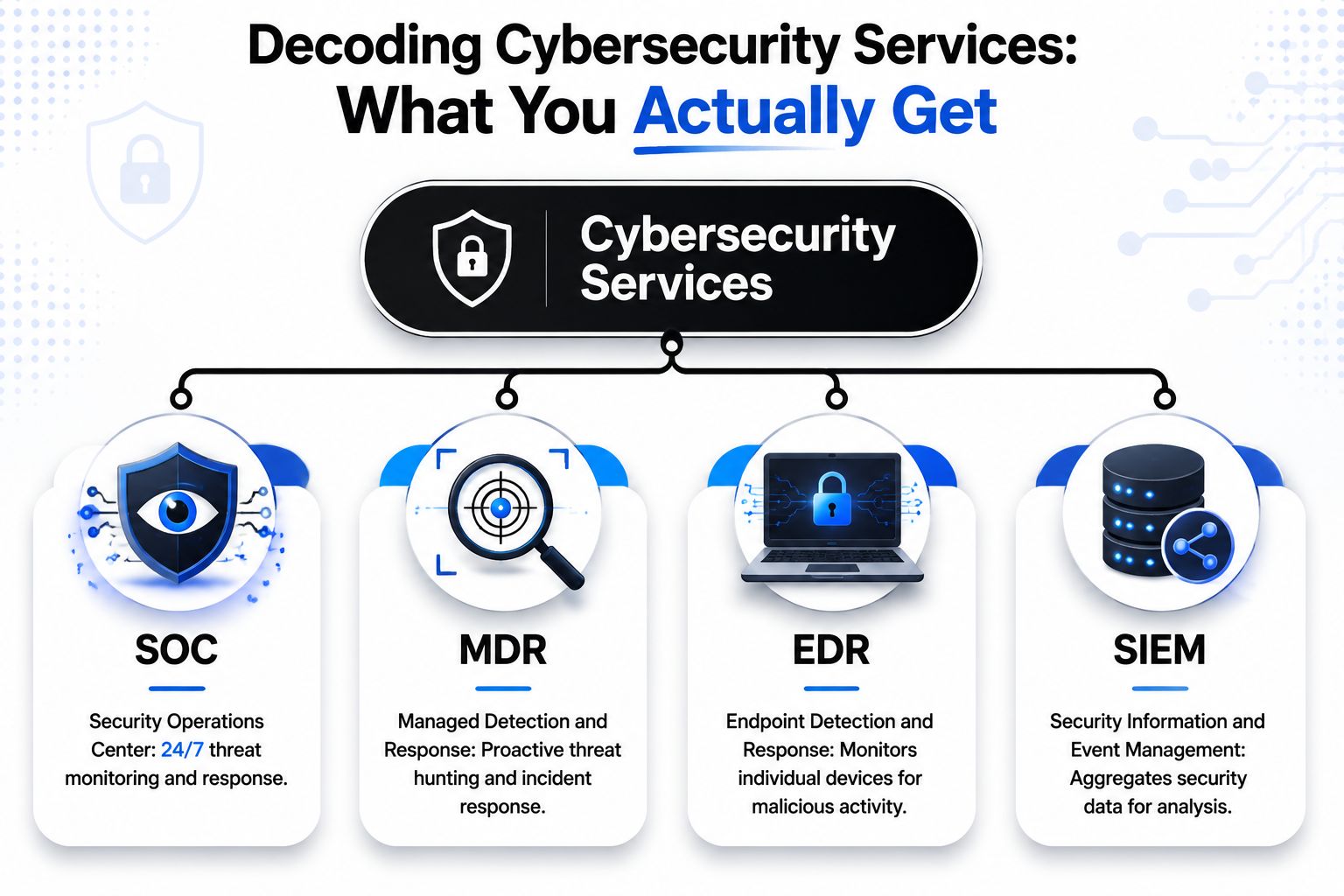
Decoding Cybersecurity Services What You Actually Get
Most owners hear terms like SOC, MDR, EDR, and SIEM and tune out. Fair enough. The jargon is awful. What matters is what those services do inside your business.
In Orlando, the market has clearly moved beyond old break-fix support. Local provider listings now commonly promote 24/7/365 monitoring, SOC support, advanced detection, and related capabilities, and those same listings show at least 21 cybersecurity companies in the city, which points to a mature local market for specialized services, according to Orlando cybersecurity provider listings.
The core layers that matter
Think of cybersecurity services as a building, not a single product.
Patching and hardening are the foundation. If operating systems, browsers, line-of-business apps, firewalls, and cloud settings stay sloppy, every other control has to work harder. This is the unglamorous work that prevents known weaknesses from sitting open for months.
EDR sits on the devices themselves. Laptops, desktops, and servers generate the clues analysts need to spot suspicious behavior. Good endpoint tooling doesn't just say “malware found.” It shows process activity, suspicious scripts, privilege misuse, and signs that an attacker is trying to move laterally.
SIEM acts as the collection and correlation layer. It pulls logs from multiple systems into one place so someone can connect dots that users won't see. A single failed login isn't interesting. The same identity showing odd authentication behavior, mailbox changes, and suspicious endpoint events at once is very interesting.
SOC is the team watching those signals around the clock. If you want a plain-English explanation of that function, this overview of what a security operations center is is useful. The key point is simple: tools generate alerts, but people investigate, triage, escalate, and coordinate response.
Where MDR fits
MDR, or managed detection and response, is what turns monitoring into action. This is the layer that says, “We saw something bad, we investigated it, and here's what happens next.”
That usually includes:
Threat hunting to look for suspicious patterns before a full incident is obvious
Alert triage so your team isn't buried in noise
Containment guidance when a device, identity, or account needs immediate action
Incident coordination so legal, compliance, leadership, and operations don't work from different assumptions
The real question isn't whether your business has security software installed. It's whether someone is responsible for watching, interpreting, and acting on what that software reports.
What works and what doesn't
What works is a stack with ownership. Patch discipline. Endpoint visibility. Centralized logging. A real escalation path. Someone answering the phone after hours.
What doesn't work is buying a handful of tools because they looked good in a sales demo, then assuming coverage exists. That's how companies end up with antivirus, a firewall, a cloud app subscription, and no actual response capability.
If your company builds or sells software, application-layer testing belongs in the conversation too. A practical resource is this SaaS penetration testing guide, which helps separate a checkbox test from an assessment that surfaces business risk.
Why Orlando Businesses Are a Prime Target
A lot of Orlando companies assume attackers only care about big brands, hospital systems, or companies with national visibility. In practice, mid-sized firms and growing local businesses are often easier to monetize. They move money, store sensitive records, rely on email, and usually have less internal security depth than an enterprise.
That matters in Central Florida because the local economy is tightly connected. A private medical practice depends on billing vendors and cloud software. A law firm shares documents with clients, courts, and outside consultants. A contractor, property manager, or tourism supplier may touch payment data, scheduling systems, and vendor portals every day. If one company gets compromised, the problem rarely stays contained to that one company.
Why the local economy raises risk
Orlando has the kind of business mix criminals look for because it creates many points of entry and many ways to get paid.
Professional services firms hold contracts, wire instructions, tax records, litigation files, and privileged communications
Healthcare practices and support organizations deal with protected information, insurance workflows, and strict downtime tolerance
Hospitality, attractions, and tourism vendors handle reservations, payment activity, seasonal staffing, and a high volume of third-party relationships
Construction, real estate, and field-service companies rely on mobile access, project-based collaboration, and fast invoice approval cycles
Public sector and nonprofit organizations often face budget pressure while still managing sensitive constituent, donor, or operational data
Here is the trade-off I see all the time. The faster a business needs to move, the more trust it extends across email, shared files, vendor requests, and remote access. Speed helps revenue. It also gives attackers more room to blend in with normal work.
Why Orlando businesses get singled out
Many local companies sit in the middle of larger business processes without looking like obvious targets. That makes them attractive.
An accounting firm can be used to redirect funds. A specialty clinic can be pressured because downtime affects patient care. An engineering or architecture firm can expose project documents, credentials, or municipal data. A tourism-related supplier may have enough payment volume and partner access to make a compromise profitable within hours.
Attackers also know that regional businesses often depend on a small number of key people. One controller. One office manager. One outsourced IT contact. One operations lead who approves urgent requests from a phone between meetings. That concentration creates single points of failure, especially around identity, approvals, and account recovery.
In Orlando, the target is often the company that keeps business moving for someone else.
The practical takeaway is simple. Risk here is driven by interconnected operations, third-party trust, and the cost of downtime. A good security program should reflect that reality with stronger identity controls, tighter vendor access, documented approval workflows, and a response plan that matches how the business operates.
Cybersecurity Needs for Key Orlando Industries
A generic “we do cybersecurity” pitch isn't very helpful in this market. A law office, private medical practice, and field-service company don't have the same risk profile, even if they all use Microsoft 365, mobile devices, and cloud storage.
For Orlando's regulated industries, providers increasingly emphasize layered email defense and compliance hardening. Local services commonly include DMARC, DKIM, and SPF alongside vulnerability assessments and related controls, according to Orlando cybersecurity service examples for compliance-focused firms.
Professional services
Law firms, accounting firms, architecture groups, and engineering practices usually care about three things most. Confidentiality, uptime, and clean documentation.
A breach here isn't just a technical failure. It can create client notification issues, reputational damage, billing delays, and ugly questions about due diligence. Email security matters a lot because so much work moves through file shares, approvals, invoice requests, and document review.
For these firms, the most practical controls tend to be:
Identity protection around email, cloud apps, and privileged accounts
Authenticated email to reduce spoofing and impersonation risk
Endpoint visibility on every laptop used by staff and partners
Audit-friendly reporting that shows what was found and what got remediated
Healthcare and private practices
Medical spas, dentists, orthodontists, veterinarians, surgical groups, and specialty clinics have a difficult mix. They need convenience for staff, a smooth patient experience, and stronger handling around sensitive information.
A lot of smaller practices don't have deep internal IT maturity. That doesn't reduce risk. It raises the importance of straightforward controls that people can maintain. A good provider in this setting should be able to translate technical findings into operational steps. Which account needs MFA. Which workstation needs replacement. Which backup process needs testing. Which vendor access should be restricted.
A flashy security stack doesn't help if the front desk still shares credentials or if backups can't support real recovery.
In healthcare-adjacent environments, “compliant” and “recoverable” are not the same thing. You need both.
Industrial and field-service organizations
This group gets overlooked. Contractors, logistics firms, specialty manufacturers, and field-service operators often have a blend of office systems, mobile staff, vendor portals, and sometimes older infrastructure that can't be ripped out.
Their risk is usually less about one giant database and more about business interruption. If dispatch fails, job data disappears, or mobile access gets compromised, revenue slows immediately. These firms benefit from standardization more than almost any other segment. Consistent endpoint controls, clear remote-access rules, practical backup strategy, and segmentation where needed.
A field-service company doesn't need enterprise theater. It needs stable systems, fewer exceptions, and a provider who understands that downtime in the office can still stop work in the field.
Understanding Pricing and Engagement Models
Most Orlando business owners don't struggle with the idea that security matters. They struggle with buying it sensibly.
The old break-fix model felt cheap until something failed. Then the invoices piled up, decisions got rushed, and every major problem became an unplanned project. Cybersecurity doesn't fit that model well because a lot of the value comes from continuous prevention, monitoring, and response before visible failure occurs.
Fully managed vs co-managed
Here's the practical comparison:
Engagement model
Best fit
What you're paying for
Fully managed
Businesses without internal IT depth
Day-to-day support, security operations, patching, vendor coordination, and a single point of accountability
Co-managed
Companies with internal IT staff who need reinforcement
Shared responsibility, outside expertise, added monitoring, escalation support, and coverage for gaps
With fully managed IT and security, the appeal is predictability. You're usually trying to convert chaos into a consistent operating expense. That matters for SMBs because budgeting improves when support, monitoring, and routine maintenance aren't billed like emergencies.
With co-managed support, the benefit is amplified effectiveness. Your internal team may know the business well but still need help with after-hours response, advanced security tooling, documentation discipline, or compliance-related work.
What to watch for in proposals
Not all “managed security” offers are structured the same way. Two proposals can look similar and be very different in practice.
Ask whether pricing includes:
24/7 monitoring or only business-hours review
Incident response coordination or just alert forwarding
Endpoint tooling and licensing or separate line items
Vulnerability remediation guidance or only reports
Vendor and license management or a handoff back to you
Onsite support expectations when something urgent happens locally
If pricing looks low, check what got excluded. Cheap security often means you bought software and a dashboard, not real accountability.
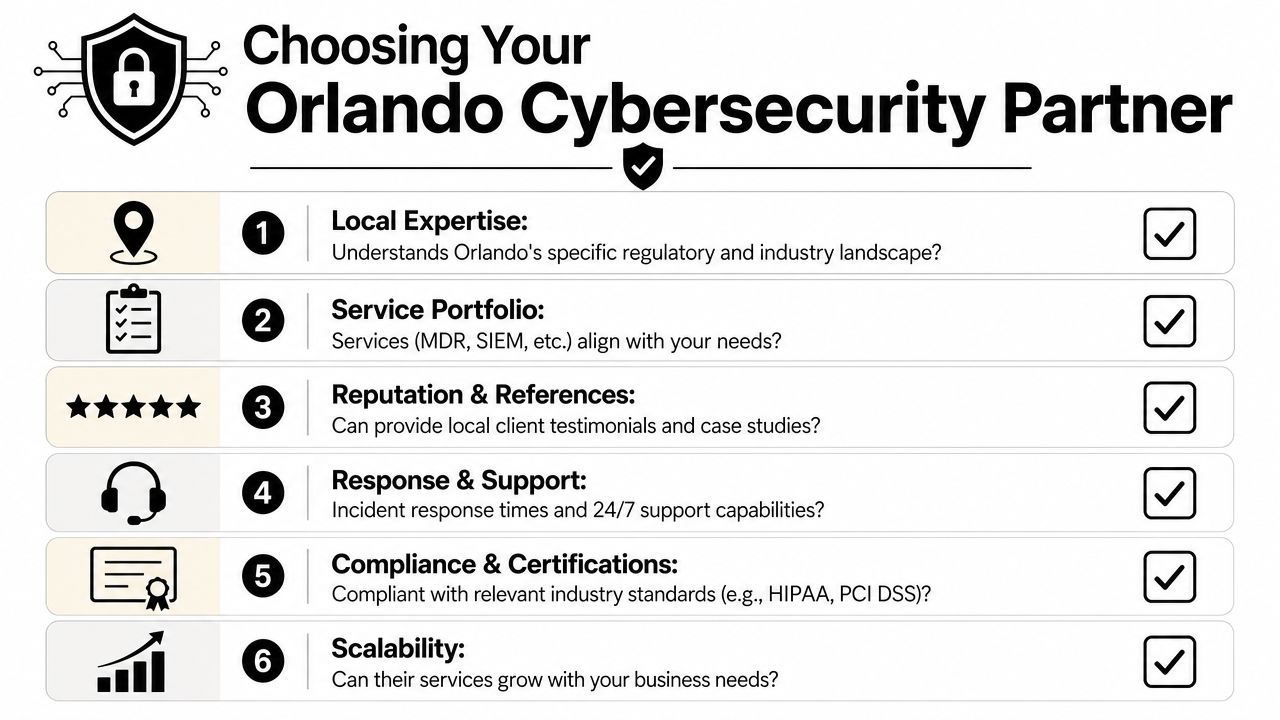
How to Choose the Right Orlando Cybersecurity Partner
Choosing a provider shouldn't feel like shopping for office supplies. This is closer to interviewing a long-term operating partner. The right firm will shape how your business handles incidents, recovers from disruptions, passes audits, and supports growth.
For Orlando SMBs, a strong technical benchmark is a 24/7 SOC paired with EDR and SIEM, because that combination supports continuous monitoring and reduces dwell time during fast-moving attacks, as described in this overview of Orlando SMB cybersecurity benchmarks.
Questions worth asking before you sign
A provider should be able to answer these clearly, without hiding behind buzzwords.
Who watches alerts after hours If something suspicious happens on Friday night, does a real analyst review it, or does your team learn about it Monday morning?
What does escalation look like Ask who gets contacted, how quickly, and what actions they're authorized to take.
How do you handle vulnerability work A useful baseline is understanding the difference between scanning and actual analysis. This guide on what a vulnerability assessment is is a helpful reference before those conversations.
Can you support forensic readiness This is one of the most overlooked areas for smaller firms. If you have a breach, can the provider preserve logs, support evidence collection, and coordinate with legal counsel without making the situation worse?
Signs you're buying the wrong relationship
Some red flags are easy to spot once you know what to look for.
Warning sign
Why it matters
They only talk about tools
Tools matter, but ownership and response matter more
Reporting is vague
If you can't see actions, risks, and trends, you can't manage outcomes
Everything becomes a project
Constant change orders usually mean weak planning or narrow coverage
No clear local response model
Orlando businesses often need practical support, not just remote ticket handling
One example in the market is Cyber Command, LLC, which states that it provides Orlando-area managed IT and cybersecurity services including a 24/7 SOC, endpoint protection, compliance support, and co-managed or fully managed models. That isn't a recommendation by itself. It's the type of service description you should compare against other providers in the area to see who offers clear accountability, not just a broad list of products.
Ask your future provider one uncomfortable question: “If we have a breach, what do you do in the first hour?” If the answer is fuzzy, keep looking.
From Protection to Partnership A New Approach to IT
The businesses that handle cyber risk well usually stop treating IT as a repair shop. They treat it like an operating function tied to resilience, compliance, and growth.
That changes the relationship. Instead of calling someone when printers break or laptops fail, you build a model where backups are planned, access is reviewed, documentation stays current, and incidents have an actual playbook. If you're revisiting your internal standards, this piece on scalable IT process documentation is a practical resource because mature security depends on repeatable processes, not tribal knowledge.
Partnership also means recovery, not just prevention. If your provider can't speak clearly about restore priorities, communication flow, and business continuity, the relationship is incomplete. A useful starting point is understanding backup and disaster recovery in business terms, not just technical terms.
Good cybersecurity services give you fewer surprises. Better ones give you confidence that the business can absorb problems and keep moving.
Frequently Asked Questions
Business owners usually ask the same small set of questions once the buzzwords are out of the way. Here are direct answers.
With the human element involved in 68% of breaches, cyber insurance carriers are paying close attention to controls like MFA and patch discipline, according to the Orlando cyber insurance and security posture discussion. That's one reason “insurance-ready” security has become a useful framing for SMBs.
Question
Answer
Do very small businesses in Orlando really need cybersecurity services?
Yes. Smaller firms often have fewer internal controls, fewer staff to catch suspicious activity, and less margin for downtime. Attackers know that.
Is antivirus enough if we already have Microsoft 365 and a firewall?
No. Basic tooling helps, but it doesn't replace monitoring, response, identity controls, patch discipline, and recovery planning.
What should we prioritize first?
Start with identity security, endpoint protection, patching, backup verification, and a clear response process. Those controls usually provide the most practical reduction in business risk.
Do we need a local Orlando provider?
Not always, but local context helps. Businesses with compliance pressure, multiple offices, or onsite support needs usually benefit from a partner who understands the Central Florida market and can respond practically.
Can cybersecurity services help with cyber insurance?
They can. Providers that document MFA, access controls, patching, backups, and recovery readiness make underwriting conversations easier and can help you answer carrier questions with evidence.
What's the difference between IT support and cybersecurity support?
IT support keeps systems working. Cybersecurity support focuses on reducing risk, detecting suspicious activity, responding to incidents, and proving controls are in place. Strong providers combine both.
The biggest mistake is waiting until something breaks to define expectations. Security works better when the roles, tools, and response steps are decided before the first incident lands in someone's inbox.
If your business needs a clearer plan for Cybersecurity Services in Orlando FL, Cyber Command, LLC is one option to evaluate for fully managed or co-managed IT, 24/7 security operations, and business continuity support in Central Florida. The right next step isn't buying more tools. It's getting a practical view of your risks, your operational dependencies, and what a workable response model should look like for your company.