
April 22, 2026
What Is a Vulnerability Assessment?
What is a vulnerability assessment? Learn why your Florida business needs one. Our 2026 guide explains the process, tools, & how to protect your company.
If you run a law office in downtown Orlando, a dental practice in Winter Springs, or an architecture firm supporting projects across Central Florida, you’ve probably had this thought: “We already have IT support, antivirus, and backups. We’re probably fine.”
That’s a common assumption. It’s also where a lot of small and mid-sized businesses get blindsided.
Most cyber risk doesn’t announce itself. It sits in an unpatched laptop, an exposed remote access setting, an outdated plugin on a client portal, a weak password policy, or a cloud configuration nobody reviewed after a software rollout. A vulnerability assessment is how you find those problems before someone else does. If you’ve been asking what is a vulnerability assessment, the short answer is simple: it’s a structured way to check your systems for security weaknesses and decide what needs attention first.
Why Orlando Businesses Can’t Ignore Hidden Cyber Risks
A lot of Orlando business owners don’t feel “targeted” enough to worry about cybersecurity until something breaks. That mindset makes sense on the surface. A regional law firm or private dental office doesn’t look like a global enterprise.
Attackers don’t care.
They look for reachable systems, weak configurations, known software flaws, and businesses that are busy enough to miss them. Small firms often have exactly the combination that creates risk: lean internal staff, many software vendors, remote access, cloud apps, and no time to sort through security alerts all day.

The problem isn’t only hackers
For most SMBs, the bigger issue is visibility. Owners assume their environment is secure because nothing obvious is wrong. Email works. The practice management system is online. Staff can log in from home. Client files open.
That doesn’t mean the environment is healthy. It only means the business is still operating.
A vulnerability assessment works like a digital health checkup. It reviews systems, applications, devices, and configurations to surface weaknesses that ordinary day-to-day IT support may not catch. That matters more now because the volume of newly disclosed weaknesses has become overwhelming. The volume of vulnerability disclosures reached 48,174 new CVEs in 2025, with the daily rate rising from about 113 per day in 2024 to between 127 and 131 per day in 2025, according to Indusface’s vulnerability statistics.
Why this hits SMBs harder
An enterprise might have dedicated security analysts watching those disclosures and mapping them to internal systems. A local medical spa, accounting office, or engineering firm usually doesn’t.
That gap creates a practical problem:
- Too many new issues: Your team can’t manually review a constant stream of software vulnerabilities.
- Too many moving parts: Cloud apps, laptops, Wi-Fi, firewalls, phones, and vendors all change over time.
- Too little context: Even when an alert appears, many firms don’t know whether it affects a critical system or something low risk.
Practical rule: If your business depends on technology to serve clients, bill patients, store records, or collaborate remotely, hidden weaknesses are already a business issue, not just an IT issue.
For Central Florida companies, this is one reason many leaders start evaluating cyber security companies in Orlando before they have a major incident. They want a repeatable way to identify risk, not another pile of alerts with no ownership.
Stuck on something like this right now?
Talk it through with a real US-based engineer, 24/7, no phone trees: (407) 587-0089.
Book a Free Strategy SessionWhat a Vulnerability Assessment Really Is (And Isn’t)
A vulnerability assessment is a systematic process to identify and classify security weaknesses across systems, applications, devices, and networks. Its job is straightforward: find problems, sort them by seriousness, and help the business fix the right issues first.
That sounds technical, but the easiest analogy is a building inspection.
A building inspector checks for faulty wiring, blocked exits, weak locks, and fire hazards. The inspector is not trying to break in. The goal is to document what’s unsafe and explain what needs repair. A vulnerability assessment works the same way for your technology environment.

What it is designed to do
A professional assessment usually aims to do three things well:
-
Identify weaknesses
This includes missing patches, exposed services, outdated software, weak passwords, misconfigurations, and web application flaws such as SQL injection, cross-site scripting, and server-side request forgery. -
Classify what was found
Findings have to be grouped in a way that separates minor housekeeping from serious exposure. Otherwise, a report becomes noise. -
Prioritize remediation
Teams need to know what should be fixed immediately, what can be scheduled, and what should be monitored.
That prioritization often relies on the Common Vulnerability Scoring System, or CVSS. In simple terms, CVSS gives a vulnerability a severity score from 0 to 10. According to Cyberproof’s explanation of vulnerability assessments, a score of 7.0 or higher signals a need for immediate remediation. The same source notes that unpatched CVSS 9.8 vulnerabilities such as Log4Shell contributed to widespread ransomware in 2022 and affected 20% of Fortune 500 firms.
What it isn’t
A vulnerability assessment is not the same as a penetration test.
That distinction matters because business owners often hear both terms and assume they’re interchangeable. They aren’t.
- A vulnerability assessment asks, “What weaknesses exist?”
- A penetration test asks, “Can those weaknesses be exploited in practice?”
The first is broader and more systematic. The second is narrower and more adversarial. One finds and ranks weaknesses. The other actively tests attack paths.
A clean scan report doesn’t prove your environment is secure. It only proves the scanner didn’t flag anything obvious at that moment.
Why businesses get confused
Part of the confusion comes from tools. Many security products let someone click “scan” and produce a report in minutes. That report may look authoritative, but scanning alone isn’t the full assessment.
Automated tools are good at spotting known issues at scale. They’re not good at business context. They don’t know which server runs your case management platform, which laptop belongs to a partner, or which cloud workload supports patient scheduling. They also miss logic flaws and can generate false positives that waste time.
If you want a deeper background explanation from another practitioner-oriented source, What Is a Vulnerability Assessment from MSP Pentesting gives a useful outside perspective. For the business side of deciding what those findings mean, a broader cyber security risk assessment process helps connect technical findings to operational impact.
Common examples a business owner will recognize
In real environments, the issues often look less dramatic than people expect:
- An old firewall rule that still allows unnecessary access
- A staff laptop missing a security update
- A web portal using an outdated component
- A cloud storage setting that exposes more data than intended
- Default or weak credentials on a device or admin account
- Overly broad permissions that let users access more than they need
None of those sounds cinematic. Any of them can become expensive.
Choosing the Right Assessment for Your Company’s Needs
Not every business needs the same kind of assessment. A litigation firm with a document portal has different exposure than a dental group with imaging systems, guest Wi-Fi, and multiple offices. A design firm using cloud collaboration tools has different concerns than a manufacturer with on-site networks and remote equipment access.
That’s why the right question isn’t just what is a vulnerability assessment. It’s also, “Which assessment fits how our business works?”
The five main types most SMBs should know
Some assessments focus on the network itself. Others focus on endpoints, applications, wireless access, or data stores. A mature program often combines several.
Network-based assessments
These examine network infrastructure and externally reachable systems. They help uncover exposed services, insecure protocols, poor segmentation, and weak perimeter controls.
For a multi-location business, this matters because one badly configured office can create risk for the rest of the organization.
Host-based assessments
These look at individual systems such as servers, desktops, laptops, and other endpoints. They often reveal missing patches, insecure local settings, unnecessary software, and privilege issues.
If your team uses a mix of office workstations, remote laptops, and line-of-business servers, host-based visibility matters more than most owners realize.
Application assessments
These focus on web and mobile applications, especially anything customer-facing or staff-facing through a browser. Client portals, intake forms, payment pages, scheduling apps, and custom internal tools fit here.
For law firms, architects, accountants, and healthcare practices, this category is often under-prioritized. If clients or staff interact with an application that stores sensitive information, the application deserves direct testing.
Wireless assessments
These review Wi-Fi security, access point configuration, rogue devices, and wireless exposure. They’re valuable for offices with staff mobility, guest access, conference rooms, and multiple physical suites.
In a busy office, wireless drift happens. Someone adds a convenience device, changes a setting, or extends coverage without fully considering security.
Database assessments
These focus on the systems that store business-critical information. That can include client records, patient data, project files, billing details, or internal reporting data.
For regulated businesses, security and compliance often overlap most clearly.
Comparison of Vulnerability Assessment Types
Assessment Type
What It Scans
Common Vulnerabilities Found
Crucial For
Network-based
Firewalls, routers, switches, exposed services, internal and external network paths
Open ports, insecure services, segmentation gaps, exposed remote access
Multi-office firms, industrial environments, businesses with remote connectivity
Host-based
Servers, desktops, laptops, operating systems, installed software
Missing patches, weak local settings, unnecessary services, privilege issues
Professional services firms, medical offices, companies with many endpoints
Application
Web apps, mobile apps, portals, APIs, login flows
SQL injection, XSS, SSRF, auth weaknesses, insecure components
Law firms, healthcare practices, firms with client or patient portals
Wireless
Wi-Fi networks, access points, wireless encryption, guest access
Weak encryption, rogue access points, insecure guest network settings
Dental practices, clinics, offices with visitors and staff mobility
Database
Databases, data stores, access controls, encryption settings
Weak permissions, insecure configuration, exposed interfaces, poor logging
Businesses storing sensitive records, regulated organizations
How to decide what comes first
For SMBs, selection should follow business risk, not vendor buzzwords.
- If you handle protected or confidential records, start with host, application, and database coverage.
- If you operate across multiple locations, prioritize network and wireless visibility.
- If staff work remotely or in hybrid roles, host-based assessment becomes harder to skip.
- If clients log into anything you provide online, application testing deserves direct attention.
The best assessment scope usually follows the flow of sensitive data. Start where your business stores it, processes it, and exposes it.
A useful way to think about scope is to ask three plain-English questions:
- Where does sensitive data live?
- How do employees access it?
- What systems touch it from outside the office?
Those answers usually point to the right assessment mix faster than a long technical questionnaire.
Business owners who want to understand the underlying security domains sometimes use broader learning resources like this CISSP study guide. You don’t need certification-level depth to make good decisions, but it helps to see how network, application, identity, and data security connect.
What doesn’t work
Two approaches routinely fail.
The first is buying a scanner and running the same generic scan against everything. That creates lists, not clarity. The second is only assessing what’s internet-facing and ignoring the internal environment. Many serious problems sit behind the firewall, especially on older servers, line-of-business systems, and admin accounts.
Good assessment planning is selective. It aligns testing with the way the company operates.
The Anatomy of a Professional Vulnerability Assessment
A real assessment is a workflow, not a one-click report. The best ones are disciplined enough to cover the environment broadly and flexible enough to account for business context.
The process usually unfolds in several connected stages.
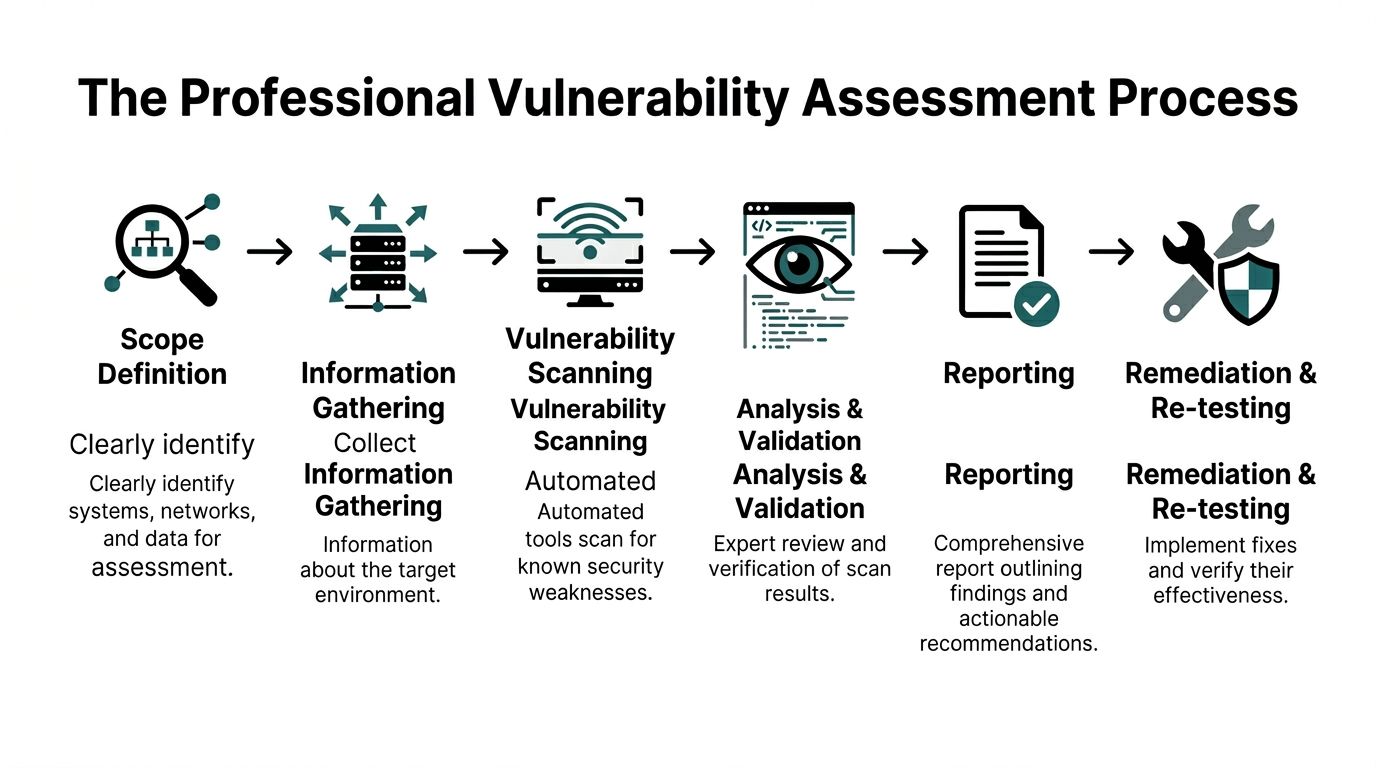
Scope comes first
Before anyone scans anything, the scope has to be clear. That means deciding what systems, locations, applications, and data stores are in play. It also means identifying business constraints, such as maintenance windows, critical applications that can’t tolerate disruption, and third-party systems that require coordination.
This stage is where many low-quality engagements go wrong. If the provider doesn’t understand the environment, the report will either miss important systems or flood you with findings that don’t matter.
Discovery and scanning
Once the scope is locked, the technical work begins. Automated tools scan assets for known weaknesses. Depending on the environment, this may include network scanners, web application scanners, and authenticated or credentialed scans on internal systems.
The goal here is broad coverage. Professional teams use automation because it can review large environments quickly and consistently. But automation is just the collection layer.
Analysis and validation
Here, the human work matters.
Raw scan data has to be reviewed, validated, grouped, and interpreted. Some findings will be duplicates. Some will be false positives. Some will be technically valid but low risk in your environment. Others will be more serious than they first appear because they affect a critical business system.
Field note: If a provider hands over hundreds of unfiltered alerts with no validation, they haven’t finished the assessment. They’ve only finished the scan.
This stage often includes manual verification. Analysts review configurations, confirm exposure, and map findings to actual business assets. That’s how a report becomes useful to decision-makers instead of just overwhelming IT staff.
Reporting that a business can use
The final deliverable should do more than list vulnerabilities. It should explain:
- What was found
- Which systems are affected
- How serious each issue is
- Why it matters to the business
- What to fix first
- What can wait and under what conditions
The strongest reports are readable by both technical and non-technical stakeholders. Owners need to understand operational impact. Internal IT or outside support teams need enough technical detail to act.
Re-testing closes the loop
An assessment isn’t complete when the PDF lands in your inbox. It’s complete when fixes are made and key issues are re-checked. Otherwise, teams can end up assuming remediation happened when it only got discussed.
That re-test matters for practical reasons and for compliance. If a healthcare or financial services business says an issue was resolved, it should be able to verify that claim.
What good process looks like in practice
A sound engagement usually includes these traits:
- Clear boundaries: Everyone knows what’s in scope and what isn’t.
- Appropriate scanning methods: External, internal, and credentialed techniques are chosen on purpose.
- Human validation: Findings are reviewed before they become recommendations.
- Actionable reporting: Business leaders can see priorities, not just technical jargon.
- Follow-through: Remediation and verification are part of the plan.
That’s the difference between security theater and a professional assessment.
Turning Your Assessment Report into Actionable Security
The report is where many businesses stall. They commission an assessment, receive a long document, skim the executive summary, and then set it aside because the list feels too technical or too large.
That wastes the value of the work.
A good vulnerability assessment report is a decision tool. It helps you decide what to fix now, what to schedule, what to monitor, and what to accept temporarily with safeguards.

Start with priority, not volume
A report may contain a handful of findings or many pages of them. The right response is not to attack everything at once. It’s to work in priority order.
One benchmark from Sprocket Security’s vulnerability assessment process overview is worth noting here: organizations conducting bi-annual assessments using CVSS achieve 55% faster patching than reactive models. The same source says credentialed scanning can reduce unauthorized access by 75%, and hybrid automated-manual approaches reach 95% detection accuracy versus 70% for automated-only scans.
Those numbers point to a practical truth. Better visibility and better validation lead to better remediation.
How professionals decide what gets fixed first
Severity matters, but it isn’t the only factor.
A high CVSS score on a non-critical lab system may deserve less urgency than a lower-scoring issue on a server that stores client records or supports patient scheduling. Mature teams weigh the technical score against asset criticality and business impact.
A simple triage model often looks like this:
-
Fix immediately
Internet-facing issues, critical CVSS findings, exposed admin access, and vulnerabilities affecting systems tied to sensitive data or core operations. -
Schedule next
Important weaknesses that are not currently easy to exploit but still create unnecessary exposure. -
Track and mitigate
Findings that can’t be patched right away because of vendor limitations, operational constraints, or application dependencies.
A vulnerability report should answer one business question clearly: “If we only fix a few things this week, which ones reduce the most risk?”
Examples of remediation that actually move the needle
The remediation itself is often less glamorous than the discovery. Typical high-value actions include:
- Applying critical patches to operating systems, software, appliances, and applications
- Removing or restricting exposed services that don’t need to be reachable
- Fixing weak configurations such as default settings or broad permissions
- Tightening identity controls around admin access, MFA, and account use
- Segmenting networks so one compromised device can’t easily reach everything else
This is also where architecture matters. A business that applies sound segmentation and access controls is in a stronger position when a flaw does appear. If you want a practical overview of that principle, the importance of zero trust architecture for modern security is directly related to how assessment findings turn into lasting risk reduction.
What doesn’t work after the report arrives
Several habits undermine good assessments:
- Treating all findings as equal
- Delegating everything to one overloaded IT generalist
- Fixing only what is easiest
- Skipping validation after remediation
- Running a one-time assessment and calling the job done
The strongest security posture comes from cadence. Assessment, remediation, verification, then repeat.
A business owner’s role in the process
Owners and practice leaders don’t need to know how to run scanners or read exploit details. They do need to do three things:
- Assign ownership.
- Approve timelines based on business risk.
- Require follow-up until critical items are verified as resolved.
That discipline is what turns a technical exercise into actual protection.
How Cyber Command Makes Proactive Security Accessible
For many SMBs, the obstacle isn’t understanding the value of vulnerability assessments. The obstacle is making them practical.
A local law office may not have a security analyst on staff. A dental group may rely on a small internal IT team that already handles support tickets, vendors, onboarding, and equipment issues. An architecture firm may have strong design talent and almost no internal cybersecurity depth.
That’s normal.
According to Imperva’s overview of vulnerability assessment challenges, 43% of SMBs cite lack of skilled staff and high costs as primary barriers to cybersecurity adoption. That helps explain why many Orlando-area firms understand the need for better security but still struggle to implement continuous assessment in a realistic way.
Why one-off projects often fall short
A single assessment can be useful, especially after a major infrastructure change, acquisition, office move, or compliance push. But one-off projects have a built-in limitation. The environment keeps changing after the report is delivered.
New laptops get deployed. Software updates introduce new dependencies. Vendors change settings. A cloud service gets connected to another platform. A staff member opens remote access for convenience. Risk shifts with normal business activity.
That’s why managed assessment support is often a better fit for SMBs than sporadic engagements.
What a managed model fixes
A managed approach makes vulnerability assessment achievable by wrapping it into ongoing operations rather than treating it like a special event. For a business owner, that usually means a few concrete advantages:
- Predictable budgeting: Flat-rate or bundled service models are easier to plan around than surprise project costs.
- Continuous visibility: Findings don’t sit untouched until the next annual review.
- Better follow-through: The same partner can help identify issues, prioritize them, and track remediation.
- Stronger alignment with compliance: Regulated firms need repeatable evidence and documented processes, not informal spot checks.
- Less burden on internal staff: Your team can focus on business systems and users instead of trying to become full-time vulnerability specialists.
For SMBs, accessibility matters as much as technical quality. A strong security process that nobody can sustain won’t stay strong for long.
Why local context matters in Central Florida
Businesses in Orlando, Winter Springs, and nearby markets often need a partner who understands the pace and structure of mid-sized operations. These aren’t giant security programs with full internal departments. They’re firms balancing patient care, client deadlines, billable work, multi-site coordination, and vendor sprawl.
In that environment, the most useful vulnerability assessment service is the one that translates security into operational decisions. What needs immediate action. What can wait until a maintenance window. What should be documented for HIPAA or financial oversight. What should trigger a bigger architecture change.
That’s how proactive security becomes manageable instead of theoretical.
Your Vulnerability Assessment Questions Answered
How often should a business get a vulnerability assessment
More than once a year is usually the practical answer, especially if your environment changes often, supports remote work, or handles sensitive records. Many businesses benefit from a recurring cadence rather than a one-time snapshot. If you add offices, launch new applications, migrate systems, or face compliance pressure, assess again.
Can free vulnerability scanners replace a professional assessment
Free tools can help spot obvious issues. They usually don’t provide enough validation, prioritization, or business context on their own. They also won’t explain which findings affect your most important systems first. Useful tool output is not the same as a finished assessment.
Is a vulnerability assessment the same as an IT audit
No. An IT audit looks more broadly at controls, processes, policies, and governance. A vulnerability assessment focuses on identifying technical weaknesses in systems, applications, devices, and configurations. The two can support each other, but they solve different problems.
Will a vulnerability assessment disrupt daily work
A properly scoped assessment is designed to minimize disruption. Professional teams plan around production systems, critical hours, and business constraints. The point is to improve security without creating unnecessary operational pain.
What’s the simplest way to think about it
Think of it as a prioritized repair list for your technology risk. Not every issue is urgent. Some are. The assessment tells you which is which.
If your business in Orlando, Winter Springs, or the surrounding Central Florida area needs a practical way to identify cyber risk before it becomes downtime, compliance trouble, or client impact, Cyber Command, LLC can help. Their team supports SMBs with managed IT and cybersecurity built around proactive prevention, continuous monitoring, and predictable service, so you can spend less time reacting to problems and more time running the business.
This article is for general informational purposes only and is not legal, compliance, insurance, or other professional advice. Threats, technologies, and regulations change quickly; confirm current requirements with your own advisors before acting. See our full disclaimer.