
July 20, 2026
Ransomware Protection Orlando: Secure Your Business 2026
Secure your Central Florida business in 2026. Get expert ransomware protection orlando guidance for prevention, response, & compliance. Protect your data!
Ransomware accounted for 88% of all data breaches affecting Central Florida small and mid-sized businesses in 2025, and approximately 19% of those businesses faced bankruptcy after an attack, according to Harmony Tech’s summary of Central Florida small business cybersecurity data. That should change how Orlando business owners think about cyber risk.
The mistake I still see most often is assuming ransomware protection is mainly about antivirus or “having backups.” It isn’t. Modern attackers go after access, identity, backup systems, and response speed. If your backups can be deleted, overwritten, or restored only after a chaotic scramble, they’re not a real recovery plan.
For Orlando firms in healthcare, legal, accounting, engineering, architecture, and other professional services, ransomware protection needs to be practical. It has to match how people work, how files are shared, and what the business can tolerate if systems go down.
Table of Contents
- The Escalating Ransomware Threat to Orlando Businesses
- Proactive Defense Your Foundational Ransomware Prevention Strategy
- Active Monitoring How to Detect Threats Before They Escalate
- Your Orlando Ransomware Incident Response Plan
- Navigating Compliance in Orlando’s Professional and Medical Sectors
- Vetting a Cybersecurity Partner A Checklist for Orlando Businesses
Stuck on something like this right now?
Talk it through with a real US-based engineer, 24/7, no phone trees: (407) 587-0089.
Book a Free Strategy SessionThe Escalating Ransomware Threat to Orlando Businesses
Ransomware is one of the fastest ways an Orlando business can lose access to revenue, operations, and customer trust at the same time. Earlier in this guide, the Central Florida data showed how heavily smaller organizations are being hit. The practical point for local owners is simple. This is a common business risk, not a rare IT event.
I see the same pattern across Orlando-area companies. The organizations under the most pressure are usually the ones with limited internal IT capacity, shared file systems, remote access, cloud apps, and no recovery process that has been tested under stress. That profile fits many law firms, medical practices, construction companies, manufacturers, distributors, and field-service businesses across Orlando and nearby Central Florida markets.
Why Orlando-area SMBs are preferred targets
Attackers do not need an advanced exploit to cause major damage. They look for weak passwords, exposed remote access, phishing responses, unmanaged devices, and users with more access than they need. Once inside, they go after the systems that create the most business pressure, such as file shares, line-of-business applications, email, and identity systems.
Industry matters, but operating model matters more. Professional services firms hold contracts, financial records, and client communications. Medical offices depend on scheduling, documentation, imaging, and billing staying available. Industrial and service businesses rely on dispatching, vendor coordination, mobile devices, and shared operational data. Each of those environments creates urgency, and urgency is what ransomware groups use to force decisions.
A simple internal cybersecurity program visual for leadership planning can help owners and managers see where those gaps exist before an attacker does.
Small businesses are not ignored by ransomware operators. They are often selected because disruption hits faster and recovery is less mature.
The myth that causes the most damage
The costliest assumption is that backups alone solve ransomware. Standard backups often fail for one reason. Modern attackers look for them first. If backup repositories are reachable from the production environment, poorly segmented, or never tested, they can be encrypted, deleted, or corrupted before anyone starts recovery.
That is the nuance many Orlando businesses miss. Recovery depends on backups that are tested, immutable, and offsite. If they cannot be altered by an attacker, if they are stored beyond the blast radius of the main network, and if the team has already proven they can restore from them, the business has real options. If not, the backup system becomes part of the incident.
A ransomware event quickly turns into a leadership problem. Owners and managers have to decide how to keep payroll moving, how to communicate with customers, whether regulated data was exposed, and how long the business can operate without its core systems.
If your company depends on email, shared files, cloud platforms, remote access, or industry software, you already have enough exposure to justify serious ransomware protection in Orlando. Smaller size does not lower the risk. In many cases, it reduces your margin for error.
Proactive Defense Your Foundational Ransomware Prevention Strategy
A solid prevention strategy doesn’t rely on a single product. It uses layers that interrupt the attack at different points: email delivery, user access, endpoint execution, internal movement, and recovery. If one layer fails, the next one has to slow the attacker down.
This matters in Orlando because phishing remains a leading entry point. In Orlando, phishing emails constitute approximately 41% of all ransomware initial access vectors, and 90% of organizations that tested their backup recovery successfully recovered without paying ransom, according to Tech Rage IT’s Orlando-focused ransomware guidance.
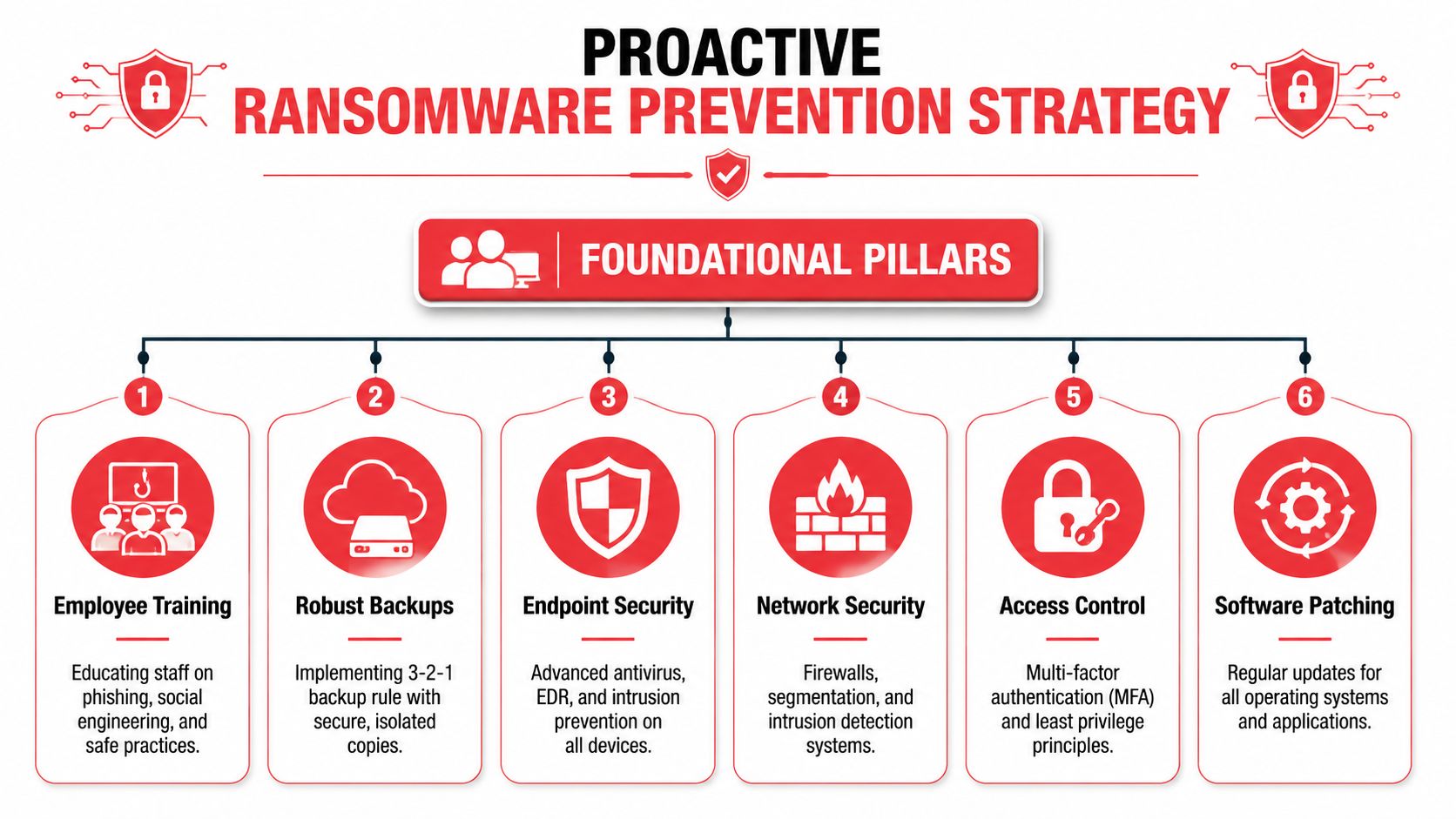
A simple visual overview helps, but success depends on operational discipline. Many Orlando companies have pieces of this in place. Fewer have the pieces integrated and tested. Even basic cybersecurity program visuals used in internal planning can help leadership understand whether the controls work together.
Why standard backups fail
The phrase “we have cloud backup” often gives false confidence. If those backups can be altered, deleted, encrypted, or restored only after a long manual process, they don’t provide reliable ransomware resilience.
The safer model is tested, immutable, and offsite backup architecture. Each part matters:
- Tested recovery: A backup job that finishes successfully isn’t the same as a recovery that works under pressure.
- Immutable storage: The backup copy can’t be changed or deleted during the retention window.
- Offsite separation: Recovery data isn’t sitting in the same blast radius as the production environment.
That’s the nuance many SMBs miss. Attackers know that if they destroy recovery options, they increase pressure to pay. So they look for backup consoles, synced storage, admin credentials, and retention settings before they trigger the main encryption event.
Practical rule: Don’t ask whether backups exist. Ask whether the business can restore clean data quickly after an attacker has already tried to tamper with recovery systems.
The six layers that matter most
Prevention works best when leadership understands what each layer is supposed to stop.
-
Employee awareness and email controls: Because phishing is such a common entry path in Orlando, staff need training tied to realistic scenarios. Finance requests, document shares, password resets, and vendor messages deserve extra scrutiny. Email filtering reduces risk, but people still need to know when to pause and verify.
-
Multi-factor authentication: MFA should protect remote access, email, cloud apps, admin accounts, and any business platform that exposes login access from outside the office. MFA won’t solve every problem, but it blocks a lot of avoidable account takeovers.
-
Aggressive patching: Systems that lag on security updates create openings attackers actively hunt. That includes operating systems, firewalls, browsers, remote access software, and line-of-business applications. Patching isn’t glamorous, but it closes known holes before criminals can use them.
-
Endpoint detection and response: Traditional antivirus is too narrow on its own. Modern ransomware defense needs behavioral detection that can flag suspicious commands, credential abuse, unusual encryption behavior, and signs of persistence.
-
Network segmentation: Not every workstation should freely talk to every server, and not every user should reach every share. Segmentation limits how far a compromise can spread and protects high-value systems from a single click gone wrong.
-
Least privilege: Users should have only the access required for their roles. Shared admin credentials, broad local admin rights, and excessive file permissions make ransomware far more damaging.
A provider such as Cyber Command, LLC can implement these layers as part of a managed security program, but the model matters more than the brand. Orlando businesses need defenses that are maintained continuously, not deployed once and forgotten.
Active Monitoring How to Detect Threats Before They Escalate
Prevention reduces risk. It doesn’t eliminate it. That’s why active monitoring matters.
A lot of SMBs buy security tools that generate alerts, then assume those alerts equal protection. They don’t. An alert without review is like an alarm system wired to an empty building. The siren may sound, but nobody is there to verify what happened, decide what matters, and act before the issue spreads.
Why alerts alone don’t solve the problem
Ransomware campaigns rarely look dramatic at the start. The early signs are often subtle. A user logs in from an unusual pattern. A process launches in a way that doesn’t fit normal business activity. A file share starts seeing odd access behavior. An admin action appears at the wrong time, from the wrong endpoint, for the wrong reason.
Automated tools can detect pieces of this. But tools don’t understand business context on their own. They don’t know whether a script execution was part of approved maintenance or the first stage of a compromise. They don’t know whether a new account is expected or suspicious. They don’t call your leadership team when a threat is moving faster than the ticket queue.
Passive security collects signals. Active security turns signals into decisions.
What effective monitoring looks like
For Orlando companies, the practical benchmark is round-the-clock monitoring with human review and a clear response path. That doesn’t just mean watching dashboards. It means triaging suspicious behavior, investigating anomalies, escalating verified threats, and taking containment actions when needed.
Effective monitoring usually includes:
- Continuous endpoint visibility: Laptops, desktops, and servers need centralized telemetry.
- Identity monitoring: Login anomalies, privilege changes, and risky access behavior have to be reviewed quickly.
- Threat hunting: Security analysts proactively look for indicators of compromise instead of waiting for a high-confidence alarm.
- Escalation discipline: A confirmed threat should trigger an immediate operational response, not a note for tomorrow morning.
- Recovery awareness: Monitoring teams should know which systems are business-critical so they can prioritize containment accordingly.
Many businesses draw the line between IT support and cybersecurity operations. Standard support helps users when something breaks. Active security looks for signs that someone is trying to break in, persist, and spread before the business notices anything is wrong.
For medical offices, law firms, accounting practices, and industrial organizations in Central Florida, that distinction is critical. Ransomware isn’t hard only because encryption is disruptive. It’s hard because attackers often spend time inside the environment first. If nobody is watching with context, the first visible sign may be the ransom note.
Your Orlando Ransomware Incident Response Plan
When ransomware hits, speed matters more than perfection. Confusion is expensive. Delay is worse.
The most important first action is simple and physical. Disconnect the infected device from all network connections within minutes, including wired Ethernet, Wi-Fi, and Bluetooth. Organizations that do this within 15 minutes reduce lateral movement by over 90%, and more than 80% of organizations that paid a ransom were attacked again, often within a month, according to SEI’s ransomware prevention and response guidance.
The first move decides the outcome
A lot of organizations lose precious time because people hesitate. They wonder whether the alert is real, whether disconnecting a device will interrupt work, or whether they should wait for IT to confirm. That hesitation gives ransomware room to spread.
If a workstation shows signs of encryption, a ransom note appears, or unusual file-locking activity starts, isolate first. Investigate second.
Take these actions immediately:
- Disconnect the device: Remove every network path you can. Wired, wireless, Bluetooth, dock connection, shared drives.
- Stop local backup tasks: If automatic local backup jobs are running, pause them during isolation so clean backup points aren’t overwritten or corrupted.
- Preserve the state: Don’t let users keep clicking around. Don’t reconnect “just to check one thing.”
- Escalate internally: Leadership, operations, IT, legal, and compliance contacts should know an incident is active.
If the business has to choose between a short interruption on one device and a company-wide encryption event, choose the interruption every time.
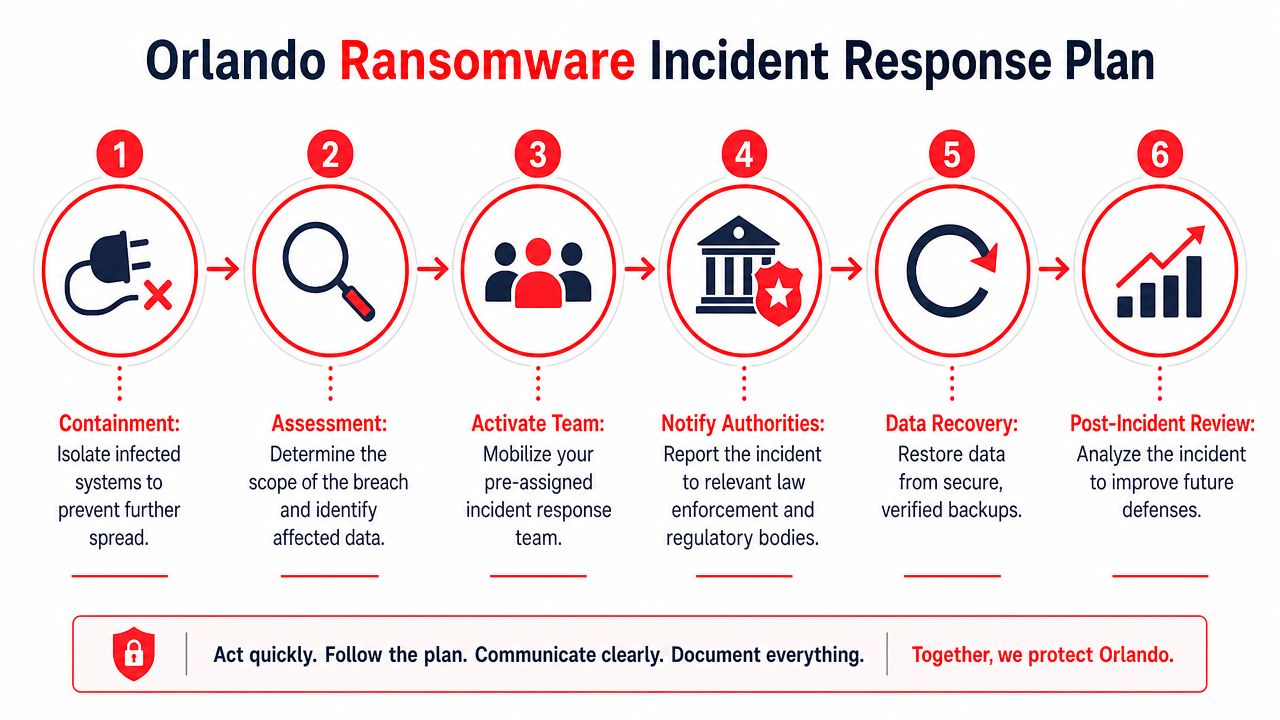
A calm response sequence for business leaders
A workable incident response plan doesn’t need to be elaborate. It does need clear roles and an order of operations.
Step 1: Contain.
Limit spread. Isolate affected systems, disable compromised accounts if needed, and restrict remote access paths until the team understands scope.
Step 2: Assess.
Identify what’s impacted. Is it one endpoint, several users, a file server, a cloud account, or something broader? Determine what data and business functions may be affected.
Step 3: Activate the response team.
This should include executive decision-makers, IT or security personnel, operations owners, and legal or compliance stakeholders where applicable.
Step 4: Preserve evidence.
Logs, screenshots, encrypted file samples, and timestamps matter. They help with forensic review, insurance discussions, legal obligations, and lessons learned.
Step 5: Restore from verified recovery sources.
Only restore from clean, validated backups. Restoring too quickly from an unverified source can reintroduce the same problem.
Step 6: Communicate carefully.
Staff need instructions. Clients may need updates. Regulated businesses may have reporting obligations. Mixed messages create additional damage.
A common leadership question is whether paying the ransom is the practical shortcut. Usually, it isn’t. Paying doesn’t guarantee clean recovery, it doesn’t erase legal or compliance issues, and the data shows it often invites another attack. A better strategy is disciplined containment, clean restoration, and a post-incident review that fixes the weaknesses the attacker used.
Navigating Compliance in Orlando’s Professional and Medical Sectors
For many Orlando organizations, ransomware isn’t just an outage. It’s a compliance event with legal, contractual, and reputational consequences.
That’s especially true in healthcare, financial services, and professional services. A medical practice handling protected health information, a financial advisor managing customer financial data, or a law firm storing sensitive client records may face obligations that go far beyond restoring files and returning to work.
Why ransomware becomes a compliance event
Florida’s incident trend should get the attention of any regulated organization. Between 2020 and 2024, Florida experienced a 67% increase in publicly documented ransomware incidents compared with the prior four-year period, and for businesses governed by regulations like HIPAA, the average total cost of a ransomware attack can exceed $5 million when factoring in fines and recovery, according to Cyber Florida’s ransomware incident analysis.
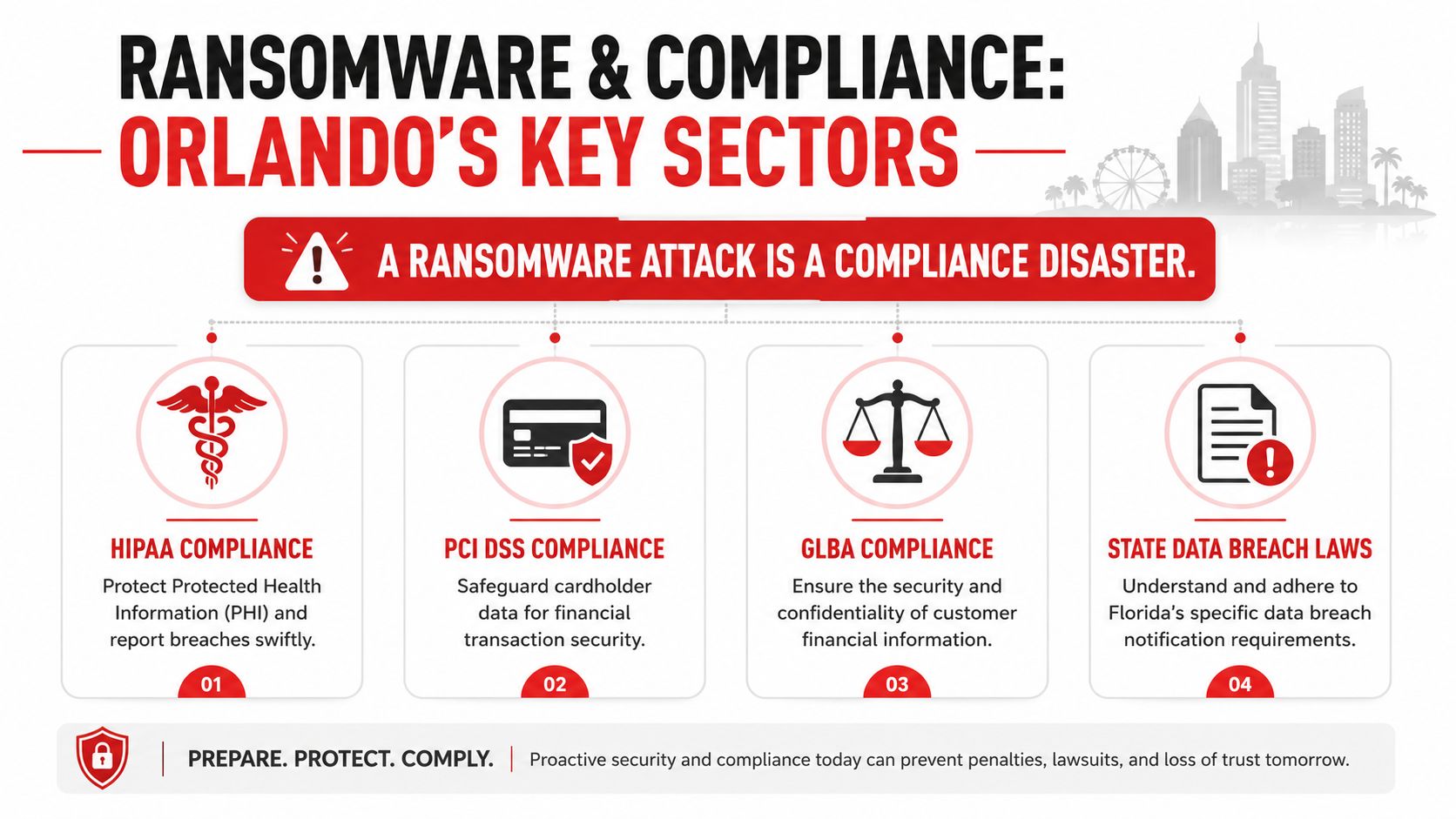
That number matters because regulated incidents often involve more than encryption. They can involve access to confidential data, business interruption, mandatory review, external counsel, forensic work, client notification, and regulatory reporting. The technical event quickly turns into a documentation and decision-making exercise.
A simple cloud compliance partner badge example used in internal materials won’t make a company compliant. What matters is whether policies, access controls, audit readiness, backup design, and response workflows align with the obligations tied to the data you hold.

What regulated Orlando firms need to prepare now
The most exposed sectors in Central Florida tend to share the same weaknesses: broad access to sensitive files, heavy dependence on cloud systems, and limited in-house security oversight.
A stronger compliance posture includes:
- Documented access control: Know who can access sensitive data and why.
- Retention and recovery discipline: Keep recovery methods aligned with legal and operational requirements.
- Incident reporting workflow: Leadership should already know who evaluates notification obligations.
- Vendor accountability: Third-party service relationships should be reviewed for security and breach responsibilities.
- Evidence preservation: Regulated response often depends on what the organization can document after the event.
Healthcare practices in Orlando need ransomware protection that supports HIPAA realities. Accounting, legal, and financial firms need the same level of seriousness for confidentiality, record integrity, and client trust. In those environments, ransomware defense is part of governance, not just IT maintenance.
Vetting a Cybersecurity Partner A Checklist for Orlando Businesses
A ransomware provider should be evaluated the same way you would evaluate any business-critical partner. Price matters. Response time matters. The bigger question is whether that provider can keep your company operating after a real attack, especially when attackers go after backups first.
That is where many Orlando businesses get misled. A vendor says you have backups, monitoring, and endpoint protection. Leadership assumes recovery is covered. Then an incident hits, the backup copies are connected to the same environment, restoration has not been tested under pressure, and the business learns too late that backup existence is not the same as recoverability.
Medical groups, law firms, accounting practices, architecture firms, and manufacturers face this problem often because they depend heavily on files, cloud apps, and small internal IT teams. They need a partner who can explain the business impact of each control, not just list products and licenses.
A disciplined buying process helps. Healthcare groups already use that mindset in other vendor decisions. Happy Billing’s RCM selection guide reflects that broader principle. Ask how the service works, how performance is measured, what happens when something fails, and who owns the result.
Awards and recognition can support credibility, including this Orlando cybersecurity recognition image. They do not answer the operational questions that decide whether you can contain an attack and recover cleanly.
Cybersecurity Partner Vetting Checklist
Area of Inquiry
What to Ask
Why It Matters
Backup architecture
Do you provide tested, immutable, and offsite backups, and how often do you verify full restoration?
Modern ransomware often targets backup files and management consoles. Recovery depends on copies the attacker cannot alter or reach.
Recovery expectations
What systems come back first, how long should recovery take, and what business functions stay down during that window?
Leaders need realistic recovery priorities, not vague promises.
Monitoring model
Who reviews alerts after hours, and what actions can your team take without waiting for the next business day?
Ransomware activity often starts nights and weekends. Delay increases damage.
Containment capability
What do you do in the first 15 minutes if a device starts encrypting files or a user account shows suspicious behavior?
Fast isolation can limit spread across servers, cloud storage, and shared drives.
Access security
How do you enforce MFA, least privilege, separate admin accounts, and review of stale access?
Identity abuse remains one of the most common paths into ransomware events.
Patch management
How do you handle critical vulnerabilities on firewalls, servers, endpoints, and line-of-business applications?
Attackers regularly use known weaknesses that stayed open too long.
Incident leadership
Who coordinates the response, updates leadership, works with legal counsel, and preserves evidence?
Good tools help. Clear command during a crisis prevents confusion and bad decisions.
Compliance support
How do you support HIPAA, financial data protection requirements, and breach reporting decisions in Florida?
Regulated firms need security work that lines up with legal obligations and documentation needs.
Reporting cadence
What does leadership receive each month, and will someone explain risk changes in plain language?
Owners and executives need clear visibility to make funding and policy decisions.
Listen for direct answers. A capable partner should be able to explain backup isolation, testing frequency, response authority, and recovery trade-offs without hiding behind jargon.
If answers stay high level, assume the service is general IT support with a security label attached. That model can handle help desk work. It usually does not hold up well during a ransomware event.
The right fit for an Orlando business is a provider that can show how prevention, monitoring, access control, and recovery work together. Tested, immutable, and offsite backups should be part of that conversation from the first meeting, because they are often the difference between a controlled outage and a prolonged business shutdown.
If your business in Orlando, Winter Springs, or the broader Central Florida market needs a practical ransomware defense strategy, Cyber Command, LLC can help you assess backup resilience, tighten access controls, improve active monitoring, and build an incident response process that matches how your organization operates.
Get updates like this in your inbox
Plain-English alerts when something like this breaks, and the occasional guide. No sales sequences; unsubscribe with one click.
This article is for general informational purposes only and is not legal, compliance, insurance, or other professional advice. Threats, technologies, and regulations change quickly; confirm current requirements with your own advisors before acting. See our full disclaimer.