
Orlando Managed Service Provider: A Buyer’s Guide for 2026


A lot of Orlando business owners reach the same point the same way. A law office in downtown Orlando adds staff faster than its systems can keep up. A medical practice in Lake Nona starts worrying about phishing after a suspicious login alert. A multi-location professional services firm realizes its “IT guy” can reset passwords, but can't give leadership a clear answer on backup readiness, after-hours response, or compliance exposure.
That's usually when the search for an Orlando managed service provider starts. Not because the business wants to outsource inconvenience, but because leadership needs technology to become predictable.
The MSP model has grown well beyond outsourced helpdesk. The U.S. managed services market is projected to grow from $69.55 billion in 2025 to $116.25 billion by 2030, and the same analysis notes that 44.9% of MSPs offer disaster recovery services while 29.2% prioritize cybersecurity, which reflects a shift toward resilience rather than simple ticket handling (managed services market projections and service mix). That matters in Central Florida, where firms often need to balance growth, seasonal demand, compliance pressure, remote access, and real-world security risk at the same time.
If you're sorting through providers now, skip the generic promises. Focus on whether the provider can reduce downtime, control risk, and give you a cost model you can plan around. If you need a local starting point, this overview of IT support for small businesses in Orlando helps frame what a stronger support model should look like in practice.
Table of Contents
- Is Your IT Keeping Up with Your Orlando Business
- Beyond Helpdesk What a Modern Orlando MSP Delivers
- Key Evaluation Criteria for Central Florida Businesses
- Decoding Orlando MSP Pricing and Hidden Costs
- Your Actionable Process for Choosing the Right Partner
- Finding Your Partner and Taking the Next Step
- Frequently Asked Questions about Orlando MSPs
Is Your IT Keeping Up with Your Orlando Business
Growth exposes weak IT fast. A firm can tolerate a few annoying support issues when it has a small team in one office. Once it has client deadlines, cloud apps, remote users, compliance obligations, and sensitive data moving across multiple devices, small gaps become business problems.

In Orlando, that pressure shows up in familiar ways. Healthcare practices need dependable access to records and systems. Accounting and legal teams need secure document handling and consistent workstation performance during deadline-heavy periods. Multi-site businesses across Central Florida need standardization, not a different support experience in every location.
What usually fails first isn't the hardware. It's the operating model. Support becomes reactive. Backups exist, but nobody in leadership knows whether recovery will work. Security tools are installed, but no one is actively watching for suspicious behavior after hours. Vendor sprawl grows, and no one owns the whole environment.
A good MSP relationship starts when the business stops asking, “Who fixes this?” and starts asking, “Who is accountable for keeping this stable and secure?”
That's why an Orlando managed service provider should be evaluated as a business partner, not a repair shop. The right provider helps you turn scattered IT activity into managed operations with defined response paths, clearer ownership, and fewer surprises.
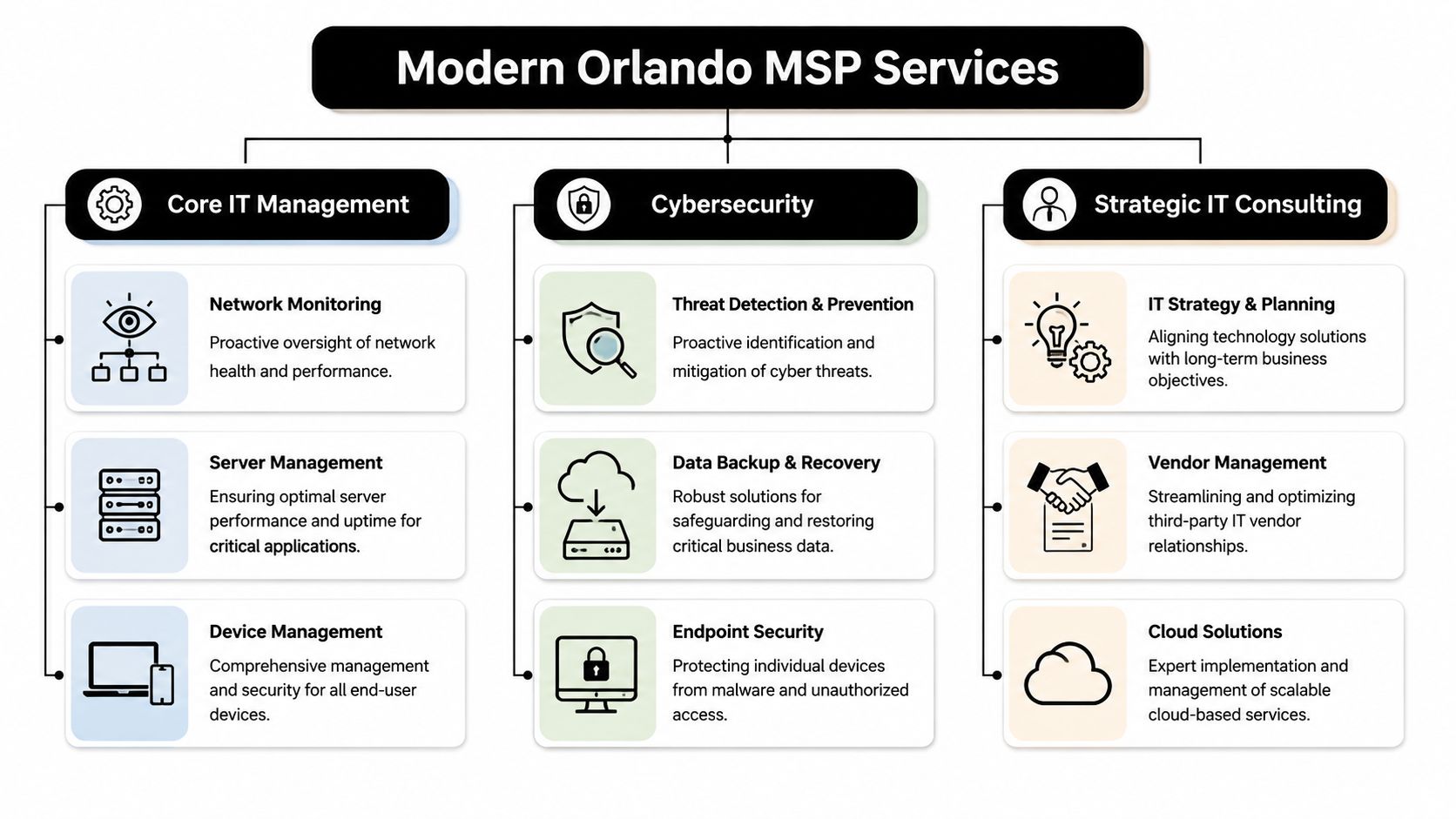
Beyond Helpdesk What a Modern Orlando MSP Delivers
A modern MSP should handle support, but support is the floor, not the ceiling. If all you're buying is ticket response, you're still managing too much risk internally.
The baseline is proactive operations
A competent Orlando managed service provider should continuously manage the often-overlooked parts of IT that create outages when neglected.
That includes:
- Monitoring and alerting: Watching servers, endpoints, network health, storage, and key business systems so the team can respond before staff starts calling.
- Patch and endpoint management: Keeping devices current, enforcing standards, and reducing the number of avoidable security gaps created by inconsistent updates.
- Backup oversight: Not just running backups, but checking job success, retention, and recovery readiness.
- Vendor coordination: Owning the handoff between your business and internet, cloud, software, telecom, and line-of-business vendors when issues cross systems.
For a busy office manager or administrator, that operational discipline matters more than technical jargon. It means fewer interruptions, fewer mystery failures, and less time spent chasing multiple vendors.
Security has to operate every day
Cybersecurity can't be bolted onto managed IT anymore. If a provider treats it as an optional add-on, you should assume the service model is behind where the market already is.
A stronger MSP will pair endpoint protection with log visibility, incident response playbooks, user access review, phishing defense, backup isolation, and escalation procedures that continue after the business day ends. If you want a practical example of what that operating layer can look like, UTMStack managed SIEM is a useful reference for understanding how centralized detection and response supports ongoing security operations.
Practical rule: If a provider says it offers “24/7 security,” ask what happens at 2:00 a.m. Who sees the alert, who investigates it, and who contacts your business?
A real answer should describe people, process, and decision paths. Anything softer than that is a sales phrase.
Compliance support should be operational
Central Florida businesses in healthcare, financial services, legal, and adjacent professional sectors often don't need a lecture on compliance. They need help turning compliance expectations into repeatable IT work.
That means an MSP should be ready to support activities such as:
- Access control reviews: Confirming the right people have the right access, and removing stale accounts quickly.
- Documentation: Maintaining asset records, network documentation, policies, and change history that leadership can review.
- Evidence collection: Producing recurring reports, security records, and control documentation when audits or insurance questionnaires show up.
- Risk reduction in daily workflows: Hardening endpoints, securing remote access, managing backups, and reducing single points of failure.
One Orlando-area option in this category is Cyber Command, LLC, which provides managed IT, co-managed IT, a 24/7 SOC, vendor management, and compliance support as part of its service model. That kind of integrated approach is what businesses should look for, whether they choose one provider or another.
Key Evaluation Criteria for Central Florida Businesses
The hardest part of buying managed IT isn't finding providers. It's separating polished sales language from operational maturity.
Maturity matters more than marketing
A useful benchmark comes from Orlando managed IT pricing guidance. It notes that roughly 150,000 to 200,000 firms call themselves MSPs, while only 5,000 to 10,000 are considered mature and certifiable, and it places common managed IT pricing around $100 to $300 per user per month depending on scope.
That gap matters. Plenty of firms can sell remote support, antivirus, and a monthly invoice. Far fewer can show mature service delivery with documented controls, recurring reporting, backup accountability, onboarding discipline, offboarding discipline, and vendor ownership.
When you evaluate providers, look for signs that they run a system, not a personality-driven operation.
Useful indicators include:
- Documented processes: They can explain onboarding, escalation, patching, access changes, and incident response in plain language.
- Recurring review structure: They don't disappear after contract signing. They schedule business reviews, roadmap discussions, and service reporting.
- Service boundaries: They can tell you what's included, what triggers extra work, and how after-hours situations are handled.
- Operational proof: They can show examples of reporting, standards, and change control without speaking in abstractions.
Local response still matters
A Central Florida business doesn't always need onsite support every week. It does need a provider that can show up when hands-on work matters.
That's especially true for:
- Medical and dental offices dealing with workstations, printers, scanners, and office-specific workflows.
- Professional firms that can't afford conference room failures, workstation issues before client meetings, or preventable office network outages.
- Multi-location organizations that need one support standard across branches, not fragmented local fixes.
A local presence also tends to improve accountability. When leadership knows who owns the relationship, issues get escalated faster and planning conversations get more practical.
Ask for evidence of security operations
A lot of providers will say they do security. Ask what they run.
You want detail around monitoring, triage, endpoint standards, incident handling, identity controls, backup escalation, and reporting. If your business has regulated data, ask how they support security documentation and policy enforcement tied to your environment.
Healthcare organizations should also review current guidance before provider meetings. This checklist for navigating 2025 HIPAA requirements is a helpful way to frame the questions you should bring into the conversation.
Don't ask, “Do you do compliance?” Ask, “What reports, controls, and review processes will you own each month?”
That wording forces a clearer answer. It also reveals whether the provider understands regulated operations or just knows the vocabulary.
Decoding Orlando MSP Pricing and Hidden Costs
Pricing causes more confusion than almost any other part of the MSP buying process. The problem usually isn't that proposals are too detailed. It's that they're too simplified at the top and too vague in the fine print.

What Orlando pricing usually looks like
Verified Orlando market data shows recurring MSP pricing often falls into three bands: $1,500 to $3,000 per month for basic monitoring and remote help desk, $3,000 to $7,000 per month for fully managed networks with security and backup, and $120 to $200 per hour for ad hoc projects or after-hours emergencies.
Those numbers tell you something important. Orlando businesses aren't buying old-school break-fix support alone. They're budgeting for continuous support, security oversight, and continuity planning.
A second local pricing view puts common managed IT at $100 to $300 per user per month, especially when helpdesk, security monitoring, and mixed onsite and remote support are part of the service. It also argues that buyers should normalize proposals by service components such as endpoint protection, patch cadence, backups, vulnerability management, vendor administration, and incident response, rather than comparing only the headline fee (managed IT service pricing comparison guide).
If you want a deeper breakdown of how these models affect budgeting, this guide to managed IT services cost is a useful reference point.
Where simple pricing models break down
Per-user pricing is easy to quote. It's not always easy to apply fairly.
A law firm with mostly desk-based staff may fit a per-user model well. A business with shared workstations, field employees, rotating devices, multiple sites, and a mix of office and remote work usually won't. The same goes for companies with an internal IT manager that wants outside help for escalation, security operations, documentation, or vendor management.
Watch for these common pricing blind spots:
- Shared-user environments: Front desk stations, exam rooms, kiosks, and conference devices can distort “per user” math.
- After-hours needs: A proposal may sound complete until you ask how nights, weekends, and emergencies are billed.
- Project labor exclusions: Many agreements cover support but not larger moves, remediation work, or changes outside routine administration.
- Vendor coordination limits: Some providers will call vendors for you. Others treat that as billable consulting.
- Multi-site complexity: A branch office with its own connectivity, hardware, and workflow needs often requires more support than a flat seat count suggests.
How to compare total cost of ownership
The cheapest monthly quote is often the most expensive operating decision.
Use this framework instead:
| Comparison area | What to examine | What often gets missed |
|---|---|---|
| Service scope | Helpdesk, patching, backup checks, security monitoring, vendor management | Assumptions that “managed” means all of the above |
| Response model | Business hours support, after-hours escalation, onsite availability | Emergency work billed separately |
| Security depth | Endpoint controls, incident response process, account protections, reporting | Security tools sold without active review |
| Compliance readiness | Documentation, policy support, evidence for audits or insurance | Generic promises with no reporting cadence |
| Environment fit | Multi-location support, hybrid staff, shared devices, co-managed workflows | One-size-fits-all seat pricing |
If your business has more than one location or more than one workflow, ask the provider to explain where the pricing model stops being simple.
That question alone can save you from buying a neat proposal that turns messy after onboarding.
Your Actionable Process for Choosing the Right Partner
A strong MSP selection process should look more like hiring a department leader than buying a utility. You're choosing who gets visibility into your systems, your users, your vendors, and your operational weak points.
Start with internal clarity
Before talking to providers, document what's failing today and what has to improve.
Write down:
- Recurring pain points: Slow support, inconsistent vendors, poor remote access, backup uncertainty, user frustration, leadership blind spots.
- Business priorities: Growth, office expansion, hybrid work, system modernization, insurance requirements, audit readiness.
- Risk areas: Sensitive data, access sprawl, unsupported systems, weak offboarding, unclear recovery process.
- Required outcomes: Faster response, stronger reporting, fewer vendors to manage, better security oversight, predictable monthly spend.
This step matters because vague requests produce vague proposals. If you ask for “managed IT,” you'll get broad packaging. If you ask for support tied to business objectives, you'll get a more useful conversation.
Run better provider meetings
Your first meeting shouldn't be a product demo. It should be an operating review.
Ask the provider to explain how they would take over your environment, standardize it, secure it, support your staff, and report back to leadership. If you want a practical selection framework before those conversations, this guide on how to choose a managed service provider is a solid checklist.
Use the meeting to test clarity. Mature providers usually answer directly. Less mature ones tend to hide behind generalities.
Here's a practical set of questions to bring.
Essential Questions for Vetting an Orlando MSP
| Category | Question to Ask | Why It Matters |
|---|---|---|
| Onboarding | How do you transition documentation, credentials, vendors, and support responsibility from the current setup? | Weak transitions create outages and confusion in the first weeks. |
| Support model | Who answers support requests, how are priorities set, and how do users escalate urgent issues? | You need to know how staff will actually experience the service. |
| Security operations | Who reviews alerts, what triggers investigation, and what happens outside normal business hours? | This exposes whether security monitoring is active or mostly passive. |
| Backup and recovery | How do you verify backups and how do you handle recovery testing and emergency restoration? | Backup value depends on recoverability, not job completion alone. |
| Compliance | What documentation and recurring reports do you provide for regulated environments? | Many providers say they help with compliance but don't produce usable evidence. |
| Vendor management | Which vendors will you coordinate with directly, and what's included in that responsibility? | Leadership needs fewer handoffs, not more. |
| Onsite support | When do you come onsite, how is it scheduled, and what work falls outside the agreement? | This helps prevent billing surprises. |
| Reporting | What will leadership receive each month or quarter? | Good reporting turns IT from guesswork into managed accountability. |
| Standards | What technical standards do you enforce across devices, accounts, and backups? | Standardization is what reduces recurring incidents over time. |
| Strategic guidance | Who helps us plan upgrades, risk reduction, and future changes? | You need a roadmap, not just ticket closure. |
Ask every provider the same core questions. That's how you compare operations instead of personalities.
Compare proposals like an operator
When final proposals arrive, don't line them up by monthly fee first. Line them up by accountability.
Review each proposal through four lenses:
What is clearly included
Look for precise language around support, security, onsite work, projects, and vendor coordination.What is excluded or capped
Find the labor categories that trigger extra billing, especially after-hours support, remediation, office moves, and nonstandard devices.How the provider will report
A better MSP relationship includes recurring visibility into issues, standards, risk items, and upcoming decisions.Whether the service model fits your business
A provider can be competent and still be the wrong fit for a multi-site healthcare practice, a growing accounting firm, or a co-managed internal IT setup.
Check references with a business lens too. Don't just ask whether the provider is responsive. Ask whether they improved control, communication, and predictability after the first few months.
Finding Your Partner and Taking the Next Step
Choosing an Orlando managed service provider isn't really about outsourcing IT. It's about deciding who will own operational discipline across support, security, vendor coordination, and business continuity.
The right partner should make your environment easier to run. Staff should know where to go for help. Leadership should have better visibility. Compliance-related work should feel more organized. Security shouldn't depend on hope and scattered tools.
The strongest buying criteria are straightforward:
- Local accountability when onsite work or direct communication matters
- Security depth that goes beyond checkbox tooling
- Transparent pricing with fewer hidden labor surprises
- Documented process for support, reporting, and continuous improvement
If your current setup still feels reactive, it's probably time for a more structured model. A consultation with a qualified local provider can quickly show whether your issues are minor support gaps or signs that your business has outgrown its current IT approach.
Frequently Asked Questions about Orlando MSPs
What's the difference between fully managed IT and co-managed IT
Fully managed IT means the provider takes primary responsibility for day-to-day support, maintenance, and operational oversight. Co-managed IT means the provider works alongside your internal IT person or team. That model works well when you need added depth in security, after-hours coverage, documentation, or project support without replacing internal staff.
How long does onboarding usually take
The timeline depends on the condition of your current environment, how complete your documentation is, and whether you're changing tools, standards, or vendors during the transition. What matters most is that the provider has a structured onboarding process for access handoff, asset review, user communication, and support cutover.
Can an MSP support industry-specific software
Yes, if the provider is willing to learn your workflow and coordinate closely with the software vendor. For legal, accounting, healthcare, architecture, engineering, and similar firms, that usually means supporting the infrastructure around the application, documenting dependencies, handling escalations, and making sure updates or device changes don't break daily operations.
If you want a practical conversation about managed IT, cybersecurity, compliance readiness, and predictable support for your Central Florida organization, talk with Cyber Command, LLC. The goal isn't a hard sell. It's to help you understand what your business needs, where your current gaps are, and whether a more mature MSP model fits the way you operate.