
Business IT Support in Orlando FL: Your 2026 Guide

You're probably feeling this already. Your staff is adding people, opening another office, taking more client calls, storing more files in Microsoft 365, and relying on cloud apps for everything from billing to scheduling. At the same time, your technology still gets treated like a side task. Someone resets passwords when they can, a printer issue turns into a half-day disruption, and cybersecurity gets attention only after a scary email slips through.
That approach doesn't hold up in Orlando anymore. A growing business in Central Florida needs stable systems, fast support, documented security controls, and a real plan for downtime. If your firm handles client records, payment data, medical information, financial files, contracts, or proprietary designs, weak IT support isn't just annoying. It's a business risk.
Why Orlando Businesses Are Rethinking IT Support
Orlando companies aren't operating in a sleepy market. They're hiring, expanding, and layering more software into daily operations. The Orlando Economic Partnership says the region has a workforce of more than 1.5 million people and labor-force growth of 3.8%, placing it among the nation's fastest-growing employment markets according to its technology market overview.
That matters for business IT support in Orlando FL because growth creates technical drag if you don't standardize early. More staff means more laptops, more logins, more vendor accounts, more cloud storage, more security gaps, and more chances for someone to click the wrong link. If you're running a law office in Winter Park, a dental practice in Lake Nona, or a finance firm near downtown, your technology burden rises faster than most owners expect.
Growth creates complexity fast
A lot of Orlando business owners hit the same wall. Revenue grows, headcount rises, and the old “call a guy when something breaks” model starts failing in predictable ways:
- Support becomes inconsistent because no one owns standards, documentation, or escalation.
- Security gets fragmented when antivirus, backups, email protection, and user policies all come from different vendors.
- Compliance starts creeping in as clients, insurers, and regulators ask harder questions about access controls, retention, encryption, and incident response.
- Leadership loses time because managers become the unofficial IT traffic cop.
That's why many firms are rethinking leveraging outsourced IT for growth. The value isn't just cost control. It's getting predictable support and a cleaner operating model.
Practical rule: If your team can't tell you who owns patching, backups, user offboarding, MFA enforcement, and vendor escalation, you don't have an IT strategy. You have a collection of tasks.
A lot of owners also underestimate how much productivity gets trapped in avoidable friction. Slow machines, recurring Wi-Fi issues, poor onboarding, and unclear support channels don't look like major failures on paper. They still drain the business every week.
If you want the business case for getting serious, this breakdown of the benefits of outsourcing IT support is a useful reference. My view is simpler. In Orlando's current market, professional IT support has moved from optional overhead to operational infrastructure.
What Modern Business IT Support Actually Includes
If you still think IT support means fixing laptops and reconnecting printers, you're shopping for the wrong service.
The Orlando market is mature. Directories list over 25 established managed service providers in the city, and common offerings include managed IT, cybersecurity, cloud solutions, and helpdesk support, which reflects a shift from simple repair work to broader operational management in the local managed IT services landscape.
Break-fix is outdated
Break-fix support rewards delay. You wait for something to fail, then pay to react. That model is a poor fit for firms that depend on cloud apps, remote access, voice systems, file sharing, and compliance controls.
Modern business IT support in Orlando FL should include these core functions:
- Helpdesk support: Staff need one place to go for password resets, Outlook issues, line-of-business software problems, and access requests.
- Endpoint management: Every workstation and laptop should be tracked, patched, protected, and replaced on a schedule.
- Network oversight: Firewalls, switches, wireless networks, and internet circuits need active management, not occasional attention.
- Backup and recovery: Your provider should know what gets backed up, how often, where it goes, and how recovery works under pressure.
- Cloud administration: Microsoft 365, SharePoint, Teams, and identity tools need policy management and security hardening.
- Vendor coordination: Someone has to own the call with your software vendor, internet provider, copier company, and cloud platform when systems fail.
What good support looks like in practice
The right provider doesn't just “fix issues.” They reduce issue volume.
That means standardizing devices, automating software updates, removing stale accounts, documenting the network, managing licenses, testing backups, and giving leadership visibility into recurring risks. It also means someone is accountable for the environment, not just the ticket queue.
Good IT support should make your environment quieter over time. Fewer repeat issues. Fewer emergency calls. Fewer unknowns.
Many Orlando businesses often get shortchanged. They buy a support contract but never get strategic guidance, documentation, or prevention. They're paying for availability, not management.
If you're reviewing scope, compare your current agreement against a broader managed IT services checklist. If it doesn't clearly address support, security, cloud administration, backups, and vendor ownership, it's incomplete.
Managed vs Co-Managed IT Which Fits Your Orlando Business
This decision shouldn't be based on ego. It should be based on internal capacity.
If you have no in-house IT staff, fully managed support is usually the right move. If you have one or two internal IT generalists who are overloaded, co-managed support often makes more sense. The wrong model creates confusion, duplicated work, and security gaps.
Managed vs. Co-Managed IT Support Models
| Consideration | Fully Managed IT | Co-Managed IT |
|---|---|---|
| Internal IT staff | None, or very limited | Existing IT person or small internal team |
| Ownership | Provider owns day-to-day IT operations | Responsibilities are shared |
| Helpdesk | External provider handles user support | Provider supplements internal team |
| Security operations | Usually bundled into service stack | Often added to strengthen internal coverage |
| Strategic planning | Provider usually leads roadmap and standards | Provider collaborates with internal IT leadership |
| Best fit | Small firms, professional practices, multi-site SMBs | Growing firms with internal staff that need depth |
| Main risk | Picking a provider with shallow scope | Unclear division of responsibility |
Fully managed works best when nobody owns IT internally
This is common in legal, medical, accounting, and professional services firms across Central Florida. The office manager ends up coordinating vendors, the most technical employee becomes accidental support staff, and nobody consistently owns security.
In that situation, fully managed support gives you one accountable partner for user support, infrastructure, cybersecurity tooling, vendor management, and planning. That's cleaner than trying to stitch together freelancers, software vendors, and internal admins who already have another full-time job.
A fully managed model is usually the better fit when:
- Your business runs on cloud apps all day and downtime directly disrupts client service.
- You handle regulated or sensitive data and need documented controls, not informal habits.
- You want leadership out of the IT weeds so owners and managers can focus on operations.
Co-managed works best when your internal team needs reinforcement
Some Orlando businesses already have capable internal staff. The problem isn't competence. It's bandwidth.
Your IT manager may be handling onboarding, hardware, Microsoft 365, vendor calls, user support, and security reviews. That's too much for one person. Co-managed IT gives that team backup in the areas that usually break first: after-hours support, endpoint management, security operations, compliance documentation, and escalation depth.
If your internal IT person is good but constantly interrupted, don't replace them. Reinforce them.
For companies considering that route, co-managed IT solutions are worth evaluating when you need shared ownership without creating internal turf battles.
My recommendation is direct. If your business depends on fast support and nobody internally can own standards, go fully managed. If you already have an internal IT lead who understands the business, use co-managed support to give them tools, coverage, and breathing room.
Critical Cybersecurity Defenses for Central Florida Firms
Cybersecurity is not a bolt-on. It's the core of modern business IT support.
That matters even more for Orlando firms in legal, finance, healthcare, engineering, and architecture. Those businesses don't just store office files. They handle contracts, tax records, medical documentation, payment data, design files, and confidential client communications. A breach doesn't just create cleanup work. It creates legal, contractual, reputational, and operational fallout.

The controls that actually matter
A lot of small firms buy a firewall and antivirus, then assume they're covered. They're not.
A serious security stack for business IT support in Orlando FL should include:
- Multi-factor authentication: This is basic access control. If it isn't enforced broadly, you're exposed.
- Endpoint detection and response: EDR gives your team visibility into suspicious behavior on laptops and desktops, not just known malware signatures.
- Email security and phishing defense: Most business attacks still start with inbox activity, fake logins, credential theft, or malicious attachments.
- Patch management: Unpatched systems create avoidable openings.
- Backup integrity: Backups only matter if you can restore quickly and cleanly.
- Security awareness training: Staff behavior affects risk every day.
- A SOC or equivalent monitoring function: Someone has to review alerts, investigate activity, and respond fast.
Industry-specific pressure is real
For a law firm, the issue is client confidentiality and access control. For an accounting or finance firm, it's protecting financial records and aligning operations with client and insurer expectations. For a medical practice, HIPAA-related safeguards and staff access discipline aren't optional. For architecture and engineering firms, the crown jewels are often project files, plans, and intellectual property.
Those firms shouldn't ask whether cybersecurity is included. They should ask how it's delivered, who monitors it, and what happens when there's an alert at night or on a weekend.
One practical starting point is reviewing outside guidance on implementing network safeguards. Then push further. Ask your provider how they handle endpoint response, account compromise, backup validation, and user-risk training.
Security spending should be tied to continuity. You're not buying tools. You're buying the ability to keep operating when something goes wrong.
One local option in this category is Cyber Command, LLC, which offers managed IT, co-managed IT, a 24/7 SOC, helpdesk support, cloud services, and compliance-focused security for Orlando-area organizations. That's the kind of integrated model buyers should compare against other providers, especially if they need one partner to own both uptime and cyber risk.
Choosing Your Orlando IT Partner A Practical Checklist
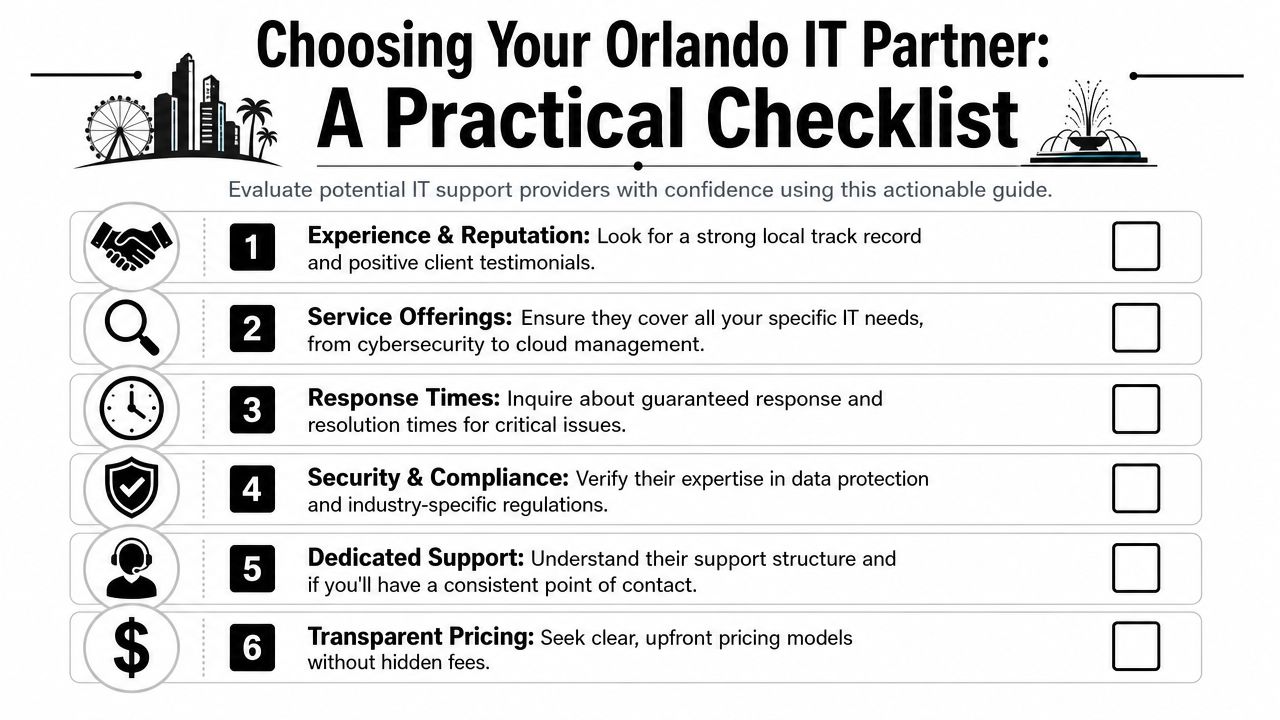
Most IT proposals look similar at first glance. They mention monitoring, support, cybersecurity, and strategic guidance. That's not enough. You need to know how the provider operates when your team is locked out of email, a workstation won't connect to the line-of-business app, or a user reports suspicious activity.
Local provider guidance says many common incidents can be resolved in about 30 minutes when the helpdesk is structured for rapid triage and remote remediation, according to this Orlando IT support benchmark. That's the standard I'd use when evaluating responsiveness. If a provider can't clearly explain how tickets are triaged, escalated, and resolved, keep looking.
Ask these questions before you sign
- Who answers the phone when we need help? You want a clear support model, live helpdesk access, and an explanation of after-hours coverage.
- What's included in your security stack? Don't accept vague answers. Ask about endpoint protection, MFA, email security, patching, backup oversight, and active monitoring.
- How do you handle on-site issues in Orlando and nearby cities? Some problems still need hands-on work. A local or regional presence matters.
- What industries do you already support? Law, medical, finance, and engineering firms have different software, workflows, and risk profiles.
- How do you document our environment? If they don't maintain diagrams, asset inventories, access records, and vendor details, they're improvising.
- What happens during onboarding and offboarding? Weak user lifecycle management creates security risk fast.
What to listen for
A good provider gives direct answers. A weak one hides behind jargon.
Here's what I'd consider a strong response:
| Question | Strong sign | Weak sign |
|---|---|---|
| Response times | Clear SLA language and triage process | “We're usually pretty quick” |
| Security | Named controls and response process | Generic “we do cybersecurity” claims |
| Compliance | Familiarity with your industry obligations | No documentation or policy support |
| Pricing | Defined scope and exclusions | Vague fees and project surprises |
| Ownership | One accountable team | Finger-pointing across vendors |
Red flags that should end the conversation
- They separate support from security as if they're unrelated.
- They can't explain escalation from helpdesk to engineering to incident response.
- They rely heavily on break-fix billing for work that should be part of ongoing management.
- They don't ask about your business workflows and only talk about tools.
- They avoid defining what's excluded from the monthly agreement.
Don't hire an IT company because they seem friendly. Hire them because they can show you how they prevent avoidable problems and respond when prevention fails.
The best Orlando IT partner will sound less like a gadget seller and more like an operations partner. That's what you want.
Decoding IT Support Pricing Models and Value
Buyers often get distracted at this point. They compare monthly fees without comparing scope.
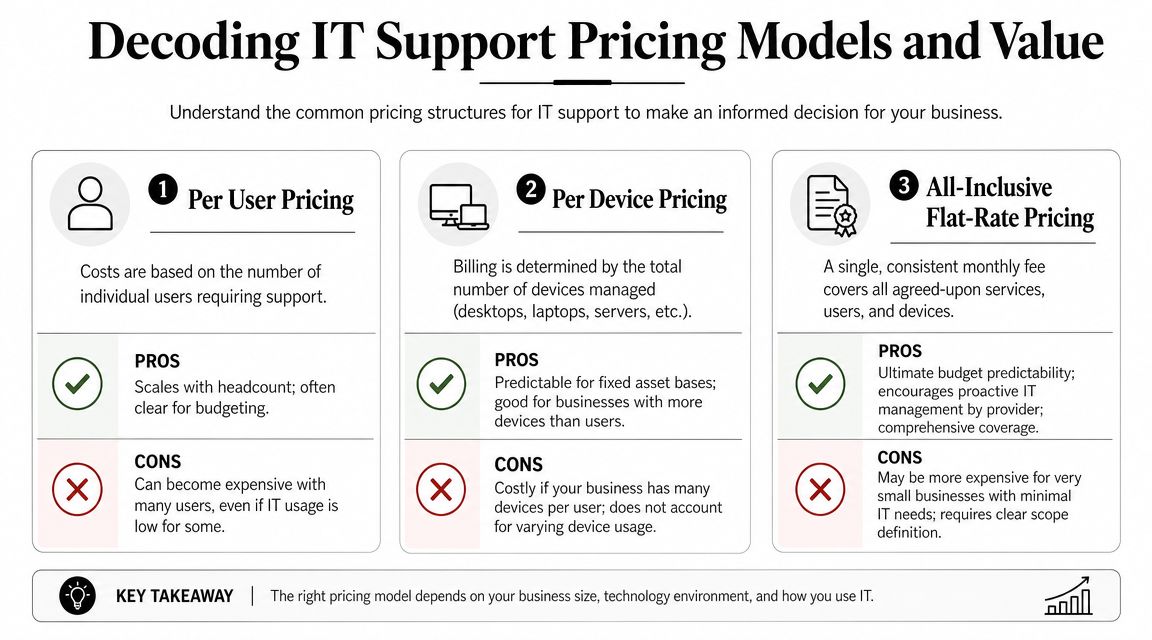
For Orlando SMBs, managed IT services are commonly priced at about $100 to $300 per user per month, and one local guide also notes 300+ managed services providers in the market, which is why buyers should compare security, monitoring depth, and support cadence instead of chasing the cheapest headline rate in this Orlando IT pricing overview.
The three pricing models you'll see most
Per-user pricing is common for firms with cloud-heavy workflows and mobile staff. It usually aligns well with support demand, but only if the scope is broad and clearly defined.
Per-device pricing can work for businesses with a stable hardware footprint. It gets messy when users rely on multiple endpoints, shared devices, or remote work setups.
Flat-rate or all-inclusive pricing is often the cleanest model for buyers who want budget predictability. The catch is scope discipline. You need a written definition of what's covered, what counts as a project, and how after-hours support is handled.
How to judge value instead of price
A cheaper proposal can cost more if it leaves gaps in:
- Security coverage: If email protection, EDR, or backup oversight are extra, your “savings” disappear fast.
- Project work: Many low monthly agreements shift routine improvement work into separate invoices.
- Vendor management: If your provider doesn't own carrier issues, software support coordination, and procurement guidance, your staff carries the burden.
- Strategic oversight: No roadmap means your environment drifts until a major upgrade becomes urgent and expensive.
The monthly fee matters. The unanswered question matters more: what problems are still going to land on your desk after you sign?
When you review pricing, ask for a plain-English scope summary. I'd want to know who owns support, security tooling, patching, backups, Microsoft 365 administration, vendor escalation, compliance assistance, and routine changes. If the provider can't make that simple, the relationship won't feel simple either.
Your Next Step Toward Resilient and Strategic IT
Orlando businesses don't need more tech clutter. They need control.
That means support that's proactive, security that's built into daily operations, and a service model that matches how the business runs. For a law office, that may mean tighter access control and better document protection. For a medical practice, it may mean stronger user policies and cleaner device management. For a finance or engineering firm, it often means reducing risk around sensitive data, vendor sprawl, and recovery readiness.
The right IT partner helps you do three things well. Keep people productive, reduce preventable risk, and give leadership clear visibility into what's being managed. That's what turns IT from a recurring frustration into a business asset.
If you're planning broader changes beyond support, this article on a complete modernization strategy is a useful complement. Just don't start with transformation language if the basics are still loose. Standardize support, tighten security, document the environment, then modernize with purpose.
If your current setup feels reactive, fragmented, or too dependent on one internal person, it's time to get a second opinion.
If you're evaluating business IT support in Orlando FL, Cyber Command, LLC can help you assess your current environment, identify operational and cybersecurity gaps, and determine whether fully managed or co-managed support fits your business. A no-obligation conversation is the fastest way to see where your risks, inefficiencies, and support blind spots are.
