Cloud Based Backup Solutions Small Business Guide 2026

If you're running a medical practice in Winter Springs, a law firm in downtown Orlando, or an accounting office with staff spread across Central Florida, your backup problem probably isn't theoretical. It's immediate. You already know your files matter. What most business owners don't know is whether their current setup would let them recover after a ransomware event, a server failure, or a week where the office is inaccessible.

That's where a lot of "cloud backup" advice falls apart. Many providers sell storage and call it backup. Many small businesses buy a tool and assume they're covered. Then a restore is needed, versions are missing, retention wasn't configured correctly, or nobody knows how long recovery will take. At that point, the monthly subscription you paid for doesn't matter. Recovery does.

For Central Florida businesses, especially in regulated industries, cloud based backup solutions small business plans have to do more than hold copies of files. They need to support continuity, security, compliance, and fast decision-making during a bad day. The right system protects data. The right strategy protects the business.

What Cloud Backup Really Means for Your Business

A real cloud backup system is a digital vault outside your office. If your building has a power issue, hardware failure, water intrusion, or a security incident, the backup copy still exists somewhere separate and recoverable.

That sounds obvious, but many businesses still confuse backup with sync or storage. Dropbox, OneDrive, and Google Drive are useful collaboration tools. They are not, by themselves, a complete business continuity plan. If a file is deleted, overwritten, corrupted, or encrypted by ransomware, those changes can sync too.

A digital cloud symbol inside a secure vault representing protected cloud-based data storage during a storm.

Backup protects recovery, not just storage

The question isn't "Where are my files stored?"

The question is "How fast can I get the right version back, and how much work will I lose?"

A Winter Springs dental office is a good example. If the practice management workstation crashes at 4:30 p.m. and the latest usable backup is from the night before, the office may lose a full day's scheduling changes, intake updates, and billing activity. If the same office has a modern backup platform capturing changes continuously, the data loss window is much smaller.

That leads to the two terms owners need to understand:

  • RPO
    means how much data you can afford to lose. If your RPO is one day, you could lose everything created since the previous backup.
  • RTO
    means how long you can afford to stay down. If your RTO is many hours, your team may sit idle while systems are restored.

Why RPO and RTO matter more than marketing features

Most backup sales pages talk about storage limits, dashboards, and "military-grade security." That's not what matters during an outage. What matters is whether your backup design matches how your business operates.

Practical rule: If your staff updates records all day, nightly backup alone is usually too blunt an instrument.

Modern platforms that use Continuous Data Protection capture file changes in near real time instead of waiting for a nightly job. According to this review of cloud backup for small businesses, providers such as Acronis and IDrive Business demonstrate RPOs under 15 minutes, while scheduled backups can create 24-hour data loss windows. The same analysis notes that block-level differencing and deduplication can reduce storage costs by up to 90% for database-heavy workloads.

What works and what doesn't

In practice, these are the setups that usually work best:

  • Good fit for smaller offices
    Endpoint and server backup with continuous protection, versioning, and offsite retention.
  • Good fit for heavier operations
    A mix of local recovery plus cloud copy, so large restores don't depend entirely on internet speed.
  • Weak fit for serious operations
    USB drives, a single NAS in the same office, or a sync folder that everyone assumes counts as backup.

A proper backup system should answer four plain questions without hesitation:

  1. What exactly is being backed up?
  2. How often are changes captured?
  3. How long does recovery take for one file, one server, and the whole office?
  4. Who verifies restores work?

If you can't get clean answers to those four questions, you don't have a backup strategy. You have backup hope.

Why Florida Businesses Need More Than Just Data Storage

Small businesses in Orlando don't operate in a neutral environment. They deal with weather risk, infrastructure interruptions, and a steady stream of cyber threats. That changes what a good backup strategy looks like.

A storage account is passive. A business continuity backup plan is active. It assumes something will eventually go wrong and builds for recovery before that happens.

Your office can be unavailable even when your company isn't

A lot of owners still picture disaster recovery as a worst-case building loss. That's one scenario, but it's not the only one that matters. You can have a functioning business with a non-functioning office.

If your team can't get into the building, if local systems are offline, or if one location goes down while another stays open, staff still need access to current data and a clear restoration path. That's where offsite copies, role-based access, and tested recovery workflows matter more than raw storage space.

For firms with more than one office, or even one office plus remote staff, consistency is often the hidden problem. One branch may have current data, another may not. A restore may be possible for one location but incomplete for another.

Multi-location sync failure is a real operational risk

Generic backup advice usually misses the mark. Distributed businesses don't just need copies; they need reliable replication and version consistency across sites.

A 2025 Gartner finding summarized by Lenovo reported that 47% of SMBs with multiple branches experienced data synchronization failures in their cloud backups. It also found that those failures amplified ransomware impact by 3x because replication was incomplete. The same summary notes that hybrid solutions from Acronis and Veeam use edge caching and WAN optimization, cutting sync times by 40% for remote teams and reducing overall TCO by 30% compared to cloud-only models for distributed organizations.

For a Central Florida business with an Orlando office, a second location, and remote users working from home, that's not abstract. It means a backup plan can look healthy on paper while still leaving gaps in the data your team needs.

A backup that works for one office can fail a multi-location business if the replication design is sloppy.

Florida risk changes the backup conversation

Three local realities push businesses toward stronger backup architecture:

  • Weather exposure
    Storms, flooding, and building access problems make same-site-only backups risky.
  • Power and connectivity instability
    Even short outages can interrupt backup jobs, corrupt local systems, or delay restores if there's no local recovery option.
  • Professional services targeting
    Law firms, dental offices, accounting firms, and medical practices hold sensitive, operationally critical data that attackers know can't stay down long.

What doesn't work in this environment is the minimalist approach. One copy in the office is fragile. One cloud repository with no restore testing is fragile too. Businesses that need uptime usually end up with layered protection, not a single tool.

Operating from anywhere requires design, not luck

The practical goal is simple. If your office is unavailable, your business should still be able to function in a controlled way. That means staff can access the systems they need, leadership knows what's recoverable first, and the backup environment isn't tangled up with the same failure that hit production.

For Orlando-area firms, the right backup system isn't just a place to park files. It's part of how the business keeps moving when the office, the network, or a user endpoint fails.

Key Architectures and Components of a Modern Backup Solution

When owners hear "cloud backup," they often picture one thing. In reality, there are several architectures, and each one solves a different problem. Picking the wrong model creates pain later, usually during restore.

Here's the visual map most buyers never get from providers.
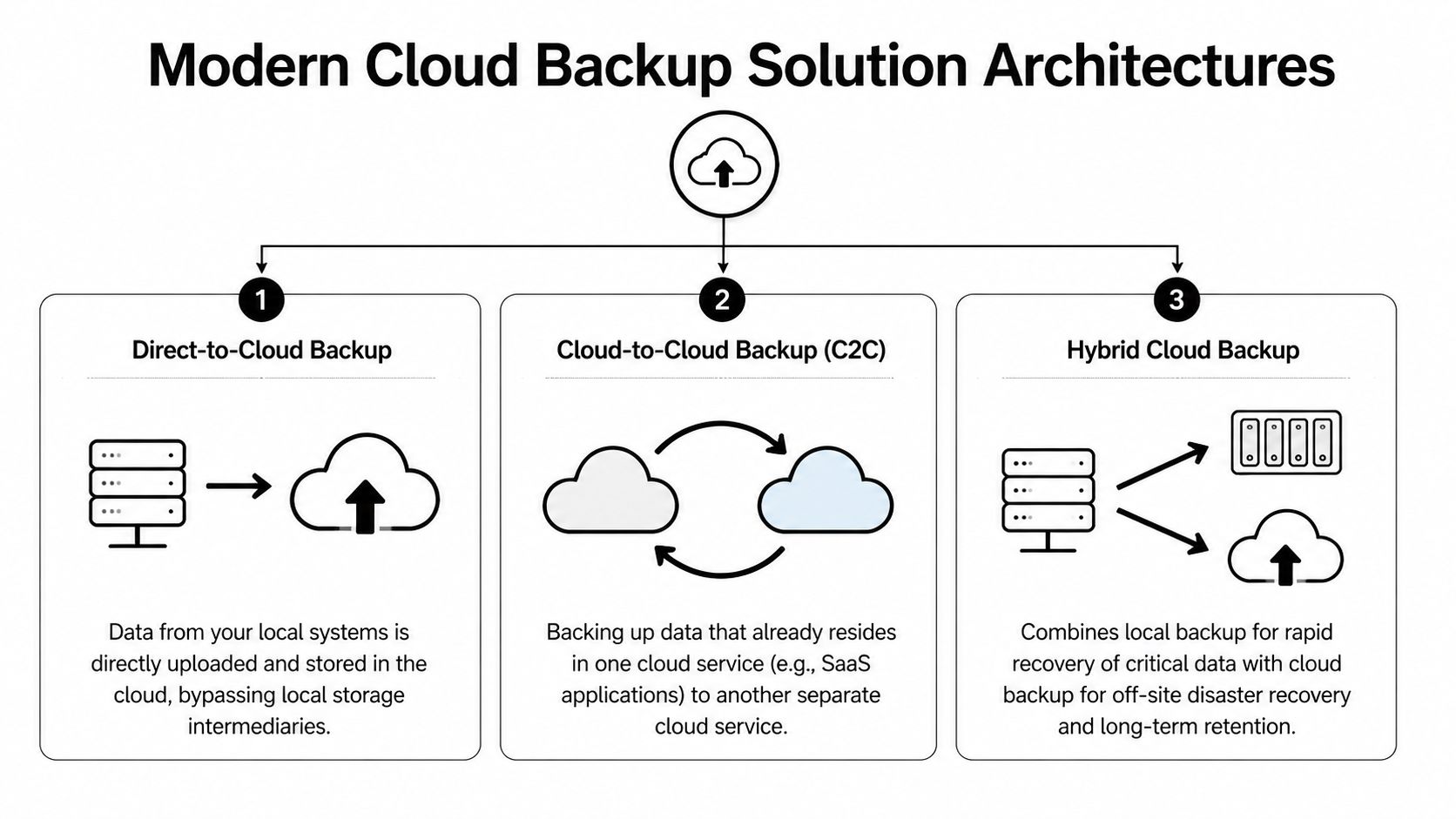
A diagram illustrating three modern cloud-based backup architectures: direct-to-cloud, cloud-to-cloud, and hybrid cloud backup systems.

Direct-to-cloud works best when simplicity matters

In a direct-to-cloud model, backup agents on laptops, desktops, and servers send data straight to the provider's cloud repository. This is often a sensible fit for smaller offices without much infrastructure.

Benefits are straightforward:

  • Less local hardware
    You don't need to maintain a separate backup appliance for basic protection.
  • Strong fit for remote users
    Laptops can keep backing up even when employees aren't in the office.
  • Cleaner deployment
    Endpoint coverage is usually easier to standardize.

The trade-off is recovery speed for large restores. If you need to pull back a full server or a large file set, your internet connection becomes part of the recovery path.

Hybrid is usually the practical answer for serious uptime needs

A hybrid backup design keeps a local backup copy for fast recovery and a cloud copy for offsite disaster recovery. For many small and midsize businesses, this is the architecture that balances speed, resilience, and operational sanity.

If an employee deletes a shared folder, a local recovery target can return it quickly. If the office is compromised, the offsite copy still exists. If ransomware reaches the production environment, a properly isolated backup design gives you a cleaner recovery option.

That local component is often a NAS, backup appliance, or dedicated storage target. The cloud component handles the geographic separation that local-only systems can't provide.

The best architecture usually isn't the one with the most features. It's the one that matches how your business restores.

Cloud-to-cloud fills a gap many firms miss

Many businesses assume Microsoft 365 or another SaaS platform handles backup for them. That's a dangerous assumption. A cloud-to-cloud architecture backs up data that's already in a cloud platform into a separate backup system.

This matters for:

  • Exchange and mailbox data
  • OneDrive and SharePoint files
  • Teams and collaboration content
  • Sales and client records in SaaS apps

If your business lives inside Microsoft 365, that data needs a backup strategy of its own. SaaS availability isn't the same as business-controlled retention and point-in-time restore.

The components you should expect to see

A modern backup environment usually includes several moving parts:

Component What it does Why it matters
Endpoint agent Captures changes on laptops and desktops Protects remote users and key workstations
Server backup service Backs up physical or virtual servers Covers line-of-business systems
Local recovery target Stores a nearby copy for fast restore Reduces downtime for common incidents
Cloud repository Holds offsite backup data Protects against site-level disasters
Management console Shows status, failures, retention, and restore options Lets IT verify protection instead of guessing
Recovery testing process Validates that backups can actually be restored Turns backup from theory into proof

For businesses running cloud workloads, it's also worth understanding how infrastructure-level backup fits into the picture. A useful reference is this guide to AWS backup and disaster recovery planning, especially if your applications or data stores already live in the cloud.

What buyers should ask before choosing an architecture

Ask providers to design around your recovery priorities, not their standard package.

  1. Which systems need rapid local recovery?
  2. Which users need backup even when offsite?
  3. Which cloud apps need separate protection?
  4. What is isolated from production so an attacker can't erase everything at once?

A lot of backup failures start before any attack happens. They start when the architecture was never matched to the business.

Navigating Compliance and Security in Regulated Industries

For regulated businesses, backup isn't just an IT tool. It's part of your compliance posture. A dental office handling patient records, a law firm retaining client documents, or an accounting practice protecting financial data can't treat backup as an afterthought.

The mistake I see most often is buying a general-purpose backup service and assuming compliance will sort itself out. It won't. Providers can offer encryption and storage, but that doesn't automatically produce the safeguards, retention controls, and audit evidence your business may need.
Dual computer monitors on a desk displaying cybersecurity dashboards with a lock icon and data charts.

What regulated firms should care about first

If you operate in healthcare, legal, accounting, or financial services, these backup features move from "nice to have" to "required for responsible operations":

  • Encryption at rest and in transit
    Sensitive records should remain unreadable whether stored or moving across networks.
  • Immutability
    Backup data shouldn't be easy to alter or delete after it's written.
  • Access control and authentication
    Not every employee should be able to browse or remove backup sets.
  • Audit trails
    You need records showing what was backed up, when, and who accessed it.
  • Retention policy control
    Compliance isn't only about making copies. It's also about keeping the right copies for the right amount of time.
  • Restore verification
    If you can't prove recoverability, the backup isn't doing its compliance job.

AES-256 matters because it changes the exposure profile

For regulated businesses, one of the most important baseline controls is AES-256 encryption. According to Box's overview of cloud backup for small business, cloud backup solutions for regulated businesses rely on AES-256 encryption for data at rest and in transit, and it describes that NIST standard as practically unbreakable. The same source notes that leading solutions such as Acronis and CrashPlan encrypt data client-side before upload, which prevents provider access and reduces insider-threat exposure.

That client-side piece matters. If the provider never receives your files in plaintext, you've reduced one category of risk before the data even leaves your environment.

How this maps to real compliance pressures

For Orlando-area regulated firms, the details differ by industry, but the practical requirements look similar.

Medical practices and HIPAA

A medical spa, dentist, orthodontist, or veterinary clinic needs backup controls that protect electronic patient information and support reliable restoration after an incident. Encryption helps protect confidentiality. Access controls limit exposure. Immutable or protected backup copies help when ransomware hits systems that staff use every day.

HIPAA conversations also force a question many small practices avoid. If a patient record must be restored, how quickly can that happen, and who owns that process?

Law firms and accountants under GLBA-style pressure

Law offices and accounting firms hold sensitive financial records, tax data, case files, and communications. Even when the exact regulatory framework varies, the operational expectation is the same. Sensitive client data needs controlled access, secure retention, and documented recovery capability.

A provider saying "we're secure" isn't enough. Ask how deletion is prevented, how restores are logged, and who can access backup data.

Financial and professional services with audit expectations

Firms serving financial clients often need proof, not promises. That means logs, reports, policy enforcement, and recoverability evidence. During a client security review or internal audit, "our backups run every night" is weak. A defensible answer includes encryption method, retention policy, access restrictions, and restore test records.

Security features that actually improve recovery

Security in backup isn't just about confidentiality. It also affects whether recovery works under pressure.

Box's overview also states that in simulated ransomware tests, Acronis's encrypted backups demonstrated a 99.9% data recovery success rate and a 40% faster RTO compared to non-encrypted alternatives. That's useful because it cuts through a common misconception that stronger security always slows recovery. In backup design, the opposite can be true when integrity checking and protected restore paths are built in.

What to reject during vendor review

Be cautious if a provider can't clearly answer these points:

  • Where is data stored
    If they can't explain data residency and control, keep pushing.
  • How are backups protected from deletion
    If the answer is vague, assume the design is weak.
  • Can they support regulated documentation
    Agreements, logs, and compliance-oriented reporting shouldn't be optional extras.
  • How often are restores tested
    Marketing language is easy. Restore evidence is harder, and that's what matters.

The safest approach for regulated small businesses is usually not the cheapest subscription on a website. It's a backup design built for security controls, operational recovery, and auditability from the start.

Choosing Your Cloud Backup Strategy DIY versus Managed

Some business owners want direct control. Others want clear accountability. Both instincts are reasonable. The real question is whether your team has the time and skill to build, monitor, test, and document backup properly.

DIY can work. It often works poorly when backup is one of fifteen responsibilities assigned to an office manager, internal admin, or busy IT generalist. The software may be installed, but alerting, retention, restore testing, and access control drift over time.

Where DIY usually breaks down

The problem isn't buying the tool. The problem is everything after purchase.

A small business has to make dozens of decisions that marketing pages tend to skip:

  • What gets backed up, and what gets excluded
  • How retention should differ for servers, endpoints, and SaaS data
  • Which backup copies are protected against deletion
  • How often restore tests should happen
  • Who reviews failed jobs and who fixes them
  • How compliance evidence gets documented

If you're still comparing local hardware and offsite options, this plain-language piece on understanding your data storage choices is a useful companion before you commit to a model.

DIY vs Managed Cloud Backup Comparison

Factor DIY (Do-It-Yourself) Managed Service (e.g., Cyber Command)
Ownership Your team owns setup, monitoring, policy decisions, and restores A service partner owns day-to-day management and escalation
Internal time Staff must review alerts, fix failed jobs, and document results Internal staff spends less time on backup administration
Skill requirement Requires backup, security, and recovery expertise Lets non-specialist teams rely on experienced operators
Compliance support You must map retention, logging, and controls yourself Managed oversight usually makes audit preparation more structured
Disaster accountability Recovery depends on whoever is available and qualified Responsibility is clearer during an incident
Hidden costs Missed alerts, weak testing, and rushed recovery create expensive risk Monthly cost is higher on paper but often lowers operational risk
Fit Works best for firms with capable in-house IT and time to spare Works best for firms that need predictable outcomes

Managed service is about risk transfer, not convenience alone

The strongest argument for managed backup isn't that it's easier. It's that someone is watching the system when you aren't.

That matters when:

  • backups fail unnoticed,
  • a retention policy is misconfigured,
  • ransomware starts touching unusual data patterns,
  • or a restore has to happen outside business hours.

For many small businesses, especially regulated ones, the better question isn't "Can we run this ourselves?" It's "Do we want recovery to depend on improvisation?"

A managed approach also fits well when backup is tied to broader continuity planning. If you're comparing service models, this overview of managed disaster recovery as a service helps frame the discussion beyond just storage and backup licensing.

If nobody is responsible for testing restores, nobody is responsible for recovery.

A direct recommendation

Choose DIY only if you already have disciplined internal IT ownership, documented procedures, and a real testing cadence. Don't choose it just because the monthly line item looks smaller.

Choose managed when uptime, compliance, and accountability matter more than the feeling of direct control. For most Orlando-area medical, legal, financial, and professional services firms, that's the safer business decision.

A Practical Checklist for Selecting Your Solution

Vendor demos are polished. Backup failures are messy. The easiest way to cut through sales language is to ask direct questions and keep asking until you get specific answers.

Questions that reveal whether the provider is serious

Bring this checklist into every evaluation call.

  • What are our recovery targets
    Ask for your expected RTO and RPO by workload, not a generic platform statement.
  • What exactly gets backed up
    Endpoints, servers, virtual machines, Microsoft 365, shared folders, databases, line-of-business apps.
  • How is backup data protected from deletion or tampering
    You're looking for clear language around immutability, isolation, and protected administrative access.
  • How are restores tested
    Ask whether they perform regular test restores and whether they document results.
  • How do you handle failed backup jobs
    A mature provider has an escalation process, not just automated emails no one reads.
  • Where is the data stored
    You need a clear answer on hosting location and control.
  • What compliance documentation can you support
    For regulated businesses, ask about agreements, audit logs, retention records, and reporting.
  • Who has access to backup data
    Administrative scope should be controlled and auditable.
  • How are remote users protected
    Staff working from home or traveling shouldn't fall outside the backup plan.
  • What is the restore process during ransomware
    Ask them to walk through the steps in plain English.

Questions many buyers forget to ask

These often uncover the biggest gaps:

  1. If our office is unavailable, how do we access restored data?
  2. If one server fails, what comes back first?
  3. If one employee deletes a folder, can we restore only that folder?
  4. If a backup fails overnight, who notices before our staff logs in?
  5. If we leave your service, how do we retrieve our backup data?

Ask every provider to describe the last restore problem they had to solve and how they handled it. The quality of that answer tells you more than the product demo.

Red flags during selection

Watch for these responses:

  • "Unlimited" with no retention clarity
    Unlimited storage doesn't mean unlimited recoverability.
  • Vague compliance language
    If they speak in generalities, assume you will do the hard compliance work yourself.
  • No restore evidence
    If they can't show testing discipline, don't assume they have it.
  • One-size-fits-all packaging
    Dental practice, law office, and architecture firm backups should not all be designed the same way.

The right provider should make backup feel less mysterious, not more.

Putting Your Backup Plan into Action

Good backup projects don't start with software. They start with recovery priorities. Identify what must come back first, what can wait, and which systems create the biggest operational risk if they're unavailable.

Then deploy in a practical order. Install agents on endpoints and servers. Configure retention and access policies. Run the initial full backup. Add cloud app coverage if your business depends on Microsoft 365 or similar services. Document the restore path for the systems your team uses every day.

After that, testing becomes the definitive dividing line.

A backup that has never been restored is an assumption. A backup that is restored and verified on a schedule becomes part of business operations. That includes single-file restores, server-level recovery, and scenario testing for ransomware or office outage conditions. If your team doesn't already have a documented process, start with a structured disaster recovery plan template and build backup decisions around that plan, not the other way around.

Most small businesses don't fail because they ignored backup entirely. They fail because they assumed setup was the finish line. It isn't. The finish line is verified recovery.


If your business in Orlando, Winter Springs, or the surrounding Central Florida area needs a backup strategy that covers cybersecurity risk, compliance, and real-world recovery, Cyber Command, LLC can help you design, manage, and test a solution that fits how your business operates. Their team supports regulated firms, multi-location organizations, and small businesses that need more than basic storage. They focus on recoverability, accountability, and ongoing protection so you can spend less time worrying about backups and more time running the business.

How to Choose a Managed Service Provider in Central Florida

It’s tempting to jump right into Googling managed service providers, but the best place to start your search is actually by looking inward. Before you ever get on a call with a potential IT partner, you need a solid internal audit of where your technology stands today, what your goals are, and what a "win" actually looks like for your business.

This foundational work creates a ‘needs scorecard’ that becomes your North Star, ensuring you pick a partner who solves your real problems, not just one with a flashy services list.

Defining Your Business Needs Before You Search

A professional reviews a 'Needs Scorecard' on a tablet, with a laptop and security documents.

Before you start comparing providers, you need a crystal-clear picture of what your business actually requires. Skipping this self-assessment is like shopping for a car without knowing if you need a commuter sedan or a heavy-duty truck. It's the single biggest reason partnerships fail.

There's a reason the U.S. managed services market is projected to hit $128.07 billion in 2025 and $162.52 billion by 2030. Businesses are realizing they can't go it alone, especially with cyber threats up 300% since 2020. Yet, a painful 60% of SMBs end up regretting their choice, often because they picked a cheap vendor and got slammed with slow responses and hidden fees.

Conduct an Honest Internal Audit

Start with an honest, no-blame look at your current IT situation. The goal here isn't to point fingers; it's to create a tangible list of pain points and strategic goals that an MSP can solve.

What are the recurring IT headaches that drain your team's productivity? Is your current setup holding you back from growing or scaling effectively? What are your most significant cybersecurity fears?

Here are a couple of real-world examples for Central Florida businesses:

  • A law firm in Orlando might realize their current IT support is painfully slow, leading to lost billable hours. Their top need is lightning-fast, expert support, but their biggest concern is protecting sensitive client data from a ransomware attack that could cripple their reputation.
  • An architecture firm in Winter Park with teams across multiple job sites could be struggling with file sync and collaboration. Their main priority is standardizing their infrastructure to make teamwork seamless and secure, especially when sharing large, proprietary design files.

Pinpoint Industry-Specific Requirements

Your industry brings a unique set of IT and security demands to the table. A generic, one-size-fits-all MSP will almost certainly miss something critical, leaving you exposed to both compliance violations and cyber threats.

For professional services like accounting or legal practices in Central Florida, this means drilling down on compliance and data protection. Does your business handle financial data that falls under PCI-DSS or medical information governed by HIPAA? Any potential MSP must have proven experience here. Breaches are not just a technical problem; they are a business-ending event.

Similarly, a construction or manufacturing business in Sanford might be more concerned with securing operational technology (OT) and ensuring the integrity of their supply chain. Your scorecard has to reflect these non-negotiable industry standards. To get a head start, check out our guide on the first 8 questions to ask before you hire managed IT services.

The most crucial part of this process is to be specific. Instead of saying "we need better security," write down "we need a partner to manage our firewall, provide 24/7 threat monitoring to prevent ransomware, and ensure we are compliant with HIPAA regulations."

This level of detail is your best filter. It also helps you think holistically about your operations. For instance, you might realize your front desk is overwhelmed, which leads you to ask, "Do I Need A Virtual Receptionist" to offload administrative work. This ensures your final MSP choice is a true strategic partner, not just another vendor.

How to Vet an MSP's Cybersecurity and Compliance Chops

A man works at a computer, analyzing a cybersecurity dashboard with a map and security features.

Let’s get straight to the point: if you get this part wrong, nothing else matters. Evaluating an MSP's security capabilities is the most critical part of your decision. We’re not talking about just installing antivirus software. We’re talking about a deep, multi-layered security framework that protects your business from every angle, 24/7. This isn't just about preventing problems—it's about ensuring your business can actually survive one.

For any business in Central Florida, whether you’re a financial firm in Orlando, a medical practice in Kissimmee, or a real estate agency in Lake Mary, the question isn't if you'll be targeted, but when. Your MSP needs to be a fortress, not a flimsy gate.

Look for Active Threat Hunting, Not Just "Monitoring"

A lot of providers will tell you they offer "monitoring." Be careful with that term. Often, it just means they get an automated alert after something bad has already happened. In today's threat landscape, that’s not nearly good enough.

Cyber threats are designed to be stealthy. They lurk in your network for weeks or months, quietly gathering data before they strike. A passive system will miss them entirely until it's too late. What you need is a partner who performs active threat hunting.

This means they have a dedicated team inside a 24/7/365 Security Operations Center (SOC) who are constantly digging through your network logs, looking for anomalies and indicators of compromise. They aren't waiting for an alarm; they are proactively hunting for the digital footprints of an attacker before a breach occurs.

A top-tier MSP doesn't just manage alerts; they hunt for adversaries. Their SOC team should be using advanced tools and human expertise to identify suspicious behavior that automated systems might miss, neutralizing threats like ransomware or data exfiltration in their earliest stages.

This proactive stance is what separates a true security partner from a basic IT vendor. It’s the difference between finding a smoldering match and dealing with a raging inferno.

Nail Down the Incident Response Plan

When a security incident happens—especially something as devastating as ransomware—every second counts. The most important question you can ask a potential MSP is not just if they have an incident response plan, but how quickly it will get you back up and running.

You need specifics. Vague promises of "we'll handle it" are a huge red flag.

Ask them directly:

  • What is your guaranteed response time once we declare a cybersecurity incident?
  • What is your exact process for isolating infected systems to stop the spread of malware?
  • How fast can you restore our critical data and systems from backups to get us operational again? What is your recovery time objective (RTO)?
  • Can you share a real-world, anonymized example of how you handled a ransomware attack for a client in a regulated industry like healthcare or finance?

Their answers should be confident, clear, and detailed. For a busy law firm in Orlando, being down for even a day could mean tens of thousands in lost billable hours and serious reputational damage. The MSP's plan has to be built for speed and effectiveness.

Do They Speak Your Compliance Language?

For many industries, compliance isn't just a good idea—it's a legal requirement with crippling financial penalties for getting it wrong. This is especially true for businesses in Central Florida's growing healthcare, finance, and legal sectors.

A private medical practice in Kissimmee or Oviedo, for instance, lives and dies by HIPAA regulations. The MSP you choose must have documented, proven experience managing HIPAA-compliant environments. This covers everything from securing patient data (ePHI) with encryption to providing reports that will stand up to a federal audit.

Likewise, if you’re an accounting or financial services firm in downtown Orlando handling credit card information, you must be PCI-DSS compliant. Your MSP needs to show you exactly how their services will help you meet and maintain these standards. A failure here doesn't just risk a data breach; it puts your entire business on the line. To get a better handle on this, you can master cybersecurity compliance for IT managed services with our detailed guide.

Let's put some real numbers on this. A stunning 85% of small and mid-sized businesses see their cybersecurity posture improve after partnering with a specialized MSP, slashing threat detection times from days to mere minutes. With HIPAA compliance fines averaging $1.5 million per violation, the right partner is critical. A top-tier MSP can reduce breach costs by 40% on average through services like continuous SOC monitoring and rapid incident response, offering true 24/7 protection. You can explore the research behind these powerful managed services market findings.

Decoding Service Level Agreements and Support Models

The Service Level Agreement (SLA) is where an MSP puts their promises in writing. But let’s be honest, the real story is always buried in the fine print. Learning to spot the difference between a real guarantee and a vague promise is what separates a great IT partnership from a frustrating one.

When your network is down and your team is at a standstill, you don't care about uptime percentages. You care about how fast you can get back to work. That’s why you need to ignore the fluff and focus on two things: guaranteed response times and, far more importantly, resolution times.

Response Time vs. Resolution Time

Don't let an MSP fool you with a fast response time. It’s a classic sales tactic. A "four-hour response" guarantee sounds great, but it often just means they’ll open your ticket and say "we got it" within that window. It says absolutely nothing about when they’ll actually fix the problem.

A resolution time guarantee is what really matters. This is the MSP’s commitment to actually solving the issue and getting your systems back online within a specific, promised timeframe. In a real-world crisis, the difference is night and day.

Let’s walk through a scenario I’ve seen play out dozens of times:

  • The Problem: A busy law firm in Winter Park has a complete server outage at 10 AM on a Tuesday. They can't access client files, track billable hours, or even send an email. Every single minute of downtime is costing them money and damaging their reputation.
  • MSP A (Response-Based SLA): Promises a 4-hour response. They log the ticket at 10:05 AM and maybe assign a technician around 1:30 PM. The actual work to fix the outage might not even start until late afternoon.
  • MSP B (Resolution-Based SLA): Guarantees a 15-minute resolution for critical failures. By 10:15 AM, their team is already actively working on the problem. The firm is back online before lunch.

For any business where time is money, the choice is obvious. You're not paying for a ticket acknowledgment; you're paying for a fix. This is a non-negotiable part of choosing a managed service provider who understands what it takes to keep a business running.

The true measure of an SLA isn't how fast an MSP says "we got your ticket." It's how fast they get your business back up and running when a critical system fails. Always push for clear, guaranteed resolution times for different types of problems.

Examining the Support Model

Beyond the written SLA, you need to dig into the support model itself. When you call for help, who are you actually talking to? Is it a faceless overseas call center agent reading from a script, or a dedicated, U.S.-based team that actually knows your business?

Ask any potential MSP these direct questions:

  • Is your helpdesk staffed by your own full-time, U.S.-based employees?
  • Will we have a dedicated account manager or technical lead who understands our environment?
  • How do you handle on-site support for issues that can't be fixed remotely?

For businesses in Central Florida, a local presence is a massive advantage. Having a provider with offices and engineers in the Orlando area means they can dispatch a technician for rapid on-site support when a physical server fails or a network switch dies. That local knowledge and fast response capability provides a layer of security that a remote-only provider simply can't match.

The Importance of Transparent Reporting

A great SLA is meaningless if the MSP can't prove they’re meeting it. The best providers aren't afraid of transparency; they embrace it. They’ll give you regular, easy-to-read reports that show exactly what you're paying for, with clear metrics on uptime, ticket response times, and resolution times.

This is what creates accountability and builds trust. The global managed services market is expected to surpass $500 billion by 2026, but the quality of service from one provider to the next varies wildly. The best MSPs can slash resolution times to under 15 minutes for critical issues, a stark contrast to the industry average of four hours.

That’s because only a small fraction, maybe 5-10%, of the 150,000+ MSPs out there are mature enough to handle compliance-heavy industries. These are the providers delivering proactive support that can boost uptime by 35% for businesses with multiple locations. You can read more about these industry-defining MSP statistics and trends to see what separates the top-tier from the rest.

Understanding Pricing Models and Total Cost of Ownership

Trying to compare MSP quotes can feel like you're being intentionally confused. A low monthly fee looks great on paper, but it's often a Trojan horse for hidden charges that will blow up your IT budget. To pick the right managed service provider, you have to look past the sticker price and figure out the true Total Cost of Ownership (TCO).

The Per-Device and Per-User Models

You'll almost certainly run into two common pricing models: per-device and per-user. In a per-device plan, you're charged a flat fee for every piece of hardware the MSP manages—servers, desktops, firewalls, you name it. It's straightforward, but the costs can balloon quickly as your business adds more gear.

The per-user model is often a better fit for modern offices, charging a single fee for each employee, no matter how many devices they use (think desktop, laptop, and phone). The problem is, both models often get packaged into tiers, where the stuff you actually need—like robust 24/7 cybersecurity monitoring—is locked away in the most expensive plans.

The Problem with "Cheaper" Tiers and Break-Fix

Many providers, especially those dangling a low introductory rate, lean on a tiered or "break-fix" model. It looks like a bargain until something actually goes wrong. With this setup, basic monitoring might be included, but any real work—fixing a server outage, cleaning up a malware infection, or even just setting up a new hire—gets billed at a steep hourly rate.

This creates a massive conflict of interest. The provider only makes good money when your technology is broken. They are paid to react to problems, not to prevent them. For any business in Orlando that relies on being operational, this is a recipe for disaster.

A pricing model that relies on hourly billing for emergencies means the MSP profits from your downtime. A true partner’s profitability should be tied to keeping you up and running, not billing you for fires they should have prevented.

Think about it. A single cybersecurity incident, like a ransomware attack, can easily rack up thousands in hourly remediation fees, and that's before you even calculate the cost of lost business. Suddenly, that "cheaper" plan is astronomically expensive. For businesses across Central Florida facing a constant barrage of cyber threats, this reactive model is a gamble you can't afford to take.

The All-Inclusive, Flat-Rate Advantage

The most predictable and business-friendly model is the all-inclusive, flat-rate plan. It’s simple: you pay one fixed monthly fee that covers everything. We’re talking unlimited 24/7 support, on-site visits, comprehensive cybersecurity with a SOC, and strategic IT planning.

This is the model that aligns an MSP's goals directly with yours. Their profit margin depends on keeping your systems secure, stable, and running so smoothly that you have fewer reasons to call them. It forces them to be proactive—constantly patching systems, hunting for threats, and optimizing your network to stop problems before they start. For a professional services firm in Winter Park, this means your IT spend is a predictable line item, and you get the peace of mind that you're covered, no matter what.

Calculating the True Total Cost of Ownership

To make a real apples-to-apples comparison, you have to dig deeper than the monthly quote and calculate the TCO. This means sniffing out all the potential "hidden" costs that come with a cut-rate plan.

Here are the questions you need to ask every potential provider to uncover the real cost:

  • Are on-site visits included in the flat fee, or are they billed separately?
  • What’s your hourly rate for work that you consider "out of scope"?
  • Are software licenses for security tools (like EDR and 24/7 SOC monitoring) and productivity suites (like Microsoft 365) part of the deal?
  • Is vendor management included? If our internet goes down, will you sit on the phone with the provider for us?
  • What are the potential costs if we suffer a security breach under your plan?

The true cost of a cheap MSP isn't on their invoice. It's the cost of downtime, the lost productivity when your team is dead in the water, and the massive financial and reputational hit from a security breach they should have prevented. A predictable, all-inclusive model might have a higher monthly fee, but its TCO is almost always lower because it insures you against the catastrophic costs of failure.

Making The Final Choice With Confidence

You’ve done the hard work—the research, the calls, the demos. Now you're at the finish line with a shortlist of managed service providers. It’s time to make the final call.

This decision is about more than just finding the cheapest vendor. You’re choosing a strategic partner who will have keys to your entire technology kingdom. It’s a choice you need to make with confidence, based on a clear picture of their technical skills, security posture, and long-term value.

Making an objective, data-driven choice is the only way to go. Relying on gut feelings alone can be a recipe for disaster. This is where a decision matrix comes in. It’s a simple tool that turns a complex choice into a clear, quantifiable comparison, helping you see past the sales pitch and focus on what truly matters.

Create Your MSP Decision Matrix

Start by creating a simple table to score your finalists. In the first column, list out your non-negotiable criteria. Then, add a column for each of your top MSP candidates. As you go, score each provider on a scale of 1 to 5 (with 1 being poor and 5 being excellent) for every single criterion.

Your criteria should be tailored to your business, but here’s a solid starting point:

  • Cybersecurity & Compliance: How well do they meet your security needs? Do they have a 24/7 SOC? Do they have proven experience with regulations like HIPAA or PCI, which is critical for medical practices in Kissimmee or finance firms in Orlando?
  • SLA & Support Model: Did they provide a clear, guaranteed resolution time? Is their support team U.S.-based and knowledgeable, or did you get bounced around?
  • Technical & Industry Expertise: Do they actually get the challenges your industry faces, whether you're a law firm in Orlando or a construction company in Sanford?
  • Local Presence: How critical is fast, on-site support for your operations? A local Central Florida team can be a massive advantage when things go wrong.
  • Cultural Fit: Did their team feel like an extension of yours? Was communication proactive and clear, or did you have to chase them down for answers?

This matrix is your best defense against letting one factor, like a low price, overshadow more critical elements like security or the quality of their support.

This is how you turn a subjective process into an objective decision. The table below gives you a template to start with. Just copy it into a spreadsheet and fill it out for your top contenders.

MSP Decision Matrix Template

Evaluation Criteria Provider A Score Provider B Score Provider C Score Notes
Cybersecurity & Compliance
SLA & Support Quality
Technical Expertise
Industry Experience
Local Presence & On-Site Support
Pricing & Value
Cultural Fit & Communication
Reference Check Feedback
Total Score

Once you've scored each provider, the numbers will often reveal a clear winner, making your final choice much easier and more defensible.

Don’t Ignore The Human Element

It’s easy to get lost in the weeds of technical specs and service lists, but remember: you’re hiring a team, not just a service. These people will have deep access to your most sensitive data and business operations. A strong cultural fit is non-negotiable for a successful long-term partnership.

Think back on your interviews and reference checks. Did the provider feel like a team you could trust in a crisis? Their communication style has to align with yours. If you value proactive updates and strategic guidance, an MSP that only calls when something breaks will be a constant source of frustration.

The right MSP should feel like a natural extension of your team. Their success is tied to your success, and this partnership mentality should be evident in every interaction, from the initial sales call to the final contract review.

This is where having a local presence can really make a difference. An MSP with offices in the Orlando area is more than just a name on a support ticket; they’re part of your community. That often translates to a more personal and accountable partnership.

For a deeper dive into vetting providers, our complete 2026 MSP buyer's guide offers an even more detailed framework for making the right choice.

This flowchart breaks down a core pricing decision: whether you need the budget stability of a flat-rate model or are comfortable with variable hourly billing.

A flowchart guiding MSP pricing decisions: choose per-hour or flat-rate based on cost predictability.

The key takeaway is that if budget predictability is a priority, you should lean toward a flat-rate model. It aligns the MSP's goals with yours by incentivizing uptime and efficiency, not billable hours.

The Final Steps Before You Sign

Once your decision matrix points to a clear winner, there are just a couple of final hurdles before you make it official. Don't skip these.

  1. Review the Master Service Agreement (MSA): Go through the contract line by line, preferably with your legal counsel. Make sure everything you discussed—from resolution time guarantees to what’s included in the flat rate—is clearly documented. Pay close attention to the terms for ending the contract.
  2. Plan the Onboarding Process: A professional MSP will have a structured, documented onboarding plan. Ask them to walk you through it. What’s the timeline? What information do they need from you? A chaotic transition is the first red flag of a disorganized partner.

As you finalize your choice, you might also find that providers specializing in specific environments are a better fit. For instance, this guide on choosing an AWS managed service provider is a great resource if your business relies heavily on Amazon’s infrastructure.

By following this structured process, you can be confident that you're not just buying a service. You’re investing in a partnership that will protect your business and support its growth for years to come.

Frequently Asked Questions About Choosing an MSP

As you start seriously comparing managed service providers, you'll find that a few key questions come up again and again. Getting clear, honest answers is critical before you sign any contract. Let's tackle the questions we hear most from businesses right here in Central Florida.

What Is the Difference Between Co-Managed and Fully Managed IT?

This is one of the first big decisions you'll make, and the right choice boils down to what you already have in-house. It’s about deciding if you need a full-time partner to run the show or a specialist to back up your existing team.

Fully managed IT is exactly what it sounds like. You're handing over the keys to your entire IT operation to the MSP. They become your IT department, handling everything from the 24/7 helpdesk and cybersecurity to long-term technology planning. This is the go-to choice for businesses that don't have (or want) an internal IT person on the payroll.

Co-managed IT, on the other hand, is all about partnership. Your current IT staff keeps handling their day-to-day duties, but the MSP comes in to act as a force multiplier. They fill the gaps, providing tools and expertise your team might not have. For example, your team handles user tickets while the MSP manages complex server infrastructure and provides 24/7 SOC-level cybersecurity monitoring.

We see this a lot with growing businesses in Central Florida. The co-managed model lets them keep their trusted in-house expert while plugging into enterprise-grade security and a deep bench of specialists—something that would be impossible to hire for directly. It's a game-changer.

How Important Is a Local Presence for an MSP in a City Like Orlando?

While it’s true that a good MSP can fix most problems remotely, a local presence becomes absolutely critical when things go physically wrong. You simply can't reboot a fried server from a thousand miles away.

Having an MSP with engineers in the Orlando or Kissimmee area means they can get a technician on-site in a hurry, slashing the downtime that costs you money. A local provider also just gets it—they understand the regional business climate, the challenges, and even the traffic patterns that affect response times.

Beyond emergencies, there's real value in being able to sit across the table for a strategic meeting. It builds a stronger, more accountable partnership when you can look your technology partner in the eye. Knowing that expert help is just a short drive down I-4 provides a level of peace of mind you can't get from a call center on the other side of the country.

Why Should I Choose a Flat-Rate Model Over a Cheaper Per-Hour Option?

The break-fix, or per-hour, model seems cheaper on the surface, but it creates a fundamental conflict of interest. With that model, the IT provider only gets paid when your technology breaks. Their business model literally depends on your problems.

A predictable, all-inclusive flat-rate model completely flips that dynamic. It aligns the MSP’s financial success directly with yours. They make a profit by keeping your systems running so smoothly that you have fewer reasons to call them. This proactive mindset is a win-win.

  • Higher uptime because their goal is prevention, not reaction.
  • Better security because they are highly motivated to stop threats before they can cause a billable emergency.
  • A predictable monthly IT budget that eliminates surprise invoices for after-hours work or disaster recovery.

At the end of the day, a flat-rate plan means you're investing in uptime and resilience, not paying for downtime and chaos.

What Should I Expect During the Onboarding Process?

A well-structured onboarding process is the sign of a truly professional MSP. It shouldn't feel chaotic or disruptive. A mature provider will have a documented plan to get you from kickoff to fully supported without a hitch.

  • Deep-Dive Discovery: It all starts with a thorough audit. The MSP's team will map out and document your entire technology environment—every server, workstation, software license, and user account.

  • Agent Deployment & System Takeover: Next, they'll quietly install their remote monitoring and security agents on all your devices. This is how they gain the visibility needed to proactively manage your network.

  • Documentation Handover: You should receive a comprehensive set of documents, including network diagrams. This becomes the blueprint for your entire IT infrastructure.

  • Team Introduction & Training: The MSP should meet with your staff to explain how to get support, introduce them to key contacts, and set clear expectations for the partnership.

  • First Strategic Review: The process isn't complete until you've had your first strategic business review. This meeting confirms that your technology roadmap is aligned with your business goals right from day one.


If you're a business in Orlando, Kissimmee, or anywhere in Central Florida looking for a true IT partner, not just another vendor, Cyber Command, LLC is ready to help. Our all-inclusive, flat-rate model and 24/7 U.S.-based support team are designed to give you peace of mind and measurable results. Learn more about how we can protect and grow your business at https://cybercommand.com.