Incident Response Playbooks for Orlando, Tampa, and Central Florida Businesses

An incident response playbook is a detailed, step-by-step guide that dictates the specific actions to take during a security incident. Unlike a general plan, a playbook provides a precise, repeatable workflow for a particular threat, such as ransomware, ensuring your team can act quickly and decisively to minimize damage.

Beyond the Plan: Why Actionable Playbooks Are Your Real Defense

When a cyber incident strikes, having a generic response plan is like carrying a map of Florida to navigate a specific backstreet in downtown Orlando. It’s a good starting point, but it's utterly useless when you’re under pressure and need to make a fast, correct turn.

Central Florida businesses, from manufacturing companies in Tampa to legal and financial firms in Orlando, need more than a dusty, high-level document. You need dynamic, actionable incident response playbooks.

Imagine a ransomware attack hits your network on a busy Tuesday morning. Alarms are blaring, and chaos erupts. Without a clear playbook, your team scrambles. Decisions are delayed, critical mistakes are made, and every second costs you. For businesses in key Florida industries like hospitality, healthcare, or construction, this is where catastrophic financial and reputational damage happens.

From Vague Ideas to Concrete Actions

A well-crafted playbook transforms that chaos into a controlled, manageable process. It’s the bridge from theoretical ideas to a concrete sequence of operations. A generic plan might say, "Isolate affected systems." That’s not helpful in a crisis.

A ransomware playbook, on the other hand, tells you exactly who isolates them (by name and role), how they do it (with specific commands or tools), and what communication needs to happen immediately after.

This shift from a high-level plan to a detailed playbook is fundamental to business continuity. It’s not just an IT concern—it’s about protecting your revenue, client trust, and operational stability against pressing cybersecurity concerns.

To put it plainly, a generic plan and a playbook are two completely different tools. One is for the boardroom, the other is for the trenches.

A Generic Plan vs an Actionable Playbook

Attribute Generic Incident Plan Actionable Incident Response Playbook
Scope Broad, high-level strategy for all incidents Narrow, step-by-step checklist for one specific threat
Audience Leadership, auditors, and management IT/security team, SOC analysts, on-call engineers
Example Action "Contain the threat and notify stakeholders." "1. Disconnect network cable from workstation WS-07. 2. Disable user account j.doe in Active Directory. 3. Use the 'Data Breach – Tier 2' email template to notify the Legal team."
Goal To meet compliance and outline general goals To stop an active attack, minimize damage, and recover quickly

The difference is stark. One sets a direction, while the other gives you turn-by-turn instructions to get there safely and quickly.

The real value of an incident response playbook is its power to eliminate guesswork during a high-stress event. It provides absolute clarity and direction when time is your most critical asset, ensuring every action taken is deliberate, correct, and effective.

The New Reality of Cyber Threats in Florida

Modern cyberattacks are meticulously designed for maximum disruption. Attackers don't just steal data anymore; they aim to cripple your entire operation and hold your business hostage. For Florida's diverse industries—from tourism in Orlando to shipping and logistics in Tampa—this trend makes having a pre-defined response strategy non-negotiable for any small or mid-sized business in the region.

The latest data paints a grim picture. In incidents analyzed by Palo Alto Networks' Unit 42, a staggering 86% involved significant business disruption, such as operational downtime and lasting reputational harm.

The report also found that attackers often hit businesses on multiple fronts, with 84% of cases involving multi-faceted attacks. This is why having specific playbooks—one for ransomware, one for a business email compromise, another for a data breach—is essential for industries like professional services or healthcare in Central Florida.

You can explore the complete incident response report to understand the evolving threat landscape. By preparing for these complex scenarios, you can turn a potential business-ending event into a survivable, manageable incident.

Crafting Your Core Incident Response Playbooks

When an attack hits, a three-ring binder full of high-level theory is the last thing you need. For small and mid-sized businesses, especially those in co-managed environments, the line between surviving a cyberattack and becoming a statistic is drawn by having specific, actionable incident response playbooks.

This isn't about generic advice. It’s about building practical, step-by-step guides for the threats your business is most likely to face. The whole point is to have a script that answers the only question that matters in a crisis: who does what, and when?

Identifying Your Most Likely Threats

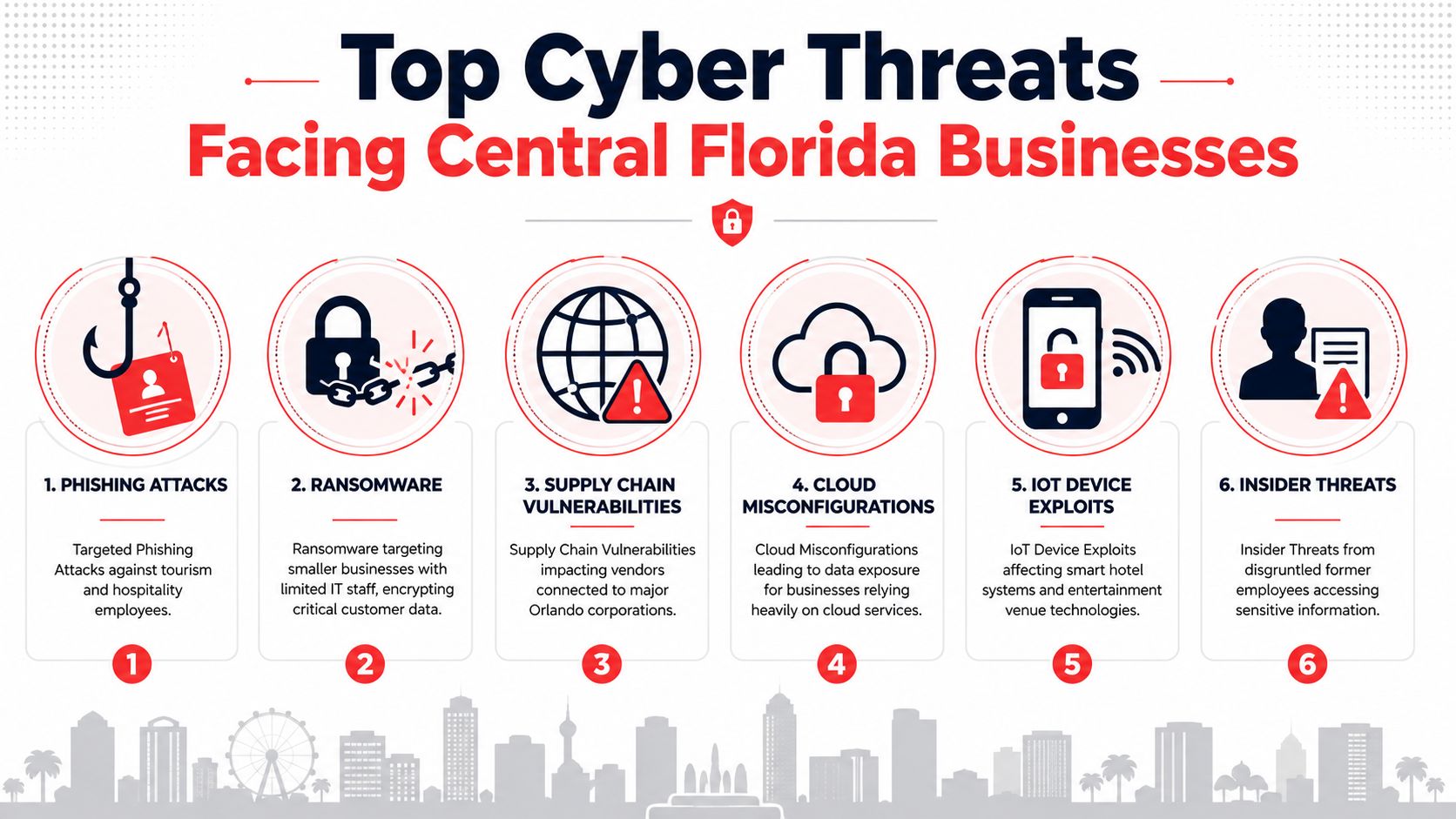
You can’t boil the ocean, and you can’t defend against every threat at once. The first step is to get real about the 3-4 most probable and impactful threats to your specific business. For the professional services firms, medical practices, and industrial companies we work with across Central Florida, the list usually narrows down to a few key cybersecurity concerns.

  • Phishing & Business Email Compromise (BEC): This is the gateway for many attacks. A single deceptive email can lead to stolen credentials, fraudulent wire transfers, or a full-blown network breach. For any business that relies on email for operations—from construction firms in Tampa to law firms in Orlando—this is a persistent, high-risk threat.
  • Ransomware Attack: This is the nightmare scenario for many businesses. Malicious software encrypts your critical files, grinding operations to a halt and putting sensitive data at risk. For industries like healthcare, finance, or legal services, a ransomware attack is not just an IT problem; it's a business-ending event that can trigger regulatory fines and destroy client trust.
  • Lost or Stolen Device: A single company laptop or phone goes missing from a job site in Lakeland or an office in Orlando. If it contains sensitive client data, intellectual property, or financial records, you're not just dealing with a lost asset—you're facing a potential data breach and a compliance nightmare.

Once you’ve identified your core threats, you build a dedicated playbook for each one. This focused approach means your team has clear, relevant instructions when they need them most, instead of fumbling through a 100-page "one-size-fits-all" document.

The Anatomy of an Effective Playbook

Each playbook needs to be a concise, no-fluff checklist. Think of it as a recipe that anyone on your team—or your co-managed IT partner—can follow under extreme pressure. It must contain four critical sections that guide the response from detection to recovery.

1. Triggers: What specific event kicks off this playbook?
* Example (Ransomware): An alert from endpoint protection software detects ransomware activity, or an employee reports seeing a ransom note on their screen.

2. Containment: How do we stop the bleeding and prevent this from spreading?
* Example (Ransomware): Immediately disconnect the infected device from the network. With a co-managed partner, a Security Operations Center (SOC) can execute this remotely within seconds of the trigger.

3. Eradication: How do we get the bad stuff out of our environment completely?
* Example (Ransomware): Wipe and re-image the affected machine from a known-good, clean backup. The next step is to find and patch the vulnerability that let the attacker in.

4. Recovery: How do we safely get back to business as usual?
* Example (Ransomware): Restore encrypted data from clean, verified backups. You have to monitor the network for any signs of lingering attacker activity before bringing all systems back online.

Getting the recovery stage right is critical. You can find more on that in our guide on ransomware recovery.

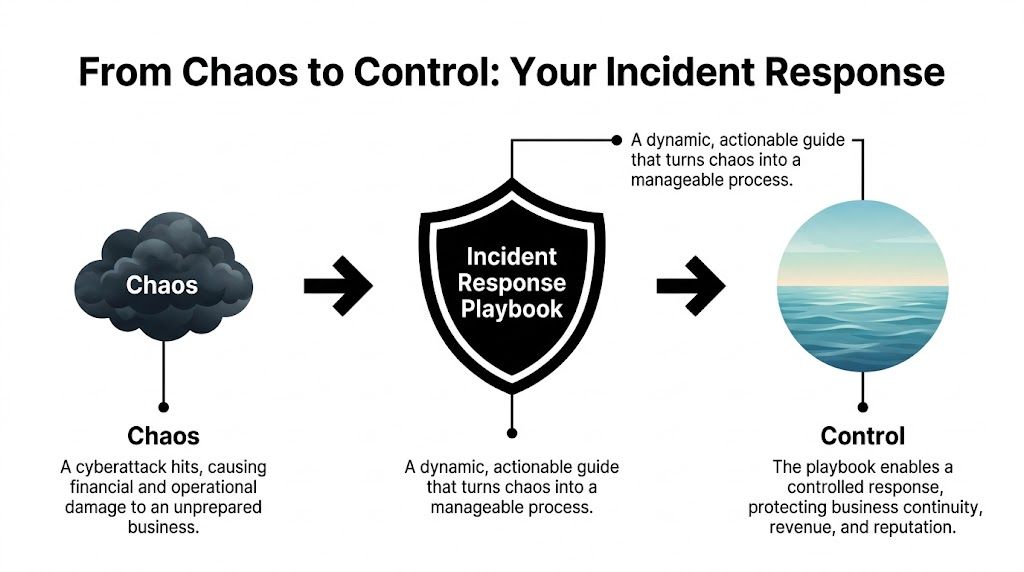
This process is what turns the utter chaos of an attack into a controlled, manageable process.

A diagram illustrating how an incident response playbook transforms cyberattack chaos into business control and stability.

As you can see, the playbook is the tool that lets you move from a state of damaging chaos to one of control, protecting your revenue and reputation along the way.

A great incident response playbook is all about execution. It provides the “who, what, and when” with absolute clarity, ensuring that even in a high-stress situation, your team—and your IT partner—are working from the same script to protect the business.

Bridging the Gap Between Plan and Reality

Here’s a sobering statistic: even though 99% of organizations report having formal incident response plans, a shocking 73% of cybersecurity leaders admit they aren't truly prepared for the next big attack. Why the massive gap? It often comes down to coordination failures, executive disengagement, and other delays that cripple the response.

For SMBs with lean internal teams, this is where things can fall apart. Having a plan on paper is one thing; having the people, processes, and communication lines ready to execute it is something else entirely.

This is exactly where detailed playbooks combined with a strong communications strategy make all the difference. When you build your playbooks, you must integrate your communication steps. It's worth reviewing a modern guide to crisis communications management to ensure your reputation defense is as robust as your technical one. By pre-defining every step, both technical and communicative, you close that dangerous gap between good intentions and effective action.

Defining Roles and Escalation Paths for Your Team

A professional man presenting an incident response flowchart to his team during a business meeting in office.

Having a great incident response playbook is one thing. Knowing exactly who does what during an attack is another. The best-written plan will fail if your team descends into chaos because roles aren't crystal clear.

This is where the human element becomes your greatest asset—or your biggest liability.

For small and mid-sized businesses in Orlando, Tampa, and across Central Florida, this gets even trickier. Your people already wear multiple hats. In a crisis, that flexibility can turn into paralysis if they don't have pre-assigned duties. The goal is to make sure nobody ever has to ask, "What now?"

Building Your Response Team Matrix

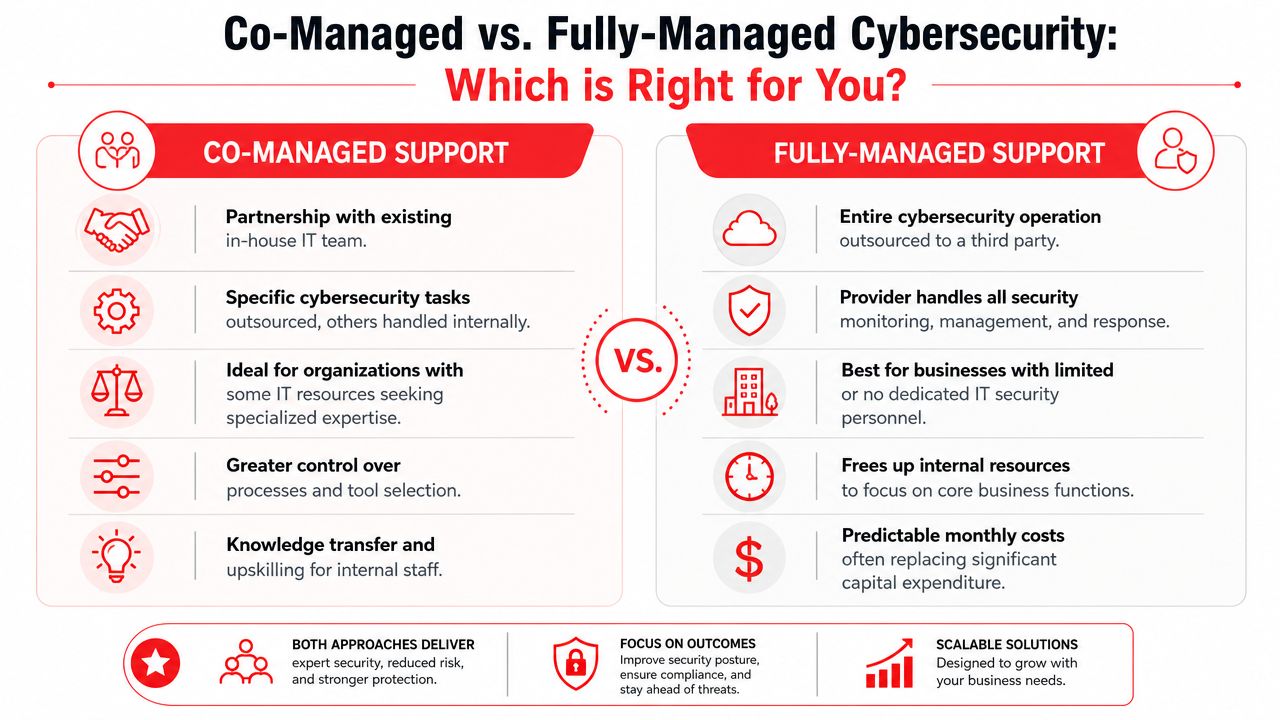
Your first move should be to build a roles and responsibilities matrix. This isn’t some complicated spreadsheet; it's a simple, at-a-glance chart that maps people to specific actions for every type of incident. For any Central Florida business we work with, this matrix always includes internal staff, key executives, and us—your co-managed security partner.

Here are the core roles we see in every successful response team:

  • Incident Commander: This is your field general, the single person directing the response. In a law firm or a construction company, this is often the managing partner or office administrator—someone who can make decisive operational calls, not necessarily your most technical person.
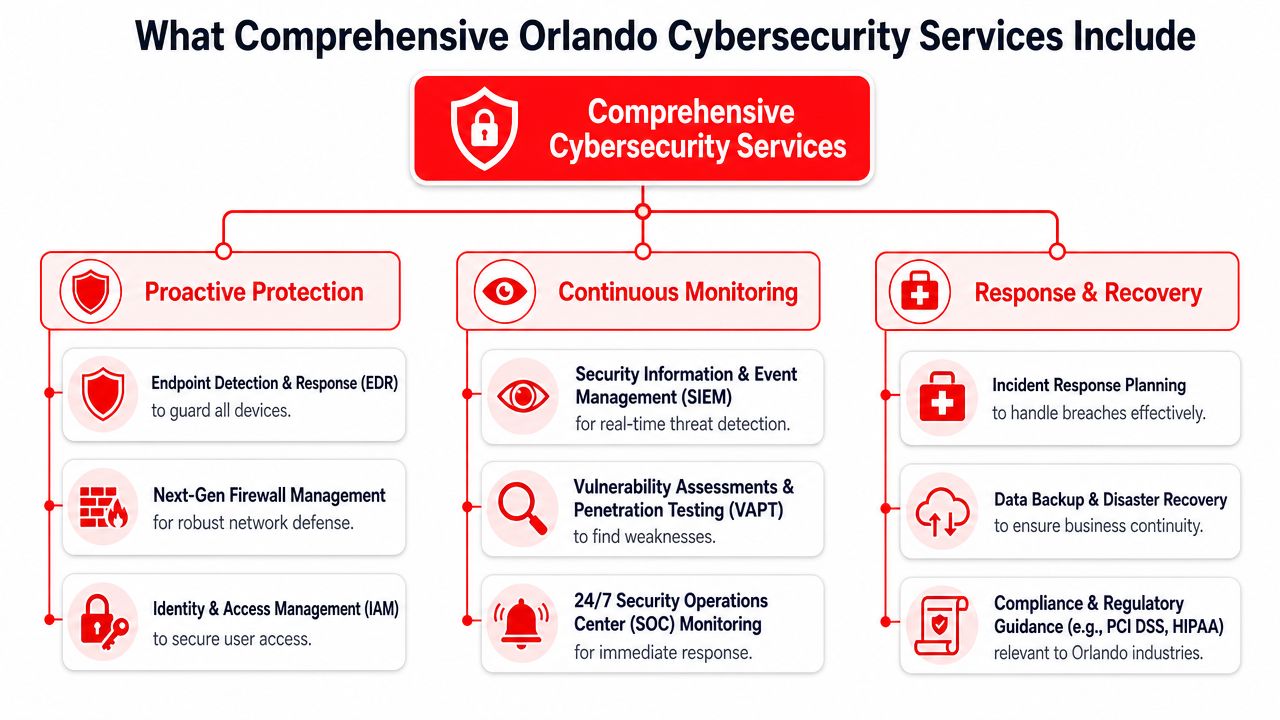
  • Technical Lead: This role is almost always handled by your managed IT partner and their 24/7 Security Operations Center (SOC). They are the boots on the ground, handling the hands-on work of isolating systems and kicking the bad guys out.
  • Communications Lead: This person manages all messaging, both internally to staff and externally if needed. In a medical practice, this might be the practice manager, who uses pre-approved templates to update the team or communicate with patients about an outage.
  • Executive Sponsor: This is the business owner or CEO. They aren't in the technical weeds but are kept in the loop on major developments and are the ones who approve critical business decisions, like authorizing emergency funds for recovery.

This structure lets your technical experts focus on the tech, while business leaders focus on the business. No one steps on anyone else’s toes.

Designing Smart Escalation Paths

Not every blip on the radar needs a 2 AM phone call to the CEO. A smart, logical escalation path protects your leadership’s time and focus, while ensuring genuine emergencies get the executive attention they demand. Your playbooks must define these triggers with absolute precision.

An effective flow matches the incident's severity to the right level of response. It stops people from overreacting to minor issues and, more importantly, guarantees that a major threat doesn't get lost in the noise.

A well-designed escalation path ensures that the right people are notified at the right time, with the right information. It turns a chaotic "fire alarm" situation into a structured, tiered response, preserving leadership focus for when it truly matters.

Let’s look at a CPA firm in Tampa that has a co-managed IT environment. Here’s how a simple escalation flow for a malware alert should work:

  • Severity 1 (Minor): A single workstation blocks a low-risk PUP (Potentially Unwanted Program). The SOC logs it, and a report goes to the office manager at the end of the day. No immediate action is needed.
  • Severity 2 (Moderate): An employee clicks a phishing link, but our endpoint protection blocks the malicious site before any damage is done. The SOC gets an alert, the user is notified, and we automatically assign them a quick security awareness training module. The office manager gets an email notification.
  • Severity 3 (Critical): Ransomware is detected on a file server. This is an all-hands-on-deck event. The SOC immediately isolates the server from the network, the Incident Commander (the office manager) gets an urgent phone call, and the Executive Sponsor (the managing partner) is notified via a priority alert. The full ransomware playbook is activated.

This tiered system ensures the response always matches the risk. It prevents alert fatigue and keeps your team laser-focused on what actually counts.

How a 24/7 SOC Amplifies Your Playbooks

A professional working at a desk with two computer screens displaying incident response playbook automation workflows.

Your incident response playbooks are a fantastic starting point, but they’re only half the battle. A playbook sitting in a shared drive is just a document; it’s a great plan, but it can’t act on its own. The real magic happens when you connect that plan to a 24/7/365 Security Operations Center (SOC).

This is where your strategy gets a pulse. When a SOC integrates your playbooks, they aren’t just reading a set of instructions—they’re codifying them into their security platforms. This turns your carefully planned response steps into a living, automated defense system that works for you around the clock.

From Hours to Minutes with Machine-Speed Containment

When an attack hits, every second counts. A human-only response, even one guided by a well-written playbook, has built-in delays. An employee has to see the alert, find the right playbook, get the necessary approvals, and then manually execute the containment steps. That can easily take hours.

A SOC-driven response crushes that timeline from hours down to minutes, or even seconds.

Let’s walk through a real-world scenario. Imagine an employee at your Orlando office clicks on a malicious link at 10 PM on a Friday. Here’s how a SOC uses your playbook to shut down the threat before you even get a notification:

  • Automated Trigger: The endpoint detection and response (EDR) tool on the employee’s laptop spots the suspicious activity and flags a high-priority alert.
  • Playbook Execution: The SOC’s security platform instantly recognizes the alert type and triggers your pre-approved "Malware Infection" playbook.
  • Machine-Speed Action: Without any human intervention, the platform executes the first containment step in your playbook—isolating the infected laptop from the network to stop the malware from spreading.
  • Simultaneous Alerting: At the exact same time, the system sends an automated notification to your designated Incident Commander and logs every action for later review.

All of this happens before an analyst even has to touch a keyboard. Your playbook provided the "what," and the SOC provided the "how," executing it instantly to stop an attacker’s lateral movement in its tracks. Our guide on setting up a security operations center for your small business takes a deeper dive into how this integrated defense works.

A U.S.-Based SOC Guided by Your Business Priorities

For business owners in Central Florida, from Tampa to Orlando, the value of a 24/7/365 U.S.-based SOC is immense. Cyber threats don't stick to a 9-to-5 schedule. An attack is just as likely to unfold on a holiday weekend as it is in the middle of your busiest workday.

While a dedicated SOC provides that constant vigilance, it’s the guidance from your playbooks that makes it truly effective. Your playbooks are what tell the SOC what actually matters to your business.

By integrating your playbooks, the SOC isn’t just reacting to generic alerts; it’s executing a response strategy tailored to your specific operational needs and risk tolerance. It becomes an extension of your team, enforcing your rules even when you’re not there.

This partnership is what ensures security actions align with business goals. For example, if a non-critical server shows odd behavior, your playbook might instruct the SOC to simply monitor and report back. But if that same behavior appears on the server holding your client financial data, the playbook will demand immediate isolation and escalation.

That's a critical distinction the SOC can only make with your predefined instructions. This intelligent, customized response is the key to protecting what matters most without bringing your entire operation to a halt over a minor issue. It's the ultimate peace of mind.

Testing Your Playbooks for Real-World Resilience

Let’s be honest: an incident response playbook that hasn't been tested is just a theory. It’s a well-intentioned document sitting in a folder, but it’s guaranteed to have hidden flaws that will only show up under the pressure of a real attack. For a busy SMB, regular testing is what turns that paper plan into battle-tested muscle memory.

This isn't about running massive, time-consuming drills every week. It's about weaving practical, manageable tests into your routine to make sure your strategy actually works. These exercises are where you find the small but critical gaps—an outdated contact number, a technical process that fails, or a communication breakdown—before a real crisis does it for you.

Starting with Tabletop Exercises

The best place to start is with a tabletop exercise. Think of it as a structured "what if" conversation. You get your incident response team in a room—your Incident Commander, tech leads, and other key players—and talk through a specific scenario.

For example, your scenario for a construction company in Lakeland could be: "A phishing email was reported, and it looks like our project manager's credentials have been compromised."

From there, the exercise leader walks the team through the playbook, asking pointed questions:

  • "According to the playbook, what's our very first move?"
  • "Who owns the task of disabling the user account?"
  • "How do we verify the account is locked and check for any unauthorized activity?"
  • "What's the next communication that needs to go out, and who is responsible for sending it?"

This simple discussion quickly uncovers confusion, incorrect assumptions, and gaps in your process without touching a single live system. It's a low-stress, high-impact way to build team confidence and polish your playbooks.

Advancing to Breach and Attack Simulations

Once your team has a few tabletop exercises under their belt, it's time to level up. A breach and attack simulation (BAS) is where you use safe, controlled tools to mimic parts of a real attack and see what happens.

This could mean running a simulated ransomware agent on an isolated, non-critical machine. Did your endpoint protection software catch it and fire an alert? Did the SOC receive that alert and kick off the right playbook?

These simulations test both your technology stack and your team's response. They prove that your automated containment rules are working and that your people can interpret the alerts correctly and take the right next steps. To build truly robust playbooks, you have to include and regularly perform scheduled disaster recovery testing to ensure your recovery steps are just as solid as your initial response.

The goal of testing isn't to pass or fail. It's to find your weak points in a safe environment. Every gap you uncover during a drill is one less vulnerability an attacker can exploit during a real incident.

The financial incentive for this diligence is staggering. Organizations that lack documented and tested incident response plans face an average breach lifecycle of 258 days. For those who have them, it’s just 189 days. That 69-day difference can easily be a death sentence for a small business, like a veterinarian or an accounting firm in Central Florida. Despite proof that regular drills save an average of $1.49 million per breach, a shocking 30% of companies actually test their plans.

Turning Lessons Learned into Action

After every test—whether it’s a quick tabletop chat or a full-blown simulation—the most critical step is the post-mortem. This is where you sit down and document what worked, what didn't, and what needs to be fixed.

Was the playbook clear and easy to follow? Were there steps that were confusing or impossible to execute? Did a piece of technology fail?

The answers to these questions must be used to immediately update your incident response playbooks. This creates a powerful cycle of continuous improvement, making your plans stronger and more resilient with every test. Our article on disaster recovery testing offers more ideas on building this resilient mindset. This consistent refinement is what separates a static document from a living, breathing defense strategy that truly protects your business.

Your Questions About Incident Response Playbooks

Even with a clear plan, I find that many business owners in Central Florida have the same practical questions when it comes to incident response playbooks. It's smart to ask them. This is an investment in your company’s resilience, so let's get you some straightforward, no-nonsense answers.

How Many Playbooks Does My Small Business Really Need?

You don't need a library of playbooks to be protected. The trick is to start small and zero in on the 3-4 most probable and impactful scenarios that could hit your business. It's always quality over quantity.

For a professional services firm here in Orlando, for instance, we almost always start with playbooks for:

  • Ransomware attacks
  • Business Email Compromise (BEC)
  • A lost or stolen company laptop with client data

A medical practice over in Tampa, on the other hand, has a different set of priorities. Their biggest cybersecurity concern is a data breach involving protected health information (PHI), so that playbook comes first due to strict HIPAA compliance rules. The goal is to cover your most significant risks first. A good security partner can run a quick risk assessment to pinpoint these, making sure your effort goes where it counts.

We Are a Small Team—How Can We Possibly Manage This?

This is probably the most common concern I hear, and it’s a valid one. It’s also exactly where a co-managed IT partnership proves its worth. Nobody expects you to become a team of cybersecurity experts overnight. In fact, a good incident response playbook makes it easier for a small team by laying out clear, manageable roles.

During an incident, your playbook will map out simple, non-technical tasks for your internal staff. Your Office Manager might be responsible for sending out pre-approved internal updates using a template. Meanwhile, your partner's 24/7 Security Operations Center (SOC) is handling the heavy lifting—the technical containment, threat removal, and system restoration.

The playbook is the bridge that makes this teamwork seamless, not chaotic. It lets your people focus on keeping the business running while expert engineers neutralize the threat. Everyone knows their role, and confusion is kept to a minimum.

Is Creating and Testing Playbooks Expensive?

The investment in creating and testing incident response playbooks is pocket change compared to the catastrophic cost of a real data breach. The price of an attack isn't just a ransom payment; it’s the regulatory fines, the crushing reputational damage, and the extended downtime that can easily put a small business under.

When you work with a managed service provider, playbook development and testing are typically woven directly into your security program. These become regular activities, like a Quarterly Business Review (QBR), not some massive, one-time project with a scary price tag. This approach makes proactive defense accessible and affordable, reframing it from an expense into a smart investment in your company's future.

How Often Should We Update Our Playbooks?

Your playbooks have to be living documents. A playbook that’s six months out of date can be just as dangerous as having no playbook at all. If it’s just collecting digital dust on a server, it’s useless.

We recommend a full review and update on a clear schedule:

  • At least annually: This keeps the plans aligned with your current business goals and team structure.
  • Whenever a major business change occurs: Think adopting new critical software, moving offices, or changes in key personnel.

And this is the most critical part: after any security incident or testing drill, your playbooks must be updated immediately with the lessons you learned. This cycle of continuous improvement is what keeps your response strategy sharp and effective against threats that are changing all the time.


Ready to move from theory to action? Cyber Command, LLC specializes in building practical, actionable incident response playbooks for businesses across Central Florida. We integrate them with our 24/7 SOC to provide a defense that works around the clock. Let's build your resilience together.

Your Guide to Surviving a HIPAA Compliance Audit in Central Florida

Think of a HIPAA compliance audit as a deep-dive investigation into your records to see if you're really protecting patient data according to the Security, Privacy, and Breach Notification Rules. It's not just something that happens after a data breach. The Office for Civil Rights (OCR) is now actively and proactively auditing organizations to make sure the right safeguards are in place for protected health information (PHI).

For any small or mid-sized business in Central Florida—from a healthcare clinic in Kissimmee to a law firm handling personal injury cases in Lakeland—understanding this process has gone from a "nice-to-have" to a critical business requirement.

Why Every Orlando Business Needs a HIPAA Audit Game Plan

If you handle PHI, the days of thinking HIPAA compliance is just for big hospital systems are long gone. The game has changed. Regulators have shifted from simply penalizing breaches to conducting proactive, targeted audits that can hit any business, no matter its size. For businesses in and around Orlando, Tampa, and the I-4 corridor, this means you are squarely on the radar.

The OCR is now using technology to scrutinize everyone, from private medical spas in Winter Park to the accounting firms and IT companies that support them. A single missing document, like an up-to-date Security Risk Analysis, isn't just an oversight anymore—it's a fast track to hefty fines. This new reality demands you get proactive about your cybersecurity and compliance.

The Escalating Reality of HIPAA Enforcement

What's really changed is the sheer volume of enforcement actions and the growing cybersecurity threats that trigger them. The OCR has settled or issued civil money penalties in over 50 cases tied directly to failures in risk analysis and Right of Access violations. As regulators integrate risk management into every phase of their process, organizations that lag behind face the highest Tier 4 penalties, which can hit $1.5 million annually per violation category.

Simply reacting to problems as they pop up is a losing strategy. Your business has to build what's known as a 'defensible position.'

A defensible position is your ability to prove to auditors that you have implemented reasonable and appropriate safeguards to protect PHI. It’s built on documented policies, continuous monitoring, and a thorough, up-to-date Security Risk Analysis.

This is where we see so many businesses in the Orlando and Tampa areas fall short. They might have good intentions, but they lack the documented proof to back them up when an auditor comes knocking.

Cybersecurity Is Your Compliance Foundation

In this environment, strong cybersecurity isn't just an IT problem; it's the bedrock of your entire HIPAA compliance strategy. Auditors will want to see hard evidence of specific technical safeguards, including:

  • Access Controls: Proof that only authorized people can get their hands on PHI, often using Multi-Factor Authentication (MFA).
  • Audit Logs: Records showing who accessed PHI and what they did, which are critical for detecting insider threats or compromised accounts.
  • Data Encryption: Evidence that data is unreadable, both when it's sitting on your servers ("at rest") and when it's moving across the network ("in transit").
  • Incident Response: A documented, step-by-step plan for how you would handle a data breach, including ransomware.

A full grasp of Mastering HIPAA Compliance IT Requirements is non-negotiable for any business in this space. Without these technical controls properly implemented and documented, your policies are just words on paper.

This is exactly why having a proactive cybersecurity partner is no longer a luxury but a fundamental necessity. A dedicated partner brings the expertise and tools needed to build and maintain your defensible position against modern cyber threats. To see what options are available, check out our guide on top-tier cyber security companies in Orlando. It ensures you can focus on your patients and clients, confident that your security and compliance are being actively managed.

That dreaded letter from the Department of Health and Human Services (HHS) isn't the time to start scrambling for documents. For any private medical practice or professional services firm in Central Florida—whether you're in Orlando, Tampa, or Lake Mary—a successful HIPAA compliance audit comes down to one thing: having your proof ready. It’s all about showing, not just telling.

Think of this readiness checklist as your game plan. It’s designed to help you spot the critical gaps in your compliance before an auditor does. We’ll organize it around the three core pillars of the HIPAA Security Rule: Administrative, Physical, and Technical Safeguards.

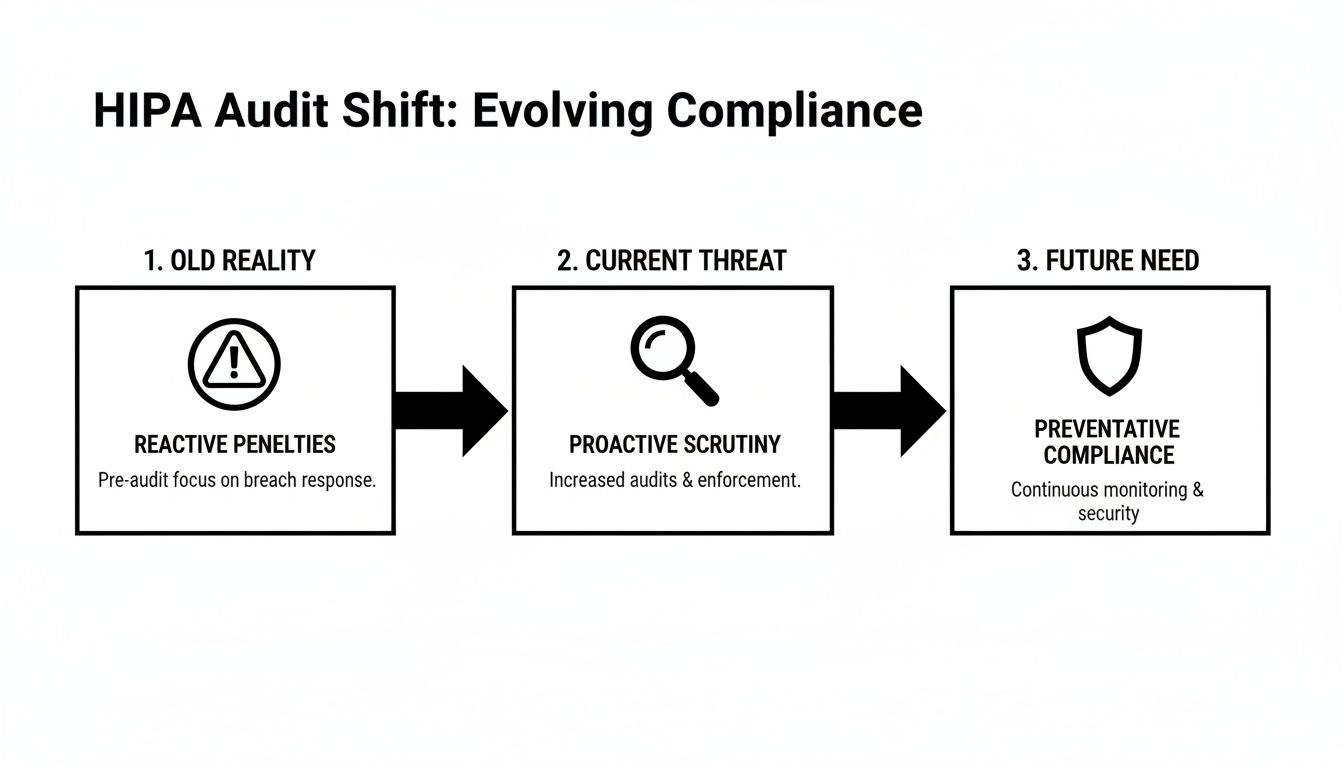
The game has changed when it comes to HIPAA audits. It's no longer just about getting slapped with a fine after a breach. Auditors are now on the hunt for risks before they become incidents, demanding a constant state of preventative compliance.

Diagram illustrating the evolution of HIPAA audit from reactive penalties to proactive scrutiny and preventative compliance.

As you can see, the focus has shifted from reacting to penalties to proactively building a defensive shield. This is where your documentation becomes your best defense.

Administrative Safeguards: The Paper Trail of Proof

Administrative Safeguards are the policies, procedures, and documented decisions that form the backbone of your HIPAA program. This is where so many small businesses get into hot water. They might be doing the right things, but without a paper trail, it’s like it never happened.

Here’s what you absolutely must have ready to go:

  • A Designated Security Officer: You need to have officially appointed a specific person as your Security Officer. Their role and responsibilities must be clearly written down, showing they have the authority to enforce your security policies.
  • A Current Security Risk Analysis (SRA): This is the #1 document auditors will ask for. It has to be recent, and it needs to be a thorough review of potential risks to every piece of PHI you touch.
  • Documented Policies and Procedures: You need written policies for everything, from what happens when an employee violates HIPAA to your data backup and recovery plan. These aren't "set it and forget it" documents; they must be reviewed and updated at least annually.
  • Workforce Training Records: It's not enough to say you trained your team. You need signed and dated records proving every single employee—from the front desk staff to the lead physician—completed their HIPAA and security awareness training, including phishing simulations.

Physical Safeguards: Securing Your Physical Space

Physical safeguards are all about controlling access to your facility and equipment to protect PHI from being seen or stolen. This covers everything from the lock on your server closet to the angle of the computer screen at your reception desk.

Auditors will want to see hard evidence of:

  • Facility Access Controls: Who can get into your office or specific secure areas? You need logs or other records showing you monitor who comes and goes, especially in places where PHI is stored or accessed.
  • Workstation Security: Are computers that can access PHI kept in secure areas? Are screens positioned so the public can't see them? Your policies have to define these rules, and you need to prove you're enforcing them.
  • Device and Media Controls: What happens to old hard drives, retired laptops, or USB sticks? You need a documented process for tracking the movement of all electronic media and ensuring it's securely wiped or destroyed.

An auditor will never just take your word for it. A locked server room door is only a compliant control if you can hand them a policy that says who has the key and a log showing you monitor access. Without the documentation, the lock might as well not be there.

The difference between what auditors require and where businesses typically fall short is stark, especially for smaller organizations without dedicated IT teams.

HIPAA Audit Evidence Required vs Common Gaps

This table shows the specific evidence auditors demand versus the common, costly mistakes we see businesses make all the time.

Safeguard Category Required Evidence Example Common Failure Point for SMBs
Administrative A signed, dated Security Risk Analysis (SRA) performed within the last 12 months, with a corresponding risk management plan. The SRA is over a year old, was a simple "checkbox" exercise, or there's no plan to fix the identified risks.
Administrative Dated training logs for all new hires and annual refresher training, signed by each employee. Training is informal ("we told them about HIPAA") with no attendance records, or records are missing for some staff.
Physical Visitor and vendor access logs for sensitive areas like server rooms or file storage rooms. The server is in an unlocked closet that anyone can access, and there's no log of who enters.
Physical A formal, documented procedure for the final disposal of old computers and hard drives, including certificates of destruction. Old equipment containing PHI is just thrown out, sold, or donated without being professionally wiped.
Technical Audit logs from the EMR/EHR system, along with a documented procedure for reviewing those logs regularly. Audit logging is turned on, but no one ever actually reviews the logs for inappropriate access.
Technical Reports from endpoint security software confirming that all laptops and mobile devices are encrypted. A "bring your own device" (BYOD) policy exists, but there's no way to prove employee-owned devices are actually encrypted.

As you can see, simply having a policy isn't enough. The real challenge—and where most audits fail—is the lack of proof that those policies are being followed every day. As auditors dig deeper into the entire lifecycle of PHI, these "small" documentation gaps are now seen as major failures. You can find more insights into how HIPAA compliance audits in 2026 are evolving and what it means for your paperwork.

Technical Safeguards: Your Digital Defenses

Finally, Technical Safeguards involve the technology and associated policies you use to protect electronic PHI (ePHI). This is where having a managed security partner like Cyber Command is a game-changer, as we can typically generate this evidence for you on demand.

An auditor will demand to see:

  • Unique User Identification: Proof that every single person has their own unique username and password to access systems containing ePHI. Shared or generic logins are a massive red flag.
  • Access Control Evidence: System logs and reports that demonstrate you're using role-based access controls. This means you can prove employees can only see the minimum necessary information to do their jobs.
  • Encryption Confirmation: You must be able to prove that ePHI is encrypted "at rest" (on hard drives) and "in transit" (over the network). An auditor will ask for reports from your endpoint management tools to verify that all company laptops and servers are encrypted.
  • Audit Logs: You need systems that automatically log who accesses ePHI and when they do it. Critically, you also need a documented procedure showing that someone is reviewing these logs for suspicious activity on a regular basis.

Getting this documentation in order isn't just about surviving a HIPAA compliance audit. It's about building a fundamentally more resilient and secure business that your patients and clients can trust.

Conducting a Meaningful Security Risk Analysis

Let’s be blunt: more than any other single document, your Security Risk Analysis (SRA) is the linchpin of a successful HIPAA compliance audit. Failing to have a thorough, properly documented SRA isn't just a misstep—it's a guaranteed way to get the attention of the Office for Civil Rights (OCR), and not in a good way.

Too many businesses treat the SRA as a check-the-box chore. That's a huge mistake. A well-done SRA is a powerful strategic tool, not just a compliance hoop to jump through. It's your roadmap for identifying where your most sensitive data—protected health information (PHI)—lives and how it could be compromised. It’s the difference between having a vague sense of security and a documented, defensible plan.

Hand drawing a PHI data flow diagram with servers and cloud, illustrating data security risk.

Beyond the Template: Identifying Your Unique Risks

A generic template won't cut it. An auditor can spot a canned SRA from a mile away. Your analysis has to be specific to your organization’s unique operations, technology, and even your physical environment. For businesses here in Central Florida, that means thinking about local factors, from hurricane risks to the specific software vendors popular in our region.

The first move is to methodically map out every single place PHI is created, received, stored, or sent. This goes way beyond just your main Electronic Health Record (EHR) system.

Let's imagine a multi-location accounting firm with offices in Tampa and Orlando that serves healthcare clients. Their PHI data map would need to include:

  • The primary accounting software holding client financial data that may contain PHI.
  • The document management server where client records are stored.
  • Third-party cloud apps used for file sharing or client portals (e.g., QuickBooks Online, shared drives).
  • Employee laptops and tablets that connect to the network from home or while visiting clients.
  • The email server, which likely transmits PHI to clients, their business associates, or for billing purposes.

Only when you have this complete inventory can you start to really assess the specific threats and vulnerabilities that could impact the confidentiality, integrity, and availability of that data.

Assessing Threats and Vulnerabilities

Okay, so you know where all your PHI lives. Now you have to analyze what could go wrong. This means documenting potential threats—both natural and human, intentional and accidental—and pinpointing the weak spots in your current setup that could let those threats cause harm.

For that Tampa accounting firm, this assessment is about more than just "hackers."

  • Threat: A ransomware attack encrypts their entire client file server.
    • Vulnerability: The firewall firmware is a year out of date, and they don't have true offline, air-gapped backups.
  • Threat: An accountant accidentally emails a client's sensitive data to the wrong recipient.
    • Vulnerability: No email data loss prevention (DLP) policy in place to flag and block emails containing PHI.
  • Threat: A disgruntled former employee logs in and downloads client financial records a week after being terminated.
    • Vulnerability: A slow, manual process for deactivating user accounts.

The real point of the SRA isn't to get a perfect score. It's to honestly identify your weaknesses so you can create a prioritized plan to fix them. An SRA that finds zero risks is a massive red flag to an auditor—it signals you didn't look hard enough.

This process can feel overwhelming, which is why many practices bring in experts. If you want to go deeper on this, our detailed guide on how to conduct a cyber security risk assessment is a great resource.

From Analysis to Action: Your Risk Management Plan

Identifying risks is only half the battle. The second, equally critical part of the process is your Risk Management Plan. This is your documented, actionable strategy for dealing with every vulnerability you just uncovered.

For each risk you found, you have to document your decision:

  1. Remediate: You're going to fix it. Implement a new control to eliminate the vulnerability (e.g., buy and install a new firewall).
  2. Mitigate: You're going to reduce it. Make the risk less likely or less impactful (e.g., enable multi-factor authentication to make stolen passwords less of a threat).
  3. Transfer: You're going to shift it. Move the risk to another party (e.g., migrate data to a HIPAA-compliant cloud provider who contractually assumes certain security duties).
  4. Accept: You're going to live with it. Formally acknowledge the risk and accept it, along with a written reason why it’s not being fixed (this is usually reserved for low-impact, low-probability risks).

This plan becomes your roadmap for security improvements and budget requests for the next 12 months. When an auditor asks to see your SRA, what they really want is both the analysis and this management plan.

As you prepare, it's also a good time to review your IT asset disposition processes. What happens to old hardware? You need a solid answer for how you achieve HIPAA/NIST compliant data destruction to ensure PHI doesn't walk out the door on an old hard drive.

Ultimately, a meaningful SRA proves to auditors that you’re engaged in an ongoing process of security discipline. It shows you're not just waiting for a breach, but you’re actively working to prevent one—making it the single most important step in preparing for a HIPAA compliance audit.

How to Navigate the Audit and Respond to Findings

The notification letter from the Office for Civil Rights (OCR) is in your hands. This is the moment all that preparation—the risk analyses, the policy reviews, the training logs—was for. Actually navigating the audit and responding to the results is a very structured process. It's a direct test of your documentation, your technical controls, and your ability to prove you've built a culture of compliance.

For a business in Orlando or Tampa, the key is to stay organized and responsive from the very first communication. An auditor’s initial request is usually for documentation, and it can feel overwhelming. Having a designated point person, typically your Security Officer, to manage all communications and document submissions is absolutely critical.

Professional woman examining an 'Audit Findings' report at her desk with a laptop and pen.

Desk Audits vs. Onsite Audits

The OCR generally conducts two types of audits, and knowing the difference helps set the right expectations. Figuring out which one you’re facing is the first step in building your response strategy.

  • Desk Audits: This is the more common approach. Auditors will remotely request specific documents related to your Administrative, Physical, and Technical Safeguards. You'll typically have a very short window, often just 10-15 business days, to upload all the required evidence to a secure portal.

  • Onsite Audits: These are far more intensive and comprehensive. Auditors will physically visit your location to conduct staff interviews, observe your daily operations, and test security controls firsthand. They’ll want to see everything from the lock on your server room door to how your reception desk handles patient sign-in sheets.

In either scenario, your interactions with auditors should be professional, transparent, and direct. Only answer the questions asked and provide only the evidence requested. Volunteering extra information can, and often does, open up new lines of inquiry you weren't prepared for.

Understanding the Audit Report and Findings

Once the audit wraps up, you will receive a draft report detailing the findings. This report is your first real look at how the OCR views your compliance posture. It will pinpoint specific areas where your organization isn't meeting the HIPAA Rules.

It's tempting to see these findings as a simple pass/fail grade, but that's the wrong way to look at it. Instead, view the report for what it really is: a strategic roadmap for fortifying your cybersecurity and operational resilience. The findings are a gift—an expert-validated punch list showing you exactly where to focus your resources.

Common findings we see again and again include:

  • An inadequate or outdated Security Risk Analysis.
  • Insufficient workforce training and security awareness programs, especially against phishing.
  • The lack of a documented, tested incident response plan for events like ransomware.
  • Poor access controls, like shared user accounts or failure to terminate access for former employees.

Your response to the draft report is your chance to provide important context or correct any misunderstandings. If an auditor missed a key piece of evidence you submitted, this is your opportunity to respectfully point it out before the report gets finalized.

Crafting a Corrective Action Plan

If the final audit report confirms areas of non-compliance, the OCR will most likely require you to develop and submit a Corrective Action Plan (CAP). This isn't a punishment; it’s a formal, binding agreement between your organization and the government. It spells out the specific steps you will take to fix the identified issues, who is responsible for each step, and the deadlines for completion.

For example, a finding of "insufficient activity logging" could lead to a CAP that looks something like this:

  1. Action: Implement a Security Information and Event Management (SIEM) tool to centralize and analyze logs from all critical systems.
  2. Responsibility: IT Department / Managed Security Partner.
  3. Timeline: 90 days for implementation and configuration.
  4. Evidence of Completion: Provide a report from the SIEM tool showing active log collection and a documented procedure for weekly log review.

Let's be clear: the financial stakes for non-compliance are huge. Data breaches continue to underscore the need for a robust HIPAA compliance audit, with incidents exposing records growing 25% year-over-year on average. Penalties can range from $100 for an unknowing violation all the way up to $50,000 per violation for willful neglect that goes uncorrected, with annual caps hitting $1.5 million. You can learn more about these HIPAA statistics and their impact to get a better sense of the risks.

Ultimately, a HIPAA compliance audit forces a level of security maturity that protects your patients, your reputation, and your bottom line. It’s an opportunity to transform your compliance program from a source of anxiety into a genuine business advantage.

Here’s the rewritten section, crafted to match the specified human-expert style and tone.

Going It Alone Is No Longer an Option: Partnering for Continuous Compliance

Let's be blunt: HIPAA compliance isn't a project you finish. It’s an ongoing, active commitment. For most small and mid-sized businesses we see across Central Florida, from healthcare providers to law and accounting firms, the DIY approach to cybersecurity and compliance has shifted from impractical to outright dangerous.

What worked yesterday is already inadequate today. The sheer complexity and constant evolution of cyber threats like ransomware and phishing mean that relying on an in-house team, or worse, no team at all, is a gamble you can't afford to take.

This is where a true cybersecurity partner comes in. A real partner doesn’t just show up to fix what’s broken. They build a proactive security program from the ground up that tackles the very challenges we’ve discussed, providing the resources, expertise, and round-the-clock vigilance that auditors demand—and that you need to actually stay secure.

The Power of a 24/7 Security Operations Center

When a HIPAA compliance audit begins, one of the first things they’ll scrutinize is your ability to monitor your systems and respond to incidents. This is flat-out impossible without continuous oversight. A dedicated 24/7 Security Operations Center (SOC) is the engine that drives this capability, giving you eyes on your network even when you’re busy running your practice.

Think about a potential breach at 2 AM on a Saturday. Without a SOC, that threat sits undetected for hours, or even days. With a SOC, you get:

  • Active Threat Hunting: Trained analysts are constantly on the lookout, searching for the subtle signs of a compromise that automated tools almost always miss.
  • Real-Time Incident Response: The moment a threat is confirmed, the team jumps into action, beginning containment and mitigation to minimize the damage from an attack.
  • Comprehensive Logging and Reporting: The SOC generates the detailed audit logs and incident reports that auditors will demand as proof of your security posture.

For a dental practice in Orlando or a law firm in Tampa, having a SOC means you can demonstrate a mature, always-on security program that not only satisfies auditors but genuinely protects your data.

A partner with a 24/7 SOC fundamentally changes the compliance conversation. Instead of scrambling to find logs after an incident, you have a documented history of proactive monitoring and rapid response ready to hand over to an auditor.

Turning Policies into Reality with Managed IT

A written policy isn't worth the paper it's printed on if it isn't actually being enforced. This is one of the most common—and avoidable—failure points in a HIPAA compliance audit. A managed IT services partner is the bridge between your policies and your technology, ensuring those rules are consistently enforced across your entire network.

Just look at these common audit findings and how a partner flips the script:

  • Audit Finding: Inadequate Endpoint Protection. We deploy, manage, and monitor advanced endpoint security on every single device—laptops, desktops, and servers—to ensure they are protected and encrypted.
  • Audit Finding: Missing or Inconsistent Patching. Our team runs a rigorous patch management schedule, making sure all your systems and software are updated to shield against known vulnerabilities before attackers can exploit them.
  • Audit Finding: Poor Access Controls. We help you implement and enforce role-based access controls and Multi-Factor Authentication, ensuring employees only have access to the minimum necessary PHI and providing the clear documentation auditors need to see.

This approach transforms compliance from a theoretical exercise into a living, breathing operational reality.

Shifting from Reactive Firefighting to Proactive Prevention

For many Orlando and Tampa businesses, IT and compliance costs are completely unpredictable. You pay when something breaks, or you pay when you’re staring down an audit. A partnership model throws that entire mindset out the window.

By moving to a predictable, flat-rate model, you can finally budget for security and compliance as a core, strategic business function. This allows you to get out of a state of constant firefighting and into one of proactive prevention.

It lets you focus your time, energy, and resources on growing your practice, secure in the knowledge that a dedicated team is managing the cybersecurity and compliance headaches for you. Understanding how different compliance frameworks overlap is also key; you can explore our guide on compliance mapping for GDPR and HIPAA to see how a unified strategy can save time and resources. This proactive approach builds resilience, ensures uptime, and gives you the defensible position you need to pass a HIPAA compliance audit with confidence.

Common Questions We Hear About HIPAA Audits

When it comes to HIPAA, a few questions pop up time and time again, especially from our clients running small and mid-sized practices. Whether you're a medical spa in Orlando, a law firm in Tampa, or an accounting firm in Kissimmee, navigating the world of compliance can feel overwhelming. Let’s cut through the noise and get straight to the answers you really need.

Our Practice Is Small. Are We Really at Risk for an Audit?

Yes, absolutely. Thinking you’re too small to get audited is one of the most dangerous myths in healthcare today. The Office for Civil Rights (OCR) has made it crystal clear they are targeting businesses of all sizes, not just major hospital systems.

In fact, being small can actually make you a more attractive target. Many recent enforcement actions—and the steep fines that come with them—have been aimed at smaller practices. Why? They often have fewer resources, limited IT expertise, and are more likely to have glaring gaps in their security. The most common one we see is the lack of a current Security Risk Analysis. Cybercriminals know this too, making small practices a prime target for the very attacks that can trigger an OCR audit in the first place.

What’s the Biggest Mistake That Leads to a Failed Audit?

By a huge margin, the single most costly mistake we see is the failure to conduct and document a thorough, organization-specific Security Risk Analysis (SRA). This isn't a minor slip-up. The OCR views the absence of a proper SRA as “willful neglect,” a classification that carries the highest possible financial penalties.

We see practices make one of three critical errors:

  • They simply don't do an SRA at all.
  • They download a generic, "check-the-box" template that doesn't actually reflect how their business operates.
  • They perform an SRA, identify risks, and then do nothing to fix them.

Your SRA is the foundation of your entire security program. It's the very first thing auditors will ask for, and not having a legitimate, up-to-date one is an immediate and indefensible failure.

We Use a Certified EHR. Doesn't That Make Us Compliant?

No, and this is a widespread and hazardous misconception. Using a certified Electronic Health Record (EHR) system is an important piece of the puzzle, but it’s just one piece. Your EHR vendor cannot make your organization HIPAA compliant.

HIPAA compliance is your responsibility, not your software vendor's. It covers your administrative processes, physical security, and all other technical aspects of your network—far beyond a single application.

Think of it this way: owning a car with the latest safety features doesn't automatically make you a safe driver. You are still responsible for your own policies (like not texting and driving), physical security (locking the doors), and overall maintenance. The exact same logic applies to your practice's security and your duty to protect PHI across your entire operation.

How Can a Managed Security Partner Help During an Audit?

During an actual hipaa compliance audit, a partner like Cyber Command acts as your technical expert and first line of defense. Instead of you scrambling to find evidence and answer complex questions, your partner steps in to handle the technical lift. This immediately shows auditors a mature, proactive approach to security.

A good partner can instantly pull critical evidence, such as:

  • Access Control Logs from a 24/7 Security Operations Center (SOC) to prove you're monitoring who accesses PHI.
  • Patch Management Reports showing that all your systems are up-to-date against known vulnerabilities.
  • Proof of Endpoint Encryption across all company laptops and devices.
  • Detailed Network Diagrams and a complete inventory of your assets.

Your partner becomes your technical liaison, confidently answering auditors' questions about your network security. This saves you an immense amount of time and stress, letting you focus on running your business while we handle the technical burden of the audit.


A successful HIPAA compliance audit hinges on having proactive, documented proof of your security measures. Cyber Command provides the 24/7 monitoring, managed IT, and compliance expertise that Central Florida businesses need to build a defensible security posture with confidence. Learn how our partnership approach can protect your practice and prepare you for any audit at https://cybercommand.com.