Managed IT Services in Orlando FL: Your 2026 Guide

Your office opens at 8. By 8:12, someone can't print. By 8:20, your practice management system is lagging. By 9:00, a staff member forwards a suspicious email and asks, “Is this real?” You're not running a technology company, but technology now controls how fast you invoice, serve clients, protect records, and stay compliant.

That's where many Central Florida businesses are right now. The company is growing, the team is busy, and the old approach to IT support isn't keeping up. You call when something breaks. You hope backups work. You assume your security stack is enough. Then one outage, one ransomware attempt, or one failed audit reminder turns IT from a background function into a business risk.

For Orlando businesses, managed IT isn't just about outsourced support anymore. It's about uptime, security, accountability, and choosing the right operating model for how your business runs.

Table of Contents

Is Your Orlando Business Outgrowing Its IT

A lot of owners in Orlando, Winter Springs, and nearby Central Florida cities don't notice the turning point at first. Revenue improves. Headcount grows. Maybe you add a second location, hire remote staff, or start relying on more cloud apps. Then little problems become daily friction.
A professional woman in an office looks frustrated while waiting for a loading icon on her computer screen.

One downtown office might deal with file access delays every afternoon when everyone is in the same system. A dental group in Winter Park may worry whether front-desk workstations, imaging systems, and patient communications are protected the way they should be. A growing accounting firm may have no clear answer when a client asks how their data is secured or how quickly systems can be restored after an incident.

That's the sign you've outgrown ad hoc support. It's not just that things break. It's that your business now depends on technology behaving predictably.

When break fix starts hurting the business

Reactive IT feels cheaper until it starts interrupting payroll, intake, billing, scheduling, and client communication. The hidden cost is management attention. Owners, office managers, and operations leads end up chasing vendors, approving emergency work, and making decisions without a roadmap.

You don't have an IT problem when a laptop fails. You have an IT problem when every failure turns into an executive interruption.

Managed IT Services in Orlando FL make sense when technology stops being a side function and becomes part of your delivery model. If your staff can't work when the network slows down, if compliance questions keep landing on your desk, or if cybersecurity headlines feel uncomfortably relevant, you're already there.

What growing companies usually need next

At this stage, most businesses aren't looking for more tickets. They need structure:

  • Reliable support: People need fast answers when they're blocked.
  • Preventive maintenance: Systems need patching, monitoring, and routine review before issues spread.
  • Clear accountability: Someone should own the environment, vendor coordination, and follow-through.
  • Security that's active: Not just alerts. Actual response.
  • Planning discipline: Decisions about renewals, cloud changes, office moves, and compliance shouldn't happen in a rush.

That shift is less about buying IT and more about building operational resilience.

Defining Managed IT Services for Central Florida Businesses

Managed IT services are often described too loosely. For a Central Florida business, the practical definition is simpler. It's an ongoing operating partnership where a provider helps keep your systems available, secure, supported, and aligned with how your company works. That's very different from calling someone after an outage.
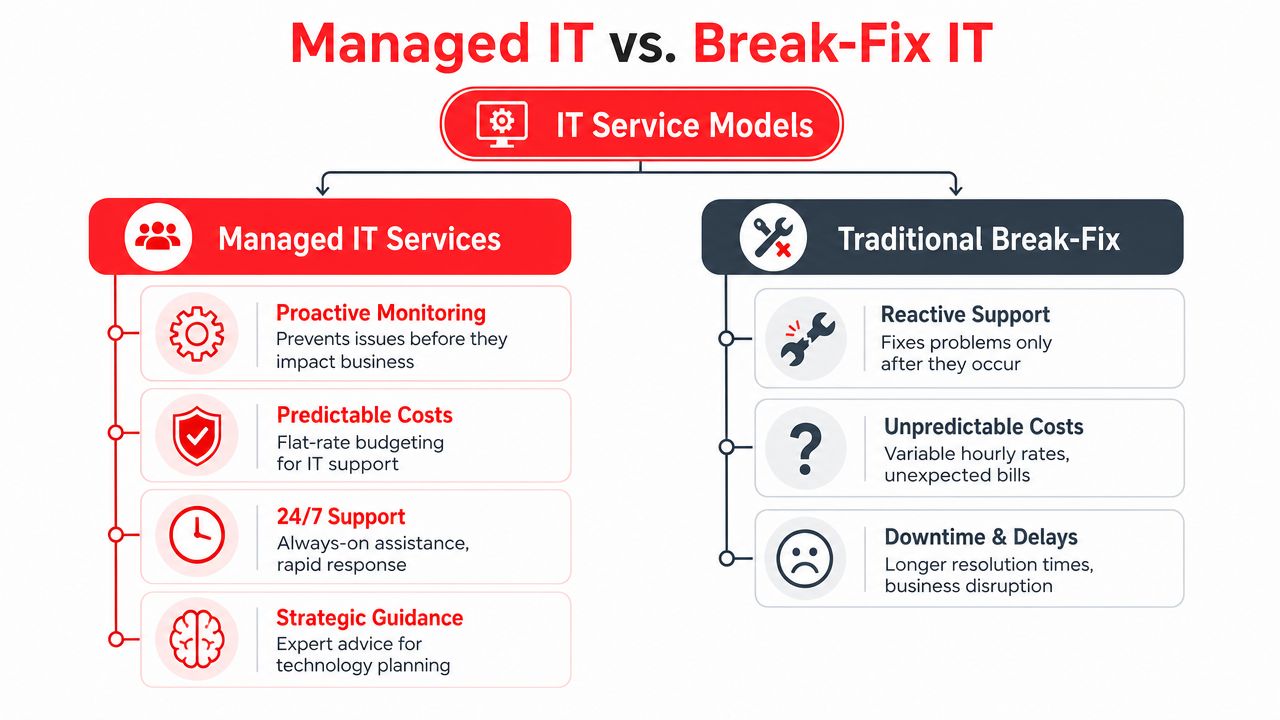
A comparison chart outlining the key differences between proactive Managed IT Services and reactive Traditional Break-Fix IT models.

What managed IT actually includes

A complete managed services agreement should cover more than a helpdesk. At minimum, Orlando businesses should expect:

  • User support: Day-to-day issue resolution for staff, including remote help and escalation.
  • System monitoring: Devices, servers, and network assets watched continuously so small faults don't become outages.
  • Patch and endpoint management: Routine updates, protection, and policy enforcement across workstations and servers.
  • Cloud administration: Oversight for productivity platforms, identity controls, and access policies.
  • Vendor and license management: Coordination with internet, software, telecom, and line-of-business vendors so your team isn't stuck in the middle.
  • Documentation: Network diagrams, standards, inventory, and recovery information that make the environment manageable.
  • Strategic guidance: Budgeting, lifecycle planning, and quarterly review of business priorities against technical risk.

A weaker provider usually leads with “we fix issues quickly.” A mature provider explains how they reduce the number of issues in the first place.

Why the market keeps moving this way

Businesses aren't adopting managed services because it sounds modern. They're doing it because reactive support creates operational drag, especially once cloud systems, compliance requirements, and cybersecurity risks start stacking up.

The managed services market data from Fortune Business Insights states that the global managed services market was valued at USD 330.4 billion in 2025 and is projected to reach USD 1,118.2 billion by 2034. The same source notes that only 5,000–10,000 of the world's 150,000–200,000 providers meet verifiable maturity standards. For an Orlando business owner, that matters. It means the label “MSP” doesn't tell you much by itself.

Practical rule: Don't buy managed IT based on the service name. Buy it based on operating depth, security capability, and proof of process.

That's also where the local decision gets more nuanced. A good fit for a single-office professional firm may not be the right fit for a multi-location healthcare group or a field-service company with internal technical staff. Some businesses need fully managed support. Others need co-managed support, where an outside team handles monitoring, security operations, and escalation while internal staff retain control over selected systems and vendors.

Cyber Command, LLC is one example of that broader model. It provides fully managed and co-managed IT, 24/7/365 U.S.-based helpdesk, cloud support, vendor management, and SOC-backed security operations for organizations in Orlando and Winter Springs.

The Business Case Uptime Security and Compliance

Most owners don't buy managed IT because they want a cleaner network closet or nicer reports. They buy it because they want the business to keep running. The strongest case for managed services is operational. Your staff stays productive, your risk posture improves, and compliance work stops getting treated like a last-minute project.

Uptime is an operational issue, not a technical vanity metric

Downtime hits payroll, scheduling, intake, quoting, patient flow, dispatch, and customer communication. It also creates a second layer of damage because your team starts building workarounds. People save files in the wrong place, delay updates, and avoid systems they no longer trust.

The Orlando managed IT benchmark data shows that 24/7/365 live helpdesk support combined with real-time system monitoring preempts 85% of potential downtime events, resulting in a 30% increase in operational uptime for mid-sized businesses. That same benchmark ties performance to SLA-driven protocols with response times under 15 minutes.

If a provider can't explain how it detects issues before users report them, you're still buying reactive support with a nicer label.

Security monitoring is not the same as active defense

Many Orlando businesses are often misled. They hear “monitoring” and assume someone is actively watching for attacker behavior. Often, that isn't what they're getting. They're getting tools that generate alerts, not a staffed security function that investigates, contains, and responds.

For law firms, medical practices, and finance-related businesses, that gap matters because attackers don't behave like routine malware anymore. They move laterally, abuse valid credentials, and hide inside normal user activity. That's why true SOC-backed security matters. A real security operations function doesn't just collect events. It hunts, validates, escalates, and coordinates response.

Monitoring tells you something may be wrong. A security operations center determines whether an attacker is actually in your environment and what to do next.

Compliance needs continuous execution

Compliance-heavy businesses often think in terms of annual checklists. That approach fails because compliance is tied to daily controls. Are devices patched? Are user permissions reviewed? Are logs retained? Are backup and recovery processes documented? Is there a response path for suspicious activity?

For a privately owned medical practice, a legal office handling sensitive records, or a financial services firm managing confidential documents, the right managed IT partner turns compliance into operating discipline. That includes consistent patching, endpoint control, documented configurations, access review support, and repeatable reporting.

What doesn't work is buying a generic “cyber package” and assuming that solves governance. It doesn't. Security tools without process leave gaps. Policy without enforcement does the same.

Tailored IT Solutions for Orlandos Key Industries

Managed IT only works when it matches the business model. Orlando isn't one market with one operating profile. A law office near downtown has different exposure than a med spa in Winter Park, a hospitality group serving visitors, or a field-service company with technicians moving across sites.
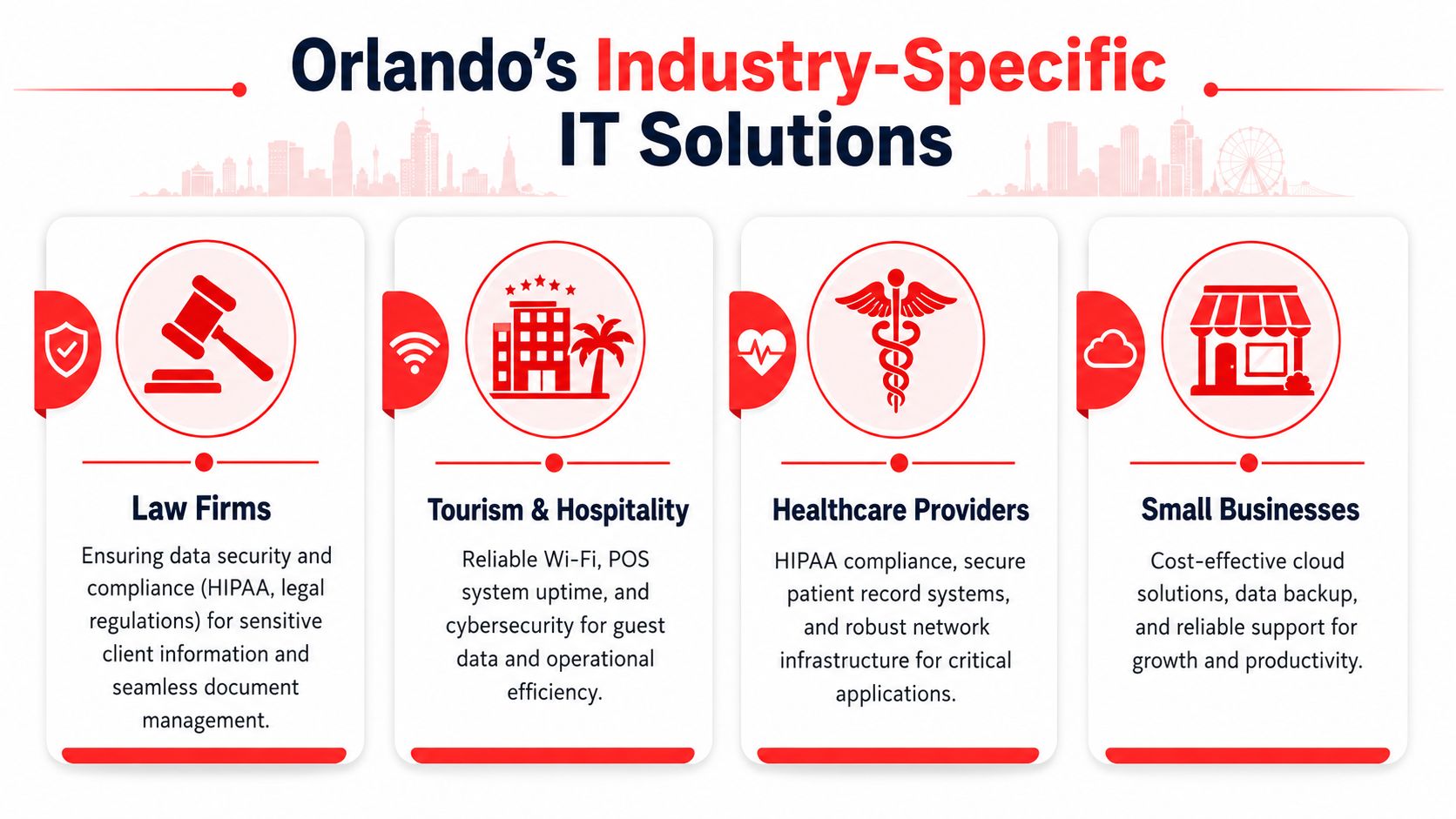
An infographic detailing industry-specific IT solutions in Orlando for law firms, hospitality, healthcare, and small businesses.

Professional services and legal offices

A legal or accounting practice usually needs three things from IT. First, staff must reach files and line-of-business systems without delay. Second, the firm needs clear control over who can access sensitive documents. Third, leadership needs confidence that a security incident won't become a client trust issue.

That often means tighter identity controls, documented device standards, secure remote access, dependable backup oversight, and support that understands the cost of delay during deadlines. In these environments, “mostly working” is not acceptable. If the document system slows down before a filing deadline or tax cutoff, revenue work stops.

Healthcare and privately owned practices

Small healthcare organizations in Central Florida often have lean administrative teams and very little tolerance for disruption. A dentist, orthodontist, veterinarian, plastic surgeon, or med spa may rely on a mix of imaging, scheduling, billing, and patient communication systems that all have to work together.

What they need isn't generic IT. They need compliance-aware workflows, device security, controlled access to patient information, and support that can separate a routine issue from a privacy event. They also need clarity on whether the provider offers real co-management if the practice works with an internal operations lead or outside application consultant.

The Florida co-managed IT findings report that 64% of multi-site SMBs in Florida require a hybrid co-managed IT model, while 78% of Orlando MSPs only market fully managed options. That gap is especially relevant for regional clinics, franchise-style operations, and growing healthcare groups that want predictable support but still need internal control over some decisions.

Hospitality field service and multi location operations

Hospitality and tourism create a different support profile in Orlando. Guest-facing systems can't go down during peak periods. Wi-Fi, point-of-sale continuity, and front-desk operations affect both revenue and reputation. Businesses serving visitors also deal with irregular support patterns, extended hours, and a higher expectation for immediate response.

If you operate in that environment, it helps to review a more specialized hospitality IT solutions guide for Orlando businesses. The same logic applies to field-service and industrial companies. They often need standardization across office and remote environments, stronger vendor coordination, and a support structure that can handle both back-office systems and site-specific constraints.

A multi-location company rarely needs less IT control. It needs clearer division of responsibility.

For these businesses, co-managed support can be the better fit. Internal staff may own business applications, local relationships, or site workflows. The outside partner handles monitoring, security operations, documentation, escalation, patching, and after-hours support. That split tends to work well when leadership wants resilience without giving up visibility.

Understanding Managed IT Services Pricing Models

Pricing gets most of the attention, but structure matters more than the base number. Two quotes can look similar and produce very different results. The core question is what behavior the pricing model encourages.

What Orlando businesses usually see in quotes

The Orlando managed IT pricing data shows that managed IT services in Orlando typically range from $100–$300 per user per month. The same source states that all-inclusive flat-rate packages can reduce administrative overhead by 25%, help SMBs predict IT spend with 95% accuracy, and that proactive monitoring can reduce monthly IT incidents by up to 70%.

That lines up with what works in practice. When support, maintenance, and oversight are fragmented across line items, businesses spend too much time arguing about scope. Every issue becomes a billing decision. Every project request becomes a surprise.

Managed IT Pricing Models Compared

Model How It Works Best For Predictability
Per-user A monthly fee is tied to each supported employee account Offices where each staff member uses a similar set of systems and support needs Good if scope is clearly defined
Per-device Billing is based on workstations, servers, and other managed assets Environments where equipment counts matter more than user counts Mixed, because users often touch multiple systems
All-inclusive flat rate A broader monthly agreement bundles support, monitoring, maintenance, and defined services Businesses that want stable budgeting and fewer scope disputes High when the agreement is written clearly
Break-fix or hourly You pay when something breaks or a project appears Very small environments with low complexity and high tolerance for disruption Low

A flat-rate model usually produces better operational behavior because the provider has reason to prevent problems instead of waiting for billable incidents. That doesn't mean every flat-rate proposal is good. Some exclude onboarding, after-hours support, licensing coordination, vendor management, or security response.

Use a quote review process that asks what is included, what triggers extra charges, how after-hours work is handled, and whether strategic reviews are part of the agreement. If you want a deeper breakdown of how to evaluate scope, this managed IT services cost guide is a useful starting point.

Cheap IT support often becomes expensive the first time you need urgent after-hours help, vendor coordination, or real incident response.

Your Buyers Checklist Questions to Ask Any Orlando IT Provider

Most businesses ask the wrong opening question. They ask, “What do you charge?” before they ask, “How do you operate?” In Orlando's market, that leads buyers into weak agreements that sound complete but leave out the capabilities that matter when something serious happens.
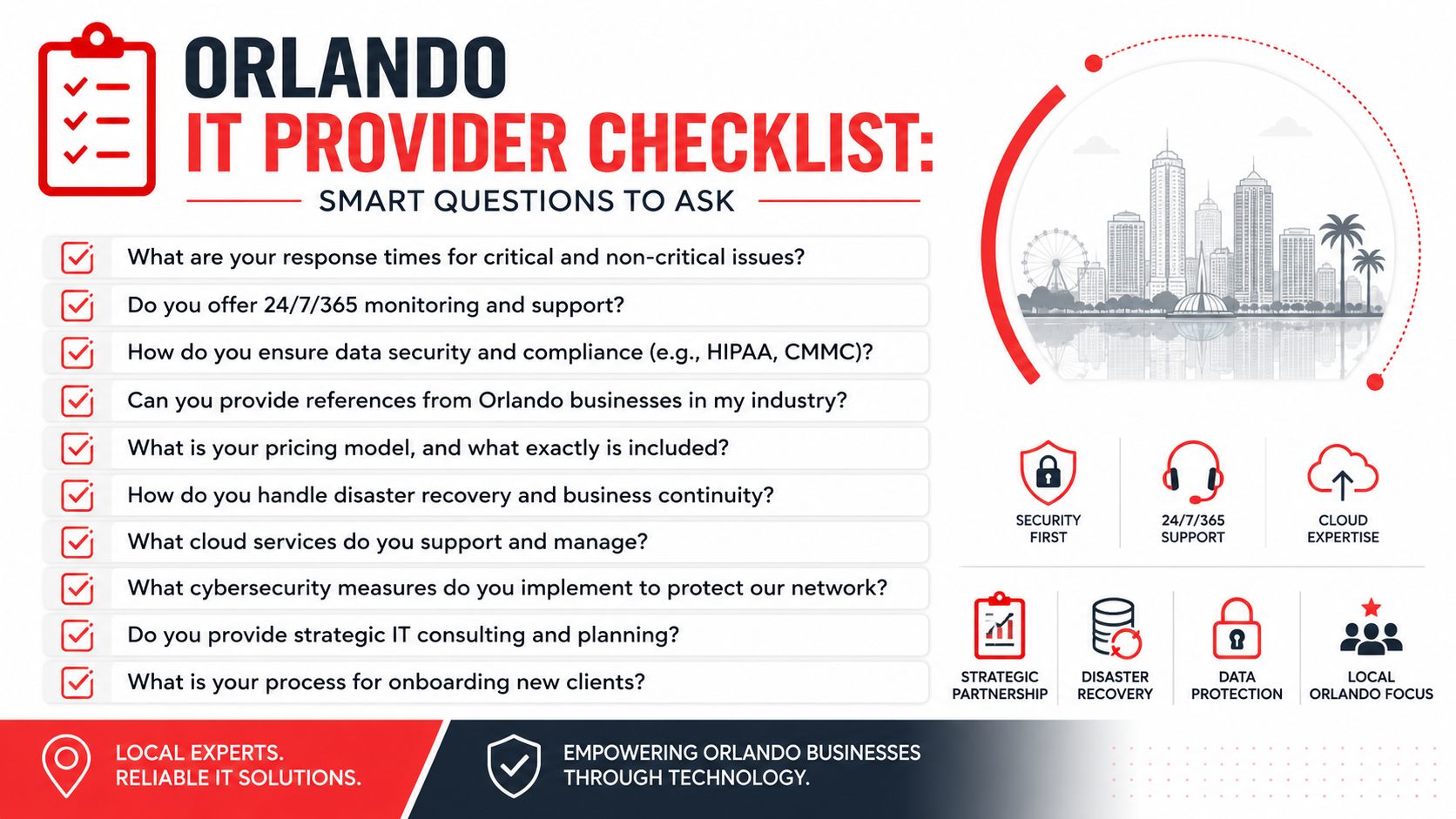
A checklist of smart questions for businesses looking to hire a managed IT service provider in Orlando.

The biggest gap to investigate is security depth. The Orlando security gap data states that 68% of successful breaches in SMBs occurred because passive monitoring tools failed to detect active attacker behavior, and 73% of Orlando MSPs' marketing materials do not explicitly mention SOC-backed incident response. That's the difference between having alerts and having defense.

Questions that expose shallow service delivery

Ask direct questions and listen for process, not slogans.

  • How is your SOC structured? Ask whether incident response is backed by live analysts around the clock or whether the provider mainly relies on automated alerting.
  • What happens when suspicious behavior is detected at night or on a weekend? You want a response path, not a vague statement about notification.
  • Is your helpdesk staffed by your own U.S.-based team? Support quality drops when escalation paths are fragmented or outsourced without ownership.
  • What do you patch, how often, and how do you verify it? A provider should explain routine execution, exceptions, and reporting.
  • Can you show a sample QBR or technology roadmap? If they can't show structured planning, the relationship may stay ticket-driven.
  • Who handles vendor coordination? Internet, telecom, software, and line-of-business vendors shouldn't all bounce your staff around during an outage.

Questions that clarify fit for your business model

Buyers should now get more specific about business structure.

  1. How do you support co-managed environments? If you already have internal IT, ask who owns security tooling, who handles escalations, and who approves change.
  2. How do you document the environment? You should expect diagrams, standards, recovery information, and clear ownership records.
  3. How do you support multi-location operations? Ask how they standardize devices, user policies, and support workflows across offices.
  4. How do you handle onboarding? A mature provider should have a sequence for assessment, stabilization, access control, documentation, and communication.
  5. How do you support compliance-sensitive industries? The answer should connect daily controls to your operating reality, not just name regulations.

If you want a more detailed evaluation framework, review this guide to choosing a managed service provider.

If a provider can't describe who does what during a security event, you're not evaluating a managed service. You're evaluating a promise.

The right buyer behavior is simple. Push past the brochure. Ask for examples of process. Ask who responds, who owns the outcome, and what your team should expect in the first ninety days. Mature providers answer plainly.

Partnering for Growth Your Next Step to Secure IT

The right managed IT relationship changes how a business runs. It reduces disruption, tightens accountability, and gives leadership a clearer view of risk. For Orlando companies, that matters because growth usually increases complexity faster than it increases internal IT capacity.

The key decision isn't whether to outsource everything. It's whether your current model supports uptime, security, and compliance without constant executive involvement. Some businesses need fully managed support because they don't have internal capacity. Others need co-managed support because they want outside depth while keeping selected control in house. The important part is choosing a partner that can operate in the model your business needs.

Managed IT Services in Orlando FL should do more than answer tickets. They should help you prevent downtime, close security gaps, support compliance, and give your team room to grow without dragging leadership back into daily technical firefighting.


If you want a practical review of your current environment, Cyber Command, LLC can help you assess whether you need fully managed support or a co-managed model, identify gaps between basic monitoring and true SOC-backed security, and map out a more predictable path for uptime, compliance, and growth.
IT Support Near Altamonte Springs FL: A 2026 Buyer’s Guide

Your office opens at 8. By 8:17, someone can't print, a shared folder won't load, and a manager is forwarding a suspicious email asking for a wire transfer review. Your current IT person says they'll “take a look soon.” That's not support. That's drift.

If you're shopping for IT Support Near Altamonte Springs FL, the critical issue isn't whether a provider can reset passwords or reboot a firewall. It's whether they can keep your business operating, secure, and accountable when something goes wrong after hours, during a cyber event, or in the middle of a growth push. Most providers sell reassuring phrases. Few explain what those phrases mean in practice.

This matters more in Central Florida than many owners realize. Altamonte Springs isn't an isolated suburb. It operates inside a large regional business environment where speed, compliance, and uptime directly affect revenue, client trust, and staff productivity.

Table of Contents

Why Altamonte Springs Businesses Need Strategic IT

A frustrated office worker sitting at a desk with his hands on his face before a computer error.

A lot of local businesses are running with a patchwork setup. One outside technician. One office manager who “handles tech stuff.” One cloud app no one fully owns. It works until it doesn't, and then the whole company feels it.

That approach is too fragile for the market you're operating in. Altamonte Springs sits inside the Orlando, Kissimmee, Sanford metro area, which had an estimated population of about 2.7 million in 2024 and is part of one of Florida's largest business markets, according to regional Altamonte Springs IT market context. In plain English, your firm is competing in a serious operating environment. Clients expect responsiveness. Employees expect systems to work. Regulators and insurers expect discipline.

IT now affects every department

Professional services firms depend on document access, email continuity, and secure client communication. Medical and dental offices depend on stable line-of-business systems and privacy controls. Architecture, engineering, and field-service companies depend on file availability, device management, and vendor coordination.

Practical rule: If your business stops earning when your systems stop working, IT is a leadership issue, not a side task.

That's why helpful frameworks like Cloudvara IT support insights resonate with small business owners. They push the conversation beyond “who can fix my computers” and toward service reliability, planning, and fit.

Local growth requires a support model that scales

If your company has outgrown ad hoc support, start by assessing whether you need a provider that can own helpdesk, security, vendor management, and planning in one motion. Businesses comparing options often benefit from looking at resources on local IT support for small business because the core decision isn't technical. It's operational.

You need an IT partner that treats uptime, security, and accountability as part of your business model. If a provider can't talk clearly about those three areas, keep looking.

Beyond Break-Fix Understanding Your IT Support Options

The wrong service model creates constant friction. Not because the provider is malicious, but because you hired a plumber when you needed a facilities team.

Break-fix is cheap until it isn't

Break-fix support means you call when something breaks. That can work for a very small office with low complexity, low compliance pressure, and high tolerance for downtime. The problem is simple. Break-fix providers get paid when things fail.

That model creates bad incentives for a growing business. There's little reason for long-term planning, patch discipline, asset standards, or user training if the agreement only starts after the outage.

A law office with shared files, remote access, and frequent email attachments usually outgrows break-fix quickly. A medical practice with multiple devices and specialized applications should skip it entirely. Downtime there isn't an inconvenience. It's operational damage.

Managed and co-managed models fit most growing firms

Managed IT services are the better fit when you want someone responsible for day-to-day technology health. That includes helpdesk, device oversight, updates, monitoring, vendor coordination, and routine maintenance. This model fits firms that don't want to build a full in-house team.

Co-managed IT works when you already have internal staff but need depth, after-hours coverage, project support, or cybersecurity muscle. A controller, operations lead, or in-house technician may know the business well, but still need outside support for escalations and continuous coverage.

Security-focused support matters when your exposure is bigger than your helpdesk. If your staff handles sensitive data, financial records, patient information, contracts, or privileged communications, basic desktop support isn't enough. You need a provider that can explain how incidents are detected, triaged, contained, and recovered.

A good provider doesn't just describe services. They define responsibility boundaries.

One useful way to think through service delivery is to review how remote monitoring and management platforms support operations. If you're evaluating how enterprise-grade support environments are structured, this overview to evaluate Superops RMM for enterprises helps frame what mature service tooling is supposed to enable. The tool itself isn't the point. The point is visibility, consistency, and accountability.

Pick the model that matches your business risk, not your smallest monthly quote.

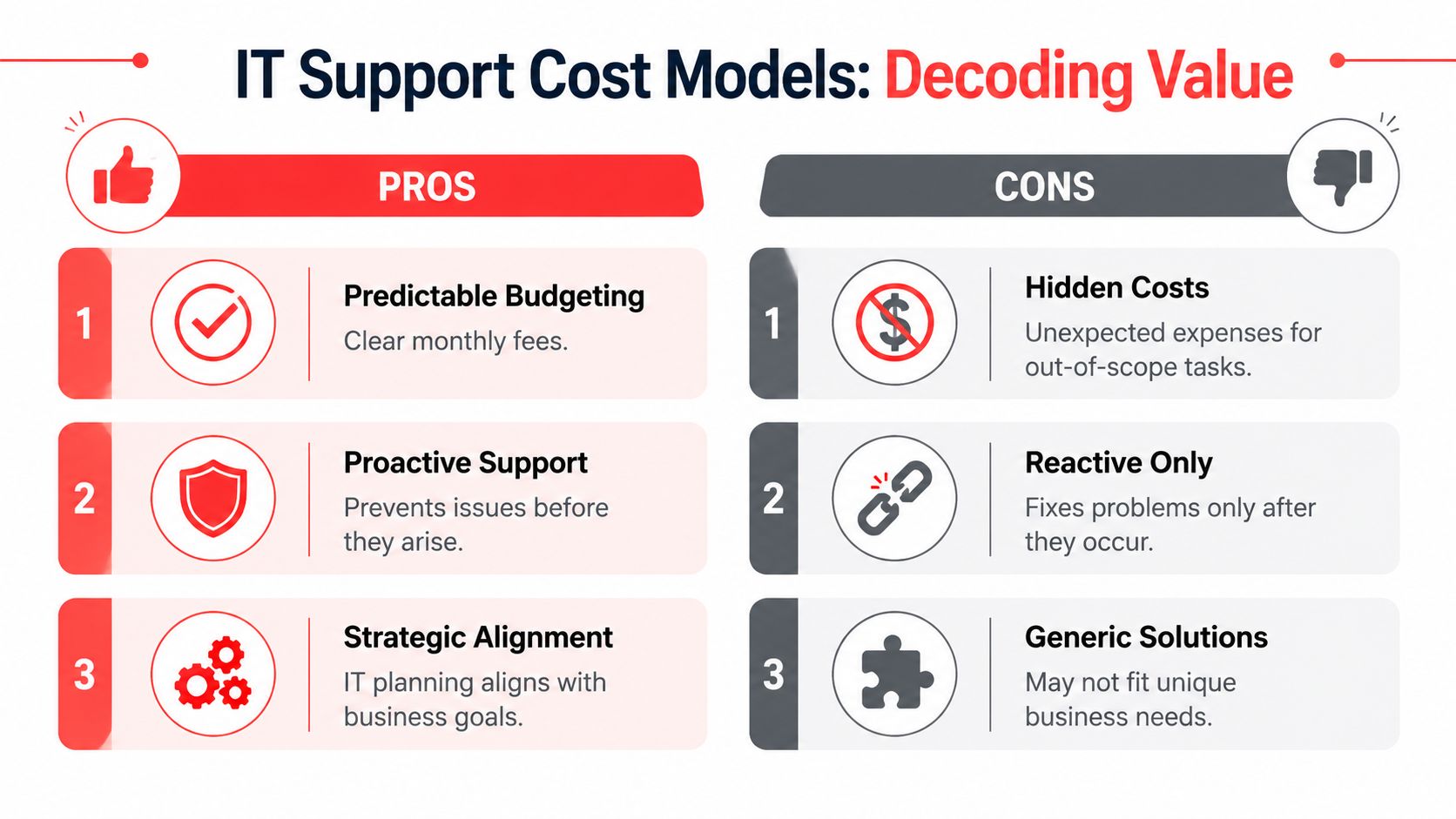
Decoding IT Support Costs and Finding True Value

Most business owners ask the wrong first question. They ask, “What's your monthly rate?” They should ask, “What exactly stops being included the moment something difficult happens?”

A comparison chart outlining the pros and cons of different IT support cost models for businesses.

Headline pricing hides scope decisions

A major problem in the local market is that many providers advertise flat-rate, month-to-month, or predictable pricing without clearly spelling out scope. One local source that addresses this directly notes that costs can still vary by business size and may include one-time setup fees or extra monthly charges for specific services. It also makes the more important point that flat-rate IT isn't automatically cheaper if the contract excludes remediation, compliance work, or major projects. A total-cost-of-ownership comparison is more valuable than a headline monthly number, as explained in this Altamonte Springs managed IT pricing discussion.

That's the part many owners miss. “Flat-rate” can still mean:

  • Onboarding isn't included. You pay to document, standardize, and clean up what should have been handled at the start.
  • After-hours work is extra. The contract sounds broad until a weekend outage appears.
  • Projects sit outside the agreement. Infrastructure changes, compliance remediation, or system upgrades become separate invoices.
  • Security is partial. Basic antivirus may be included, while more serious protections and response support are not.

Ask for total cost of ownership not a teaser rate

Don't compare vendors on monthly price alone. Compare them on total cost of ownership over the life of the relationship.

Use these filters:

  1. What is covered every month. Helpdesk, patching, endpoint protection, vendor management, reporting, backups, and routine admin work should be clearly defined.
  2. What triggers extra billing. Ask for examples, not slogans.
  3. What happens during a bad month. If an outage, migration, or security issue appears, does the provider stay engaged under the agreement or flip into project billing?
  4. What gets standardized. Mature providers usually reduce chaos by enforcing supported devices, documented processes, and clear ownership.

Cheap IT support often becomes expensive the first time you need urgency, security work, or cross-vendor coordination.

A strong pricing conversation should feel almost uncomfortably specific. If it doesn't, you're probably being sold a package, not a support outcome.

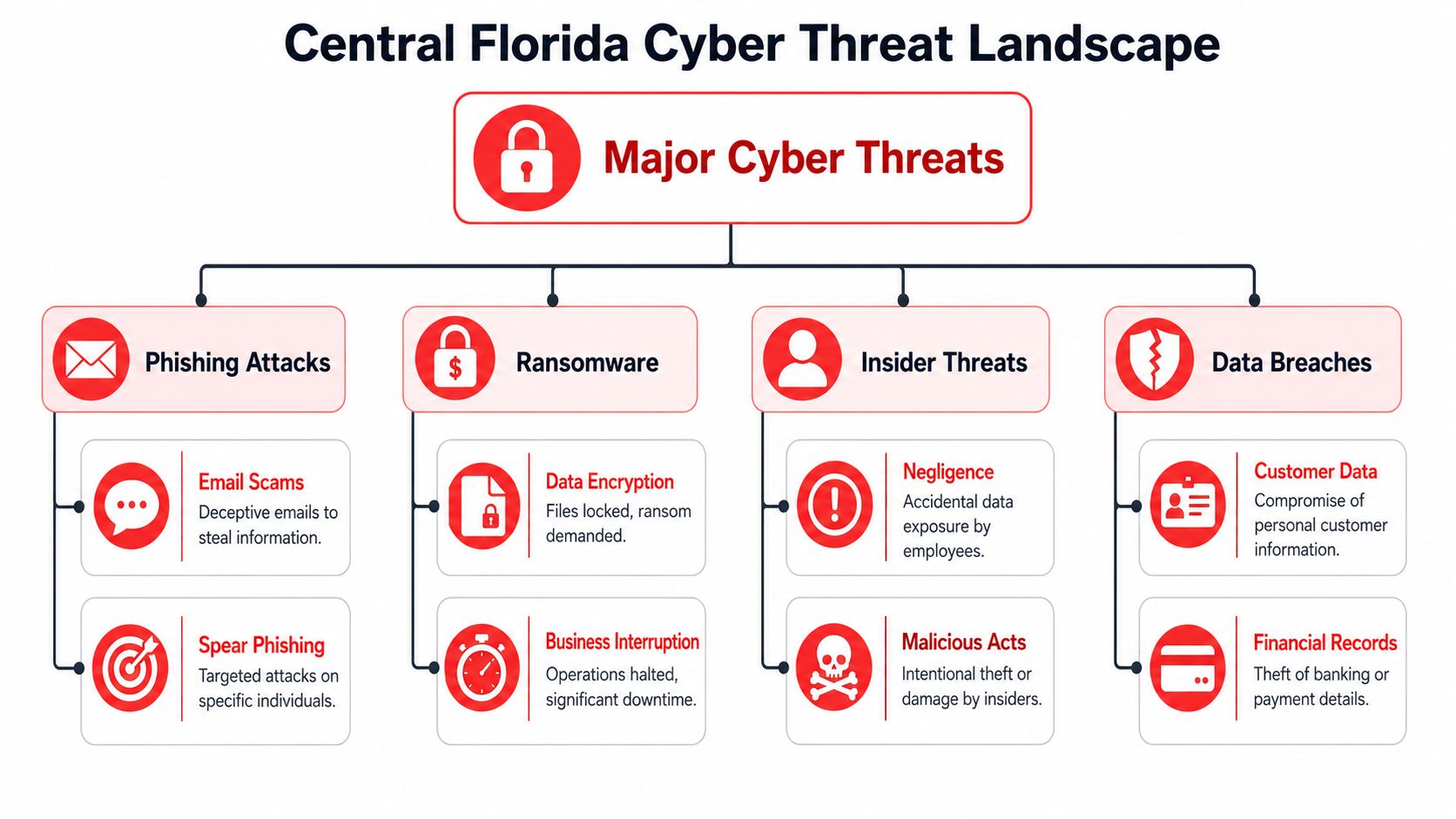
The Real Security Threats Facing Central Florida Businesses

A lot of small and mid-sized businesses still treat cybersecurity as a technical add-on. That's outdated. If your company uses email, cloud apps, remote logins, stored client data, or online payments, you already have meaningful exposure.

An organizational chart showing major cyber threats in Central Florida, including phishing, ransomware, insider threats, and data breaches.

The threat isn't abstract

The FBI's Internet Crime Complaint Center reported about $12.5 billion in losses in 2023, a reminder that ransomware, business email compromise, and related incidents aren't edge cases for SMBs. That figure appears in this Altamonte Springs cyber risk discussion. The lesson for local businesses is straightforward. A provider saying “we offer 24/7 support” tells you almost nothing by itself.

A CPA firm can be hit through an email impersonation attempt. A dental office can lose access to scheduling and patient records. An engineering firm can have sensitive files exposed through poor access control. In each case, the first business question is the same. Who notices, who responds, who coordinates recovery, and who owns communication?

Security has to include response and recovery

Basic helpdesk support and real security operations are not the same thing. Good cybersecurity support should include a documented response path, not just protective software on endpoints.

Look for evidence of:

  • Incident triage. Someone has to review alerts, determine whether the event is real, and prioritize action.
  • Containment steps. A compromised device or account must be isolated fast.
  • Backup validation. Backups aren't useful if no one has confirmed they can be restored.
  • Patch and endpoint discipline. Many attacks exploit neglected systems and unmanaged devices.
  • User controls. Access should match job roles, and departures should trigger prompt offboarding.

If a provider can't explain their incident workflow in plain language, they won't perform well when your staff is stressed and your phones are ringing.

Local owners should also expect guidance on practical controls for staff behavior, access, and recovery readiness. This resource on cybersecurity best practices for small businesses is useful because it frames security as a business operations discipline, not just an IT purchase.

What matters most is clarity. When an employee clicks the wrong link at 9:40 p.m., you need more than a voicemail box and a dashboard. You need a team with a documented plan.

Your Checklist for Choosing the Right IT Partner

Sales calls are easy. Accountability is harder. The fastest way to separate polished marketing from real capability is to ask operational questions and insist on direct answers.

Questions that expose weak providers fast

Start with response structure. Not promises. Structure.

Ask how they handle a Friday night outage, a Monday morning login failure across multiple users, or a suspected compromised email account. A serious provider should describe triage, escalation, communication, and next actions without hiding behind vague “best effort” language.

A practical benchmark in this market is 24/7 live coverage because after-hours incidents still need immediate triage. Local job postings in Altamonte Springs explicitly expect night, weekend, and on-call coverage for service operations, which reflects how support demand is structured around continuous availability, as shown in this Altamonte Springs IT support supervisor posting.

Then ask about onboarding. Weak firms treat onboarding like paperwork. Strong firms use it to map systems, identify risk, standardize devices, review vendors, and establish support boundaries.

What you want to hear: “Here's how we take ownership, document your environment, and reduce uncertainty in the first phase.”

Also ask how they report. If you never receive meaningful updates on recurring issues, security posture, asset health, and planning priorities, you're not in a managed relationship. You're in a ticket queue.

IT Provider Vetting Checklist

Question Category Question to Ask What a Good Answer Looks Like
Response Model Do you provide live after-hours triage or just an answering service? Clear explanation of who answers, who escalates, and what happens during nights and weekends
Incident Handling What happens if we suspect a compromised account? A documented workflow for triage, containment, communication, and recovery
Onboarding What do you review during transition? Systems documentation, user access, device standards, vendor handoff, and risk review
Pricing Scope What is not included in the monthly agreement? Specific exclusions with examples, not vague contract language
Reporting How do you show accountability over time? Regular reporting, issue trends, planning reviews, and documented recommendations
Security Who owns patching, endpoint protection, and backup checks? Named responsibilities and a clear cadence for ongoing oversight
Strategic Fit How do you align IT decisions with business goals? Roadmap thinking, budgeting input, lifecycle planning, and operational context
Team Depth If our main contact is unavailable, who steps in? Shared documentation, escalation paths, and team-based coverage

If you want another set of criteria before signing anything, this guide on how to choose a managed service provider is worth reviewing alongside your shortlist.

A trustworthy provider won't get annoyed by hard questions. They'll welcome them.

Partnering for Growth The Cyber Command Advantage

The right IT partner does four things well. They make costs understandable. They reduce avoidable downtime. They bring real security operations to the table. They show their work through reporting and planning.

What a real partner looks like

That standard is what you should apply to any provider you consider. For businesses that need one firm to combine managed IT, co-managed support, cybersecurity coverage, vendor management, and strategic planning, Cyber Command, LLC is one example of that model. Based on the publisher information provided, the company offers 24/7/365 U.S.-based helpdesk, managed and co-managed IT, cloud services, a dedicated SOC, reporting, and predictable pricing structured around proactive support.

Screenshot from https://cybercommand.com

That doesn't mean every business needs the same stack or the same agreement. It does mean your next IT relationship should be judged by operational clarity, not sales language. If a provider can't define what happens during onboarding, after-hours incidents, security events, and major changes, they're not ready to support a growing Central Florida business.

The strongest outcome isn't “having IT covered.” It's having a partner that helps your business stay available, secure, and easier to run.


If you're evaluating Cyber Command, LLC, start with a direct conversation about your current risks, your support gaps, and what's included in ongoing service. A good fit should leave you with clearer accountability, fewer surprises, and a practical path to stronger uptime and security.

Orlando Managed Service Provider: A Buyer’s Guide for 2026

A lot of Orlando business owners reach the same point the same way. A law office in downtown Orlando adds staff faster than its systems can keep up. A medical practice in Lake Nona starts worrying about phishing after a suspicious login alert. A multi-location professional services firm realizes its “IT guy” can reset passwords, but can't give leadership a clear answer on backup readiness, after-hours response, or compliance exposure.

That's usually when the search for an Orlando managed service provider starts. Not because the business wants to outsource inconvenience, but because leadership needs technology to become predictable.

The MSP model has grown well beyond outsourced helpdesk. The U.S. managed services market is projected to grow from $69.55 billion in 2025 to $116.25 billion by 2030, and the same analysis notes that 44.9% of MSPs offer disaster recovery services while 29.2% prioritize cybersecurity, which reflects a shift toward resilience rather than simple ticket handling (managed services market projections and service mix). That matters in Central Florida, where firms often need to balance growth, seasonal demand, compliance pressure, remote access, and real-world security risk at the same time.

If you're sorting through providers now, skip the generic promises. Focus on whether the provider can reduce downtime, control risk, and give you a cost model you can plan around. If you need a local starting point, this overview of IT support for small businesses in Orlando helps frame what a stronger support model should look like in practice.

Table of Contents

Is Your IT Keeping Up with Your Orlando Business

Growth exposes weak IT fast. A firm can tolerate a few annoying support issues when it has a small team in one office. Once it has client deadlines, cloud apps, remote users, compliance obligations, and sensitive data moving across multiple devices, small gaps become business problems.

A stressed businessman looking at an application not responding error on his computer screen in an office.

In Orlando, that pressure shows up in familiar ways. Healthcare practices need dependable access to records and systems. Accounting and legal teams need secure document handling and consistent workstation performance during deadline-heavy periods. Multi-site businesses across Central Florida need standardization, not a different support experience in every location.

What usually fails first isn't the hardware. It's the operating model. Support becomes reactive. Backups exist, but nobody in leadership knows whether recovery will work. Security tools are installed, but no one is actively watching for suspicious behavior after hours. Vendor sprawl grows, and no one owns the whole environment.

A good MSP relationship starts when the business stops asking, “Who fixes this?” and starts asking, “Who is accountable for keeping this stable and secure?”

That's why an Orlando managed service provider should be evaluated as a business partner, not a repair shop. The right provider helps you turn scattered IT activity into managed operations with defined response paths, clearer ownership, and fewer surprises.

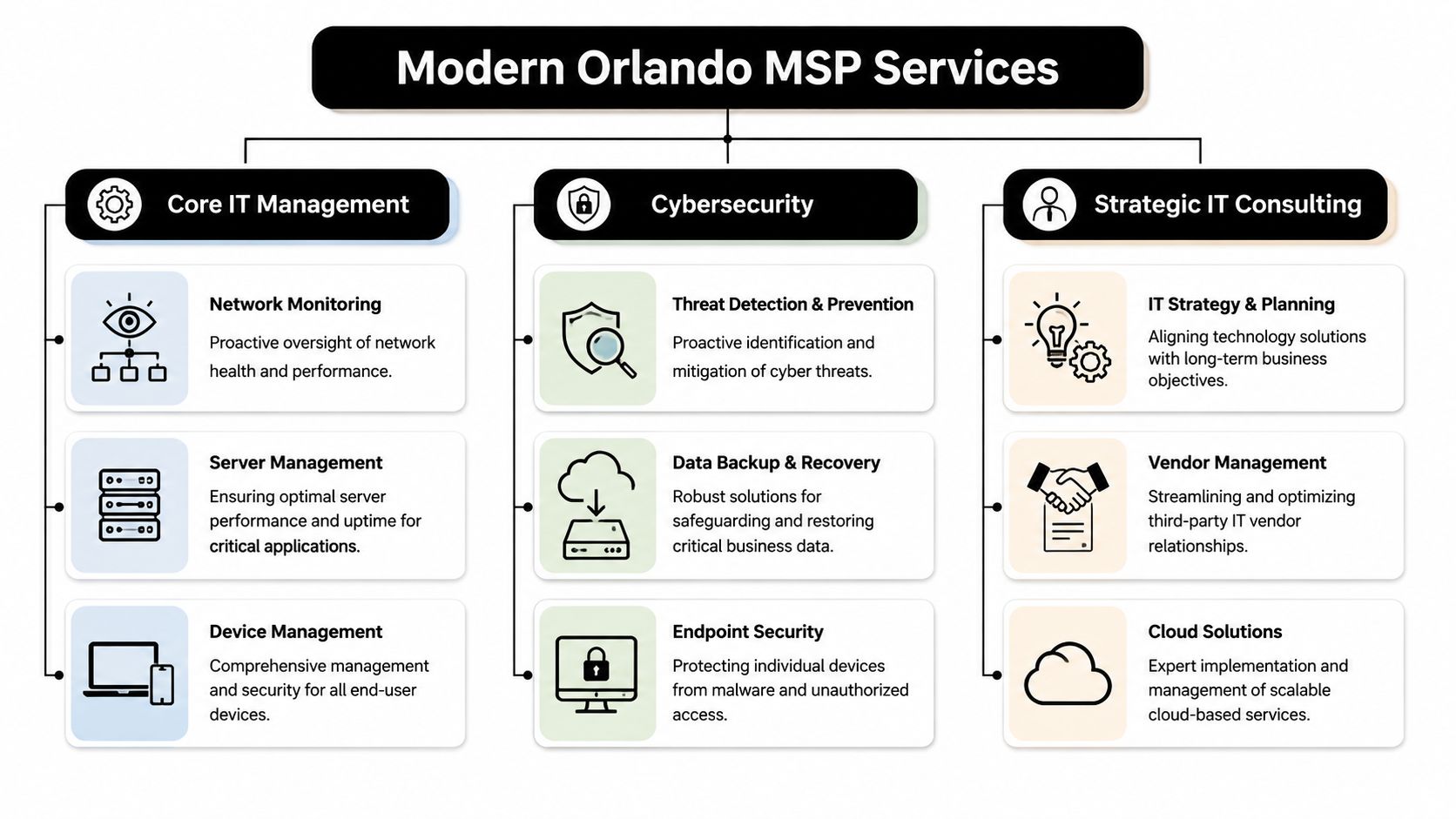
Beyond Helpdesk What a Modern Orlando MSP Delivers

A modern MSP should handle support, but support is the floor, not the ceiling. If all you're buying is ticket response, you're still managing too much risk internally.

A diagram illustrating IT services provided by a managed service provider in Orlando, including core IT, cybersecurity, and consulting.

The baseline is proactive operations

A competent Orlando managed service provider should continuously manage the often-overlooked parts of IT that create outages when neglected.

That includes:

  • Monitoring and alerting: Watching servers, endpoints, network health, storage, and key business systems so the team can respond before staff starts calling.
  • Patch and endpoint management: Keeping devices current, enforcing standards, and reducing the number of avoidable security gaps created by inconsistent updates.
  • Backup oversight: Not just running backups, but checking job success, retention, and recovery readiness.
  • Vendor coordination: Owning the handoff between your business and internet, cloud, software, telecom, and line-of-business vendors when issues cross systems.

For a busy office manager or administrator, that operational discipline matters more than technical jargon. It means fewer interruptions, fewer mystery failures, and less time spent chasing multiple vendors.

Security has to operate every day

Cybersecurity can't be bolted onto managed IT anymore. If a provider treats it as an optional add-on, you should assume the service model is behind where the market already is.

A stronger MSP will pair endpoint protection with log visibility, incident response playbooks, user access review, phishing defense, backup isolation, and escalation procedures that continue after the business day ends. If you want a practical example of what that operating layer can look like, UTMStack managed SIEM is a useful reference for understanding how centralized detection and response supports ongoing security operations.

Practical rule: If a provider says it offers “24/7 security,” ask what happens at 2:00 a.m. Who sees the alert, who investigates it, and who contacts your business?

A real answer should describe people, process, and decision paths. Anything softer than that is a sales phrase.

Compliance support should be operational

Central Florida businesses in healthcare, financial services, legal, and adjacent professional sectors often don't need a lecture on compliance. They need help turning compliance expectations into repeatable IT work.

That means an MSP should be ready to support activities such as:

  • Access control reviews: Confirming the right people have the right access, and removing stale accounts quickly.
  • Documentation: Maintaining asset records, network documentation, policies, and change history that leadership can review.
  • Evidence collection: Producing recurring reports, security records, and control documentation when audits or insurance questionnaires show up.
  • Risk reduction in daily workflows: Hardening endpoints, securing remote access, managing backups, and reducing single points of failure.

One Orlando-area option in this category is Cyber Command, LLC, which provides managed IT, co-managed IT, a 24/7 SOC, vendor management, and compliance support as part of its service model. That kind of integrated approach is what businesses should look for, whether they choose one provider or another.

Key Evaluation Criteria for Central Florida Businesses

The hardest part of buying managed IT isn't finding providers. It's separating polished sales language from operational maturity.

Maturity matters more than marketing

A useful benchmark comes from Orlando managed IT pricing guidance. It notes that roughly 150,000 to 200,000 firms call themselves MSPs, while only 5,000 to 10,000 are considered mature and certifiable, and it places common managed IT pricing around $100 to $300 per user per month depending on scope.

That gap matters. Plenty of firms can sell remote support, antivirus, and a monthly invoice. Far fewer can show mature service delivery with documented controls, recurring reporting, backup accountability, onboarding discipline, offboarding discipline, and vendor ownership.

When you evaluate providers, look for signs that they run a system, not a personality-driven operation.

Useful indicators include:

  • Documented processes: They can explain onboarding, escalation, patching, access changes, and incident response in plain language.
  • Recurring review structure: They don't disappear after contract signing. They schedule business reviews, roadmap discussions, and service reporting.
  • Service boundaries: They can tell you what's included, what triggers extra work, and how after-hours situations are handled.
  • Operational proof: They can show examples of reporting, standards, and change control without speaking in abstractions.

Local response still matters

A Central Florida business doesn't always need onsite support every week. It does need a provider that can show up when hands-on work matters.

That's especially true for:

  • Medical and dental offices dealing with workstations, printers, scanners, and office-specific workflows.
  • Professional firms that can't afford conference room failures, workstation issues before client meetings, or preventable office network outages.
  • Multi-location organizations that need one support standard across branches, not fragmented local fixes.

A local presence also tends to improve accountability. When leadership knows who owns the relationship, issues get escalated faster and planning conversations get more practical.

Ask for evidence of security operations

A lot of providers will say they do security. Ask what they run.

You want detail around monitoring, triage, endpoint standards, incident handling, identity controls, backup escalation, and reporting. If your business has regulated data, ask how they support security documentation and policy enforcement tied to your environment.

Healthcare organizations should also review current guidance before provider meetings. This checklist for navigating 2025 HIPAA requirements is a helpful way to frame the questions you should bring into the conversation.

Don't ask, “Do you do compliance?” Ask, “What reports, controls, and review processes will you own each month?”

That wording forces a clearer answer. It also reveals whether the provider understands regulated operations or just knows the vocabulary.

Decoding Orlando MSP Pricing and Hidden Costs

Pricing causes more confusion than almost any other part of the MSP buying process. The problem usually isn't that proposals are too detailed. It's that they're too simplified at the top and too vague in the fine print.

A person viewing software pricing models for businesses on a tablet device at a desk.

What Orlando pricing usually looks like

Verified Orlando market data shows recurring MSP pricing often falls into three bands: $1,500 to $3,000 per month for basic monitoring and remote help desk, $3,000 to $7,000 per month for fully managed networks with security and backup, and $120 to $200 per hour for ad hoc projects or after-hours emergencies.

Those numbers tell you something important. Orlando businesses aren't buying old-school break-fix support alone. They're budgeting for continuous support, security oversight, and continuity planning.

A second local pricing view puts common managed IT at $100 to $300 per user per month, especially when helpdesk, security monitoring, and mixed onsite and remote support are part of the service. It also argues that buyers should normalize proposals by service components such as endpoint protection, patch cadence, backups, vulnerability management, vendor administration, and incident response, rather than comparing only the headline fee (managed IT service pricing comparison guide).

If you want a deeper breakdown of how these models affect budgeting, this guide to managed IT services cost is a useful reference point.

Where simple pricing models break down

Per-user pricing is easy to quote. It's not always easy to apply fairly.

A law firm with mostly desk-based staff may fit a per-user model well. A business with shared workstations, field employees, rotating devices, multiple sites, and a mix of office and remote work usually won't. The same goes for companies with an internal IT manager that wants outside help for escalation, security operations, documentation, or vendor management.

Watch for these common pricing blind spots:

  • Shared-user environments: Front desk stations, exam rooms, kiosks, and conference devices can distort “per user” math.
  • After-hours needs: A proposal may sound complete until you ask how nights, weekends, and emergencies are billed.
  • Project labor exclusions: Many agreements cover support but not larger moves, remediation work, or changes outside routine administration.
  • Vendor coordination limits: Some providers will call vendors for you. Others treat that as billable consulting.
  • Multi-site complexity: A branch office with its own connectivity, hardware, and workflow needs often requires more support than a flat seat count suggests.

How to compare total cost of ownership

The cheapest monthly quote is often the most expensive operating decision.

Use this framework instead:

Comparison area What to examine What often gets missed
Service scope Helpdesk, patching, backup checks, security monitoring, vendor management Assumptions that “managed” means all of the above
Response model Business hours support, after-hours escalation, onsite availability Emergency work billed separately
Security depth Endpoint controls, incident response process, account protections, reporting Security tools sold without active review
Compliance readiness Documentation, policy support, evidence for audits or insurance Generic promises with no reporting cadence
Environment fit Multi-location support, hybrid staff, shared devices, co-managed workflows One-size-fits-all seat pricing

If your business has more than one location or more than one workflow, ask the provider to explain where the pricing model stops being simple.

That question alone can save you from buying a neat proposal that turns messy after onboarding.

Your Actionable Process for Choosing the Right Partner

A strong MSP selection process should look more like hiring a department leader than buying a utility. You're choosing who gets visibility into your systems, your users, your vendors, and your operational weak points.

Start with internal clarity

Before talking to providers, document what's failing today and what has to improve.

Write down:

  • Recurring pain points: Slow support, inconsistent vendors, poor remote access, backup uncertainty, user frustration, leadership blind spots.
  • Business priorities: Growth, office expansion, hybrid work, system modernization, insurance requirements, audit readiness.
  • Risk areas: Sensitive data, access sprawl, unsupported systems, weak offboarding, unclear recovery process.
  • Required outcomes: Faster response, stronger reporting, fewer vendors to manage, better security oversight, predictable monthly spend.

This step matters because vague requests produce vague proposals. If you ask for “managed IT,” you'll get broad packaging. If you ask for support tied to business objectives, you'll get a more useful conversation.

Run better provider meetings

Your first meeting shouldn't be a product demo. It should be an operating review.

Ask the provider to explain how they would take over your environment, standardize it, secure it, support your staff, and report back to leadership. If you want a practical selection framework before those conversations, this guide on how to choose a managed service provider is a solid checklist.

Use the meeting to test clarity. Mature providers usually answer directly. Less mature ones tend to hide behind generalities.

Here's a practical set of questions to bring.

Essential Questions for Vetting an Orlando MSP

Category Question to Ask Why It Matters
Onboarding How do you transition documentation, credentials, vendors, and support responsibility from the current setup? Weak transitions create outages and confusion in the first weeks.
Support model Who answers support requests, how are priorities set, and how do users escalate urgent issues? You need to know how staff will actually experience the service.
Security operations Who reviews alerts, what triggers investigation, and what happens outside normal business hours? This exposes whether security monitoring is active or mostly passive.
Backup and recovery How do you verify backups and how do you handle recovery testing and emergency restoration? Backup value depends on recoverability, not job completion alone.
Compliance What documentation and recurring reports do you provide for regulated environments? Many providers say they help with compliance but don't produce usable evidence.
Vendor management Which vendors will you coordinate with directly, and what's included in that responsibility? Leadership needs fewer handoffs, not more.
Onsite support When do you come onsite, how is it scheduled, and what work falls outside the agreement? This helps prevent billing surprises.
Reporting What will leadership receive each month or quarter? Good reporting turns IT from guesswork into managed accountability.
Standards What technical standards do you enforce across devices, accounts, and backups? Standardization is what reduces recurring incidents over time.
Strategic guidance Who helps us plan upgrades, risk reduction, and future changes? You need a roadmap, not just ticket closure.

Ask every provider the same core questions. That's how you compare operations instead of personalities.

Compare proposals like an operator

When final proposals arrive, don't line them up by monthly fee first. Line them up by accountability.

Review each proposal through four lenses:

  1. What is clearly included
    Look for precise language around support, security, onsite work, projects, and vendor coordination.

  2. What is excluded or capped
    Find the labor categories that trigger extra billing, especially after-hours support, remediation, office moves, and nonstandard devices.

  3. How the provider will report
    A better MSP relationship includes recurring visibility into issues, standards, risk items, and upcoming decisions.

  4. Whether the service model fits your business
    A provider can be competent and still be the wrong fit for a multi-site healthcare practice, a growing accounting firm, or a co-managed internal IT setup.

Check references with a business lens too. Don't just ask whether the provider is responsive. Ask whether they improved control, communication, and predictability after the first few months.

Finding Your Partner and Taking the Next Step

Choosing an Orlando managed service provider isn't really about outsourcing IT. It's about deciding who will own operational discipline across support, security, vendor coordination, and business continuity.

The right partner should make your environment easier to run. Staff should know where to go for help. Leadership should have better visibility. Compliance-related work should feel more organized. Security shouldn't depend on hope and scattered tools.

The strongest buying criteria are straightforward:

  • Local accountability when onsite work or direct communication matters
  • Security depth that goes beyond checkbox tooling
  • Transparent pricing with fewer hidden labor surprises
  • Documented process for support, reporting, and continuous improvement

If your current setup still feels reactive, it's probably time for a more structured model. A consultation with a qualified local provider can quickly show whether your issues are minor support gaps or signs that your business has outgrown its current IT approach.

Frequently Asked Questions about Orlando MSPs

What's the difference between fully managed IT and co-managed IT

Fully managed IT means the provider takes primary responsibility for day-to-day support, maintenance, and operational oversight. Co-managed IT means the provider works alongside your internal IT person or team. That model works well when you need added depth in security, after-hours coverage, documentation, or project support without replacing internal staff.

How long does onboarding usually take

The timeline depends on the condition of your current environment, how complete your documentation is, and whether you're changing tools, standards, or vendors during the transition. What matters most is that the provider has a structured onboarding process for access handoff, asset review, user communication, and support cutover.

Can an MSP support industry-specific software

Yes, if the provider is willing to learn your workflow and coordinate closely with the software vendor. For legal, accounting, healthcare, architecture, engineering, and similar firms, that usually means supporting the infrastructure around the application, documenting dependencies, handling escalations, and making sure updates or device changes don't break daily operations.


If you want a practical conversation about managed IT, cybersecurity, compliance readiness, and predictable support for your Central Florida organization, talk with Cyber Command, LLC. The goal isn't a hard sell. It's to help you understand what your business needs, where your current gaps are, and whether a more mature MSP model fits the way you operate.

Co Managed IT Services in Orlando FL: Boost Your Business

Your office manager is fielding password reset requests. Your internal IT lead is chasing a server alert. A vendor needs access approval. Someone in accounting is worried about a suspicious email. Meanwhile, your business still has to run.

That's the situation many Orlando companies are in. They already have an internal IT person or a small team, but the workload has outgrown what that team can realistically cover during business hours, after hours, and during projects. The gap usually shows up in cybersecurity first. Monitoring slips. Documentation gets stale. Patch cycles drift. Strategic work gets delayed because daily support keeps winning.

That's where co-managed IT services in Orlando, FL fit. It's not about replacing your people. It's about giving them reinforcement, specialized coverage, and a structure that keeps support and security from depending on one or two overloaded staff members.

Table of Contents

What Exactly Are Co-Managed IT Services

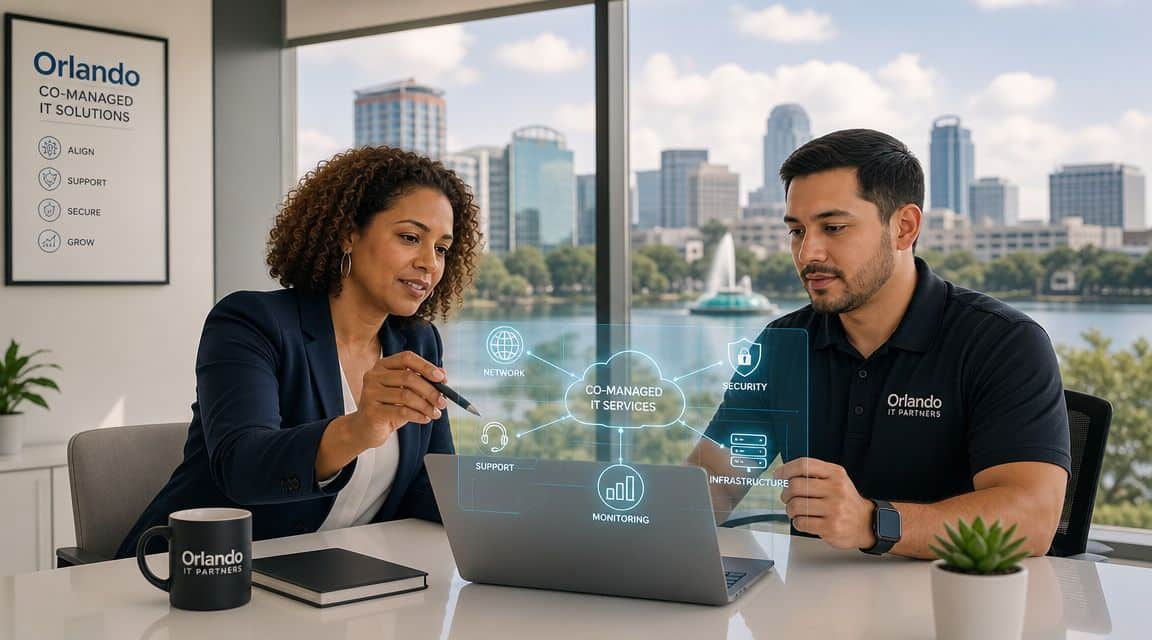
Think of co-managed IT as a co-pilot for your internal IT function. Your business still has someone in the pilot seat. They know your users, your line-of-business systems, your workflow quirks, and the political reality of how decisions get made inside your company. The outside partner adds lift where small teams usually get stretched thin.

That matters because co-managed IT is a hybrid operating model, not a full replacement for internal staff. In Orlando-focused guidance, the model is described as working “alongside your internal team, not replace it,” while the in-house team keeps control of core systems and strategy and the external provider takes on defined work such as overflow support, monitoring, license tracking, and related responsibilities. The same guidance also frames 24/7 monitoring, shared cybersecurity responsibility, and rapid response as standard parts of co-managed arrangements for businesses that need after-hours protection and continuity coverage, as explained in Orlando co-managed IT guidance.

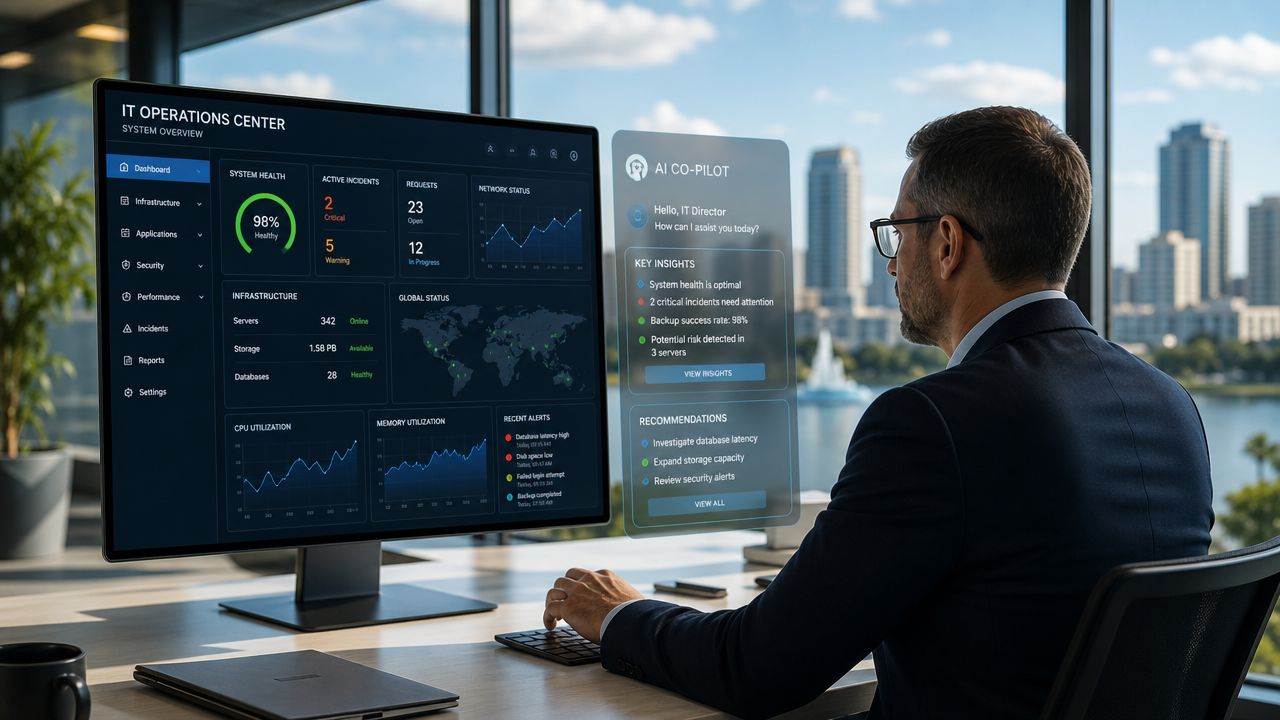
An IT professional reviewing system performance metrics and AI-driven insights on a large monitor in an office.

How it differs from other IT models

A fully outsourced arrangement usually shifts nearly everything to the provider. That can work for companies with no internal IT presence, but it's often a poor fit when you already have capable staff and want to keep institutional knowledge in-house.

A purely internal model gives you maximum direct control, but it also creates obvious risk if your environment depends on a very small team. Vacation coverage, after-hours incidents, specialized cybersecurity tasks, and project overload can all bottleneck quickly.

Co-managed IT sits in the middle:

  • Internal team keeps ownership: They remain the primary stewards of business priorities, user relationships, and core technology decisions.
  • Provider adds capacity: Overflow tickets, maintenance routines, monitoring, and specialist escalation don't have to stack up on one person's desk.
  • Security becomes shared: Instead of asking one internal generalist to do everything, you spread responsibility across roles and processes.

Practical rule: If your internal IT person spends most of the week reacting, you don't have a staffing problem alone. You have an operating model problem.

What this looks like in day-to-day practice

In a healthy co-managed setup, your internal lead might own business applications, local process decisions, and executive communication. The outside partner may cover patching, endpoint oversight, documentation support, backup checks, help desk overflow, and security monitoring. That split is often what allows the internal team to stop living in triage mode.

For Orlando businesses evaluating options, co-managed IT solutions are usually most useful when the goal is predictable support coverage without adding full internal headcount. It works especially well when leadership wants more resilience but doesn't want to hand over strategy or lose internal control.

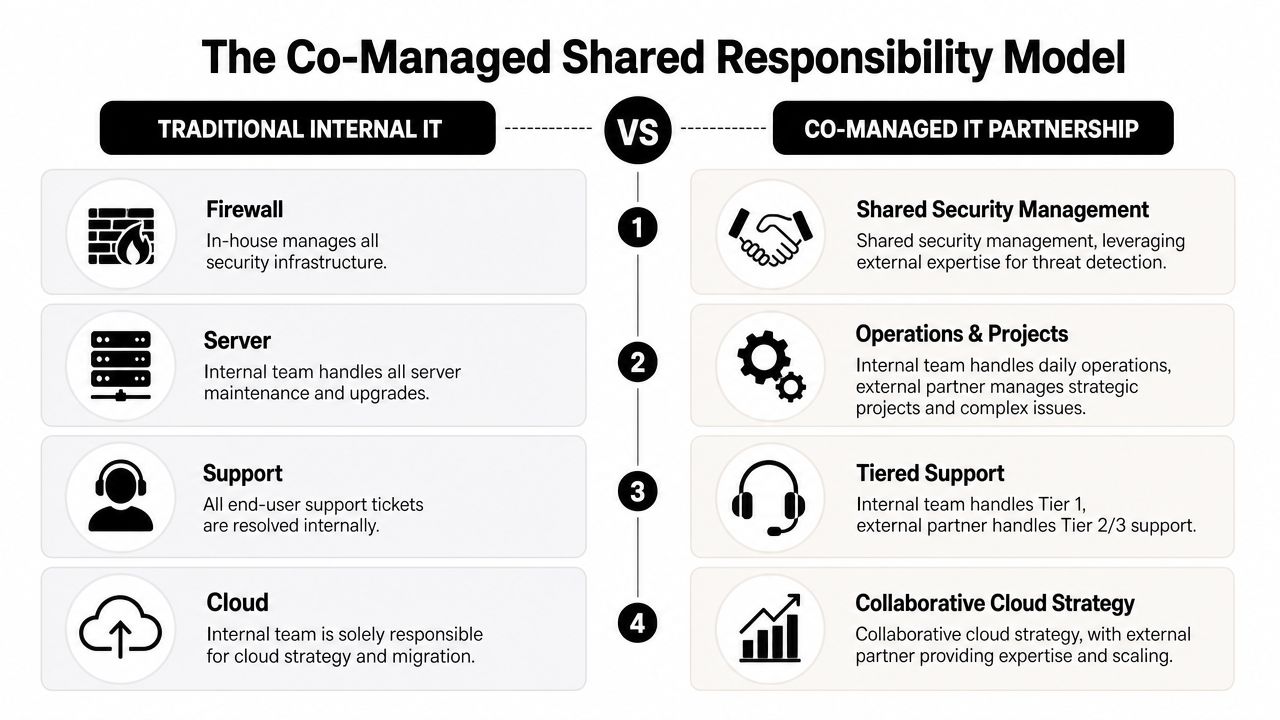
The Co-Managed Shared Responsibility Model

The most important design choice in co-management is shared operational ownership. Your internal team still controls core systems. The outside partner supplies specialized coverage such as cybersecurity monitoring, endpoint protection, vulnerability management, incident response, and project overflow. Orlando and broader Florida service descriptions consistently frame co-managed IT this way, with provider-side support commonly focused on help desk augmentation, security management, and proactive maintenance, as noted in managed IT coverage for Orlando.

A comparison chart showing traditional internal IT versus a co-managed IT partnership responsibility model.

That structure works because it removes a common failure point. When everything depends on a small internal team alone, one sick day, one resignation, or one urgent project can slow both support and security at the same time.

A practical division of responsibility

The cleanest co-managed relationships are explicit. They don't rely on assumptions.

IT Function Internal Team Usually Owns Co-Managed Partner Usually Owns
Business IT strategy Priorities, budgeting input, executive alignment Technical recommendations, roadmap support
End-user support VIP users, business-context issues, local workflow support Overflow tickets, after-hours coverage, Tier 2 and Tier 3 escalation
Core systems Final approval over critical systems and standards Maintenance execution, monitoring, remediation assistance
Cybersecurity operations Internal policy decisions, risk acceptance, business communication Monitoring, endpoint protection, vulnerability management, incident response support
Projects Internal sponsorship, change approval, business coordination Specialized engineering, deployment support, project overflow
Vendor coordination Business relationship ownership Technical coordination, troubleshooting, licensing and service administration

Where companies get this wrong

Some businesses say they want co-management, but what they want is emergency labor. That usually fails. If the provider is only called when something is already broken, the internal team still carries the full burden of prevention, process, and accountability.

The better approach is to assign recurring responsibility in advance.

  • Security tasks need named owners: If nobody clearly owns alert review, patch cadence, vulnerability follow-up, and backup verification, those jobs drift.
  • Escalation paths need to be written down: Your staff should know when an issue stays in-house and when it moves to the partner.
  • Strategy and operations should be separated: Internal leadership can keep strategic control while the outside team handles repeatable technical execution.

Shared ownership doesn't mean blurred ownership. It means both sides know exactly where they step in.

What strong co-management feels like

A good partnership doesn't create turf battles. Your internal team shouldn't feel replaced, and your provider shouldn't be guessing.

The healthiest version looks like this: your internal staff handles what requires business context, trust, and day-to-day familiarity. The external team handles what requires scale, after-hours coverage, specialist depth, or tool-heavy operational work. That's usually where Orlando businesses see the biggest relief.

Is Co-Management Right for Your Orlando Business

At 8:15 on a Monday, your internal IT lead is resetting passwords for new hires, chasing a backup alert from the weekend, and fielding a call from leadership about cyber insurance requirements. By noon, critical project work is already off track.

That is usually the clearest sign that co-management deserves a serious look.

Co-managed IT fits Orlando businesses that already have capable internal staff but need more coverage, stronger security follow-through, or operational support across multiple offices, teams, or schedules. The decision should come from workload, risk, and accountability gaps, not just ticket count. If your team knows the business well but keeps getting pulled away from higher-value work, a shared model often makes more sense than replacing them or expecting them to do everything.

A practical way to judge fit is to look at where the strain shows up first.

Professional services firms

Law offices, accounting firms, architecture teams, and engineering practices usually run on a mix of confidential data, deadline pressure, and small internal IT teams. In these environments, one experienced IT manager often becomes the default owner for everything. User issues, vendor coordination, onboarding, laptop failures, application access, and security questions all land on the same desk.

That setup creates a predictable problem. The person who should be improving standards, reviewing risks, and planning ahead spends the day clearing interruptions.

Co-management works well here when the internal lead keeps control of business priorities, key applications, and stakeholder communication, while the outside team handles recurring support and security operations. That division is especially useful for firms trying to tighten small business cybersecurity best practices without adding another full-time hire.

Common signs of fit include:

  • Sensitive client or case data: Security work needs consistent follow-up, not merely as an afterthought.
  • One-person dependency: Vacation coverage, after-hours issues, and security review should not depend on a single employee.
  • Compliance pressure: Internal teams often need outside help documenting controls, reviewing backups, and keeping routine tasks on schedule.

Multi-location businesses

Orlando companies with offices in places like Downtown Orlando, Winter Park, Lake Mary, or elsewhere in Central Florida often run into a scale problem before they run into a staffing problem. Each site starts making local exceptions. Workstation builds vary. Access requests get handled differently by office. Support quality depends on who answers first.

Internal IT can usually see the drift. The issue is having enough time and process discipline to correct it across every location.

A co-managed model gives the internal team a way to keep policy control while using outside support to enforce standards, document procedures, and keep monitoring consistent. That matters for cybersecurity because inconsistent account management, patch timing, and endpoint handling create gaps attackers tend to exploit first.

Multi-location growth usually adds operational risk before it adds headcount.

This is a strong fit when leadership wants consistency across sites but does not want to build a larger internal support bench just to maintain it.

Field-service and industrial organizations

Field-service companies, contractors, distributors, and industrial firms usually judge IT by uptime, remote access, and speed of recovery. Office productivity still matters, but daily operations often depend on devices in trucks, temporary worksites, warehouses, and shared field environments.

Internal IT teams in these businesses get stretched in a different way. They are pulled toward urgent support issues while longer-cycle work, such as device lifecycle planning, secure remote access, backup validation, and deployment standards, keeps slipping.

Co-management helps when the outside team owns repeatable operational work and after-hours coverage, while internal staff stay focused on the systems and workflows that require business context. That can reduce risk without taking authority away from the people who know the environment best.

A practical fit often includes:

  • Remote and mobile users: Access requests, device setup, and support do not need to bottleneck with one internal technician.
  • Higher uptime expectations: Shared coverage improves response continuity when issues happen outside normal business hours.
  • Projects that keep getting delayed: Site rollouts, hardware refreshes, and infrastructure cleanup move faster when internal staff are not carrying every task themselves.

Co-management is usually the right move when your internal IT team is trusted, overextended, and too valuable to spend all week reacting.

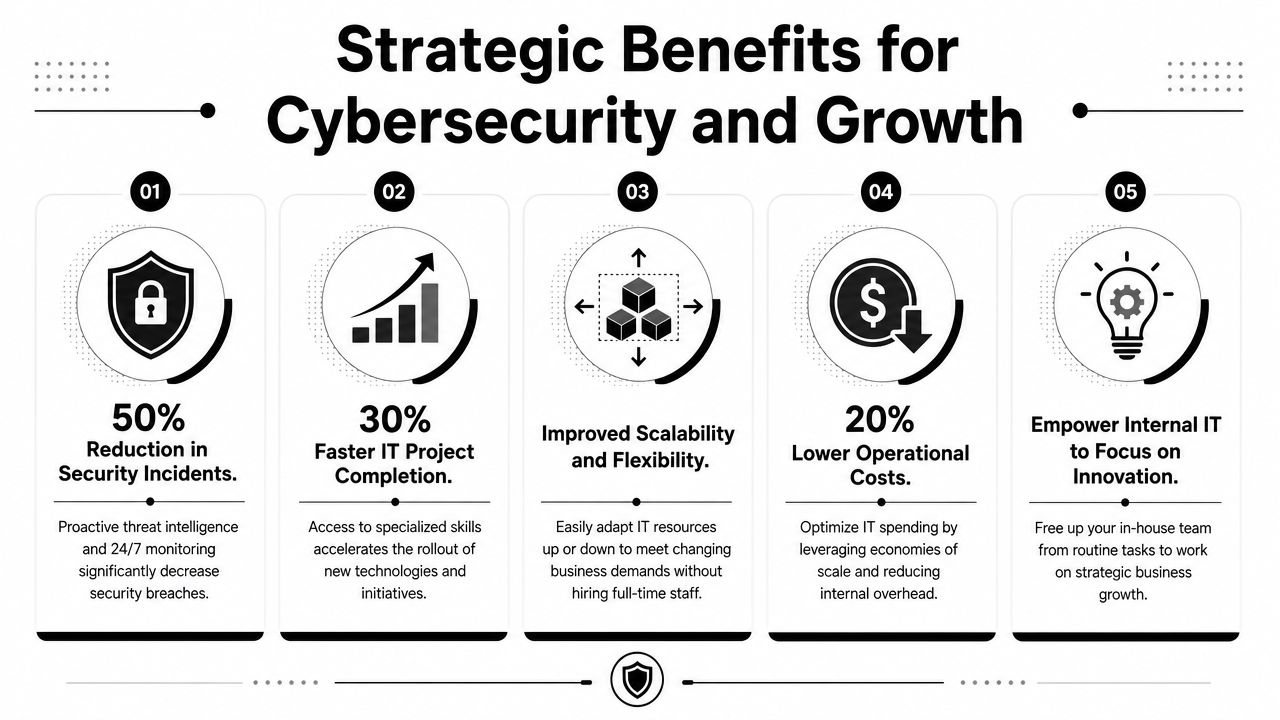
Strategic Benefits for Cybersecurity and Growth

The biggest mistake business owners make is evaluating co-managed IT as if it's just a support contract. It's not. At its best, it's a way to tighten control over cybersecurity while giving your internal team room to work on the business instead of constantly reacting to it.

For Orlando organizations with internal IT staff, the stronger benchmark is always-on security and fixed-budget support, not break/fix service. Orlando market descriptions highlight 24/7 monitoring, preventative maintenance, and layered defenses across email, web applications, remote access, mobile internet, and network perimeters, with those controls intended to detect, prevent, and recover from ransomware, advanced malware, zero-day exploitation, and other automated threats. The same guidance points buyers toward measurable control coverage such as monitoring breadth, response time, backup and recovery readiness, and patch or vulnerability cadence, as outlined in managed IT services for Orlando businesses.

A strategic infographic highlighting five key benefits of cybersecurity and growth for business operations.

Security maturity improves

Most internal teams in small and midsized companies are broad generalists. They know a little about everything because they have to. That's useful for daily support, but cybersecurity is a discipline that punishes inconsistency.

A co-managed relationship can improve your operating posture because it gives security work a defined process instead of letting it compete with every other task on the help desk list.

  • Monitoring becomes continuous: Someone is responsible for watching, escalating, and following through.
  • Patch and vulnerability work gets rhythm: It stops being “when we get time” and starts becoming part of the service model.
  • Incident handling gets clearer: Roles are established before a security event happens, not during it.

Internal IT gets time back

The less visible benefit is focus. Your internal IT leader usually knows what the business should fix next. They often just can't get to it because support noise and security admin consume the week.

That's why many Orlando businesses pair co-management with internal process work. The provider handles recurring operational duties. The internal team regains time to improve line-of-business applications, department workflows, onboarding processes, device standards, and policy enforcement.

For companies looking to strengthen this side of the equation, cybersecurity best practices for small businesses can help frame what to measure beyond simple ticket closure.

A mature IT environment isn't the one with the fewest alerts. It's the one where alerts, changes, backups, and patching all have clear ownership and follow-through.

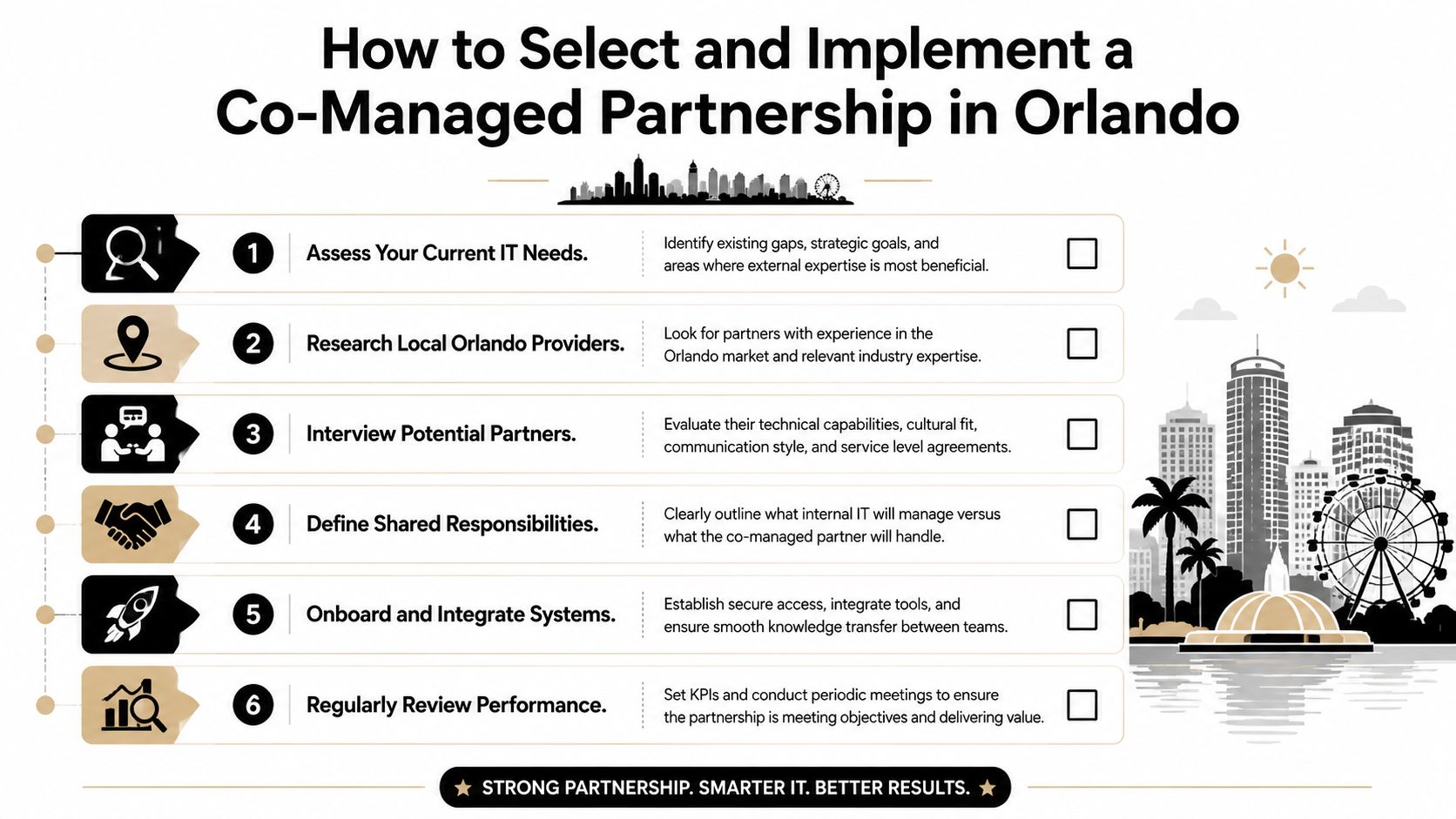
How to Select and Implement a Co-Managed Partnership in Orlando

Buying co-management the wrong way creates friction fast. Businesses often start by comparing providers before they've defined what they want to keep in-house. That usually leads to vague proposals, duplicated effort, and a rocky first few months.

The better path is operationally simple. Decide the division of labor first. Then choose the partner that can work inside it.

A six-step infographic detailing how to select and implement a co-managed IT partnership in Orlando, Florida.

A useful lens here is implementation economics. Much of the market explains the model but skips the practical question of how to phase co-management without disrupting an existing internal team. That gap is especially important for companies with one or two internal IT staff who need predictable coverage, and the most useful buyer question is often what co-managed IT replaces, what stays in-house, and what the first 90 days should include, as discussed in co-managed IT implementation planning.

Choose the operating model before the provider

Start with a short internal inventory. Not a technical audit. An ownership audit.

Write down which responsibilities must stay internal because they depend on business judgment, executive trust, or deep application familiarity. Then list the work your team struggles to cover consistently.

That list usually includes a mix of:

  • After-hours support: Alerts and urgent issues that don't wait for business hours.
  • Security operations: Monitoring, vulnerability follow-up, endpoint oversight, and response coordination.
  • Project overflow: Migrations, rollouts, refreshes, and cleanup work that keep getting delayed.
  • Administrative load: Vendor coordination, documentation upkeep, user lifecycle tasks, and license management.

If a provider tries to skip this conversation, that's a red flag. Co-management only works when the boundaries are deliberate.

What to ask during evaluation

The right questions are operational, not flashy. You're trying to learn how the provider works with internal IT, not how polished the sales process sounds.

Ask questions like these:

  1. How do you divide work with an existing internal IT manager?
  2. Which security functions do you own directly, and which remain client-owned?
  3. How do you handle escalation after hours?
  4. What does onboarding look like when tools and documentation already exist?
  5. How do you report on coverage, outstanding risks, and unresolved dependencies?

A few practical warning signs show up quickly.

  • Vague role definitions: If everything sounds flexible, nothing is assigned.
  • No transition discipline: If the provider can't explain access control, documentation review, and communication cadence, onboarding will be messy.
  • Ticket-only mindset: If the conversation stays centered on reactive support, the security and governance side is probably underdeveloped.

For buyers comparing options, how to choose a managed service provider is a useful framework for structuring interviews and avoiding soft promises.

What the first 90 days should look like

The first phase shouldn't feel dramatic. If it does, the partnership probably started without enough planning.

A solid implementation usually follows this pattern:

Phase What should happen
Initial handoff Access is reviewed, communication channels are set, emergency contacts are confirmed
Environment review Existing tools, documentation, coverage gaps, and support workflows are assessed
Responsibility alignment Both sides confirm who owns support tiers, patching, vendor communication, projects, and security tasks
Tool rationalization Overlapping platforms and redundant processes are reduced where appropriate
Operational rollout Overflow support, monitoring, escalation, and recurring tasks move into the new model
Review cycle Leadership and IT meet to evaluate service fit, unresolved risks, and process changes

The first 90 days should reduce ambiguity first. Efficiency comes after that.

Florida market guidance also notes that managed and co-managed services commonly bundle 24/7 help desk, cybersecurity, cloud services, and flat-fee support into one service line, with flat-fee per-user pricing described as a common approach. That's why cost discussions should focus less on hourly rates and more on what operational coverage is included.

In practice, one option businesses may consider is Cyber Command, LLC, which provides co-managed IT, 24/7 helpdesk, cloud services, and cybersecurity support for organizations that want shared coverage rather than full replacement. The key question isn't who sounds biggest. It's who can work cleanly with your internal team.

Frequently Asked Questions About Co-Managed IT Services

Will we lose control of our IT strategy

A well-run co-managed arrangement keeps decision-making with your business and your internal IT lead. Your team should still set priorities, approve changes, and decide what matters most to operations. The outside partner handles the work you assign, whether that is after-hours support, security monitoring, project delivery, or specialized technical tasks.

If a provider cannot define that boundary clearly, expect confusion later.

Is co-managed IT more expensive than hiring another technician

It depends on the gap you need to close.

One technician can help with day-to-day tickets. That usually does not solve after-hours coverage, security operations, cloud administration, vacation coverage, or project backlog. Co-management often costs more than a single salary on paper, but it can cost less than building a full internal bench with multiple specialties.

For Orlando businesses, that trade-off matters. A healthcare office, manufacturer, or multi-location professional services firm may need broader coverage than one hire can reasonably provide.

How do we avoid conflict with our existing IT person

Start with written ownership. Define who handles Tier 1 support, vendor escalations, patching, identity management, endpoint security, backups, and emergency response. Then make sure both sides use the same ticketing and escalation rules.

This is usually where partnerships succeed or fail.

Internal IT should not feel replaced. They should get relief from repetitive support work, better access to security expertise, and time to focus on business systems, user needs, and planning. That shared responsibility model works best when the provider respects your internal team's context and authority.

What does co-managed IT actually replace

It usually replaces coverage gaps and reactive firefighting. It can also reduce dependence on one person who carries too much undocumented knowledge, too many admin rights, or too many after-hours calls.

In cybersecurity, that matters. Shared coverage can improve patch discipline, alert response, log review, access control, phishing response, and recovery planning. Your internal team still owns the business decisions. The partner adds capacity and specialized execution.

Is this only for larger companies

No. Co-management often fits small and midsized businesses that already have an internal IT generalist or a lean IT manager. Those teams usually do not need a full replacement. They need depth in a few areas and consistent backup when workload spikes.

That is common in Central Florida. A growing construction firm may need support across job sites and the office. A medical practice may need tighter security oversight and less downtime. A hospitality group may need broader hours of support than an internal team can cover alone.

What should we expect from pricing conversations

Expect pricing to center on users, devices, locations, service hours, and included responsibilities. Ask what is covered in the monthly fee, what counts as project work, what happens after hours, and which security services are included versus optional.

Ask one more question. Who is accountable when something is missed?

A usable proposal should spell out response expectations, escalation paths, security duties, and tool ownership. Clear pricing without clear responsibility still creates risk.

If your team is stretched thin and you want a practical co-managed model that strengthens cybersecurity without replacing internal IT, Cyber Command, LLC is one option to evaluate. The firm works with organizations in Central Florida that need shared support, 24/7 coverage, and a clearer division of operational responsibility so internal staff can focus on the business.