Orlando Cybersecurity Services: A 2026 Guide for SMBs

60% of small businesses in the U.S. say cybersecurity threats are their top concern, ahead of supply chain disruption and pandemic risk, according to the MetLife & U.S. Chamber of Commerce Small Business Index. That number matters because it shifts cybersecurity out of the “IT issue” bucket and into business continuity, client trust, and operational survival.

In Central Florida, that shift is overdue. Orlando firms are growing across legal, medical, financial, engineering, and service industries. Many operate across multiple offices, depend on cloud systems, and move sensitive data every day. A generic security package built for a national average business usually misses the actual pressures local companies face, especially in places like Lake Mary, Winter Springs, Winter Park, Kissimmee, and Downtown Orlando.

Good Orlando cybersecurity services aren't about buying the biggest stack. They're about protecting uptime, keeping regulated data under control, and making sure one bad click doesn't turn into a week of downtime, a failed audit, or a client confidence problem.

Table of Contents

Why Orlando Businesses Cannot Ignore Cybersecurity in 2026

The FBI's Internet Crime Complaint Center continues to log heavy losses from business email compromise, ransomware, and related cybercrime across the U.S. That matters in Orlando because the local impact usually shows up first as downtime, delayed billing, missed deadlines, and compliance exposure, not as a technical headline.

For Central Florida companies, cybersecurity has become an operating requirement. A Winter Park law firm needs reliable access to case files and email. A medical practice in Kissimmee needs scheduling, records, and communications available throughout the day. A Lake Mary financial or accounting office needs to protect client data while meeting reporting deadlines and regulatory expectations. If those systems fail, revenue and trust both take a hit.

The pressure is higher here because many Orlando businesses have grown faster than their security controls. They added cloud apps, remote access, new offices, outsourced vendors, and mobile devices, but kept the same approval habits, backup routines, and account permissions they used when the company was much smaller.

That gap creates risk.

Local growth creates local exposure

In Central Florida, I see the same pattern across legal, medical, and financial services firms. Leadership invests in tools that help the business move faster, then treats security as a separate project to handle later. The result is usually predictable. Shared admin accounts, weak MFA coverage, flat networks, inconsistent backups, and no clear owner for incident response.

Those weaknesses are expensive in regulated industries. A legal office has confidentiality obligations. A healthcare group has patient privacy and availability concerns. A financial firm has to protect sensitive records, control access, and show that security procedures are more than a policy sitting in a folder.

Brand risk belongs in the same conversation. Fake domains, spoofed email, and lookalike web addresses are common starting points for fraud and credential theft. If your company has not taken steps to protect your brand from typosquatting, you are leaving a preventable opening for attackers.

Practical rule: If payroll, client communication, scheduling, billing, or records access depends on connected systems, cybersecurity already affects uptime.

What works and what fails

Effective security is usually plain and disciplined. Protected identities. Limited admin rights. Tested backups. Documented recovery steps. Endpoint monitoring. Staff training tied to the actual scams your employees see. Regular reviews of vendors and remote access.

What fails is easy to spot. Companies buy advanced monitoring while basic account security is still weak. They assume cyber insurance replaces preparation. They depend on one internal IT person without confirming who watches alerts after hours, who approves privileged access, or how fast systems can be restored after an incident.

For Orlando businesses in 2026, the question is not whether cybersecurity deserves budget. The question is whether the business can afford the downtime, compliance problems, and client fallout that follow weak controls.

Top Cyber Threats Facing Central Florida Businesses

Florida small businesses face five primary threats: ransomware, phishing and social engineering, data breaches, insider threats, and compliance failures, and the same guidance stresses the need for offline backups, endpoint detection and response, and regular compliance assessments for frameworks such as HIPAA, PCI-DSS, and NIST, as outlined in this Florida small business cybersecurity guidance.

That list lines up with what Central Florida companies deal with. The threat names may sound generic, but the business impact isn't.
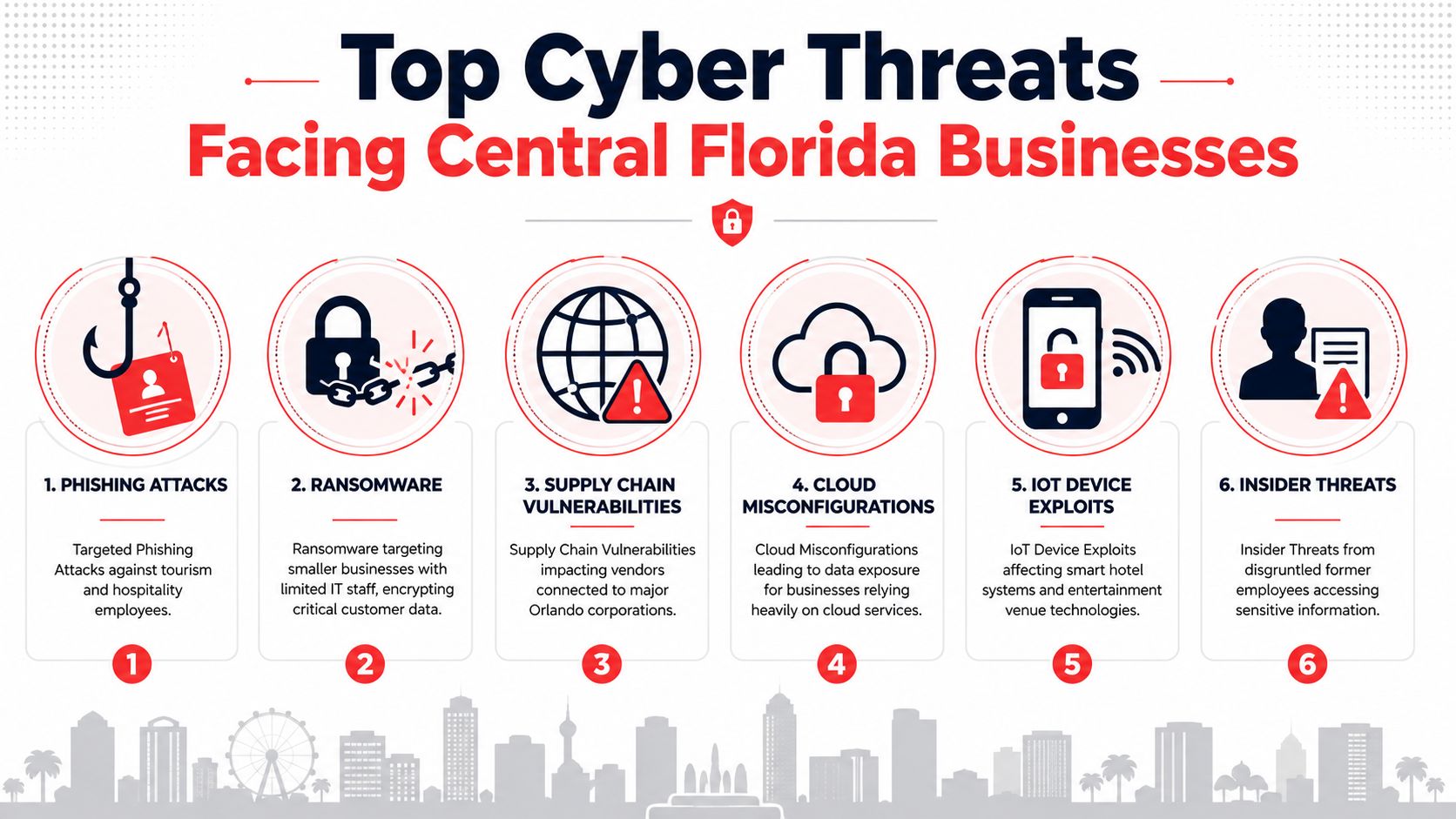
An infographic detailing the top six cyber threats facing businesses in the Central Florida area.

Where the pressure shows up locally

A Winter Park law firm handles confidential client files, contract drafts, and litigation records. A breach there isn't just an IT cleanup. It can become a client trust issue and a records access problem at the worst possible time.

A Kissimmee medical practice has a different exposure. Clinical workflows, scheduling, billing, and patient communication all rely on systems being available. If ransomware hits that environment, the operational disruption lands immediately.

A Lake Mary accounting or financial services office faces another pattern. Staff move sensitive documents, client tax data, and payment-related information through email, portals, and shared storage. Attackers know those users are accustomed to links, attachments, and approval requests. That makes phishing more effective when the controls are weak or inconsistent.

The threats that deserve immediate attention

Here's how these risks usually show up on the ground:

  • Ransomware: This is the fastest route from “minor security issue” to full business interruption. If backups are poorly designed or never tested, recovery becomes slow, expensive, and chaotic.
  • Phishing and social engineering: Most Orlando businesses don't get breached through movie-style hacking. They get tricked. Fake invoices, login prompts, voicemail notices, and document-share alerts still work because they target normal behavior.
  • Data breaches: These often follow weak identity controls, exposed cloud data, or poor access hygiene. Professional firms and healthcare groups are especially exposed because they hold regulated or confidential information.
  • Insider threats: Not every insider incident is malicious, but former employees with lingering access, shared passwords, and unmonitored file exports create avoidable risk.
  • Compliance failures: This category gets ignored until a renewal, client questionnaire, or audit reveals that required controls were never formalized.

There's also a related brand risk many firms overlook. Attackers don't always need to breach your network if they can register lookalike domains and impersonate your business. If your company relies on email trust, invoices, or appointment confirmations, it's smart to protect your brand from typosquatting as part of the wider security conversation.

A useful test is simple. Ask which single event would disrupt your firm fastest: loss of email, loss of files, loss of internet, or loss of access to your core application. Your most likely threats usually map to that answer.

For Central Florida industries, this is why industry-specific guidance matters. Legal, medical, and financial businesses don't have identical risk. They need Orlando cybersecurity services that understand both the threat pattern and the compliance pressure attached to it.

What Orlando Cybersecurity Services Actually Include

A cybersecurity proposal should answer three questions fast: what gets protected, who is watching it, and what happens when something goes wrong. If those answers are buried under acronyms, the service is probably being sold better than it is being run.

For Orlando businesses, the right scope usually starts with a multi-layered architecture. That means perimeter controls such as managed firewalls and intrusion prevention, internal segmentation that limits lateral movement, endpoint controls on laptops and servers, centralized log review, and a documented response process. Legal, medical, and financial firms often need one more layer. They need those controls mapped to client requirements, insurance questionnaires, and regulatory obligations that affect renewals and contracts.
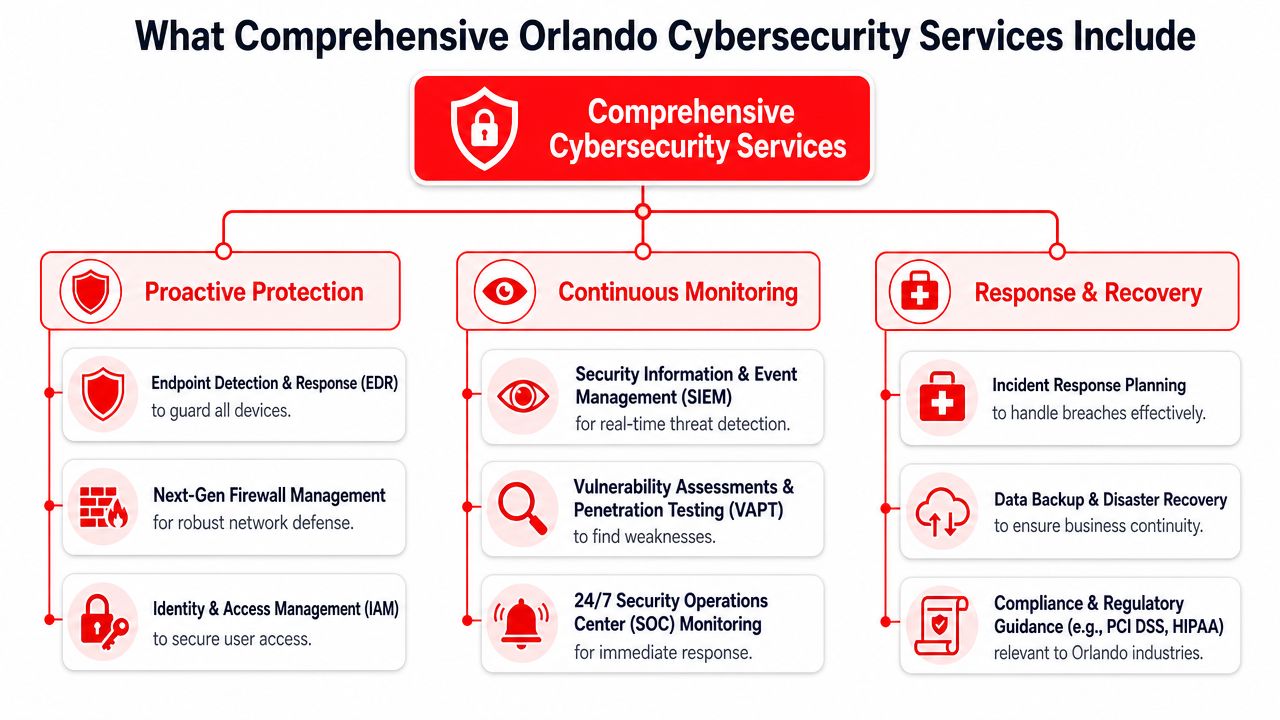
A diagram outlining comprehensive cybersecurity services, including proactive protection, continuous monitoring, and response and recovery strategies.

The core layers that matter

The first layer is protection. This covers endpoint security, patch management, email and web filtering, firewall administration, access controls, and multi-factor authentication. The business outcome is simple. Fewer preventable incidents and less downtime from basic failures that should have been stopped earlier.

The second layer is monitoring and investigation. Logs from endpoints, servers, cloud systems, and network devices are collected and reviewed so suspicious behavior can be validated instead of ignored. Alert fatigue is a real problem, so a provider needs a triage process that filters noise and escalates events that can affect operations, data, or compliance.

The third layer is response and recovery. This includes account containment, host isolation, evidence preservation, communication steps, backup validation, and recovery sequencing based on business priority. If your firm cannot explain who makes the call on a Friday night ransomware event, you do not have an operational service yet.

What business owners should expect in practice

A solid provider should explain services in plain language and tie each one to an outcome your leadership team cares about.

  • Managed monitoring: Security staff review activity, investigate alerts, and escalate confirmed issues. Tools without review create a false sense of coverage.
  • Incident response: The provider should define containment steps, decision paths, communication roles, and recovery actions before an event occurs.
  • Endpoint protection: User devices, servers, and mobile systems need active controls because Orlando teams work from offices, homes, client sites, and healthcare facilities.
  • Identity and access management: Account security includes MFA, privilege control, access reviews, and disciplined onboarding and offboarding. This matters a lot for law firms, clinics, and finance teams handling confidential records.
  • Backup and recovery readiness: Backups must be protected from tampering, tested for recovery, and aligned to the systems your business cannot operate without.

For many Central Florida companies, compliance support is part of the service, not an add-on. A medical practice may need security controls aligned with HIPAA workflows. A law firm may need documented access governance for client data. A financial services firm may need stronger evidence collection for audits, cyber insurance, and vendor due diligence. Good providers build that documentation into day-to-day operations instead of scrambling when an auditor or client sends a questionnaire.

One trade-off deserves attention. Some businesses buy advanced monitoring before they have disciplined patching, MFA enforcement, and backup testing in place. That order usually creates cost without enough risk reduction. Firms with an internal IT lead often get better results from a co-managed IT services model in Orlando where internal staff keep control of daily operations and the security partner owns specialized coverage, escalation, and compliance support.

Good security service reduces operational risk and decision delay. If a provider cannot explain what happens at 2 a.m. during an incident, the service is not ready for a real event.

For businesses that want a local provider with integrated managed IT and security operations, one example is Cyber Command, LLC, which offers managed security capabilities as part of broader IT and cybersecurity support. The important question is whether the service covers protection, monitoring, response, recovery, and compliance in a way your team can practically use.

Co-Managed vs Fully-Managed Support Models

Choosing between co-managed and fully-managed support is less about company pride and more about operating reality. The right model depends on whether you already have internal IT capability, how regulated your environment is, and how much accountability you want a provider to own day to day.

One point is often missed in local sales conversations. Orlando SMBs usually need to prioritize foundational controls such as MFA, patching, and backups before paying for expensive SOC monitoring, and some guidance notes that 60–75% of cyber incidents are prevented by basic hygiene alone in the SMB context, as explained in this small business IT support analysis.
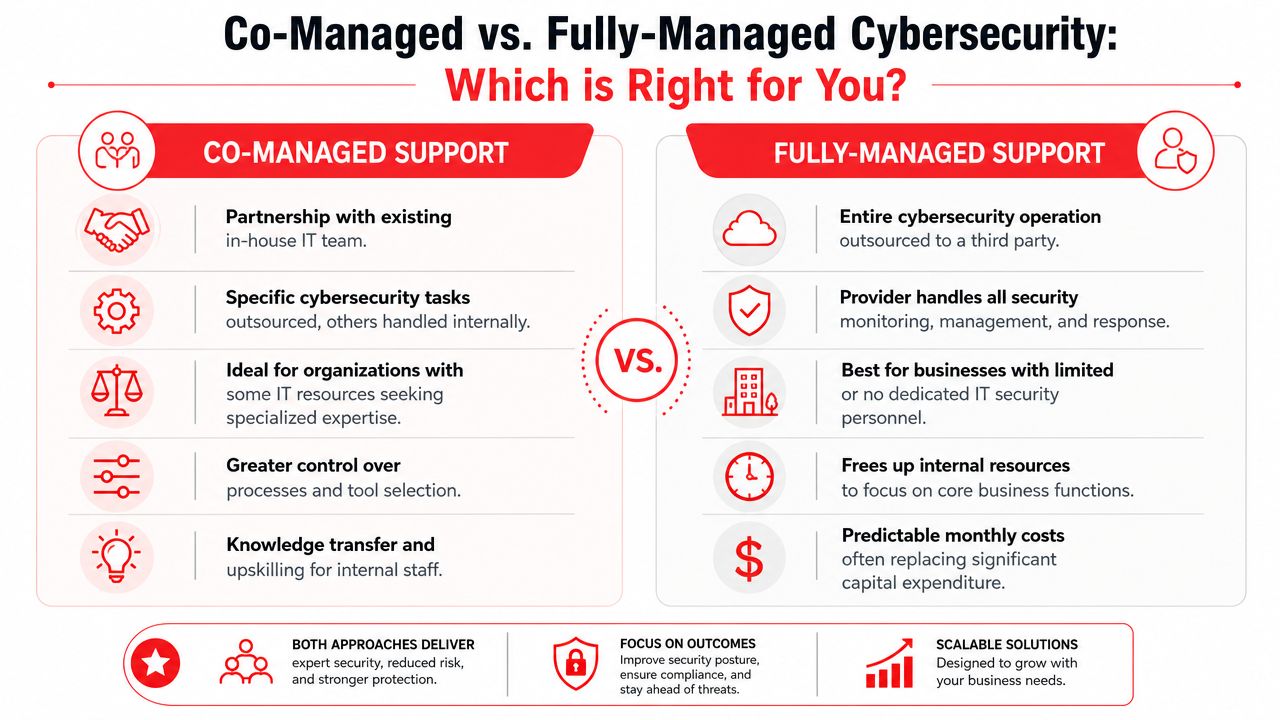
A comparison chart outlining the differences between co-managed and fully-managed cybersecurity support services for businesses.

When co-managed support fits

Co-managed support works best when you already have an internal IT person or small team that understands your environment but needs depth, coverage, or help with specialized security functions.

That model usually fits businesses like these:

Business profile Why co-managed works
A growing professional services firm with an internal IT generalist Internal staff handle daily user support while the outside partner adds security operations, strategy, and escalation coverage
A multi-location company standardizing systems The internal team keeps local knowledge, and the outside partner helps unify tools, process, and reporting
A regulated business with IT staff but limited security expertise Internal personnel stay involved while outside specialists address compliance, monitoring, and recovery readiness

A co-managed arrangement can also improve team maturity. The internal staff gains process discipline, documentation support, and access to broader expertise. For businesses exploring that route, this overview of co-managed IT services in Orlando gives a useful example of how the model is structured.

When fully-managed support makes more sense

Fully-managed support is the better fit when there's no real internal security bench, or when leadership wants one accountable partner handling the environment instead of a patchwork of freelancers and vendors.

Fully-managed usually makes sense when:

  • There's no dedicated IT staff: A law firm, medical office, or accounting practice often needs one team to own support, security, vendor coordination, and recovery planning.
  • Leadership wants clarity: One provider, one escalation path, one reporting structure. That's easier to govern than multiple handoffs.
  • The environment is already inconsistent: If devices, user permissions, backup procedures, and documentation are all uneven, full ownership helps clean it up faster.

The wrong model is the one that leaves critical tasks in the gap between “our internal team thought the provider handled it” and “the provider assumed your team owned it.”

The biggest trade-off is control versus responsibility. Co-managed gives you more internal control but requires internal time and discipline. Fully-managed reduces management burden, but only if the provider is transparent about scope, response, and accountability.

How to Choose the Right Orlando Cybersecurity Partner

Most firms don't fail vendor selection because they asked too many questions. They fail because they asked the wrong ones. A polished proposal can hide weak response processes, vague accountability, and a service scope that looks strong on paper but doesn't match the way your business runs.

The provider you choose should understand basic control expectations for small businesses. The FCC says businesses should require password changes every three months, use MFA, enable encrypted and hidden Wi-Fi by disabling SSID broadcast, and restrict administrative privileges to trusted IT staff, according to the FCC cybersecurity guidance for small businesses. If a provider treats those fundamentals casually, that's a warning sign.
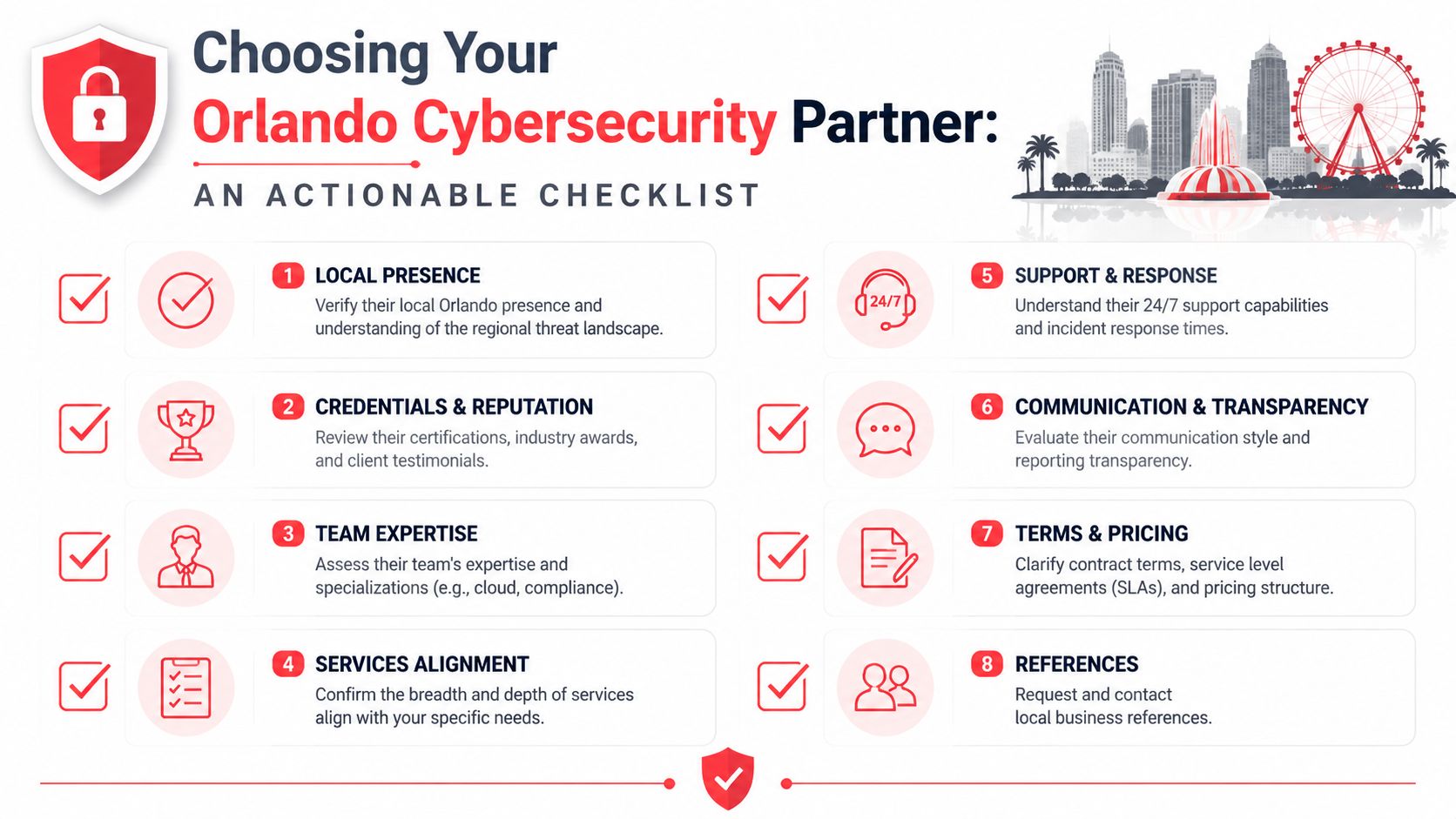
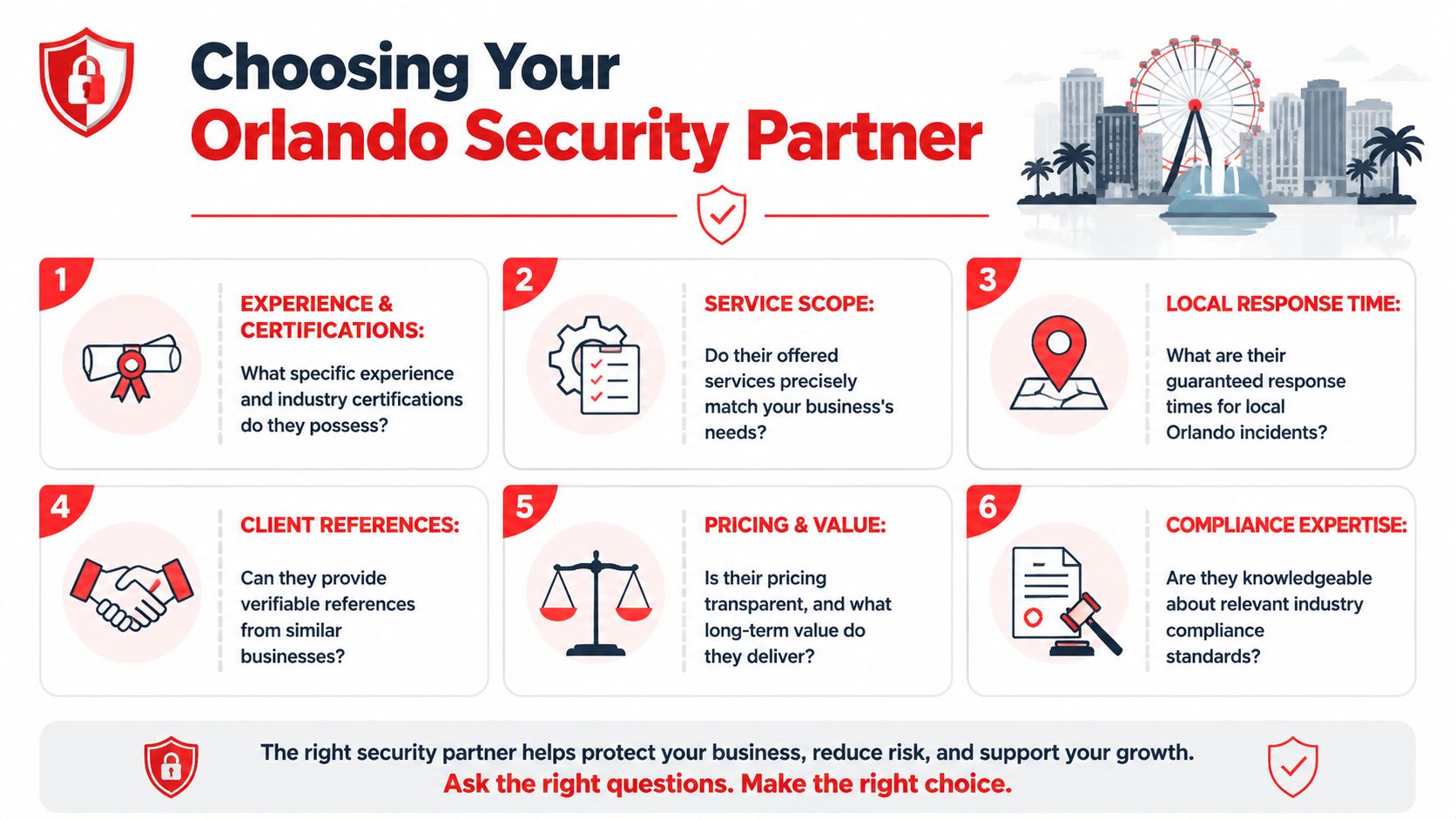
An infographic checklist for choosing a professional cybersecurity partner in the Orlando, Florida area.

Questions that reveal real capability

Start with operating questions, not marketing claims.

  • Who answers after hours: Ask whether real people handle urgent incidents and where that support sits operationally.
  • What's included in response: Confirm whether the provider only alerts you, or also investigates, contains, and helps recover.
  • How do they handle network security: A provider should be able to discuss segmentation, firewall governance, and access control clearly. A local example of service scope is this Orlando network security company page.
  • How do they support compliance: Legal, medical, and financial firms need more than antivirus and backups. They need documentation, control alignment, and repeatable processes.
  • What reporting do you receive: You want useful reporting that shows risk, actions taken, unresolved issues, and business impact.

A strong local partner should also understand the business rhythm of Central Florida industries. Medical offices need minimal disruption during patient hours. Law firms need records access certainty. Financial businesses need disciplined identity control and audit readiness. Architecture and engineering firms often highly value drawing access, project continuity, and vendor coordination.

Red flags that show up early

Some warning signs are easy to spot once you know where to look:

  • Everything starts with advanced tooling: If the proposal skips basics and jumps straight to premium monitoring, the foundation may be weak.
  • No clear line on admin rights: Uncontrolled privilege is still one of the fastest ways to turn a small incident into a larger one.
  • Vague onboarding: If the provider can't explain how they assess devices, users, networks, backups, and vendors at the start, expect surprises later.
  • No business language: If every explanation stays technical, they may struggle to support owners, practice managers, and operations leaders.

Ask one direct question: “If we suspect an account compromise at 8:30 a.m., what happens in the first hour?” The quality of the answer tells you more than a long service list.

The right partner doesn't just sell Orlando cybersecurity services. They connect security work to uptime, client trust, insurance expectations, and the practicalities of how your business operates.

Real-World Cybersecurity Outcomes for Local Businesses

The most useful way to judge cybersecurity isn't by how many acronyms a provider uses. It's by what changes in daily operations after the work is in place.

Professional services

A Downtown Orlando law office often starts from a familiar place. Staff use shared files heavily, attorneys work remotely, and no one is completely sure who still has access to what. Security projects in that environment usually produce two immediate outcomes: tighter control over confidential data and fewer disruptions during urgent client work.

An accounting firm in Lake Mary has a different pressure point. Tax season and reporting deadlines leave no room for instability. When the environment is standardized, backups are tested, user access is governed, and suspicious activity gets reviewed quickly, the biggest gain is confidence that the team can keep operating when the workload spikes.

The best security outcome is often quiet. The team stops improvising around recurring problems because the environment becomes predictable.

Healthcare and multi-location operations

A private practice or medical spa group in Central Florida usually cares about consistency across locations. One office may have decent controls while another has weak Wi-Fi security, informal onboarding, or poor device management. Once those locations are brought under one security standard, leadership gets cleaner oversight and fewer compliance gaps.

Backup and recovery planning becomes especially important in these environments. A provider that builds and manages a clear recovery process can reduce operational chaos when something breaks or a system has to be restored. This example of data backup and recovery in Orlando shows the kind of service area businesses should evaluate closely.

Another overlooked outcome is staff behavior. When employees know how to report suspicious emails, handle sensitive data, and escalate issues quickly, the business gets faster containment and less confusion. The improvement isn't flashy, but it protects schedules, reputation, and revenue.

For local businesses, that's the core point of cybersecurity. Better uptime. Fewer surprises. Cleaner compliance posture. More trust from clients and patients. That's what good Orlando cybersecurity services should deliver.

Your Orlando Cybersecurity Questions Answered

Are we too small to need cybersecurity services

No. If you use email, cloud apps, shared files, online banking, payment systems, or Wi-Fi, you have exposure. Smaller teams often need outside help sooner because they have less internal capacity to monitor, document, and recover.

Should we buy advanced monitoring first

Usually no. Start with fundamentals. Lock down identities, patch systems, protect endpoints, review admin rights, and make sure backups are usable. More advanced monitoring makes sense after the basics are under control, or sooner if you're in a high-risk regulated environment.

What should every employee be trained on

Every employee should receive yearly cybersecurity training that covers phishing recognition, unique passwords, safe handling of sensitive data, and immediate reporting of suspicious activity, based on the University of Rhode Island SMB cybersecurity guidance.

What should we do first if we suspect a breach

Isolate the affected system or account, preserve what happened, and contact your security partner immediately. Don't let staff troubleshoot ad hoc. Fast containment matters more than guesswork.


If your business in Orlando, Winter Springs, Lake Mary, or the broader Central Florida market needs a practical cybersecurity partner, Cyber Command, LLC is one option to evaluate. The firm provides managed and co-managed IT, 24/7/365 U.S.-based support, cybersecurity operations, compliance support, and recovery planning for organizations that need tighter security without losing sight of uptime, budget control, and day-to-day business operations.
Choosing an Orlando Network Security Company: A 2026 Guide

You're probably looking at two proposals right now.

One promises “complete protection” with a flat monthly fee. The other lists a lower starting price, then buries key services in optional add-ons, project fees, and vague language about “advanced response” if something serious happens. Both claim they can protect your business. Neither makes it easy to compare the precise offering.

That's where most Orlando business owners get stuck. For a law firm, medical practice, accounting office, architecture firm, or engineering company, network security isn't a side purchase. It's a business continuity decision tied to client trust, compliance pressure, downtime risk, and how much management attention gets dragged into emergencies. If your office is growing, moving locations, adding remote staff, or opening another site, security choices get even more expensive to fix later. That's one reason relocation planning should include infrastructure decisions early, not after the furniture is in place. A practical guide to IT infrastructure for office relocations makes that point well.

A good Orlando network security company should help you buy clarity, not just software. The right provider gives you a procurement process you can defend internally: what's covered, what isn't, how incidents are handled, who responds, and what costs can still surprise you.

Table of Contents

Why Your Choice of Orlando Network Security Company Matters

Monday starts with a locked screen at the front desk. Your staff cannot open client files. Phones are still ringing, appointments are still booked, and payroll, billing, and deadlines have not paused just because your systems did. In that moment, the quality of your security provider stops being an IT decision and becomes a business continuity decision.

That is why procurement matters here.

Many Orlando business owners buy security the way they buy internet service. They collect a few quotes, compare monthly fees, and assume the listed tools tell the story. They do not. For a law firm, medical practice, or accounting office, the bigger cost usually shows up after the contract is signed. It appears in emergency project fees, slow incident response, unclear ownership, staff downtime, and leadership time pulled into avoidable problems.

You are purchasing operational stability. You are also purchasing a provider's judgment under pressure.

A capable Orlando network security company should help you reduce surprises, not just install controls. That starts with clear scoping. A vulnerability assessment that shows where your network is actually exposed is more useful during procurement than a long list of product names, because it ties the service to business risk, recovery effort, and likely cost.

The buying question is simple. What will this provider prevent, what will they respond to, and what will still become your problem?

Decision lens Weak buying approach Strong buying approach
Budget Lowest advertised monthly fee Predictable total cost, including response and remediation
Coverage Broad service labels with little detail Specific protections, exclusions, and ownership spelled out
Response General promise to assist Defined monitoring hours, escalation path, and response steps
Leadership reporting Technical reports no one uses Plain-language updates tied to risk, downtime, and priorities

The wrong provider can look affordable in a proposal and become expensive in practice.

Professional services firms feel that gap quickly. A medical office loses patient flow and trust when systems are unavailable. A law firm risks missed deadlines and confidentiality problems. An accounting firm in filing season cannot afford vague support boundaries or a provider that treats every urgent issue as a separate billable event.

Orlando buyers should treat security selection like a managed procurement process, not a rushed technical purchase. Ask for pricing that holds up during incidents, office changes, and growth. That matters even in routine operational events such as expansions or moves, where weak planning can create new exposure. The same discipline that applies to IT infrastructure for office relocations applies here. Hidden work during change is still cost, even if it was missing from the original quote.

Cyber Command, LLC approaches this work as an operations issue first. The practical question is not whether a provider says they offer cybersecurity. The practical question is whether their service model is clear enough that you can budget for it, rely on it, and explain it to partners, managers, or compliance stakeholders without translating jargon.

If a proposal cannot tell you who is watching, what is covered, when response begins, and which tasks trigger extra fees, keep shopping.

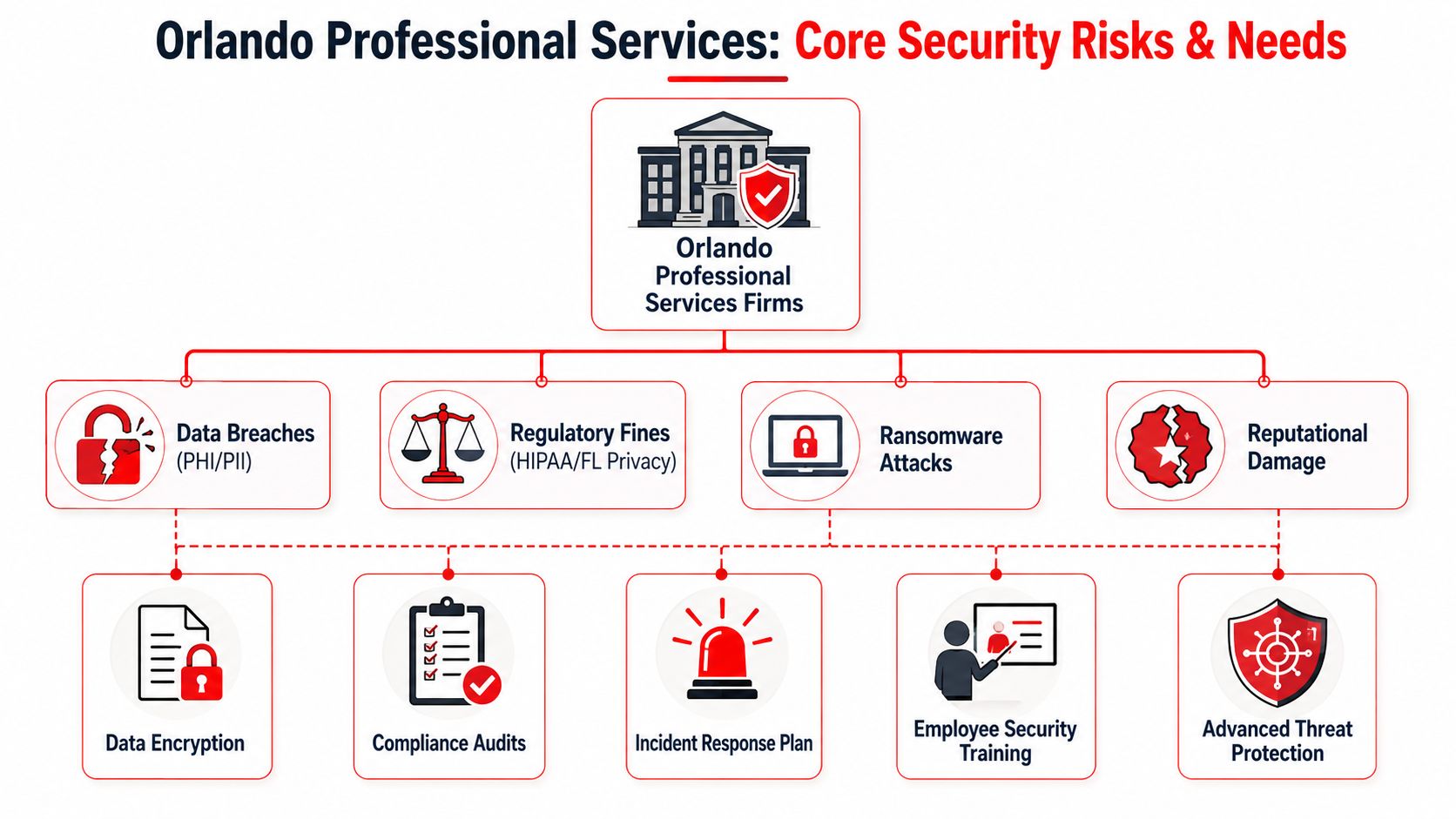
Core Security Needs for Orlando Professional Services Firms

Professional services firms don't all face the same threats, but they do share one problem: they hold information that clients assume is protected. Medical records, financial documents, legal files, design plans, internal communications, signed agreements, and payment data all carry consequences when access is lost or confidentiality breaks down.

A diagram illustrating core security risks and protection needs for professional services firms in Orlando.

Sensitive data changes the stakes

A dentist and a CPA may buy different software, but their security priorities overlap. Both need to protect client records, control access, train staff, and keep systems available when the business day starts. The biggest mistake is treating network security like a hardware purchase instead of a risk management process.

An Orlando-focused guide puts the small-business risk in plain terms: 43% of cyberattacks target small businesses, only 14% are prepared to defend themselves, and 95% of breaches involve human error, which is why training and continuous monitoring matter so much for smaller organizations (Orlando cybersecurity guidance for small businesses).

For legal practices, human error often shows up in email, document sharing, and account access. For medical practices, it can appear in front-desk workflows, mobile devices, and third-party access. For accounting firms, it often centers on credential security, seasonal workload spikes, and sensitive file transfer. If you're evaluating policy and practical controls for law offices, this overview of securing sensitive client information is a useful outside reference.

Start with maturity before tools

Most firms ask for solutions too early. The better starting point is a Technology Maturity Assessment. That means identifying where data lives, how employees access it, which systems are critical, what compliance obligations apply, and where the highest-vulnerability assets sit. From there, layered controls make sense: next-generation firewalls, intrusion prevention, endpoint protection, segmentation, reporting, and response playbooks.

A one-tool mentality fails because risk doesn't enter through one door. Staff click links. Vendors connect remotely. Old devices miss patches. Shared accounts linger. Cloud apps get used outside policy. Buying one product and calling it “network security” leaves gaps between systems, users, and processes.

A practical assessment usually follows this sequence:

  1. Inventory assets so you know what must be protected.
  2. Classify data so high-risk information gets stronger controls.
  3. Baseline current controls to see what already exists and what's missing.
  4. Close critical gaps first instead of trying to modernize everything at once.
  5. Monitor and revise because staff, offices, and workflows change constantly.

Practical rule: If a provider recommends tools before mapping your data, access paths, and compliance duties, they're probably selling inventory, not building a security program.

If you want a plain-English primer on the assessment process itself, Cyber Command's guide to what a vulnerability assessment is is a good starting point.

The Evaluation Checklist Technical and Business Criteria

Choosing a security provider is a procurement decision, not just a technical one. For an Orlando law firm, medical practice, or accounting office, the wrong choice usually shows up later as overtime invoices, confusing scope disputes, slow response during an incident, or compliance work your staff thought was included but was not. A proposal needs to hold up with both the person responsible for operations and the person watching the budget.

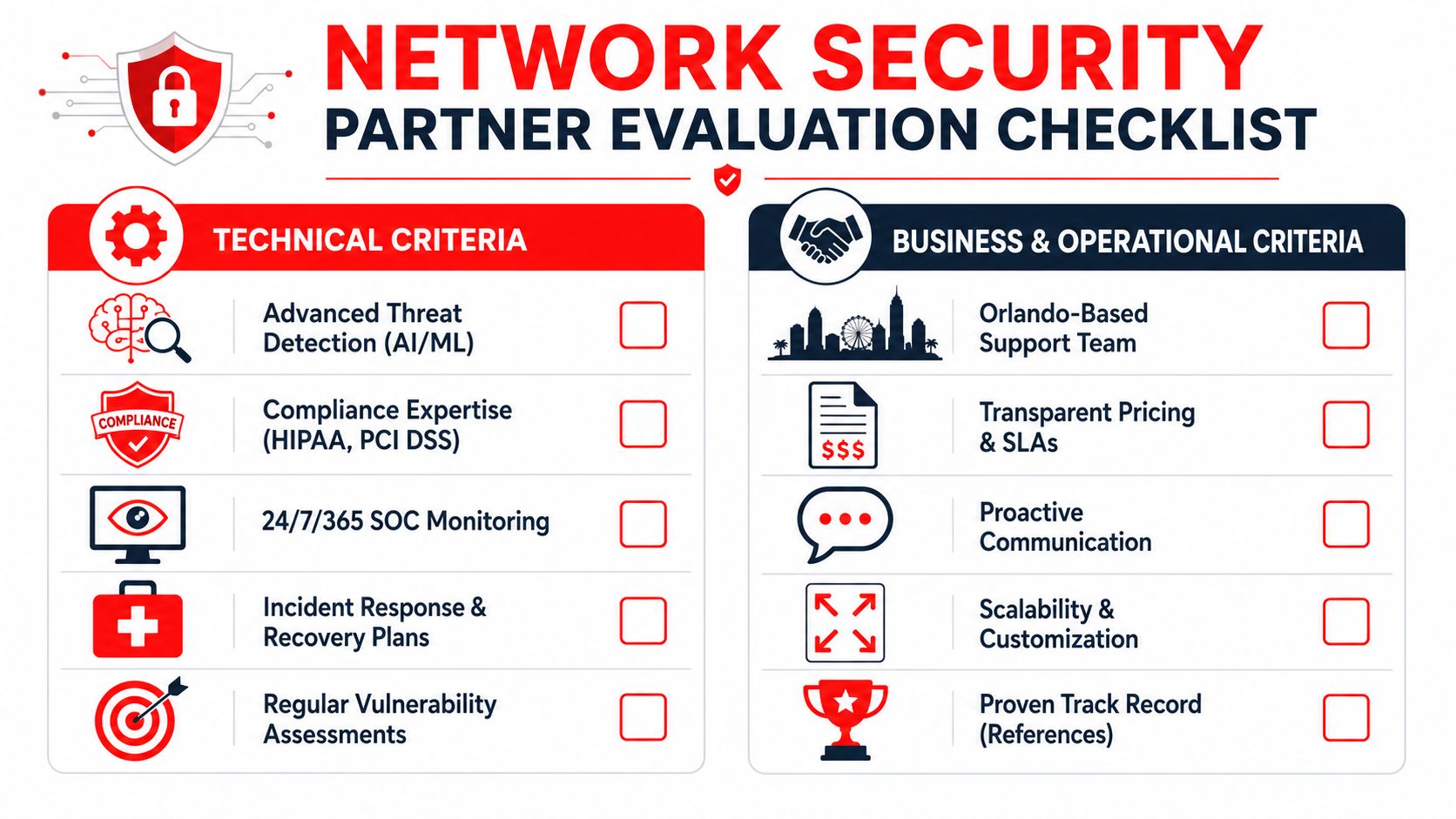
A comprehensive network security partner evaluation checklist featuring technical and business criteria for choosing service providers.

Technical criteria that should be required

Start by checking how the provider runs security day to day. Product lists are easy to pad. Operating discipline is harder to fake.

A provider should be able to explain who watches alerts after hours, how incidents get triaged, what gets escalated, and how your firm is notified. If they cannot explain their monitoring workflow in plain English, expect confusion during a real event. For background, this overview of what a Security Operations Center is helps clarify what should sit behind any serious monitoring service.

Use this technical checklist during evaluation:

  • Continuous monitoring: Alerts should be reviewed and acted on outside business hours, not left waiting until the next morning.
  • Endpoint detection and response: Laptops, desktops, and servers should have active visibility so suspicious behavior can be investigated and contained quickly.
  • Network security controls: Firewalls, segmentation, intrusion prevention, remote access restrictions, and account controls should support each other.
  • Patch and vulnerability management: The provider should show a repeatable process for identifying weaknesses, prioritizing fixes, and tracking exceptions.
  • Incident response process: Detection alone is not enough. You need documented containment steps, recovery responsibilities, communication rules, and decision ownership.
  • Support for regulated workflows: Professional services firms need controls that fit how client files, case data, tax records, and protected health information move through the business.

One practical test helps here. Ask the provider to walk through a realistic event, such as a compromised employee mailbox or malware on a bookkeeper's laptop. Strong firms answer with sequence, ownership, and timing. Weak firms answer with tool names.

Business criteria that determine the real experience

Many Orlando buyers often make an expensive mistake. They compare monthly fees without comparing what the fee buys.

A lower quote can become the higher-cost option if onboarding, after-hours response, remediation labor, compliance reporting, user changes, or project work sit outside the base agreement. Predictable pricing matters because professional services firms run on utilization, scheduling, and client trust. Surprise invoices hit all three.

Review the business side with the same discipline you use for the technical side:

Business criterion What to ask for Why it matters
Scope clarity A written list of included services, exclusions, and billable extras Prevents disputes and unexpected project charges
SLA detail Response times, escalation rules, and after-hours coverage terms Sets expectations before an urgent event happens
Reporting Executive summaries, technical detail, and compliance-facing documentation Gives leadership usable information without forcing them to decode jargon
Local support model Who handles onsite needs in Central Florida and when they are available Matters for office moves, hardware issues, and coordination with your staff
Change management Pricing and process for adds, moves, departures, and permission changes Keeps routine business changes from turning into ticket delays and extra fees
Contract flexibility Term length, termination language, renewal terms, and onboarding costs Reduces lock-in risk if service quality slips

Good providers make the environment easier to understand over time. Bills become more predictable. Reports become more useful. Roles become clearer.

The strongest proposal usually is not the one with the longest feature list. It is the one that ties each control and each line item to a business outcome your firm cares about: fewer interruptions, faster recovery, cleaner compliance support, and pricing that stays stable instead of expanding every time something goes wrong.

Key Questions to Ask Every Potential Security Provider

A security sales call should answer one procurement question: what will this cost us over the life of the agreement, and how will this provider perform when something breaks? Orlando law firms, medical practices, and accounting firms do not need more glossy language. They need clear operating answers they can compare across bids.

An infographic listing five crucial security questions to ask a cybersecurity service provider in Orlando, Florida.

Questions that clarify pricing

Security pricing gets messy fast because many providers quote a low monthly fee, then bill separately for the work that matters during a real incident. For professional services firms, that usually means surprise charges tied to compliance requests, user changes, vendor coordination, and cleanup work after an attack. Ask questions that turn a vague quote into a usable budget.

Start here:

  • What is included in the monthly fee, line by line? Ask them to break out monitoring, endpoint protection, patching, reporting, alert response, after-hours coverage, and remediation.
  • What work is billed outside the agreement? Ask for plain examples such as incident recovery, employee onboarding and offboarding, office moves, policy updates, audit support, and third-party vendor coordination.
  • Which services are one-time projects and which are recurring protections? This helps separate a true managed service from a proposal padded with future project work.
  • How is pricing handled for regulated firms? Legal, medical, and accounting offices often need more documentation, access review, retention controls, and policy support.
  • Can you show a sample invoice from a client with similar complexity? A sample invoice often reveals more than a polished proposal.

This is procurement, not just vendor selection. A provider that explains pricing clearly is usually easier to manage after the contract starts. A provider that stays abstract during the sales process often stays abstract when invoices arrive. For a practical reference point, review this breakdown of managed security service provider pricing models.

Questions that test operational maturity

A low price does not help if your staff cannot work on Monday morning.

Ask the provider to walk through actual operating scenarios, especially the ones that hurt revenue and client trust. For an Orlando medical office, that may be an EHR outage or a compromised Microsoft 365 account. For a law firm, it may be a partner's mailbox sending phishing emails to clients. For an accounting firm, it may be ransomware during tax season. Good providers can describe their process without hiding behind jargon.

Use questions like these:

  1. Walk me through the first hour of a ransomware event at a firm like ours.
  2. Who contacts us first, and who has authority to contain the issue?
  3. What decisions would you expect our internal team to make during an incident?
  4. How do you explain security performance to an owner or practice administrator who is not technical?
  5. What proactive work do you perform each month to reduce risk, not just report on it?
  6. How do you handle repeated user mistakes, access problems, and training gaps?

Listen for specifics. Strong answers include sequence, ownership, communication steps, and realistic limits. Weak answers drift into product names, dashboard screenshots, and promises that sound good until you ask who performs the work.

One more test helps separate polished sales teams from mature operators. Ask, "Tell me about a client situation where your original recommendation had to change because of budget, workflow, or compliance constraints." Experienced firms have real examples. They understand trade-offs. They know that a ten-person accounting office and a fifty-user medical practice should not be sold the same package just because both need security.

You are buying operating discipline. That includes how the provider thinks, how it communicates under pressure, and how reliably its pricing matches the work your firm will actually need.

Red Flags to Watch For When Choosing a Security Firm

A weak provider usually tells on itself early. Not always through a dramatic mistake. More often through ambiguity, inconsistency, and small evasions that seem harmless during the courtship phase.

Proposal red flags

Watch for proposals that sound broad but define very little. “Fully protected” means nothing if the document never states which systems are covered, what response work is included, or how after-hours events are handled. The more regulated your business is, the more dangerous that vagueness becomes.

Other warning signs show up in pricing language:

  • Unclear bundles: The proposal groups many services together but never identifies service boundaries.
  • Low base fee, high exception model: The headline number looks reasonable, but essential work sits outside scope.
  • Assessment-light selling: They want to quote quickly without understanding data flows, user access, or site layout.
  • Project dependency: Routine security upkeep appears to require recurring “special” projects.

A good security agreement shouldn't feel like buying a low-cost airline ticket where every useful function costs extra.

Behavior red flags

The sales process is a preview of the service process. Slow follow-up, unclear answers, and constant personnel changes during quoting usually don't improve after the contract is signed.

Pay close attention to behavior like this:

Red flag What it usually means
They avoid direct answers Scope problems later
They over-focus on products Weak service operations
They can't explain reporting Poor executive communication
They speak only to technical staff Leadership gets left out during incidents
They promise everything immediately Process is probably thin

The proposal phase is the easiest your relationship with a provider will ever be. If it already feels confusing, don't expect clarity after onboarding.

Another red flag is defensiveness when you ask about exclusions, escalation, or local response. Serious buyers should ask those questions. A good firm expects them. A weak one treats scrutiny like distrust because scrutiny exposes weak process.

The Cyber Command Approach Predictable Security for Orlando

A law firm partner approves a security contract because the monthly fee looks manageable. Three months later, an after-hours alert, an email compromise review, and a firewall change all show up as extra charges. The budget problem is not the attack. It is the gap between the proposal and the actual operating cost.

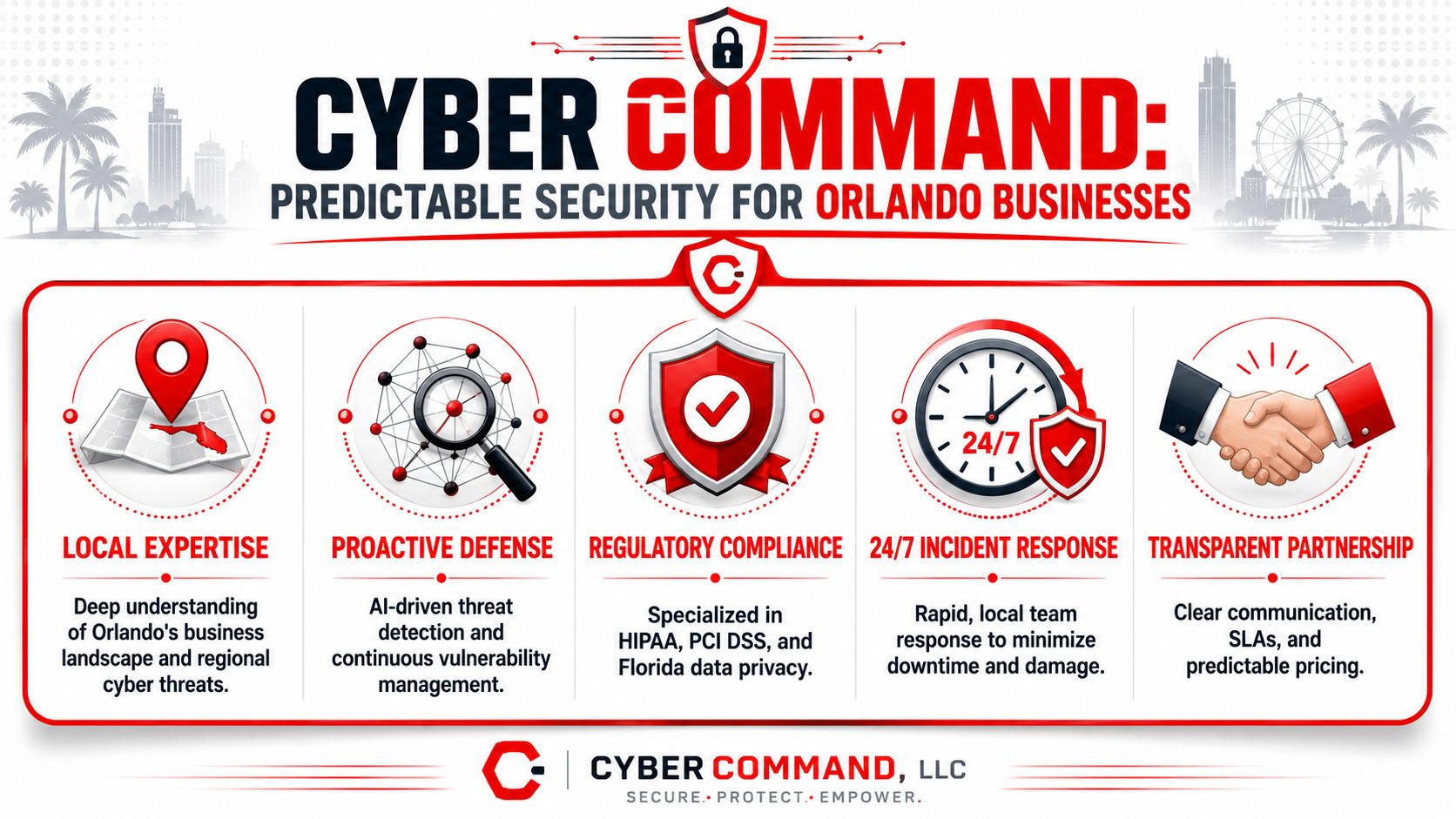
A professional infographic for Cyber Command, an Orlando-based company providing cyber security and incident response services.

What predictable security looks like in practice

For Orlando professional services firms, predictable security means the contract matches the daily reality of the environment. Monitoring runs after hours. Response paths are defined before an incident. Reporting makes sense to a managing partner, practice administrator, or office manager, not just to technical staff.

Cyber Command, LLC is positioned as a managed security provider, not a reactive repair shop. That difference matters during procurement. A managed model is built around recurring coverage, defined processes, and ongoing visibility into endpoints, network activity, and suspicious behavior. A reactive model often looks cheaper at signing and more expensive once the exceptions start.

In practical terms, buyers should look for four things:

  • Continuous monitoring: Issues are reviewed outside normal office hours, which matters because many account misuse events start at night or on weekends.
  • Coordinated controls: Endpoint protection, network defenses, alerting, and response procedures work together instead of sitting in separate silos.
  • Support that fits real offices: Professional services firms still deal with office moves, copier vendors, line-of-business software, remote staff, and third-party access.
  • Clear recurring scope: Leadership can budget for the service without guessing which routine security tasks will become surprise projects.

Why this model fits professional services firms

Legal, medical, and accounting firms do not buy security for its own sake. They buy it to keep client work moving, protect regulated information, and avoid billing disruption. If a provider cannot explain what is covered, who responds, and what will trigger added cost, the procurement process has not done its job.

That is where predictable pricing becomes a business control, not just a finance preference. A flat monthly agreement with clear inclusions gives owners a cleaner way to compare vendors and a better way to forecast support costs over a year. Hidden exclusions do the opposite. They turn routine security work into unplanned spend and force leadership to approve technical decisions in the middle of an incident.

For smaller firms with lean internal IT support, that trade-off is especially important. The right provider reduces decision fatigue. The wrong one creates a steady stream of approvals, change orders, and vague recommendations that someone on your team still has to sort out.

Cyber Command, LLC fits this procurement lens because the value is not just tools. The value is a service structure a business owner can price, review, and hold accountable over time. If you want help evaluating what your firm needs from an Orlando network security company, Cyber Command, LLC can help you review your current environment, identify coverage gaps, and understand what should be included in a predictable managed security agreement before you sign anything.

IT Security Services in Orlando FL: A 2026 Business Guide

You're probably not reading this because security is a hobby. You're reading it because something already happened, or almost did. A suspicious Microsoft 365 login. A fake invoice that looked real enough to fool accounting. A cyber insurance renewal that suddenly asks for proof of MFA, patching, and incident logging. Or a competitor in Orlando gets hit, and you realize your business would have a hard time answering one simple question: if an attack starts at 4:30 p.m. on a Friday, who takes over?

That's where most small and mid-sized companies in Central Florida get stuck. They've bought some tools, they have an IT person or provider, and they assume that means they're covered. In practice, that often means they have partial coverage, weak documentation, and no clear incident-response path. If you need a useful baseline before talking to a provider, this 2024 digital security guide is a solid plain-English refresher on the habits and controls that reduce avoidable risk.

Table of Contents

Why Orlando Businesses Must Prioritize Cybersecurity

A typical Orlando security scare doesn't start with a movie-style breach alert. It starts with a person. Someone in accounting gets an email that looks like it came from a vendor. A manager gets a password-reset prompt that appears normal. A front-desk employee clicks a link because the message mentions a missed shipment or a payroll issue.

That matters locally because Orlando's business mix creates a very specific risk profile. A local threat assessment says the area is shaped by high-value tourism infrastructure, dense hospitality and entertainment activity, a growing technology sector, and significant federal-contractor presence tied to nearby defense installations, and it identifies social engineering and phishing as the highest-volume initial access vector across sectors in Orlando's market (Orlando cybersecurity threat landscape analysis).

Why local context changes the security plan

A law office in Winter Springs doesn't face the same exposure as a restaurant group near the attractions corridor. A medical practice with several locations doesn't have the same attack surface as an engineering firm handling client drawings and bid documents. But they all share one problem: staff still interact with email, cloud apps, mobile devices, payment workflows, and outside vendors every day.

That's why generic “we have antivirus” thinking fails. The core issue isn't just malware. It's whether your business can:

  • Spot suspicious behavior early: Before a phish turns into account takeover.
  • Contain access quickly: Before one compromised user reaches file shares, email, and finance systems.
  • Document what happened: So you can answer insurance, legal, and compliance questions later.
  • Keep operating: Even while investigation and recovery are underway.

Orlando businesses don't need abstract cybersecurity theory. They need a response model that works when a real employee clicks the wrong thing during a normal workday.

What owners usually underestimate

Business owners often focus on prevention and overlook operations. They ask whether a provider installs protections. They don't ask what happens after detection, who is watching alerts after hours, or how evidence gets preserved if a claim, audit, or dispute follows.

That's the practical reason to prioritize cybersecurity in Orlando. The threat is local, the attack path is usually human, and the business impact shows up in downtime, missed revenue, disrupted scheduling, and stressful compliance cleanup.

Understanding Your Defensive Layers What Are IT Security Services

Most business owners hear “IT security services” and think of one product. That's the wrong model. Security works more like building protection. You don't secure a facility with only a front-door lock. You use locks, cameras, alarms, badge access, guard procedures, and incident logs that all work together.

For Orlando-area businesses, the meaningful stack goes beyond antivirus or general IT support. Local market guidance points to a layered stack that includes intrusion detection, firewall hardening, managed access control, video surveillance, and continuous monitoring, reflecting the reality that many organizations here have both cyber and physical exposure.

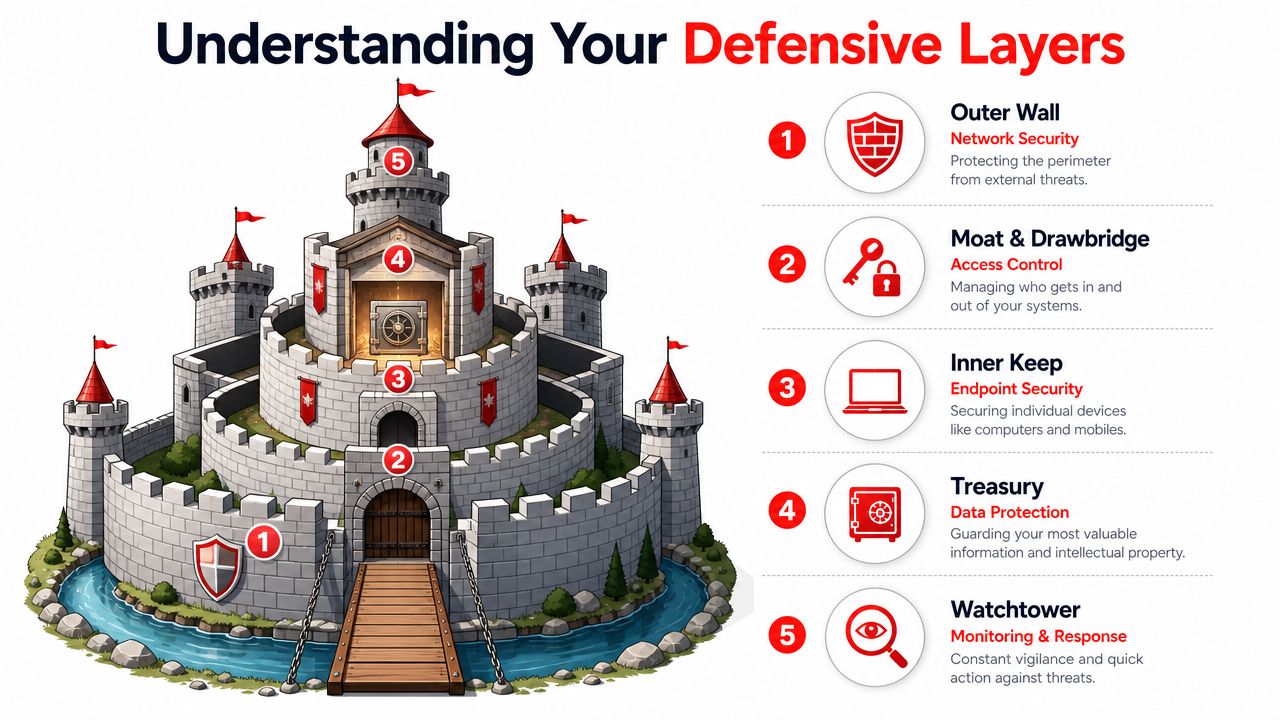
A diagram illustrating IT security strategy using a castle metaphor with five distinct defensive layers.

Your business as a castle

Think of your environment in layers:

  • Outer wall: Your firewall and network controls. These filter and restrict traffic before it reaches internal systems.
  • Moat and drawbridge: Access control. This includes MFA, role-based access, account policies, and joiner-mover-leaver discipline.
  • Inner keep: Endpoint security on laptops, desktops, and mobile devices where staff work.
  • Treasury: Data protection. Backups, retention, encryption policies, and permission boundaries around sensitive files.
  • Watchtower: Monitoring and response. Someone has to review alerts, investigate anomalies, and act fast.

A lot of businesses buy pieces of this but never integrate them. That creates blind spots. The firewall may log a strange connection, the endpoint may show unusual activity, and the access system may record a suspicious login, but if nobody correlates those events, the incident gets investigated too late.

What a real layered stack looks like

A workable security program usually includes a mix of controls and ongoing services:

  1. Preventive controls such as hardened firewalls, MFA, email filtering, and endpoint protections.
  2. Detective controls such as centralized logging, intrusion detection, and user activity review.
  3. Response controls such as isolation procedures, account lockouts, escalation paths, and recovery steps.
  4. Evidence controls such as incident logs, patch records, and access documentation.

If you're reviewing your environment, a formal vulnerability assessment process is often the fastest way to identify which layer is weak first.

Practical rule: If a provider can only name products, but can't explain how alerts move from detection to containment to documentation, you're not looking at a mature security service.

There's also a newer human-side challenge. Staff are no longer just spotting fake emails. They're seeing manipulated images, voice clips, and synthetic media used in fraud attempts. Training employees to question unusual requests matters more than ever, and resources on spotting AI-created media can help teams sharpen that judgment.

The Core Security Services Every Orlando Business Needs

A Monday morning ransomware event rarely starts with dramatic warnings. It starts with a locked laptop, a failed login, a phone call from accounting, and a manager trying to decide whether the issue is isolated or spreading. The businesses that recover fastest usually have three things in place before that moment: active monitoring, a response plan people can execute under pressure, and documentation that stands up to insurer and auditor questions.

A professional IT specialist working on cyber security monitoring tasks in a modern server room environment.

Continuous monitoring and a real SOC

Monitoring matters when alerts lead to action. Orlando businesses with after-hours operations, remote staff, or customer-facing systems need someone reviewing suspicious activity outside normal business hours and deciding what requires containment now versus investigation later.

For owners and operations leaders, the business case is straightforward. Faster review cuts downtime. Faster containment limits how many devices, accounts, or locations get pulled into the same incident. It also reduces the chaos that follows when leadership has no clear timeline or owner.

Ask direct questions. Who reviews alerts at 2 a.m.? What events trigger human escalation? How quickly can the provider isolate a device or disable a compromised account? If those answers are vague, the service probably looks better on paper than it performs in practice.

Incident response that holds up under pressure

A provider should be able to explain the first few hours of an incident in plain language. That includes who makes decisions, how evidence is preserved, when leadership is notified, and what records are created for insurance, legal review, and compliance.

A usable incident response function should include:

  • Containment actions: isolate endpoints, disable accounts, block malicious traffic, and restrict lateral movement
  • Evidence handling: preserve logs, endpoint data, and change records so the business can support a claim or investigation
  • Recovery priorities: restore line-of-business systems in the right order instead of bringing everything back at once
  • Executive communication: give leadership a clear status update, current risk, and next actions without technical clutter

Many service agreements fall short. They cover alerting but not response labor, or they promise help during an incident without defining what help entails. Before signing, review the scope as carefully as the tools.

A strong provider also proves its work after the fact. You should be able to get incident timelines, remediation records, and policy evidence without chasing multiple teams. That paper trail matters when cyber insurance carriers or regulators ask for proof, not assurances.

Firewall management, endpoint protection, and vulnerability scanning

Firewall and endpoint controls need ongoing care. Rules drift after office moves, vendor access requests, cloud changes, and staffing turnover. Laptops miss patches. Remote devices fall outside normal review. One neglected system is often enough to create an entry point.

That is why routine scanning and remediation review belong in the core service set. A provider should show what was found, what was fixed, what remains open, and who owns the exception if something cannot be remediated quickly. Fivenines security scanning offers a useful example of the kind of visibility businesses should expect from a scanning program.

This work also affects budgeting. If you want a clearer view of how recurring security tasks and exception handling influence monthly costs, this breakdown of key factors influencing IT managed service pricing helps frame the discussion.

Phishing resistance and user controls

Email remains one of the cheapest ways to get into a business. Training helps, but annual presentations are not enough. Staff need short, repeated guidance on login prompts, payment changes, shared file requests, MFA fatigue attacks, and messages that create urgency.

User controls matter just as much as awareness. Security teams should be enforcing MFA, limiting local admin rights, reviewing risky sign-ins, and tightening access when roles change. Training without those controls leaves too much to individual judgment.

Cyber Command, LLC is one Orlando-area provider offering services such as EDR, SOC monitoring, firewall management, and MFA within managed IT and cybersecurity support. The larger point applies to any provider you consider. Choose one that can show response procedures, compliance evidence, and a clear path from detection to containment to recovery.

Decoding IT Security Pricing Predictability vs Hidden Fees

Security pricing gets messy fast because providers package services in different ways. One charges by user. Another charges by device. Another wraps most services into a flat monthly agreement but bills separately for projects or after-hours work. If you don't pin this down early, the “cheaper” proposal can become the expensive one.

The labor market explains part of this. The Bureau of Labor Statistics reports a median annual wage of $124,910 for information security analysts in May 2024, with employment projected to grow 29% from 2024 to 2034 and about 16,000 openings each year on average (BLS information security analyst outlook). For Orlando businesses, that helps explain why outsourced security has become standard. Hiring one internal security person is hard enough. Building round-the-clock coverage internally is a different level of cost and complexity.

Comparing common pricing models

Pricing Model How It Works Best For Potential Downside
Per-user Monthly fee based on employee count Office-centric firms with predictable staffing Shared devices, servers, and site systems may not fit neatly
Per-device Fee tied to laptops, desktops, servers, and sometimes network gear Environments where asset counts are stable and tightly managed Costs can creep as devices, locations, and special systems get added
Flat-rate One recurring fee covering an agreed service scope Businesses that want budgeting stability and broad coverage You must review scope carefully to see what's included versus excluded

What to watch for in proposals

The issue isn't only price. It's cost predictability.

Look closely at these pressure points:

  • After-hours response: Is emergency work included, limited, or separately billed?
  • Projects and changes: Are office moves, migrations, or remediation tasks covered?
  • Security stack components: Does the monthly fee include monitoring, response, reporting, and training, or just the software licenses?
  • Compliance support: Will the provider help produce evidence for insurance and audits, or only deploy tools?

A broader breakdown of these trade-offs is covered in this guide to managed service pricing factors.

The practical buying decision

Per-user pricing can work well for a smaller professional office. Per-device pricing can fit firms with stable infrastructure and fewer swings in headcount. Flat-rate models usually make the most sense when leadership cares about budget consistency, broad accountability, and avoiding a surprise invoice during a bad month.

If you're buying IT Security Services in Orlando FL, ask a blunt question: what will I still get billed for when something goes wrong? That answer tells you more than the base monthly number.

Choosing Your Orlando Security Partner Key Questions to Ask

Most providers can give you a service list. Fewer can give you evidence. That difference matters more now because cyber insurance, audits, and vendor reviews increasingly require proof that controls exist and are being maintained. For Orlando firms in professional services and healthcare, documentation such as patching records, MFA enforcement, and incident logs is often more valuable than a polished security brochure (compliance evidence and cyber insurance guidance).

An infographic outlining six key factors to consider when choosing a security partner in Orlando, Florida.

Ask for proof, not promises

A provider may say they “support compliance.” That phrase means nothing unless they can show what they produce and how often they produce it.

Ask these questions directly:

  • Can you provide patching records? You need evidence that systems were updated, not just a verbal assurance.
  • How do you verify MFA enforcement? Ask how they document protected accounts and exception handling.
  • What incident logs do you retain? You want to know what's recorded, where it's stored, and who can access it.
  • What happens during ransomware containment? Listen for a step-by-step answer, not vague reassurance.
  • Who is staffed after hours? Clarify whether response is live and operational, or only on-call escalation.

Evaluate response maturity

A mature provider should be able to walk you through the first day of an incident in plain English. Not every answer needs to be highly technical. It does need to be coherent.

Look for signs of operational maturity:

  1. Clear triage path: Who reviews alerts first, who escalates, and who contacts your leadership team.
  2. Defined containment authority: Whether they can disable accounts, isolate endpoints, or block traffic immediately.
  3. Recovery discipline: Whether they prioritize business-critical systems rather than restoring everything at once.
  4. Documentation habits: Whether every major action is timestamped and preserved.

What good answers sound like: “Here's how we contain, document, recover, and report.”
Weak answers sound like: “We monitor things and let you know.”

Local fit still matters

Remote monitoring is standard. Local presence still matters when hardware fails, offices move, physical access systems tie into IT, or leadership wants in-person incident coordination. In Central Florida, that matters more than many buyers expect because many businesses run across offices, clinics, warehouses, or public-facing locations.

If you need a vetting framework before interviews, this guide on how to choose a managed service provider gives a useful starting point.

Industry-Specific Security Needs in Central Florida

Different industries buy security for different reasons. A law firm is protecting confidential client matters and billable time. A healthcare practice is protecting patient data and continuity of care. A multi-location operator is trying to secure users, networks, and devices across several sites without losing visibility.

Professional services firms

Law firms, accounting practices, architecture groups, and engineering firms usually depend on a mix of email, cloud files, document workflows, and client communication. Their biggest risk isn't just malware. It's unauthorized access to sensitive records, impersonation of trusted contacts, and silent account misuse that goes unnoticed until a client asks questions.

The most useful controls here are:

  • Strong access policies: Limit who can reach financial records, client folders, and partner accounts.
  • Centralized logging: Make it possible to investigate who accessed what and when.
  • Email and identity protection: Reduce exposure to impersonation and account takeover.
  • Evidence-ready reporting: Support insurance questionnaires, vendor due diligence, and client security reviews.

For these firms, security has to protect reputation as much as systems.

Healthcare practices

Medical, dental, veterinary, and elective-care practices have a different operating problem. They can't tolerate much downtime at the front desk, in scheduling, or in clinical systems. Their risk sits at the intersection of privacy, operations, and staff workflow.

Priorities usually include:

  • MFA and account controls: Especially for email, remote access, and administrative accounts.
  • Patch discipline: Clinical and office systems need a documented update process.
  • Incident logging: Investigations need records, not memory.
  • Recovery planning: Staff should know how the practice operates if one application is unavailable.

A healthcare office doesn't need unnecessary complexity. It needs consistent controls that staff can follow on a busy day.

Industrial and multi-location businesses

Industrial firms, field-service businesses, and operators with several sites face a wider attack surface. They may have office users, warehouse devices, cameras, access systems, shared workstations, and site-to-site connectivity. That means security can't live only on desktops.

These organizations often benefit most from:

  • Network segmentation: Separate business systems, site infrastructure, and sensitive resources.
  • Managed access control: Control physical and logical entry together where possible.
  • Continuous monitoring across locations: See problems centrally instead of waiting for a site manager to report them.
  • Standardized policy enforcement: Keep onboarding, patching, and device handling consistent across every office.

The common mistake is treating each site as its own island. Centralized visibility usually matters more than adding one more point product.

Frequently Asked Questions About IT Security

What's the difference between an MSP and an MSSP

A general managed service provider usually handles broad IT needs such as support, devices, user administration, and infrastructure upkeep. A managed security provider focuses more specifically on threat monitoring, incident response, containment, and security operations. Some firms combine both. What matters is whether they can show a real security workflow, not just general IT support with a security label.

My business is small. Do we really need this level of protection

Yes, but the level of complexity should match the business. A small firm doesn't need enterprise sprawl. It does need strong account security, endpoint protection, backup discipline, logging, and a defined response process. Small companies are often hit through ordinary channels such as phishing, reused passwords, and unmanaged devices. Basic maturity beats expensive chaos.

Smaller businesses usually don't need more tools first. They need fewer gaps.

How long does onboarding usually take

That depends on how organized your current environment is. Clean user records, documented devices, and known vendors make onboarding smoother. The core issue isn't speed alone. It's whether the provider can discover unknown assets, close obvious holes, and establish reporting without interrupting the business. A rushed onboarding that skips documentation usually creates problems later.

What should happen in the first hour of a suspected incident

The provider should confirm the alert, assess scope, start containment, preserve evidence, and communicate clearly with decision-makers. If they can't clearly explain those steps, they probably haven't operationalized response. During a real event, clarity matters more than marketing language.


If your business needs IT Security Services in Orlando FL, the next step isn't buying another standalone tool. It's getting a provider to show you how they monitor, respond, document, and support compliance in practice. Cyber Command, LLC works with Central Florida organizations that want predictable support, 24/7 coverage, and security operations tied to uptime, recovery, and accountability.