Managed IT Services in Orlando FL: Your 2026 Guide

Your office opens at 8. By 8:12, someone can't print. By 8:20, your practice management system is lagging. By 9:00, a staff member forwards a suspicious email and asks, “Is this real?” You're not running a technology company, but technology now controls how fast you invoice, serve clients, protect records, and stay compliant.

That's where many Central Florida businesses are right now. The company is growing, the team is busy, and the old approach to IT support isn't keeping up. You call when something breaks. You hope backups work. You assume your security stack is enough. Then one outage, one ransomware attempt, or one failed audit reminder turns IT from a background function into a business risk.

For Orlando businesses, managed IT isn't just about outsourced support anymore. It's about uptime, security, accountability, and choosing the right operating model for how your business runs.

Table of Contents

Is Your Orlando Business Outgrowing Its IT

A lot of owners in Orlando, Winter Springs, and nearby Central Florida cities don't notice the turning point at first. Revenue improves. Headcount grows. Maybe you add a second location, hire remote staff, or start relying on more cloud apps. Then little problems become daily friction.
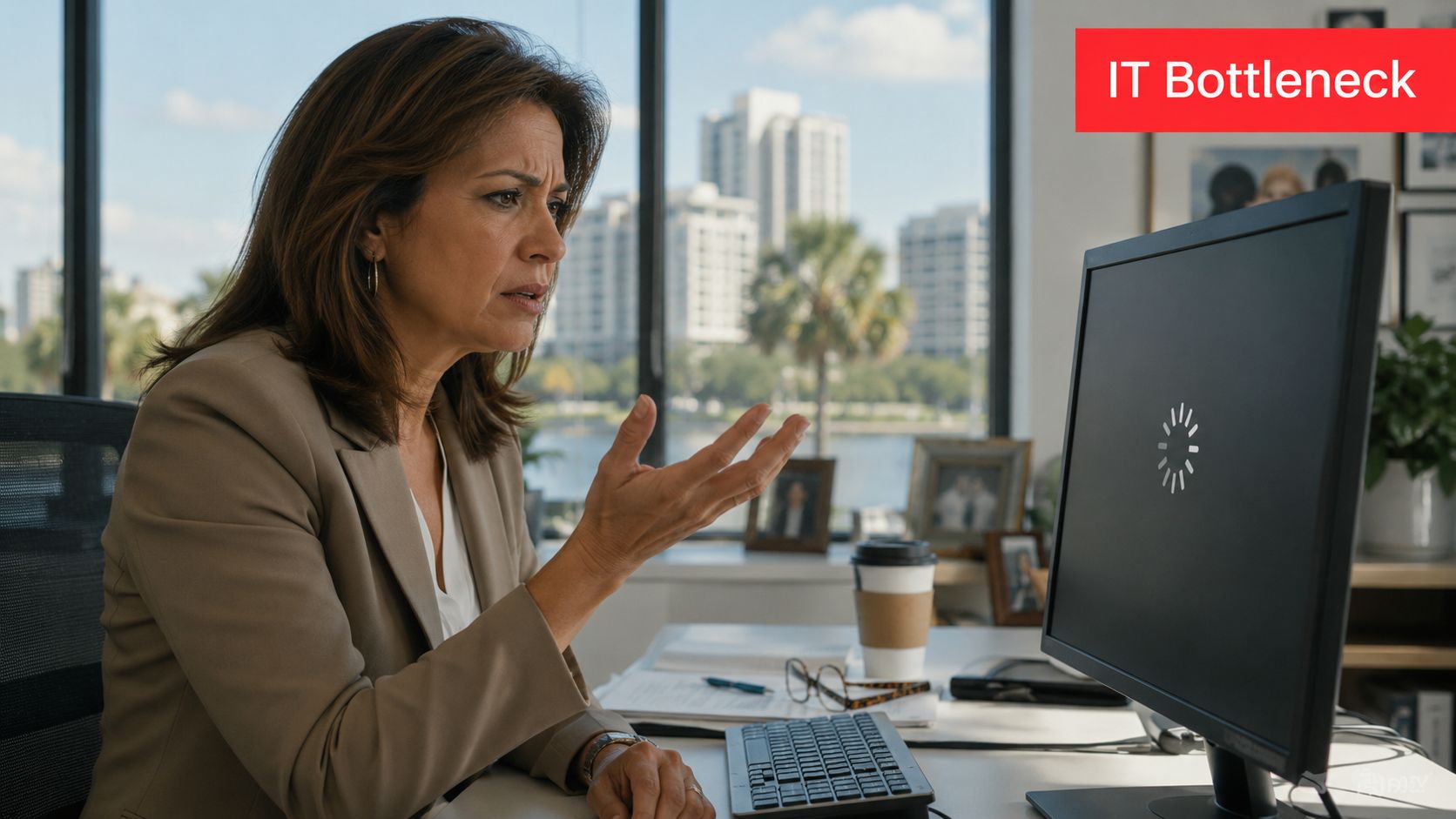
A professional woman in an office looks frustrated while waiting for a loading icon on her computer screen.

One downtown office might deal with file access delays every afternoon when everyone is in the same system. A dental group in Winter Park may worry whether front-desk workstations, imaging systems, and patient communications are protected the way they should be. A growing accounting firm may have no clear answer when a client asks how their data is secured or how quickly systems can be restored after an incident.

That's the sign you've outgrown ad hoc support. It's not just that things break. It's that your business now depends on technology behaving predictably.

When break fix starts hurting the business

Reactive IT feels cheaper until it starts interrupting payroll, intake, billing, scheduling, and client communication. The hidden cost is management attention. Owners, office managers, and operations leads end up chasing vendors, approving emergency work, and making decisions without a roadmap.

You don't have an IT problem when a laptop fails. You have an IT problem when every failure turns into an executive interruption.

Managed IT Services in Orlando FL make sense when technology stops being a side function and becomes part of your delivery model. If your staff can't work when the network slows down, if compliance questions keep landing on your desk, or if cybersecurity headlines feel uncomfortably relevant, you're already there.

What growing companies usually need next

At this stage, most businesses aren't looking for more tickets. They need structure:

  • Reliable support: People need fast answers when they're blocked.
  • Preventive maintenance: Systems need patching, monitoring, and routine review before issues spread.
  • Clear accountability: Someone should own the environment, vendor coordination, and follow-through.
  • Security that's active: Not just alerts. Actual response.
  • Planning discipline: Decisions about renewals, cloud changes, office moves, and compliance shouldn't happen in a rush.

That shift is less about buying IT and more about building operational resilience.

Defining Managed IT Services for Central Florida Businesses

Managed IT services are often described too loosely. For a Central Florida business, the practical definition is simpler. It's an ongoing operating partnership where a provider helps keep your systems available, secure, supported, and aligned with how your company works. That's very different from calling someone after an outage.
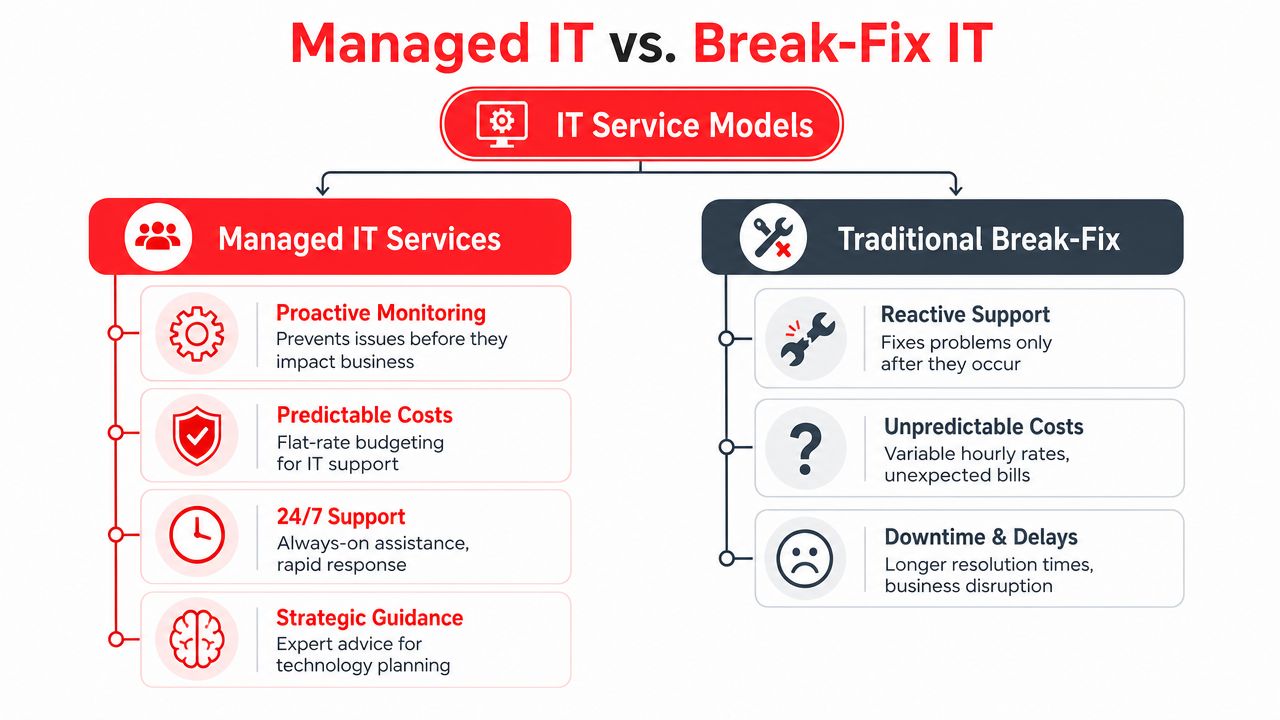
A comparison chart outlining the key differences between proactive Managed IT Services and reactive Traditional Break-Fix IT models.

What managed IT actually includes

A complete managed services agreement should cover more than a helpdesk. At minimum, Orlando businesses should expect:

  • User support: Day-to-day issue resolution for staff, including remote help and escalation.
  • System monitoring: Devices, servers, and network assets watched continuously so small faults don't become outages.
  • Patch and endpoint management: Routine updates, protection, and policy enforcement across workstations and servers.
  • Cloud administration: Oversight for productivity platforms, identity controls, and access policies.
  • Vendor and license management: Coordination with internet, software, telecom, and line-of-business vendors so your team isn't stuck in the middle.
  • Documentation: Network diagrams, standards, inventory, and recovery information that make the environment manageable.
  • Strategic guidance: Budgeting, lifecycle planning, and quarterly review of business priorities against technical risk.

A weaker provider usually leads with “we fix issues quickly.” A mature provider explains how they reduce the number of issues in the first place.

Why the market keeps moving this way

Businesses aren't adopting managed services because it sounds modern. They're doing it because reactive support creates operational drag, especially once cloud systems, compliance requirements, and cybersecurity risks start stacking up.

The managed services market data from Fortune Business Insights states that the global managed services market was valued at USD 330.4 billion in 2025 and is projected to reach USD 1,118.2 billion by 2034. The same source notes that only 5,000–10,000 of the world's 150,000–200,000 providers meet verifiable maturity standards. For an Orlando business owner, that matters. It means the label “MSP” doesn't tell you much by itself.

Practical rule: Don't buy managed IT based on the service name. Buy it based on operating depth, security capability, and proof of process.

That's also where the local decision gets more nuanced. A good fit for a single-office professional firm may not be the right fit for a multi-location healthcare group or a field-service company with internal technical staff. Some businesses need fully managed support. Others need co-managed support, where an outside team handles monitoring, security operations, and escalation while internal staff retain control over selected systems and vendors.

Cyber Command, LLC is one example of that broader model. It provides fully managed and co-managed IT, 24/7/365 U.S.-based helpdesk, cloud support, vendor management, and SOC-backed security operations for organizations in Orlando and Winter Springs.

The Business Case Uptime Security and Compliance

Most owners don't buy managed IT because they want a cleaner network closet or nicer reports. They buy it because they want the business to keep running. The strongest case for managed services is operational. Your staff stays productive, your risk posture improves, and compliance work stops getting treated like a last-minute project.

Uptime is an operational issue, not a technical vanity metric

Downtime hits payroll, scheduling, intake, quoting, patient flow, dispatch, and customer communication. It also creates a second layer of damage because your team starts building workarounds. People save files in the wrong place, delay updates, and avoid systems they no longer trust.

The Orlando managed IT benchmark data shows that 24/7/365 live helpdesk support combined with real-time system monitoring preempts 85% of potential downtime events, resulting in a 30% increase in operational uptime for mid-sized businesses. That same benchmark ties performance to SLA-driven protocols with response times under 15 minutes.

If a provider can't explain how it detects issues before users report them, you're still buying reactive support with a nicer label.

Security monitoring is not the same as active defense

Many Orlando businesses are often misled. They hear “monitoring” and assume someone is actively watching for attacker behavior. Often, that isn't what they're getting. They're getting tools that generate alerts, not a staffed security function that investigates, contains, and responds.

For law firms, medical practices, and finance-related businesses, that gap matters because attackers don't behave like routine malware anymore. They move laterally, abuse valid credentials, and hide inside normal user activity. That's why true SOC-backed security matters. A real security operations function doesn't just collect events. It hunts, validates, escalates, and coordinates response.

Monitoring tells you something may be wrong. A security operations center determines whether an attacker is actually in your environment and what to do next.

Compliance needs continuous execution

Compliance-heavy businesses often think in terms of annual checklists. That approach fails because compliance is tied to daily controls. Are devices patched? Are user permissions reviewed? Are logs retained? Are backup and recovery processes documented? Is there a response path for suspicious activity?

For a privately owned medical practice, a legal office handling sensitive records, or a financial services firm managing confidential documents, the right managed IT partner turns compliance into operating discipline. That includes consistent patching, endpoint control, documented configurations, access review support, and repeatable reporting.

What doesn't work is buying a generic “cyber package” and assuming that solves governance. It doesn't. Security tools without process leave gaps. Policy without enforcement does the same.

Tailored IT Solutions for Orlandos Key Industries

Managed IT only works when it matches the business model. Orlando isn't one market with one operating profile. A law office near downtown has different exposure than a med spa in Winter Park, a hospitality group serving visitors, or a field-service company with technicians moving across sites.
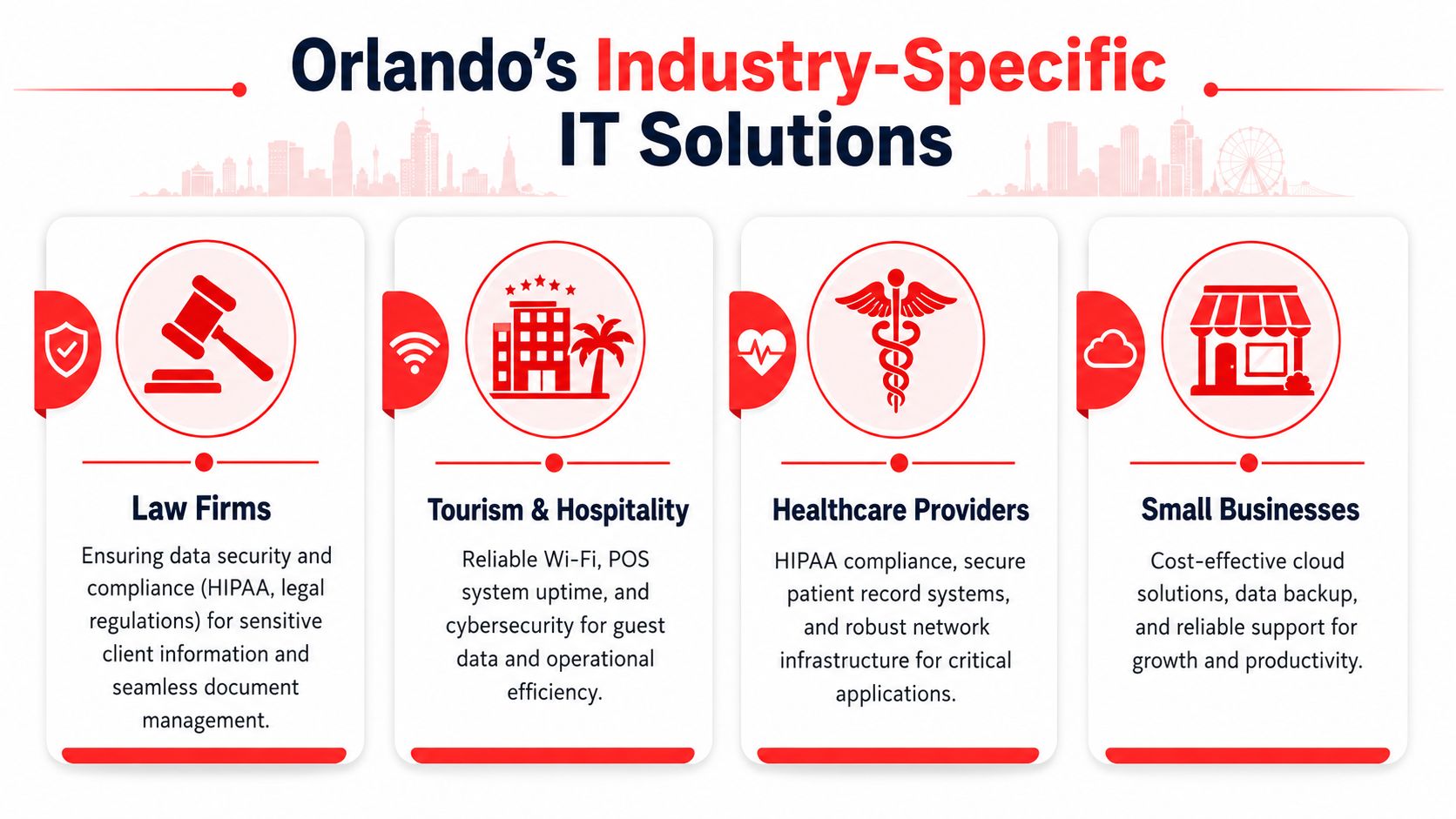
An infographic detailing industry-specific IT solutions in Orlando for law firms, hospitality, healthcare, and small businesses.

Professional services and legal offices

A legal or accounting practice usually needs three things from IT. First, staff must reach files and line-of-business systems without delay. Second, the firm needs clear control over who can access sensitive documents. Third, leadership needs confidence that a security incident won't become a client trust issue.

That often means tighter identity controls, documented device standards, secure remote access, dependable backup oversight, and support that understands the cost of delay during deadlines. In these environments, “mostly working” is not acceptable. If the document system slows down before a filing deadline or tax cutoff, revenue work stops.

Healthcare and privately owned practices

Small healthcare organizations in Central Florida often have lean administrative teams and very little tolerance for disruption. A dentist, orthodontist, veterinarian, plastic surgeon, or med spa may rely on a mix of imaging, scheduling, billing, and patient communication systems that all have to work together.

What they need isn't generic IT. They need compliance-aware workflows, device security, controlled access to patient information, and support that can separate a routine issue from a privacy event. They also need clarity on whether the provider offers real co-management if the practice works with an internal operations lead or outside application consultant.

The Florida co-managed IT findings report that 64% of multi-site SMBs in Florida require a hybrid co-managed IT model, while 78% of Orlando MSPs only market fully managed options. That gap is especially relevant for regional clinics, franchise-style operations, and growing healthcare groups that want predictable support but still need internal control over some decisions.

Hospitality field service and multi location operations

Hospitality and tourism create a different support profile in Orlando. Guest-facing systems can't go down during peak periods. Wi-Fi, point-of-sale continuity, and front-desk operations affect both revenue and reputation. Businesses serving visitors also deal with irregular support patterns, extended hours, and a higher expectation for immediate response.

If you operate in that environment, it helps to review a more specialized hospitality IT solutions guide for Orlando businesses. The same logic applies to field-service and industrial companies. They often need standardization across office and remote environments, stronger vendor coordination, and a support structure that can handle both back-office systems and site-specific constraints.

A multi-location company rarely needs less IT control. It needs clearer division of responsibility.

For these businesses, co-managed support can be the better fit. Internal staff may own business applications, local relationships, or site workflows. The outside partner handles monitoring, security operations, documentation, escalation, patching, and after-hours support. That split tends to work well when leadership wants resilience without giving up visibility.

Understanding Managed IT Services Pricing Models

Pricing gets most of the attention, but structure matters more than the base number. Two quotes can look similar and produce very different results. The core question is what behavior the pricing model encourages.

What Orlando businesses usually see in quotes

The Orlando managed IT pricing data shows that managed IT services in Orlando typically range from $100–$300 per user per month. The same source states that all-inclusive flat-rate packages can reduce administrative overhead by 25%, help SMBs predict IT spend with 95% accuracy, and that proactive monitoring can reduce monthly IT incidents by up to 70%.

That lines up with what works in practice. When support, maintenance, and oversight are fragmented across line items, businesses spend too much time arguing about scope. Every issue becomes a billing decision. Every project request becomes a surprise.

Managed IT Pricing Models Compared

Model How It Works Best For Predictability
Per-user A monthly fee is tied to each supported employee account Offices where each staff member uses a similar set of systems and support needs Good if scope is clearly defined
Per-device Billing is based on workstations, servers, and other managed assets Environments where equipment counts matter more than user counts Mixed, because users often touch multiple systems
All-inclusive flat rate A broader monthly agreement bundles support, monitoring, maintenance, and defined services Businesses that want stable budgeting and fewer scope disputes High when the agreement is written clearly
Break-fix or hourly You pay when something breaks or a project appears Very small environments with low complexity and high tolerance for disruption Low

A flat-rate model usually produces better operational behavior because the provider has reason to prevent problems instead of waiting for billable incidents. That doesn't mean every flat-rate proposal is good. Some exclude onboarding, after-hours support, licensing coordination, vendor management, or security response.

Use a quote review process that asks what is included, what triggers extra charges, how after-hours work is handled, and whether strategic reviews are part of the agreement. If you want a deeper breakdown of how to evaluate scope, this managed IT services cost guide is a useful starting point.

Cheap IT support often becomes expensive the first time you need urgent after-hours help, vendor coordination, or real incident response.

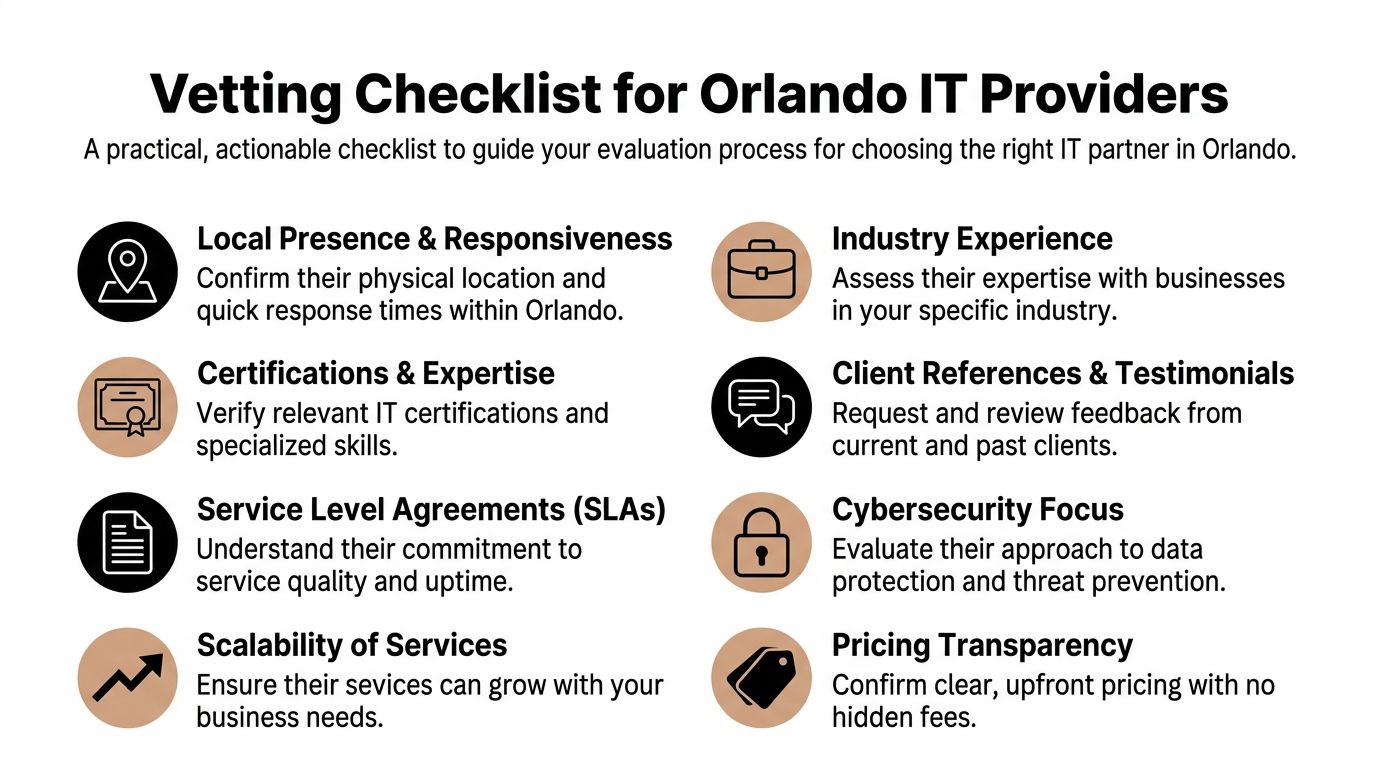
Your Buyers Checklist Questions to Ask Any Orlando IT Provider

Most businesses ask the wrong opening question. They ask, “What do you charge?” before they ask, “How do you operate?” In Orlando's market, that leads buyers into weak agreements that sound complete but leave out the capabilities that matter when something serious happens.
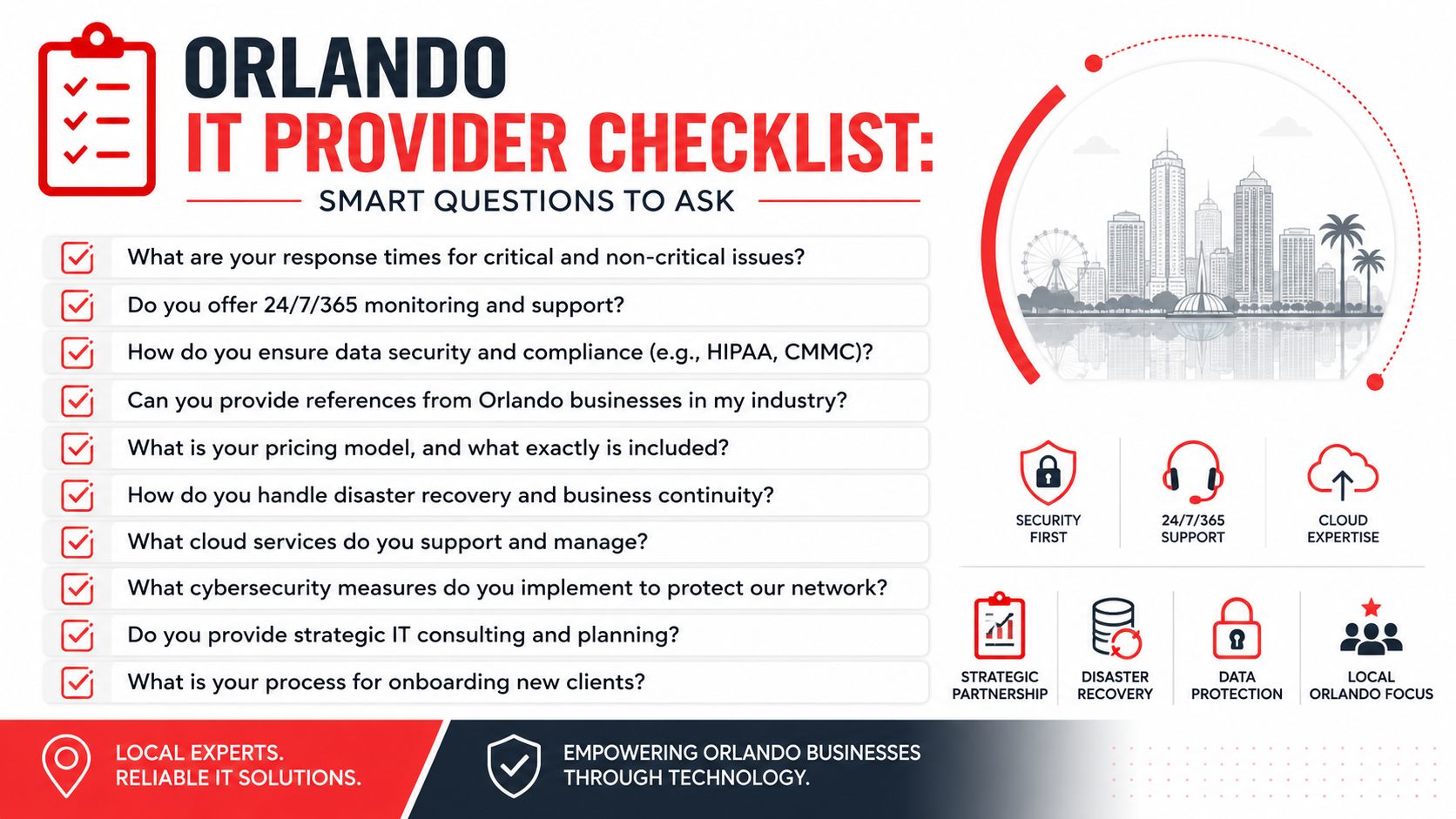
A checklist of smart questions for businesses looking to hire a managed IT service provider in Orlando.

The biggest gap to investigate is security depth. The Orlando security gap data states that 68% of successful breaches in SMBs occurred because passive monitoring tools failed to detect active attacker behavior, and 73% of Orlando MSPs' marketing materials do not explicitly mention SOC-backed incident response. That's the difference between having alerts and having defense.

Questions that expose shallow service delivery

Ask direct questions and listen for process, not slogans.

  • How is your SOC structured? Ask whether incident response is backed by live analysts around the clock or whether the provider mainly relies on automated alerting.
  • What happens when suspicious behavior is detected at night or on a weekend? You want a response path, not a vague statement about notification.
  • Is your helpdesk staffed by your own U.S.-based team? Support quality drops when escalation paths are fragmented or outsourced without ownership.
  • What do you patch, how often, and how do you verify it? A provider should explain routine execution, exceptions, and reporting.
  • Can you show a sample QBR or technology roadmap? If they can't show structured planning, the relationship may stay ticket-driven.
  • Who handles vendor coordination? Internet, telecom, software, and line-of-business vendors shouldn't all bounce your staff around during an outage.

Questions that clarify fit for your business model

Buyers should now get more specific about business structure.

  1. How do you support co-managed environments? If you already have internal IT, ask who owns security tooling, who handles escalations, and who approves change.
  2. How do you document the environment? You should expect diagrams, standards, recovery information, and clear ownership records.
  3. How do you support multi-location operations? Ask how they standardize devices, user policies, and support workflows across offices.
  4. How do you handle onboarding? A mature provider should have a sequence for assessment, stabilization, access control, documentation, and communication.
  5. How do you support compliance-sensitive industries? The answer should connect daily controls to your operating reality, not just name regulations.

If you want a more detailed evaluation framework, review this guide to choosing a managed service provider.

If a provider can't describe who does what during a security event, you're not evaluating a managed service. You're evaluating a promise.

The right buyer behavior is simple. Push past the brochure. Ask for examples of process. Ask who responds, who owns the outcome, and what your team should expect in the first ninety days. Mature providers answer plainly.

Partnering for Growth Your Next Step to Secure IT

The right managed IT relationship changes how a business runs. It reduces disruption, tightens accountability, and gives leadership a clearer view of risk. For Orlando companies, that matters because growth usually increases complexity faster than it increases internal IT capacity.

The key decision isn't whether to outsource everything. It's whether your current model supports uptime, security, and compliance without constant executive involvement. Some businesses need fully managed support because they don't have internal capacity. Others need co-managed support because they want outside depth while keeping selected control in house. The important part is choosing a partner that can operate in the model your business needs.

Managed IT Services in Orlando FL should do more than answer tickets. They should help you prevent downtime, close security gaps, support compliance, and give your team room to grow without dragging leadership back into daily technical firefighting.


If you want a practical review of your current environment, Cyber Command, LLC can help you assess whether you need fully managed support or a co-managed model, identify gaps between basic monitoring and true SOC-backed security, and map out a more predictable path for uptime, compliance, and growth.
Choosing an Orlando Network Security Company: A 2026 Guide

You're probably looking at two proposals right now.

One promises “complete protection” with a flat monthly fee. The other lists a lower starting price, then buries key services in optional add-ons, project fees, and vague language about “advanced response” if something serious happens. Both claim they can protect your business. Neither makes it easy to compare the precise offering.

That's where most Orlando business owners get stuck. For a law firm, medical practice, accounting office, architecture firm, or engineering company, network security isn't a side purchase. It's a business continuity decision tied to client trust, compliance pressure, downtime risk, and how much management attention gets dragged into emergencies. If your office is growing, moving locations, adding remote staff, or opening another site, security choices get even more expensive to fix later. That's one reason relocation planning should include infrastructure decisions early, not after the furniture is in place. A practical guide to IT infrastructure for office relocations makes that point well.

A good Orlando network security company should help you buy clarity, not just software. The right provider gives you a procurement process you can defend internally: what's covered, what isn't, how incidents are handled, who responds, and what costs can still surprise you.

Table of Contents

Why Your Choice of Orlando Network Security Company Matters

Monday starts with a locked screen at the front desk. Your staff cannot open client files. Phones are still ringing, appointments are still booked, and payroll, billing, and deadlines have not paused just because your systems did. In that moment, the quality of your security provider stops being an IT decision and becomes a business continuity decision.

That is why procurement matters here.

Many Orlando business owners buy security the way they buy internet service. They collect a few quotes, compare monthly fees, and assume the listed tools tell the story. They do not. For a law firm, medical practice, or accounting office, the bigger cost usually shows up after the contract is signed. It appears in emergency project fees, slow incident response, unclear ownership, staff downtime, and leadership time pulled into avoidable problems.

You are purchasing operational stability. You are also purchasing a provider's judgment under pressure.

A capable Orlando network security company should help you reduce surprises, not just install controls. That starts with clear scoping. A vulnerability assessment that shows where your network is actually exposed is more useful during procurement than a long list of product names, because it ties the service to business risk, recovery effort, and likely cost.

The buying question is simple. What will this provider prevent, what will they respond to, and what will still become your problem?

Decision lens Weak buying approach Strong buying approach
Budget Lowest advertised monthly fee Predictable total cost, including response and remediation
Coverage Broad service labels with little detail Specific protections, exclusions, and ownership spelled out
Response General promise to assist Defined monitoring hours, escalation path, and response steps
Leadership reporting Technical reports no one uses Plain-language updates tied to risk, downtime, and priorities

The wrong provider can look affordable in a proposal and become expensive in practice.

Professional services firms feel that gap quickly. A medical office loses patient flow and trust when systems are unavailable. A law firm risks missed deadlines and confidentiality problems. An accounting firm in filing season cannot afford vague support boundaries or a provider that treats every urgent issue as a separate billable event.

Orlando buyers should treat security selection like a managed procurement process, not a rushed technical purchase. Ask for pricing that holds up during incidents, office changes, and growth. That matters even in routine operational events such as expansions or moves, where weak planning can create new exposure. The same discipline that applies to IT infrastructure for office relocations applies here. Hidden work during change is still cost, even if it was missing from the original quote.

Cyber Command, LLC approaches this work as an operations issue first. The practical question is not whether a provider says they offer cybersecurity. The practical question is whether their service model is clear enough that you can budget for it, rely on it, and explain it to partners, managers, or compliance stakeholders without translating jargon.

If a proposal cannot tell you who is watching, what is covered, when response begins, and which tasks trigger extra fees, keep shopping.

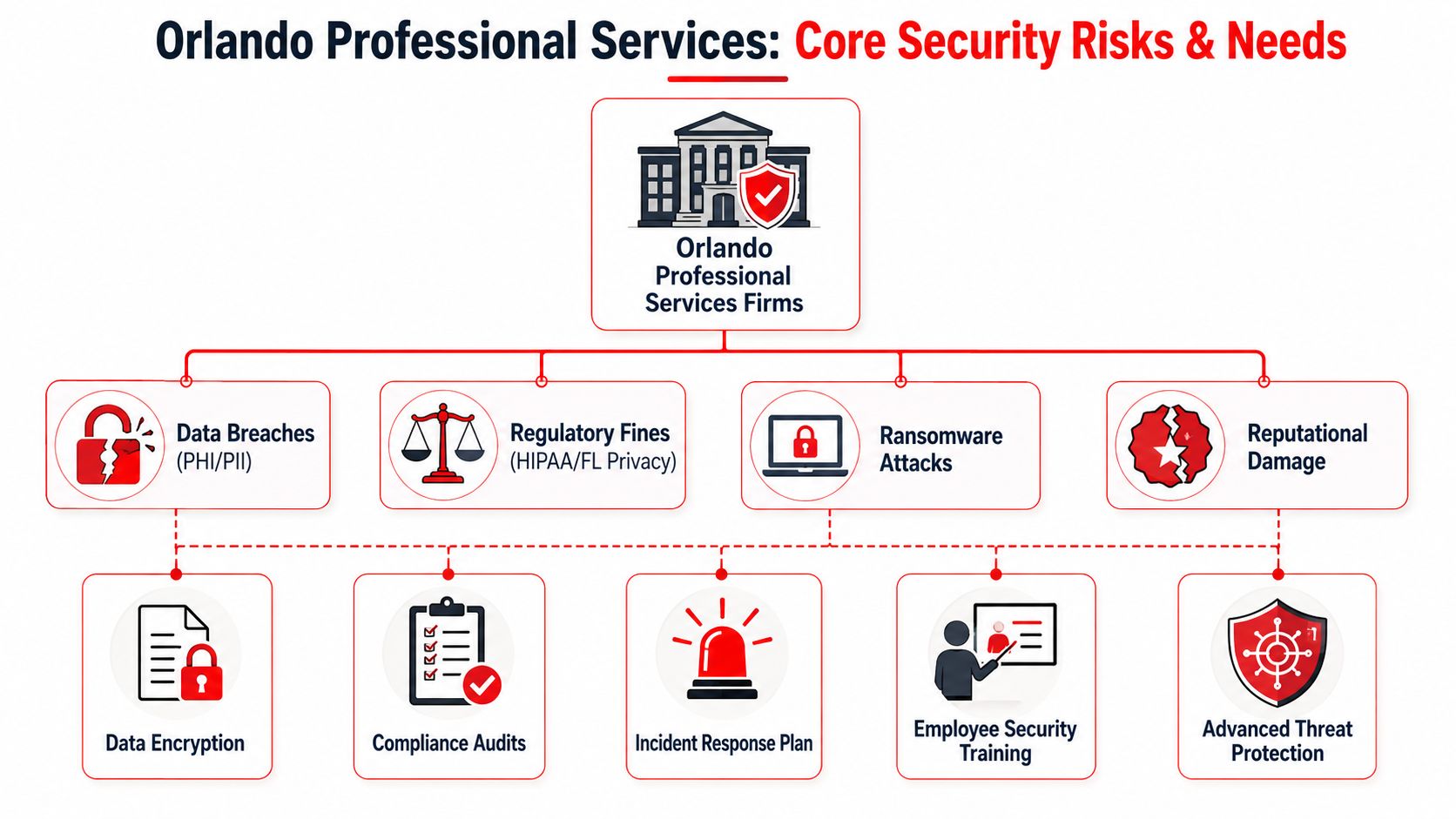
Core Security Needs for Orlando Professional Services Firms

Professional services firms don't all face the same threats, but they do share one problem: they hold information that clients assume is protected. Medical records, financial documents, legal files, design plans, internal communications, signed agreements, and payment data all carry consequences when access is lost or confidentiality breaks down.

A diagram illustrating core security risks and protection needs for professional services firms in Orlando.

Sensitive data changes the stakes

A dentist and a CPA may buy different software, but their security priorities overlap. Both need to protect client records, control access, train staff, and keep systems available when the business day starts. The biggest mistake is treating network security like a hardware purchase instead of a risk management process.

An Orlando-focused guide puts the small-business risk in plain terms: 43% of cyberattacks target small businesses, only 14% are prepared to defend themselves, and 95% of breaches involve human error, which is why training and continuous monitoring matter so much for smaller organizations (Orlando cybersecurity guidance for small businesses).

For legal practices, human error often shows up in email, document sharing, and account access. For medical practices, it can appear in front-desk workflows, mobile devices, and third-party access. For accounting firms, it often centers on credential security, seasonal workload spikes, and sensitive file transfer. If you're evaluating policy and practical controls for law offices, this overview of securing sensitive client information is a useful outside reference.

Start with maturity before tools

Most firms ask for solutions too early. The better starting point is a Technology Maturity Assessment. That means identifying where data lives, how employees access it, which systems are critical, what compliance obligations apply, and where the highest-vulnerability assets sit. From there, layered controls make sense: next-generation firewalls, intrusion prevention, endpoint protection, segmentation, reporting, and response playbooks.

A one-tool mentality fails because risk doesn't enter through one door. Staff click links. Vendors connect remotely. Old devices miss patches. Shared accounts linger. Cloud apps get used outside policy. Buying one product and calling it “network security” leaves gaps between systems, users, and processes.

A practical assessment usually follows this sequence:

  1. Inventory assets so you know what must be protected.
  2. Classify data so high-risk information gets stronger controls.
  3. Baseline current controls to see what already exists and what's missing.
  4. Close critical gaps first instead of trying to modernize everything at once.
  5. Monitor and revise because staff, offices, and workflows change constantly.

Practical rule: If a provider recommends tools before mapping your data, access paths, and compliance duties, they're probably selling inventory, not building a security program.

If you want a plain-English primer on the assessment process itself, Cyber Command's guide to what a vulnerability assessment is is a good starting point.

The Evaluation Checklist Technical and Business Criteria

Choosing a security provider is a procurement decision, not just a technical one. For an Orlando law firm, medical practice, or accounting office, the wrong choice usually shows up later as overtime invoices, confusing scope disputes, slow response during an incident, or compliance work your staff thought was included but was not. A proposal needs to hold up with both the person responsible for operations and the person watching the budget.

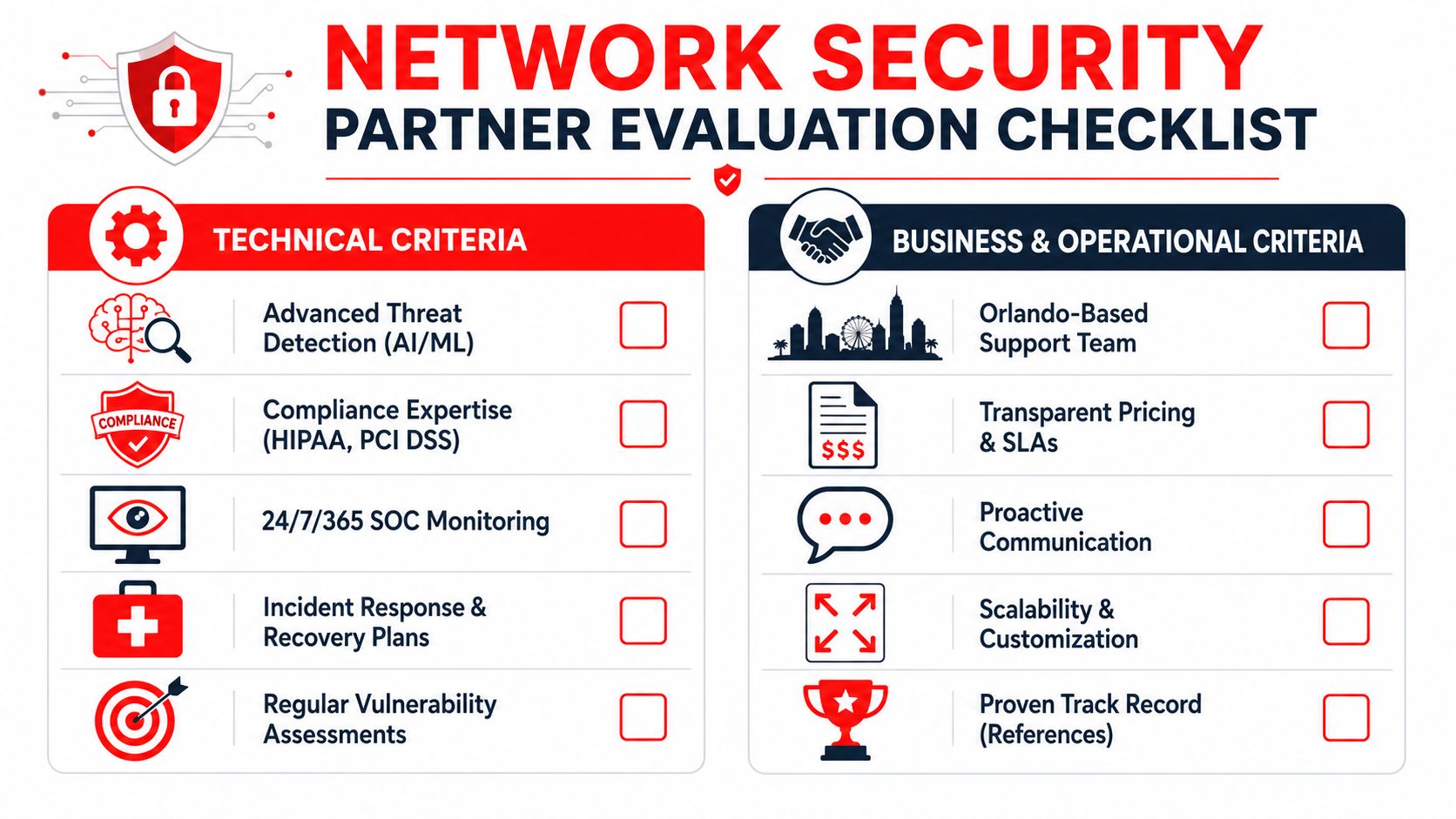
A comprehensive network security partner evaluation checklist featuring technical and business criteria for choosing service providers.

Technical criteria that should be required

Start by checking how the provider runs security day to day. Product lists are easy to pad. Operating discipline is harder to fake.

A provider should be able to explain who watches alerts after hours, how incidents get triaged, what gets escalated, and how your firm is notified. If they cannot explain their monitoring workflow in plain English, expect confusion during a real event. For background, this overview of what a Security Operations Center is helps clarify what should sit behind any serious monitoring service.

Use this technical checklist during evaluation:

  • Continuous monitoring: Alerts should be reviewed and acted on outside business hours, not left waiting until the next morning.
  • Endpoint detection and response: Laptops, desktops, and servers should have active visibility so suspicious behavior can be investigated and contained quickly.
  • Network security controls: Firewalls, segmentation, intrusion prevention, remote access restrictions, and account controls should support each other.
  • Patch and vulnerability management: The provider should show a repeatable process for identifying weaknesses, prioritizing fixes, and tracking exceptions.
  • Incident response process: Detection alone is not enough. You need documented containment steps, recovery responsibilities, communication rules, and decision ownership.
  • Support for regulated workflows: Professional services firms need controls that fit how client files, case data, tax records, and protected health information move through the business.

One practical test helps here. Ask the provider to walk through a realistic event, such as a compromised employee mailbox or malware on a bookkeeper's laptop. Strong firms answer with sequence, ownership, and timing. Weak firms answer with tool names.

Business criteria that determine the real experience

Many Orlando buyers often make an expensive mistake. They compare monthly fees without comparing what the fee buys.

A lower quote can become the higher-cost option if onboarding, after-hours response, remediation labor, compliance reporting, user changes, or project work sit outside the base agreement. Predictable pricing matters because professional services firms run on utilization, scheduling, and client trust. Surprise invoices hit all three.

Review the business side with the same discipline you use for the technical side:

Business criterion What to ask for Why it matters
Scope clarity A written list of included services, exclusions, and billable extras Prevents disputes and unexpected project charges
SLA detail Response times, escalation rules, and after-hours coverage terms Sets expectations before an urgent event happens
Reporting Executive summaries, technical detail, and compliance-facing documentation Gives leadership usable information without forcing them to decode jargon
Local support model Who handles onsite needs in Central Florida and when they are available Matters for office moves, hardware issues, and coordination with your staff
Change management Pricing and process for adds, moves, departures, and permission changes Keeps routine business changes from turning into ticket delays and extra fees
Contract flexibility Term length, termination language, renewal terms, and onboarding costs Reduces lock-in risk if service quality slips

Good providers make the environment easier to understand over time. Bills become more predictable. Reports become more useful. Roles become clearer.

The strongest proposal usually is not the one with the longest feature list. It is the one that ties each control and each line item to a business outcome your firm cares about: fewer interruptions, faster recovery, cleaner compliance support, and pricing that stays stable instead of expanding every time something goes wrong.

Key Questions to Ask Every Potential Security Provider

A security sales call should answer one procurement question: what will this cost us over the life of the agreement, and how will this provider perform when something breaks? Orlando law firms, medical practices, and accounting firms do not need more glossy language. They need clear operating answers they can compare across bids.

An infographic listing five crucial security questions to ask a cybersecurity service provider in Orlando, Florida.

Questions that clarify pricing

Security pricing gets messy fast because many providers quote a low monthly fee, then bill separately for the work that matters during a real incident. For professional services firms, that usually means surprise charges tied to compliance requests, user changes, vendor coordination, and cleanup work after an attack. Ask questions that turn a vague quote into a usable budget.

Start here:

  • What is included in the monthly fee, line by line? Ask them to break out monitoring, endpoint protection, patching, reporting, alert response, after-hours coverage, and remediation.
  • What work is billed outside the agreement? Ask for plain examples such as incident recovery, employee onboarding and offboarding, office moves, policy updates, audit support, and third-party vendor coordination.
  • Which services are one-time projects and which are recurring protections? This helps separate a true managed service from a proposal padded with future project work.
  • How is pricing handled for regulated firms? Legal, medical, and accounting offices often need more documentation, access review, retention controls, and policy support.
  • Can you show a sample invoice from a client with similar complexity? A sample invoice often reveals more than a polished proposal.

This is procurement, not just vendor selection. A provider that explains pricing clearly is usually easier to manage after the contract starts. A provider that stays abstract during the sales process often stays abstract when invoices arrive. For a practical reference point, review this breakdown of managed security service provider pricing models.

Questions that test operational maturity

A low price does not help if your staff cannot work on Monday morning.

Ask the provider to walk through actual operating scenarios, especially the ones that hurt revenue and client trust. For an Orlando medical office, that may be an EHR outage or a compromised Microsoft 365 account. For a law firm, it may be a partner's mailbox sending phishing emails to clients. For an accounting firm, it may be ransomware during tax season. Good providers can describe their process without hiding behind jargon.

Use questions like these:

  1. Walk me through the first hour of a ransomware event at a firm like ours.
  2. Who contacts us first, and who has authority to contain the issue?
  3. What decisions would you expect our internal team to make during an incident?
  4. How do you explain security performance to an owner or practice administrator who is not technical?
  5. What proactive work do you perform each month to reduce risk, not just report on it?
  6. How do you handle repeated user mistakes, access problems, and training gaps?

Listen for specifics. Strong answers include sequence, ownership, communication steps, and realistic limits. Weak answers drift into product names, dashboard screenshots, and promises that sound good until you ask who performs the work.

One more test helps separate polished sales teams from mature operators. Ask, "Tell me about a client situation where your original recommendation had to change because of budget, workflow, or compliance constraints." Experienced firms have real examples. They understand trade-offs. They know that a ten-person accounting office and a fifty-user medical practice should not be sold the same package just because both need security.

You are buying operating discipline. That includes how the provider thinks, how it communicates under pressure, and how reliably its pricing matches the work your firm will actually need.

Red Flags to Watch For When Choosing a Security Firm

A weak provider usually tells on itself early. Not always through a dramatic mistake. More often through ambiguity, inconsistency, and small evasions that seem harmless during the courtship phase.

Proposal red flags

Watch for proposals that sound broad but define very little. “Fully protected” means nothing if the document never states which systems are covered, what response work is included, or how after-hours events are handled. The more regulated your business is, the more dangerous that vagueness becomes.

Other warning signs show up in pricing language:

  • Unclear bundles: The proposal groups many services together but never identifies service boundaries.
  • Low base fee, high exception model: The headline number looks reasonable, but essential work sits outside scope.
  • Assessment-light selling: They want to quote quickly without understanding data flows, user access, or site layout.
  • Project dependency: Routine security upkeep appears to require recurring “special” projects.

A good security agreement shouldn't feel like buying a low-cost airline ticket where every useful function costs extra.

Behavior red flags

The sales process is a preview of the service process. Slow follow-up, unclear answers, and constant personnel changes during quoting usually don't improve after the contract is signed.

Pay close attention to behavior like this:

Red flag What it usually means
They avoid direct answers Scope problems later
They over-focus on products Weak service operations
They can't explain reporting Poor executive communication
They speak only to technical staff Leadership gets left out during incidents
They promise everything immediately Process is probably thin

The proposal phase is the easiest your relationship with a provider will ever be. If it already feels confusing, don't expect clarity after onboarding.

Another red flag is defensiveness when you ask about exclusions, escalation, or local response. Serious buyers should ask those questions. A good firm expects them. A weak one treats scrutiny like distrust because scrutiny exposes weak process.

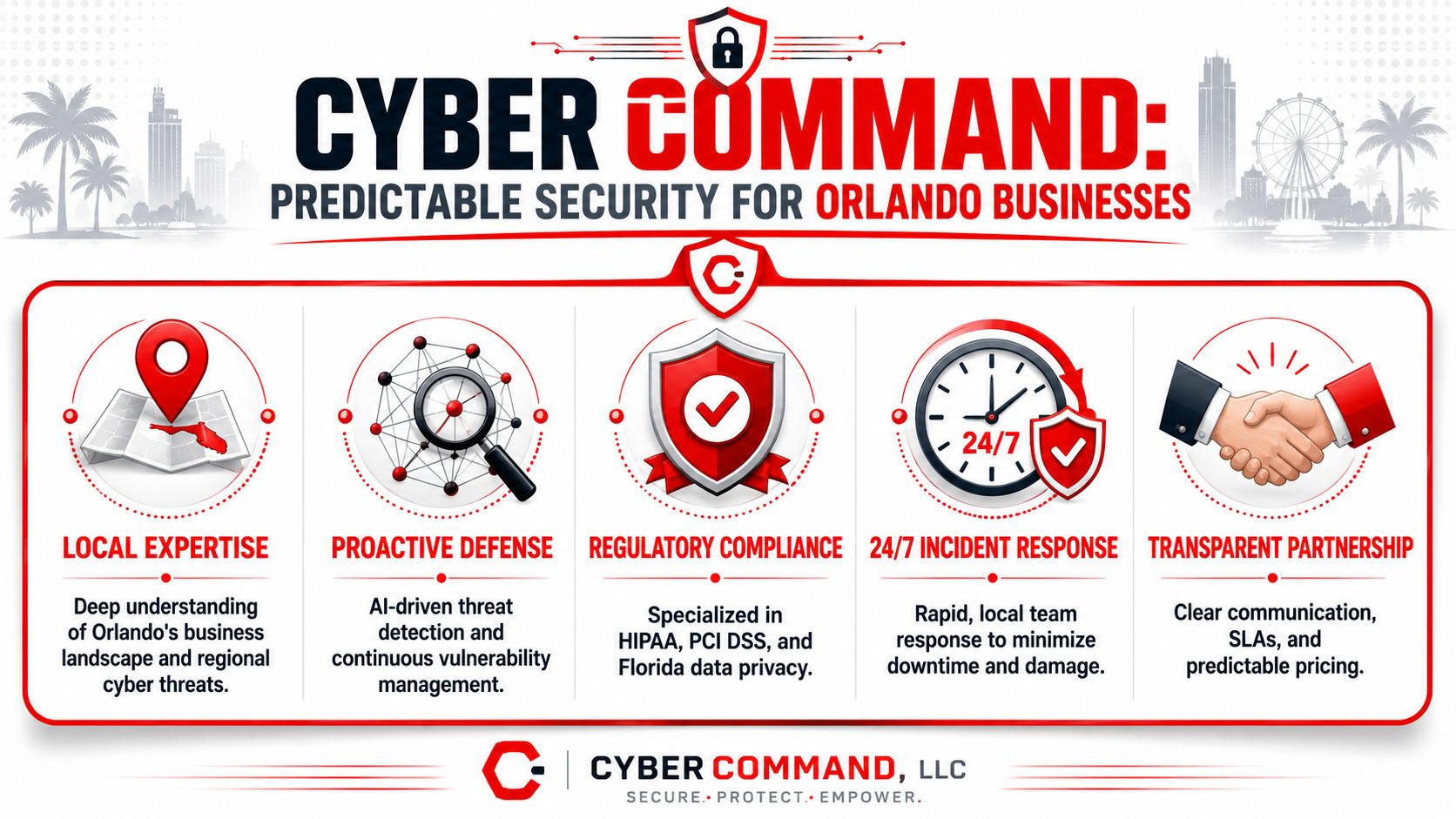
The Cyber Command Approach Predictable Security for Orlando

A law firm partner approves a security contract because the monthly fee looks manageable. Three months later, an after-hours alert, an email compromise review, and a firewall change all show up as extra charges. The budget problem is not the attack. It is the gap between the proposal and the actual operating cost.

A professional infographic for Cyber Command, an Orlando-based company providing cyber security and incident response services.

What predictable security looks like in practice

For Orlando professional services firms, predictable security means the contract matches the daily reality of the environment. Monitoring runs after hours. Response paths are defined before an incident. Reporting makes sense to a managing partner, practice administrator, or office manager, not just to technical staff.

Cyber Command, LLC is positioned as a managed security provider, not a reactive repair shop. That difference matters during procurement. A managed model is built around recurring coverage, defined processes, and ongoing visibility into endpoints, network activity, and suspicious behavior. A reactive model often looks cheaper at signing and more expensive once the exceptions start.

In practical terms, buyers should look for four things:

  • Continuous monitoring: Issues are reviewed outside normal office hours, which matters because many account misuse events start at night or on weekends.
  • Coordinated controls: Endpoint protection, network defenses, alerting, and response procedures work together instead of sitting in separate silos.
  • Support that fits real offices: Professional services firms still deal with office moves, copier vendors, line-of-business software, remote staff, and third-party access.
  • Clear recurring scope: Leadership can budget for the service without guessing which routine security tasks will become surprise projects.

Why this model fits professional services firms

Legal, medical, and accounting firms do not buy security for its own sake. They buy it to keep client work moving, protect regulated information, and avoid billing disruption. If a provider cannot explain what is covered, who responds, and what will trigger added cost, the procurement process has not done its job.

That is where predictable pricing becomes a business control, not just a finance preference. A flat monthly agreement with clear inclusions gives owners a cleaner way to compare vendors and a better way to forecast support costs over a year. Hidden exclusions do the opposite. They turn routine security work into unplanned spend and force leadership to approve technical decisions in the middle of an incident.

For smaller firms with lean internal IT support, that trade-off is especially important. The right provider reduces decision fatigue. The wrong one creates a steady stream of approvals, change orders, and vague recommendations that someone on your team still has to sort out.

Cyber Command, LLC fits this procurement lens because the value is not just tools. The value is a service structure a business owner can price, review, and hold accountable over time. If you want help evaluating what your firm needs from an Orlando network security company, Cyber Command, LLC can help you review your current environment, identify coverage gaps, and understand what should be included in a predictable managed security agreement before you sign anything.

Your Top IT Company Near Sanford FL for 2026

A server stalls during a busy morning. Staff can't pull files, email starts bouncing, and the owner hears three different explanations from three different people. By noon, the actual problem still isn't fixed. What looked like “just an IT issue” has now turned into lost time, delayed work, and a growing concern that the business is more fragile than it seemed.

That's where many companies in Sanford are right now. They know technology matters, but they don't always know how to judge whether an IT company near Sanford FL can protect uptime, support growth, and reduce risk instead of reacting when something breaks. Operational discipline matters just as much as technical skill. If you're trying to make the business run with fewer bottlenecks, this perspective on business optimization from AmbitionCFO is worth reading because IT problems rarely stay confined to the IT department.

A good technology partner doesn't just reset passwords and replace failed hardware. They help you avoid avoidable outages, tighten security, and give leadership a clearer handle on cost. In a market like Sanford, where buyers have options, the key question isn't who claims to be local. It's who can prove how they work.

Table of Contents

Is Your IT Keeping Up with Your Sanford Business

A Sanford business rarely feels “behind” all at once. It usually starts with smaller friction points. A shared drive slows down. Someone works around a login problem instead of reporting it. A vendor renewal sneaks past without review. Then one day a bigger incident exposes how much the business has been relying on luck.

That's why choosing an IT company near Sanford FL should be treated as a business decision, not a repair decision. If your systems support scheduling, accounting, medical records, project files, customer communication, or field operations, then IT performance affects revenue, client trust, and how hard your team has to work to get normal tasks done.

What owners usually notice first

Most business owners don't start by asking for architecture diagrams or security workflows. They ask simpler questions.

  • Why does every issue feel urgent: If small problems pile up, your team loses confidence in the environment.
  • Why are costs inconsistent: Hourly support, emergency visits, and surprise project charges make planning difficult.
  • Why can't anyone explain risk clearly: If your provider talks in jargon, leadership can't make sound decisions.

Practical rule: If your team only hears from IT when something is broken or a bill is due, you probably have a reactive relationship, not a strategic one.

The right partner should help the business run more smoothly, reduce avoidable interruptions, and give leadership confidence that someone is watching the details. That's the standard to use as you evaluate options.

Managed IT Services vs Break-Fix Support Models

The easiest way to understand the difference is this. Break-fix support is like calling a plumber after the pipe bursts. Managed IT services are closer to a building maintenance agreement that checks systems routinely, catches issues early, and plans around risk before operations are disrupted.

That difference changes cost, downtime, accountability, and security posture.

A comparison infographic between Managed IT Services and Break-Fix Support models detailing their operational differences.

How the two models behave under pressure

Break-fix can feel cheaper at first because you're only paying when there's an obvious issue. The problem is that the business absorbs the hidden cost. Staff wait. Work stops. Small security gaps stay unnoticed because no one is monitoring them day to day.

Managed services work differently. The provider is responsible for routine maintenance, monitoring, patching, documentation, user support, and issue prevention as part of an ongoing relationship. That shifts the conversation from “What broke?” to “What can we stabilize before it affects the business?”

When support is reactive, downtime becomes the trigger for action. When support is managed, unusual behavior becomes the trigger.

What the business actually buys

What you're buying isn't just labor. You're buying a service model.

Feature Break-Fix Model (Reactive) Managed IT Services (Proactive)
Cost structure Hourly or per incident Recurring, predictable service model
Response pattern Work begins after failure is reported Monitoring and maintenance reduce issues before users notice them
Budget planning Hard to forecast Easier to plan month to month
Security posture Often limited to point-in-time fixes Ongoing oversight, patching, and policy enforcement
Business impact More disruption during urgent incidents Better support for uptime and continuity
Strategic value Little long-range planning Roadmapping, standards, and lifecycle management

A break-fix firm can solve an immediate problem. That's useful in a narrow sense. But it usually doesn't create a healthier environment over time because no one is consistently accountable for prevention.

Managed services also create better habits inside the business. Devices get reviewed before they become liabilities. User onboarding and offboarding become more controlled. Vendors are managed more deliberately. Documentation improves. Those aren't flashy wins, but they're the things that keep companies from losing a day to a preventable problem.

For companies that depend on stable systems, that difference isn't theoretical. It affects payroll, scheduling, client delivery, and leadership focus every single week.

Why a Local Sanford Partner Outperforms a National Helpdesk

At 8:10 a.m., your front desk cannot print, two users lost access to a line-of-business app, and your internet circuit is up but performance is erratic. In that moment, the difference between a local IT partner and a national helpdesk is simple. One can coordinate the issue from the screen and from the office. The other usually starts with a ticket number and a queue.

Sanford's business footprint is dense enough that proximity changes service quality in practical ways. Census Reporter's Sanford profile shows a concentrated local service area, which makes on-site dispatch, project visits, and face-to-face planning easier to schedule and easier to execute. For a business owner, that often means less downtime, fewer scheduling delays, and faster resolution when a problem involves both people and equipment.

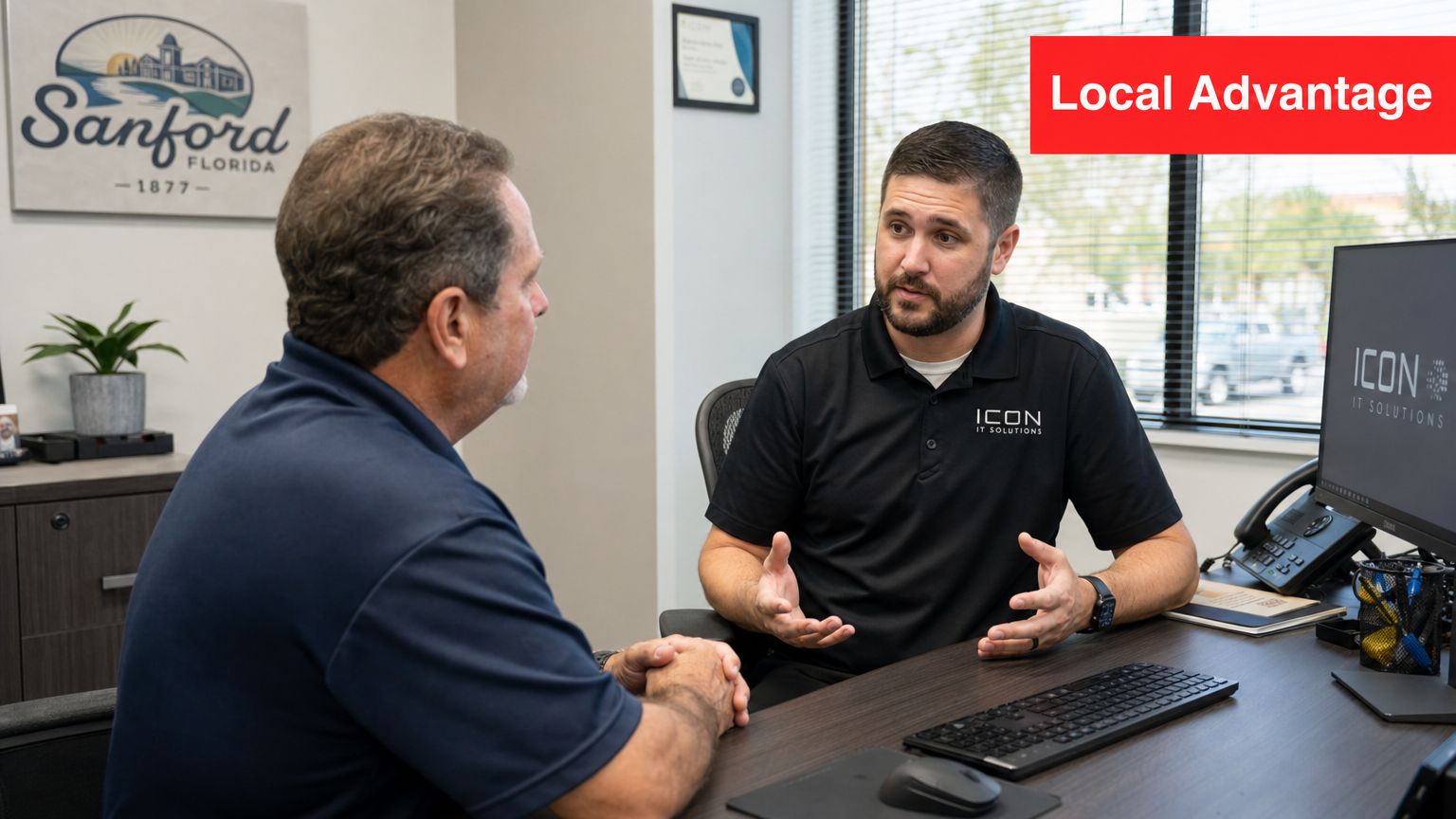
An IT professional consults with a client in a modern office, emphasizing local IT support services.

Proximity matters when the issue is physical, operational, or time-sensitive

Many support tasks can be handled remotely. Password resets, software errors, patching, and routine monitoring usually should be. But some problems need hands on site. Failed switches, bad cabling, new workstation setups, office expansions, internet handoffs, and conference room issues do not get solved faster by explaining your layout to a call center three states away.

A local partner can combine remote efficiency with on-site execution. That hybrid model is what businesses should evaluate. It is also why response-time commitments matter more than generic claims about “local support.” If a provider is nearby, ask how quickly they respond remotely, how quickly they can be on site for a business-stopping issue, and who owns escalation after hours. A practical benchmark starts with clear SLAs, real dispatch coverage, and a documented path from alert to resolution.

For companies evaluating local IT support for small business, the better question is not whether the provider has an office nearby. The better question is whether proximity improves outcomes you can measure.

Local context reduces delays and bad assumptions

National helpdesks are built for scale. That model can work for simple requests. It often struggles when support depends on building access, vendor coordination, site history, or knowledge of how your team works.

In Sanford and the broader Central Florida area, that shows up in a few predictable ways:

  • Building and cabling realities: Older office spaces, shared suites, and mixed telecom handoffs can turn a simple outage into a coordination problem.
  • Weather and site disruption planning: Storms, power events, and connectivity issues require more than remote troubleshooting. They require a provider who can assess the office, work with carriers, and help restore operations quickly.
  • Business workflow familiarity: A medical office, professional services firm, warehouse operation, and field-service company all depend on different systems at different times of day. Support is better when the provider knows which outage hurts revenue first.

That local context also helps with prevention. An experienced Sanford-area IT partner notices recurring weak points during visits, documents them, and fixes them before they become a Monday-morning outage.

Local is useful only if the provider can prove performance

“Local” by itself is not a service standard. A nearby provider with weak processes can still miss alerts, drag out escalations, or leave you guessing about ownership.

Ask for evidence. Review ticket response targets, after-hours coverage, documentation standards, and how the firm handles endpoint security, user changes, backups, and vendor communication. If data security is a concern, the FaxZen data protection checklist is a useful reference for judging whether a provider's security habits are disciplined or improvised.

The best local partner is not only easier to reach. The best local partner reduces handoffs, shortens recovery time, and gives leadership a clearer picture of risk, cost, and accountability. That is what outperforms a national helpdesk.

The Pillars of Modern Cybersecurity for Florida Businesses

Cybersecurity for a small or mid-sized business can't stop at antivirus, password reminders, and a firewall someone configured years ago. Those basics still matter, but they don't create resilience by themselves. A business needs monitoring, response discipline, and clear ownership when something looks wrong.

That matters in Sanford because the local market points to more technical complexity than a simple helpdesk environment. Indeed currently shows 316 information-technology jobs in Sanford that include skills tied to data analysis, software development, database administration, data systems design, and enterprise systems, according to Indeed's Sanford IT job listings. Businesses in that environment often depend on more integrated systems, more sensitive data, and more structured support.

Security has to stay active after business hours

Attackers don't care whether your office is open. If suspicious behavior starts late at night, waiting until the next morning is too slow. That's why the concept of a security operations center, or SOC, matters. In practical terms, it means people, process, and tooling are aligned to monitor activity continuously, investigate alerts, and respond before a problem spreads.

A capable cybersecurity model usually includes:

  • Continuous monitoring: Someone reviews meaningful alerts instead of letting them pile up unread.
  • Threat investigation: Not every alert is a crisis. Someone still has to determine what's noise and what needs action.
  • Containment steps: If a device or account behaves suspiciously, the response has to be fast and documented.
  • Recovery discipline: Businesses need a plan to restore operations, not just detect trouble.

For leaders reviewing their own data handling practices, this data protection checklist from FaxZen is a useful companion to internal security reviews.

Compliance support has to be operational

Compliance isn't a binder on a shelf. It's how access gets controlled, how devices are managed, how evidence is documented, and how exceptions are handled. That's especially important for firms in legal, financial, medical, and other regulated environments.

Security maturity shows up in routine operations. It shows up in account reviews, documented changes, endpoint control, backup testing, and who gets alerted when something fails.

A practical provider should be able to explain what's covered in plain language. If they say they offer security, ask what they monitor, who responds, what gets escalated, and how reporting works. A useful starting point for business owners is this overview of cybersecurity best practices for small businesses.

Modern cybersecurity is less about buying isolated products and more about building a repeatable operating model. That's what keeps a bad click, a stolen password, or an exposed device from becoming a business-wide incident.

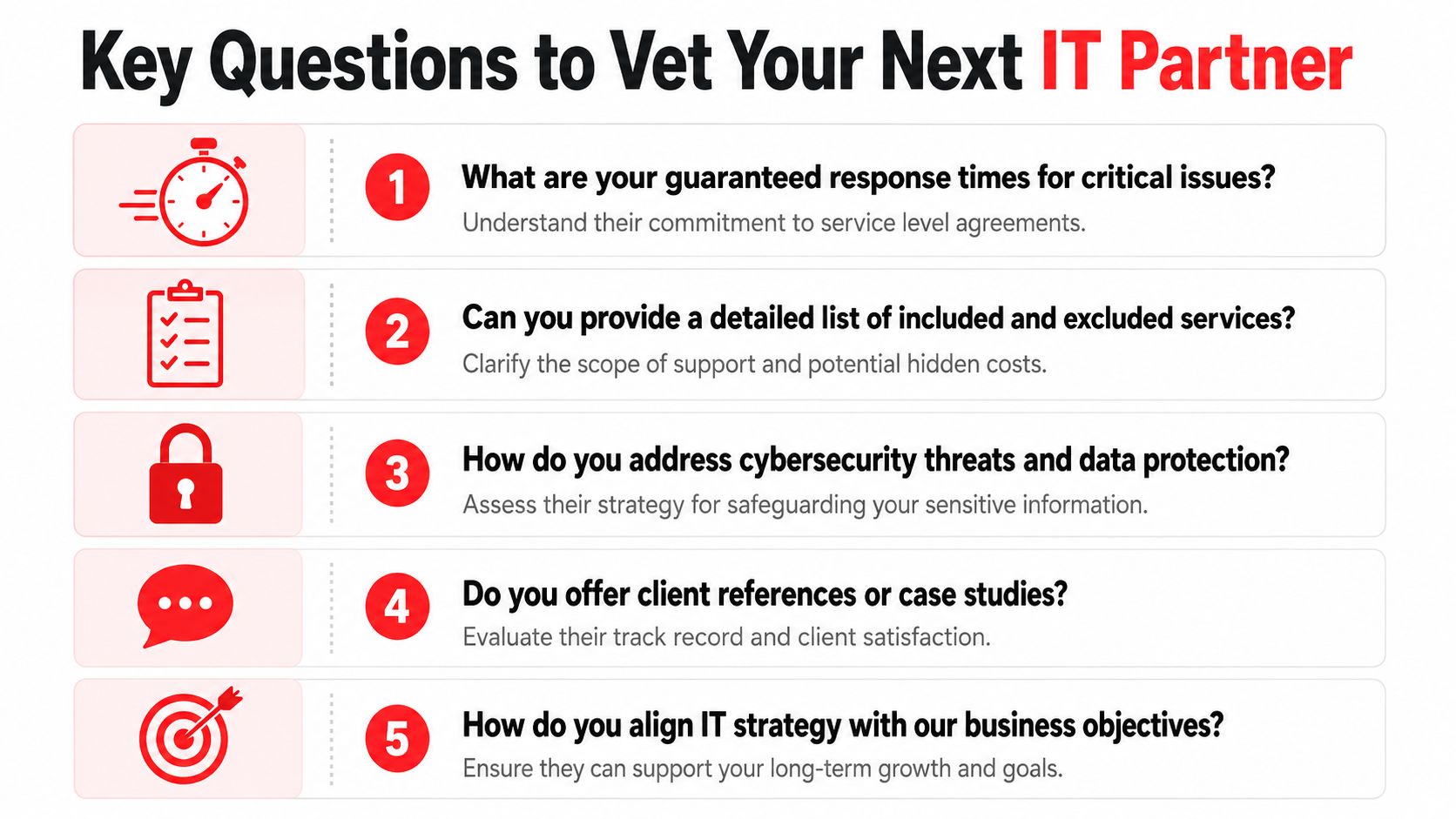
Key Questions to Vet Your Next IT Partner

Many local service pages promise fast support, expert help, or around-the-clock care. The problem is that those claims are often too vague to evaluate. As noted in this Sanford IT support discussion, local pages often fail to quantify response times, coverage hours, and the difference between helpdesk availability and true continuous security operations. If you want a reliable IT company near Sanford FL, your questions need to force precise answers.

A list of five essential questions to ask when vetting a potential IT partner for your business.

Questions that expose vague promises

Ask these in the sales process, and ask for direct answers in writing when possible.

  • What are your guaranteed response times for critical issues: Don't accept “we respond quickly.” Ask what counts as critical, when the clock starts, and what happens after intake.
  • What does 24/7 support include: Is there a live engineer, an on-call escalation path, or just an answering service that creates a ticket?
  • What is included in the monthly agreement and what is excluded: You need to know whether routine projects, on-site visits, after-hours work, vendor coordination, and user onboarding are covered.
  • Where are your helpdesk and security teams based: This affects communication, handoffs, and accountability.
  • How do you handle compliance support and reporting: Ask whether they provide structured reviews, documentation, and regular business-level reporting.

A useful way to think about this is the same way companies vet other service partners. This checklist of questions to ask a web designer from Netco Design LLC shows the broader principle well. Good buyers don't reward polished claims. They reward clear scope, process, and accountability.

Answers that usually indicate a stronger partner

Strong providers don't get defensive when you ask for detail. They're usually ready for it. They can explain support coverage, escalation paths, documentation standards, and pricing boundaries without hiding behind jargon.

Look for signs that the provider operates with discipline:

  • Defined service levels: They can explain urgency tiers and how they handle each one.
  • Operational transparency: They describe what their team does daily, not just what their brochure says.
  • Business alignment: They ask about workflows, compliance concerns, vendor sprawl, and leadership goals.
  • Review cadence: They don't disappear after onboarding. They schedule recurring reviews and use reporting to guide decisions.

Buyer test: If the provider can't explain their service model clearly during sales, they probably won't communicate clearly during an outage.

For a more detailed buyer framework, this guide on how to choose a managed service provider is a practical next step.

A good vetting process should leave you with fewer assumptions and more evidence. That's the difference between buying support and buying confidence.

Red Flags to Avoid When Choosing an IT Company

Most bad IT relationships show warning signs early. The mistake many businesses make is assuming those small concerns will improve after the contract is signed. Usually, they don't.

Warning signs in the sales process

Watch how the provider behaves before you become a client. That's often the cleanest preview of future support.

  • Slow replies during sales: If they're hard to reach when they're trying to win your business, response discipline probably isn't a strength.
  • Unclear pricing language: If the proposal uses broad phrases without defining what's covered, expect billing friction later.
  • Too much jargon: A provider should be able to explain risk and support in business terms, not hide behind technical vocabulary.
  • No real discovery: If they don't ask how your business runs, they're probably preparing a generic service package.

Operational gaps that become your problem later

Some problems don't show up until the relationship is underway. By then, switching providers feels disruptive, so businesses tolerate more than they should.

Pay close attention to these issues:

  • No documented SLAs: Without service commitments, “urgent” becomes subjective.
  • No clarity on after-hours coverage: Many firms say they support emergencies at all times, but can't explain who responds.
  • Hardware-first selling: If every conversation circles back to replacing equipment instead of improving operations, strategy is missing.
  • Opaque staffing: If they won't explain who handles your tickets and security events, you won't know where responsibility sits.
  • Weak reporting: If you never see trends, recurring issues, or recommendations, the provider is likely working ticket to ticket.

A vague contract is often the first sign of a vague operating model.

Businesses don't need a flashy provider. They need one that is clear, responsive, and structured. If those basics are missing in the first conversations, it's safer to keep looking.

Partner for Growth Your Next Steps with Cyber Command

A Sanford business usually reaches this decision point after something has already gone wrong. A server outage drags into the workday. An after-hours security alert sits too long. Staff waste time chasing vendors instead of serving customers. At that stage, the question is no longer whether outside IT support is needed. The question is whether the provider can run a disciplined operation that protects uptime, reduces risk, and keeps costs predictable.

The right next step is to test for proof, not promises.

A provider should be able to explain how tickets are prioritized, who responds after hours, what the security team watches, how reporting is delivered, and where responsibility starts and stops. Those details matter more than sales language because they show how the relationship will work under pressure, not just during onboarding.

Cyber Command, LLC matches the framework outlined in this guide. The company provides managed IT, cybersecurity, cloud services, and a U.S.-based 24/7/365 helpdesk and SOC. For a Sanford business owner, that means the evaluation can stay focused on operating standards that affect daily performance: response expectations, security coverage, user support, and visibility into recurring issues.

Screenshot from https://cybercommand.com

A useful next move is simple. Bring a short list of business problems to the conversation. Include the outages that disrupted work, the systems no one fully owns, the compliance requirements that create pressure, and the support gaps that keep landing on your internal team. Then ask for direct answers on how those issues would be handled, measured, and reviewed.

That approach gives you a practical way to judge fit. You can see whether the provider works from documented processes, whether leadership reporting is part of the service, and whether security operations continue outside normal business hours. Those are the signs of a partner that can support growth without creating new management overhead.

If you want a grounded conversation about managed IT, cybersecurity, response expectations, and support fit for your Sanford business, contact Cyber Command, LLC. A no-obligation discussion can help you compare your current setup against a more accountable service model and identify the gaps that matter most first.

IT Consulting in Orlando FL: Your 2026 Business Guide

Tuesday at 9:07 a.m., your office is already behind. A proposal has to go out. Someone can't get into Microsoft 365. The copier won't scan to email. Your line-of-business app is crawling. Then a staff member forwards a suspicious message that looks like it came from a vendor. Now you're not dealing with “an IT issue.” You're dealing with lost revenue, operational drag, and possible security exposure.

That's why business owners start looking into IT consulting in Orlando FL. Not because they want more tech. They want fewer interruptions, cleaner accountability, and a way to stop guessing whether their systems are safe.

If you run a law firm, medical practice, engineering office, field-service company, or multi-location professional services business in Central Florida, your technology stack is already tied to client trust. The wrong partner keeps you in a loop of tickets, patches, and excuses. The right partner gives you stability, visibility, and a plan.

Is Your IT a Business Asset or a Liability

A lot of Orlando businesses still treat IT like plumbing. If something breaks, call somebody. If email comes back up, problem solved. That approach worked when systems were simpler and cyber risk was lower. It doesn't work now.

Orlando's economy is built around office-heavy and knowledge-based work, and the city market report places Orlando at about 320,742 residents in 2023 while describing a regional labor market with high concentrations of office-based and knowledge-economy activity. For those businesses, IT isn't overhead. It's the operating engine. The same report also notes the broader U.S. IT consulting sector is projected by IBISWorld to reach $821.2 billion in 2026, with 502,000 businesses nationwide and 2.9% CAGR from 2021 to 2026. That tells you the market is mature, standardized, and far past the “guy who fixes computers” era according to the City of Orlando market report.

What liability looks like in practice

You feel it before you can describe it:

  • Staff lose momentum when logins fail, printers drop, or shared files become unreliable.
  • Leadership loses confidence because every month brings a new surprise invoice or another “urgent” system issue.
  • Security becomes reactive when nobody is consistently reviewing alerts, access controls, backups, and endpoint health.
  • Growth slows down because opening a second office, onboarding new hires, or adding software feels risky.

That's not a technology problem. It's a management problem.

Practical rule: If your provider mostly appears after things break, you don't have a strategy. You have a repair service.

What an asset looks like

A business asset supports uptime, protects revenue, and reduces uncertainty. That means your IT partner should be preventing common failures, standardizing tools, documenting vendors, and tightening security controls before they become expensive incidents.

For many businesses, one of the biggest shifts is moving from manual security work to process-driven operations. If you want a useful primer on that, this guide to automating cyber security operations is worth reading because it frames the issue correctly. Security can't depend on whether someone remembered to check something that day.

If your current setup creates stress every week, your IT is acting like a liability. Call it what it is and fix it.

What IT Consulting Actually Means for Your Orlando Business

Most business owners hear “IT consulting” and think of projects, migrations, or a specialist who shows up for a meeting and hands over a report. That's too narrow.

In the Orlando market, the concentration of established IT firms points to demand for integrated advisory and operational delivery, not just one-off project work. Businesses need strategic partners who can manage the full stack, especially when they don't have deep internal engineering teams as reflected by local provider concentration in Orlando.

Break-fix is a mechanic. Consulting is a decision system.

Break-fix support is simple. Something fails. You call. You pay. The provider restores service and leaves. That model is built around incidents.

Real IT consulting works more like an outsourced technology leadership function. Some people call it a Virtual CIO model. I care less about the label than the behavior. A good consulting partner asks questions like:

  • What systems are critical to revenue?
  • Where is your real operational risk?
  • Which vendors own parts of your workflow?
  • What happens if one employee account gets compromised?
  • Can you open another location without chaos?
  • Are you buying tools that fit your team?

That's a business conversation, not a helpdesk script.

What a strong consulting relationship should include

A useful Orlando IT consulting partner should do three things at once.

First, they should stabilize day-to-day operations. Users need support. Devices need patching. Backups need oversight. Software needs license management.

Second, they should reduce risk deliberately. That means access control, endpoint security, response planning, vendor review, and clear accountability around compliance-sensitive systems.

Third, they should plan ahead. New hires, office moves, cloud changes, workflow automation, and software renewals shouldn't be handled as emergencies.

The fastest way to overspend on IT is to make every decision under pressure.

What to stop buying

Stop buying “support” with no roadmap.

Stop buying “consulting” that never touches execution.

Stop buying “monitoring” if nobody can explain what happens when a real alert hits.

If your provider can't connect technology choices to uptime, security, staffing efficiency, and budget control, they aren't consulting. They're just adjacent to your problems.

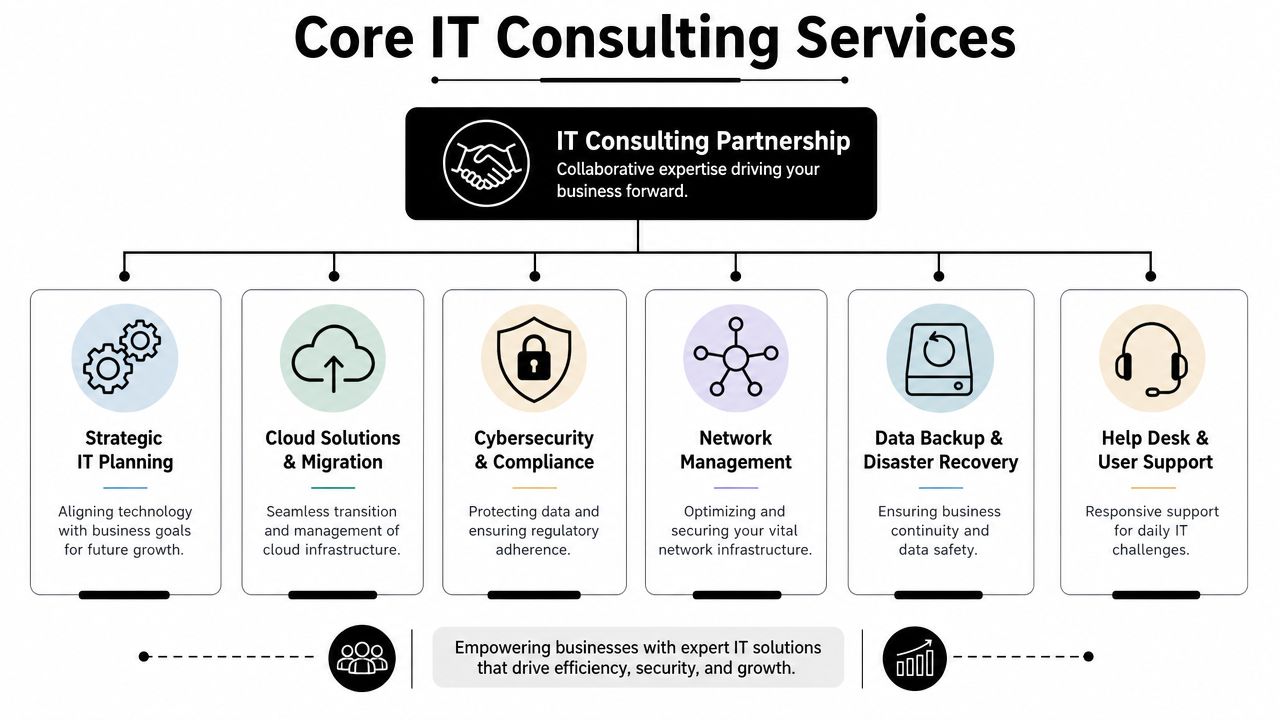
Core IT Consulting Services Your Business Needs

A serious IT consulting relationship isn't one service. It's a stack. Each piece supports a business outcome. When one piece is missing, the whole thing gets weaker.

A diagram outlining core IT consulting services including strategic planning, cloud solutions, cybersecurity, and network management.

The foundation services

These are the essential elements. If a provider is weak here, the rest is just marketing.

  • Managed endpoint support. Laptops, desktops, mobile devices, updates, antivirus, and user issues need consistent control.
  • Network management. Firewalls, switches, Wi-Fi, remote access, and office connectivity should be documented and maintained.
  • Backup and disaster recovery. Backups aren't useful if nobody verifies recoverability and ownership.
  • Help desk coverage. Your staff need a clear path to resolution when tools stop working.

A lot of firms discover they need a fuller managed environment after comparing piecemeal support with a dedicated managed IT support team in Orlando. The difference is structure. Covered systems, documented workflows, and named responsibilities beat ad hoc troubleshooting every time.

The strategic layer

Consulting effectively earns its keep.

A provider should help you decide what to standardize, what to retire, what to move to the cloud, and what to lock down. They should also map technology spending to business priorities instead of letting every department buy disconnected tools.

Use this quick test:

Question Weak provider answer Strong provider answer
Why are we using this platform? “That's what most clients use.” “It fits your workflow, support model, and security needs.”
What's our biggest IT risk? “Cybersecurity in general.” “Account compromise, vendor sprawl, and undocumented dependencies.”
What should we change this quarter? “Let us audit and get back to you.” “Standardize access, tighten backup oversight, and clean up devices first.”

The security layer

Cybersecurity isn't a bolt-on. It has to sit inside daily operations. That includes endpoint protection, identity controls, alert review, patching, privileged access management, and response readiness.

If your environment includes development workflows, integrations, or custom platforms, a structured DevOps IT security assessment can help expose risk that basic support vendors usually miss. Many firms talk about security but only understand office IT. That gap matters.

Strong security work is boring by design. Policies are clear, devices are current, access is controlled, and surprises become rare.

The growth layer

Cloud planning, vendor management, automation, co-managed support, and AI-related advisory belong here. These services matter once the basics are under control. Don't buy “innovation” from a provider who still struggles to keep your users supported and your systems documented.

One practical example is Cyber Command, LLC, which offers managed and co-managed IT, cloud services, DevOps support, AI consulting, and a 24/7/365 U.S.-based helpdesk plus SOC. That kind of model makes sense for businesses that need both operational coverage and strategic input without building a large internal team.

Tailoring IT Support for Central Florida Industries

Generic IT support sounds fine until your business hits a sector-specific problem. Then the cracks show fast.

Orlando has plenty of IT providers, but buyers still struggle to find useful guidance on what support should look like for different business types, especially when comparing a medical practice to a multi-site professional services firm as seen in Orlando provider listings and market positioning.

A split image showing corporate IT professionals working in a modern office and construction managers at a site.

Professional services firms need control, not gadgetry

Law firms, accounting firms, architecture firms, and engineering practices usually don't need exotic infrastructure. They need consistency.

Their risk profile is built around confidential files, email, document retention, client deadlines, and staff who are billable by the hour. Every minute spent fighting VPN access, file shares, Outlook, or PDF workflow issues costs money twice. Once in payroll, once in lost billing opportunity.

For these firms, I'd prioritize:

  • Identity and email security because account compromise is often the fastest path to real damage.
  • Document access controls so staff only reach what they should.
  • Reliable remote work tools for partners, field staff, and client-facing professionals.
  • Vendor discipline so you don't end up with scattered subscriptions and zero ownership.

If you operate in this category, specialized IT support for professional services is a more useful benchmark than a generic MSP checklist.

Healthcare practices need operational reliability with compliance discipline

Medical, dental, ortho, med spa, and veterinary offices live in a different world. Scheduling systems, imaging tools, EMR access, front-desk workflows, e-prescribing dependencies, and patient communications all create risk.

The wrong IT partner tends to focus on devices and ignore workflow sensitivity. That's a mistake. A clinic doesn't just need protected endpoints. It needs systems that stay available during patient hours and staff who understand what can't go down at the wrong moment.

If your IT provider treats your practice like a normal office, expect avoidable disruption.

A healthcare-focused approach should emphasize user access discipline, secure vendor coordination, backup review, workstation standardization, and fast response when line-of-business applications fail.

Industrial and field-service firms need connectivity across moving parts

Construction, logistics, service dispatch, light industrial, and multi-site operations have a different challenge. Their risk isn't only in the office. It sits in trucks, job sites, tablets, mobile phones, remote supervisors, and weak handoffs between field and admin teams.

A provider who only understands desks and conference rooms will miss the actual work.

For these firms, the right consulting model usually centers on:

  1. Mobile device management for phones and tablets in the field.
  2. Secure access to cloud apps without creating password chaos.
  3. Site-to-office coordination so estimates, photos, work orders, and approvals move cleanly.
  4. Procurement and lifecycle planning for rugged devices and replacement timing.

Industry fit matters more than provider size. I'd rather see a smaller firm that understands your workflow than a larger one that gives every client the same stack and same script.

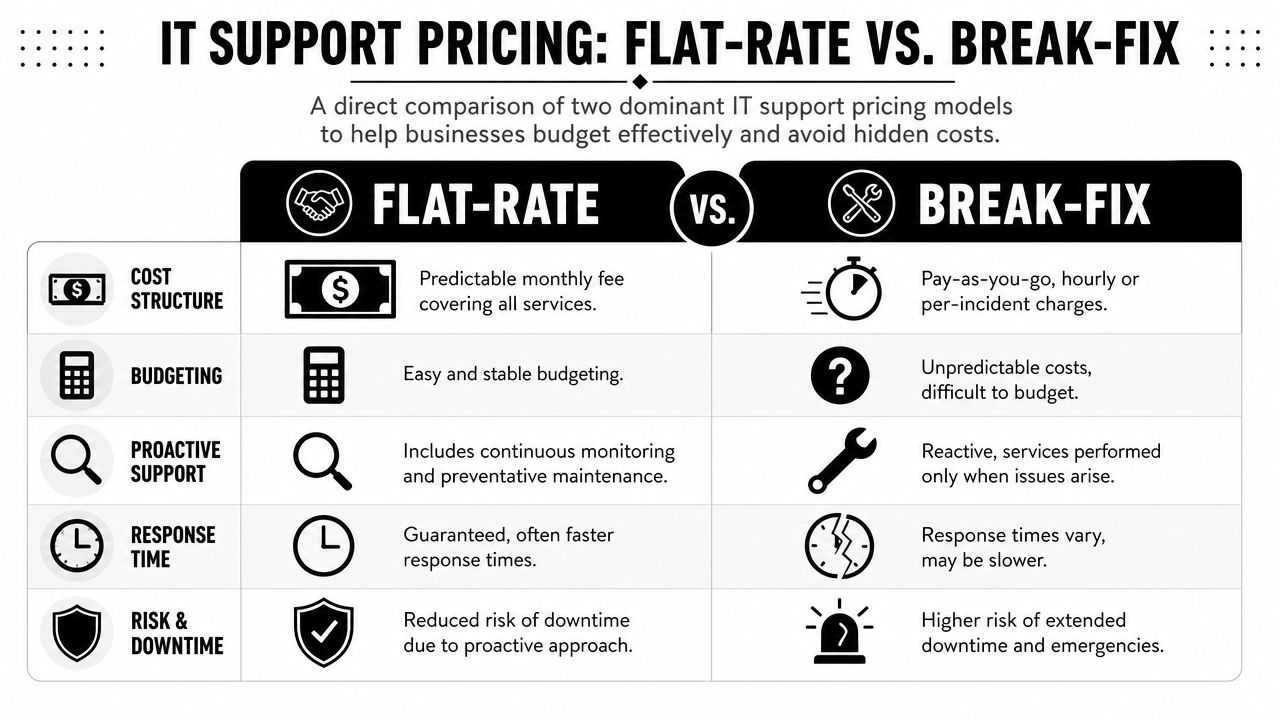
Decoding IT Support Pricing Flat-Rate vs Break-Fix

Many Orlando businesses get burned when they ask for “cost-effective IT,” get a vague quote, and assume they're comparing the same thing. They usually aren't.

Local market commentary shows a real gap between what buyers want and what many firms explain. Businesses want predictable spend, but pricing is often vague. Understanding the tradeoffs between flat-rate support and other models matters more as cyber pressure and technology change keep accelerating as reflected in Orlando market positioning for SMB IT services.

A comparison chart showing the differences between flat-rate and break-fix IT support pricing models for businesses.

Break-fix looks cheap until you use it

Break-fix means you pay when something goes wrong. That sounds flexible. It's unstable.

The provider gets paid when your systems fail, when users can't work, and when neglected issues finally explode into urgent projects. Their financial incentive is tied to incidents. Your business goal is fewer incidents. That's a bad alignment from day one.

Here's the hidden cost table most owners never see:

Issue Break-fix impact Flat-rate impact
Surprise outages Extra invoice plus downtime Covered under an ongoing service model
Deferred maintenance Easy to postpone Usually part of routine service
Security reviews Often separate or inconsistent More likely built into the operating model
Budget planning Reactive Predictable

Flat-rate support aligns incentives better

Flat-rate support isn't automatically good. Plenty of providers underdeliver. But the model itself makes more business sense.

If the monthly service is fixed, the provider wins by keeping your systems healthy, reducing noise, and standardizing your environment. That's what you want too. Stable systems, fewer interruptions, and fewer ugly billing surprises.

Cheap hourly support often becomes expensive leadership time.

What to ask when you review pricing

Don't just ask for the monthly number. Ask what's inside it.

  • Covered systems. Which devices, users, locations, and platforms are included?
  • Security scope. Are endpoint tools, alert handling, and access controls part of the service?
  • Projects versus support. What counts as routine work and what triggers extra billing?
  • Vendor management. Will they coordinate with your internet, software, printer, and telecom providers?
  • Reporting. Do you get plain-language accountability or just invoices and ticket counts?

The right pricing model isn't the one with the lowest entry point. It's the one that gives you dependable service, defined scope, and a budget you can effectively use.

Your Vetting Checklist for Orlando IT Providers

Most IT sales meetings are designed to keep you passive. Nice slide deck. Broad promises. Lots of words like smooth, strategic, and secure. That's useless unless you know how to press for specifics.

Use a checklist and lead the conversation.

A checklist for businesses evaluating and selecting professional IT service providers located in Orlando, Florida.

The questions that expose weak providers

Ask these plainly and wait for direct answers.

  1. How does onboarding work?
    If they can't explain discovery, documentation, access review, device standardization, and transition ownership, expect a messy start.

  2. What happens when a security alert fires after hours?
    You want a real response path, not “someone gets notified.”

  3. What's included in the monthly agreement and what gets billed separately?
    This reveals whether the pricing is disciplined or deliberately vague.

  4. Who owns vendor coordination?
    Somebody has to deal with internet providers, software vendors, copier companies, phone systems, and cloud platforms.

  5. How do you support businesses in my industry?
    If the answer sounds generic, they probably don't.

  6. What do your reports show? Ticket counts aren't strategy. You need visibility into risk, recurring issues, asset status, and action items.

For a more detailed framework, this guide on how to choose a managed service provider is useful because it forces comparison beyond surface-level sales language.

What to verify, not just ask

Claims are easy. Proof is harder.

  • Local relevance. Ask for current Central Florida references in businesses similar to yours.
  • Technical depth. Ask who handles cloud, compliance-sensitive systems, and escalations.
  • Staffing stability. If you rely on outside augmentation, learn how they find the right tech staffing partner or internal talent mix to support continuity.
  • Documentation discipline. If they don't document environments well, every issue takes longer.

Good providers answer hard questions without getting defensive. Weak ones pivot back to marketing language.

Red flags I wouldn't ignore

Here are the ones that matter most:

  • Everything is “custom” but nobody can define scope.
  • They talk mostly about tools and not about business workflows.
  • They promise fast response but avoid talking about actual resolution ownership.
  • They can't explain your industry risks in plain English.
  • They sell security as an add-on instead of an operating standard.

You're not hiring a vendor to sound smart. You're hiring a partner to reduce operational risk.

Taking the Next Step With Your IT Partner

The main decision isn't whether you need support. You already do. The decision is whether you want a vendor who reacts to tickets or a partner who helps run technology as a business function.

That distinction matters in Orlando because the local market supports both subscription-style managed services and premium advisory work. Local pricing examples show service packages starting at $750 per month, onboarding that can be operational in 1 to 2 weeks after signing, and enterprise-tier consulting rates that can range from $175 to $350 per hour based on Orlando IT consulting market examples. For most small and midsized firms, that points to a simple conclusion. Predictable monthly support usually makes more sense than paying premium hourly rates for fragmented expertise.

The standard I'd use

Choose a partner that can do five things well:

  • Keep users productive
  • Reduce cyber risk consistently
  • Give you predictable costs
  • Handle vendors without drama
  • Translate technology decisions into business outcomes

If a provider can't do all five, keep looking.

What a practical next move looks like

Don't start with a giant transformation project. Start with an honest review of what's fragile.

List your core applications. Identify where downtime hurts revenue. Review how staff access systems. Check whether anyone officially owns backups, vendor documentation, and after-hours response. Then compare that against the provider conversations you're having.

The right Orlando IT consulting partner should make your environment calmer, cleaner, and easier to manage. That's the job. Not more noise. Not more acronyms. Not another year of patchwork support.


If you want a partner that approaches IT as an operational and security discipline, not a ticket queue, talk with Cyber Command, LLC. They work with Central Florida organizations that need managed or co-managed IT, 24/7/365 U.S.-based helpdesk coverage, cybersecurity support, and predictable flat-rate service built around uptime, accountability, and business continuity.